-
Website Navigation Update/Testing 2023
SofaCitizen said:
MelanieL said:
... and the text now appears much smaller than it did, I need my stronger reading glasses!
(I tend to be looking at several different things in tabs in my browser, so increasing the Zoom to make Daz forums easier to read makes the others too large!)
If you are using Firefox then search your settings for Fonts and click the Advanced button. In there is a section where you can set the minimum font size. Other browsers should have a similar setting within their settings/preferences. Setting that to something like 16px (currently seems to be set to 14.2222px for comments in the forum) or more should help without having to zoom into every site.
Thanks, but as I noted in my second sentence: if I do that then the text on all the other sites I visit have annoyingly large letters. (Zoom in Chrome remembers what was selected so no need to zoom into every site)
I am looking for a Brainiac headpieceYou can try else I will convert it to DS format.
Import the attached OBJ, with scale 10000% and standard DS orientation.
Load a G8M character.
Run Transfer Utility Edit > Object > Transfer Utility with G8M as source and the obj as target and default settings (you can add a smoothing modifier, but that can also be done later)
The obj is now rigged to match G8M.
Apply surface settings. There is 3 surfaces: Base plate, lights and wires.
You can save to your library (if wanted) File > Save As > Support Asset > Figure/Prop Asset (you have to choose a path, e.g. People > Genesis 8 Male > Accessories (or Props)).
It is zipped as forum won't allow an obj file.
Website Navigation Update/Testing 2023joanna said:
NorthOf45 said:
Looks like DAZ changed the fonts on the store and forum pages. It looks lighter, more spaced out, with thinner lines. They've also dropped the multi-coloured head from the logo, so it's just text now.
To me, it doesn't feel easier to read, and it doesn't seem to add anything aethetics-wise either (the bolded thread titles luck heavy and clunky).
Agreed. It is actually harder to read. Lower contrast relative to the surrounding white, so it looks blurry. It's all about edge detection.
How to Add Images to Post BodyI know how to attach them, but I've forgotten how to display them in the body as many do in the contest or the Render Your Buys threads.
(Optional: insert Search Rant)
Render your buys! Use buys from the current month and the previous month of salesETA: The renders. For some reason they never iloaded.
And now for my latest.Perusing one of the late July/early August discount selections, I found some things I'd missed before, including some G9 aliens, Arcturian https://www.daz3d.com/arcturian-hd-for-genesis-9 & Sidra https://www.daz3d.com/dav-sidra-hd-for-genesis-9-feminine who are just chilling and hanging out
Once I bought Sidra I had to see what she looked like with eyes. So, has this species taken sexual dimorphism to an ocular extreme? Are they different subspecies or 2 different species? Is the geograft a symbiont or parasite? A crown or a cybernetic device or both? IDK...Dangnabbit Jim! I'm an artiste, not a xenobiologist!* Giving her eyes wasn't easy. I couldn't just add any G9 eye texture to Sidra's eyes even though they show in scene tab as visible bones. After deleting the geograft. I ended up loading EG Kin & making all but the eyes invisible, then I Grouped Sidra, Kin, and the eyes so those eyes would stay in place. If anyone knows a simpler way, please message me. Notes: 1. You will have to use DS search for the Sidra skins and apply/remove morphs; they don't show up under materials, even after I reinstalled the package. 2.The eyeless Sidra has Sidra feminine dialed down and G9 base male dialed up.
Acturian was way easier to work with. G3 Clothes autofitted easy, with hardly no adjustments. One of the easiest figures I've ever worked with. My only complaint is that is the Scene tab the figure is labeled G9 not Arcturian, but that's picky. I recommend both characters if you do SF.
*Disclosure: I have a BS in Zoology but haven't thought this through yet
The Aliens Are Hanging Out!:
Zelara 8 https://www.daz3d.com/zelara-8
Glow-Fi Bodysuit G3 https://www.daz3d.com/glowfi-bodysuit-for-genesis-3
Wasp https://www.daz3d.com/the-wasp-class-space-fighter
Barbarian Landscape https://www.daz3d.com/warrior-couple-and-landscape--genesis-8The Aliens Are Chilling!:
EG Kin G9 (eyes) https://www.daz3d.com/eg-kin-for-genesis-9
FH Scifi Window https://www.daz3d.com/fh-sci-fi-window-vignette
ArtemisX G1 https://www.daz3d.com/artemisx-for-genesis
GIS Emperor G2M https://www.daz3d.com/gis-emperorDoes somebody know this female model?This looks like several different characters. If you have one good picture, do a Google image search.
Website Navigation Update/Testing 2023NorthOf45 said:
Looks like DAZ changed the fonts on the store and forum pages. It looks lighter, more spaced out, with thinner lines. They've also dropped the multi-coloured head from the logo, so it's just text now.
To me, it doesn't feel easier to read, and it doesn't seem to add anything aethetics-wise either (the bolded thread titles luck heavy and clunky).
Website Navigation Update/Testing 2023MelanieL said:
... and the text now appears much smaller than it did, I need my stronger reading glasses!
(I tend to be looking at several different things in tabs in my browser, so increasing the Zoom to make Daz forums easier to read makes the others too large!)
If you are using Firefox then search your settings for Fonts and click the Advanced button. In there is a section where you can set the minimum font size. Other browsers should have a similar setting within their settings/preferences. Setting that to something like 16px (currently seems to be set to 14.2222px for comments in the forum) or more should help without having to zoom into every site.
Website Navigation Update/Testing 2023NorthOf45 said:
Looks like DAZ changed the fonts on the store and forum pages. It looks lighter, more spaced out, with thinner lines. They've also dropped the multi-coloured head from the logo, so it's just text now.
... and the text now appears much smaller than it did, I need my stronger reading glasses!
(I tend to be looking at several different things in tabs in my browser, so increasing the Zoom to make Daz forums easier to read makes the others too large!)
AIUTO...CHI CONOSCE L’ITALIANO? PARTE QUATTORDICIKainjy said:
Imago said:
Oh, vedo che hanno di nuovo cambiato il font del forum e del negozio.

Anche del forum... è tutto più piccolo
Leggi tutta la frase, ragazzo!
 AIUTO...CHI CONOSCE L’ITALIANO? PARTE QUATTORDICI
Imago said:
Oh, vedo che hanno di nuovo cambiato il font del forum e del negozio.
Anche del forum... è tutto più piccolo
AIUTO...CHI CONOSCE L’ITALIANO? PARTE QUATTORDICIOh, vedo che hanno di nuovo cambiato il font del forum e del negozio.
Website Navigation Update/Testing 2023Looks like DAZ changed the fonts on the store and forum pages. It looks lighter, more spaced out, with thinner lines. They've also dropped the multi-coloured head from the logo, so it's just text now.
Where to go?10 likes is superstar status in DAZ Gallery scheme of things. I only post in the gallery if I do something I like, or if I enter one of the DAZ forum contests. Also, the DAZ Gallery is way too slow.
You don't do DAZ as an amateur expecting FB likes or such, quite the opposite in fact. If you want more likes, hang out in art forums where gamers hang out and make renders they are liking on that platform.
I like your renders though.
Where to go?SilverGirl said:
Your stuff is beautiful! I'll give you lots of likes once I can get onto my PC and navigate easier.
I agree with others, though... I'm sure there's a lot of incredible stuff on the Daz gallery, but I find it cumbersome and don't really go there. I do, however, often click people's personal gallery links when they're in their forum post signatures.
ty, i just today learned how to add a forum signiture lol.
Where to go?Your stuff is beautiful! I'll give you lots of likes once I can get onto my PC and navigate easier.
I agree with others, though... I'm sure there's a lot of incredible stuff on the Daz gallery, but I find it cumbersome and don't really go there. I do, however, often click people's personal gallery links when they're in their forum post signatures.
Where to go?Elor said:
The easiest way is to:
- Upload your picture on the gallery
- Get the link of the picture from the gallery by right-clicking on it, then choosing something -- my browser langage is set to French -- like 'Open the picture in a new tab' then copy the link from the URL bar or directly getting it via 'Copy Picture link'
- Start writting a message in the forum
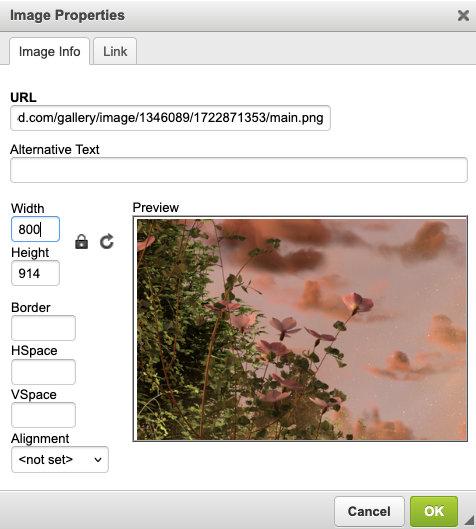
- Paste the link of the picture in the URL field then set the Width to 800:
5. Add a link to the picture gallery page (not the link of picture itself)
This way, you only have to upload one picture (in your gallery) and on top of having the correct ratio for your picture in your forum message, people clicking on it will enjoy it's full size. Then, they'll have to click on the gallery link to add a Like if they want.
I see you're a Platinum Club member: Daz is organizing a weekly contest (which require the use of one of the new Daz+ items released the same week among them the weekly freebie) and a monthly contest with a different theme each month, to give you a general direction (you can usually twist the theme like a pretzel so it's really just a general instruction).
LMAO, that hilarious. theme, can be twisted like a pretzel XD! so pretty opan as long as you use the product. i tried one contest a couple years ago. the proceedure to properly upload into the contest seemed a little vague for a noob to forums. i didn't win anything, and have no clue if i was even entering properly for my work to be eccepted or not. maybe once i learn what some of the forum lingo means exactly. i'll give contests another shot.
and yeah, i'm platinum. how much money daz sucks out of my wife and i, we want as much as we can get for that money lol. we have dumped $1000's into something we don't make money with. hoping to eventually... i hope i get good enough anyhow. really, i'd love to get in with some of the creators and maybe create some of their product pictures for them. if that's even a thing.(Edited by mod to pull post from quote)
Where to go?The easiest way is to:
- Upload your picture on the gallery
- Get the link of the picture from the gallery by right-clicking on it, then choosing something -- my browser langage is set to French -- like 'Open the picture in a new tab' then copy the link from the URL bar or directly getting it via 'Copy Picture link'
- Start writting a message in the forum
- Paste the link of the picture in the URL field then set the Width to 800:
5. Add a link to the picture gallery page (not the link of picture itself)
This way, you only have to upload one picture (in your gallery) and on top of having the correct ratio for your picture in your forum message, people clicking on it will enjoy it's full size. Then, they'll have to click on the gallery link to add a Like if they want.
I see you're a Platinum Club member: Daz is organizing a weekly contest (which require the use of one of the new Daz+ items released the same week among them the weekly freebie) and a monthly contest with a different theme each month, to give you a general direction (you can usually twist the theme like a pretzel so it's really just a general instruction).
Where to go?Elor said:
Brian&Alicia said:
I figured you can only post your work in the gallery. Hence, the reason for having a gallery separate from the forums. Thats awesome thank you.You can attach pictures to a message (under the box where you're writing a message, there is Attach a file) but as long as your pictures are in the gallery, you can get the link for the picture from the gallery and insert it in your message. And if you want to offer people the possibility to give you a like, it's best to also have a link to this picture gallery page.
One trick to know: if your picture is larger than 800 pixels, you need to set its width at 800 to force the forum to keep the correct ratio.
An example with your most recent render (it's in portrait mode, but 'hopefully', the problem should still be visible), first without the width set at 800:
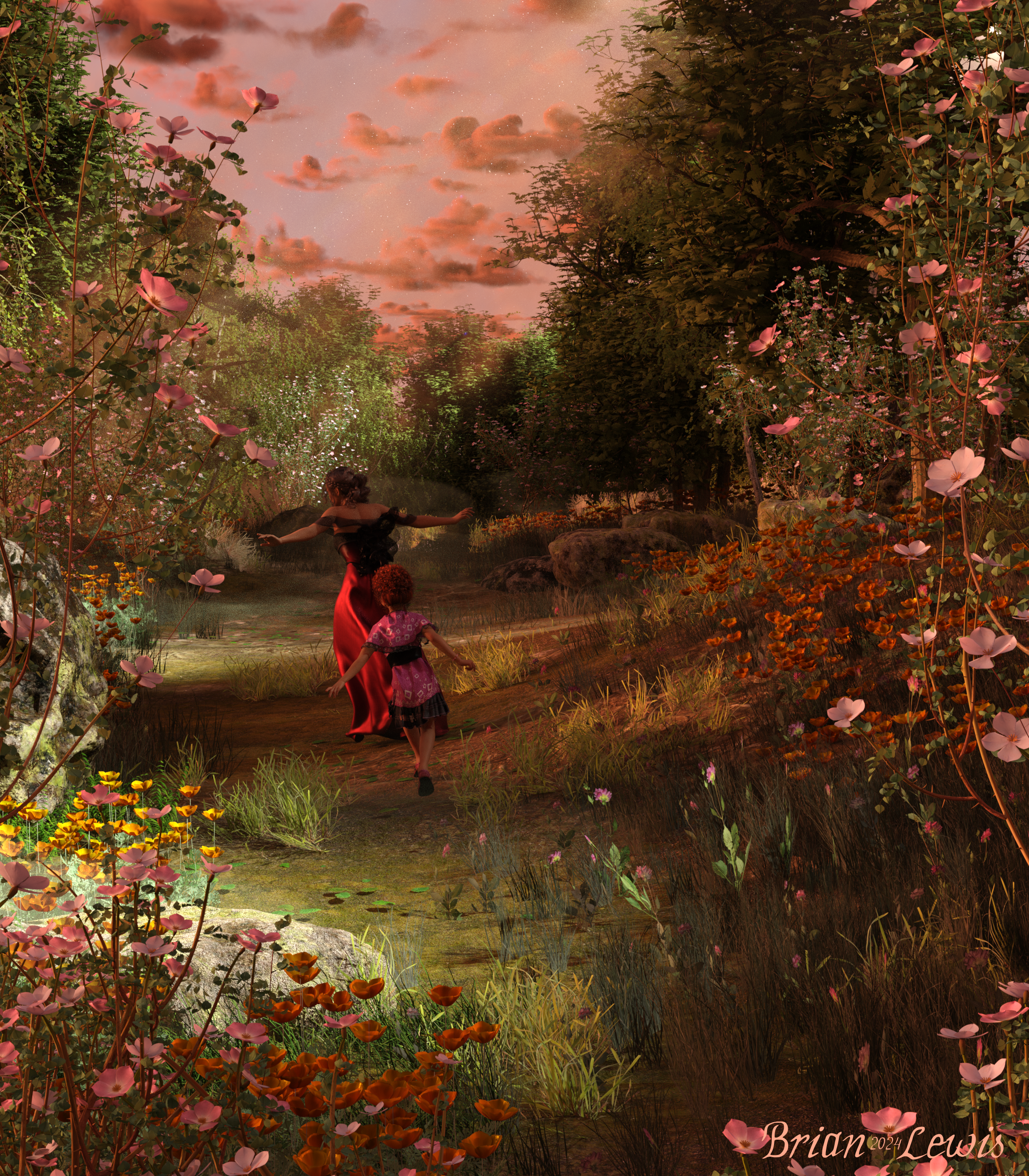
The with the width set at 800:
ok, to make sure i understand this correctly. when posting my work in the forums, fishing for likes to feel good about myself and my work lol. i resize the image to 800 width to properly show the image. upload it as a seperate upload. so they can see the image? and the link to the image so the people can see the full size and like it right? i don't need to upload to the gallery at 800 width right, just 800 for the forums specifically? sorry, i haven't been much of a peopley person. so forums have never been a thing for me really. so i don't know much on how forums work. so if being peopley is what i need to do to promote my work. i guess, i'll work on that! lol
Let's appreciate/discuss today's new releases - more ongoinger threadGogger said:
nemesis10 said:
Gogger said:
What I want to know is, do we think that Thomas is based on any particular actor. I've been looking up faces right and left and I can't find any that bear a strong resemblance, and yet he seems so familiar ...
There are subtle, little things that make me think just maybe Ben Affleck? A little. More like he brings Ben to mind, not LOOKS EXACTLY LIKE. Could just be expression in the eyes and mouth in certain poses (ESPECIALLY the image above by SolitarySandpiper).
Alan Ritchson.... Same height, same build, same beard...
Going back and looking at the whole bundle, I would agree Alan Ritchson more so.
Or maybe checkout google https:// weddingentertainment.com/act/ron-pearman
Edit: And the link leads to a 404 unless you copy and paste the link (delete the space after //) into the search bar.
@SolitarrySandpiper very nice! Now he reminds me of Adam Lambert (love his witty sense of humor) for some weird reason. I am so tempted to buy this bundle or at least some of it.
Edit: Never mind. Forget the link. It's fickle. Here's a screenshot.
Daz 3D is part of

Connect
DAZ Productions, Inc.
7533 S Center View Ct #4664
West Jordan, UT 84084Licensing Agreement | Terms of Service | Privacy Policy | EULA
© 2026 Daz Productions Inc. All Rights Reserved.