-
dsb poses
are the ones in F:\My Library\People\Victoria\Poses\Faerie
OK tried saving again, no luckthey do work in D|S3
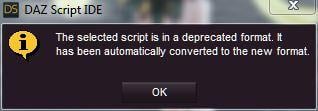
got this dialogue with the editor
 tara 2 product issue
hello guys, i'm having a annoying issue with a "character" from daz, this one:
https://www.daz3d.com/tara-2-hd-for-victoria-7-victoria-8
my issue is which it's seens to be conflicting with something in daz, if i'm staling the product "early" it appear normally but later as i'm keep installing new products(i didn't pay attention to what is the product conflicting with it), at one point it start to display as "not installed anymore or as "available" instead of installed, then i need to uninstall and go online and install ir using the smart content install inside daz, installing that way the product appear but however doing that it can make some conflict and issues in my daz, because i'm installing it in a secondary HD, and don't want to install anything in my primary which is another issue since the "smart" install it on the primary and i don't find a way to change it.
anyone had this issue as well and know how to fix it???
Was the V4 Era the Golden Age of Creativity?Sometimes I use V4. Victoria 4 doesn't use a lot of video card memory. I use V4 and Genesis 1. I hardly use Genesis 3 or 8. I do have old projects with Victoria 4 that I want to finish. Plus, I bought a ttton of clothes and hair for her. I might as well use these clothes and hair on V4 and Genesis 1. I gotta run and do some chores.
Need help identifying hair (SOLVED!) Thanks Taoz!Taoz said:
Possibly this with some 3rd party shader. It has a ton of morphs so can be shaped in many ways, and the character could very well be a G2F.
Janna Hair For Genesis 2 Female(S) And Victoria 4 - https://www.daz3d.com/catalog/product/view/id/018977
Was also considering this but it doesn't seem messy enough:
https://www.daz3d.com/matilda-hair-for-genesis-8-females
EDIT: Forgot the Janna Hair render, an old one I had, I've applied OOT's shader but doesn't look quite right.
Forgot to add that I think you are right about it being a custom shader for the hair.
Need help identifying hair (SOLVED!) Thanks Taoz!Taoz said:
Possibly this with some 3rd party shader. It has a ton of morphs so can be shaped in many ways, and the character could very well be a G2F.
Janna Hair For Genesis 2 Female(S) And Victoria 4 - https://www.daz3d.com/catalog/product/view/id/018977
Was also considering this but it doesn't seem messy enough:
https://www.daz3d.com/matilda-hair-for-genesis-8-females
You nailed it with the Janna hair, thanks! I was looking in my G3/G8 libraries and didn't even think of checking G2.
Transferring V4 morphs to G8F/G8.1FStore search sure leaves a bit to be desired. Okay ... so going by PA's name ... yes, now we can find V4 Clones for G8,
https://www.daz3d.com/sy-victoria-4-and-michael-4-clones-for-genesis-8 ;-)
Need help identifying hair (SOLVED!) Thanks Taoz!Possibly this with some 3rd party shader. It has a ton of morphs so can be shaped in many ways, and the character could very well be a G2F.
Janna Hair For Genesis 2 Female(S) And Victoria 4 - https://www.daz3d.com/catalog/product/view/id/018977
Was also considering this but it doesn't seem messy enough:
https://www.daz3d.com/matilda-hair-for-genesis-8-females
EDIT: Forgot the Janna Hair render, an old one I had, I've applied OOT's shader but doesn't look quite right.
XTransfer Module 1- Genesis 3 to Genesis 8 Morph Converter (Commercial)Zev0 said:
Hi. If it hasn't crashed it is stil processing. Question... We found it takes a bit longer with those who have a Genesis 8 figure with long load times, does yours take long to load?
I have tried on another Genesis 3 character and converted it to 8, it took less than a minute. But it didn'r have alot of morphs though only two.
With the Esme G3 character, I deleted the victoria 7 morphs related to the esme character and just kept the esme head morph and that worked ok.
3D Art Freebie Challenge-July 2021-"Wild Wild West" -Main Thread OnlyHylas said:
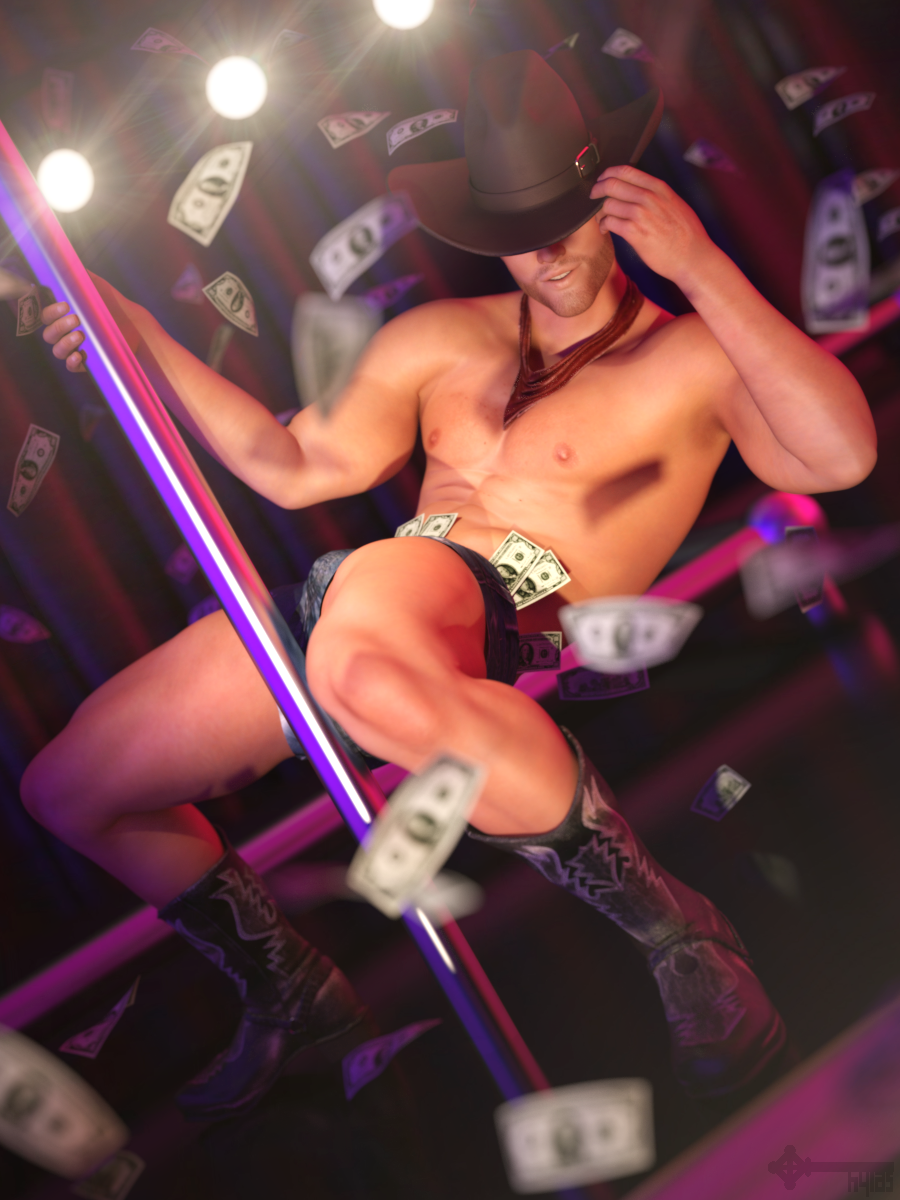
Title: Pony
DAZ Studio and Photoshop.
Version before post work attached below.Freebies:
1) Skin by LexaKiness: https://www.renderosity.com/freestuff/items/85293/lk-skin-merchant-resource-for-g8m-freebie
2) Head Morph (partly used) by khoshekh: https://www.renderosity.com/freestuff/items/86774/sokka-for-g8m
3) Morphs by SickleYield: https://sharecg.com/v/91888/gallery/21/DAZ-Studio/SY-200-Morphs-for-Genesis-8-Head-and-Body
4) Cowboy Hat by Cocco: http://shop.poseraddicts.com/index.php?act=viewProd&productId=3157
5) Daisy Dukes by Adam Thwaites: https://www.most-digital-creations.com/g8f_shorts_and_hoody.php
6) Cowboy Boots by Mint3D: https://www.renderosity.com/freestuff/items/65783/mountain-blues-boots-for-m4
7) Stubble by intheflesh: https://sharecg.com/v/94752/gallery/21/DAZ-Studio/Dante-DMC5-Free-Stubble-for-Genesis-8-Male
8) Dollar Bills by Jim Farris: https://www.sharecg.com/v/25053/browse/11/Poser/Free-Money!
9) Pose based on preset by SquarePeg3D: https://www.renderosity.com/freestuff/items/82812/heavy-hitters-for-g8f
10) Stage Lights by Rick Bridenbaker: https://www.sharecg.com/v/35900/Poser/Poser-Club-Stage
11) HDRI by zbyg: https://www.deviantart.com/zbyg/art/HDRi-Pack-1-97402522
12) Curtain by ArtTailor: https://www.renderosity.com/freestuff/items/81296/background-curtains
No Count:
- Stage and Pole: Limited Time Freebie by Adam Thwaites
- Genesis 8 Male Head Morphs
- Genesis 8 Male Body MorphsPurchased
1) SY V4 and M4 clones for G8 to auto-fit the boots
2) Desperado for G3M for the scarf
3) Lens Flares and Light Beams for postworkI feel like this is a winning entry =)
the skimpiest skimpwear in store?Pretty. I should revisit Victoria 6
XTransfer Module 1- Genesis 3 to Genesis 8 Morph Converter (Commercial)Hi, just using the xTransfer, I was transfering a Genesis 3 character (esme) to Genesis 8, however it seems to be taking a long time to transfer. It's reached 71% but it hasn't crashed.
It's been going for over an hour and I'm wanting to know is this normal to take this long?The model is
https://www.daz3d.com/vyk-esme
It's stuck on the part 'Updating Morph Deltas'
Also, to add it needs the Genesis 3 Female Head Morphs and Victoria 7 Character. Would that be the reason?
3D Art Freebie Challenge-July 2021-"Wild Wild West" -Entries Thread OnlyTitle: Pony
DAZ Studio and Photoshop.
Version before post work here.Freebies:
1) Skin by LexaKiness: https://www.renderosity.com/freestuff/items/85293/lk-skin-merchant-resource-for-g8m-freebie
2) Head Morph (partly used) by khoshekh: https://www.renderosity.com/freestuff/items/86774/sokka-for-g8m
3) Morphs by SickleYield: https://sharecg.com/v/91888/gallery/21/DAZ-Studio/SY-200-Morphs-for-Genesis-8-Head-and-Body
4) Cowboy Hat by Cocco: http://shop.poseraddicts.com/index.php?act=viewProd&productId=3157
5) Daisy Dukes by Adam Thwaites: https://www.most-digital-creations.com/g8f_shorts_and_hoody.php
6) Cowboy Boots by Mint3D: https://www.renderosity.com/freestuff/items/65783/mountain-blues-boots-for-m4
7) Stubble by intheflesh: https://sharecg.com/v/94752/gallery/21/DAZ-Studio/Dante-DMC5-Free-Stubble-for-Genesis-8-Male
8) Dollar Bills by Jim Farris: https://www.sharecg.com/v/25053/browse/11/Poser/Free-Money!
9) Pose based on preset by SquarePeg3D: https://www.renderosity.com/freestuff/items/82812/heavy-hitters-for-g8f
10) Stage Lights by Rick Bridenbaker: https://www.sharecg.com/v/35900/Poser/Poser-Club-Stage
11) HDRI by zbyg: https://www.deviantart.com/zbyg/art/HDRi-Pack-1-97402522
12) Curtain by ArtTailor: https://www.renderosity.com/freestuff/items/81296/background-curtains
No Count:
- Stage and Pole: Limited Time Freebie by Adam Thwaites
- Genesis 8 Male Head Morphs
- Genesis 8 Male Body MorphsPurchased
1) SY V4 and M4 clones for G8 to auto-fit the boots
2) Desperado for G3M for the scarf
3) Lens Flares and Light Beams for postwork3D Art Freebie Challenge-July 2021-"Wild Wild West" -Main Thread OnlyHylas said:
Title: Pony
DAZ Studio and Photoshop.
Version before post work attached below.Freebies:
1) Skin by LexaKiness: https://www.renderosity.com/freestuff/items/85293/lk-skin-merchant-resource-for-g8m-freebie
2) Head Morph (partly used) by khoshekh: https://www.renderosity.com/freestuff/items/86774/sokka-for-g8m
3) Morphs by SickleYield: https://sharecg.com/v/91888/gallery/21/DAZ-Studio/SY-200-Morphs-for-Genesis-8-Head-and-Body
4) Cowboy Hat by Cocco: http://shop.poseraddicts.com/index.php?act=viewProd&productId=3157
5) Daisy Dukes by Adam Thwaites: https://www.most-digital-creations.com/g8f_shorts_and_hoody.php
6) Cowboy Boots by Mint3D: https://www.renderosity.com/freestuff/items/65783/mountain-blues-boots-for-m4
7) Stubble by intheflesh: https://sharecg.com/v/94752/gallery/21/DAZ-Studio/Dante-DMC5-Free-Stubble-for-Genesis-8-Male
8) Dollar Bills by Jim Farris: https://www.sharecg.com/v/25053/browse/11/Poser/Free-Money!
9) Pose based on preset by SquarePeg3D: https://www.renderosity.com/freestuff/items/82812/heavy-hitters-for-g8f
10) Stage Lights by Rick Bridenbaker: https://www.sharecg.com/v/35900/Poser/Poser-Club-Stage
11) HDRI by zbyg: https://www.deviantart.com/zbyg/art/HDRi-Pack-1-97402522
12) Curtain by ArtTailor: https://www.renderosity.com/freestuff/items/81296/background-curtains
No Count:
- Stage and Pole: Limited Time Freebie by Adam Thwaites
- Genesis 8 Male Head Morphs
- Genesis 8 Male Body MorphsPurchased
1) SY V4 and M4 clones for G8 to auto-fit the boots
2) Desperado for G3M for the scarf
3) Lens Flares and Light Beams for postworkall the Share CG items had trouble loading while I was checking just now, which seems to point at trouble on the sharer CG site, will probably solved later again, since there are still enough freebies for the challenge
This is approved, please move to entries!
3D Art Freebie Challenge-July 2021-"Wild Wild West" -Main Thread OnlyTitle: Pony
DAZ Studio and Photoshop.
Version before post work attached below.Freebies:
1) Skin by LexaKiness: https://www.renderosity.com/freestuff/items/85293/lk-skin-merchant-resource-for-g8m-freebie
2) Head Morph (partly used) by khoshekh: https://www.renderosity.com/freestuff/items/86774/sokka-for-g8m
3) Morphs by SickleYield: https://sharecg.com/v/91888/gallery/21/DAZ-Studio/SY-200-Morphs-for-Genesis-8-Head-and-Body
4) Cowboy Hat by Cocco: http://shop.poseraddicts.com/index.php?act=viewProd&productId=3157
5) Daisy Dukes by Adam Thwaites: https://www.most-digital-creations.com/g8f_shorts_and_hoody.php
6) Cowboy Boots by Mint3D: https://www.renderosity.com/freestuff/items/65783/mountain-blues-boots-for-m4
7) Stubble by intheflesh: https://sharecg.com/v/94752/gallery/21/DAZ-Studio/Dante-DMC5-Free-Stubble-for-Genesis-8-Male
8) Dollar Bills by Jim Farris: https://www.sharecg.com/v/25053/browse/11/Poser/Free-Money!
9) Pose based on preset by SquarePeg3D: https://www.renderosity.com/freestuff/items/82812/heavy-hitters-for-g8f
10) Stage Lights by Rick Bridenbaker: https://www.sharecg.com/v/35900/Poser/Poser-Club-Stage
11) HDRI by zbyg: https://www.deviantart.com/zbyg/art/HDRi-Pack-1-97402522
12) Curtain by ArtTailor: https://www.renderosity.com/freestuff/items/81296/background-curtains
No Count:
- Stage and Pole: Limited Time Freebie by Adam Thwaites
- Genesis 8 Male Head Morphs
- Genesis 8 Male Body MorphsPurchased
1) SY V4 and M4 clones for G8 to auto-fit the boots
2) Desperado for G3M for the scarf
3) Lens Flares and Light Beams for postworkWhat happened to Genesis 8 Starter Essentials with new 8.1?Thank you for suggestion, Richard. The starter essentials icon does appear in smart content. In the upper right there is a circle -- rather like a C with gaps at the top and the bottom. Inside the circle the is a smaller 3/4 circle -- from -90 to 135 deg with a small downward pointing arrow at 135 deg. When I select the icon it takes over the left most pane and displayes a rectangular button labelled "update." I'll click on it to see what happens.
I'm not very familiar with the smart content pane. I've been using Daz studio for years, since Victoria 4 at least. But I've never understood what smart content is and what it does. To me it always seemed to be misnamed. I rely on the content library pane to select figures and objects. So I do not understand the significance of the Genesis 8 essentials being there with an update button. I updated G8 Essentials using the IM. but that had no effect. Must I update it here as well / instead?
Also, since this unexpected failure of GF8.1 scenes to load (they worked last week) when I load a scene with a G8F character whose joints were posed beyond the limits -- that is the limits were disabled via the edit mode of the parameters are now forced to obey the preset limits and are completely wrong. This is a major pain. It angers me greatly. I have literally hundreds of scenes with characters whose joints are beyond the limits. Will I have to reposition all of them now? Just what the heck happened in the last week to Daz Studio? It was fine on Thursday 1 July 2021 and on 5 July 2021 when I next opened studio and loaded a scene was clearly broken. I did nothing that I can think of that would have caused this.
Auto Adapted HelpThe "data/auto_adapted" folder is Studio's dumping ground, in there you will find mesh/morph/UV data for content that wasn't loaded as DS native formats before it was saved as a scene/subset.
An example is Poser content, take Victoria 4.2, she isn't in DS native formats, loading her into a scene and saving her as a scene/subset means you get a DUF file, but you also get a "data/auto_adapted/blMilWom_v4b_68498" folder, inside which you will find a large number of DSF files.
Another example is making a dress for G8F, you import the OBJ into DS, use the Transfer Utility to rig it to work with G8F, then instead of using "File > Save as > Support Asset > Figure/Prop Asset" to save it you use scene/subset instead, you now have a "data/auto_adapted"" folder for it, instead of the correct "data/Creator's Name" folder.
Same thing for all of the import formats (OBJ/FBX/DAE etc).
Now with Poser content DS adds references to the DUF file, that way if the data in the auto_adapted folder is missing, then DS knows where to go looking to find the content so it can recreate the missing data files before loading the DUF.
Not sure if it does the same for the other import formats thought.
So if you are getting missing files, then it probably means you don't have the content installed for DS to recreate them.
Carrara Challenge #58 - It's a Kind of Magic - WINNERS ANNOUNCED!Entry: #17
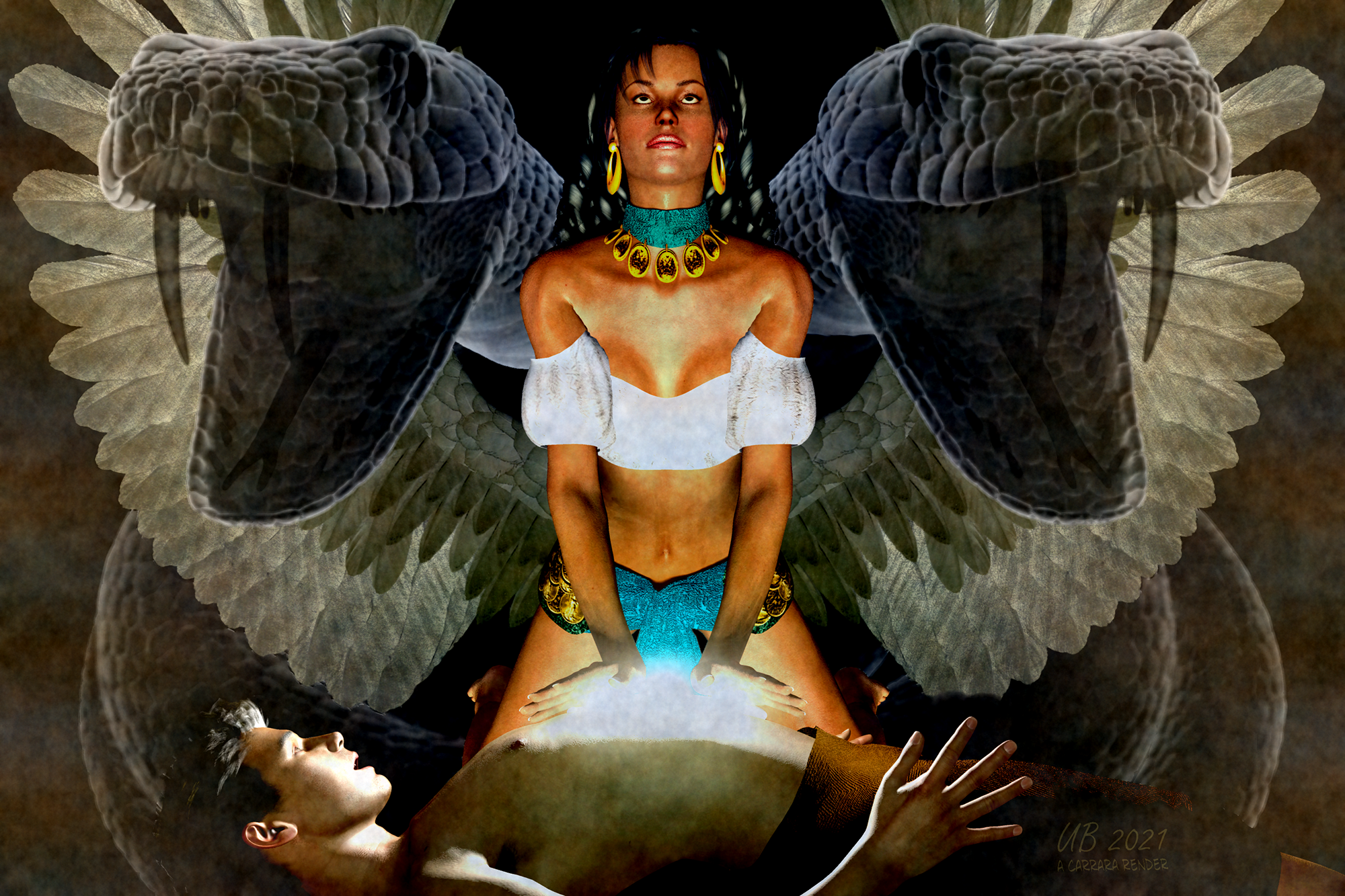
Title: Carmen summons the Caduceus to save her beloved Harry
Artist: UnifiedBrain
WIP Links: https://www.daz3d.com/forums/discussion/comment/6843821/#Comment_6843821
Additional Notes: The Caduceus is the magical staff of Hermes, the messenger of Olympian Gods. It is an ancient symbol for healing, characterized by twin snakes and angel wings.
The render style is supposed to be a pulp magazine cover.
Carmen - Victoria 3, using the Firedancer outfit.
Harry - David 3
The other main props are the Giant Fantasy Snake, and Epic Wings for Genesis (no longer in the Daz store)
Carrara process include lens flare, aura, blur, and text. As usual, GMIC was used for color adjustments (and general noise).
No postwork.
 An angry rant (but not exactly at DAZ)
Margrave: Seams definitely show up in Dome mode if you're only using an HDRI for lighting, so maybe adding a scene light helps? I'll try that shortly. I'm about to test 8.1, but I'm sure your tests are accurate. I'll also try to take a look at your new MDL discoveries soon, I'm getting overloaded with tests and stuff to figure out at the moment. :)
EDIT: I get the same results, seams are almost invisible (not quite) with Victoria 8.1, but strong with 8.0 with both HDRI only and with additional spotlight added. Also can't figure out baking yet, it looks easy to do, but I cannot select a directory in the panel and the textures never seem to actually get baked or applied even after using the bake function.
Artini: I haven't use that cape in a long time (and because the Fur Cape is much more stable), but I'll try to get around to testing that too. Raising dynamic cloth above the head does often work, but of course, collision and the mesh itself plays a part. I have my doubts anything has changed with that cape unless it was updated since I last used it.
Wolf: Substance Painter offers three types of SSS (Redshift, "Skin", and Translucency), but I don't think they have any effect on the exported textures themselves. They're mainly just there to help visualize SSS while working and how it might look in other software.
Iray cutout oppacity weirdnessI randomly found a weirdness in Iray, which I, for now at least, are considering a bug.
In the attached image is our lovely Victoria 8 - in 2 versions.
One is default out of the box. The second has a pure white image in the cutout oppacity for the face. My expectation was that it shouldn't make any difference.
But it is clear that it has.
Exactly why it is happening, I don't know. I suspect that it might somehow affect SSS.
Anybody who know why, and if it is the expected behaviour?
An angry rant (but not exactly at DAZ)From my tests, it appears spectral seams don't show up at all in Dome or Sun-Sky mode, so all these images were taken in "Scene Only" mode with a single rectangular spotlight, 100cm x 100cm, 50,000 lumens. These are all Iray viewport draws, none of them are actual renders.
Victoria 8.0
Very noticable seams.
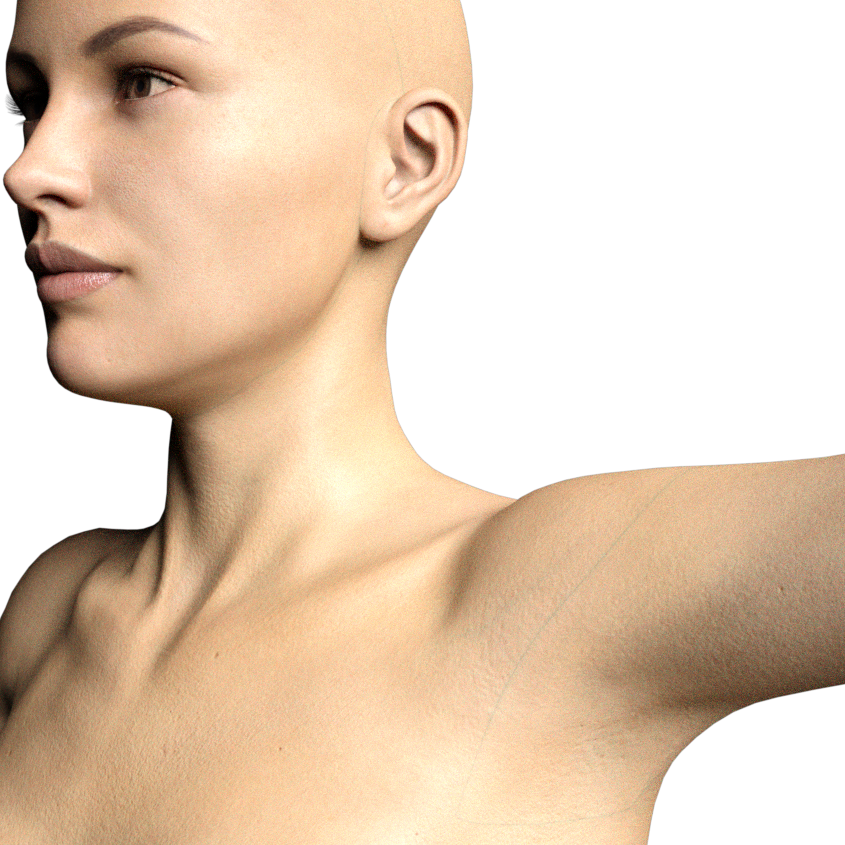
Bloom 8.1
An 8.1 generation character, but using the default Uber shader instead of the new PBR Skin shader. Seams are still there, but faded and blurry.
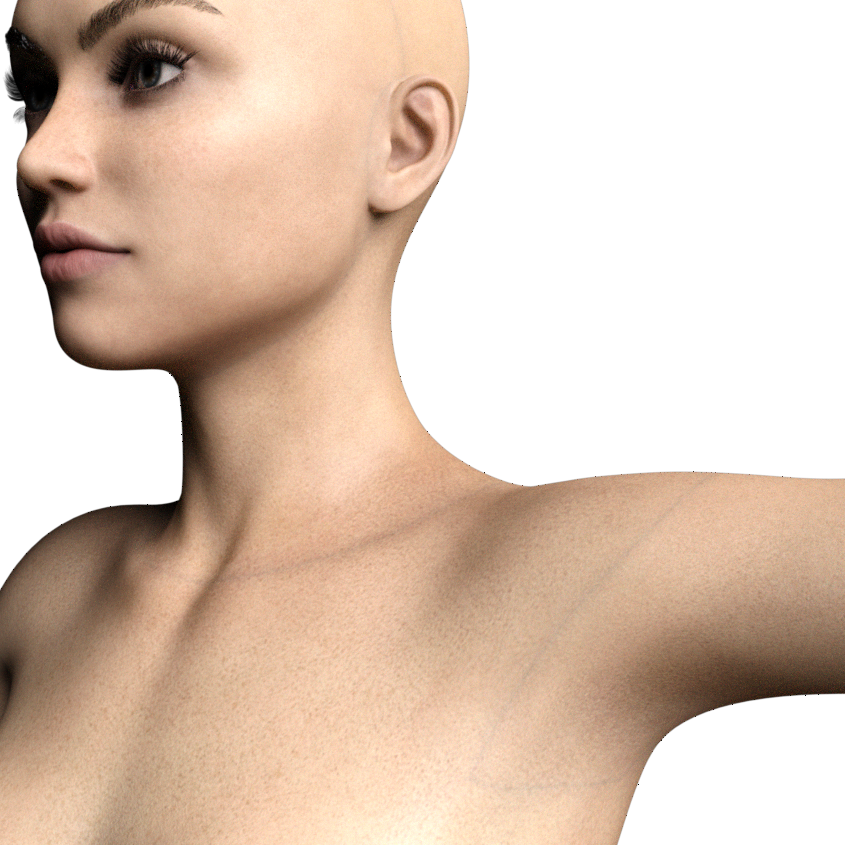
Victoria 8.1
Using the PBR Skin shader. Seams are barely visible, to the point you could pass them off as veins.
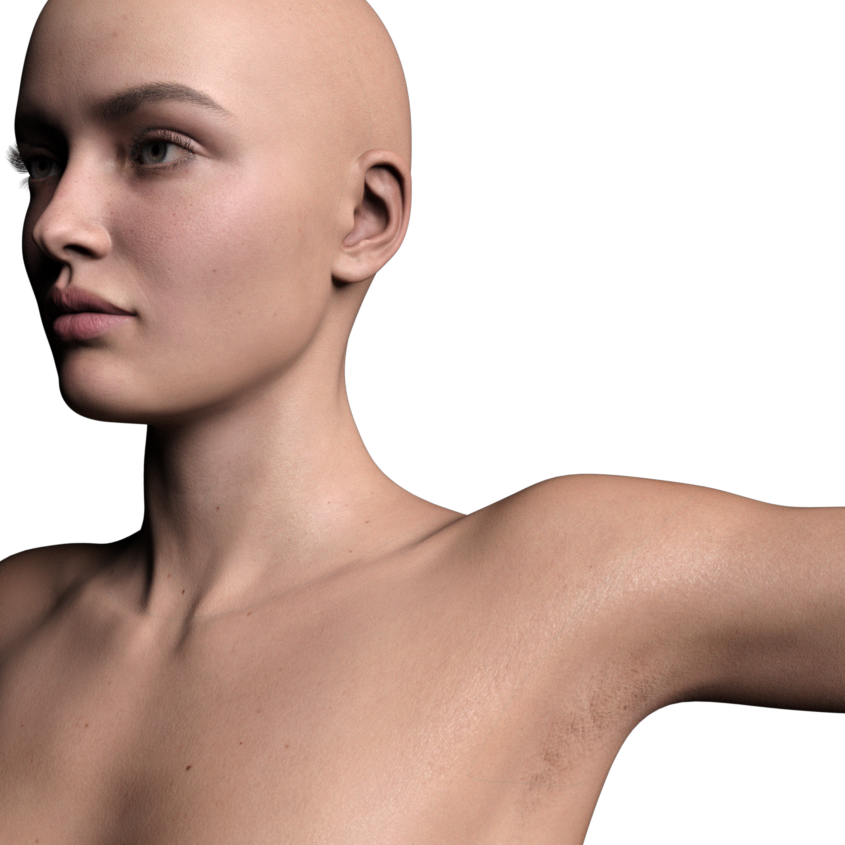
Bloom 8.1
Default skin manually replaced with the PBR Skin shader. No seams whatsoever, as far as I can tell.
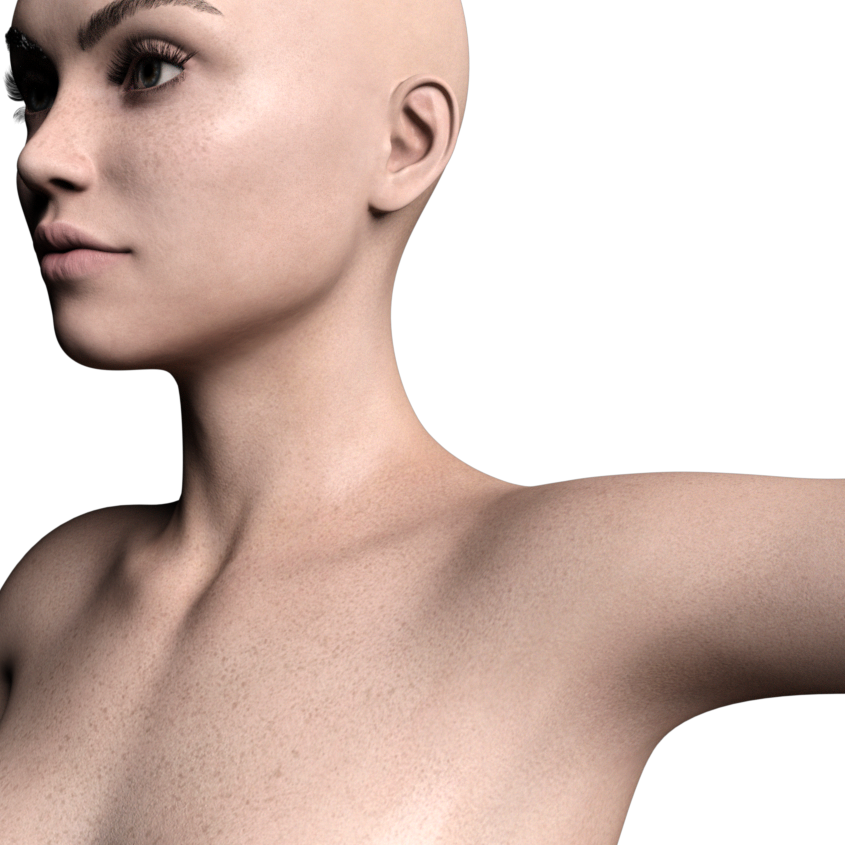
Daz 3D is part of

Connect
DAZ Productions, Inc.
7533 S Center View Ct #4664
West Jordan, UT 84084Licensing Agreement | Terms of Service | Privacy Policy | EULA
© 2026 Daz Productions Inc. All Rights Reserved.