-
Creating a Genesis 8 character from a custom mesh?
arstropica said:
Richard Haseltine said:
I'm sure Blender must have some kind of projection/shrink wrap type function. Hexxagon will snap to a background object, I think, though not sure if it works with a push/shrink type of tool.
Based on my research, Blender's shrinkwrap uses a combination of vertex positioning and groups to deform meshes. As a tool, it is more of a broadsword than a scalpel for doing any type of detailed retopology work. I've checked out HeadShop, Facegen and Daz's Face Transfer plugin and none of them really deliver good results. My initial goal was to take a 2D information from a photograph of a face and project it onto a Daz figure as accurately as possible. I had to come up with my own modeling workflow which uses 3 different types of software to import photogrammetric objects into Daz.
1. Face Alignment (free / open source)
URL: https://github.com/1adrianb/face-alignment
Requirements: Linux (apparently mac and windows too), Miniconda (https://docs.conda.io/en/latest/miniconda.html), Python 3.7
Installation: Clone my repository fork (https://github.com/arstropica/face-alignment/tree/demo) and follow the Github instructions.
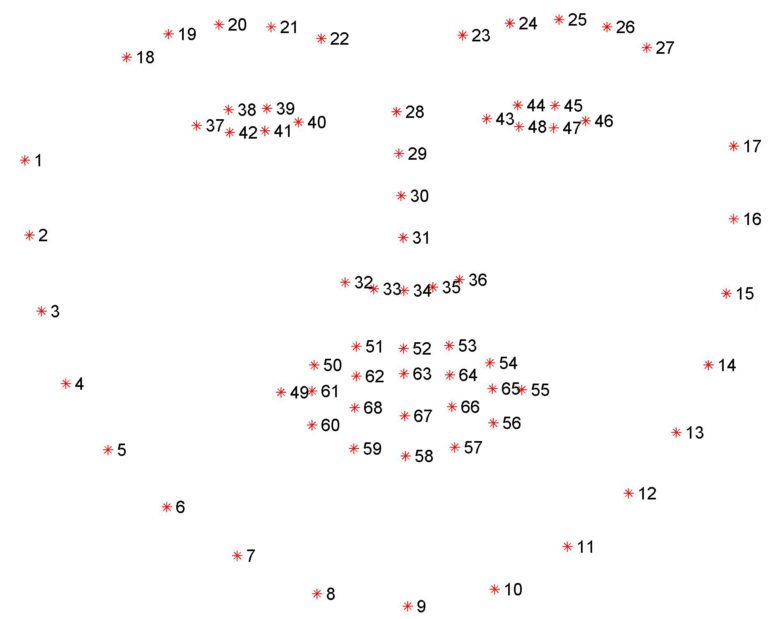
This python script is part of a 2-step process that generates an accurate 3D facial model from almost any photograph of a human in which the facial features are visible. The purpose of the script is to identify and localize facial landmarks on a 2D photo that can be used to build a 3D model later on. In it's original form, the script will generate 69 facial landmarks using DLib, a Computer Vision library. But we really only need 5 of these landmarks (2 eyes, 1 nose, and 2 lips corners).
I had to write my own implementation of the script to extract the 5 landmarks for the next step. (https://github.com/arstropica/face-alignment/blob/demo/scripts/batch.py).
Run python scripts/batch.py <image directory> to generate the landmark text files.
2. Microsoft Deep 3D Face Reconstruction (free / open source)
URL: https://github.com/microsoft/Deep3DFaceReconstruction
Requirements: Linux, Github Large File Storage (https://git-lfs.github.com/), Miniconda (https://docs.conda.io/en/latest/miniconda.html), Python 3.7, g++ & gcc Linux libraries
Installation: You can either clone the original repository, setup an anaconda environment and then download the dependencies separately or use my branch (https://github.com/arstropica/Deep3DFaceReconstruction/tree/demo) which contains the anaconda environment file as well as the dependencies and follow the Github instructions. If you do use my branch, you'll also need to install and initialize Github's LFS extension (https://git-lfs.github.com/) in the cloned repository in order to be able to download the 100M+ model files.
The Deep 3D package uses AI to reconstruct a 3D facial model from an image. The python script accepts the 5 landmarks from the previous step (similar to Facegen) and uses a trained AI model to render a textured 3D mesh of the facial characteristics of the subject in a photograph.
Copy your text and image files from the image directory in the face-alignment repo, to an "input" directory in Deep3D and run the demo.py script to generate the mesh(es).

3. Softwrap for Blender (paid plugin)
URL: https://blendermarket.com/products/softwrap
Requirements: Blender v2.8+, Meshlab
Installation: install from the settings/add-ons panel like any Blender plugin.
This is finally where the magic happens!
Softwrap is a Blender plugin that uses a cloth-like physics engine (not unlike dForce) to deform one mesh using another. It does it without changing the vertex order of the source mesh so it's perfect for Daz. There are a ton of settings from symmetrical deformations to mesh filtering, smoothing, elasticity, etc. A better way to look at the plugin is that it treats your source mesh as a cloth that wraps around a hard 3D object. Using the plugin to get a Genesis model to conform to a 3D mesh requires a few preliminary steps.
First take your 3D face mesh from Deep 3D and use an application like MeshLab to convert it to a DAE model. You need to do this if you want to import the face model into Daz Studio as it doesn't handle OBJ vertex colors well.
Then, in Blender, unwrap the model's UV map and bake the DAE model's vertex colors to a bitmap texture. (Here is a good tutorial if you don't know how: https://www.youtube.com/watch?v=7cphcAZ5ai8). It is a good idea to normalize the positioning of the model by rotating and aligning it with the origin and resetting its pivot.
Export the baked texture and the unwrapped model back to an OBJ and MAT format. Now you can import it into Daz.
At this point, I usually make shape or pose to adjustments to my Genesis character's head in Daz. I import my textured facial model into a scene with a vanilla Genesis character and position and/or scale it so that it covers the character's face. I then use the shape and pose morphs to make gross changes to Genesis facial characteristics so that the forehead, eyes, nose, mouth, chin and jaw are roughly the same shape, size and dimensions as my facial mask. This doesn't have to be perfect, but it will help with Softwrap's retopology process.
Export your Genesis character from Daz as an OBJ at base resolution (I use 1% scale to work in Blender). Also export your positioned 3D facial model the same way.
Import both OBJ models into Blender (ensuring the Poly Groups option is checked).
You may want to create a custom vertex group for the part of your Genesis model that will should not be affected by Softwrap. I usually create a group excluding the character's face, lips and eyelids.
In the Softwrap rollout, select the Genesis character as the source mesh and the Deep 3D mask as the target mesh. Select your vertex group as the Snapping & Frozen Group to protect the bits of your Genesis character that shouldn't be affected by the plugin. Hit the Start button and slowly increase the Snapping strength control to see the changes.
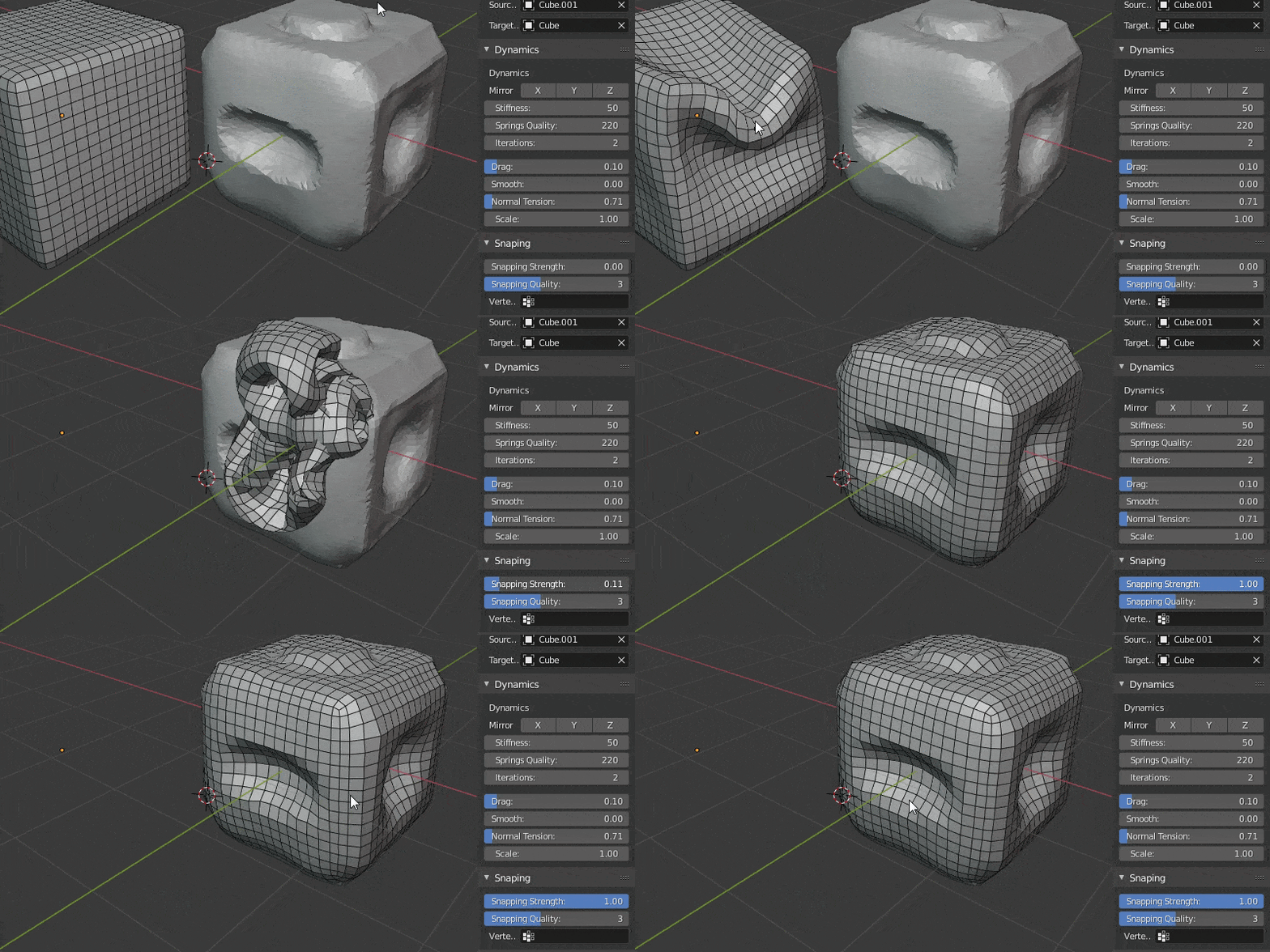

Use the pins, and other settings to fine tune the fit and then hit apply once you are satisfied. You can also leave the deformation as a shapekey and continue modifying your mesh.
Then you just export the mesh back to Daz (this time at 100%) and import it as a morph on a clean Genesis character and you have a good beginning for a custom character without ever having to do manual modelling.
Hope someone finds this helpful!
Has anyone gotten this to work, or improved on this workflow?
I can use softwrap in Blender, but have not had much luck with face alignment or Deep 3D Face Reconstruction in Windows
It seems like there is a new Pytorch-based version of Deep 3D Face Reconstruction that doesn't require the 5 facial landmarks: https://github.com/sicxu/Deep3DFaceRecon_pytorch#inference-with-a-pre-trained-model
Daz vs Character Creator to Unity URPHi,
I'm trying to get the best characters I can imported into Unity - this is what I've learnt -
I'd love to know if I can import CC skin material and Eyes into a Daz character, then I could have the best of both worlds.
Daz pro's
1. Daz has body morphs 2. Material export ok'ish. 3. Gen 8 good skeleton
Daz neg
1. Daz 9 and 8.1 bad skels. Materials not as good as Character Creator 2. Eye need more work
Character Creator 4 pro's
1. Great skels, 2. Great materials, Skin looks nicer in light 3. Soft cloth dynamics 4. Great eyes
Neg
1. NO BODY MORPHS!
Can't combine them together (yet) If know how let me know in the comments! :(.
Loading G3M MorphI just brought "Genesis 3 Male Body Morphs"
SAME ERROR STILL
2023-08-13 16:59:47.956 [INFO] :: Prepare asset load (merge): /Genesis 3 Male/Characters/Elf and Dwarf/Acrondroplasia.dsf
2023-08-13 16:59:47.956 [INFO] :: Locking viewport redraw...
2023-08-13 16:59:47.956 [INFO] :: Viewport redraw locked.
2023-08-13 16:59:48.003 [INFO] :: Native format content directories: 2
2023-08-13 16:59:48.003 [INFO] :: Poser format content directories: 1
2023-08-13 16:59:48.004 [INFO] :: Other import format content directories: 0
2023-08-13 16:59:48.004 [INFO] :: Begin asset load (merge): /Genesis 3 Male/Characters/Elf and Dwarf/Acrondroplasia.dsf
2023-08-13 16:59:48.004 [INFO] :: Determining missing assets...
2023-08-13 16:59:48.004 [INFO] :: Setting textures...
2023-08-13 16:59:48.004 [INFO] :: Preparing modifiers...
2023-08-13 16:59:48.004 [WARNING] :: ..\..\..\..\..\src\sdksource\fileinput\dzassetdaz.cpp(5962): Parent for modifier not found: Acrondroplasia.
2023-08-13 16:59:48.005 [WARNING] :: ..\..\..\..\..\src\sdksource\fileinput\dzassetdaz.cpp(1712): Modifier not prepared: Acrondroplasia!
2023-08-13 16:59:48.006 [INFO] :: Creating modifiers...
2023-08-13 16:59:48.006 [WARNING] :: ..\..\..\..\..\src\sdksource\fileinput\dzassetdaz.cpp(1729): Modifier not created: Acrondroplasia!
2023-08-13 16:59:48.006 [INFO] :: Finished asset load (merge): 0m 0.2s - /Genesis 3 Male/Characters/Elf and Dwarf/Acrondroplasia.dsf
2023-08-13 16:59:48.064 [INFO] :: Unlocking viewport redraw...
2023-08-13 16:59:48.065 [INFO] :: Viewport redraw unlocked.Loading G3M MorphFreebie: https://sharecg.com/v/83054/view/21/DAZ-Studio/Dwarfism-Elfish
ERROR LOGS
2023-08-13 13:58:30.359 [INFO] :: Prepare asset load (merge): /Genesis 3 Male/Morphs/Elf and Dwarf/Acrondroplasia.dsf
2023-08-13 13:58:30.359 [INFO] :: Locking viewport redraw...
2023-08-13 13:58:30.359 [INFO] :: Viewport redraw locked.
2023-08-13 13:58:30.403 [INFO] :: Native format content directories: 2
2023-08-13 13:58:30.403 [INFO] :: Poser format content directories: 1
2023-08-13 13:58:30.403 [INFO] :: Other import format content directories: 0
2023-08-13 13:58:30.403 [INFO] :: Begin asset load (merge): /Genesis 3 Male/Morphs/Elf and Dwarf/Acrondroplasia.dsf
2023-08-13 13:58:30.403 [INFO] :: Determining missing assets...
2023-08-13 13:58:30.404 [INFO] :: Setting textures...
2023-08-13 13:58:30.404 [INFO] :: Preparing modifiers...
2023-08-13 13:58:30.404 [WARNING] :: ..\..\..\..\..\src\sdksource\fileinput\dzassetdaz.cpp(5962): Parent for modifier not found: Acrondroplasia.
2023-08-13 13:58:30.405 [WARNING] :: ..\..\..\..\..\src\sdksource\fileinput\dzassetdaz.cpp(1712): Modifier not prepared: Acrondroplasia!
2023-08-13 13:58:30.405 [INFO] :: Creating modifiers...
2023-08-13 13:58:30.405 [WARNING] :: ..\..\..\..\..\src\sdksource\fileinput\dzassetdaz.cpp(1729): Modifier not created: Acrondroplasia!
2023-08-13 13:58:30.405 [INFO] :: Finished asset load (merge): 0m 0.2s - /Genesis 3 Male/Morphs/Elf and Dwarf/Acrondroplasia.dsf
2023-08-13 13:58:30.461 [INFO] :: Unlocking viewport redraw...
2023-08-13 13:58:30.461 [INFO] :: Viewport redraw unlocked.Hair parting "flipped" feature for hairdosI do agree with you AOBB. It would be useful. My favourite character lives with an X axis -100% scale 'Robin Hair for G8F' as the +100% version doesn't suit her. I think the -100% X-Scale trick does mostly work for conformal and fabric dForce hair provided the hair isn't much more than shoulder length. (Don't know about SBH as I haven't yet found any that work well enough to persist with beyond 30mins.) To improve things - and it has only just occurred to me so I've not tried it, take the warning! - you could export the -X100% hair as an obj file. Then import as a prop, convert to a figure and use the transfer utility to get the original hair rigging back, but on the mirrored hair. That way the character's shoulder movements should be followed rather better. May have to go through all the morphs in a similar way to get the morphs working on the new native inverted hair, but it could well work. Might be a reasonable substitute until PA's provide the mirrored version we'd both like with the original... Regards, Richard.G8F Expressions morphs are stored in wrong body node in G8.1F modelsBejaymac said:
Alias files are basically a redundant system using code "borrowed" from the Poser Import system.
Poser does have a sinmilar feature (linkParms) for numeric properties, which can be reproduced wheer needed in DS. However the Aliases are not that - they can be used for other proerpty types, and can appear on more than two nodes. They allow properies to appear in mutliple places (e.g. the bend/twist values on both Bend and Twist bones, grasp controls on both hand and root, expressions on Head adn root) in such a way that adjusting one is rflected on all of the others.
Badly done alias file can and do have an effect on load times, but it depends on just how much [stuff] DS is having to load.
Load times are down to three things-
The number of DSF files in the Morphs folder, think of it like a truck, the more [stuff] you put in the trailer the heavier it gets and the more effort the truck needs to use to move, that's the sort of effect it has on DS.
The number of Formulas it's having to process, these add to the heavy load DS is already dealing with from the number of DSF files, and as the average character has just under 1600 formulas in it files it can get really heavy very quick.
Last is the number of errors being generated, and not just the ones you see in the log, on a 10-15 minute load they can stretch load time out to an hour.
So cutting down on the amount of [stuff] in the Morphs folder is always advisable.
Daz Studio Pro BETA - version 4.22.0.15! (*UPDATED*)barbult said:
The change log is full of comments about in-app notifications, but the highlights thread makes no mention of it. Can anyone explain what it does or point me to documentation? I'm afraid to install this beta version without more understanding of the purpose and mechanism of in-app notifications. Does a customer have to be logged in to their account in Daz Studio? I avoid logging in, because I don't want to accidently install anything with Daz Connect and don't want automatic metadata updates that I have no control of.
Given that Daz has been careful not to connect without permission in other respects I would be very surprised if that was not the case here too. No details have been given, though I did notice the use of notification both here and in the description of what used to be called in-store messages (but of course that may just mean that one group was using the term, so it was in the air when the other groupneeded to label soemthing that is actually unrelated).
Daz Studio Pro BETA - version 4.22.0.15! (*UPDATED*)The change log is full of comments about in-app notifications, but the highlights thread makes no mention of it. Can anyone explain what it does or point me to documentation? I'm afraid to install this beta version without more understanding of the purpose and mechanism of in-app notifications. Does a customer have to be logged in to their account in Daz Studio? I avoid logging in, because I don't want to accidently install anything with Daz Connect and don't want automatic metadata updates that I have no control of.
Not many daz 9 Animations to buy - How do people do their animations?Hi,
Can you import animation from other fbx files so that they work in gen 9 characters? Looked like there was only about 12 animations packs for gen 9 in the store. Can you convert gen 8 animations to gen 9 etc?
What do people do to get some generic animations?
G8F Expressions morphs are stored in wrong body node in G8.1F modelsAlias files are basically a redundant system using code "borrowed" from the Poser Import system.
Badly done alias file can and do have an effect on load times, but it depends on just how much [stuff] DS is having to load.
Load times are down to three things-
The number of DSF files in the Morphs folder, think of it like a truck, the more [stuff] you put in the trailer the heavier it gets and the more effort the truck needs to use to move, that's the sort of effect it has on DS.
The number of Formulas it's having to process, these add to the heavy load DS is already dealing with from the number of DSF files, and as the average character has just under 1600 formulas in it files it can get really heavy very quick.
Last is the number of errors being generated, and not just the ones you see in the log, on a 10-15 minute load they can stretch load time out to an hour.
So cutting down on the amount of [stuff] in the Morphs folder is always advisable.
Daz Studio Pro 4.22(.0.x) - Highlights4.21.1.80 (August 11, 2023)
- Code Signing
- Executables are signed (once again) on Windows
- User Account Control (UAC) prompt is now blue with publisher name instead of yellow with unknown publisher
- Addresses a known issue in the current (4.21.0.5) General Release
- Executables are signed (once again) on Windows
- Recent Files
- Added a "Set Max Recent Files..." action
- Causes an input dialog that allows viewing/setting the maximum number of recent files (within the [0,100] range) to be displayed
- Increased the default from 10 to 15
- Added a "Set Max Recent Files..." action
- New Item Creation
- "Create New Item" dialog
- Fixed a memory leak
- Fixed an issue with naming for new point at target nodes
- D-Formers
- Fixed an issue where hidden pre-defined options could still have an influence on the resulting node
- Manifested when using the “Create New D-Former…” action with the "Weight Map Mode" option active, by resulting in the selected node(s) having their "Point At" target unintentionally set to the newly created D-Former node
- Fixed an issue where hidden pre-defined options could still have an influence on the resulting node
- "Create New Item" dialog
- Property Limits On/Off (Rotation) actions
- Fixed an issue where the actions would not recurse the node hierarchy using the default configuration
- A "Change Limit State" option dialog is displayed if [Ctrl/Cmd] is pressed when triggering the action
- The default configuration is Nodes:Root, Skeletons:Exclude, Propagation:Recursive
- Fixed an issue where the actions would not recurse the node hierarchy using the default configuration
- Property Reset actions
- Changed the label of the "Reset" action in the options menu to "Reset Value"
- Added a "Reset Attributes" action; see the Change Log for more detail
- Property Hierarchy pane
- Added actions to the context menu
- Expand All
- Expand Selected
- Expand from Selected
- Collapse All
- Collapse Selected
- Collapse from Selected
- Moved context menu "Set" actions to a submenu
- Set > Limits To Extents
- Set > Limits To Extents Recursive
- Set > Scalars...
- Set > Save With...
- Added actions to the context menu
- Daz Connect
- Fixed an issue with remembering username/password
- Fixed a possible crash on macOS when updating metadata
- Logging
- Modified message severity of many entries
- Added capture of many more events; see the Change Log for more detail
- Scripting API
- Made additions in various areas; see the Change Log for more detail
- Fixed bugs and/or made improvements in various areas; see the Change Log for details
SIGGRAPH 2023, AI, and USDRichard Haseltine said:
TheMysteryIsThePoint said:
So, today is the last day of SIGGRAPH 2023 in Los Angeles. It's always a blast seeing tomorrow's new technologies, but this year one cannot fail to have the sense that things are going to change drastically, and very soon because of two things: AI and USD.
This time last year, everyone was talking about USD. This year, everyone is actually adopting it. With no exaggeration, every company I came across is buying in to USD with gusto and everyone is saying that all other file types are going to be deprecated because their developers don't want to deal with anything other than USD now that they've had a taste of it for a while. The enthusiasm for USD at every level is like nothing I've seen before.
NVidia is integrating ChatGPT-like features into Omniverse.
Because USD is completely open, ChatGPT knows all about it. Because one of USD's manifestations is just a declarative DSL in plain old ASCII, ChatGPT can output it. I tried a simple experiement: "Write a USD ascii file that represents a unit cube."
#usda 1.0
def Xform "UnitCube"
{
def Mesh "Mesh"
{
int[] faceVertexCounts = [4, 4, 4, 4, 4, 4]
int[] faceVertexIndices = [0, 1, 5, 4, 1, 2, 6, 5, 2, 3, 7, 6, 3, 0, 4, 7, 0, 3, 2, 1, 4, 5, 6, 7]
point3f[] points = [(0, 0, 0), (1, 0, 0), (1, 1, 0), (0, 1, 0), (0, 0, 1), (1, 0, 1), (1, 1, 1), (0, 1, 1)]
}
}Importing that into Blender gives, sure enough, a unit cube. USD is elegant, simple, and easy to generate programmatically... the tools that are going to be built around it are going to begin to flood in. I saw and heard the enthusiasm from the crowd of mostly devs at every session about USD.
My point with all of this: DAZ, seriously, we need USD. Not just export but import, too. The 3D world's train is leaving the station and our bags are not packed.
and how well do materials transfer between render engines using USD? How about rigging between applications? Geometry itself is easy, and long has been.
Easy enough as Omniverse has MDL's to translate to or from Unreal Engine, from an MDL Standpoint. So USD will be easy enough as demonstrated by Omniverse itself.
Bruises, no materials in productcrosswind said:
'Cause no metadata was given to those LIE presets... if you use Smart Content, right click on the tip thumbnail, menu Show assets in - Mapped folder
Thanks for the replies. That would explain it.
How do I install Renderosity content in DAZ Studio 4.10?If one never uses Smart Content, just follow the video as above... we call it "direct dump", but truly truly not recommended nowadays, especially you have lots of 3rd-party products.
We always suggest use Smart Content first and Content Wizard to install 3rd-party products to your Daz Library.
The reason is pretty simple -: e.g. It'll take 3 seconds for a Smart Content user to find all "Sneaker Products", while it'll take...I don't really know, maybe 3 mins for a Content Library user to get the results by searching Files other than Metadata...
Spend more of your valuable time on your scenes other than searching assets...Genesis 8 "Actors" aren't recognized by contextI think that is what they are using. Sounds like a metadata problem. Load a generic G8 base figure, and a G8 character from the presets. Compare the SceneID's to see if they match or are obviously wrong. Node Name, Scene ID and Compatibility Base should be the same for both. The Node Label can be different, it is just for presentation.
Bruises, no materials in product'Cause no metadata was given to those LIE presets... if you use Smart Content, right click on the tip thumbnail, menu Show assets in - Mapped folder
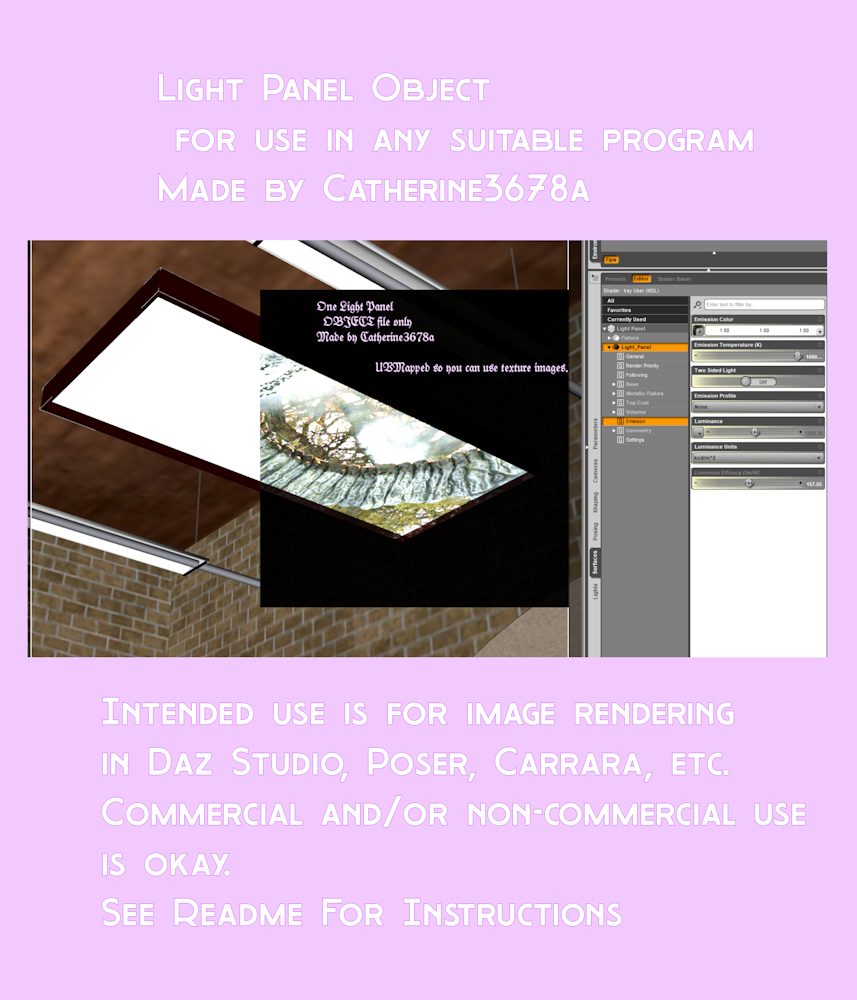
Light Panel ObjBasically, just the .obj to use as a light panel in D/S or any other program you want. No textures or other scene stuff included.
In D/S, import using Daz measurements, resize and position to where you want it ... hiding or removing all else from the scene, export out the .obj. Then remove that from the scene. Import back in your new .obj file; apply desired shader presets etc. and save as a Figure/Prop to a sensible location.
UVMapped so one can use texture images.
At Renderosity.
 SIGGRAPH 2023, AI, and USD
TheMysteryIsThePoint said:
So, today is the last day of SIGGRAPH 2023 in Los Angeles. It's always a blast seeing tomorrow's new technologies, but this year one cannot fail to have the sense that things are going to change drastically, and very soon because of two things: AI and USD.
This time last year, everyone was talking about USD. This year, everyone is actually adopting it. With no exaggeration, every company I came across is buying in to USD with gusto and everyone is saying that all other file types are going to be deprecated because their developers don't want to deal with anything other than USD now that they've had a taste of it for a while. The enthusiasm for USD at every level is like nothing I've seen before.
NVidia is integrating ChatGPT-like features into Omniverse.
Because USD is completely open, ChatGPT knows all about it. Because one of USD's manifestations is just a declarative DSL in plain old ASCII, ChatGPT can output it. I tried a simple experiement: "Write a USD ascii file that represents a unit cube."
#usda 1.0
def Xform "UnitCube"
{
def Mesh "Mesh"
{
int[] faceVertexCounts = [4, 4, 4, 4, 4, 4]
int[] faceVertexIndices = [0, 1, 5, 4, 1, 2, 6, 5, 2, 3, 7, 6, 3, 0, 4, 7, 0, 3, 2, 1, 4, 5, 6, 7]
point3f[] points = [(0, 0, 0), (1, 0, 0), (1, 1, 0), (0, 1, 0), (0, 0, 1), (1, 0, 1), (1, 1, 1), (0, 1, 1)]
}
}Importing that into Blender gives, sure enough, a unit cube. USD is elegant, simple, and easy to generate programmatically... the tools that are going to be built around it are going to begin to flood in. I saw and heard the enthusiasm from the crowd of mostly devs at every session about USD.
My point with all of this: DAZ, seriously, we need USD. Not just export but import, too. The 3D world's train is leaving the station and our bags are not packed.
and how well do materials transfer between render engines using USD? How about rigging between applications? Geometry itself is easy, and long has been.
SIGGRAPH 2023, AI, and USDSo, today is the last day of SIGGRAPH 2023 in Los Angeles. It's always a blast seeing tomorrow's new technologies, but this year one cannot fail to have the sense that things are going to change drastically, and very soon because of two things: AI and USD.
This time last year, everyone was talking about USD. This year, everyone is actually adopting it. With no exaggeration, every company I came across is buying in to USD with gusto and everyone is saying that all other file types are going to be deprecated because their developers don't want to deal with anything other than USD now that they've had a taste of it for a while. The enthusiasm for USD at every level is like nothing I've seen before.
NVidia is integrating ChatGPT-like features into Omniverse.
Because USD is completely open, ChatGPT knows all about it. Because one of USD's manifestations is just a declarative DSL in plain old ASCII, ChatGPT can output it. I tried a simple experiement: "Write a USD ascii file that represents a unit cube."
#usda 1.0
def Xform "UnitCube"
{
def Mesh "Mesh"
{
int[] faceVertexCounts = [4, 4, 4, 4, 4, 4]
int[] faceVertexIndices = [0, 1, 5, 4, 1, 2, 6, 5, 2, 3, 7, 6, 3, 0, 4, 7, 0, 3, 2, 1, 4, 5, 6, 7]
point3f[] points = [(0, 0, 0), (1, 0, 0), (1, 1, 0), (0, 1, 0), (0, 0, 1), (1, 0, 1), (1, 1, 1), (0, 1, 1)]
}
}Importing that into Blender gives, sure enough, a unit cube. USD is elegant, simple, and easy to generate programmatically... the tools that are going to be built around it are going to begin to flood in. I saw and heard the enthusiasm from the crowd of mostly devs at every session about USD.
My point with all of this: DAZ, seriously, we need USD. Not just export but import, too. The 3D world's train is leaving the station and our bags are not packed.
GENERAL FREEBIE REQUESTS part 3Catherine3678ab said:
DoctorJellybean said:
Hopefully there is a ceiling panel light like this one out there
https://gcdn.daz3d.com/p/24359/i/02-i13-bowling-alley-environment-with-poses-daz3d.jpg
Maybe but figured it'd be faster to simply make one. Obj. file is uploaded to Renderosity, pending approval. Concept is one can move and/or resize it as please, export out a new .obj file. Then import it back in and save it as a Figure/Prop file.
Oh, thank you. Looking forward to it being approved.
Daz 3D is part of

Connect
DAZ Productions, Inc.
7533 S Center View Ct #4664
West Jordan, UT 84084Licensing Agreement | Terms of Service | Privacy Policy | EULA
© 2026 Daz Productions Inc. All Rights Reserved.














