-
New DS Filament Render Engine
Wait.. what? How do I get the filament preview?
You have to download the most current beta version which is only available through DIM.
I can't seem to be able to set DIM to even find the beta, much less download it.
You need to "buy" the beta in order for it to show up in DIM.
Thanks
AIUTO...CHI CONOSCE L’ITALIANO? PARTE DODICISalve Ragazzi... e come si dice "chi non muore si rivede"!

a parte gli scherzi, sto passando un periodaccio.

Ho un problema con la genesis 8 con le pupille del "male", non è la texture e non ci sono morph, ne sliders fuori posizione, vi posto qui sotto l'immagne così vi rendete conto e mi potete dire se vi è capitato pure a voi e se possibile risolverlo... Grazie
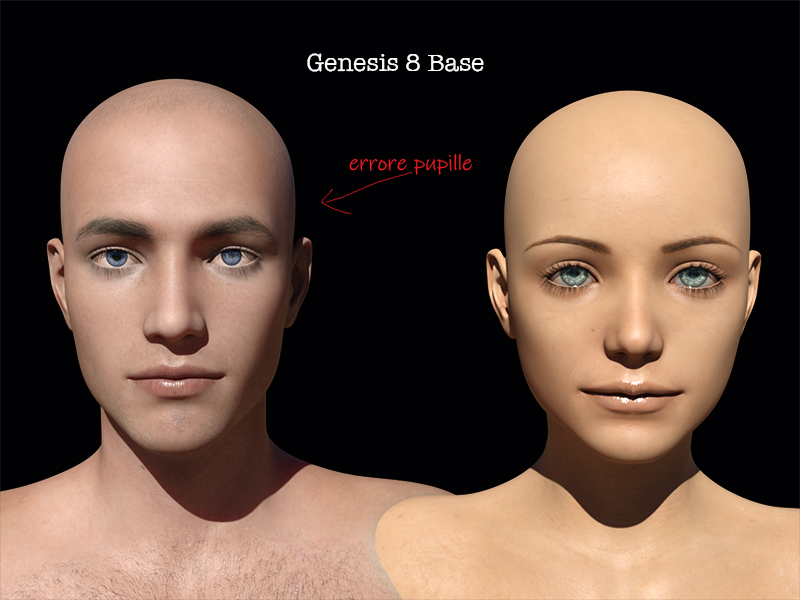
Ho letto che stanno introducando un nuovo motore di rendering "Filament".... sostiturà IRAY oppure Iray rimane nelle prossime versioni di Daz Studio???
P.S. @Muscleman Auguri!!! se è il Compleanno... che domani tocca a me
 MEC4D's celebration ( with freebies ) [commercial]
I guess there is another reason for celebration that you finally got hands on new viewport preview in. DS, it is a great move , finally don't need to run Iray every second when setup my new shaders , it take time to get used to it , but I play with it for a while and very happy about that, of course it is a draw mode not full rendering mode so many light and shadows info will not show up, but anything better than the ancient OpenGL
You may experience different look in the viewport with my specular based shaders, since I use top coat Fresnel for fixing some shader issue with lost of energy while rendering with Iray and it is still not fixed until today.
I made some comparisons early in time to test stuff out with Metallicity shaders to see if my other PBR filament corresponding with DS and it was indeed proper result.
It is of course not full render engine but the results are pretty accurate without running my cards for hours , saving on the power while setup stuff
Daz Studio Pro BETA - version 4.12.2.60! (*UPDATED*)Not exactly , it is easy to calibrate your Filament PBR to match Iray , you just don't touch Iray Enviorment settings of your scene to do that , there of course will be difference since Filament PBR is not rendering reflections from other objects or Global illumination from other objects but only IBL lighting , for that reason is is a draw mode and very useful for setting up a scene or shader , just give it a time and play with the Filament Option node as that all you have to do.
Below some examples I did inearly releases of the beta , it is a accurate as in other programs I use, remember PBR is based on reflections , so some shaders may not looks exactly the way it should with it, especially if parameters are mixed
As far as lighting, you either light for Iray or you light for Filament.
So if I am to render in IRay there's no advantage to using Filament in the viewport? Otherwise it would be a hassle to keep changing the lighting before I click render.
New DS Filament Render EngineDetlef, maybe changing the shaders will work better
Old Poser materials in 3Delight had that exact issue because of the ambient and specularity settings
I found my iray stonework glossy too in Filament so applied DZdefault holding ctl and ignoring maps
then set both to black
in fact I am finding DZdefault works best in Filament for adding ambient glow too
New DS Filament Render EngineHi,
how to dimm the light in the mouth ?
Check that the lights are set to cast shadows - because it's needed for Filament the setting is now avaialble even when Iray is the active engine, though it won't affect Iray (except for Interactive mode).
New DS Filament Render EngineWell, I just got the new 4.12.2.54 PB Monday at midnight and I hope it fixes all the Filament crashes I've been getting. I'm trying to load a scene now and it's still slower than molasses.
The problem was I had upped the 'Interface' quality in Preferences were all to the 'best' but even with 32GB RAM that was too much somehow so I won't try that again until I have 64GB system RAM. And I'll forghet about using any sort of Pixel Buffer with the size of those textures.
- I just tried with all that set to 'Best' but Pixel Buffer to off and that works OK too, no crash dumps.
I'm glad you got it worked out! :D
Daz Studio Pro BETA - version 4.12.2.60! (*UPDATED*)It would be nice if in the DAZ Studio we had an dockable/undockable subwindow Gizmo on the bottom left hand side of the Viewport that showed the current 'Interface' settings and allowed us to change them on that dockport gizmo correctly. It's sort of important for those of us that want to use Filament in the viewport or use iRay Preview in the Viewport.
I don't think it would be that tough to add to the code.
- I will make a feature request in CS - #349947
New DS Filament Render EngineWell, I just got the new 4.12.2.54 PB Monday at midnight and I hope it fixes all the Filament crashes I've been getting. I'm trying to load a scene now and it's still slower than molasses.
The problem was I had upped the 'Interface' quality in Preferences were all to the 'best' but even with 32GB RAM that was too much somehow so I won't try that again until I have 64GB system RAM. And I'll forghet about using any sort of Pixel Buffer with the size of those textures.
- I just tried with all that set to 'Best' but Pixel Buffer to off and that works OK too, no crash dumps.
Shortcut for Filament Draw Style Not WorkingIf you want it addressed by Daz you should report it, though posting in the forums (ideally in Daz Studio Discussion) will at least allow others to check the issue. I can't get any shortcut, not just ctrl 9, to work for Filament.
Thanks for having checked it Richard!
Shortcut for Filament Draw Style Not WorkingIf you want it addressed by Daz you should report it, though posting in the forums (ideally in Daz Studio Discussion) will at least allow others to check the issue. I can't get any shortcut, not just ctrl 9, to work for Filament.
New DS Filament Render EngineWait.. what? How do I get the filament preview?
You have to download the most current beta version which is only available through DIM.
I can't seem to be able to set DIM to even find the beta, much less download it.
You need to "buy" the beta in order for it to show up in DIM.
New DS Filament Render Engineif we could get the option to switch a material from default to twopasssinglesided or twopasstwosided as per the filament specs that would solve the issues with transparency.
while tinkering with this image I also discovered that refration weight is not mappable or at least it ignores the iray map.
anyway Hagar with the Bardot outfit and dForce soft curls hair.
the shadows cast by the hair on the face are a bit iffy might need to change the light settings
New DS Filament Render EngineWait.. what? How do I get the filament preview?
You have to download the most current beta version which is only available through DIM.
I can't seem to be able to set DIM to even find the beta, much less download it.
New DS Filament Render EngineWell, I just got the new 4.12.2.54 PB Monday at midnight and I hope it fixes all the Filament crashes I've been getting. I'm trying to load a scene now and it's still slower than molasses.
Problem solved. I had turned on and now turned back off the pixel buffers. Maybe whn I have a video card with over 100 GB of RAM I can turn on pixel buffers.
New DS Filament Render EngineI'm still working on Filament render to get them working again. DS keeps crash dumping.
Problem solved. I had turned on and now turned back off the pixel buffers. Maybe whn I have a video card with over 100 GB of RAM I can turn on pixel buffers.
Shortcut for Filament Draw Style Not WorkingHi everyone!
I always switch between draw styles with keyboard shortcuts.
For example, I've now set "0" for Iray and "8" for Texture Shaded, and they work as intended.I've also set "9" for Filament, but it doesn't work.
I haven't confused the numpad or else, and I've checked multiple times.
Will this issue be addressed?
Thank you for your attention,
LenioTG.New DS Filament Render Engine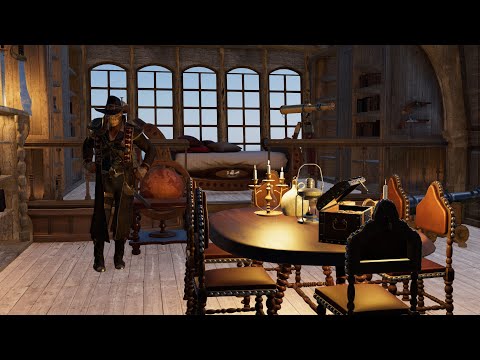
another video
Neat! I like the compilation of different scenes and genres.
I think you could work on the speed though. The magic guy with the wings went on far too long and was extremely slow motion, whereas the movements and speed of the guy in the Pirate Cabin at the very end wearing the Giuro Vendetta outfit was going at superspeed.
yeah I overcompensated after the too fast one


a comparison
That's pretty cool. Filament renders won't be confused with Iray, but if you buy into the style, it'll be an extremely viable alternative. That wizard's transparent wings looked pretty cool.
New DS Filament Render EngineWait.. what? How do I get the filament preview?
You have to download the most current beta version which is only available through DIM.
New DS Filament Render EngineWait.. what? How do I get the filament preview?
Same place as all the other previews.

Daz 3D is part of

Connect
DAZ Productions, Inc.
7533 S Center View Ct #4664
West Jordan, UT 84084Licensing Agreement | Terms of Service | Privacy Policy | EULA
© 2026 Daz Productions Inc. All Rights Reserved.