-
OtherKind: Shadow Kin HD for Genesis 9 - How To Use Some of the Files? (Solved)
Think of those document files as dividers for when you are looking at that product in it's "Content Library" location. In Smart Content they don't serve a purpose, other then the "LY OK Shadow Kin ! Morph Guide" maybe. To see what I'm talking about, from Smart Content right click on one of the document files and choose "Show Asset in /Content Library /Mapped Folder.
Morph for "Cookie" and "Chip" charactersLeana said:
Speculativism said:
Yeah, well, I looked at crossdresser a few years ago and it looked really complicated with lots of pieces to buy.
You need the base product (free) and licenses for the figures you're converting to (free or paid depending on the figure). Once you have that installed you can convert clothes from any of the supported figures to the figures you have the license for. So for example if you get the V4 license you could convert cothes from all the supported figures to V4.
There are also "XD morphs" packs for some figures which add morphs matching a set of morphs for that figure (typically the standard body morph pack) in the clothes. They're not required in DS as there's autofollow / transfer active morphs, but they sometimes give better results than DS automatic version.
I can see now that I've been missing out on an important tool.
Morph for "Cookie" and "Chip" charactersSpeculativism said:
Yeah, well, I looked at crossdresser a few years ago and it looked really complicated with lots of pieces to buy.
You need the base product (free) and licenses for the figures you're converting to (free or paid depending on the figure). Once you have that installed you can convert clothes from any of the supported figures to the figures you have the license for. So for example if you get the V4 license you could convert cothes from all the supported figures to V4.
There are also "XD morphs" packs for some figures which add morphs matching a set of morphs for that figure (typically the standard body morph pack) in the clothes. They're not required in DS as there's autofollow / transfer active morphs, but they sometimes give better results than DS automatic version.
[Released] Turbo Loader for Genesis 8 and 8.1 [Commercial]Hi there, I had a question and need some help. I've recently started using Turbo Loader and love it, and tried to get a friend to use it as well. But we've run into an issue; the scene configuration scanning is not finding all of her morphs in scene. It finds them in the manager correctly, but about half her morph products are not found when she goes to scan the scene it only finds half the morphs of her products. As an example, it won't find SY 200's morphs she uses on her characters. Yet for me, Turbo Loader finds them instantly. What could be causing that? Turbo Loader Manager finds them, but scanning the scene does not.
Thanks for any help!
Dog 8 texturesAre there any dog textures by breed (and house cat, too) besides the mostly default textures that come with the breeds? (And I don't mean zombie or death dog textures.) I'm hoping for various colorings for dog furs but can't seem to find any. Pose assets are common. And there are a few morph assets. But texture assets don't seem to be common.
Question about the Mesh Grabber Bundle (Win) downloadI have the bundle, but only the Windows versions of Morph Editor and Mesh Grabber have a download option. None of my MacOS items have a download option. But MeshGrabber v3.0.1 is installed on my Mac. I opened DIM and if you type in 'Mesh Grabber' all three products do show up as installed in my case. The manual is stored with Mesh Grabber, so click on it and 'Show Installed Files' and the pdf will be there. Click on it and the instructions for Rotations and Morphs are there. I expect this is similar for Windows.
is it available to apply g9 morphs to g8?i found this item in the shop : Dragonscale HD for Genesis 9 | Daz 3D
yet im nervous to purchase, i havent tried g9 figures before, i do not have related items and assets as well
when it comes to clothes Daz3d atuomatically convert to the figure we want to apply in most cases
but not sure in this situatio, i assume those are morph files.
TY in advance
Weird Conforming/Auto-Fit IssueDelete out the arm bones from the transfer.
To do this, switch to the Joint Editor Tool(bone with a pencil on top), select the Tutu, then select each bone starting at the Upper arm.
AFAIK, you have to do one joint at a time, so it's a bit tedious, but you can select the bones in the scene tab.
Then right click while the mouse pointer is in the viewport and select Delete>Delete bone.
I'd recommending unfitting the tutu and moving g9 back a few ticks, or deleting it(g9) out, so you're only deleting out the bones of the tutu, and not g9.
Be sure to save it as a new Wearables preset, so you don't have to do this again in the future.
Weird Conforming/Auto-Fit IssueThe product with the issue is SWAN Dance Costume Kit
It is G8/8.1 product, but I want to use it on this particular G9 character. I have tried auto-fit and converted it, but no matter what, there is this weird connection to the forearms. Is there a setting/morph I can change? Or is there a way to remove this conforming? Any help would be appreciated.
How to add real clock hands to a watch prop?Masterstroke said:
So, I finally got the clock arms rigged and made the watch a figure, but NOT a conforming figure.
I still have to parent it to the forearm.
Creating a conforming figure didn't work, because it messes up the clock arm bones.
So I leave it with a parenting figure, which is okay.
Now, there is one more thing to do, that I have not figured out yet.
I wanted to make control dials for the clock arms and I expected an erc freeze command would do it, but that messes up my rig again.
So, how to add control dials for the bones (hours from 0-12 and minutes from 0-60)?If you want to make the watch as a conformer, rig it with the settitngs shown in screen shot 1, by using Transfer Utility > Merge Hierarchies. The clock hand bones will be reserved and intact. Then Reparent Bones. But if there're Transforms on them..., you have to hide their polygons with Geometry Editor, and also tick Respect Hidden Facets on Target when rigging, then they shouldn't be messed up ~
For setting up controlling dials, you can refer to screen shot 2. For instance, setting an Hour controller: 1) set Min Max to -360 ~ 0 in Y Rotate. Hide it. 2) Create a Hour Controller, set its Min Max to 0 ~ 12, Nudge to 1. 3) Set YRotate as Hour's 1st Stage Sub-Component. Scalar as -30.
For Minutes controller, Min Max 0 ~ 60, Scalar -6... accordingly.
What is your favorite Retro MU for G3, G8 or G9?Torquinox said:
I'm sorry. IDK who AOBB is and not sure what you're asking.
AOBB is a Daz Forum member and frequent contributor to the Freebie section. AOBB's specialty are morphs of celebrities from the 30's to the 80's (everything from a morph of Clark Gable to morphs of the cast of Blade Runner). I suspect the writer is looking for retro hairstyles, clothing, makeup and skin textures. Jopefully, this link helps: https://www.daz3d.com/forums/discussion/572306/aobb-s-freebies/p1
P3/P4 and Zygote Appreciation ThreadsThe Adventures of Barbarella - Posette's Valeri P4

This project's purpose was to use some of the files I had found that were not a complete freebie. In this case I had found some of renapd's Barbarella outfit files. renapd had remapped Posette's catsuit into two different versions. There were no textures, and no images of what the outfit was suppose to look like but you could get a good idea by just looking through the internet at all the still images of Jane Fonda in the costumes used in the movie. In my hunting I also found PoserWorld's Thigh boots used in the project and the gun. Also in my hunting I fould a really cool texture freebie called DNA Dragon Scales by creed3d. I converted the freebie to iray textures. That is what I used on the catsuit and the boots. The model is Valeri P4 by stahratte. The model uses Posette morphs and textures but there is a bit of V2 in the mix. Her face is 3Dream's Cara and her hair is Kozaburo's Morph hair that is contained in Arduino's Eve 2 freebie and her skin texture is 3Dream's old texture. Her jewelry is by traveler. The finger nail is a V4 freebie Freebie Vampy-4.0, by Maikaefer-Mai3d.
The background uses the old temple ruins by DAZ3D, the ship and tenticals are Dreampaint and the background is Cyclo Drop by Traveler
Hero physicalityMale-M3dia ha some hero morph for G9 and G8, you can check his store there is also SimonWM his SWOLE morphs might help you.
Hitoshi Sensei by Mechasar... AMAZING!Mechasar said:
function said:
Mechasar said:
Hi there!
Thank you Rkane_1! I'm glad you like it, guys.
Hello Mechasar, I have a question on your product - Hitoshi Sensei HD for Genesis 8 Male, the old man's teeth is rare, how can I add some teeth for him?
I tried to slide the Hitoshi Sensei bar to 0 in the Shaping, he then goes back to normal G8M, and his teeth is full, but I don't know how to keep those full teeth when slide to 100% Hitoshi Sensei, please help. Thanks.
I apologize for the delayed reply, but without a tag it’s hard for me to find requests. So, Hitoshi’s character doesn’t come with an opacity map for the teeth, the entire mouth is part of the head morph, teeth included. This means that trying to reposition his teeth won’t achieve anything except distorting the whole character. But the great thing about DAZ Studio is that you can always find out-of-the-box solutions. So, follow the steps below and you’ll be able to easily fix old Hitoshi’s teeth.
At this point, dear Hitoshi should be sporting a bright, shiny smile ;)
Thank you Mechasar, I also apologize for the late reply since I found another way so that I didn't come back very frequent. My way is to use the product 'Teeth Master Control for Genesis 8 Male', restart DAZ, then select Hitoshi, go to Shaping pane, in Mouth - Real World - Teeth TMC, at the Lower or Upper, adjust i.e. the Central Incisor and Lateral Incisor's Left or Right Growing and Width, the lost front teeth growing back, two side teeth is in the same way.
[Released] RSSY Character And Material Conversion Bundle Genesis 8 to Genesis 9 [Commercial]towdow3 said:
JUST BOUGHT this today. very disappointed because I thought it was me, but it seems no one can ge this to work. i wonder if it has anything to do with the nature of genesis 9 being a basic blank canvas meaning not a male or female figure. I dont know what to do
No, it is because G9 is way different than G8. If you load G8 and G3, for example, their size is the same and basically they match each other. The transfer process picks up the DIFFERENCE between the two figures - since they start the same, a small morph that only changes the vertices of the hand for example, will be caught and recorded as a morph. For G9 and G8, they are very different, the morph catches the hand change PLUS all the vertices that changed to get their body to the same shape (basically all of them).
[Released] RSSY Character And Material Conversion Bundle Genesis 8 to Genesis 9 [Commercial]OVD said:
Hey, I'm just wondering if the wrinkled character issue ever got resolved. I started reading through this thread and saw in the first 5 pages that people were having the exact same issue I am; a head morph will go and double-morph the body or something, and so far no G8 character I've tried has resulted in a successful transformation to G9.
Was there ever a solution found? I find the manual's written solution hard to understand and even though I think I'm following the steps correctly, it seems like it's a problem with multiple morphs combining to create a twisted mess, so even if I delete one, the character's body is good, but the head remains wrinkled, and there isn't a combination of morphs that result in the correct character shape
Thanks
This is the nature of the conversion. G9 is VERY different than G8. In order to match the shape of the two figures, which is what you need to transfer morphs, we had to morph G9. This means that any "tiny" morph is dialing in all those changes to G9 as well as the tiny morph. Each converted morph will include the G9 changes, "adding" them together and making a wrinkled mess. This converter is best for whole body morphs. If you have a custom character, it is best to create ONE morph on G8 that contains all those tiny morphs, and convert only that ONE morph.
[Released] RSSY Character And Material Conversion Bundle Genesis 8 to Genesis 9 [Commercial]IceCrMn said:
I just got this one today and my G8 to G9 conversions are coming out wrinkled also.
When I open the parameters and look under sub-components it lists, what looks like, hundreds of bones.
My custom character used morphs from other characters to build. It's a traditional "dial spun" build.
So the conversion included things like the breast morph and for some reason it included many many bones like toes, eye lids, teeth, etc,etc that all had what looked like random scaling and orientation assigned to them.
The face and body dials that came over with the conversion included a duplicate set of these and had yet different settings for them.
It is best in this case to export (on your G8) the entire custom character as one morph and then pull it back into G8. Turn off all the little morphs and only dial in the one big morph, then convert that.
[Released] RSSY Character And Material Conversion Bundle Genesis 8 to Genesis 9 [Commercial]onemadwomble said:
Hi, I have converted a character from G8 to G9 (using convert scene character) but when I dial in the character, I lose G9 expressions. I can't understand how this could be happening because I thought morphs were additive. So... if I dial in an expression on G9 and then apply my character, the character is dialled in and the expression disappears. If I have the character dialed in and dial in the expression not much happens (minor movement of lips etc...). The character I am converting is a single face morph in G8. I thought at first that I had lost my expressions on G9 but I think that the new character dial has got the face rig encoded in it... the bone rotations of the face rig are definitely changing when I dial the new character in and out. Do you know what I might have done wrong?
You did nothing wrong. This is the nature of the conversion. Because G9 is so different than G8, the morph captures the entire change, unlike with the converters from G3 to G8. This is why it cannot work on small morphs (like on a hand) and people complain about the figure getting wrinkled. Every converted morph is affecting the entire body. This converter is best for whole "character" morphs.
[Released] Hat Check for Genesis 9 [Commercial]Elor said:
I don't know if I did something wrond while using it with Daz Studio 4.24 on Windows, and I'm not completely sure what cause the problem, but when I tried to use Hat Check with a cylinder (to create morphs for a headset) I encountered a strange behaviour.
If I'm using the slider to change the various scale, then type a numerical number, the scale of the visible cylinder can be reduced a lot and more importantly will be off compared to the one that will be used by the script.
At one point, I ended with the whole hairs being taken into account by the script: while what I saw was a cylinder with a diameter close to the headset ear covers, the script thought it was big enough to cover the whole head.
If feels like typing a numerical value will apply the percentage typed on the current size of the cylinder instead of applying it to the base size.
1. I used the slider to set the X and Z scale at 57.9%:
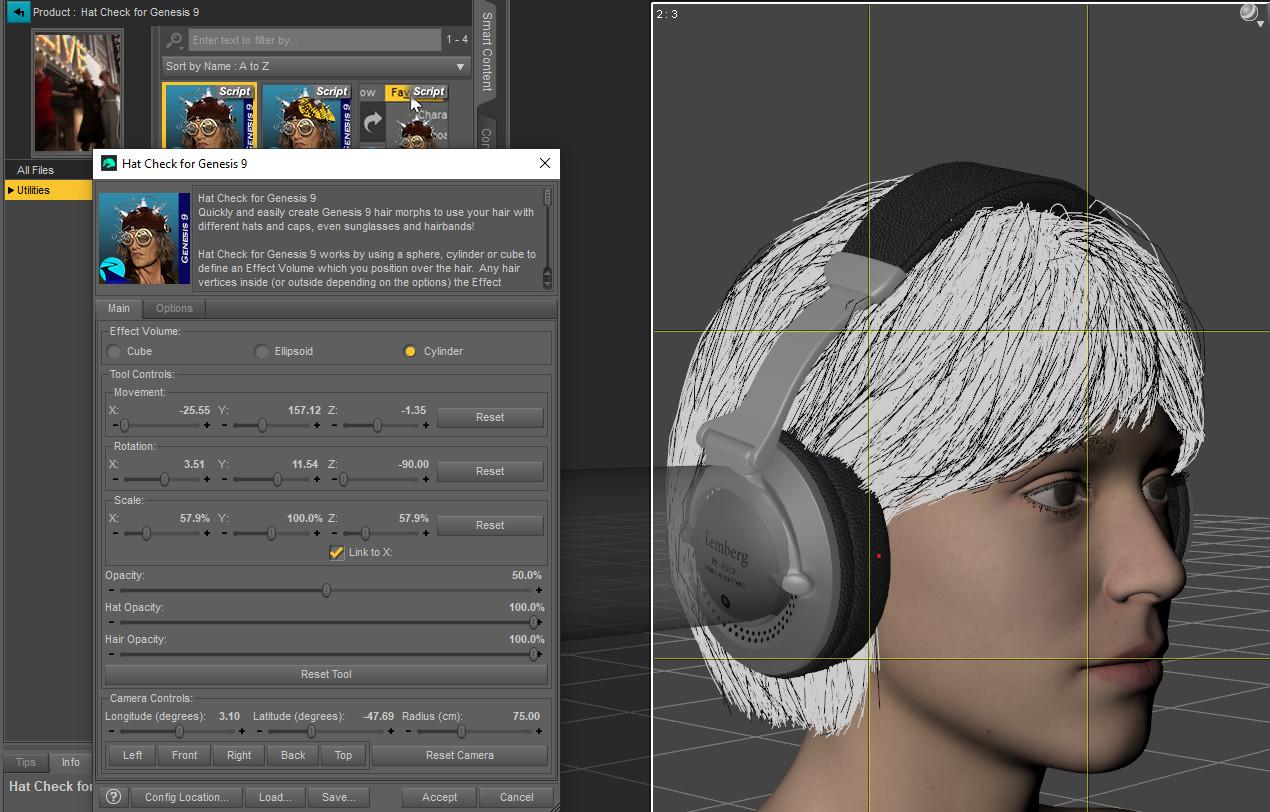
2. Then, later, I typed 60 and ended with a cylinder smaller that it was at 57.9% (sorry, I didn't think to place the camera in the same position as on the previous screenshot, but the cylinder is smaller):

The first time it happened (the one which ended with the script working on the whole hairs), reseting the value didn't reset the cylinder to it's original scale. I don't remember trying to type a numerical value over 100% to see if it would actually made the visible cylinder bigger though.
I am not sure what is happening. However, I do know that typing a value will often NOT give an immediate change to the script. Typing for some reason will not trigger the same events in the script. The script often has to wait until you change another slider to see the true value of the slider where you typed.
The good new is that I read the manual and will track all the morphs loaded on Genesis 9 Dev that are triggering the script to say the figure is not in a zero state

A more practical question: to create a morph for the ear covers of a headest, do you think it's best to do it one ear at a time or both at the same time, with a cylinder going from ear to the other?
Not sure. Can the headset ear covers be independently changed?
How to add real clock hands to a watch prop?If you want to rig the clock hands from very beginning, better rig them on the target zeroed figure / prop. That would be much easier to align the orign / end points from proper Views.
Since now you're just adopting the rigged clock hands from another watch, you can simply Reparent the watch bones to the root node of that watch with Joint Editor, delete other bones as well as the polygons you don't need, then parent the rigged watch hands to the target non-rigged watch. (Vanity Watch...) (ss1)
Or, you can further rig one watch to another with Greedy and Merge Hierarchies options in Transfer Utility, then do: Merge Fitted Figure(s) Geometry with Geometry Editor on the root watch node, the geometry of two watches can be merged as a single watch figure.
Finally, save a Figure Asset... as needed. (ss2)
Daz 3D is part of

Connect
DAZ Productions, Inc.
7533 S Center View Ct #4664
West Jordan, UT 84084Licensing Agreement | Terms of Service | Privacy Policy | EULA
© 2026 Daz Productions Inc. All Rights Reserved.