-
HeadShop 12 Problem, Not Loading Properly "Please Help"
So I just Purchased this and followed all directions on the install, double checked everything like they asked to make sure it was installed the right way, when I open Daz 4.12 and go to Edit / Start HeadShop , everything seems fine until I get to the "The create new project window" it does not open all the way, and HeadShop Loader window says waiting for HeadShop and my mouse curser has the Hour Glass when I am in DAZ, when I move the Mouse into the Create a New Project Window the mouse is fine and I can even start the project but the window is so small that it just is not loaded all the way, and its not like I can expand it
Then when I close it down it tells me "HeadShop closed before it can Create the necessary files" , and the Genesis 8 Morph that was loaded in Daz has just her limps showing, no body or head.
https://www.daz3d.com/forums/discussion/comment/5142376/#Comment_5142376
HeadShop 12 Problem, Not Loading Properly "Please Help"So I just Purchased this and followed all directions on the install, double checked everything like they asked to make sure it was installed the right way, when I open Daz 4.12 and go to Edit / Start HeadShop , everything seems fine until I get to the "The create new project window" it does not open all the way, and HeadShop Loader window says waiting for HeadShop and my mouse curser has the Hour Glass when I am in DAZ, when I move the Mouse into the Create a New Project Window the mouse is fine and I can even start the project but the window is so small that it just is not loaded all the way, and its not like I can expand it
Then when I close it down it tells me "HeadShop closed before it can Create the necessary files" , and the Genesis 8 Morph that was loaded in Daz has just her limps showing, no body or head.
Headshop 11 ProblemsDAZ Studio beta has different file names and may not work with HeadShop. Better wait for release version.
Headshop 11 ProblemsQuick question:
I've installed HeadShop 11 for the general release version of DS 4.12 and it works, etc., but it doesn't show up in 4.12 Beta. Not a big deal but would that have to be a separate install or is some other step needed?
Some good face transfer programs?HeadShop can mirror better half of face over to the obscured one. Pls. upload the picture that you have problems with
Some good face transfer programs?Hi all,
I have tried Face Transfer and HeadShop 10 for putting real faces onto a Genesis 8.
However, it seldom works for woman. Once there are a few hairs nex to her head of the lighting is a bit off I get the most stranges output from the programs.
Its truelly horror...Now my question follows; is there any really good face transfer program out there which can interpret some hair nex to faces and can deal when the lighitng is a bit off?
The programs above only work when you basically have a photo which comes close to a neutral expression portrait.Thanks in advance.
That is pretty much how all of them work, you need good source material to get the best results.
Some good face transfer programs?Hi all,
I have tried Face Transfer and HeadShop 10 for putting real faces onto a Genesis 8.
However, it seldom works for woman. Once there are a few hairs nex to her head of the lighting is a bit off I get the most stranges output from the programs.
Its truelly horror...Now my question follows; is there any really good face transfer program out there which can interpret some hair nex to faces and can deal when the lighitng is a bit off?
The programs above only work when you basically have a photo which comes close to a neutral expression portrait.Thanks in advance.
Face TransferBy all my pictures, I get why I get 'face transfer failed to generate try a different source image' What's wrong, notting work. This isn't funny !
Just tried out face transfer free and I was getting the same message for almost every photo. The solution was to rename the source image, and remove all special characters from filename (eg. spaces, dashes, accented letters, etc.), just give it a simple very short name. Btw. Headshop has the same problem, it also cannot process long special filenames. Also make sure the path either does not contain special characters. After this all photos were accepted.
mat or texture files Face Transfer and HeadshopI use FaceGen, Face Transfer and Headshop and old FaceShop 8 to create new characters. FaceGen actually specifies a path for accessing and applying the mat or texture files to the model. Do Face Transfer and Headshop create similar files and if so, where do I find them?
Roger the old guy in Tucson.
HeadShop texture files are in "User/Public/Public Documents/My DAZ 3D Library/Runtime/FaceShop/fs folder"
mat or texture files Face Transfer and HeadshopI use FaceGen, Face Transfer and Headshop and old FaceShop 8 to create new characters. FaceGen actually specifies a path for accessing and applying the mat or texture files to the model. Do Face Transfer and Headshop create similar files and if so, where do I find them?
Roger the old guy in Tucson.
Headshop 12Hello,
Before I make the purchase of HeadShop 12 with LoveChild WIN, I was wondering will it work for Windows 8.1 64 bit?
Recreate people from photosDepends on how you want to approach it. You could use morphs, you could sculpt it yourself in a modeling program like Hexagon or ZBrush, or you could use something like Face Transfer/Headshop/FaceGen.
FaceGen vs Face Transfer vs Headshop 12. Pros & Cons?None of them are going to be a substitute for a proper sculpt, but under good conditions they can work pretty well. They rely heavily on the photo texture detail to provide their illusion. Like if you have a face of a person with wrinkles those wrickles are purely textures on the 3d model it creates. They are not capable of that level of sculpting.
Rather you will get a general head shape. Of the 3, only Facegen will offer a full set of textures for the face and body. FG attempts to blend the texture with the body. The other 2 options only blend the photo into the face texture, leaving the rest alone. This makes them more prone to looking like a clown face where the face is an obvious mismatch for the body. Though FG can also do this as well, it does handle it better. So in this area FG is the best one.
Headshop is unique in that it can handle a smiling photo. The other two need photos that are more like mugshots. But your results will vary.
I honestly cannot think of a single advantage for Daz Face Transfer over the other 2 aside from its price, and its a Daz Original...I guess? Both Facegen and Headshop have vastly more features than Face Transfer.
Oh, one cool thing about Facegen is that it uses .fg files to save within its app. These files can be freely shared, and you can find places where people have uploaded their own Facegen creations.
Sometimes you can also find Daz characters with some bits of Facegen in them. At sharecg there is dumbuser who uploads various characters which were created with Facegen.Thanks, Outrider42 for the added information. I had purchased Headshop 9.2 about a year ago, never could get it to work properly with Daz. I gave up on the efforts and was considering potentially purchasing Headshop 11, but did not want to go down that road once more. I purchased FaceGen Pro, and it does work. I was hoping for something that would not require my using a PC to integrate into Daz, especially after gifting my laptop to someone in need. Ideally, I would like something works seamlessly on a Mac. It looks like I need to stick with FaceGen and try running it on my Mac under a bootstrap type mode to get the results I want with new character creation.
I have to seriously scale back on the funds spent on Daz products to basically act as a "tester" in my mind to confirm whether things work for my needs. (As a side note, I even purchased FaceTransfer with the intention of testing it out as well on a PC.)
Thanks again for the details and feedback from everyone. I think Daz truly needs a rating scale, along with comments, to better assist not only purchasers but the resource developers as well. I appreciate the work that goes into developing things, and feedback is the best avenue for reaching a higher level of quality while fixing some problems that may not be known earlier on.
Any good tutorials and advice on how to make my own Daz Model?Welcome Chris! First off, Daz Studio is not a modeling app, it's for posing, animation and rendering. Blender is a modeling app with posing, rendering and animation capabilities. You don't have to know anything about working with 3D to use Daz Studio, but it does help. There are so many one click oprions it makes creating digital art or anmations pretty easy IMO.
As for creating your very own 3D model, that is not really an option per say in DS. You can morph, mold and create any shape or likeness you want with DS, but the actual 3D mesh model belongs to DAZ, you just have a license to use it for renders and animations and it can't be shared or sold, just an FYI.
As for creating celebrity likenesses with DS you have 4 options, one is facegen https://www.daz3d.com/facegen-artist-pro
the other is headshop https://www.daz3d.com/headshop-12-for-genesis-8
the third is the face transfer system in DS, this products helps with that https://www.daz3d.com/face-transfer-unlimited
and lastly, like you mentioned, using a modeling app like Blender or ZBrush to create a morph by hand
Headshop 11 QuestionsHello.
Does anyone experienced Headshop 12 (either for Gen 3 or Gen 8) to have better results than the previous versions? And I mean REALLY better results.
imo the Headshop plugin is actually a bit of a dissapointment . :(
i have it but not installed still running 11 and just started using it actually. the app is interesting and the ease of use, time saving are some of its strong points. If the dev can actually come with a solution to blending the face texture and body texture nicely, i think it will be a game changer.
We are working on making blending MUCH better. In tghe meantime, please watch the how to video - it is easy to manually blend with DAZ Studio.
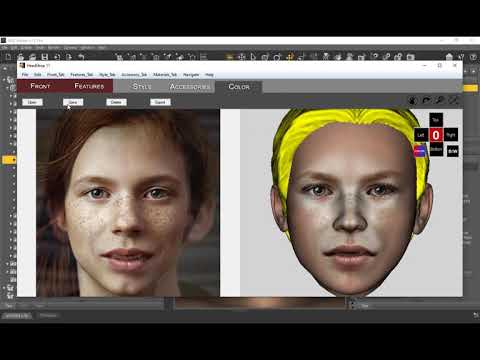 at 9:36Headshop 12
I got headshop 12. I had no problem with the installation, but when i go to use it the window where you import the image is too small and cuts off part of ther options. So I can import the image i want to use but can not apply it *the apply button is not visible). I have tried a few times to adjust the size of the window but nothing works. Any help would be appreciated
Please try to adjust your screen resolution down. There's an issue when using ultra-high (5K) screens, but they can be adjusted down to 3K or less.
The error message is attached.
I'm using two 2560x1440 side by side.
What has this got to do with the screen resolution?
I got headshop 12. I had no problem with the installation, but when i go to use it the window where you import the image is too small and cuts off part of ther options. So I can import the image i want to use but can not apply it *the apply button is not visible). I have tried a few times to adjust the size of the window but nothing works. Any help would be appreciated
Please try to adjust your screen resolution down. There's an issue when using ultra-high (5K) screens, but they can be adjusted down to 3K or less.
The error message is attached.
I'm using two 2560x1440 side by side.
What has this got to do with the screen resolution?
You are right. This means that you have to redirect your Library preferences - or place your figure in My DAZ 3D Library/Runtime
My Library content preperence is set to : D:/My DAZ 3D Library and all the contenent is installed where it should be as far as I know.
Though the install instructions are faulty, there is only one library that the archive extracts to :
"Content/General/Abalone LLC/HeadShop 12 for Genesis 8/HS12forG8/" for the installer
"Content/General/Abalone LLC/HeadShop 12 for Genesis 8/morpher/" for the rest of thefiles.
The installer does it's job wherever it is located and the folder morpher is copied into the "C:/Program(DAZ 3D/HeadShop plugin/" folder as described in the install video.
What should I redirect to "My DAZ 3D Library/Runtime" for Headshop 12 to find my model?
2020 "There's Always Another Sale™" (Report sales errors here.)Looks like you guys have discussed the gift card craziness aleady. Short form, I took a pass on the headshop sale, so I missed out on that 10% off. Felt that the buyin was too high. But, I had the purple banner for purchasing the Dain 8 pro bundle in time, but hadn't bought the Dain fantasy bundle yet so that was in my cart as my new item, and I also threw in the torn clothes from the other sale for the extra 10% off (purple banner prereq as I remember). When it was all said and done, 39% off for a $301+ gift card. Not too shabby! And I now have the Dain fantasy bundle, which I wanted anyways.
I could have saved another 6% I suppose with the headshop sale, but as I said the buy-in looked a little steep at the time, based on the amount I picked for my gift card. Plus, now I could theoretically use the store credit on those headshop items, so said 39% discounted store credit more than offsets the 10% off in the Headshop sale if I wanted that stuff.
The gift card flash sale won't last of course, but it worked for me at least. I'm at least partially prepared for March Madness/Mehness, depending on how medoicre or insane that sale ends up being this year.
2020 "There's Always Another Sale™" (Report sales errors here.)I also used the HEADSHOP offer to get another 10% off, and after I had added the 3 items needed to trigger the additional 10% the cart price actually fell by a few dollars (and the added items were effectively free). Gift card was 45% off, which is a new record for me.
I did not really need the store credit, as I had plenty already, but now, in theory, I am good for the next 6 months, but alas I suspect it will last a lot less than that!
2020 "There's Always Another Sale™" (Report sales errors here.)(... bla bla bla ...)
Here is the calculation on my $2000 Gift Card:16% 24% 20% 10% 1680.00 1512.00 1209.60 1088.64 3 more items from HEADSHOP banner with LOOK-AT-ALL-THIS code and you could get another 10%. I was trying to put $2000 Gift Card to my cart but this "Glitch" didn't happen to me ;D
2020 "There's Always Another Sale™" (Report sales errors here.)For me it was 46% Off - I thought it was a glitch, but figured it out = Flash Sale 16% + 24% Plus Purple banner 20% + 10%. Gift card > $300
Damn, close to 40% off gift cards, I definitely am not buying a gift card with just 24% now.
Actually, with all discounts it can be more than that
The flash sale gives 24% in total if you buy a gift card over $300. That's what it gives, nothing more. If the purple banner gives 20%, it should be around 40% in total. I don't know how you got more than that.
You get an extra 10% off if you buy one of the new releases in the Wizard promo. From looking at the flash sale promo again, you're right and the gift card should be 24% off if over $300, but I guess due to a glitch, it gave me the 16% off for gift cards over $200 too... Attached a pic of my last cart.
Here is the calculation on my $2000 Gift Card:
16% 24% 20% 10% 1680.00 1512.00 1209.60 1088.64 Where is the 10% for a new item from the Wizard promo mentioned? I don't see any such offer.
There is an extra 10% indeed from the headshop offer (you need to buy 3 items in total and use coupon code).
Anyways, congrats for the nice discount :).
Daz 3D is part of

Connect
DAZ Productions, Inc.
7533 S Center View Ct #4664
West Jordan, UT 84084Licensing Agreement | Terms of Service | Privacy Policy | EULA
© 2026 Daz Productions Inc. All Rights Reserved.