-
G8F hip/pelvis distortion
Sometimes a base figure can get slightly 'corrupted' by an installed morph. I've read threads on it. Unfortunately, I can't recall the solution off hand (I think it involves uninstalling/reinstalling/looking for the stuff that included the bad morph).
For me, Base G8F poses fine (see attached).
Also, I don't think black bars are acceptable, according to the forum rules: https://www.daz3d.com/forums/discussion/3279/acceptable-ways-of-handling-nudity#latest
Nails bad when morphing bodyHi, I exported a developers char 8 to zbrush, basemesh, in zbrush did a pose and imported back into Daz as morph, exported to morph asset, loaded a new figure and aply the morph, but the nails are weird, why??? everything else is fine, also an animation make the nails float ...madness.
True Anime Character - Male and Female.Almost forgot about Hitomi, and she's a nice anime character morph too. I tend to mix in aiko 3 or 4 for more slender morphs. Tossed this image together yesterday to see how close I could get to the art statue sample in the first post. Probably should have used Genesis 3's Star 2.0 and SF Anime Character Builder to get a closer match to Saber, but I don't have a very big library of G3F clothes and I'm more used to working with Genesis. Rendered in Iray.
credits
Genesis Hitomi/ Aiko 4 shape
SaberHair by Qupeen
Sickle Fingerless Gloves by SickleYield
Gift Outfit for Victoria 5 by Markdc
DragonLord for Genesis sword
Colorized Background by Balivandi
Facegen 2.0 Released- Now 2.1
Heartfelt thanks, nonesuch. I will try to follow your instructions this weekend. Hopefully I wont have to bug you with more questions.Can someone provide instructions for sharing a character created with facegen? In my case, it is a G3M character.
Just an example, yours will depend on the location of your DAZ Content
1) Copy D:\Documents\Design\DAZ 3D\Studio\Library\data\DAZ 3D\Genesis 8\Female\Morphs\FaceGen\MyChar.duf to D:\MyChar\data\DAZ 3D\Genesis 8\Female\Morphs\FaceGen\MyChar.duf
i) The path will vary according to with version of Genesis you saved the FaceGen morph to and whether it is male or female morph.
2) Copy D:\Documents\Design\DAZ 3D\Studio\Library\Runtime\textures\FaceGen\Genesis8F\MyChar\ to D:\MyChar\Runtime\textures\FaceGen\Genesis8F\MyChar\
i) The path will vary according to with version of Genesis you saved the FaceGen morph to and whether it is male or female morph.
3) Have you created a MyChar Material Preset? A MyChar Shape Preset? And so on? Then create D:\MyChar\<Same Path to the Preset\MyCharPreset.duf> for each unique MyChar preset you have created.
4) in D:\MyChar\ create a readme.txt telling how to copy the data, runtime, and possibly various preset files, to the user's DAZ Studio Content Library location as configured in Preferences (of their choosing if they have more than one configured). Terms of use of your share. ...
5) Use 7-Zip or similar zip utility to create a MyChar.zip file using the MyChar root folder as the root folder in the Zip file.
6) Upload to the location where you want to share it.
Facegen 2.0 Released- Now 2.1Can someone provide instructions for sharing a character created with facegen? In my case, it is a G3M character.
Just an example, yours will depend on the location of your DAZ Content
1) Copy D:\Documents\Design\DAZ 3D\Studio\Library\data\DAZ 3D\Genesis 8\Female\Morphs\FaceGen\MyChar.duf to D:\MyChar\data\DAZ 3D\Genesis 8\Female\Morphs\FaceGen\MyChar.duf
i) The path will vary according to with version of Genesis you saved the FaceGen morph to and whether it is male or female morph.
2) Copy D:\Documents\Design\DAZ 3D\Studio\Library\Runtime\textures\FaceGen\Genesis8F\MyChar\ to D:\MyChar\Runtime\textures\FaceGen\Genesis8F\MyChar\
i) The path will vary according to with version of Genesis you saved the FaceGen morph to and whether it is male or female morph.
3) Have you created a MyChar Material Preset? A MyChar Shape Preset? And so on? Then create D:\MyChar\<Same Path to the Preset\MyCharPreset.duf> for each unique MyChar preset you have created.
4) in D:\MyChar\ create a readme.txt telling how to copy the data, runtime, and possibly various preset files, to the user's DAZ Studio Content Library location as configured in Preferences (of their choosing if they have more than one configured). Terms of use of your share. ...
5) Use 7-Zip or similar zip utility to create a MyChar.zip file using the MyChar root folder as the root folder in the Zip file.
6) Upload to the location where you want to share it.
More Non-photorealisitic Renders (NPR II)Nice work, head wax.
thank you Artini - I was just looking at some of your vector style (?) renders on the carrara forum yesterday - very inspiring
Thanks a lot. I do not use Carrara, so much, because I am not so comfortable with its interface, yet.
Usually, I create a scene in Daz Studio, transfer it to Carrara, adjust it, as needed and render with vector style.
Post Your Renders like it's the year 2020!!!Thanks HW
yep.. did the morph myself today in Carrara.. just a rack of the eye thing...
that basket with them 3 pigeons would weigh around 2kg I reckon...

great work on the morph - I
I've always loved boston terriers
Post Your Renders like it's the year 2020!!!Thanks HW
yep.. did the morph myself today in Carrara.. just a rack of the eye thing...
that basket with them 3 pigeons would weigh around 2kg I reckon...
A Really Good Morph Transfer Program, Plugin, or ImprovementWell, we don't need to start all over again, if you're happy with your generation 2 characters, what you'd want is something to get them wearing all the new clothes and using all the new poses. That's the difference, really. New content. The Genesis 8 characters, themselves are different. At first, when vendors were learning, they all looked like Victoria 8. Now, in time, we are getting some really varied and interesting new figures.
So if you want to have 100% customizable gen 8 figures, yeah you'd have to buy all those morph packages, but to expect the "fantasy ears and eyes" set for gen 2 to work or be transferred to your gen 8 figure is a little much. You should be using the 'fantasy ears and eyes" for gen 2 on your gen 2 figure.
If you created a locked in figure, like a character that's reoccuring, then yeah, you want to transfer and NOT lose those precise morphs and shapes - but there's also plug-ins for that already.
--------------
One more thing, don't forget- since part of this is "starting all over" you don't have to- there's not THAT MUCH new stuff that is unique to gen 8. All sorts of poses and add-ons still make a great value and if you are buying older content, you are in great luck as your prices are so doable. lol
If you're happy with Gen2 stay there. It took me a long time to embrace gen8 as I am very happy with gen 3. Two years ago, I actually started using Daz and freely bought 2 and 3 products, mostly generation 2 content as it was cheaper. My overall plan is to basically own enough products across the generations so I don't need to worry about compatibility or conversions. I haven't gone too much with V4 items except clothing and few figures for their unique skins.
I just think the gap between V4 and Gen 3 is wide- without work on your end, like shaping and shaders, etc....
Post Your Renders like it's the year 2020!!!Indian Dream A quick render :D Products: Maddelirium Rashi Caribbean Queen HairNice work Namatar3d love the pose and expressiob and lush textures
is that like "How do you race a pigeon?" A: very quickly.
nice balance in that pose as if there is weight in that cage
In case anyone is interested or hasn't seen it... This guy is looking to license suitable renders for eBook Sci-Fi titles. The thread is posted here.
thanks selina
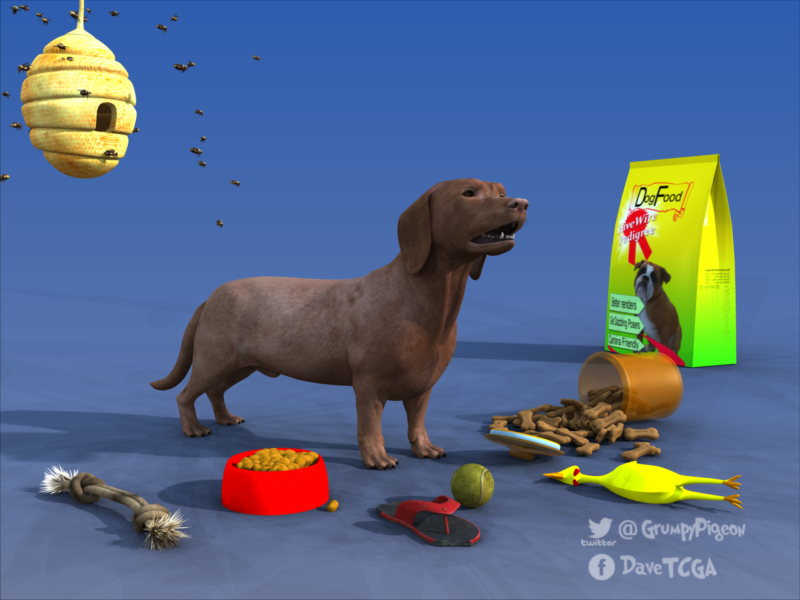
Hivewire3d dog playing in Carrara
nice work Stezza, you do that morph yourself ?
ha ha just saw the chicken
Released-Lorenzo for Genesis 8 Male (Commercial)Well, it looks wonderful. But the thing is, what happens when Genesis 9 (or whatever) comes along? Will we be able to transfer the skins? What about the body morphs? I wish someone would work on a body morph transfer product. But, yes, he looks great.
Well, if you have genesis 8, you can continue to render him untill the cows come home; generally, if you have a scene with a mixed population of the current generation and the previous generation, most viewers would be had pressed to tell them apart...
Not to mention you can go broke trying to keep up with each new generation. The biggest improvement in G8 over G3, in my opinion, is in the face bones and the ability to create more subtle expressions. (Not to discount the other changes, though.) I prefer to use the G8 line for closeups, but for long shots and background characters, I chose the outfits, and then use a figure the outfit was created for.
Anyway, as I'm a big fan of anything made by Darwin, I'm sure you'll get more than your money's worth from any character of his you purchase, regardless of the generation.
ETA: G9 will have to have a lot of improvements to get me to buy. Unless it's one of Darwin's boys, of course.
New Cat?They're OK but the fur not great. Hopefully the Cat 8 will have better fur & if that's the cast you likely won't see as good a fur made fo MilCats.
...I've had the mesh distort on what would be "normal" cat poses that are not even as extreme as the ones I posted at the beginning of this thread.
Wasn't all that thrilled by look of the Hivewire offering. Something about it just doesn't look "right" to me.
I've seen the Hivewire cat & dogs & like the milcat & mildog better.
Same here but why isn't there a kitten morph for the MilCat? My quick attempt here but I guess I made the eyes too big, it looks more like a toony Cheshire Cat LOL.
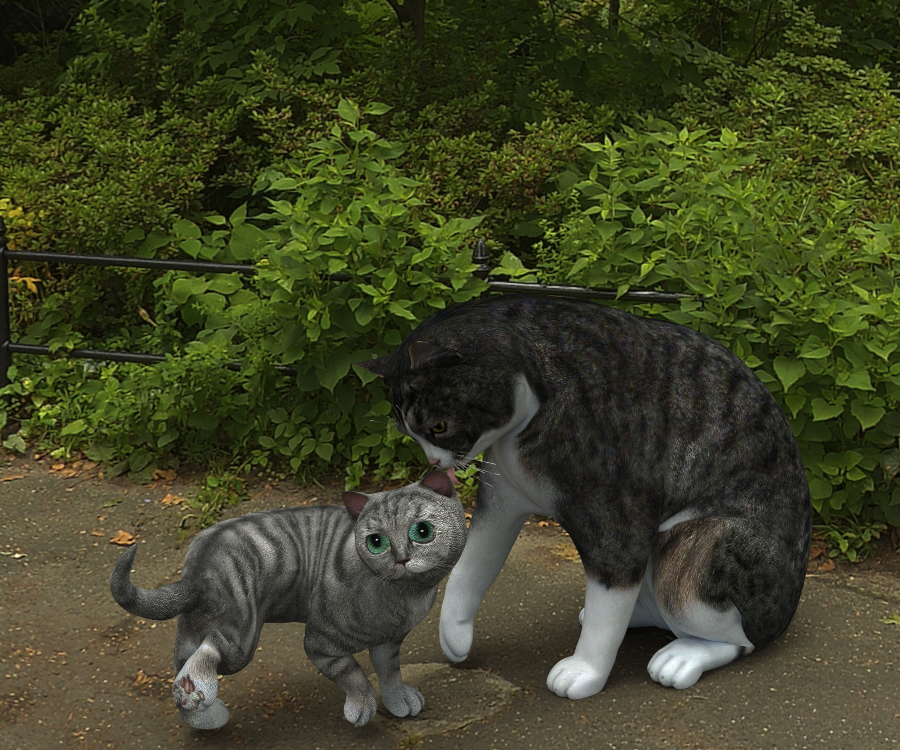
Oh, I love your attempt at a kitten. You should share it on shareCG or here.
Really??? I think it looks kind of silly myself LOL. Looks more like a toon Cheshire Cat to me, but if anyone wants the preset, PM me...
I PMed you, thanks! That cat makes me laugh.
I probably won't be able to do it until Saturday, hope that's OK. Also, I'm not sure how to share it-- as a scene subset, character subset, shape preset, with fur or not? I think you have to already own all the milcat stuff for it to work. I still don't understand DS's various saving abilities and usually just save everything as a scene because if I save as anything else, I can't find it because I don't want to save to the C drive where it likes to put it... After, what is it, more than two years now, I still don't know so much about DS...
Thanks. A scene subset that includes the cat I think would be least error prone but a shape would work too? If the fur the LAMH freebie? It is is than a scene subset with just the milCat works easiest. I can add the LAMH freebie fur from the LAMH site if it's too big to include in a secene subset (it might be!).
Thanks.
dog 8 dog 8 woof woof we finally have a dog 8There are over 300 recognized dog breeds. Maybe give the PAs some slack to cover more ground. ;)
Or not. The original Classic Canine's bundle which came out relatively concurrently with the Millenium Dog contained 2 bully morphs and textures. In this current mode of sky rocketing prices and little to no regard for anything other than "Will this make me the most possible money", I'm going to go on record and say I wanted this and I didn't buy it. Why? Becuase there wasn't a bundle. Because the options were weak. Because there wasn't a single one with LAMH support. This was a poorly thought out release, but that seems par for the course of late. I don't know what the management is thinking, but its gone pretty far south from where I am and have been. That makes it difficult for me to be ok with spending my money for things that I'm not convinced I am going to use.
I know. I was so on the fence with this dog, but caved in. I thought maybe the Victoria Birthday sale cut off the dog products prematurely. I'm hoping they do come out with more breeds and furs And the build your own bundle thing ended up more expensive than a pro bundle and had no freebie extras like other big Daz O intro products. I do like the dog, but it is VERY limited at this time...Really hope some PAs pick up the slack and make good morph packs and extra textures and LAMH presets...
LAMH fur looks great, but I'm hoping for a future better hair solution than LAMH. LAMH has never been very usable in Iray, in my opinion. Catalyzer only works for a limited number or products sold in the store. It is still very resource intensive. The Fiber hair or OBJ conversion of non-Catalyzer LAMH hairs is cumbersome, error prone, slow, and also a big resource hog. The LAMH plugin has errors that cause it to crash a lot. It never gets updated or fixed. Some people get some useful results out of it; I don't. We need a better hair/fur solution, I think.
New Cat?They're OK but the fur not great. Hopefully the Cat 8 will have better fur & if that's the cast you likely won't see as good a fur made fo MilCats.
...I've had the mesh distort on what would be "normal" cat poses that are not even as extreme as the ones I posted at the beginning of this thread.
Wasn't all that thrilled by look of the Hivewire offering. Something about it just doesn't look "right" to me.
I've seen the Hivewire cat & dogs & like the milcat & mildog better.
Same here but why isn't there a kitten morph for the MilCat? My quick attempt here but I guess I made the eyes too big, it looks more like a toony Cheshire Cat LOL.
Oh, I love your attempt at a kitten. You should share it on shareCG or here.
Really??? I think it looks kind of silly myself LOL. Looks more like a toon Cheshire Cat to me, but if anyone wants the preset, PM me...
I PMed you, thanks! That cat makes me laugh.
I probably won't be able to do it until Saturday, hope that's OK. Also, I'm not sure how to share it-- as a scene subset, character subset, shape preset, with fur or not? I think you have to already own all the milcat stuff for it to work. I still don't understand DS's various saving abilities and usually just save everything as a scene because if I save as anything else, I can't find it because I don't want to save to the C drive where it likes to put it... After, what is it, more than two years now, I still don't know so much about DS...
dog 8 dog 8 woof woof we finally have a dog 8There are over 300 recognized dog breeds. Maybe give the PAs some slack to cover more ground. ;)
Or not. The original Classic Canine's bundle which came out relatively concurrently with the Millenium Dog contained 2 bully morphs and textures. In this current mode of sky rocketing prices and little to no regard for anything other than "Will this make me the most possible money", I'm going to go on record and say I wanted this and I didn't buy it. Why? Becuase there wasn't a bundle. Because the options were weak. Because there wasn't a single one with LAMH support. This was a poorly thought out release, but that seems par for the course of late. I don't know what the management is thinking, but its gone pretty far south from where I am and have been. That makes it difficult for me to be ok with spending my money for things that I'm not convinced I am going to use.
I know. I was so on the fence with this dog, but caved in. I thought maybe the Victoria Birthday sale cut off the dog products prematurely. I'm hoping they do come out with more breeds and furs And the build your own bundle thing ended up more expensive than a pro bundle and had no freebie extras like other big Daz O intro products. I do like the dog, but it is VERY limited at this time...Really hope some PAs pick up the slack and make good morph packs and extra textures and LAMH presets...
Transfering HD MorphsHello! Is there a technical reason why HD morph can not be transfered?
New Cat?They're OK but the fur not great. Hopefully the Cat 8 will have better fur & if that's the cast you likely won't see as good a fur made fo MilCats.
...I've had the mesh distort on what would be "normal" cat poses that are not even as extreme as the ones I posted at the beginning of this thread.
Wasn't all that thrilled by look of the Hivewire offering. Something about it just doesn't look "right" to me.
I've seen the Hivewire cat & dogs & like the milcat & mildog better.
Same here but why isn't there a kitten morph for the MilCat? My quick attempt here but I guess I made the eyes too big, it looks more like a toony Cheshire Cat LOL.
Oh, I love your attempt at a kitten. You should share it on shareCG or here.
Really??? I think it looks kind of silly myself LOL. Looks more like a toon Cheshire Cat to me, but if anyone wants the preset, PM me...
I PMed you, thanks! That cat makes me laugh.
Is it possible to combine a pre-existing model with FaceGen face?Well the overall shape & size of the skull, if you've paid attention to DAZ 3D standard human models doesn't change and that's a big shortcoming of DAZ models. Foreheads look particularly low and skull cases too small and narrow.
FaceGen just superimposes the face geometry from the brow ridge to the lower jaw and doesn't do much with the temple or above the browline.
You will need products like RareStone's G8F / G8M Face Morphs to adjust the temple, forhead, and other areas after applying a facegen morph to be more accurate.
https://www.daz3d.com/rarestone-s-face-morphs-collection-for-genesis-8-male
https://www.daz3d.com/rarestone-s-face-morphs-collection-for-genesis-8-female
I know of no morph products that allow for a lot of systematic changes to the cranium which can be quite varied.
Is it possible to combine a pre-existing model with FaceGen face?3. Yes Facegen head morphs can be applied independently of body morphs.
I understand it is if I apply the Facegen face to a base G3F (for example) and after that I can apply only body morphs (or vice versa). But what if I decide to apply the FaceGen face to a preset model? Do I have to slide each head morph to 0% oe there is some other faster (and lazier) way?
It sounds like you want to use the skin from an existing character with a headmorph created in Facegen. The easiest way to do that is to load a base G3F, then check the G3F/Characters and G3F/Materials folders for the skin you want to use, apply it, then dial up the Facegen morph to your heart's content.
Please note that Facegen dials tend to look cartoony at 80%+, and myself and some other users feel that it's better to only dial them up to 70% or less, and use morph shaping kits to get your character the rest of the way to what you need.
Dialing a Facegen character only part way up and doing the same with an existing character can be a good way to come up with a less symmetric, more natural looking face.
Is it possible to combine a pre-existing model with FaceGen face?3. Yes Facegen head morphs can be applied independently of body morphs.
I understand it is if I apply the Facegen face to a base G3F (for example) and after that I can apply only body morphs (or vice versa). But what if I decide to apply the FaceGen face to a preset model? Do I have to slide each head morph to 0% oe there is some other faster (and lazier) way?
Daz 3D is part of

Connect
DAZ Productions, Inc.
7533 S Center View Ct #4664
West Jordan, UT 84084Licensing Agreement | Terms of Service | Privacy Policy | EULA
© 2026 Daz Productions Inc. All Rights Reserved.