-
Filament tutorials/shaders/lights?
Well, since we now already have a thread focused on Filament lights, here's my limited understanding so far:
- Filament does HDRI (yay!) but it's about 300% brighter than iRay, so I must turn it down for my scenes. It will easily overpower all other light sources.
- The dome is sometimes drawn in detail and sometimes as a blurred light source only. No idea how/when/why.
- Spotlights work BUT each spotlight has a light cone. With iRay/Textured the lenght of the cone does not matter, but with Filament, light just stops abruptly at the end of the cone. I must resize my lights.
- it doesn't do emissive surfaces.
- it doesn't do Subsurface scattering, and typical G8 figures use that heavily. Surfaces with low/no SSS (incl. at least some 3DL skins) look better in Filament.
- Shadows apparently can work but I have not seen it so far. Objects do not stop HRDI light. Nostrils tend to glow.
- Filament preview likes to hang occasionally, sometimes for many minutes
I'm hoping DAZ will keep improving it. It's so FAST. Posing your camera so that the scene is in harmony with the HDRI background is way more fun in Filament.
New DS Filament Render Enginethis is an iray render of a scene for some reason Filament cannot load!
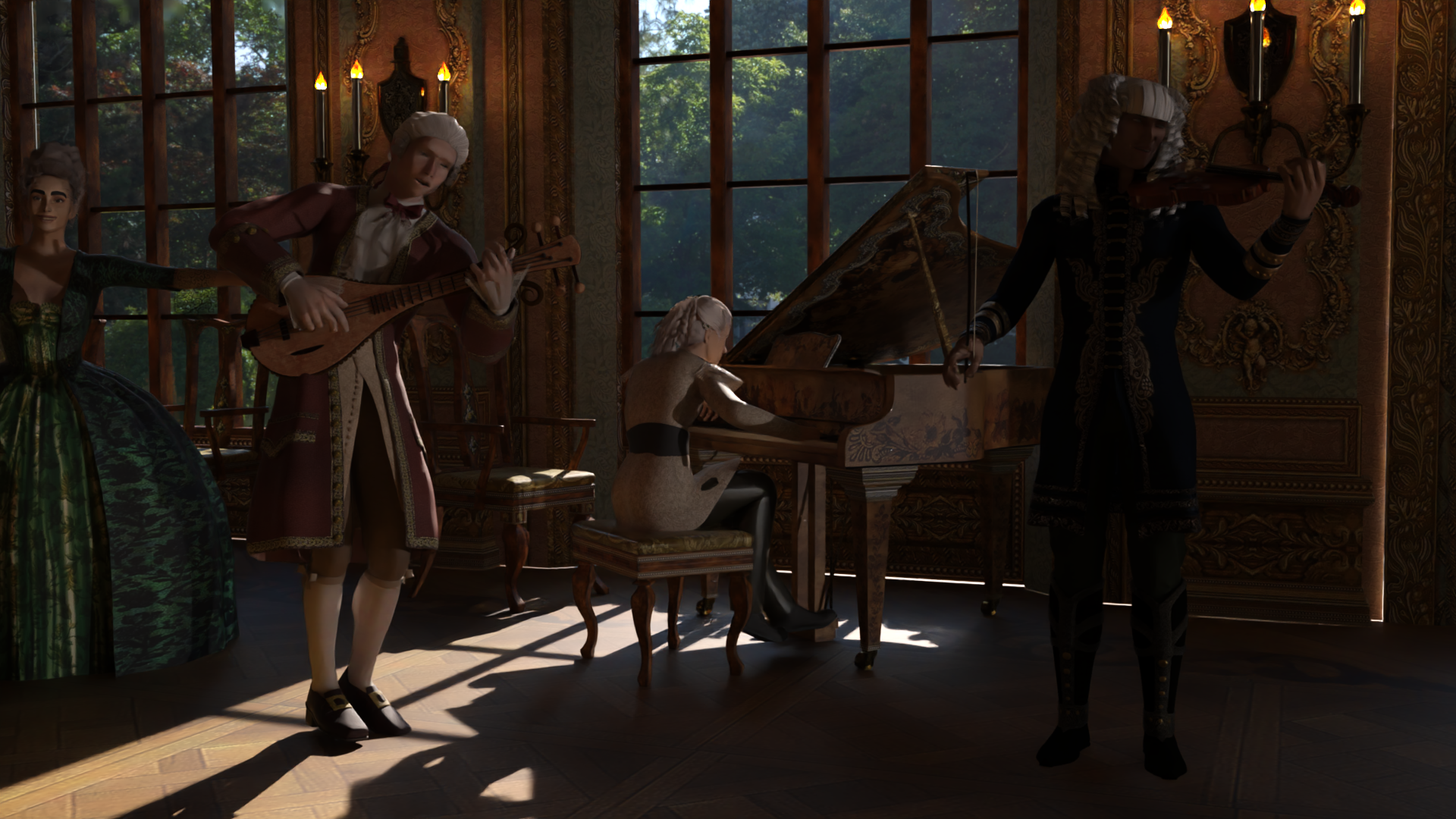
iray is rendering just over a frame a minute at 20 iterations path length 10, denoiser enabled
card using 5GB VRAM Max mostly under
is weird
so I used the toon viewport

am doing the iray one too but that will take some hours
Genesis 9 delayed until at least 2020. Will you be buying it?
This is a very good point. I don't know how many of DAZ's customers care about photorealism, but DAZ knows better. If it's only a percentage of enthusiasts there are other ways to cater to these people and I think from the products in DAZ's lineup your assessment is spot on. It's hard to believe the majority of photorealism enthusiasts would be happy to stay inside DAZ Studio from start to final render. Also while Iray isn't the worst rendering solution, compared to other renderers I always feel Iray is quite hardware-intensive for the results it provides. I guess DAZ realized this and that's why they released the bridges, which will allow those who care about photorealism but are not willing or have the time or the talent to model a human shape from scratch and rig them to pursue what they like in other apps with other renderers.I think M9 needs to step it up a notch if DAZ3D wants him to stay competitive.
This is the level of realism that should be expected in the near future, otherwise it's the same ol same ol.
"I don't want reality. I want magic!" (I think Blanche Dubois in Tennessee Williams STREETCAR NAMED DESIRE) Please don't make DAZ figures PHOTO REAL. There are 700 billion stock photographs available of every concievaable subject costing next to nothing on the Internet already. It's VERY VERY VERY easy to just buy a stock image and in Photoshop, composit into an image. $200,000,000 movies still look phony.
M4 looked like a cartoon. Every version after that was created to make these characters look more realistic. It's the whole basis of DAZ's platform. The program doesn't even need to handle extra geometry. It just needs to update how it handles hair, light and textures. That's where it falls flat and bogs down.
This Lightwave model (see pics) has almost identical geometry. How its uses it is next level.
I have nothing against photorealism, but is that what the average Daz customer wants? A lot of people don't, or don't much care. For people making comics or visual novels and even many people creating stills, realism doesn't seem to be a big priority. Their focus is telling a story, not amazing people with eyeball reflections. Excessive realism can be a distraction from the story. In fact, a lot of them will be better served by Filament than by Iray once a decent set of shaders and conversion and other tools become available. There are games with beautifully made cutscenes, but if the gameplay is crap, the game will still fail. Meanwhile, lots of people still play WoW and Lineage and FFXIV. MS Flight Simulator 2020 is pretty, but how long do most people really want to fly a plane to nowhere around?
Point is that I think it's presumptuous to say that Daz has to do this or that, just because it's possible. It's their company and their customer base they have to deal with the decisions they make. Besides, it's not like there hasn't been progress already.
My 2 cents - I like thus approach very much, it works for me, and hopefully, others as well, because thus makes the Genesis line an even bigger platform. However, in the context of G9, this also means I have become independent from the figure generation.
Genesis 9 delayed until at least 2020. Will you be buying it?I think M9 needs to step it up a notch if DAZ3D wants him to stay competitive.
This is the level of realism that should be expected in the near future, otherwise it's the same ol same ol.
"I don't want reality. I want magic!" (I think Blanche Dubois in Tennessee Williams STREETCAR NAMED DESIRE) Please don't make DAZ figures PHOTO REAL. There are 700 billion stock photographs available of every concievaable subject costing next to nothing on the Internet already. It's VERY VERY VERY easy to just buy a stock image and in Photoshop, composit into an image. $200,000,000 movies still look phony.
M4 looked like a cartoon. Every version after that was created to make these characters look more realistic. It's the whole basis of DAZ's platform. The program doesn't even need to handle extra geometry. It just needs to update how it handles hair, light and textures. That's where it falls flat and bogs down.
This Lightwave model (see pics) has almost identical geometry. How its uses it is next level.
I have nothing against photorealism, but is that what the average Daz customer wants? A lot of people don't, or don't much care. For people making comics or visual novels and even many people creating stills, realism doesn't seem to be a big priority. Their focus is telling a story, not amazing people with eyeball reflections. Excessive realism can be a distraction from the story. In fact, a lot of them will be better served by Filament than by Iray once a decent set of shaders and conversion and other tools become available. There are games with beautifully made cutscenes, but if the gameplay is crap, the game will still fail. Meanwhile, lots of people still play WoW and Lineage and FFXIV. MS Flight Simulator 2020 is pretty, but how long do most people really want to fly a plane to nowhere around?
Point is that I think it's presumptuous to say that Daz has to do this or that, just because it's possible. It's their company and their customer base they have to deal with the decisions they make. Besides, it's not like there hasn't been progress already.
I agree. DAZ doesn't have to do anything. Just like they don't have to remain competitive or relevant.
Genesis 9 delayed until at least 2020. Will you be buying it?I think M9 needs to step it up a notch if DAZ3D wants him to stay competitive.
This is the level of realism that should be expected in the near future, otherwise it's the same ol same ol.
"I don't want reality. I want magic!" (I think Blanche Dubois in Tennessee Williams STREETCAR NAMED DESIRE) Please don't make DAZ figures PHOTO REAL. There are 700 billion stock photographs available of every concievaable subject costing next to nothing on the Internet already. It's VERY VERY VERY easy to just buy a stock image and in Photoshop, composit into an image. $200,000,000 movies still look phony.
M4 looked like a cartoon. Every version after that was created to make these characters look more realistic. It's the whole basis of DAZ's platform. The program doesn't even need to handle extra geometry. It just needs to update how it handles hair, light and textures. That's where it falls flat and bogs down.
This Lightwave model (see pics) has almost identical geometry. How its uses it is next level.
I have nothing against photorealism, but is that what the average Daz customer wants? A lot of people don't, or don't much care. For people making comics or visual novels and even many people creating stills, realism doesn't seem to be a big priority. Their focus is telling a story, not amazing people with eyeball reflections. Excessive realism can be a distraction from the story. In fact, a lot of them will be better served by Filament than by Iray once a decent set of shaders and conversion and other tools become available. There are games with beautifully made cutscenes, but if the gameplay is crap, the game will still fail. Meanwhile, lots of people still play WoW and Lineage and FFXIV. MS Flight Simulator 2020 is pretty, but how long do most people really want to fly a plane to nowhere around?
Point is that I think it's presumptuous to say that Daz has to do this or that, just because it's possible. It's their company and their customer base they have to deal with the decisions they make. Besides, it's not like there hasn't been progress already.
Daz Studio Pro BETA - version 4.12.2.60! (*UPDATED*)First of all you need Filament in the viewport to be able to render out bigger render of the Filament, other way you will get OpenGL render only as it was there for so long I guess you never tried it before .
I have no issue with opacity map, it render exactly as I see it in the viewport , no matter what draw mode I use .
If you use cartoon shader preview the setting of cutoutpacity not really matter, as long there is an proper alpha map , assuming you using Iray shader for that , other viewport modes than Filament and Iray was made for 3DL shaders so it render as OpenGL as it was before.
Use 3DL shaders for the cartoon mode preview as Iray shader not really works with it at full , however if you use opacity map it works, it only need to be black and white without middle gray colors for a true alpha, if the eyelashes alpha is not completely white on black it will not works . the proper cutout opacity values are 0 or 1 and nothing between it, that why it is called Cutout , opacity on materials don't excist in PBR iray shader
same when you render refractions like glass etc.. it need to have something behind it like a prop or Enviorment as it will not render in a vacuum space and not in Filament
looks below, cartoon viewport and cutout alpha map ( Iray shader as I was too lazy to change it to 3DL ) and Filament render out and the rest works fine , can you show image to see the problem you have ?
KInda, sorta, off topic… Cath mentioned something in passing about making sure the Render Engine is set to Iray and not Viewport a day or two ago. I thought, "What!?" so I went looking, and sure enough, where it use to say "OpenGL" it now says "Viewport". I don't know what version brought us that change, but I suspect it was the same version that made Filament available. (Because, as far as I can see, that's the only way to actually render an image with Filament. Currently, of course.) But I'm getting sidetracked.
I tested this new "Viewport" as render engine, and found it does render your viewport to a separate window, regardless of what Draw Mode I tried. (I did not try all of them…) I admit, I got a bit excited. It's always bothered me that I can view the scene in Cartoon Shaded, but had to jump through numerous hoops, including purchasing separate products, in order to render in that style. But now I can. Thank you, Daz.
To test this out, I used my render, Tea Time, and ultimately created a toon version of the image, (both are currently linked in my signature.) Mostly it worked "out of the box." There is an issue if an object has any opacity, either less than 100% or a transmap. Where the opacity exists, the rendered image, (in the render window, not the viewport,) is also transparent. For example, eyelashes. Where the lashes should be, the image is transparent. The opacity of zero works correctly for the mesh, It's only where the opacity is greater than zero that the image has the same opacity.
Knowing that now, I think it would have been much easier to create a scene specifically to use as a toon rather than converting this particular image to use the Cartoon Shaded mode.
Not sure if the opacity issue deserves a bug report, though.
Filament tutorials/shaders/lights?You might try this thread :)
New DS Filament Render Engine https://www.daz3d.com/forums/discussion/442982/new-ds-filament-render-engine/p1
OK - yes, I had forgotten that because it is in the commons and I expected to find the discussion in the DAZ Studio Discussion forum. I'll read though and see if my questions are answered.
Filament tutorials/shaders/lights?You might try this thread :)
New DS Filament Render Engine https://www.daz3d.com/forums/discussion/442982/new-ds-filament-render-engine/p1
Filament tutorials/shaders/lights?Like anyone else who has installed the latest beta releases, I have tried Filament. I have to say that I'm somewhat underwhelmed at the moment but I'm prepared to accept that I just don't know how to use it. I don't know how to light scenes or adjust the materials or apply Filament-friendly shaders. So I am wondering when we might get some tutorials and products specifically set up for this new engine (is it even a render engine?).
My guess is that we will have to wait for a General Release which has become a rare even this year (only one?). If so, I hope that there are a number of PAs toiling into the wee hours creating those shaders and lights, etc., that will make our Filament renders look half-decent - especially skins which is the biggest disappointment for me. Meanwhile I have a couple of questions:
1. For those becoming experienced with Filament, are you finding that it hogs VRAM more or less than IRay?
2. For those same users, does it work with CPU and, if so, how well (or how fast)?
I'm in the middle of a quite intense project at the moment and I'm having to stay with IRay (even for my short animations) so I don't have a chance to experiment right now.
Daz Studio Pro BETA - version 4.12.2.60! (*UPDATED*)KInda, sorta, off topic… Cath mentioned something in passing about making sure the Render Engine is set to Iray and not Viewport a day or two ago. I thought, "What!?" so I went looking, and sure enough, where it use to say "OpenGL" it now says "Viewport". I don't know what version brought us that change, but I suspect it was the same version that made Filament available. (Because, as far as I can see, that's the only way to actually render an image with Filament. Currently, of course.) But I'm getting sidetracked.
I tested this new "Viewport" as render engine, and found it does render your viewport to a separate window, regardless of what Draw Mode I tried. (I did not try all of them…) I admit, I got a bit excited. It's always bothered me that I can view the scene in Cartoon Shaded, but had to jump through numerous hoops, including purchasing separate products, in order to render in that style. But now I can. Thank you, Daz.
To test this out, I used my render, Tea Time, and ultimately created a toon version of the image, (both are currently linked in my signature.) Mostly it worked "out of the box." There is an issue if an object has any opacity, either less than 100% or a transmap. Where the opacity exists, the rendered image, (in the render window, not the viewport,) is also transparent. For example, eyelashes. Where the lashes should be, the image is transparent. The opacity of zero works correctly for the mesh, It's only where the opacity is greater than zero that the image has the same opacity.
Knowing that now, I think it would have been much easier to create a scene specifically to use as a toon rather than converting this particular image to use the Cartoon Shaded mode.
Not sure if the opacity issue deserves a bug report, though.
Daz Studio 4.12 Pro, General Release! (*UPDATED*)It is not that it don't works, this function is not enable in Filament draw style, Filament only reflect Enviorment , spot and distance light , no other surfaces or shaders so emitters will not work, it is a draw style not full render engine , same with glass shaders on a object in Filament , you need a background to see the object and not just vacuum space . Filament works best with Enviorment as reflections are the true reason for PBR
Just got the .60 Beta.
- Filament doesn't work with "Scene Only" lights, where all lights are emissive wall/ceiling surfaces. It is just a black scene that way.
- On a scene with 2+ hd characters, if filament is active (with dome light) and drawing settings -> tone mappings are 1.00 burn / 0.00 crush; increasing or decreasing exposure via +/- causes long wait time and during this time daz studio is unresponsive.
DELETEBlogs like this are usually used to give customers a glimpse of what to expect in the future, with or without a timeline. You'd think they'd take the opportunity to tell us what they are hoping to achieve with Filament in a blog post. It's something some PAs have obviously been informed about, but we mere customers have no idea what's going on.
L'Adair's WIPsI created Tea Time for Llola's Challenge this month, (October,) with Open and Shut as the theme. Specifically, the sugar bowl is open, and the teapot's lid is being held shut. The Karla Hair works really well for younger girls, which isn't true of a lot of hair styles in the Shop for the adult female figures. I created the tablecloth in Marvelous Designer and used the Remesh feature to attain mostly uniform quad polygons. And I draped it with dForce in DS. I used scaled spheres to push the fabric toward the center, then falling out of the way and allowing the fabric to move out again, toward the figures and chairs. A lot of kit-bashing for the objects on the table, and the sugar cubes are instances of a cube primitive I created.

When I first started playing with Daz Studio, I tested the different Draw Modes. I thought the Cartoon Shaded mode looked like fun, but I was disappointed to find I couldn't actually render that look natively, that other products were needed. I finally did buy toon cameras, but I've never quite gotten the hang of it, in part because I'm not particularly good with 3Delight.
A comment in the Beta thread piqued my curiosity. Since when does the Render Engine include "Viewport" as an option? As of 4.12, apparently, as it's not in 4.11. I didn't notice it before I updated to 4.12.2.54. Maybe I just didn't notice the change, or maybe it was added when Filament was added as a viewport Draw Mode. Regardless, if you select Viewport as the render engine, rendering will produce an image of whatever Draw Mode is active.
It only took five and a half years, but I can now render any scene in Cartoon Shaded! Here is Tea Time, as viewed via Draw Dome, Cartoon Shaded.

It wasn't quite as easy as push button, make art though. For one thing, all textures are render with tiling of 1. That's why the lavender shirt doesn't have the patterns on it. I had to create a new texture for the tablecloth, tiling the pattern by 5 in Photoshop. Other than that, the image appears fine in the viewport, but in the actual render, anything using transparency will make objects behind them also transparent.
For example, the steam from her tea cup made parts of the older girl's arm transparent. The scalp/hair caps of both hairs cause the girls heads to partially disappear. The tablecloth makes the table mostly disappear under it. the solution was to hide things with transparency and render a Base layer. Then unhide the items with transparency and render a second layer, compositing them in Photoshop. It did, however, take several passes before I figured out what needed to be hidden, what would work with just the transmaps removed from the opacity channel, and so on.
It wasn't feasible to hide the eyelashes, so the final image has a brown layer under the base image so the eyelashes appear brown for both of the girls. Liloo's eyebrows used transparency, too. For those, I removed the transparency, changed the colors to match the Cartoon Shaded hair, and set Refraction Weight around halfway. (The brows looked really thick after removing the transmaps. Setting the refraction made them less so. I think I ended up with 0.6.)
With Viewport selected as the Render engine, you can also set the dimensions. I started out using the same dimensions as the original Tea Time, but I didn't like the results. I changed the dimension for the long side to be 10000 pixels, the maximum without editing the parameters. After I finished the image, I sized it to 25% of the original, in two steps of 50% each. This image is sharper and has more detail than my first attempts, even though the final image is slightly smaller.
The "Animators Assemble!" thread for Daz animation WIPs, clips, and tips
a silly one using a mishmash of iClone6, iray png sequence overlays, 360 panoramas, Filament, Carrara Octane and Native
I spent lots of time jumping between softwares and still had some I didn't use

since we have a lot of lovely baroque/roccoco fashions at DAZ I still haven't used and all these vaulted ceiling's and ballrooms I must try doing these dances
lots of Handel, Mozart, Bach public domain music too
 RTX 3080 20GB Cancelled: Are 10GB Enough?
I'm in precisely the same boat as the OP except perhaps that my hopes were pinned on a 16GB 3070 because the 20GB 3080 would be a huge challenge for my bank account while a 3090 is out of the question.
So I've been trying to glean from other discussions around this forum what my alternatives are. A couple of them take me out of DAZ Studio for rendering. Blender has Eevee and Cycles which can use AMD cards. The Diffeomorphic bridge seems better than the DAZ option and allows for scene transfer to Blender. I just have not been able to reproduce IRay quality in Blender yet but that is because I am not skilled at manipulating the Blender node system yet. However, anyone who claims that Diffeo material conversion can reproduce IRay quality must have altogether different eyesight to mine because I just can't see it. Nevertheless, in Blender there's also out-of-core and Render Simplify for Cycles which help with scenes which would cause IRay to give up and drop to CPU.
I just don't see the point in replacing my 8GB 1070 with another 8GB (or even 10GB) card when I am already optimising as much as I know how. As it is I can't have more than 3 characters in a scene or use many of the sets that I have bought (and often returned) because they exceed my VRAM even after running through Scene Optimizer. So if anyone has better suggestions for further optimisation, I would be happy to be educated. I've often seen comments such as "I have never had a problem with dropping to CPU - you guys need to learn how to optimise". Well, for those who claim that - speak up: tell us how.
I'm actually one of those guys, I mean that I rarely run out of VRAM with 6GB.
But that's because I've made my first 600 renders with less than 2.5GB of available VRAM, so it's natural for me to optimize: I render with Render Queue, and I hide the characters/heavy objects that are not being shown, etc.Yet, that makes my workflow a bit slower.
And it's happening more and more to see standard scenes requiring more VRAM.The fact is that, if I go for a RTX 3080, chance is I won't upgrade it for let's say 3 years: I don't think that 10GB tomorrow will have the same utility they have today, with how heavy the new products are becoming.
Thanks for telling me about this Simplify!
For my workflow, I prefer to not go out of Daz if that's not necessary. I can't even consider AMD GPUs, with the requirement to go to Blender every time. I couldn't even have a proper Iray viewport that way.
By the way, just out of curiosity (I don't plan on using it much, and it's fast anyway), does Filament use AMD GPUs too?Lenio, time is money. If you could swing getting a 3090 FE, it's $1500 and only available online at Best Buy for now in the US but out of stock. It looks like you're going to have to wait no matter what. I would work on optimizing and compositing. That's the only way to make do with less. But if you could swing the $1500, your time is valuable and stopping the render from going to CPU is well worth it if you render enough or animate.
Thanks Kevin, I could already buy a 3090 at that price, but I won't, because that's not a wise choice for my online business!
Especially with these harsh pandemic times: you may never know when you'll need money just to buy groceries.
It wouldn't give me much more than a 3080, for less than half the price.
If tomorrow a thousand people will subscribe to my Patreon, I'd gladly get 4x 3090...but I don't think that's going to happen! xD€700/800 for a RTX 3080 is definitely worth it: in the Iray benchmark it's 12iter/s versus 3.8 that I'm having now. And it's almost double the VRAM (I rarely need more VRAM nowadays anyway).
But I can't justify in my head to spend €1500 for a 3090, in my particular situation.
I'd rather get a 2nd 3080 for that extra money, going to 24iter/s, instead of just 14 with a single 3090.
No doubt it's a great card, but it's not for me.As I was saying above, I have a XX60 GPU right now, so going up to a XX80 is already a lot!
On the news aggregator from Google I no sooner read of the 3070 16GB & 3080 20GB cancel than of another article claiming now there was going to be a 3070 Super build from cutdown 3080 & 3090 GPUs before the new year.
For me all those rumours and problems means one thing really: if you need to pinch pennies and you need an nVidia 30X0 series GPU then you shouldn't be buying any 30X0 now except the GeForce RTX 3090 24GB.
I couldn't buy a RTX 3000 now even if I wanted to!
In Italy, there's basically no stock.A 3070 Super would look tasty!
I've found this article: https://www.techradar.com/news/is-a-new-nvidia-rtx-30-series-card-on-the-way-to-take-down-amds-big-navi
But they're not saying how much VRAM it'll pack.It depends on what kind of scene you want to render.
Anyway, things are way too uncertain right now to give anyone advice other than to wait until they settle down.
I make comics!
Let's say three fully clothed/haired G8 characters and a modern environment on screen.
I'd like to be able to do that in three years as well.I know how to optimize very well (I've made two whole comics with a GTX 1050 back in 2018), but I wouldn't mind to not have to do that anymore.
About 3DelightI love 3dl & still use it fairly a lot. I wish daz would have continued with its updates. One thing I do like about Poser 11.3 render is they have sketch render built in which si great for grid & vector art , Firefly and Superfly also have built in motion blur you can set up for Animation. I love that poser can use MP4 video as background and can be used as a 1st stage video editor. I just do not find superfly animation renders as appealing as Iray not as crisp and clean..
I have no interest at this time to use filament It maybe quick for rendering But it is still to limiting on shader and emissive and a few other thing, from the post i have read & it did just come out in beta. So I'll hold off a bit, maybe later in the future after its got the bugs worked out. I may mess around with it .So I am not trying to be discouraging about filament I just have no interest in it at the moment..
Daz Studio 4.12 Pro, General Release! (*UPDATED*)Just got the .60 Beta.
- Filament doesn't work with "Scene Only" lights, where all lights are emissive wall/ceiling surfaces. It is just a black scene that way.
- On a scene with 2+ hd characters, if filament is active (with dome light) and drawing settings -> tone mappings are 1.00 burn / 0.00 crush; increasing or decreasing exposure via +/- causes long wait time and during this time daz studio is unresponsive.
The "Animators Assemble!" thread for Daz animation WIPs, clips, and tips It's really horrible, but I pulled off my first Filaments test. Too bad there aren't any actual "Render Engine" settings for this thing, that I could find. It sure is Fast!
I'm still not very 'at home' working in DS. It seems like it's designed to hamper the animator any way it can, like highlighting parts of the scene as we wave the mouse pointer in front of the viewport, for example. Yikes that drives me nuts!
But that's just me, not being used to it. Quite frankly, I'm finding that Daz Studio is one Incredible piece of Excellence! I love how I can plunk any part of the interface anywhere I want - and even get rid of it if I want, since it's all handy there in the Windows tab!
Well, I'm a Huge Alita Battle Angel fan, and I saw Syph and her amazing suit in the PC for a Day sale, so I had a G8F character to play with to test Filaments.
hahah I wouldn't say it's horrible at all. :) I'm glad you gave it a go - I'm enjoying animation with Filament. It still has some work needed but it's got a lot of promise. I think with some practice and some time for the community to experiment with it to find the best settings for it, Filament will be quite viable for animators.
I think when any new render engine launches there's always a need for tests and experiments to see what makes it look best. Just like using Default 3DL render settings isn't optimal and using Default Iray render settings isn't optimal, I think it will take time to also find what render settings, lighting, and shaders will help Filament to shine.
The "Animators Assemble!" thread for Daz animation WIPs, clips, and tipsSevrin has a thread here you can read through on Filament

I like the fact I can just actually use DAZ studio on my Win7 machine with it
the hardware was insufficient otherwise
I still will chug through iray on my other Win10 one
and use Carrara on both

unfortunately it doesn't render alpha png or backdrops but a green or blue plane behind could work for keying
The "Animators Assemble!" thread for Daz animation WIPs, clips, and tipsIt's really horrible, but I pulled off my first Filaments test. Too bad there aren't any actual "Render Engine" settings for this thing, that I could find. It sure is Fast!I'm still not very 'at home' working in DS. It seems like it's designed to hamper the animator any way it can, like highlighting parts of the scene as we wave the mouse pointer in front of the viewport, for example. Yikes that drives me nuts!
But that's just me, not being used to it. Quite frankly, I'm finding that Daz Studio is one Incredible piece of Excellence! I love how I can plunk any part of the interface anywhere I want - and even get rid of it if I want, since it's all handy there in the Windows tab!
Well, I'm a Huge Alita Battle Angel fan, and I saw Syph and her amazing suit in the PC for a Day sale, so I had a G8F character to play with to test Filaments.
That's Awesome. that suit is almost a prefect match.
under daz preference settings edit>preference you can change up your iu interacts with more how you like it too. .
I have no interest in filament at this time I'm gonna wait a bit for the bugs to be worked out and some shaders are available. and folks to figure out how to work it. I donno to me it looks like a iclone render which not bad, its just not crisp like irays
Daz 3D is part of

Connect
DAZ Productions, Inc.
7533 S Center View Ct #4664
West Jordan, UT 84084Licensing Agreement | Terms of Service | Privacy Policy | EULA
© 2026 Daz Productions Inc. All Rights Reserved.