-
Sharing my character preset, some MATs, settings, etc
I've posted some free stuff in a deviantArt journal, including a morph preset for my character (Smacky), a simple transparency map for the Eternal Outfit, some MATs for the Phoenix HD and Amaya for Genesis 3 textures sold here, and some various other surface settings for anyone who might be interested. Nothing too special, but maybe something will be useful. Just please read the readme and don't use any of it for commercial purposes.
Thanks for your interest. :)
MORPH MY FRIEND! SOLVED!Does the morph work if you manually set it on the clothing?
MORPH MY FRIEND! SOLVED!Done! Followed the steps exactly as you wrote. Point is that when I slide up the Sheila shape morph, it confiming the base and not the Morph Loader cloth imported over it.
Sheila shape has the same name in label and name. I know that it SHOULD change from base to Sheila conform but I don't know don't do it. Seems like the Morph Loader don't load the fitted morph. But we'll find the solution! Yea!
 Baby
BabyThe alien quality is the unnatural way it looks and moves and poses. Plus it’s not fatty enough so it looks wrong in some way that is probably cognitive dissonance. Babies are really hard to do. Even the great masters failed at making decent ones... so it is no surprise really
I love the idea of an alien baby though. Wow that’s a great idea.
Baby for Genesis looks very fatty to me but maybe the babies I've seen are skinny unnatural looking babies. The deformed morph & pose problem is present in all Genesis product. It's why I don't use Genesis product unless I have too. It's one reason why they split to male and female again with Genesis 2. I don't know but the Baby for Genesis solution being remade for Genesis 8 isn't as good as making DAZ Studio SW and dForce work better; without that, making a new Baby for Genesis 8 is mostly a wasted effort.
Genesis 8 doesn't handle posing fat that well because it doesn't do it at all, and Genesis 8 would need some sort of fat dForce weightmaps and ragdoll physics to pose fat characters naturally. Like George for example. He's great in a few poses but pose him in any pose where one expects to see fat roll and you'll quickly notice George isn't that realistic for posing. Or even thin characters - when I was very young and we'd stand on our head & do other acrobatics I noticed how the skin sagged toward the ground, not like a bassethound but the same principle. Unflexed muscles sag toward a gravity field. Hair. Clothing. dForce is already trying to remedy hair & clothing though which disguises dForce not working on fat and muscle since most poses have clothing on.
Genesis, Victoria, 4,7,8... confused !You also might want to bear in mind that Victoria 4 is a base figure, whereas Victorias 5, 6, 7 and 8 are not; V5-8 are morphs of the base figures.
Products stating that Victoria 4 is a requirement are being more literal.
The requirements when talking about the Genesis line are less stringent.
Take the following product as an example https://www.daz3d.com/fwsa-elizabeth-hd-for-victoria-8; it will work without Victoria 8, but will look different as it won't be able to use the Victoria 8 morph if Victoria 8 is not owned/installed.
Edit:
It is worth noting, that prior to Genesis 8, if the character used the same UVs as the character it stated as a requirement, it may not work correctly; UVs can be transferred, but I'm not sure if it can be done if the base character with those UVs is not owned.
So far (I believe), all characters for Genesis 8 use the default UVs
MORPH MY FRIEND! SOLVED!Import the base OBJ and rig it, then import the morph onto that. There should not be any defomrations to reverse at the point of importing the morph. It's vital to make sure you are using the name, not the label, of the morph (if they differ).
BabyI was annoyed putting Genesis baby into one of the preset poses (on belly holding up head) and the arms looked all deformed. Sheesh. The head, at least, looks relatively decent.
You're used to Genesis 8 now but all Genesis extreme morphs and even many close to the shape of the base Genesis figure as well as poses look deformed and always have. I found trying to morph or pose the Genesis Mouse much beyond a very unnaturally tight range of motion was awful.
It makes me want to try and transfer those products to Genesis 8 via Genesis 2 & Genesis 3...
MORPH MY FRIEND! SOLVED!Hey Richard, I'm following the steps you said, tell me if wrong.
1 Genesis 3 base figure in the scene.
2 Import the "Sheila T-Shirt base.OBJ" (this is the OBJ name of the G3F base cloth.).
3 Clean Generated Morphs of the G3F figure
4 Before rig the cloth mentioned above, import via Morph Loader Pro the fitted cloth named "Sheila",the same name of the Sheila shape OBJ. (Need to switch on or off some option in the panel? For instance "Reverse Deformations"?
5 With "Sheila T-Shirt base.OBJ" selected rig the cloth through the Transfer Utility. About this, usually I transfer clothes in this way: Source: G3F, item shape: nothing, Target: name of the cloth (is the one I find in the list together those in the scene), then click Accept.
6 Finally I slide up the dial of Sheila and I find always the cloth obj with gap. No cloth fitted imported in Morph Loader Pro. I don't find the dial too.
Probably I missing something or I move the wrong buttons to do the procedure, anyway the solution is so close.
G3 male teen?Since you mention cheap, you could also look for free characters. Here are two morphsI found by searching "teen" in Rendo free stuff, for example (you need the base head and body morphs)
https://www.renderosity.com/mod/freestuff/teen-males---free-version/76296
https://www.renderosity.com/mod/freestuff/genesis-3-teen-morph-max-g3m/75852
Floyd 8Does anyone know if the base character for Floyd comes with the HD morph, or do you have to get either the starter or the pro? The store page seems to indicate that it does.
The HD morph comes with the base too.
Laurie
Floyd 8Does anyone know if the base character for Floyd comes with the HD morph, or do you have to get either the starter or the pro? The store page seems to indicate that it does.
Darwins' Schtuff Pt DeuxDid another run with dial spinning a character. And ended up using it in a render together with the Hawkmaster morph and a pure Liam, enjoy :)
Hunters Resting
A trio of hunters is enjoying a moment of good company, food and tea/coffee...

The new character I named Tarik, he's the one reclining/half laying to the left. I used different base characters on him, Shimuzu's Elite Head Morphs for Genesis 8 Male, plus a fair share of G8 male body morphs and RareStone's Facial morphs for G8 male. Below is the named characters I dialled into him, in case someone's interested to know :)
Body:
Christian - 30 %
Dylan - 25 %
Kincaid - 20 %
Owen 8 - 10 %
Robert - 10 %
Head:
Christian - 30
Dylan - 10
Giovanni - 35
Kyle - 30
Liam - 10
MORPH MY FRIEND! SOLVED!- Fiind the name of the Sheila morph - either from the original OBJ that you imported or by looking at Parameter Settings (the gear icon on the morph's slider) on the Genesis figure.
- In Zbrush (or whatever you like) make a modified version of the clothing that is shaped to fit the Sheila shape, and when you save it give it the name of the Sheila morph.
- Load a fresh copy of the rigged suit into DS, or unfir the clothing from the Genesis figure and go to Edit>Figure>Clear Generated Morphs - that gives a clean starting point.
- Use Morph Loader Pro to bring the Sheila version of the clothes in as a morph
If you fit the clothes to the Genesis figure then as you set the morph on Genesis the clothes should bring up their custom shape to match.
How Difficult is Shoe Rigging?Heels or not heels? Non-heels are not, I think, very different - heels take a bit of fiddling, though that seems to be as much as anything in the modelling and setting up to transfer.
Oso Fur Shaders for Iray [Commercial]Jedijudd: There are a number of tips mentioned in the readme for dealing with fur and clothing.
1) Hiding fur
The easiest approach, you can expand the nodes of the fur (Hips/Pelvis/etc etc) and simply hide (toggle the little eye) all the fur that's where clothes are. You can also go into the Geoshell Visibility in Parameters/Shell/Visibility; Visibility can be set by surfaces (Arms, Legs, Face, Ears, etc) or Face Groups (which are broken up by rigged body parts, so allow you to be potentially more precise).
Unfortunately... this probably won't work really well by itself, because clothes rarely line up with surfaces or face groups. But it might get you close enough, or be a good starting point.
2) Pushing out the clothes
If clothes have Expand All morph, you can use that to push the clothing until it's spaced out enough so the fur doesn't poke through.
If the clothes don't have expand all, you can go to Edit/Object/Geometry/Add Push Modifier. Adjust the 'Offset' that is listed.
This can be a pretty easy approach, assuming your clothes don't turn goofy when pushed out, and particularly if the fur is fairly short.
3) Cutout Opacity
This is tricky to do but works very well; create a mask where the parts of the body covered by clothes are blacked out and everything else is white, and stick it into the fur's cutout opacity.
The hard part is managing to get the edges lined up right; you'd probably want to migrate the figure and then also the clothes converted to obj to a 3d paint program. Then you'd paint on the figure while toggling the clothes off and on.
In a pinch if you have a really good eye you could do it in Photoshop on a figure template (IE: grab a random Torso map and paint over it).
Approach 1 and 2 are general solutions to this issue with any fur; you'd do much the same thing with LAMH converted to Obj, fibermesh, etc.
BabyI actually think genesis baby looks a bit alien. It is better than most but looks odd to me.
Really? I guess all newborns look alien a bit, huge head & big eyes that are usually closed contributes to that effect. Even more so are those echo sonargram pictures they make before they are born and they are even grey in those.
Just for the heck of it, someone should make an alien-grey baby morph. Thin body, big, inverted-teardrop head, almond-shaped eyes. :D
Released : Easy Modeling and Morphing with Blender [Commercial]Yes that's it. If you do NGons, they will anyway be triangulated at the end, and showed as tris in DS. And of course 4 vertices is the limit.
You are not forced to do ONLY quads, but sometimes if you are using triangles, some strange artifacts can happen when you render where the tris are placed. Furthermore, using triangles prevents you from having clean loops or rings to select, making mesh edition much less comfortable. But if it is just for a plate, and that you check that tris are fine for the renders you make (i.e. do not generate weird render artifacts), then you can use tris of course. In general I tend to make quads as much as I can (even for plates), because I edit a lot my meshes.
Thank you for you thorough awnser, i prefer neat so quads it will be :)
I hope you will make an advanced tutorial for blender as an follow up to this one, I will be the first to put it in my cart.
Many thanks
Mats
Hi Mats, I will probably make other Blender Tutorials, but maybe not immediately. I lack of time to do everything I feel like to do... Like a lot of people.
Hi,
I just wanted to say thank you for this tutorial. I find I am going back and forth between the videos and the PDF. For me, that is the best way I learn. I have tried to learn Blender in the past and discovered that I quickly forgot how to do things in Blender. That is not the case for me with this Blender tutorial. I am actually accomplishing things. You have a great way of building on what you have already presented.
I like how you present it in a way that is pertinent to us DAZ users. I think that is something missing from other tutorials I have tried. Once again, thanks so much.
Jack
Thanks a lot Jack, this is very nice from you. I learned Blender alone and once I got used to it, I realised that it was finally really easy to use and wondered why there was no tutorial so that more Daz users could use Blender to. So I finally created something that the wide majority of Daz users could use either to morph their figures or outfits, our to create their own props when they cannot find or afford them. So I'm really happy with your feedback. And I'm also happy for Blender because this is not only an easy 3D modeller, but also an excellent one!
How Difficult is Shoe Rigging?Is it particularly difficult to rig a shoe if you're comfortable wiith pants and shirts via TransferTool and post-transfer modifications? Is there a good tutorial for this someplace?
Floyd 8Floyd 8 with Gilgamesh morph from: https://www.daz3d.com/swole-for-genesis-8-male
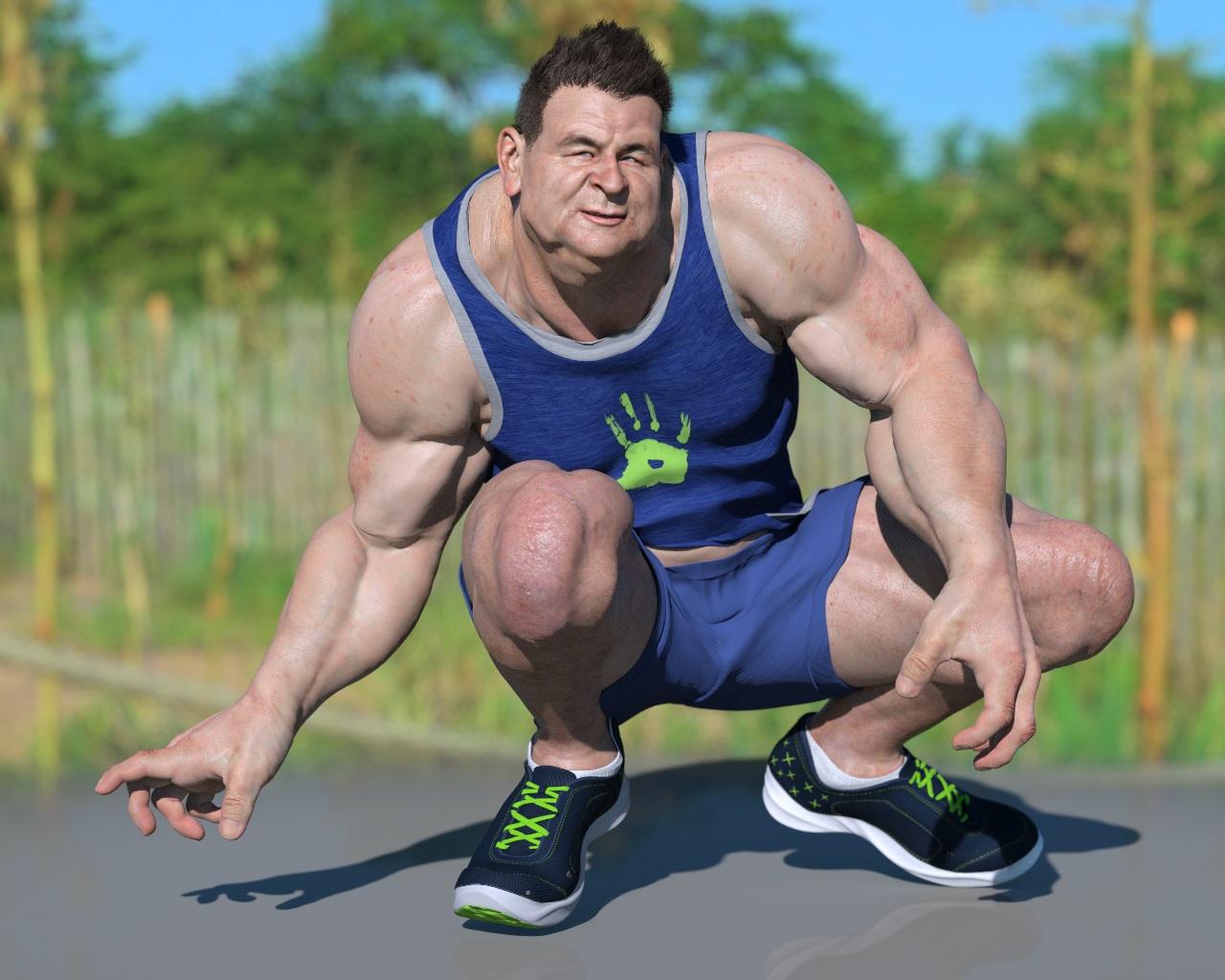
Love this render, and a wonderful mix of morphs!!
Photo-real characters. A different approach.Nonesuch00, as Diva has already shown, the morph is already linked above. I used Rarestone's morphs extensively in creating it, so I'm very familiar with them (though the morph was first shaped on a masculinized G8F and then transfered to G8M, 'cause at the time, Rarestone's counterparts for G8M were either unavailable or too costly). Don't worry about discouraging me. It's going to take alot worse than what I've so far gotten before I feel anything more than momentary discouragement. I know you're all trying to help, : )
Diva, wow! He looks far more different than I thought he would! Could you please be more specific about the textures? In the meantime, I've got a render in the works with reduced chin and cheekbones, so stay tuned!
Yes, these things are more subjective than you might thnk. You think my skin needs alot of work, while at least one person over at the Smith Micro forum seems to think I "nailed it" in that latest female close-up (and I made it pretty clear that I'm aiming for photo-realism). Sometimes it's hard to know whose feedback will ultimately get you closer to a truly convincing image. It's probably wise in general to err on the side of the more critical commentary, but this does come with the risk of inadvertently compromising whatever it was that earned you the more positive comments.
Honestly, the quest for convincing photo-realism would probably be much easier if there was more consistency in the responses.
I don't want this to be a "Gregorius only thread" so I don't leave much feedback (because other people have already given you a TON of feedback).
You want my opinion - start with some high res high-quality skin photos and create a good skin texture base. I see some improvement in your skin from when you started but it's still (imo) far away from photorealism and I'm not sure you're going to get there with what you're currently doing. BOTH the morph and the texture isn't close to photorealism (again that's just my opinion). But the morph, imo, is the least of your worries. Once you get an actual photorealistic skin, the morph will only be icing on the cake. As I think you can fudge an "ok" morph as long as you have photorealistic skin. I've very rarely (if ever) have seen the opposite. Getting the skin photorealistic should probably be your main focus, imo. Once you get that you can worry about morphs.
But again, I'm not sure what exactly you're doing, but I don't think it's getting you much closer than when you started. I HIGHLY recommend doing what PAs do and start with high-quality high res skin photos and create textures from that (or start with a good quality Merchant Resource skin set where someone has already done that legwork). You just can't fudge the look of real skin.
I agree with you. Gregorius should start his own thread. He is just making this thread a daily/weekly update on his morphs.
Daz 3D is part of

Connect
DAZ Productions, Inc.
7533 S Center View Ct #4664
West Jordan, UT 84084Licensing Agreement | Terms of Service | Privacy Policy | EULA
© 2026 Daz Productions Inc. All Rights Reserved.