-
Duf that requires original product
no enjection channels only the morph loader. I am working on a fresh copy of the emotiguy2018 I have decided to call him and of course make the girl as well. I seem to have lost it with the newer studio and don't know how to export poser files to change maps.... I am relearning everything and it seems The version I have of Emo is poser. I found how to create the cr2 but how do I amke the pz2 files from studio. I seem to recall that it was possible. Is it no longer possible?
HD Wrinkled Soles and Bend MorphsI am very interested in a product that can be applied to G8F feet as a morph HD dial for realistic wrinkles and flexing on the soles of the feet. I have found that the rest of the model can look very realistic but the soles look flat. I have dialed in other morphs to try and find something that would make the soles look better but have not found anything quite right yet.
This may not be a heavily desired item but I would be interested in commissioning this. If this site is not a viable avenue for requesting commissioned work, or there is simply no interest in taking on the project any suggestions for where I may have better luck would be appreciated.
To summarize I am looking for:
HD Morph for G8F that applies to the soles of the feet which when dialed in will give varying strength of wrinkles for poses where the feet flex or relax. If this is not able to be accomodated by a morph then simply HD detailed scuplted wrinkled soles that can be applied to any G8F figure. I am looking for scuplted wrinkles not just normals or bump maps.
[Solved] Genesis 8 Female takes 6-7 minutes to load. Help?The more morphs you have installed for her, the slower she loads. After removing the C drive library from the Content Directory Manager, are you still getting all of your morphs loaded? (Are they there to be dialed in when you load G8F?)
Good thinking! Thank you for the suggestion! :) Based on your suggestion I tested a LOT of my G8F characters - all of them looked fine to me and looked the way they were supposed to. The Daz Original "official 8" figures load in seconds now. Older saved custom characters (dial spun, my own morphs, etc) take a little longer to load but load under a minute. However, the newer custom characters, while they load in under a minute as well, call for missing files - all of them made from the "x-morphs" product. Even if the newer characters were not made with any of those morphs and shouldn't be calling for them, they do.
I tried tracking down the files and they are on the C drive (I guess the x-morphs product puts them there by default?). I copied the file that has the morphs the newer custom characters are calling for (again even though they shouldn't be calling for them) and added a copy of that file to the other drive that has my Daz content hoping that would fix the issue. It did, kind of - they stopped asking for those files but they took WAY longer to load (3-4 minutes to load, as opposed to under a minute).
So I removed that file again and they load fine and under a minute, they still call for those morphs but I can live with that. I don't mind the error messages on the newer custom characters - as long as they load quickly and look right (which they do).
I'm not sure why my newer characters are calling for the x-morph files, they shouldn't be as I didn't use the morphs on them. But right now I'm just glad I got my G8F characters to start loading promptly again. lol
Shape Splitter - Divide, Combine and Save (The new version is already available. 1.2.1)[Commercial]Only save the remaining morph, it is not necessary to save the head.
And save as asset, so that it is available with load the base figure.When you save as asset, it is saved in the folder
YOURLIBRARY\data\DAZ 3D\YOURFIGURE\Base\Morphs\CGI3DM\X-MORPHS
Shape Splitter - Divide, Combine and Save (The new version is already available. 1.2.1)[Commercial]So even though I will never use head morph and only the remaining body morph, I need to save the head as a morph in order to keep the body only remaining morph??
So how do I delete the remaining body xmorph that is in the project GM8?
Shape Splitter - Divide, Combine and Save (The new version is already available. 1.2.1)[Commercial]Then what is this save dialogue (save remaining morph)??
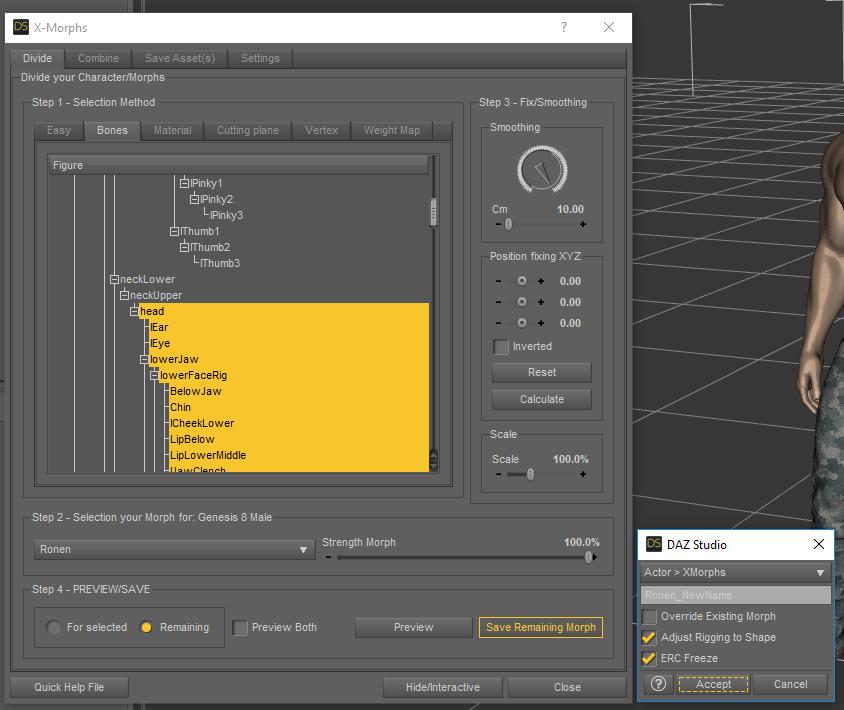
If you have selected the head as the image shows, you would save the body (remaining to the selected).
So you can have the 2 morphs, head and body, which when combined will be the same as the original morphShape Splitter - Divide, Combine and Save (The new version is already available. 1.2.1)[Commercial]Then what is this save dialogue (save remaining morph)??
Shape Splitter - Divide, Combine and Save (The new version is already available. 1.2.1)[Commercial]Maybe I am missing something, but I created a morph for GM8 and all went well and when I open "that" project I can see the morph listed under XMORPH. Yet when I load a new GM8 up, the morph is missing. Anyone else seeing this odd behavior?
Did you save the morph as Asset?
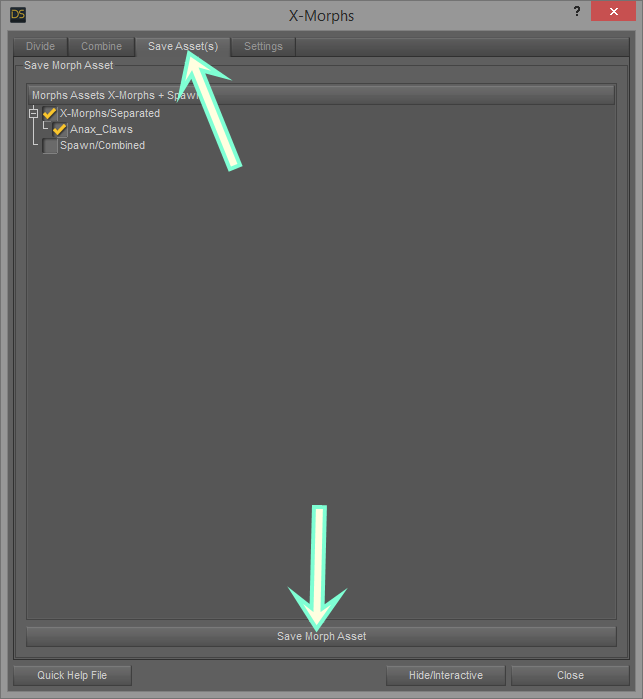
Or
File - Save As - SupportAsset - Morph Asset(s).- Select your morph.
MORPH MY FRIEND! SOLVED!Hey Richard! You shot the target again! Exactly the Default Value setted on 100%. Now is 0 and working pretty well.
Just out the curiosity. In your opinion, why, when I delete the hidden "Sheila" morph generated by the Transfer Utility, the Sheila morph Default Value go up to 100%? I don't know if depending form that, it's a my idea.
MORPH MY FRIEND! SOLVED!Ahhhh! Ok, following your steps! You know what? I have abackup of all DAZ3D folder so when I want to copy on my laptop too. So I replaced that old one. Eerything ok, until I load the T-Shirt and manually I deleted the "Sheila" fitted morph. From there I load G3F and start Seila at 100%. Anyway I do this and I keep you updated!
Shape Splitter - Divide, Combine and Save (The new version is already available. 1.2.1)[Commercial]Maybe I am missing something, but I created a morph for GM8 and all went well and when I open "that" project I can see the morph listed under XMORPH. Yet when I load a new GM8 up, the morph is missing. Anyone else seeing this odd behavior?
dForce exploding content - possible work around?Perhaps I shouldn't use the Transfer Utility tool but just assign the pants to the figure instead...
All the minotaur morphs and skins?dunno if i have them all now?
thought i did, but found the SWOLE and the Mighty this morning.
list from my prod lib:
- Genesis 2 SWOLE for the Minotaur 6
- Mighty Minotaur 6 Outfit And Morphs
- Giant Sized Minotaur 6
- Minotaur Asterion
- Minos Poses for the Minotaur 6
- Beastial Battle Armor Poses for Minotaur 6 HD
- Gentle Bull Morph and Textures for Minotaur 6
- FSL Freakish for the Minotaur 6
- Minotaur 6 HD for Genesis 2 Male(s)
- Minotaur Battle Gear
thanks
 MORPH MY FRIEND! SOLVED!
How are you deleting? Once the morph has been saved to an asset, deleting via the right-click in DS won't do anything to newly loaded figures - just the one you are working on. Fortunately the fix should be fairly simple - click the gear icon on the end of the slider, select Parameter Settings, and sset the Default Value to 0, then use File>Save As>Support Assets>Morph Asset to resave with the same options for Author and product (so that it overwrites the current file).
* Closed* RRRR - Error 404 Not Found! Render Contesttag:luci45 #4
Where Is The Groom?
Princess Coral Belle knew where to find her fianacé when he did not show up for their wedding.
"Ha, Charming! You were easy to find in my father's kitchen! I will not be left at the alter!"
"What?! Oh, no, love! I wouldn't never do that. I was just having a little snack. What time is it?"Used:
Wedding Belles
Short Wet Hair for Genesis 8 Male(s) and Female(s)
Modern Living 1
MICK-KitchenAlso Used
Corina for Genesis 8 Female
Michael 8
Genesis 8 Male Body Morphs
Fairytale Prince for Genesis 3 Male(s)
Splendor for Fairytale Prince
Edwardian Hair
Rigged Water 2
Super Splash Pack
Expressive Faces - One Click Morph Expressions for Michael 8
Z Forest Spirit - Poses and Expressions for Genesis 8 Female and Edie 8 MORPH MY FRIEND! SOLVED!
Hey Richard. This post has nothing to do with Sheila's clothes, they are working perfectly. But rahter with my mistake.
Afer a big success about the Sheila clothing morph, now happening something that it's getting me nervous.
Everytime I load default G3F, Daz load the Sheila morph.
I tried everything, from deleting morph to overwrite the G3F package in DS. Nothing to do! Indeed, if I delete completely the Sheila morph and I quit DS, when I start again DS and load default G3F it regenerate Sheila morph! Question is, it depend from the my DSF morph shape or from a file overwritten inside a misterious place in DS? Incredible!!!!
If I edit manually the DSF, what file to search for set to 0% the dial?Thank you!
Getting priced out of this hobby..and if you have skin creation/building as well as morph kit merchant resources, the need for different character skins and morphs is not as great unless they are very unique.
When Beautiful Skins and Skin Builder Pro3 were released that was when I finally was able to do something with G3F. Now with Slosh's G3 M/F UV swapping tool I can use skins I create on G3M.
Is it possible to delete body parts/anatomical assets from the base model?Thank you for the detailed, step by step, guide and for your time.
I'll try it on a real morph tomorrow, to see if I can get it to work.I've tested it on "scale" which isn't a real morph per se, and it didn't seem to change anything.
Also once I hit 0% on "scale" the body part simply stretched upwards for various meters (at 0.01% it still appeared attached, albeit very small).
I've attached a screenshot just for showing the funny result.Aging Morphs for Genesis 8 (Commercial)While I purchased both the G3 and G8 versions,... Yes, I am working with G8. The images below will show the model being used and the slider names.
Actually, while the wrinkles are great on the Shape Morph Present icon, they aren't really that noticeable when I change the viewport mode.
Hi. Wrinkle visibility depends on roughly 2 things. 1, your lighting (directional or even 360), and 2, how strong your tranclucency weight is on your skin. If too high it will eliminate a lot of HD details. Are you looking at the right promos? Face Age Controller was only for G3, and the promos for G8 says Aging Head Controller and the slider for G8 is also named that. It was changed for G8.
Thank you for this tip. Lighting is something I still need to work on learning. Changing the Translucency weight of the skin from the default 65 to a lower setting didn't not reveal the wrinkles any more prominently - instead I was looking at a pale face gent looking half ready for the grave.
Is it possible to delete body parts/anatomical assets from the base model?To lock the joint, you need to have your morph that will trigger the lock (obviously).
- Right-click in the Parameters pane and select Edit Mode (assuming it isn't already checked)
- Right-click in the pane and select Create New Property
- I named mine HiddenConstantOne, set the path to Hidden, set the Minimum to 0, set the Value and Default Value to 1, and make sure that use Limits iss et to on. I didn't, at this stage, set the Hidden switch to Yes as it's easier to handle the set-up while the control is visible
- Right-click on HiddenConstantOne Parameters pane and select Show in Property Hierarchy.
- Expand the triangles under the HiddenConstantOne entry until you can see Controllers>1st Stage.
- Find your morph in Parameters and drag it onto the HiddenConstantOne>Controllers>1st Stage
- Click the triangles to expand until you see the list of Attributes
- Click ERC Delta Add to highlight, then a second time to get a list of types and select ERC Subtract
Now, as you slide the slider for your morph up to 100% the value of the HiddenConstantOne property shouldd rop to zero.
- Now, for each rotation (or other transform) that you wish to lock, find its entry in the Property Hierarchy, expand the triangles to get to controllers>Second Stage, and drag HiddenConstantOne in to the list
When your morph is zero the transforms will act as normal, when your morph is at 100% they will be multi[plied by 0 and so effectively locked.
You can now hide the constant by clicking the gear icon on its slider, selecting Parameters settings, and checking the Hidden box.
Daz 3D is part of

Connect
DAZ Productions, Inc.
7533 S Center View Ct #4664
West Jordan, UT 84084Licensing Agreement | Terms of Service | Privacy Policy | EULA
© 2026 Daz Productions Inc. All Rights Reserved.