-
FaceGen: Aspect Ratio 1 & Perfecting Faces in Daz
Hi.
I've stopped using FaceGen for the moment because of a few things that I'm struggling with. But if I can get some answers, I can get back to it.
1. Aspect Ratio 1.
As you know Genesis 8 was added to the update of FaceGen. On the Genesis 8 Export tab it has this in the part where you assign colour maps:
Select the base color maps for each of the body parts below.
They must be in the G8 Base Male UV layout with aspect ratio 1A) What is aspect ratio 1?
B) How do you know if the map conforms to aspect ratio one?
I have tried saving maps for Genesis 8 in FaceGen. But I get a face/head map within a face/head map (I've attached an example).
2. Perfecting Faces in Daz.
So, I've been making the base for the faces in FaceGen, and them refining them with the morphs in Daz.
I'm not sure how to get this to make sense but, is there anyway I can over-write that morph that I created in FaceGen for the base, to include all of the morphs that I've used to refine it (so they're all unnder one head morph)?
Thank you for any help.
You can export the final version of the face as an obj, reload it as a morph using Morph Loader, and then save it as a morph asset. If you named it the same thing as the Facegen version, and used the same folder as the facegen version, you could thereby overwrite the original. Depending on what morph dials you were using to refine the Facegen results, you might not be permitted to share your morph dial as part of a free or paid item. (Dogz's 200 Morphs packs and Thorne's morph packs come with merchant resource permissions, but many other morph packages do not).
3D Art Freebie Challenge-July 2018-"Camping Blunders" -Main Thread OnlyDAZ 3D Art Freebie Challenge July 2018
"Camping Blunders""The Great Outdoors"
(But not so great if you are that thirsty and can't find any water!)Starring: Demarcus
The tale:You can hang up a tarp like Ray Mears, wear clothing like shorts and sandals as Cody Lundin does, or carry a high tech survival knife, but if you are out of water and not able to find any then you are in big trouble faster than the blink of an eye!
"Blue are the life-giving waters taken for granted..." © Copyright by Jimi Hendrix – Bold As Love (1967)
Demarcus saw that there was only half a bottle of water left, he had to go hiking again in search of some fresh water, he already suffered from a severe dehydration because he was already rationing his watersupply. If he can't find any water today he has to break up camp, but because it didn't rain in weeks or even months his chances are not that big...
Soundtrack:Jimi Hendrix – Bold As Love (1967)
https://vimeo.com/230228225
COUNTABLE FREEBIES: (Alphabetic order)#01! 3D Glasses by inLite studio
http://inlitestudio.com/3d/product/3d-glasses/ **#02! Beach Towel by Ildanach
https://www.daz3d.com/forums/discussion/206316/free-beach-towel-updated-with-morphs-and-materials
[Dropbox download link]#03! Blue Tit by AdamThwaites (Most-Digital-Creations)
https://www.most-digital-creations.com/blue_tit.htm#04! Commando Sweater G3M by grinch2901
https://sharecg.com/v/91665/view/21/DAZ-Studio/Commando-Sweater-G3M **#05! Demarcus for G8M by RenderGuyNY
http://www.sharecg.com/v/89285/gallery/21/DAZ-Studio/Demarcus-for-G8M-some-nudity **#06! Drinks by klausdbg
http://www.sharecg.com/v/74240/gallery/5/3D-Model/Summer-IV-Drinks **#07! Fiberhair Goatee Beard for Genesis 3 Male by RedzStudio
https://www.renderosity.com/mod/freestuff/fiberhair-goatee-beard-for-genesis-3-male/75957 **#08! Genesis 2 Female Short Skirt & Jumper by Wilmap's Digital Creations
https://www.wilmapsdigitalcreations.co.uk/view_product.php?id=217 **
[Skirt used]#09! Genesis 2 Male Beard 03 by Laticis Imagery
https://laticis.deviantart.com/art/Laticis-Imagery-FREE-Genesis-2-Male-Beard-03-521807046#10! Kitchen Utensils Pack by inLite studio
http://inlitestudio.com/3d/product/kitchen-appliance-pack/ **
[Small pan and wooden salad spoon used]#11! Labeled Whiskey Bottle by Area-50
http://www.sharecg.com/v/24358/gallery/11/Poser/Botles **
[Retextured]#12! MicCable Set by MDP
https://sites.google.com/site/mdp6gdl/ (item 12)
[Used as ropes]#13! Morph Expansion Pack for Wilmap's G2F Short Skirt by BlackFeather1973
http://www.sharecg.com/v/76461/gallery/21/DAZ-Studio/Morph-Expansion-Pack-for-Wilmaps-G2F-Short-Skirt **#14! Morphing Garden Style Stone by Mapps Graphics
http://www.freewebs.com/mapps/downloads4.htm (Last item)#15! Spy Gear-Set 4: Combat Knife + Sheath by francis_2000
http://www.sharecg.com/v/33389/gallery/5/3D-Model/Spy-Gear-Set-4-Combat-Knife-%2B-Sheath **#16! Raccoon by AdamThwaites (Most-Digital-Creations)
https://www.most-digital-creations.com/raccoon.htm#17! Rusty junk set 1 by DryJack
http://www.sharecg.com/v/53012/gallery/21/DAZ-Studio/Rusty-junk-set-1 **
[Cans used, retextured]#18! WWII Tent City by Tryphon
https://www.renderosity.com/mod/freestuff/wwii-tent-city/71967 **
NO-COUNT ITEMS:--- Tshirt and Sandals for CasualOutfit by Tab [Sandals used]
--- Backpack for G3F & G3M by Tab
++ DAZ Studio Iray HDR Outdoor Environments by Daz Originals, DimensionTheory
++ Surf's Up Outfit and Board by Sarsa [Surf's Up Hat and Shorts used, retextured]
PURCHASED/PAID FOR ITEMS: none
** Registration required
#x! Countable Items
--- No longer available
++ Free with DAZ Studio (or the Essentials)
$x. Purchased/Paid For Item
Rendered with DAZ Studio 4.10.0.123 (Iray)
Other free software used: GIMP v2.8.18 and Irfanview 4.41
Postwork, used the AltaLux Image Enhancement Filter (Effect) by Stefano Tommesani that comes with Irfanview and the Lens Flare effect in GIMP.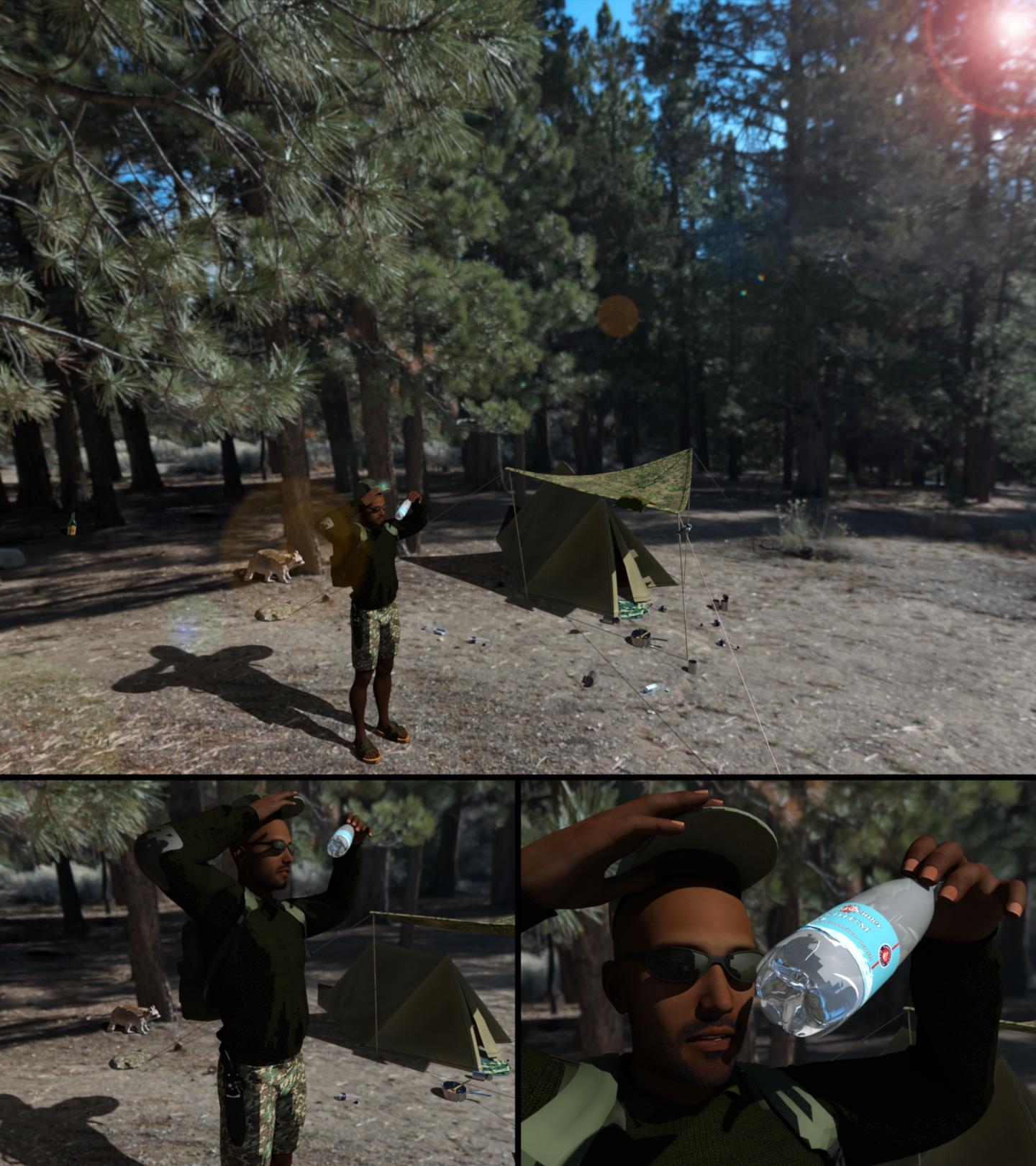
"The Great Outdoors"
Duck Pool Float - NOW UPDATEDI'll update it with a tail morph, make it a taller tail. Not sure why the texture would get messed up, it's all yellow except the eyes and the beak, and those are still in the right place so unless you moved polys out of the UV map they should still be yellow. Regardless I'll do an update.
Well, I chopped the figure in half, deleted the rear half, and then duplicated the front half and spun the second instance around 180 degrees and welded it together again. Yeah the UV wrap didn't like that...
My thought was, since the neck was already there, I could just whack off the head, and then bridge the hole in the top of the neck with a few faces/edges. It was a nice thought in theory anyways...
And I expanded the head 5% on the original figure (and hid the rest of the body) to 'hide' my head with the now messed up texture map on my WIP. Yeah it's yellow, but the beak and eyes weren't lining up.
Anyways, I saw your update in the other thread. Looking forward to seeing the final product!
What is the duck pool float used in the Floyd 8 promo image? -SOLVEDI had a request to add a tail morph. Did that, decided to add a swan neck morph too. Done. Then I needed some textures for a swan, then I figured with the swan neck but no tail it makes a passable flamingo so did a pink texture too. Gonna update the shared file in a bit, will notify you all here when that's done.
Suggestions for cartoon figures neededThe porportions of the Big D 7 Dwarves is really close to chibi territory. You might want to do a bit of checking on the methods used there. I've not dealt with chibis myself but my impression is that quite often the heads are added on separately, after making the original head invisible, and one is just careful with angles so the join isn't noticed.
The real issue would probably be getting the heads close to properly shaped and then scaling up (or scaling the bodies you intend to use down). Since those dwarves don't go about in skimpwear, you can probably keep the neck and hide the join area with the collar.
I'd be inclined to use Genesis (of whatever iteration) since it's a bit more morph-friendly to the end user than pre-Genesis figures were. Or at least in the absence of being able to dump them into an actual modeling program and bring them back out and import whatever morph you built there.
I'd be really hesitant to use a standalone figure from pretty much any source, since those are generally NOT morph-frindly. Nursoda's figures are great, but they generally only come with expression morphs (although Eepo has a male morph as well as the female base), and there is no 3rd-party morphing system that's available to modify them.
That said, if a 3rd party standalone actually looks like what you are aiming for, that's something else. But most standalones are take 'em or leave 'em.
Duck Pool Float - NOW UPDATEDOne things to watch out for is the morphs sort of overlap so if you dial up one, you might get a bigger head too. But you can dial down the head size independantly, that's a seperate morph luckily. I kind of rushed this and it shouldnt have that behavior. Sorry.
Duck Pool Float - NOW UPDATEDI'll update it with a tail morph, make it a taller tail. Not sure why the texture would get messed up, it's all yellow except the eyes and the beak, and those are still in the right place so unless you moved polys out of the UV map they should still be yellow. Regardless I'll do an update.
It's My Party and I'll Complain If I Want To Complaint ThreadThe feet of my turntable rotted off. The rubber. I don't know how to, or if I can, replace them. Good turntable. Quartz, PLL, direct drive. If I had the money, I'd get a new one that has both RCA and USB outputs, so I could rip some of my albums to CD. I have one, particularly, that I could never find on CD anywhere, and I've looked for many years on and off. Cold Blood: Sisyphus. Actually, I just did a search and found there is one, finally, but the review is that it's tinny in some respects, not a good transfer...plus it is two albums together. there are others I'd rip as well, but this one is the one that bugged me the most.
LPs were better in some ways. The cover art, and things they did with the covers, are not possible with CD cases. For instance, Jethro Tull: Stand Up...when you open the cover,artwork of the band pops up like a pop up greeting card. Three Dog Night: Seven Seperate Fools had giant playing cards with each of the band members on them. Led Zeppelin: III had a wheel in the cover and several cutouts on the front. When you moved the wheel, different images showed through the cutouts. You miss all those things with CDs.
Dana
..when I was in radio I appreciated we still had LPs instead of CDs (those came into vogue about a year after I left). One could actually read information about the composer, performer(s), performance, and works from the liner notes to give more background to the listeners without needing high powered magnification.
And lyrics. Don't forget lyrics. A lot (not all) of albums had the lyrics to the songs on the liner notes!
Dana
It's My Party and I'll Complain If I Want To Complaint ThreadThe feet of my turntable rotted off. The rubber. I don't know how to, or if I can, replace them. Good turntable. Quartz, PLL, direct drive. If I had the money, I'd get a new one that has both RCA and USB outputs, so I could rip some of my albums to CD. I have one, particularly, that I could never find on CD anywhere, and I've looked for many years on and off. Cold Blood: Sisyphus. Actually, I just did a search and found there is one, finally, but the review is that it's tinny in some respects, not a good transfer...plus it is two albums together. there are others I'd rip as well, but this one is the one that bugged me the most.
LPs were better in some ways. The cover art, and things they did with the covers, are not possible with CD cases. For instance, Jethro Tull: Stand Up...when you open the cover,artwork of the band pops up like a pop up greeting card. Three Dog Night: Seven Seperate Fools had giant playing cards with each of the band members on them. Led Zeppelin: III had a wheel in the cover and several cutouts on the front. When you moved the wheel, different images showed through the cutouts. You miss all those things with CDs.
Dana
..when I was in radio I appreciated we still had LPs instead of CDs (those came into vogue about a year after I left). One could actually read information about the composer, performer(s), performance, and works from the liner notes to give more background to the listeners without needing high powered magnification.
more of 3 would be niceI was thinking of merging the pinky with the ring finger, or merging the ring finger with the middle finger. Maybe just a geograft over the middle two fingers which hides them, and then a morph to widen the index and pinky? The texture for this is going to be an issue. But would you want a realistic texture for a 3 fingered toon? So it shouldn't have to work with existing textures. Bugs and Mickey are so nicely wearing gloves. Everyone else in the reference picture is a solid yellow or flesh tone.
Someone who is better than me at morphing will have much better ideas. Fun idea though.
FaceGen: Aspect Ratio 1 & Perfecting Faces in DazHi.
I've stopped using FaceGen for the moment because of a few things that I'm struggling with. But if I can get some answers, I can get back to it.
1. Aspect Ratio 1.
As you know Genesis 8 was added to the update of FaceGen. On the Genesis 8 Export tab it has this in the part where you assign colour maps:
Select the base color maps for each of the body parts below.
They must be in the G8 Base Male UV layout with aspect ratio 1A) What is aspect ratio 1?
B) How do you know if the map conforms to aspect ratio one?
I have tried saving maps for Genesis 8 in FaceGen. But I get a face/head map within a face/head map (I've attached an example).
2. Perfecting Faces in Daz.
So, I've been making the base for the faces in FaceGen, and them refining them with the morphs in Daz.
I'm not sure how to get this to make sense but, is there anyway I can over-write that morph that I created in FaceGen for the base, to include all of the morphs that I've used to refine it (so they're all unnder one head morph)?
Thank you for any help.
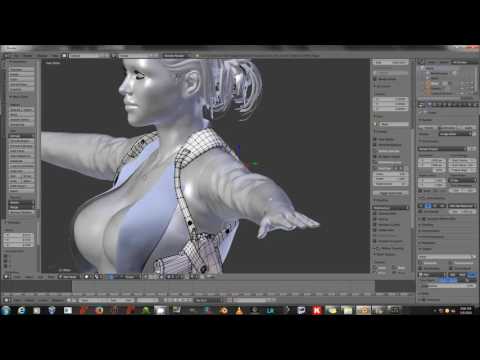
Basic Question On Daz + BlenderHonestly, it might be much simpler to morph the Sofa's mesh by hand in Blender then reimport the morphed object into DAZ as a morph; than trying to get the Parameters just so, and the morph will simply look right; not to mention it will be yours to keep for projects going forward.
Sickleyield, posted this Tut on DAZ/Blender morphs sometime ago, while dealing with a clothing morph the basic concepts apply and should serve you in good stead. BB.
 How to re position facial features
Yes, that's exactly what the Ears Height and Ears Depth morphs do.
Note that there are matching body morph sets for the G8F and G8M, plus a set of basic expressions, that are generally considered to be a useful starting set for anyone wanting to experiment with morphing their Genesis figures. They're on sale at fairly regular intervals, sometimes at a really deep discount (if you're not in a hurry and don't mind waiting), plus an extra 30% discount for Platinum Club members — stick them in your wishlist and keep an eye on the prices.
Duck Pool Float - NOW UPDATEDYay! Duck float!


Love it!
If you are looking for suggestions on how to improve it, maybe morph a tail onto to the back (i.e. pull part of it upwards) or just add a tail? That's what I plan do do with it!
I like the seam around the outer edge!
Do Genesis 8 textures work with Victoria 8 & Victoria 8 HD?Yes, G8F textures work with V8. The HD is only a morph.
For G8M textures and G8F textures to work on each other, you'd need this product https://www.daz3d.com/genesis-8-uv-swap-male-and-female-base
Stiffler's Mom (Stiff Cloth using dForce)Really nice, I too like the 2nd one as it is very realistic.
Thanks, @deathbycanon. I love these simulations - so much fun! Here's a few more of a couple different characters in some more poses:
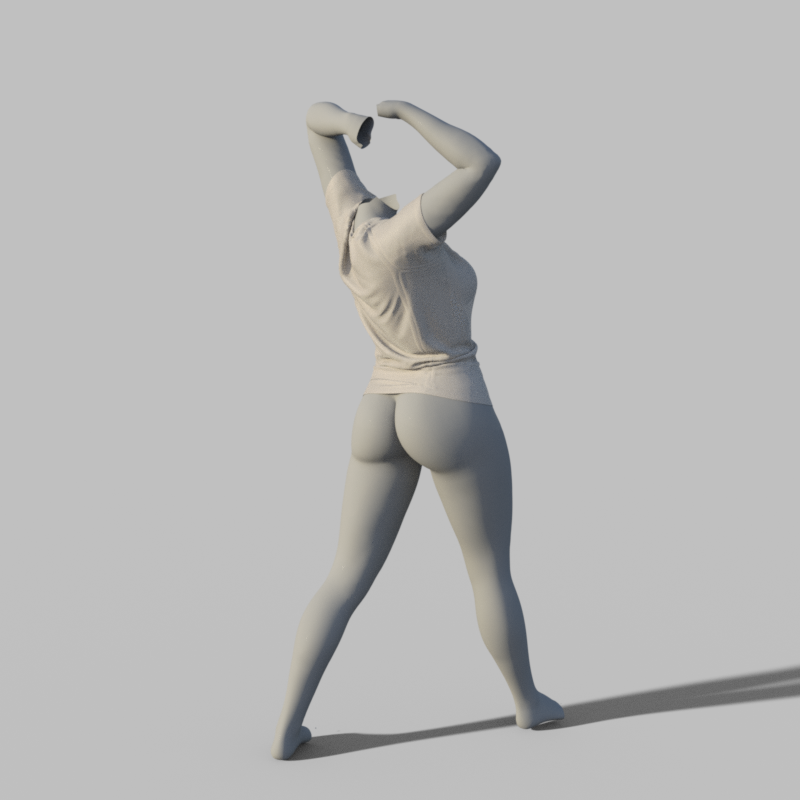


As you can see, there's probably a bit too much fabric in the shoulders (this was noticable in the first round of images, too). This can be corrected using adjustment morphs but I just didn't bother to do so and re-sim since these are just tests. For the 2 images of the smaller/younger girl, the global parameter was used to make the shirt smaller and the shirt length was also increased via a morph.
The whole system really is quite flexible.
- Greg
Genesis 8 Female modelsI can read the labels, and googling the first morph name suggests it's from Big Girl Morphs.
Thanks that was it ! Was driving me nuts
It's My Party and I'll Complain If I Want To Complaint ThreadThe feet of my turntable rotted off. The rubber. I don't know how to, or if I can, replace them. Good turntable. Quartz, PLL, direct drive. If I had the money, I'd get a new one that has both RCA and USB outputs, so I could rip some of my albums to CD. I have one, particularly, that I could never find on CD anywhere, and I've looked for many years on and off. Cold Blood: Sisyphus. Actually, I just did a search and found there is one, finally, but the review is that it's tinny in some respects, not a good transfer...plus it is two albums together. there are others I'd rip as well, but this one is the one that bugged me the most.
LPs were better in some ways. The cover art, and things they did with the covers, are not possible with CD cases. For instance, Jethro Tull: Stand Up...when you open the cover,artwork of the band pops up like a pop up greeting card. Three Dog Night: Seven Seperate Fools had giant playing cards with each of the band members on them. Led Zeppelin: III had a wheel in the cover and several cutouts on the front. When you moved the wheel, different images showed through the cutouts. You miss all those things with CDs.
Dana
Suggestions for cartoon figures neededI use DAZ Studio for LOTS of stuff.. I am currantly in need of as close as posible proportion for the Dwarves from Snow White. (The big D version) so I can trace them from multipleangles onto the faces ofwood blocksand carve figurines forfriends. I've got g3m and g8m,... and the morph/size packs.
Got contact sheets for characters. Just would like better suggestions than background picing and wireframe tweeking.Video card settings and memory1. the GPU will be used only at render time, if rendering in Iray, or while running a dForce simulation - assuming that those are set to use the GPU. Unless you haev Iray preview mode on the GPU is not greatly used in scene loading (just enough for the OpenGL display, which you can control in Edit>Preferences>Interface)
2. Yes
3. I doubt this is a hardware issue - more likely you have a lot more morphs for the figure, which have to be read in (to learn the links) even though the actual deltas (the changes in vertex position, which make up the bulk of each morph file, are not kept in memory until needed).
That is what I assumed. That and texture size. I can use a highly morphed m7 or m8 with an older m4 texture and the memory load is much less. I can also try scene optimizer which I bought but haven't used.
I guess my real question is, though, is my friend's idea correct--i.e., that having hardware set to auto or integrated (I have both nvidia and intel as graphics) will use twice the memory than having it set to a dedicated card?
Daz 3D is part of

Connect
DAZ Productions, Inc.
7533 S Center View Ct #4664
West Jordan, UT 84084Licensing Agreement | Terms of Service | Privacy Policy | EULA
© 2026 Daz Productions Inc. All Rights Reserved.