-
Cyclops Thea for G8F [commercial]
I thought I saw a baby morph for G8F at rendo so wonder if that morph and this character can be combined to make a baby cyclops? Then my question is there a G8M cyclops on the way or is baby cyclops’ Dad something else?
Help needed: Getting genesis 8 female high heeled shoes to work with genesis 3You missed a step (Highlited in blue).
1. First I change the pose of my genesis 3 character into the general genesis 8 female pose (shoulders and legs). Then I change the pose of the feet (I am getting the values from the provided genesis 8 feet pose).
2. Then I load the genesis 8 shoes into the scene without having the genesis 3 figure selected
3. Now I select the shoes in the scene tab and click on edit --- scene identification, I click on the "..." to the right of "Preferred Base and select genesis 3 female and accept.
4. Before you perform the transfer step, pose the clothing to match the target figure (arms down for G8, arms up for G3) and click the Bone Editor. It looks like a bone with a pencil across it. Now right-click in the 3d window and choose Edit and Bake Joint Rotations.
5. Now I select genesis 3 female in the scene tab and then the shoes with shift pressed. I click on edit again and Choose Edit--Rigging--Transfer Rigging (Figure Space).
Hope this helps
genesis how???Minor correction. Although Genesis 1 & 2 load natively and the clothing for them loads and conforms natively, the geografts do not. For example, the Genesis 2 male minotaur will load and its morph can be adjusted, but the geograft tail and legs need to use a work around. I think people make the initial geograft invisibl by unchking visibility, load a second of thesame figure (say the tail), and then conform the second to the invisible figure, not the minotaur. I may be off a little on the specifics because I haven't used thos much. For standard human figures, Genesis 1&2 load and conform natively.
I use all my GeoGraft for Genesis1 in Carrara without any problem or workaround!

I simply load them in the scene and then I "assign" the GeoGraft to the figure. After about 20 secs everythong fits correctly, all my morphs works perfectly and the figure's Graft bends and moves without any issue.Help needed: Getting genesis 8 female high heeled shoes to work with genesis 3Try this - it's not perfect, and will require further adjustments from you as you pose the figure. But it has worked for me when I've used it. (No guarantees that it will work with those shoes, however. I don't have them, and yes, Shoes are always a crapshoot when it comes to refitting.)
Switch ID to Genesis 3.
Fit to Genesis 3. Do Not transfer rigging.
if needed, go to the thigh bones of the shoes and adjust +6 and -6 on the Side to side/ X (I think) rotation.
As you pose the figure, you will need to manually tweak the side to side positions on the thigh bones of the shoes (not G3F) to get the shoes to follow, but if all else works, that should be the only adjustment needed.
AIUTO...CHI CONOSCE L’ITALIANO? PARTE UNDICIE vai, altro giro altra corsa!
https://www.daz3d.com/toon-boy-and-boyish-dforce-outfit-for-genesis-8-male
Continuano a ficcare nuovi morph in quella figura frantumata... Mi stupisco di quanto la gente usi Genesis8... Mi viene il dubbio che usino solo ed esclusivamente pose preconfezionate... Se avessero provato davvero Genesis8 ne sarebbero usciti scemi! Help needed: Getting genesis 8 female high heeled shoes to work with genesis 3
I do have the same problem, ie using only G3 but trying to fit clothes and shoes made for G8. Like you, my first reference was the SY approach. For clothes, no real problems, so far. Shoes, particularely high heels are another story.
By trial an error, I was able to go further and get better results than what you've got so far. I am able to get the feet fit in the shoes (If I can, I should post you my method later).
Even then, I consider my transfer tentative a fail, because the heel part of the shoe get deformed (the heel moves backward a bit) after the transfer. I suspect the reason is that G3 has a heel bone, and G8 doesn't.
I also tried something else. I load the shoes on G8, and save (only the shoes) as obj. Import the shoes, load G3F and fit the foot inside the shoes. However, with this method, the shoes are not deformed, BUT I loose all the intitial adjusting morphs made for the shoe, which is not an acceptable situation for me.
I really hope somebody will come with a solution to this problem, so G3 users can benefit from the growing offer made for G8.
STEP BY STEP How do I create a character morph?Ok; used Edit>Figure>Morph Loader Pro; in the Morph Loader Pro window... Choose Morph Files>selected the .obj I made changes to and clicked Accept; no other changes or options used in the Morph Loader Pro window; and... "Warning: Geometry did not match, failed to create morph." When I use Morph Loader Advanced instead... "One ore more of the files had no effect. See log for details." Any idea what happened and can you tell me where to find the log at?
STEP BY STEP How do I create a character morph?You don't import the OBJ as such, you have the figure selected and use one of the Morph Loaders from the Edit>Figure menu.
STEP BY STEP How do I create a character morph?Ok guys... I KNOW there are tutorials out there, but all the tutorials I've found so far seem to leave out a crucial step. I've exported the Genesis 8 Female mesh as a .obj file. I imported that into Hexagon and made the changes to the face that I wanted to make. I then exported the CHANGED mesh as a .obj file using the same scale I used when I exported it from DS to begin with. So I can now import it into Daz Studio BUT... What do I do next? Every, and I mean EVERY tutorial I've found leaves out that crucial step of how to convert the imported .obj file into a Daz Studio morph file. Now that I have it imported and at the right size and scale, all I basically have is a human-shaped brick that's only useable as a statue. How do I turn it into a character morph?
Glute and Breast Control Genesis 8 (Commercial)Hi. Skip to 1:20 of this vid.
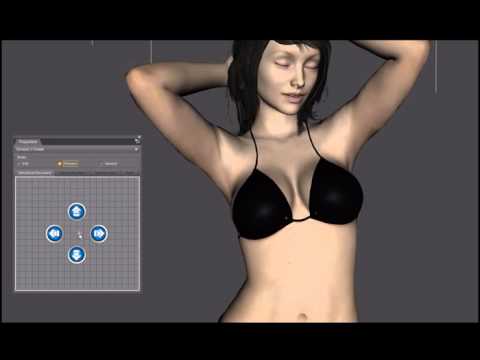
I used the puppeteer addon which drives the pose control morphs in the product. But if you want to manually do it, I added a screenshot of the used morph values.
Pretty Base NG morph problemPlease note that we don't allow censor bars - instead just post a screenshot in Smooth Shaded view.
That sounds like an ERC issue of some kind - is this a custom nipple morph for that figure, rather than using the base morph? If so, click the gear icon on the slider, open Parameter Settings, and look at the Sub-components tab - what is listed there?
genesis 8 for maya plug inHello,
Does anybody try the plug-in genesis 8 for maya ?
i've tried the "daz to maya" plug in, but it doesn't export the genitals morph. do you think it's possible with the genesis 8 for maya plug-in ?
Thanks for time
Lara Croft for DAZ3D?The facial features of the example put me a bit in mind of the Pretty Base character from Mytilus and Pretty3D. There've been a number of iterations of her, for different generations. I'm pretty sure she started as a V4 character, so it would be possible to GenX the original morph as far as G3. Although the vendors also have done iterations of her for G3 and G8.
Don't know which generation the original poster is using, but that might be something else to check. I agree with Dr Newcenstein about dialing in some version of the Girl for the body morph. Fortunately there are a number of those.
Help needed: Getting genesis 8 female high heeled shoes to work with genesis 3Have you tried it without posing the feet? I've had decent luck transfering shoes, including heels, by not posing the feet until after I do the rigging transfer.
I tried it. But I got no better result.
Genesis 9 delayed until at least 2020. Will you be buying it?" Now with G8 we are actually seeing new and unique characters never introduced before which to use, requires having to purchase all the base morphs and merchant resources all over again (and some of the latter are still not available) as they are not backwards compatible to G3. "
The Daz business model depends on you people buying this content over and over again with every figure release.
It pays for further development of the core application.Although I dont have any need for the new figures in my animated films,
I think it is wise of Daz to stop simply recycling those same characters such as Bethany,Olympia, Aiko etc,
it keeps things fresh.I agree but I think they were under some pressure to do so. I seem to remember various threads here with users begging for something different, some older characters and a departure from the glamour scene. "Normal people" was, for a long time, my mantra. Unfortunately it came with G8 and all my investment in morphs, add-ons, etc., went into G3 and largely remans there. As you say, they try to "encourage" us to spend again on those same packages for each new generation which feels a little cynical to me. What alternative business model they could think up is beyond me - I don't have a commercial bone in my body - but the character variation is at least a step in the right direction.
....maybe we need a "reverse version" of GenX where one can transfer G8 characters and morphs to G3.
I think the problem with that would be that the HD would not be transfered. I believe that has always been the case with any morph/character transfer between generations and these new G8 characters seem to be HD heavy.
Genesis 9 delayed until at least 2020. Will you be buying it?" Now with G8 we are actually seeing new and unique characters never introduced before which to use, requires having to purchase all the base morphs and merchant resources all over again (and some of the latter are still not available) as they are not backwards compatible to G3. "
The Daz business model depends on you people buying this content over and over again with every figure release.
It pays for further development of the core application.Although I dont have any need for the new figures in my animated films,
I think it is wise of Daz to stop simply recycling those same characters such as Bethany,Olympia, Aiko etc,
it keeps things fresh.I agree but I think they were under some pressure to do so. I seem to remember various threads here with users begging for something different, some older characters and a departure from the glamour scene. "Normal people" was, for a long time, my mantra. Unfortunately it came with G8 and all my investment in morphs, add-ons, etc., went into G3 and largely remans there. As you say, they try to "encourage" us to spend again on those same packages for each new generation which feels a little cynical to me. What alternative business model they could think up is beyond me - I don't have a commercial bone in my body - but the character variation is at least a step in the right direction.
....maybe we need a "reverse version" of GenX where one can transfer G8 characters and morphs to G3.
[Solved] UV Maps changing during import/exportThanks for responding, that worked, so I was finally able to use transfer utility to make it a functional conforming hair. Unfortunately, there are still a few unwelded vertices that need fixing so it's an imperfect solution for the model's other problems (it was originally a game model hair). I do have a mostly-usable conforming hair model now though, and overall that's the important part.
Hexagon's Daz bridge lets you specify sending it directly back as a morph so I didn't bother exporting it from Hex as an obj and then importing it with Morph Loader Pro (but yeah, Morph Loader Pro is great especially when you need the extra options).
I would still like to fix those unwelded vertices if at all possible (can't currently turn on smoothing or subd without ruining everything), so if anyone out there knows how to protect the original UVs when using Hexagon, it would still be very helpful.
Physical attachment of objects/morphs being carriedI cant remember if this has been asked before,but how do you attach something or somebody being carried by a morph so when you move it the thing or child they're carrying won't be left behind "hanging" in mid-air?
dForce Compatibility QuestionsThere are so many generations of figures now, and so many individual character shapes in each generation, and so many morphs for everything - that I'm afriad to buy anything in case it's not compatibile with what I'm doing.
Is dForce clothing usable on all the different figures/generations - no matter what figure the clothing's promotional page says? So, if the product page for the dForce clothing says Compatible Figures: Genesis 8 Male - does that mean it will only work on that figure? Does AutoFit not work with dForce clothes?
When you have a figure, and you apply a morph like the SWOLE or MASSIVE morphs, what happens to the dForce clothing? Does it expand to fit the figure? Do you put the clothing on the figure before morphing, or after?
Thanks!
SOLVED: The Bat Thing expressions?Anyone have The Bat Thing by TheAntFarm? LOVE him, but cannot seem to locate his expressions. There aren't morph dials anywhere on him, as far as I can see. And he doesn't have an articulated jaw. Tried re-installing him and even re-downloaded/installed manually. No luck. Before I file a ticket, was wondering if anyone else could offer help. I'm on an RRRR contest deadline, so I may not get an answer in time for his debut appearance in my gallery, but I like him enough that I'd love to know if I'm missing something for future use!
UPDATE: Found the problem. I noticed that there was an update added in May of this year (as stated on the product support page) that was supposed to have fixed some rigging issues -- which I assume were the expressions. I always install updates, but I wasn't seeing the morphs, even after re-installing through the DIM and manually. I just installed through Connect (which may not actually have fixed anything) but I then noticed that there were two options for adding the Bat Thing to the scene. There's a !FULL version that adds him with hair and hooves, or there's just the "normal" version which adds him, idk, naked? On a whim, I added just the "normal" bat (I'd been using the !!FULL option prior to this.) I discovered that if you add the naked "Bat Thing" option -- NOT the "Bat Thing !!FULL" -- the expressions are there. The "!!FULL" option is still only loading the pre-update morphs. Bizarre. I'll file a ticket.
Daz 3D is part of

Connect
DAZ Productions, Inc.
7533 S Center View Ct #4664
West Jordan, UT 84084Licensing Agreement | Terms of Service | Privacy Policy | EULA
© 2026 Daz Productions Inc. All Rights Reserved.