-
Eastern Elegance - dForce simulation issue
Hello,
I recently met some serious problems when I try to use the dForce simulation on the Eastern Elegance content. Usually I receive the error messages "Error during simulation" or "Can't prepare simulation" (or something like that).
The error log reads:
"2018-08-07 08:56:56.075 Spring(4173, 4300) of node "Eastern Elegance Dress" extended: rest length < collsion offset (0.179015 < 0.20001)
2018-08-07 08:56:56.079 Spring(4218, 4350) of node "Eastern Elegance Dress" extended: rest length < collsion offset (0.171581 < 0.20001)...
2018-08-07 08:56:57.311 Spring(10072, 10166) of node "Eastern Elegance Pants" extended: rest length < collsion offset (0.383133 < 0.40001)
2018-08-07 08:56:57.312 Spring(10074, 10169) of node "Eastern Elegance Pants" extended: rest length < collsion offset (0.378178 < 0.40001)
2018-08-07 08:56:57.317 Shortest spring had length: 0.0609603
2018-08-07 08:57:00.378 Loaded Morph Deltas in 0 min 0.0 sec.
2018-08-07 08:57:00.378 Loaded file: pJCMNeckFwd_35.dsf
2018-08-07 08:57:00.378 WARNING: cloud\dzcloudtasknotifier.cpp(178): Unexpected exception in CloudFIle::lookupFromDb: Unable to connect to the database
2018-08-07 09:00:00.061 WARNING: ..\..\..\src\dzopenclkernelfactory.cpp(30): Open CL notify: CL_MEM_OBJECT_ALLOCATION_FAILURE error executing CL_COMMAND_NDRANGE_KERNEL on GeForce GTX 970 (Device 0).2018-08-07 09:00:00.061 WARNING: ..\..\..\src\dzdynamicsengine.cpp(2294): ERROR: Memory Object Allocation Failure (-4)
2018-08-07 09:00:00.327 Total Simulation Time: 3 minutes 8.1 seconds"I also restarted DS and tried anew, but to no success. I also saved the figure as a scene subset and tried to simulate in an completely empty envorinment, but that also failed. I reinstalled the Eastern Elegance files, but the error is still persistent.
What can I do or what am I doing wrong?
Regards,
Matthias
Geo Graft Gaps on MorphTrying to create a custom geo-graft (based on the no-face from Silent Sally, but I wanted eyes).
So, clearly not a finished product, but I was able to get the geo-graft to connect seemlessly gaplessly around the nose and eyes, like the image below:
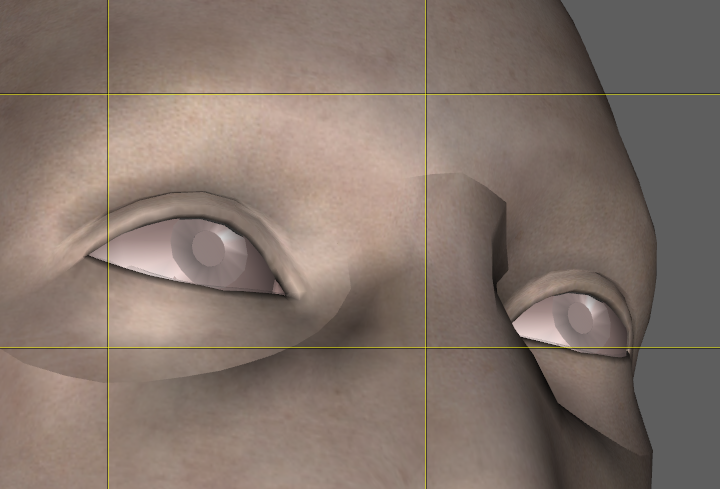
However, when I apply a morph, gaps appear in the graft: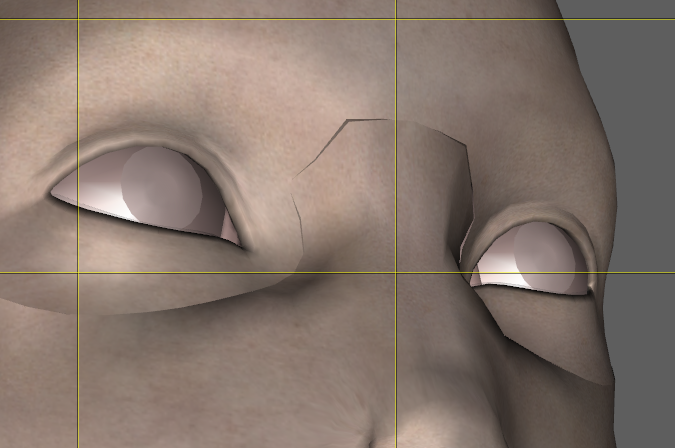
I'm not exactly sure what is causing this. The closest I can find is a comment by RawArt that suggests that maybe the verticies are not exactly in the right place. When building the graft I exported a G3 female at base resolution and positioned all the verticies from the graft in the same place as the corresponding verticies on the G3 face. I suppose that might suggest that it's a modeling issue, but was wondering if there is any other way to ensure they are lined up correctly.
genesis generation x2Two points here:
1 - Have you bought the add-ons for GenX2? The product itself comes with support only to transfer between Generation 4 (i.e. Victoria 4, Michael 4 etc) and Genesis.
To add support for Genesis 2 figures you need this as well: https://www.daz3d.com/genx2-addon-for-genesis-2
Then to add support for Genesis 3 figures you also need this: https://www.daz3d.com/genx2-addon-for-genesis-32 - There is no support for Genesis 8 figures - the creator of GenX2 and it's add-ons died some time ago and it has not yet proved possible for anyone to extend the product to Genesis 8.
I bought that https://www.daz3d.com/genesis-generation-x2
it work between all versions genesis..genesis generation x2Two points here:
1 - Have you bought the add-ons for GenX2? The product itself comes with support only to transfer between Generation 4 (i.e. Victoria 4, Michael 4 etc) and Genesis.
To add support for Genesis 2 figures you need this as well: https://www.daz3d.com/genx2-addon-for-genesis-2
Then to add support for Genesis 3 figures you also need this: https://www.daz3d.com/genx2-addon-for-genesis-32 - There is no support for Genesis 8 figures - the creator of GenX2 and it's add-ons died some time ago and it has not yet proved possible for anyone to extend the product to Genesis 8.
How to turn imported items into custom clothing?Pretty much this, I think it's one of the settings in the transfer tool that is causing this, but I have no clue which one
morphing problemIf you have the ability export the model out to a modeling program ie Blender, ZBrush, Maya, Max, ect and create a corrective morph.
How to turn imported items into custom clothing?As Barbult asked, is the clothing item made to fit the base figure? If not - if there was a morph or set of morphs applied to the figure you modelled around - then in the Transfer Utility set Source Shape to Moprh and pick the one used, or for multiple morphs set it to Current, then in the checkboxes at the bottom check Reverse Source Shape from Target.
I didn't shape it around any morphs, just the base genesis 8 female.
SY 200 Free Morphs for Genesis 8Thanks SickleYield. I set out to create a custom character using only these morphs so I could post a render and DAZ Studio crashed while doing a quick dForce sim. So I lost all the work. But I did get to go through every morph in this and they are all extremely useful and well done. So once again, thanks!
Bummer! I'm glad the morphs were fun though?
They were great! I was really happy with the character. But alas, I was working in the beta version of Studio and it's not stable with dForce on my machine. Live, learn. Maybe I'll try again tonight, someone needs to post a "thanks" render, though sadly mine tend to be not all that great compared to so many others here.
How to turn imported items into custom clothing?As Barbult asked, is the clothing item made to fit the base figure? If not - if there was a morph or set of morphs applied to the figure you modelled around - then in the Transfer Utility set Source Shape to Moprh and pick the one used, or for multiple morphs set it to Current, then in the checkboxes at the bottom check Reverse Source Shape from Target.
How to turn imported items into custom clothing?Nothing jumps out to me as being wrong. You could try the transfer utility with "None" for the projection template instead of Full Body to see what difference that makes.
I've asked another community volunteer to take a look at this thread, too. Maybe he will see the problem.
SY 200 Free Morphs for Genesis 8Thanks SickleYield. I set out to create a custom character using only these morphs so I could post a render and DAZ Studio crashed while doing a quick dForce sim. So I lost all the work. But I did get to go through every morph in this and they are all extremely useful and well done. So once again, thanks!
Hopefully it is not the whole computer doing a BSoD.
SY 200 Free Morphs for Genesis 8Thanks SickleYield. I set out to create a custom character using only these morphs so I could post a render and DAZ Studio crashed while doing a quick dForce sim. So I lost all the work. But I did get to go through every morph in this and they are all extremely useful and well done. So once again, thanks!
Bummer! I'm glad the morphs were fun though?
Jaffa Staff WeaponOooh, nice! Been waiting for someone to produce good Stargate models of zappy things. Any chance of an articulated Zat next?
Hmm... can anyone get this converted properly into a D|S asset? Every time I convert to weightmapped, the open/close morph freezes — the only thing that works is saving as a Scene Asset, and that just loads in again as a Poser figure, not full D|S file format.
Transfer all Daz Studio content from Mac to PC?Hey all! So I’ve been using daz for a few years now, and I’ve always used it on Mac. In fact I haven’t used a PC in general for about 10 years (yes I’m a bit of an Apple fan boy)! As you can imagine I’ve got a lot of content from stuff I’ve created to assets bought from the daz store and other 3rd party sellers.
I recently (within the last week) bought a gaming PC and it’s a bit of a monster. Nvidia gtx 1080ti, 32 gb ram etc. I thought to myself, because this thing is crazy powerful and actually uses Nvidia (mac’s do not ????) it’s abviously going to be waaaay more efficient when it comes to rendering scenes and such. This will obviously save me a lot of time as my Mac takes a really long time to render, especially when the scene is complex with full 3d backgrounds etc.
So basically does anyone know how on Earth I’d go about transferring all my daz content from Mac to Pc safely. I literally wouldn’t know where to start. Not helped by the fact that I’ve been using Apple for so long that windows 10 feels very alien to me.
Apologies if I’ve gone on a bit. Any help would be much appreciated :)
DSON Python ErrorsStill no luck?, ouch, well been a while since I've las used G2F in Poser, so did a try. G2F still loads fine for me. I take it you do get the errors not just with the growing up morphs? I do have them also and didn't get any problem. So if the errors only reference the growing up morphs, maybe uninstalling and reinstalling them might help (though I wouldn't get my hopes up too high if I were you).
edit to add. As the poser forum her is not exactly an active forum, you may want to try the 'official' poser forums
Okay, I'll move it, but thanks for the reply. I get these errors whenever I try to transfer active morphs with Genesis too. Hmm actually I don't see a 'Poser Official' forum.
SY 200 Free Morphs for Genesis 8Thanks SickleYield. I set out to create a custom character using only these morphs so I could post a render and DAZ Studio crashed while doing a quick dForce sim. So I lost all the work. But I did get to go through every morph in this and they are all extremely useful and well done. So once again, thanks!
Who's Next to Join the G8 Family?I've been wondering whether after bringing out Olympia 8, way early, they haven't sort of reversed the order of some of the characters that tend to return.
Monique and Darius were always *really* late in the lineup and this time they were really early. Mei Lin and Lee generally came reasonably before the half-way point in the lineup and this time they haven't. If they've been plugged into Monique and Darius's usual slot we won't see them before November, possibly December.
Gianni was something like the very first male morph to show up after Michael. The more lightly-built males (other than Lee) tended to be much later. This time we got Lucas fairly early. Owen came out of nowhere.
This cycle seems to be pushing age lines so far. (And about time.) I'm not really counting Edie and Olie, even though they were official, because their designer's figures have been one-offs about half the time. I don't really expect to see Ollie9 and Edie9.
RareStone's Face Morph Collection for The Girl 8I've already posted this in the Sakura 8 topic, but I just discovered this topic and figured I might as well post it here too.
When I saw Rarestone's face morphs for Girl 8, especially that Kaiko one, I got the idea to try combining her with Sakura 8's textures to get a more anime looking Girl 8.

Gallery link: https://www.daz3d.com/gallery/#images/621961/
This is Girl 8 with the Kaiko head morph by Rarestone (as well as the included toon eyebrows). The textures and eyelashes are from Sakura 8 (I had to push the eyelash length beyond 100%, as the eyelashes appear really short when used on non-Sakura characters). The body pose and smile shape is from Rarestone's Japanese Anime Poses for Sakura 8 (turns out the Sakura 8 expression morphs work quite well with this version of Girl 8). And finally, we have 3DOutlaw's simple eyes to finish the look.
Overall, it seems combining Rarestone's Sakura 8 textures with their Girl 8 morphs gets you a really nice alternative anime character! :D
Rendered in iRay, postwork done in Krita (a free alternative to Photoshop that I highly recommend)
So cute. Quicky, how did you get the 3DOutlaw's eyes on?
How to turn imported items into custom clothing?Did you create the mesh on the unmorphed, unposed, base character scaled to 100%? Can you show some screenshots of the mesh right after you imported it and then again after running the transfer utility, and a screenshot showing all the settings you selected in the transfer utility? Maybe someone will notice something set incorrectly.
How to turn imported items into custom clothing?What process are you using to "turn the actual mesh into a shirt"?
went to object, transfer utility, and then set the options like the tutorial said
Daz 3D is part of

Connect
DAZ Productions, Inc.
7533 S Center View Ct #4664
West Jordan, UT 84084Licensing Agreement | Terms of Service | Privacy Policy | EULA
© 2026 Daz Productions Inc. All Rights Reserved.