-
AIUTO...CHI CONOSCE L’ITALIANO? PARTE QUATTORDICI
Muscleman said:
Strano, io carco sepe scene vecchie in ds per risettarle e aggiustarle, non è che sono magari c'è qualche problema con le scene in sè?
Ragazzone... Se una cosa funziona perfettamente in 4.22 per quale motivo dovrebbe smettere di funzionare in 4.23? Non è mica MacOs...
Ho dovuto fare rollback perchè non mi riusciva più di caricare scene di dimensioni superiori i dieci megabyte, quando normalmente le mie scene sono di minimo 100 e arrivano qualche volta ai 400. E il problema si aggrava quando nella scena ci sono modelli modificati con Mesh Grabber 3 e non finalizzati in morph.
Brand-New Problems with Face Transfer (distorting heads)Making some progress.
It appears that whenever Daz loads a figure with a Face Transfer morph, it doesn't load the correct morph. Instead, it's choosing two other morphs from my saved library and applying those. Not only that, but it applies FT Morph #1 at 100% and FT Morph #2 at 0%
And wouldn't you know it, FT Morph #1 happens to be a figure with a long, narrow face...
But I was wrong in thinking that FT Morph #2 was the correct one- it's not, it just fits better with most faces because it's closer to a normal human face. Dialing it up to 100% doesn't get me where I need to be because it's still the wrong morph.
Why Daz is not choosing the correct FT morph for the figure, or why it's choosing two morphs for any reason, are still mysteries.
BIG TROUBLES WITH DAZ STUDIO !!Looks as if some kind of corrective morph, probably for a character or shape with a very enlarkged head, is kicking in when it isn't needed. Does this affect individual sliders as well as compound expressions? If so try aplying one and then enable Show Hidden Properties (Parameters pane option menu>Preferences) and look through the Currently Used group for anything with a character-related name (probably starting JCM or CBS).
Need help with Genesis 3 pants on Genesis 8 - pants losing all the foldscrosswind said:
Do not load pants to G8M with Auto-Fit. Instead, either:
Use Transfer Utility: 1) Load pants into the scene with no fitting. Dial G8M L/R Thigh > Side to Side to -6/+6; 2) Transfer Utility with settings in below screenshot 1.
Or: 1) Step one as above; 2) Change Preferred Base in Scene Identification of the pants to /Genesis 8/Male; 3) Fit pants to G8M.(screenshot 2)
After fitting, remember to Zero G8M's pose.
Thank you! I tried the way with Transfer Utility as you described and that worked.
must have utilities for DAZ Studio? Must work in version 4.23Tomhip said:
Personal Favs that I will use in almost every single scene:
- Mesh Grabber
- Render Queue 3 (maybe it was limited to Premium)
- Look at me II
- Dforce Companion - Good for clothes but does not work with objects dforce
Honorable Mentions:
- Dforce2Morph - Very handy when you want to reuse some timeline morph between secenes
- Decimator - only used it once so far but ability to turn some high popy items into background props worked really well
- Fit Control - kinda stopped using it once i got better at Dforce and Mesh Grabber but very useful when you start
- Hat And Hair Helper - saves a lot of work if you like to use hats
- HDR Creator - Can save a ton of time by making HDRI from existing scene so you dont have to render backgroun objects each time
- Ultimate PBR/Iray Skin Manager - helps with adjusting some skins
- Shape Splitter - only used it like twice, but helped me to fix an issue with eyes for one figure morph.
Things that I tried but did not work for me:
- Dforce Magnet - sounds amazing, but weird positioning requirments in timeline made it a horrendous experience for me. If i need something similar a pimitive sphere/cylinder that i clip thorough section i want to move and Mesh grabber will do the job and save me from having a meltdown....
- Ultimate Zero - To much feature creep. I was looking for something to help with reseting selected bone and all its children to defaulkt pose (hands, fingers) but this thing keeps trying to reset everything not just the transformations and I have to uncheck that each time. Eventualy I just found a built-in way of selecting all children and will just alt click currently used bends/twists etc.
- 3D Universe Scene Tools - Wanted something that mirror flips a current pose - Sometimes it works, sometimes it will only flip part of the pose.... no idea whats wrong with it.
- Ghost Dynamics - kinda does what it says but you have to use smoothing modifiers and that messes some details - better to just use Mesh Grabber imho,
- Dial Fusion - It works but it was not what I was looking for....
thank you very much. nice list.
must have utilities for DAZ Studio? Must work in version 4.23oddbob said:
Things I use most often -
V3D Iray light manager pro
3D Universe scene tools
Fit control
Projection morph manager
Iray Geolocator
Look at me II
Also DForce companion 2 and mesh grabber 3, but they're no longer in the store.
thanks. it appears dforce companion is now Premium only. bummer that.
Fit Control for Genesis 8 (Commercial)nabob21 said:
Thanks alofaro, I'll give this a try.
Hi, I know you had already gone in that (the right) direction, effectively, you pointed me towards it, but I got a final and definitive confirmation.
I installed Daz on another computer, even left the DB in the default location as told by the Daz support, even if I was sure it had nothing to do with it.
Installed few basics, Fit control worked.
Then I put back all the stuff I had, Fit control would crash Daz, as we have already seen.
Then, came to mind, since I have Turbo loader utilities (huge library), I switched off everything for G8F, and loaded a subscene with a character that is a combination of morph, and that had plenty of clothes, plus other wearables, but that I had created when Fit Control was still working using the turbo loader tools load file (which automatically loads the morphs, but only the ones needed for the scene).
I then tried to use fit control the normal way. It worked perfectly. This confirms definitively, if there was any need, that the problem is some morph that for whatever reason makes Daz go crazy, when Fit Control tries to complete the morph transfer.
Unfortunately, the problem for me started months ago, and I did not get any suggestion from the DAZ helpdesk it could be morphs, so in the meantime I have nonetheless installed plenty of stuff, understanding what could be exactly can take a looooong time, I will just have to go by making a basic list of safe morphs, and if by chance over time I found out what other products could be.
Need help with Genesis 3 pants on Genesis 8 - pants losing all the foldsFold HD morph property is set 100% as default ... the culprit is that AutoFit breaks the link to dhdm file which has to be re-imported, however, user has no multiresolution plugin to do so. PAs rarely create dhdm on Wearables, this product is a bit unique ~~
Need help with Genesis 3 pants on Genesis 8 - pants losing all the foldsI don't have that set ether but according to the file list http://docs.daz3d.com/doku.php/public/read_me/index/32073/file_list it is possible that the wrinkles are a morph (an HD morph, in fact) so you may just need to reapply the morph.
Brand-New Problems with Face Transfer (distorting heads)Found this earlier disussion that mirrors my own.
Still trying to figure out why "(t)hey seems to last quite a while and then suddenly are become unuseable," especially after working for years.
What is the trigger? What file or variable got overwritten?
I wish I knew more about how Daz plugins worked in general.
Daz Studio BETA - version 4.23.0.4! (*UPDATED*)DoctorJellybean said:
I'm afraid I can't replicate on my (Windows) system.
First load a pretty heavy scene (at least 250Mb of size, not a simple prop in the middle of nowhere) and the load another scene of about same size double clicking on the scene file in the file manager while the first scene still loaded.
The crash happen more often if you have some props altered with Mesh Grabber 3 and not baked to morph.
must have utilities for DAZ Studio? Must work in version 4.23Personal Favs that I will use in almost every single scene:
- Mesh Grabber
- Render Queue 3 (maybe it was limited to Premium)
- Look at me II
- Dforce Companion - Good for clothes but does not work with objects dforce
Honorable Mentions:
- Dforce2Morph - Very handy when you want to reuse some timeline morph between secenes
- Decimator - only used it once so far but ability to turn some high popy items into background props worked really well
- Fit Control - kinda stopped using it once i got better at Dforce and Mesh Grabber but very useful when you start
- Hat And Hair Helper - saves a lot of work if you like to use hats
- HDR Creator - Can save a ton of time by making HDRI from existing scene so you dont have to render backgroun objects each time
- Ultimate PBR/Iray Skin Manager - helps with adjusting some skins
- Shape Splitter - only used it like twice, but helped me to fix an issue with eyes for one figure morph.
Things that I tried but did not work for me:
- Dforce Magnet - sounds amazing, but weird positioning requirments in timeline made it a horrendous experience for me. If i need something similar a pimitive sphere/cylinder that i clip thorough section i want to move and Mesh grabber will do the job and save me from having a meltdown....
- Ultimate Zero - To much feature creep. I was looking for something to help with reseting selected bone and all its children to defaulkt pose (hands, fingers) but this thing keeps trying to reset everything not just the transformations and I have to uncheck that each time. Eventualy I just found a built-in way of selecting all children and will just alt click currently used bends/twists etc.
- 3D Universe Scene Tools - Wanted something that mirror flips a current pose - Sometimes it works, sometimes it will only flip part of the pose.... no idea whats wrong with it.
- Ghost Dynamics - kinda does what it says but you have to use smoothing modifiers and that messes some details - better to just use Mesh Grabber imho,
- Dial Fusion - It works but it was not what I was looking for....
Need help with Genesis 3 pants on Genesis 8 - pants losing all the foldsDo not load pants to G8M with Auto-Fit. Instead, either:
Use Transfer Utility: 1) Load pants into the scene with no fitting. Dial G8M L/R Thigh > Side to Side to -6/+6; 2) Transfer Utility with settings in below screenshot 1.
Or: 1) Step one as above; 2) Change Preferred Base in Scene Identification of the pants to /Genesis 8/Male; 3) Fit pants to G8M.(screenshot 2)
After fitting, remember to Zero G8M's pose.
must have utilities for DAZ Studio? Must work in version 4.23Things I use most often -
V3D Iray light manager pro
3D Universe scene tools
Fit control
Projection morph manager
Iray Geolocator
Look at me II
Also DForce companion 2 and mesh grabber 3, but they're no longer in the store.
Brand-New Problems with Face Transfer (distorting heads)So here's what I'm seeing on my screen.
On the left (1) here is a model that I just made on Thursday using Face Transfer and Face Transfer Shapes. Here, FT is set at 100% and FTS Main at 79%.
On the right (1) is the same figure as she appeared originally. I only know this because I exported the model as an OBJ into Blender and then reimported it into Daz using Morph Loader Pro.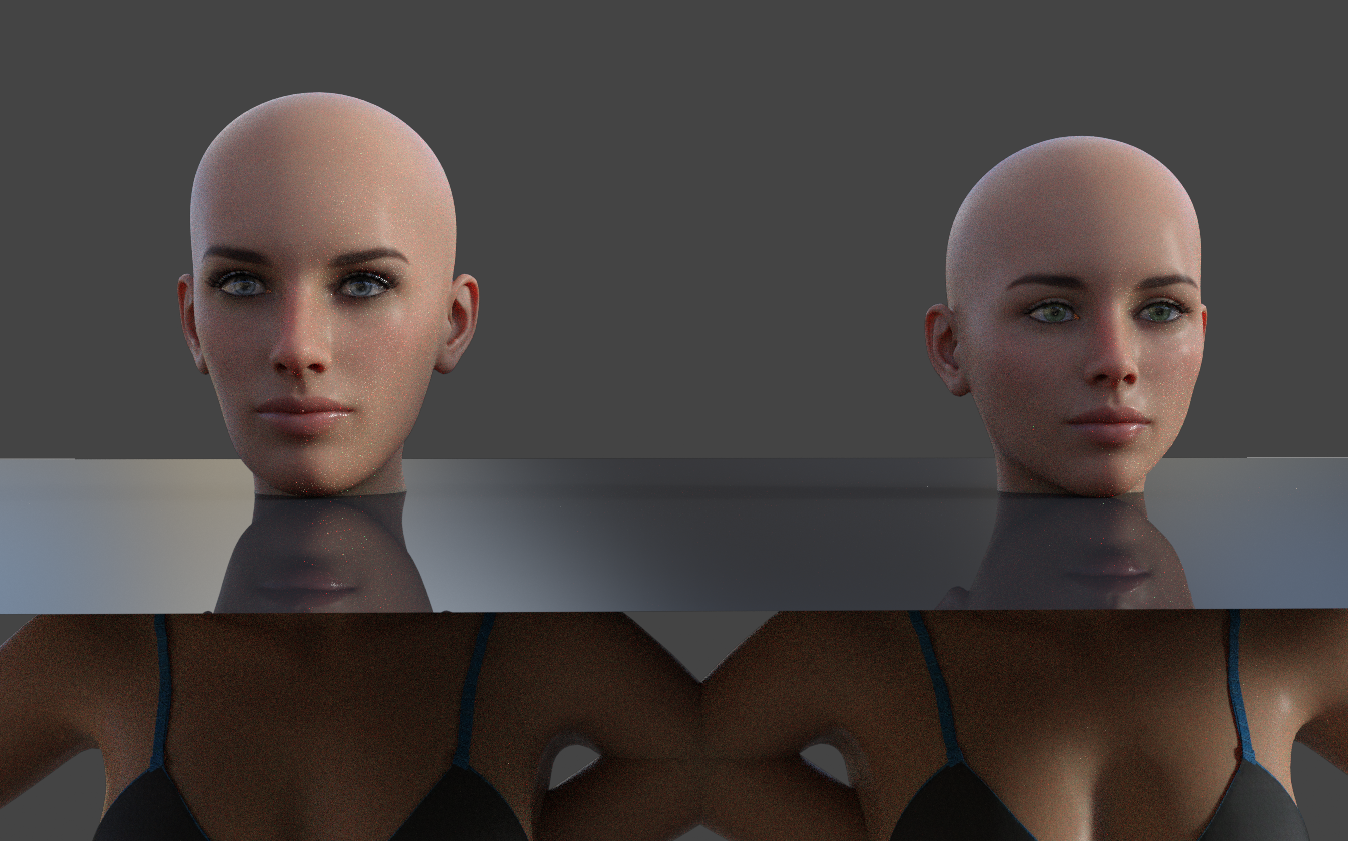
Both of these files were opened from my "Scenes" folder. When I saved them, they looked alike. Now... not so much.
(2) is the same view from the rear. Note that the bulk of the distortion is in the height/length of the head.
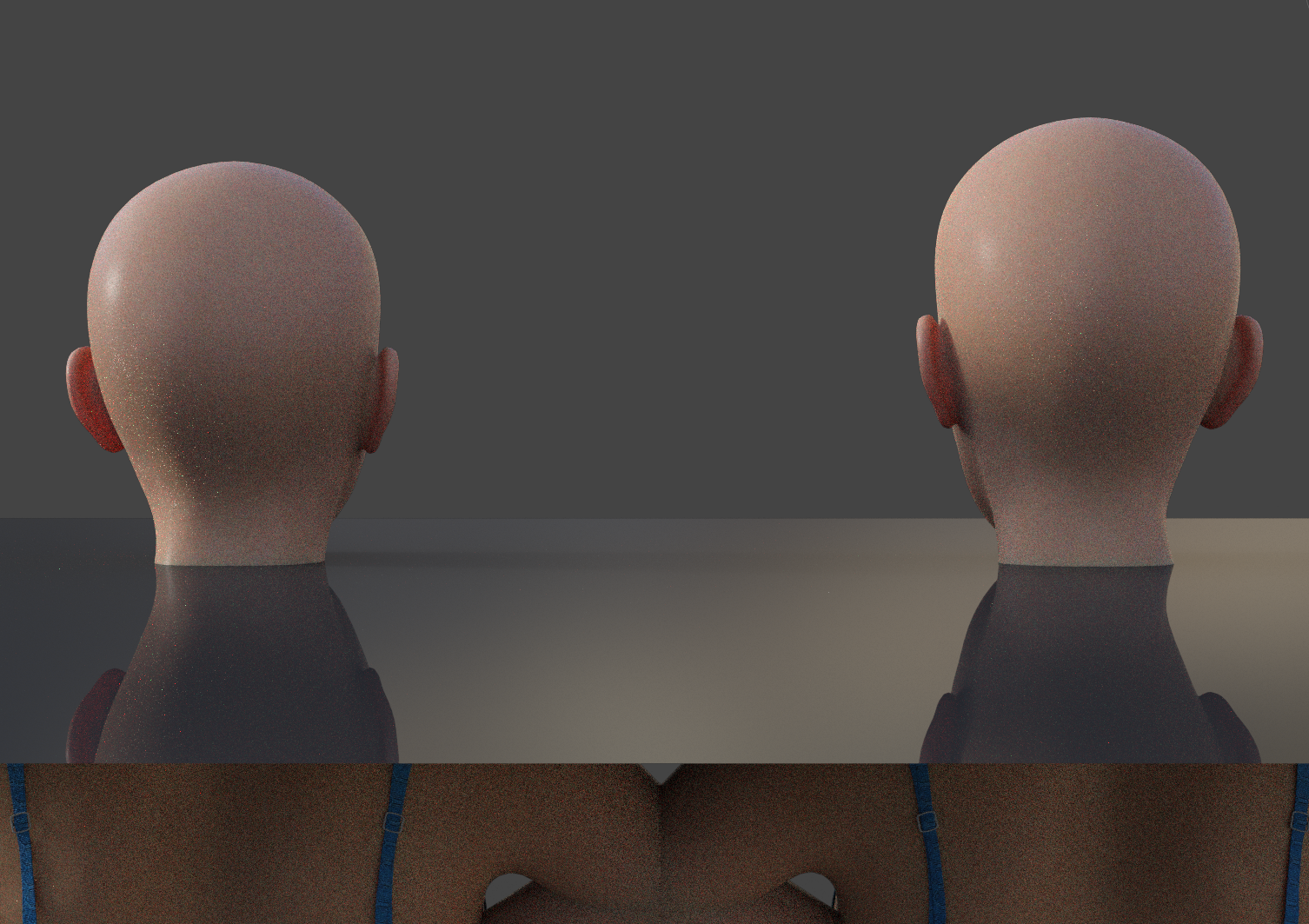
I went into the Shaping tab and noticed something unusual- Face Transfer was listed as '(2) Face Transfer 100%'. There was only one slider bar. I slid it to zero. Then, in the Parameters tab, I found the two Face Transfer sliders (3).
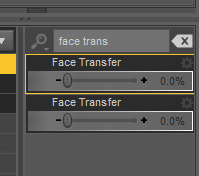
It appears that when the figure is first loaded into Daz, Face Transfer option 1 is at 100% and Face Transfer option 2 is at 0%.
In (4), the OBJ figure is on the left and the FT figure is on the right. Here I am using what Daz loads as defailt, "Face Transfer (1) at 100% and Face Transfer (2) at 0%.
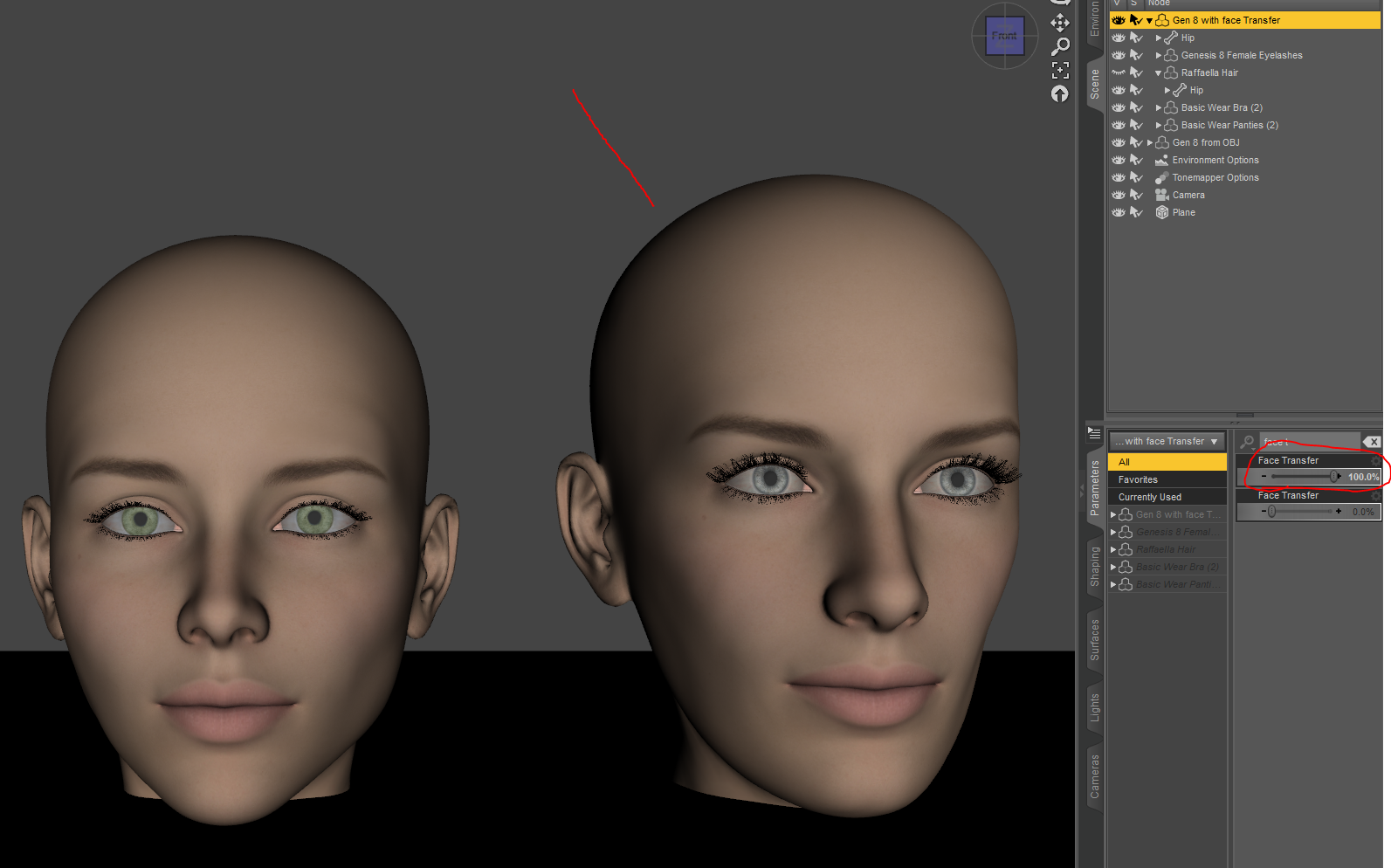
In (5) I have switched this around, with Face Transfer (1) at 0% and face Transfer (2) at 100%. Close! But, to my disappointment, no cigar. And I don't even like smoking!

Image (6) gives you an idea of what's happening. The head is still distorted. The face is still too long, especially between the eyes and the chin, causing the eyes to be too high up on the face, and causing the cheeks to look rectangular. Essentially the same problem as before, only less so, but still very noticeable.
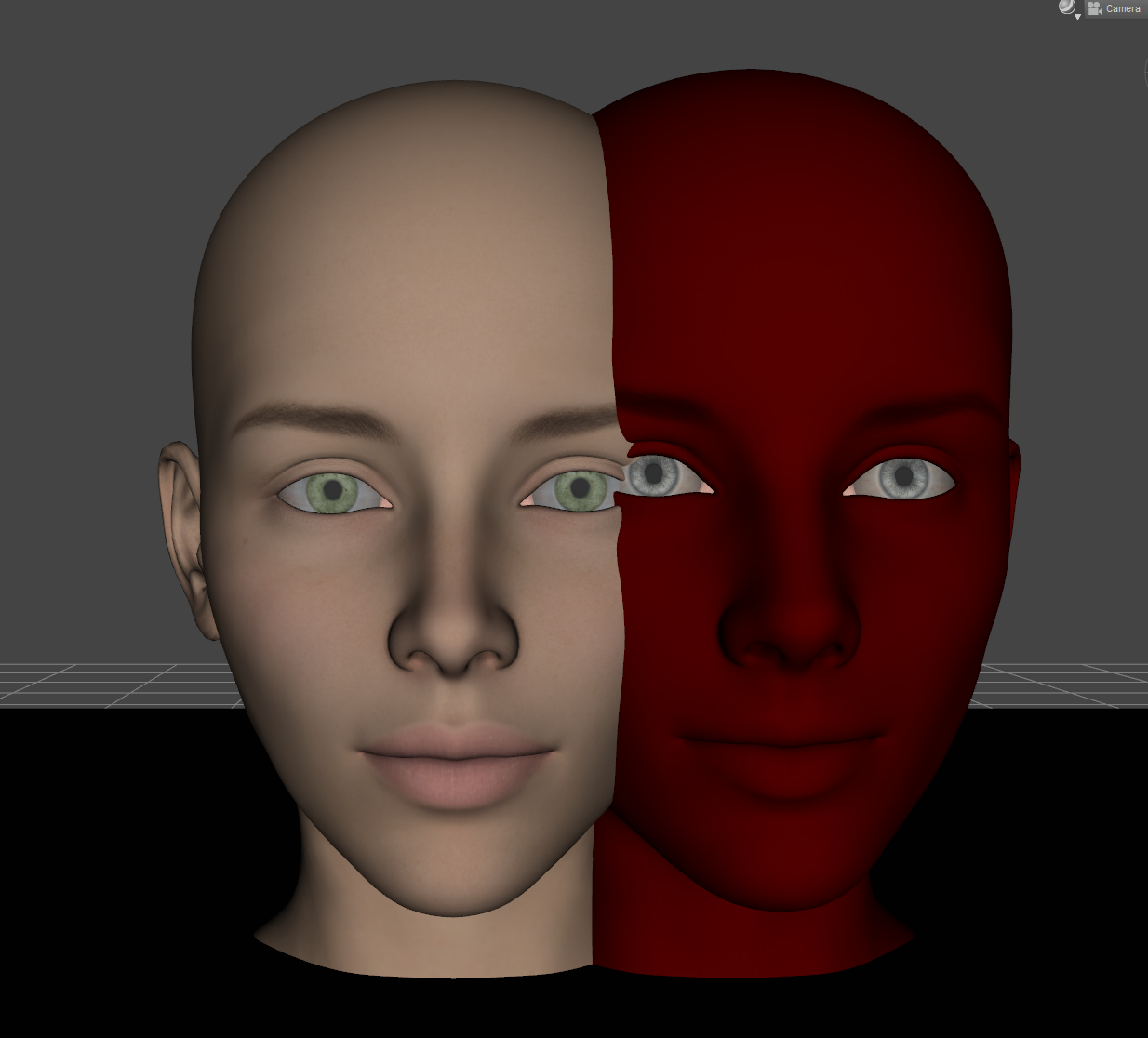
Here's what else I have tried so far:
*Upgrading Daz to the latest Beta (4.23.0.4)
*Uninstalling Daz and reinstalling
*Disabling Face Transfer in the plugins menu, restarting Daz (problem still there), enabling FT in the plugins menu, restarting again (still there).
*Opening a figure with FT morphs from a saved backup file on a different drive.Everything was working at least as of 28 October; I noticed it not working on 1 November. I didn't update or change anything between those dates. I installed Legacy UVs for Gen 9 and Render Doctor on 31 October.
I'm honestly pretty worried, y'all. I know what the problem is, but I don't know how to fix it, and I don't know exactly what Face Transfer is doing to the mesh. It seemed to happen literally overnight. Please help if you can.
Brand-New Problems with Face Transfer (distorting heads)Okay, I'm having a small panic attack tonight.
I've been using Face Transfer for years without any issues. Today, though...
Every saved figure I have in my library that has a Face Transfer morph is now loading with a distorted head. Specifically, it appears that the head is stretched vertically; quite a bit, enough to ruin the figure.
Similarly, any figure that does not have "Face Transfer" in the list of morphs loads just fine.
For reference, I pulled up a render from June and reopened the file just now. Ran the render with the camera in the same position.
The figures on the ends have morphs, including third-party ones, but they do not use Face Transfer. As you can see, they're unaffected and load as normal.
The figures in the center use Face Transfer and are both distorting in the same way.
Any ideas? I'm more than a little terrified that I've lost half of my figures library.
Currently running 4.22.1.110 Beta.
EDIT: I updated to 4.23.0.4 Beta and the problem is still there.
Please help, I'm definitely panicking now.
EDIT 2: (I had an adult beverage, feeling less panicked. Comments still very welcome!)
[Released] RSSY Character And Material Conversion Bundle Genesis 8 to Genesis 9 [Commercial]tvtom100 said:
Thanks for the response! I'll keep trying the character product. the others seem very cool. The materials/textures seem to transfer well but I tried everything to get the character transfer working. I'll try it on some other characters... just seems like I'm doing something wrong here. Like others, I found that the morphs which cause the problems are the characters main morph. Maybe your product isn't meant for the custom bought characters with a single morph? I'm not sure. I never tried like standard G8 male or female to see if that works. I'll do that now.
Are you selecting Zero when the Zero Figure Shape dialog comes up? This converter works best when you are converting the characters that are 1-2 morphs like Daz Characters such as Ollie, Dain, etc so you shouldn't be having any problem.
Olivia 9 Elder ShapeWell that's not good. I suppose I can morph with a couple age related products then.
Script to export geograft morphsNow I am trying to figure out how to revert the changes to restore the scene.
I tried keeping a cache of the new properties I am adding to the root node, then removing them at the end of the script. That does make the original geograft morph properties re-appear, but they are greyed out and I can't figure out why. I tried "unhide" but that didn't do anything.
UPDATE - Hmm.. It appears deselecting "show hidden properties" in preferences does make them disappear. Yet, right-clicking the property itself and selecting "unhide" does nothing.
UPDATE - SOLVED - Before removing the new property you added to the root node, you have to go through the process of turning off auto-follow on the original property, then removing the new property, then turning auto-follow back on for the old property. Done!
GoZ to zbrush, not keeping mask.Hello, I recently updated from windows 10 to 11 and did a fresh install so with that I had to install Daz and Zbrush fresh as well. When I was on win10 I could have a model be at a base morph (like freshly loaded in) on frame one of my timeline, I would goz into zbrush and mask out areas I wanted to work on, then I would go back into Daz and go to my last frame and goz with that. This would "update" the model in Zbrush to the version that had all my morphs on it but it would keep the masking I set up earlier from frame zero. After updating to Win11, any time I use goz it seems like it is clearing my zbrush scene and loading the model in as is, losing my masks. This makes it hard to select hair strands and the like if I have them overlapping due to morphs.
I am on Daz 4.23, Zbrush 4r8 p2. My export settings have export at current resolution and export with deformations ticked (I have tried various combinations though with no luck). I have also uninstalled the goz plugin, daz, and zbrush and reinstalled with no luck there. I have also updated the paths in zbrush.
Any help or ideas would be greatly appreciated as this really throws my workflow off. :(
Thanks!
Daz 3D is part of

Connect
DAZ Productions, Inc.
7533 S Center View Ct #4664
West Jordan, UT 84084Licensing Agreement | Terms of Service | Privacy Policy | EULA
© 2026 Daz Productions Inc. All Rights Reserved.