-
Exporting only the final frame of dForce timeline simulation?
WendyLuvsCatz said:
Richard Haseltine said:
Export as OBJ, clear the simulation, and import as a morph? Remevber you need just the one item (no add-ons like buuttons on Rigid Follow Nodes) and in base resolution.
if you do that make sure you unfit the clothing and have it at 0,0,0 position too
(also applies to dforce2morph)
Generally you would want it fitted and reverse deformations on, so that the morph stacked on top of tyhe pose - your approach is another way to achieve the same end, but it breaks the link to the wearer (minor tweaks to the pose probably wouldn't ruin the morph, so that may be useful).
Exporting only the final frame of dForce timeline simulation?Richard Haseltine said:
Export as OBJ, clear the simulation, and import as a morph? Remevber you need just the one item (no add-ons like buuttons on Rigid Follow Nodes) and in base resolution.
if you do that make sure you unfit the clothing and have it at 0,0,0 position too
(also applies to dforce2morph)
Exporting only the final frame of dForce timeline simulation?Export as OBJ, clear the simulation, and import as a morph? Remevber you need just the one item (no add-ons like buuttons on Rigid Follow Nodes) and in base resolution.
Considering M4 Mac MiniActually, I have a Windows box with a (now somewhat obsolete) graphics card, as well as my iMac, so setting up and test-rendering at low res on the Mac and transferring to the Windows box is what I used to do before some hardware issues made that less practical. It's a snap to keep the Studio assets on both systems and just transfer the finished scene (and local assets like home-edited textures).
I just want to make sure nothing will break, and that Studio will run without annoying problems.
DAZ and Unreal QuestionThe Unreal bridge is pretty good for getting things from DAZ into Unreal. You will need to make sure you are using a version of the plugin that corresponds with the version of the engine you are using. Textures often need tweaking, but the bridge does a good job of giving you a starting point.
Lighting should be considered totally separate, and you should just build a lighting scenario for the scene within Unreal. You can bring poses from DAZ into Unreal as animation assets after your initial transfer of your character, if you'd rather pose a character in DAZ. This can be tricky, but can work.
Going the other direction, I haven't tried. You would likely need to export your scene from Unreal in pieces, probably as OBJs, and then rebuild it in DAZ, and use the texture maps to rebuild the materials.
Attachment is a scene I rendered both in DAZ and in Unreal after bringing it across the bridge; showing some of the differences in how it may look. I had to fully relight, and on the Unreal side I redid most of the plants using the vegetation tools there. The statue is a Genesis 8 figure.
 Daz Studio BETA - version 4.23.0.4! (*UPDATED*)
Richard Haseltine said:
ChangelingChick said:
crosswind said:
DoctorJellybean said:
crosswind said:
UV Set is not saved in the Material Preset of a geoshell, as well as in Hierarchical Material Preset. There's no such issue with Figures / Props.
Edit: Besides 4.23 GR / PB, same issue happens in 4.22.0.16 ...
Could you please provide steps you took so I can try and replicate. Thank you.
As what I showed in mypost, the first screenshot. Can you see that ?
Load a geoshell on a G8F, choose a UV Set on a Surface, save a material preset with the surface and UV Set selected. Thanks!
Geoshells don't inherently have any UV's. They get them from the figure they're attached to. The best way to do that would be to set up the materials on the figure, then save them out from that and apply them to the geoshell (or edit the file).
GeoShells still have thje UV sets available, and those can be set independently from the base.
Available, yes, but not as part of themselves. That data is on the base. Geoshells are dynamic and created from the base when they're made, so the data from the base is there, but they don't have UV's of their own. You can see this demonstrated by saving one as a new figure/prop asset. You'll notice there are no UV (or morph) definitions saved with it. The same geoshell that would cover a primitive cube would cover a G8F. Whatever the active UV is on the base is what the Geoshell will come in with. You could do a postload script to change the UV after it's loaded though probably.
There's Always Another Sale Thread -- Discussions Only Pt 3SilverGirl said:
XiousDs said:
Earlier Genesis versions have Polynesian characters. They had not gotten to them yet in 9, so it may or maynot be coincidental timing. That said, though, I don't think their was any attempt to make them look like the characters from Moana as they could have easily accomplished that if it was their goal. What they do look like are folks with Polynesian ethnicity which is much vaster than just a couple disney characters.Look at the outfit for the girl. Including the necklace. There is absolutely *no way* that's coincidental.
To me in the main promo, plus the next several (the briefs only renders to show off the full morph/skin), Koa 9 looks more like a Random Buff White Dude than a Pacific Islander. I am talking about promos on the character only page, not the bundle/add-on pages, to be clear.
Yes, it's not true of other promos on this page - but most of those include tattoos and possibly with at least 1 other morph dialed in. Probably the Premier Kanoa?
I prefer the character promos with one render showing characters made from the base figure mixed with others and labeled (e.g., Koa+50% Michael 9, Koa + 50% Genghis 9, Koa + 70% Lawrence 9)
FilaToon / Cell shaded rendering with Filament3Diva said:
Mavka https://www.daz3d.com/mavka-for-genesis with some minor morph tweaks and with custom Filatoon shader presets.

Love this! Super cute and really nice shader set-up.
FilaToon / Cell shaded rendering with FilamentMavka https://www.daz3d.com/mavka-for-genesis with some minor morph tweaks and with custom Filatoon shader presets.
Hair/Clothing Conversion and File SizesThe data folder is part of the product's installed files - I have the set and so was able to look. Each moustache is a separate model, with separate morphs, so the total file size is enormous but not, as felis says, the in-memory size for just each item unmorphed or with only one or two morphs applied (the bulky part of a morph is the deltas, the offsets for the vertex positions, and that isn't loaded until the morph is set to a non-zero value).
Daz Studio 4.23[.0.x], General Release!Richard Haseltine said:
Modifier Assets currently include Morphs Modifiers and Push Modifiers.
http://docs.daz3d.com/doku.php/public/software/dazstudio/4/change_log_4_23_0_1#4_22_1_94
http://docs.daz3d.com/doku.php/public/software/dazstudio/4/change_log_4_23_0_1#4_22_1_97I thought I got it, but NOW I'm confused again, since the morph modifier is part of the premier subscription.
Can this "modifier assets" still be used without having a Plus+ or premier membership?Identify model used in promo?Elor said:
vonHobo said:
Is there any way to convert 8 to 9? I tried one product to do that and it did not work for me.
If you only want the morph, you can follow this tutorial by Jay Versluis:
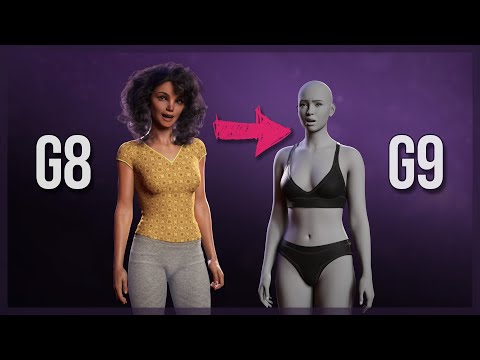
If you want to split the head and body morph, there is another tutorial:

Both tutorials can be done with no additional purchase, using only Daz Studio.
Some additionnal work around the eyes may be necessary, but I think the first tutorial speaks about it a bit.
Thank you!
Identify model used in promo?vonHobo said:
Is there any way to convert 8 to 9? I tried one product to do that and it did not work for me.
If you only want the morph, you can follow this tutorial by Jay Versluis:
If you want to split the head and body morph, there is another tutorial:
Both tutorials can be done with no additional purchase, using only Daz Studio.
Some additionnal work around the eyes may be necessary, but I think the first tutorial speaks about it a bit.
Daz Studio 4.23[.0.x], General Release!Masterstroke said:
I need some confirmation or disconfirmation about an essential DAZ studio feature, please.
Is it true as reported in other forums, that the feature
"Save As - Support Assets - Morph Assets"
is disabled and only availeble to premier subscribers?
Does that mean, you cannot save your own created morph targets anymore, unless you are a premier subscriber?There was nothing changed from functionality perspective except for the menu Description changed from Morph Asset(s)... to Modifier Asset(s)...
Because Type of Properties in Parameters Pane are all defined as Modifier/xxx (e.g. Modifer/Shape, Modifier/Pose, Modifier/Corrective...) , naming it as Modifier Asset(s)... is more precise than Morph Asset(s)...
Daz Studio 4.23[.0.x], General Release!Masterstroke said:
Leana said:
Masterstroke said:
I need some confirmation or disconfirmation about an essential DAZ studio feature, please.
Is it true as reported in other forums, that the feature
"Save As - Support Assets - Morph Assets"
is disabled and only availeble to premier subscribers?
Does that mean, you cannot save your own created morph targets anymore, unless you are a premier subscriber?No. Saving as morph assets is deprecated and replaced by saving as "Modifier asset", it's still available for everybody.
Thank you, and it works the same way it used to be when you are an unsubscribed free user?
AFAIK it works the same for morphs but can save more than just morphs now.
Daz Studio 4.23[.0.x], General Release!Leana said:
Masterstroke said:
I need some confirmation or disconfirmation about an essential DAZ studio feature, please.
Is it true as reported in other forums, that the feature
"Save As - Support Assets - Morph Assets"
is disabled and only availeble to premier subscribers?
Does that mean, you cannot save your own created morph targets anymore, unless you are a premier subscriber?No. Saving as morph assets is deprecated and replaced by saving as "Modifier asset", it's still available for everybody.
Thank you, and it works the same way it used to be when you are an unsubscribed free user?
Daz Studio 4.23[.0.x], General Release!Masterstroke said:
I need some confirmation or disconfirmation about an essential DAZ studio feature, please.
Is it true as reported in other forums, that the feature
"Save As - Support Assets - Morph Assets"
is disabled and only availeble to premier subscribers?
Does that mean, you cannot save your own created morph targets anymore, unless you are a premier subscriber?No. Saving as morph assets is deprecated and replaced by saving as "Modifier asset", it's still available for everybody.
Daz Studio 4.23[.0.x], General Release!I need some confirmation or disconfirmation about an essential DAZ studio feature, please.
Is it true as reported in other forums, that the feature
"Save As - Support Assets - Morph Assets"
is disabled and only availeble to premier subscribers?
Does that mean, you cannot save your own created morph targets anymore, unless you are a premier subscriber?Is there a way to know at which level an HD morph was sculpted ?Elor said:
If I understand correctly, if a morph was sculpted at level 3, I need to set the Mesh Resolution of the prop/figure/clothing item for which it was made at 3 too. If I set it below 3, I'll lose details from the morph, and I set it higher than 3, I'm likely vasting memory with the added geometry.
That's correct, you will still see an effect of the HD detail at lower subD, but it wont be the full effect.
But how I'm suppose to know at which level a morph was sculpted ?
Some of them will say the level of HD in the morph name. Otherwise if they dont say which SubD level it was sculpted at, then i think there's no way to know. Also, since it is jus in the name, the author could be overstating and say it is at SubD4 when in reality all the detail could be captured at SubD1
But loading Victoria 7 HD preset, the Mesh Resolution is set to 3.
I wouldnt read too much into what resolution is set by an HD preset. SubD3 is a fairly high SubD, perhaps the preset just didnt want to push up the SubD higher to 4 and were leaving that to the user to adjust in parameters.
Victoria 8 HD file are named FBMVictoria8HDLv4.dhdm and FHMVictoria8HDLv4.dhdm but this time Victoria 8 HD loads with a Mesh Resolution set to 4.
Again, wouldnt read too much into that,
Personally I would say just to use your eyeballs and set viewport drawsyle to smooth shaded, look at the screen, and see if increasing SubD higher (in parameters) will change the level of visible detail while an HD morph is dialled in.
Is there a way to know at which level an HD morph was sculpted ?Hello,
HD morphs are still a bit of a mistery to me.
If I understand correctly, if a morph was sculpted at level 3, I need to set the Mesh Resolution of the prop/figure/clothing item for which it was made at 3 too. If I set it below 3, I'll lose details from the morph, and I set it higher than 3, I'm likely vasting memory with the added geometry.
But how I'm suppose to know at which level a morph was sculpted ?
With some products, it's in the name of the slider (like CJ Eden who has a HD3 level morph, so with Mesh Resolution set at 3, I'm good I suppose) but with others, I don't have the first clue.
I thought the name of the files could be a good indication, but looking at some HD Addon I bought for Daz characters, I'm not so sure.
Victoria 7 HD file are named FBMVictoria7HDLv4.dhdm and FHMVictoria7HDLv4.dhdm and I suppose Lv4 is for Level 4. But loading Victoria 7 HD preset, the Mesh Resolution is set to 3.
Victoria 8 HD file are named FBMVictoria8HDLv4.dhdm and FHMVictoria8HDLv4.dhdm but this time Victoria 8 HD loads with a Mesh Resolution set to 4.
Both non HD Victoria 7 and 8 will load with a Mesh Resolution of 2 so at least, there is a difference between the non HD and HD version, which is not always the case.
As an example, Arianna 8.1 and Arianna 8.1 HD both have a Mesh Resolution set to 4, which may not be enough to take advantage of either of them:
- Arianna 8.1 have files called MCMArianna8_1Navel_HDLv5.dhdm, MCMArianna8_1Nipples_HDLv5.dhdm and PHMArianna8_1_Iris_HDLv5.dhdm (so level 5 morphs for her navel, nipples and irises ?)
- Arianna 8.1 HD have FBM and FHM morphs called FBMArianna8_1HDLv5.dhdm and FHMArianna8_1HDLv5.dhdm
I also have at least one clothing item which will have different Mesh Resolution levels, depending on which way I loaded it (the Untamed Warrior Shoulders): if I'm using the whole outfit preset, the Shoulders' Mesh Resolution is set to 1. If I'm loading only the Shoulders, their Mesh Resolution is set to 4.
Two other items of the same outfit also have HD version, but all are loaded with Mesh Resolution set to 1, but to make the situation even messier, the legs will only have their HD Morph (called Legs HD) dialed at 100% if loaded independantly: the version from the outfit is loaded with this Legs HD morph set to 0. And this time, none of the file has a Lv[number] in their name.
So…
Is there a way to know at which level an HD morph was sculpted, preferably one that doesn't required rendering each item at a different Mesh Resolution, then scrutining every details to decide if Mesh Resolution N+1 is more detailled than Mesh Resolution N ?
Daz 3D is part of

Connect
DAZ Productions, Inc.
7533 S Center View Ct #4664
West Jordan, UT 84084Licensing Agreement | Terms of Service | Privacy Policy | EULA
© 2026 Daz Productions Inc. All Rights Reserved.