-
Looking for Goat and/or Capricorn
xyer0 said:
This contains a goat morph and materials pack for the Daz Sheep.
Oh that looks promising, thanks a lot! come to a bit of age but that doesn't bother me
Need help creating an Akita breed for Daz dog 8I'm a Blender user so my suggestion is mostly related to Blender ~~ (probably the quickest way...)
As for the shape, an Akita is similar to a Husky, so you can easily sculpt the shape accordingly if you own a Husky for Dog 8 (also doable based on a Dog 8 Base...) in Blender (as per the metrics if needed...). Then create or udpate as an Akita morph as well as the fur morph as needed.
As for the texture, you can then export Akita figure to Blender and paint the color and texture according to a typical ginger + white Akita, especially on the material zone of "Coat", and bake the texture maps. No need to touch UV ! Personally recommend this free but pretty good add-on for texture painting https://github.com/ucupumar/ucupaint/releases
Since the dForce Furs on a Husky for Dog 8 are generated on Target Surfaces, so the painted Akita textures can be well used on both Akita's figure as well as the fur figures. Then you tweak the surface settings on Akita's surfaces to have more realistic and natural lookings, as well as the surfaces on Furs, e.g. increase density, length, etc. to make them more fluffy ~~ yada yada.
Alternatively, you can make specific strand-based furs by using SBH Editor in DS... only that'll take more time and you have no way to add dForce capability...
Need help creating an Akita breed for Daz dog 8Do you want the fluffyness to come from the dforce fur on the model or from a morph on the model?
Looking for Goat and/or Capricornv8 animation to v4i need transfer some animation of v8 to use in v4 because i have a lower ram memory and is more faster use v4 charactar is possible exist some asset / tool script etc to buy or free that can convert animatio of v8 to genesis or genesis 2 or V4
DAZ Studio Installation Guide MacWow. I found this thread looking for hope about my Mac situation and it's not looking good...
I have a MacBook Pro with 16GB RAM running Catalina. I have an external drive attached where I keep new purchases because my 1TB internal drive was filling up. (Hey, I've been using DS and Poser since they were first released!) I've been chugging along pretty well until the release of the G9 line of characters. Now I find stuff not working. Characters don't load properly. Uilities meant to transfer character shapes don't work. The utilities for converting G8 hair to G9 don't work. I have an ongoing Bug Report open with DAZ but I haven't heard back in months. All of my G9 products are installed on my external drive. G8 products installed on external drive work fine.
I'd like to know if anyone has G9 working on an M1 Mac. Because I'd still rather use a Mac than switch to a Windows PC. But if that's the way it's gotta be, I'll accept that.
HH Scarlett for G9 [Commercial]Meet Scarlett!
HH Scarlett for Genesis 9 [Commercial]

HH Scarlett is a high-definition sculpted feminine fatale, beautiful yet edgy, for Genesis 9. Her beauty comes more alive at higher subdivision levels from the many high-definition morphs including a wide range of joint-corrective morphs tailored for her figure. Scarlett also includes small, large, and supported breast HD morphs as well a high-definition sculpted anatomy morph.She also comes with a wide variety of professional-looking cosmetic options. Outside of many makeup and eye color options, Scarlett comes with a variety of brow fillers, mascara options, levels of tanned skin, and tattoos. The amount Scarlett offers doesn't stop there, she also comes with morphs and materials that can bring out her inner vampire, turn her into a demon, and even take her into the world of cyberpunk! She comes with fingernail and toenail morphs, vampire teeth, special skin colors, a shell layer to add a bloody mess, cyberpunk lines, and more.
Purchase HH Scarlett today and bring an unparalleled level of beauty and attitude to your renders!


 I am looking for a Brainiac headpiece
Do you know how to import an obj, and then do transfer utility to fit G8M?
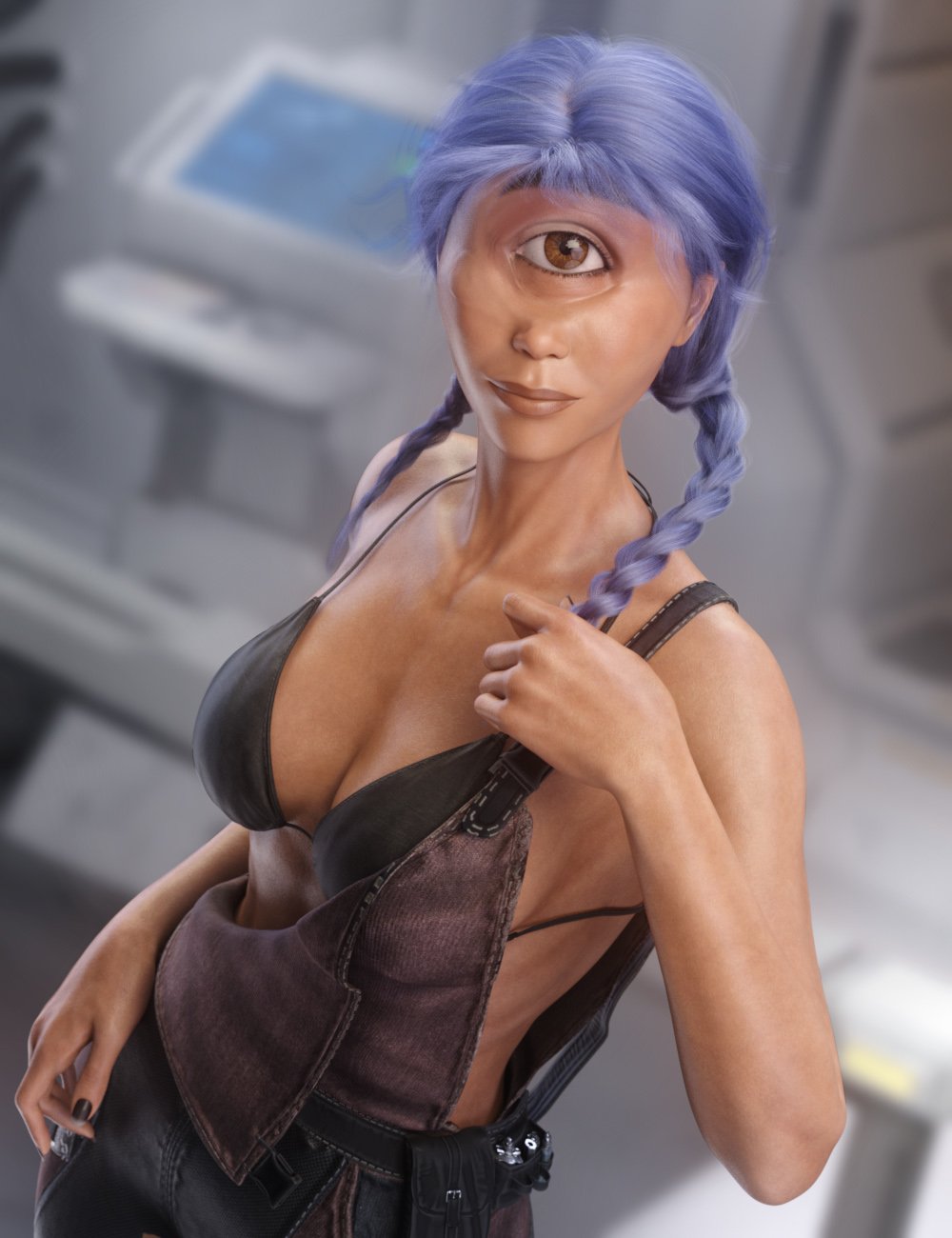
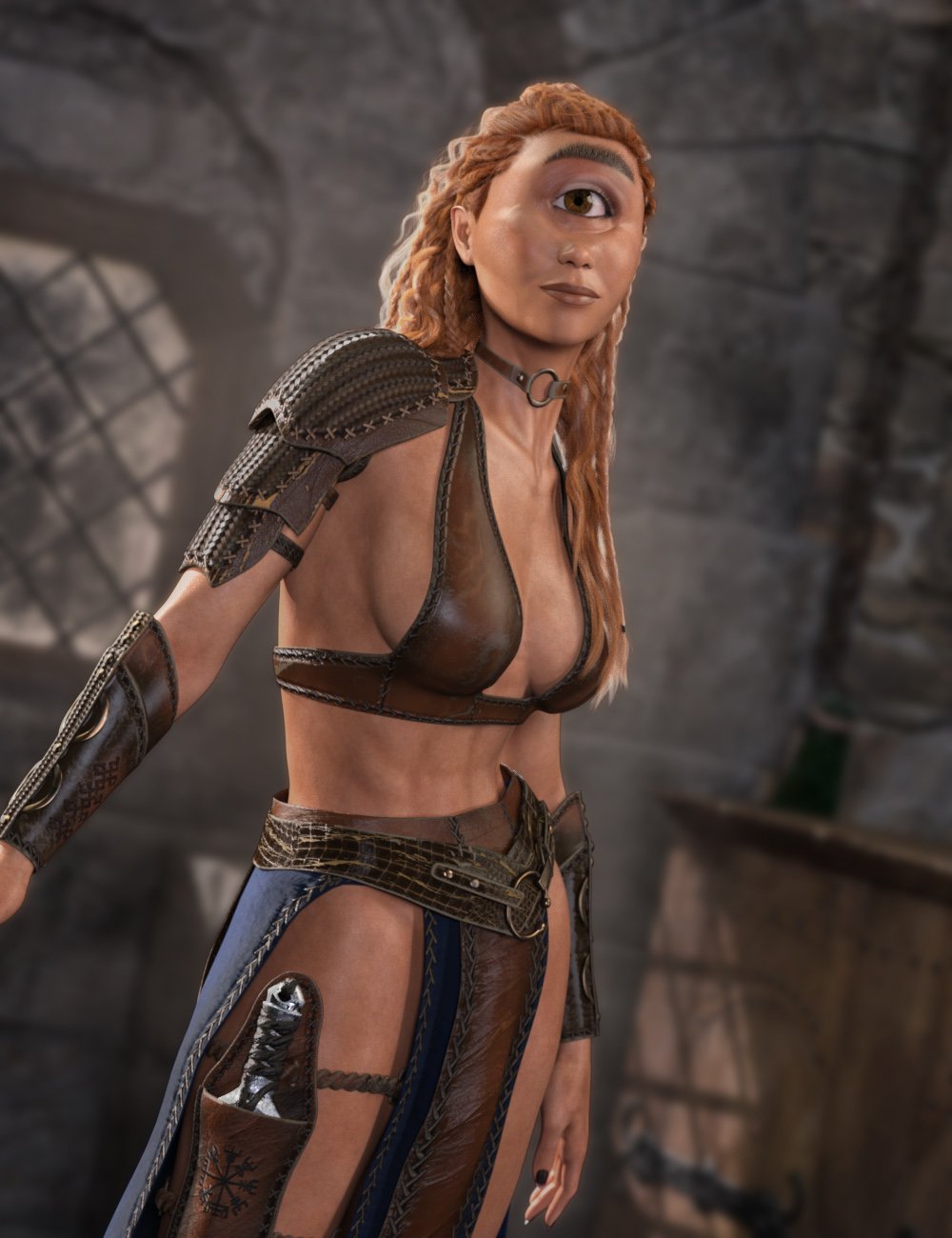
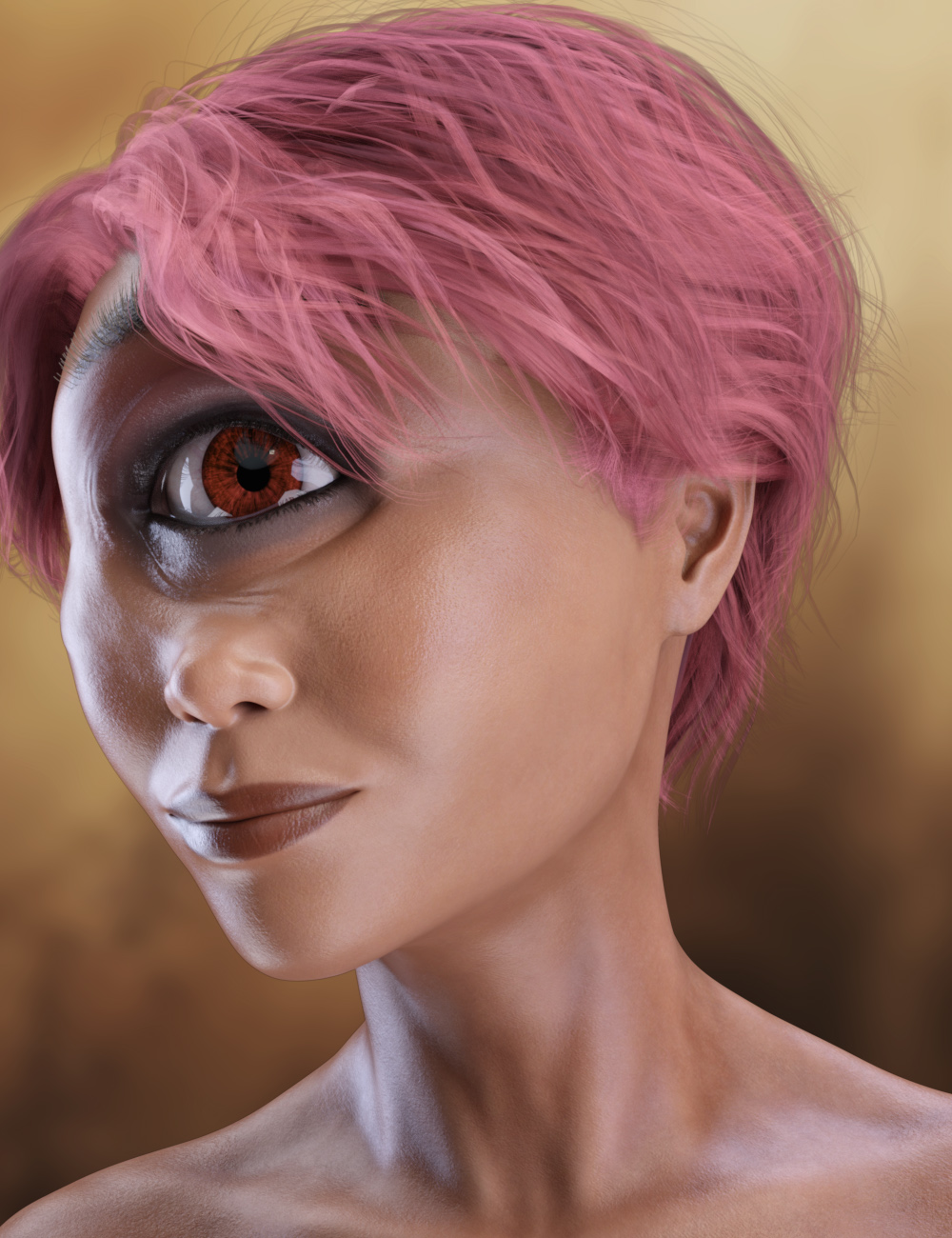
Thela Clops for G9 [commercial]Thela Clops for G9
https://www.daz3d.com/thela-clops-for-genesis-9
The Cyclops is a classic creature of Myth and Horror, Fantasy and Science Fiction.
Artfully sculpted onto Genesis 9, this character is crafted to exacting standards of poseability in body and expressions, giving her loads of personality. While care was taken to ensure most expressions work smoothly some expressions may distort due to the extreme facial morph
This set was designed with ultra-realistic PBR texture techniques. The High Definition morphs, High Quality textures really bring this character to life for your renders.
What's Included and Features
- Thela for Genesis 9: (.DUF)
- Thela Character Presets
- Thela Shaping Presets
- Material Options:
- One Full Female Skin Mat with Female Anatomical Elements
- Eight Makeup Material Presets
- Five Eye Material Presets
- Four Fingernail Material Presets
- One Face Graft for Single Eye
- One dForce Eyebrow
 Is there any way to manually edit Genesis 9 eyebrows?
dream-weaver said:
I'm trying to recreate a character and I used one of the fiber style G9 brows. But I'm not fully there yet and there is now way to get them any further without distorting the otherwise pretty much final facial structures.
Is there any way to manually edit these eyebrows with something like a tool?
I tried meshgrabber, but that's not really working on fibers.
Depending what you're really using... If they're G9's fiber mesh brows, they are not SBH other than sort of transmapped ones. So Mesh Grabber works well on them...and you can freely save the tweaked shape as morph properties with Mesh Grabber.
Alternatively, you can export the brows as OBJs to external software like Blender, and sculpt the shape as needed, then import OBJs to the brows with Morph Loader Pro to make whatever partial head morph or corrective morphs. It should be pretty simple.
D-Formers: Multiple handles on a base, linking movement, and animated morphscrosswind said:
I'm sorry man ~ I was not able to watch that video on youtube without VPN which didn't work last night.. Now I can see it and got what you want !
So, in this case, you keep going in the simplest way: use one dFormer with default settings... and animate the Transform values of d-Former Field with keyframes on the timeline.
As for the way of morphing, the way I mentoined was for static case. If going for making an animation, the traditional way in DS is to make and import sequential OBJs (with dFormer or Blender...) Like this example, I exported OBJs and sculpted them a bit in Blender as it was quicker than using multiple dFormers, then import OBJs as morphs and animate them on the timeline... to make some subtle changes, roughly like this vedeo: https://mega.nz/file/aWwU2JIS#tr6a9vmwfiS_8vCEIX7l7nQaFnUxQ7a7se4kScU-lm0
Thank you!
That is pretty much the conclusion I'd come to as well. Each individual OBJ morph could be hidden so as not to clutter things up.
Honestly though, I think that simply having the null hold all the individual D-Formers and simply having its y-position change over the timeline and converted into an ERC freeze is the way to do it. It gives that much more control. It's just too bad there isn't a way to make an "animated" morph happen.
Thanks again
https://www.daz3d.com/inflatable-water-float-poses-for-genesis-9-8-and-81-female Inflatable posing?My guess is that you load the figure, apply the pose. Load the the inflatable and dial in the matching morph. Just load both of them where they go by default, don't move them at this point. They should line up. Then you can group them and move the group where you want it. No need to parent.
Something is wrong with DS 4.22. Won't render half the time.crosswind said:
Endlessdescent said:
crosswind said:
Endlessdescent said:
crosswind said:
I don't have issue while previewing or rendering this character with DS 4.22 + driver ver. 560.70.
Suggest you use DDU to completely uninstall Nvidia driver and its residuals, then install a fresh latest Studio driver... see if it'll work.
I will give that a try. I suspect however that potentially something is getting baked into my scenes that is incompatible with 4.22. Either a shader, or a morph or something.
If you want to try to load this figure, not sure how that will go. Here is the .duf
I got no issue either with your DUF file. So I still don't think it's the problem of Daz Studio. Pls try DDU ~~
Besides, there's an OOT hair in the scene, so you've tried removing the hair, but still failed to render, correct ?
Yes I removed the hair with no luck. What is the perameter needed to fix OOT hairs for 4.22?
Alright I will try DDU thank you.
Btw, wow how does your PSU handle that hardware? O_OIf you ever updated OOT's hair shader with DIM, it's not the culprit as you've removed it but no avail... You can go to Surfaces pane, select the hair surfaces, check if there's any texture map in Transmitted Color slot. If there's is... it means you're still with the problematic shaders.
Ha ~ I have a PSU of 2000W and a big tower case ... I used to have 4 cards, they all worked well ~~

I've never even seen a 2000w PSU haha.
I ran DDU, completely removed all old drivers. Reinstalled 560.70 and still the same problem with 4.22
This is my log from 4.15. I did the exact same render with the same .duf only the render was successful.
https://drive.google.com/file/d/12TwBIy2So5yHgeqDXQ4TgRNbXBzWfWMJ/view?usp=sharing
4.22 acts like it is running out of GPU memory. If I allow CPU fallback with this .duf, 4.22 completely crashes when trying to render as shown below.
I think the reason you can successfully render in 4.22 is because you have much more GPU memory. For some reason 4.22 seems to be requiring much more memory than 4.15 for the exact same scene.
If there is a problem with my GPU, I don't know how it would only have an issue with 4.22. It runs perfectly on any other software from UE5, Blender, any games etc.
Something is wrong with DS 4.22. Won't render half the time.Endlessdescent said:
crosswind said:
I don't have issue while previewing or rendering this character with DS 4.22 + driver ver. 560.70.
Suggest you use DDU to completely uninstall Nvidia driver and its residuals, then install a fresh latest Studio driver... see if it'll work.
I will give that a try. I suspect however that potentially something is getting baked into my scenes that is incompatible with 4.22. Either a shader, or a morph or something.
If you want to try to load this figure, not sure how that will go. Here is the .duf
(Link removed by mod)I don't know why Mod removed the DUF file link ~~ Users can always share user-facing scene files ~~ as well as delta DSF files, AFAIK.
Something is wrong with DS 4.22. Won't render half the time.Endlessdescent said:
crosswind said:
Endlessdescent said:
crosswind said:
I don't have issue while previewing or rendering this character with DS 4.22 + driver ver. 560.70.
Suggest you use DDU to completely uninstall Nvidia driver and its residuals, then install a fresh latest Studio driver... see if it'll work.
I will give that a try. I suspect however that potentially something is getting baked into my scenes that is incompatible with 4.22. Either a shader, or a morph or something.
If you want to try to load this figure, not sure how that will go. Here is the .duf
I got no issue either with your DUF file. So I still don't think it's the problem of Daz Studio. Pls try DDU ~~
Besides, there's an OOT hair in the scene, so you've tried removing the hair, but still failed to render, correct ?
Yes I removed the hair with no luck. What is the perameter needed to fix OOT hairs for 4.22?
Alright I will try DDU thank you.
Btw, wow how does your PSU handle that hardware? O_OIf you ever updated OOT's hair shader with DIM, it's not the culprit as you've removed it but no avail... You can go to Surfaces pane, select the hair surfaces, check if there's any texture map in Transmitted Color slot. If there's is... it means you're still with the problematic shaders.
Ha ~ I have a PSU of 2000W and a big tower case ... I used to have 4 cards, they all worked well ~~
Something is wrong with DS 4.22. Won't render half the time.crosswind said:
Endlessdescent said:
crosswind said:
I don't have issue while previewing or rendering this character with DS 4.22 + driver ver. 560.70.
Suggest you use DDU to completely uninstall Nvidia driver and its residuals, then install a fresh latest Studio driver... see if it'll work.
I will give that a try. I suspect however that potentially something is getting baked into my scenes that is incompatible with 4.22. Either a shader, or a morph or something.
If you want to try to load this figure, not sure how that will go. Here is the .duf
I got no issue either with your DUF file. So I still don't think it's the problem of Daz Studio. Pls try DDU ~~
Besides, there's an OOT hair in the scene, so you've tried removing the hair, but still failed to render, correct ?
Yes I removed the hair with no luck. What is the perameter needed to fix OOT hairs for 4.22?
Alright I will try DDU thank you.
Btw, wow how does your PSU handle that hardware? O_OSomething is wrong with DS 4.22. Won't render half the time.Endlessdescent said:
crosswind said:
I don't have issue while previewing or rendering this character with DS 4.22 + driver ver. 560.70.
Suggest you use DDU to completely uninstall Nvidia driver and its residuals, then install a fresh latest Studio driver... see if it'll work.
I will give that a try. I suspect however that potentially something is getting baked into my scenes that is incompatible with 4.22. Either a shader, or a morph or something.
If you want to try to load this figure, not sure how that will go. Here is the .duf
I got no issue either with your DUF file. So I still don't think it's the problem of Daz Studio. Pls try DDU ~~
Besides, there's an OOT hair in the scene, so you've tried removing the hair, but still failed to render, correct ?
Something is wrong with DS 4.22. Won't render half the time.crosswind said:
I don't have issue while previewing or rendering this character with DS 4.22 + driver ver. 560.70.
Suggest you use DDU to completely uninstall Nvidia driver and its residuals, then install a fresh latest Studio driver... see if it'll work.
I will give that a try. I suspect however that potentially something is getting baked into my scenes that is incompatible with 4.22. Either a shader, or a morph or something.
If you want to try to load this figure, not sure how that will go. Here is the .duf
(Link removed by mod)D-Formers: Multiple handles on a base, linking movement, and animated morphscrosswind said:
1) Yes ~ Switch Influence Mode to Weight Map, paint the weight properly as needed ( Select polygons first, then Fill Selected and Smooth Selected with Node Weight Brush tool... and give them different weight if you want to have different size of bulges)... and then tweak Scale XZ of the d-Former ~ (ss1 ~ 2)
2) No need... (I'm lazy to try... but I think that may work to some extent.)
3) Yes ~ set mutiple key frames with different scale value(s) with the d-Former. But I suggest you export the dFormed result to OBJ and import OBJ as a morph with Morph Loader Pro. Then animate with the morph, which'll be neater. (ss3)
I played with it and I realized where the miscommunication happened:
I don't just want the different bulges to expand and contract, but to "slide along" the pipe, like in the video in the original post. So the Weight Mapped Influence isn't the way to go. I tried it and it only affects the specific geometry of the cylinder, not allowing it to move down its length.
That just brings me back to your point on #3 in my original reply; with the Morph Loader it will absolutely scale the bulges outward, but I need to figure out how/if I can use the D-Formers to make the bulges move long the pipe and put that into a morph dial. Still experimenting!
Thanks for the reply, and please let me know if you have any further insight on the matter.
D-Formers: Multiple handles on a base, linking movement, and animated morphsIt turns out that for my second question, if you parent the D-Former bases to a Null object, and then parent the Null object to the cylinder, the D-Forms will still apply to the cylinder and just skip over the null. (I'm assuming because it doesn't have geometry and it just "passes the buck" up to the next parent that does?)
crosswind said:
1) Yes ~ Switch Influence Mode to Weight Map, paint the weight properly as needed ( Select polygons first, then Fill Selected and Smooth Selected with Node Weight Brush tool... and give them different weight if you want to have different size of bulges)... and then tweak Scale XZ of the d-Former ~ (ss1 ~ 2)
2) No need... (I'm lazy to try... but I think that may work to some extent.)
3) Yes ~ set mutiple key frames with different scale value(s) with the d-Former. But I suggest you export the dFormed result to OBJ and import OBJ as a morph with Morph Loader Pro. Then animate with the morph, which'll be neater. (ss3)
1) Maybe I'm misunderstanding, but I thought that if I had changed the Influence to a Weight Map, wouldn't I be weight-mapping the geometry of the cylinder itself? I didn't consider it because I thought then that the cylinder's mesh itself would be moving rather than the D-Form through its space?
Please help correct my understanding on which part is actually being Weight-Mapped, but I will give it a go.3) A few clarifications needed here:
I get what you mean, where I can take the D-Form's position on the timeline and set its y-position to the different spots along the cylinder, but I'm confused about the OBJ file. Can an OBJ file store data about animation like that? (Again, I'll take your word for it and try it, but I want to make sure that I'm understanding the way it works.)Thank you! I will keep you updated on the results
Daz 3D is part of

Connect
DAZ Productions, Inc.
7533 S Center View Ct #4664
West Jordan, UT 84084Licensing Agreement | Terms of Service | Privacy Policy | EULA
© 2026 Daz Productions Inc. All Rights Reserved.