-
SimTenero Randomizer2 (Commercial)Does it work with morphs installed by Daz Connect?
Yep, if a morph shows up in the Shaping pane, Randomizer2 should have no problem seeing it regardless of install method. It is important to note, though, that this only applies to actual morphs, not "ERC" parameters (sliders that control other sliders).
Thanks. I looked at the user guide you posted, and I was concerned about the part about saving to the data directory. For Daz Connect installations, the data directory is in the individual "cloud" folders. In general, things a user tries to add in there won't work. Does the randomizer get around that problem because it is a plug in?Cloud installs still set up folder structures (by default, in your "Users\YourName\Documents folder) which is all the plugin needs. To be safe I just tested this with a cloud installed item I've never installed locally and verified it works

Thanks for verifying.
SimTenero Randomizer2 (Commercial)Does it work with morphs installed by Daz Connect?Yep, if a morph shows up in the Shaping pane, Randomizer2 should have no problem seeing it regardless of install method. It is important to note, though, that this only applies to actual morphs, not "ERC" parameters (sliders that control other sliders).
Thanks. I looked at the user guide you posted, and I was concerned about the part about saving to the data directory. For Daz Connect installations, the data directory is in the individual "cloud" folders. In general, things a user tries to add in there won't work. Does the randomizer get around that problem because it is a plug in?Cloud installs still set up folder structures (by default, in your "Users\YourName\Documents folder) which is all the plugin needs. To be safe I just tested this with a cloud installed item I've never installed locally and verified it works
SimTenero Randomizer2 (Commercial)
Thanks. I looked at the user guide you posted, and I was concerned about the part about saving to the data directory. For Daz Connect installations, the data directory is in the individual "cloud" folders. In general, things a user tries to add in there won't work. Does the randomizer get around that problem because it is a plug in?Does it work with morphs installed by Daz Connect?Yep, if a morph shows up in the Shaping pane, Randomizer2 should have no problem seeing it regardless of install method. It is important to note, though, that this only applies to actual morphs, not "ERC" parameters (sliders that control other sliders).
SimTenero Randomizer2 (Commercial)Does it work with morphs installed by Daz Connect?Yep, if a morph shows up in the Shaping pane, Randomizer2 should have no problem seeing it regardless of install method. It is important to note, though, that this only applies to actual morphs, not "ERC" parameters (sliders that control other sliders).
The Premier Artist SaleBasic Rule:
Buy any combination of Debut New Releases, Still New Releases, Featured Artists, or Featured Special Items to get: 40% OFF 1 or 50% OFF* 2 or more
While sales shift yearly, there are likely to be 1-3 'Catch-Up Weekends' where most previous deals return and all PAs are on sale. So if you missed something, there's a good chance it'll be around again.
Day 1: Welcome to the Wastelands. Three new items potentially available for free with Debut.Day 2: Tune Up Your Shapes. Yesterday's free items now available at 70% off. There are also previous-generation Morph products available at 90% off. Both with Debut/Still New. If you already have all of those, the section is blank.
Day 3: New Wet & Dry Bundle.Get Victoria 8 for FREE (If you buy the Leony bundle) & 80% OFF* aniMate2 (if you buy any Debut/Still New). There's an apparently unsatisfying? offer for perfume bottles if you already own Victoria 8, but I don't. There's also a Mega Fast Grab that offers recently acquired Daz Originals for 70% off if you buy a new release, and 50% (66% for PC+) alone.
Day 4: And You Win... A Free Car! Get a select Daz Original Land vehicle FREE (with 2 Debut/Still New/Featured PA items). You can still get aniMate2 for 70% off with a Debut/Still New. If you do buy something Debut/Still New today, you can get certain Genesis 3 Bundle for 75% off (83% off if you're in PC+). $24 Pro Bundles aren't the cheapest I've seen them but if you're in the market for one right now, it's worth a look.
Day 5: Fluidos Plugin and Clothing Converter The previous day's free vehicles now available for 70% off with a single Debut/Still New/Featured PA. I'm sensing a trend. aniMate2 still on sale as before. There's been an ongoing Additional Featured Artist Catalog Savings sale I haven't mentioned yet, with an extra 20%/30%/45% off PA Catalog products based on how old they are. This stacks with other PA Sale discounts so can be nice if you want older stuff. (Genesis 3 stuff ends up at 60% off if you're buying something else in the Sale.) Notable in the Featured Specials: FaceGen Artist Pro, where a 50% discount means a lot (but it's been cheaper in the past 4 months).
Day 6: A Little Trash Polka Welcome to September. Today you can get a trash-related freebie (or very-cheapie) alongside any Debut/Still New. Charlotte's the theme of the Featured Specials, but her deal isn't particularly notable in the grand scheme of PA Sale. That's.... about it for today.
Day 7: Hair Shaders and Top Sellers I noted the new releases today but I was head-down in a game jam, so if anybody wants to refresh me on this, I'd appreciate it.Day 8: One Day Labor Day MegaSale Our first catchup sale, not headlined as such. A gift card sale with discounts ranging from 4% at < $50 to 20% at > $250. No new releases (or rather, yesterday's are still 'debut') and everything on sale so far has returned to the sale at the standard rate of 40% for 1/50% for 2.
Day 9: LaTonya 8 A nice bundle release with the standard 40/50% plus new bundle incentives (if you don't already have them). With two add-ons (and PC+), LaTonya 8 Pro comes to around $33, and you can get two free Genesis 3 bundles. Aimed at the newer customer, but nice all the same.
Day 10: Luca by Thorne Other than a new set of Debuts, today is exactly like yesterday.
Day 11: New Wet Tanned and Sweaty Skins Still basically the LaTonya sale, echoing the deals of the previous two days. Possibly the only day when you have to buy a Still New release rather than a Debut to get the best Special Deal.
Day 12: Welcome Eichhorn Art Buy one of the 2 new Eichhorn Art new releases, along with another Debut/Still New/Featured PA/Featured Special, and get a free Daz Original animal. The Featured Special items are the LaTonya items.
Day 12: Faveral and Deepsea Get Medieval 70% off the Daz Dragon 3 with a Debut; get a free animal the same way as yesterday but with 4 EA characters on offer instead of 2. LaTonya remains the Featured Special..
Day 13: Cyber-Enhancements Get 70% off any Featured robot and cyborg items with a Debut purchase. Genesis 2 bundles have joined the LaTonya stuff in Featured Specials.
Day 14: Genesis 8 Flashback An additional 20% off Genesis 8 Pro bundles in Featured Special Items. More robots with a Debut.
Day 15: A Variety That Will Bring You To Tears Today, save for the Debuts, is a repeat of yesterday, despite the 'Today Only' tag both days. One note: Buying something one week seems to entitle you to 10% extra off on Debuts the week after.
Day 16: Nothing Like A Country Sale Get the Daz Horse 2 free, and 80% off other Horse stuff, both w/ a Debut or Still New Release. Featured Specials are a bit of a grab-bag this time around.
Deformers impossible to use accurately
Deformers work great on bulges and pushes, so they are great for most body parts that have to do with fat or muscles. Biceps triceps, pecs, glutes etc. With careful setup they can also be used on wrinkled body areas like lips, eyes, and anatomical elements. That takes a lot more effort, and I'm working on the file structure to apply them. The one only thing I can't get them to do is unwrinkle curved folds, especially under breasts or between glutes. But I can include tools for that (non competitive with sickleyeald). You CAN use these while moving the figure around, adding clothes, et, so you will get immidiate feedback if your creating a permanant morph or if in the in the middle of setting up a render and just need to make a tweek.There is a way to do all of this easily,from 2001 to 2005 I made series of products for poser magnets that automated this kind of stuff. I'm working on updating my dynamic deformers toolkit for Genesis 8 figures/DAZ studio( hopefully daz will take me back as a PA. I have a feeling they will when they kick the tires ) the goal will be to remove the need for third party sculpting software in most cases, even very small items like eyelids and fingernails or nisch items like fat rolls. About the only thing you won't be able to use deformers for would be things like HD viens or scales or something of that nature. And you will be able to use them while having poses, scales, and morphs active. And you will be able to save them into your own morphs and distribute the morphs. You will also be able to save deformer settings for yourself or others using the toolkit. It will be very easy for beginners.Sounds like something I'd buy just for the convenience, especially if the active defa set could be saved with a figure as a preset to be transeferred from scene to scene so that the more common flesh eformations soould be saved but alered slightly from render to render without having to create a permanent morph (thinking in terms of things like sitting distortion on uneven surfaces, etc., which I currently tend to cheat using collisions.)
SCI-FI Celebration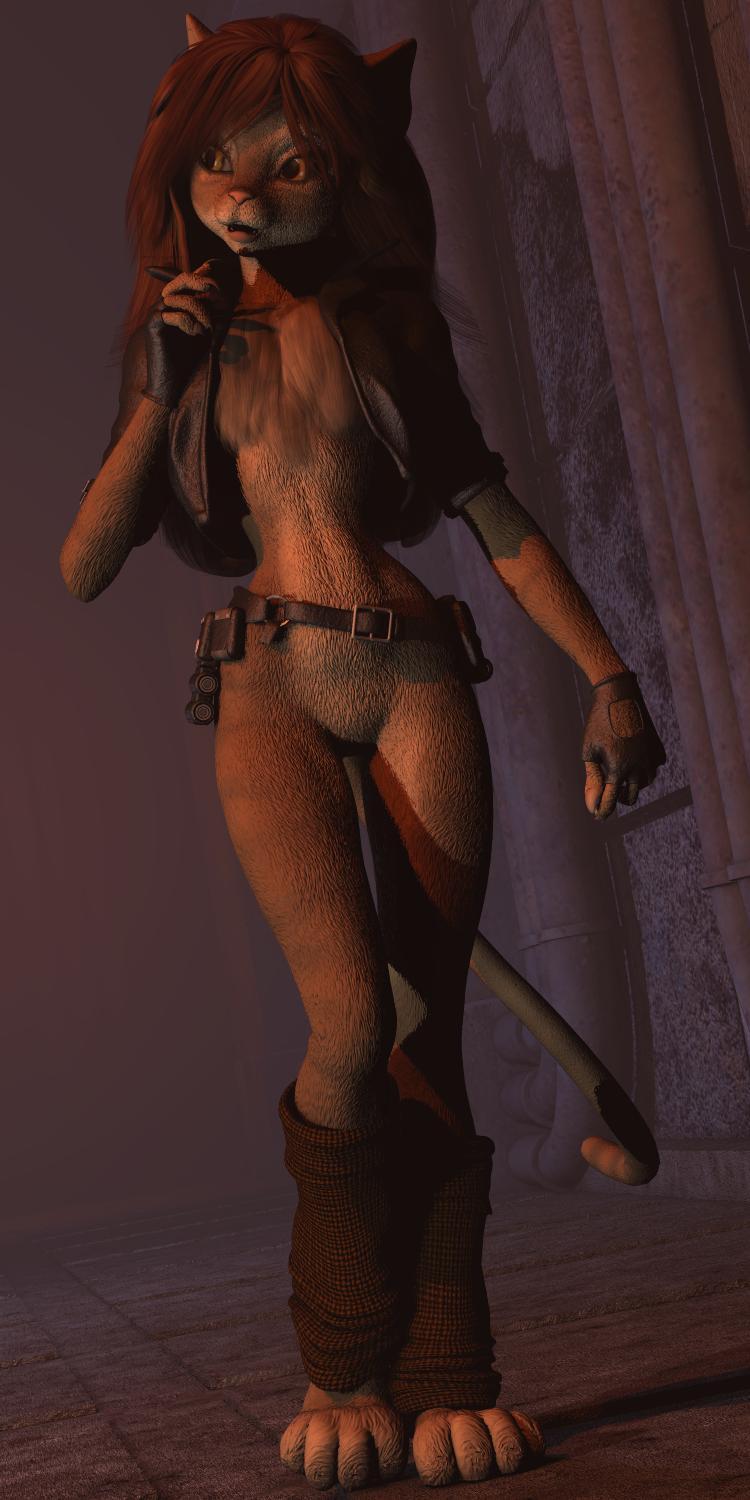
My ongoing challenge to make the digital version of K'tharr Rauthimas (a personal creation) ever closer to my conventionally illustrated version, as seen in this post...
https://www.daz3d.com/forums/discussion/comment/1750981/#Comment_1750981
The latest refinement, a "smart" prop based "pectoral ruff". When I first doodled the character in March 1985, I gave her a "ruff" that would (in theory) sidestep issues surrounding an "unclothed" character. I had made several attempts over the last ocuple of years, but none of my experiments looked right. Then, a bit over a month ago, I hiy upon a solution that worked for another cat-girl concept, Mzzkiti of "Freighter Tails" which also used Melody as the base figure. I saved the mesh after I had "parented" it to the figure which turned it into a "smart" prop. That meant that after I had selected a figure that had a "chest" body group and then load the ruff prop, it would automatically attach itself to the selected figure. As both were "Melody", it popped right into proper position. I didn't even have to use the "morph brush" to eliminate any "clipping" (poke through) with the jacket!
No doubt I can still find details I can tweak, but the ruff, or lack thereof, was the last major distinguishing difference between the polygonal and drawn versions.
Sincerely,
Bill
OT: New Nvidia Cards to come in RTX and GTX versions?! RTX Titan first whispers.Here's what the NVIDIA website says: "The GeForce RTX NVLink™ bridge connects two NVLink SLI-ready graphics cards with 50X the transfer bandwidth of previous technologies. This means you can count on super-smooth gameplay at maximum resolutions with ultimate visual fidelity in GeForce RTX 2080 Ti and 2080 graphics cards." And nothing about memory stacking.Hmm ok, so the SLI term is here to stay? Guess I had the wrong idea. SLI has such negative connotation, would have thought they would replace it. But maybe the underlying tech is still SLI, just much faster with NVLINK.
SLI has been good here except for Maxwell... I figure the link was too slow for the cards & output. I had the micro stutters with 4K and read about other users with micro stutter problems. Once I upgraded to Pascal based cards, SLI was super smooth again.
NVlink is a new tech speeding up transfers greatly from system memory to the GPU's memory.
OT: New Nvidia Cards to come in RTX and GTX versions?! RTX Titan first whispers.Here's what the NVIDIA website says: "The GeForce RTX NVLink™ bridge connects two NVLink SLI-ready graphics cards with 50X the transfer bandwidth of previous technologies. This means you can count on super-smooth gameplay at maximum resolutions with ultimate visual fidelity in GeForce RTX 2080 Ti and 2080 graphics cards." And nothing about memory stacking.Hmm ok, so the SLI term is here to stay? Guess I had the wrong idea. SLI has such negative connotation, would have thought they would replace it. But maybe the underlying tech is still SLI, just much faster with NVLINK.
OT: New Nvidia Cards to come in RTX and GTX versions?! RTX Titan first whispers.Here's what the NVIDIA website says: "The GeForce RTX NVLink™ bridge connects two NVLink SLI-ready graphics cards with 50X the transfer bandwidth of previous technologies. This means you can count on super-smooth gameplay at maximum resolutions with ultimate visual fidelity in GeForce RTX 2080 Ti and 2080 graphics cards." And nothing about memory stacking.How to sell a custom character for G8F on the store ?Hi,
I created a custom morph for Genesis 8 Female with custom shaders and textures. By "custom morph" I mean a real custom morph, not by mixing different characters together but shaping the Genesis 8 Female base character and creating a morph (.obj file) that I can apply later on another G8F base character. Then I created the skin and everything else myself.
Now I want to sell this character on the Daz Store and I have absolutely no idea how to do this. What I'm trying to do is create a "package" with this character, the skin and some makeup to get the same type of product for G8F we can buy on the store. How should I do this ? Is there a tutorial somewhere ?
Thank you :)
SimTenero Randomizer2 (Commercial)Fantastic, I use the old one almost daily when creating characters and it is a must have for my workflow. Care to share any details on what makes this one better than the original?
I'll update the original post with some more details shortly.
I also wonder, how it affects stability of Daz Studio itself, since it is more integrated with DS now (plugin).
Randomization presets are only loaded in when you manually click a "Refresh" button in the pane, so it has basically no impact on studio when you aren't using it. Once presets are loaded in, it's still pretty low impact as it's referencing existing morphs, not duplicating them.
It works only on Genesis3/8?
It will work with any generation! It will even work with other props and figures that have morph parameters. :-)
Is there going to be a Mac version in the future? If not, I'll probably pick up the old version which I have wishlisted.
Unfortunately I don't have a Mac environment to develop on, so probably not :-(.
Flying Fabric - Artistic Flowing Cloth Pieces (commercial)Yeah, What Griffin Avid said! :)I'm not sure what I would be able to add that is not already available...unless I make it animated or something.
Do all the features that we don't have yet.
1) There are very few that come with Hood Up and Hood Down.
2) Would love for someone to solve the hair busting through the top of the hood issue. I don't know if they'd have to be some wisp or sliver of hair that can come with the cape to simulate a bit of hair hanging down the front- with an easy 'zone' for texturing so it can come close to whatever hair your character already has.
3) An over the shoulder version that covers both shoulders and drapes down the back, basically Batman when he's chillin.
4) A one-shoulder cape, like a poncho- good for gunslingers and just different.
5) Animation or plenty of morph pose controls for wild shapes. Length ones for that SPAWN look.
6) Sitting poses, so the character can sit and have the cape fold up under them or drape backwards over the back of the chair.
7) Original cape poses. The character holding the cape, in multiple positions....as a shield....dramatic poses...gripping the edges...phantom of the opera style and hiding the face behind a seam...etc...
8) the cape OFF. The cape folded like laundry- anything to even simulate the suit before donning, Hanging in a closet....
9) The cape tattered, with dirty textures, but ripped up holes like a zombie shirt...
10) A cape with LOTS of zones. Even if your main design is mostly monochrome with trim, you can let the buyers choose to add their own color schemes....
11) A cape that extends from something other than a cowl. Add a small device or backpack type thingie. Not as crazy as a paper towel roller, but something with functionality that the cape could be attatched to. It would have the effect of moving the cape away from the back. That would be different and welcome. If nervous, you can make the cape start at the shoulders and neck like always, but that object could sit on the outside of the cape, high at the neck. Let it wrap around like a neck brace.
12) A cape with some see through parts. Long as we're doing so much skimp wear, might as well explore capes that have more than one material. Lace strips or a center cut etc...
13) A cape with claws or sharp metal edges at the tail ends. Great for demonic renders and bad characters. Talons.
14) A cape that can take shapes...A witches cape that can make a cat shape- walking behind her like a shadow ...or a crow shape....It would look like the cape was dragging over an animal or object and taking its shape.
is there a ds weightmap for M4 out there?has anyone managed to transfer the g3m rigging, with face rig, to M4?
in a manner that his character morphs still work?
few chars i'm hoping to save as individual actors, as in not overloading the morphs folder
no product page left for dane m4
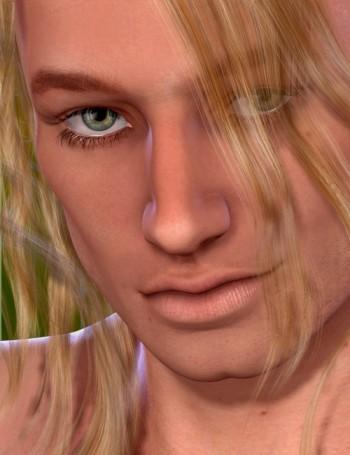


Derek

few more from rendo i want as keepers
like Ash, YuProblem posing The Bass GuitarHave the bass guitar figure selected before creating the dFormer it will then automaticly parented and a new DForm Property will be showing up in the Parameters pane set to 100% DForm influence.
Then you can add other items with Add Node to the influence of this dFormer in the DFrom pane. Where you can also Create and Remove DFormers and finaly click Spawn Morph to create a morph slider. With the checkboxes at the bottom you can delete and apply the DFormers by clicking Spawn Morph otherwise you can also keep them for further adjustments and turn down the influence in the Parameters pane before applying the morph.
The DFormer Base acts as the origin of the deformation only important while rotating and scaling. Where you can position the Base to see if that has any effect. Only manipulate the DFormer itself for the translation on the y-axis with the Universal Tool or the Parametrs.
making a modified V4 made in poser work in dazSorry for the late post and thankyou for the reply Richard Haseltine. I was trying to give v4 some of genesis morphs. for daz I transfered the morphs but I couldn't control v4's expression. in poser it worked but I would run into rigging issues for in morph that messed with v4s height or length of limbs.
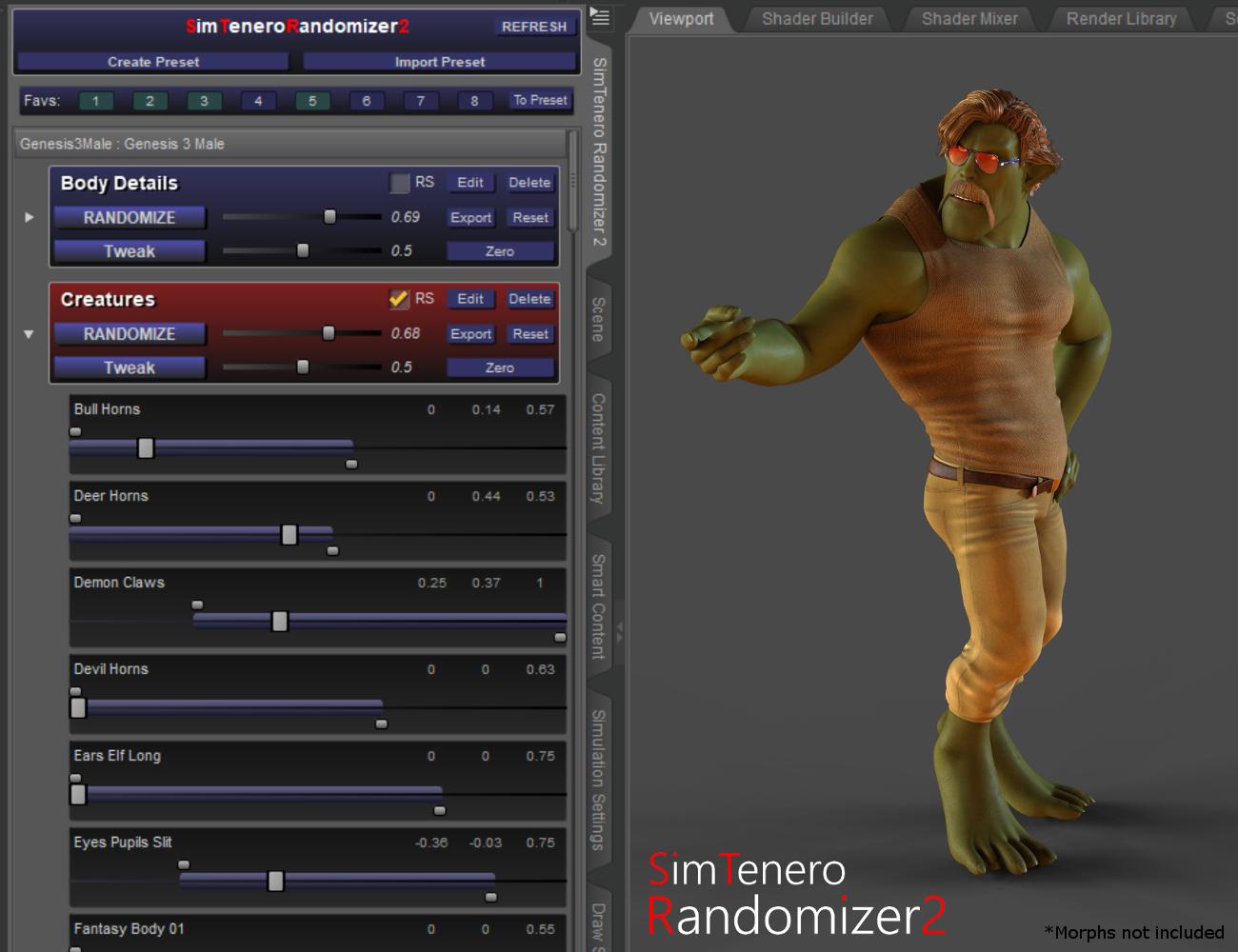
SimTenero Randomizer2 (Commercial)A ground up re-imagining of an old favorite
Click here for the Store Page.
Click here to see the user guide.
More details are available on the Store Page, but here are some highlights for folks familiar with the original:
- Randomizer2 is a dockable plugin! This may be the single most significant change for people who do a lot of randomizing. Randomizer2 is always available, no need to exit and relaunch every time you need access to the viewport or to your other panes!
- The way presets are created and used has been completely rethought. Presets are now very central to the way you'll manage big libraries of morphs. It was always possible to save and load presets in the original, but 2 gives you access to all of those presets at once. This makes it super easy to, for example, randomize parts of the body and face independently of one another.
- Presets are automatically stored with the figure. When you load a figure or prop into a new scene, just select it and click "Refresh" in the Ranomizer2 pane and all of your previously created presets for that figure will load in! This can be a huge time saver, especially if you've spent a lot of time dialing in your perfect presets.
- Morphs can be tweaked right in the pane. This is a small detail, but it's still handy :-).
- Each morph in a preset has its own randomization range. In the original, it was possible to set a randomization range; a number between 0 and 1 that would limit the max amount of randomization for all of the morphs selected. Randomizer2 still has that master range, but also includes individual ranges for each morph! This dramatically increases the value and flexibility of preset creation. For example, I may want to include "Chest Scale" in a preset, but I don't want it to vary too much. After adding it to my preset, I'd expand the little arrow next to the preset name, find the "Chest Scale" morph and tweak its upper and lower limit sliders to maybe 0.2 and -0.2 respectively. Now, whenever I randomize, that morph will stay inside that range.
- You can "tweak" the randomization. In the original, there was a feature called "Zero before Randomizing." That concept is now baked into two separate buttons. The "Randomize" button will always start from zero. That means it will set each of the morphs in its preset to zero before assigning a new random value. Tweak, on the other hand, adds or subtracts a new random value.
- Full Undo and Redo support! The original allowed limited undo, but Randomizer2 integrates with Studios undo stack. So crtl-z ctrl-y away!
Believe it or not there's more! Head over to the store page for some additional details.
 Babies with adult heads
These are the steps you should take to get the next result.
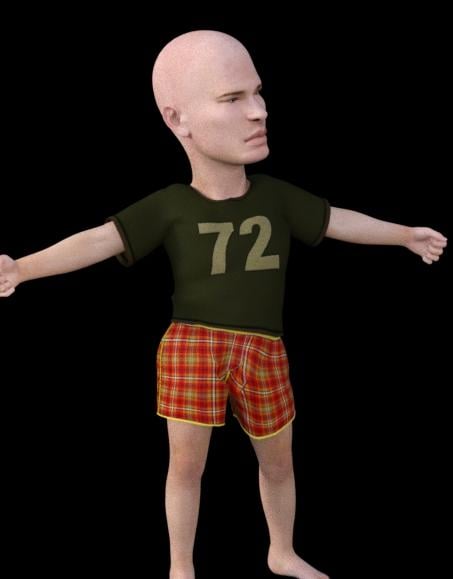
1.- Load Genesis and apply dial "Basic Child".
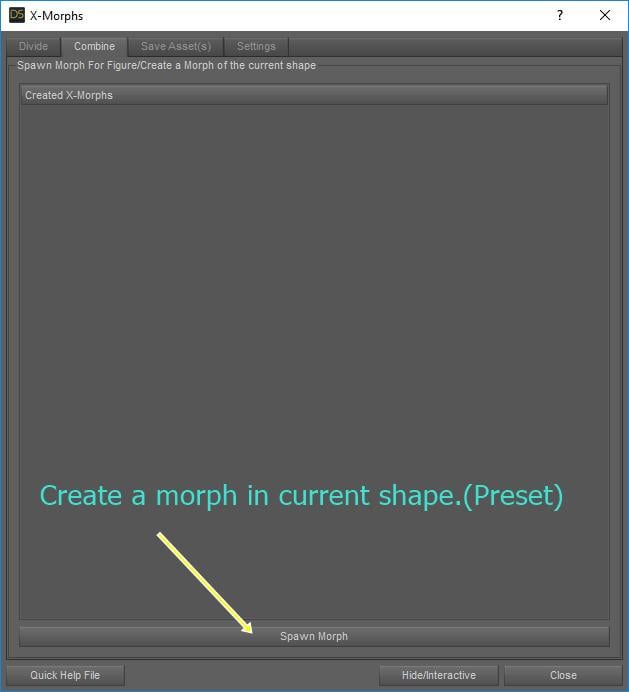
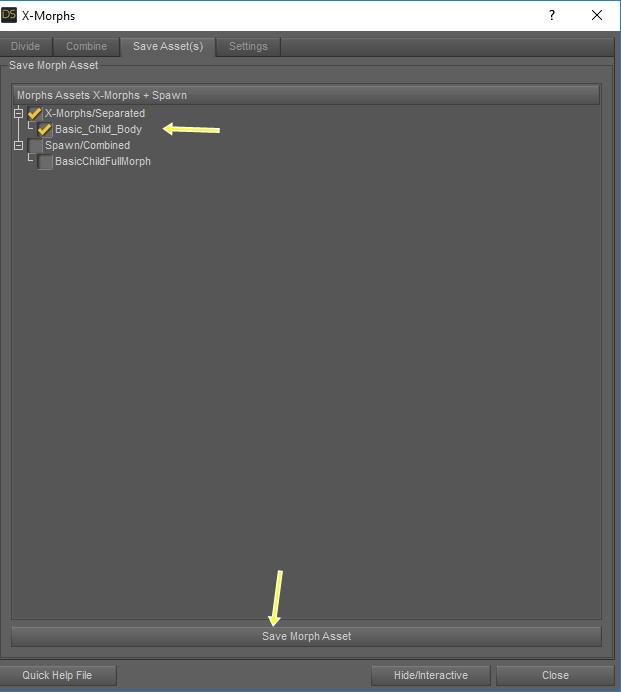
2.- Run X-Morphs and Click Spawn Morph.Combine, and save "BasicChildFullMorph" (It allows you to create a morph, with all the characteristics it has, such as the size of the character.)
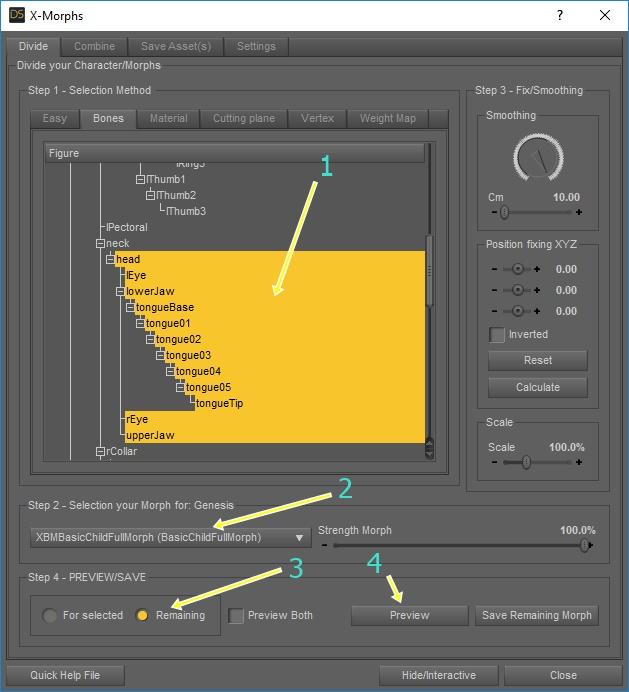
3.- In Divide-Bones, Select "Head" (childs), select "BasicChildFullMorph", select "Remaining", and Click "Preview"
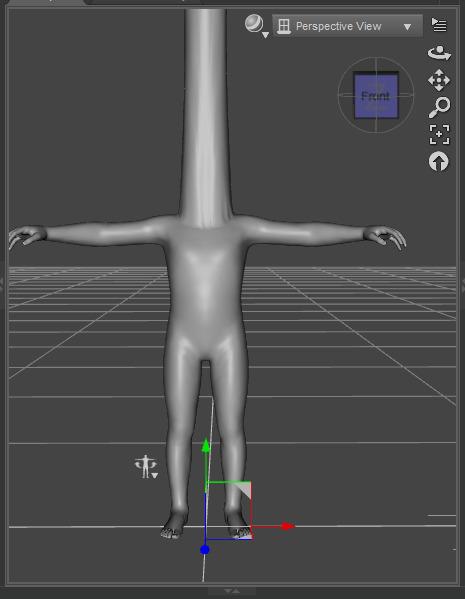
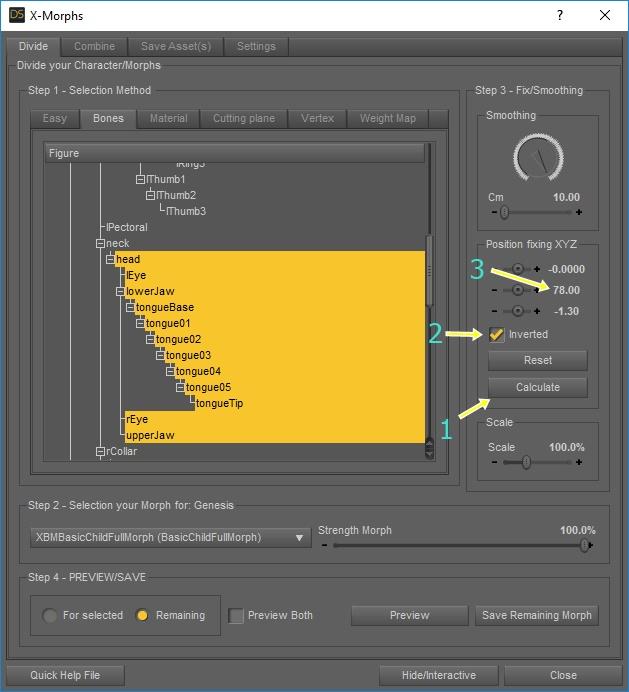
4.- To correct the position of the head, clicking on calculate.For this case, the Y position is manually adjusted to 78, for a better head position.
The "Inverted" checkbox is very important, which allows you to move your head and keep your body in the same position.
5.- Preview and test and Save Morph as "Basic_Child_Body".
6.- Save Assets.- We save the asset so that it is available in the base figure.
 Can someone with Facegen Pro tell me the correct way to get the same look in daz as in Facegen?
Its very important you add the face to a neutral character like base g8f/m or whatever your fav gen is.
So check if no other face dials are on. Like nrarts mentions, refine using morph kits.
Can someone with Facegen Pro tell me the correct way to get the same look in daz as in Facegen?I usually export out of FaceGen. Open Daz Studio, load character, add the morph, refine using other morphs, and save as a character preset (as I can't save morphs).
Sometimes imperfections in the images can also be copied by FaceGen when creating the morph. I found that out when I found a line running down my character's chin. I haven't tried to alter it. I just edit it with GIMP or another image editing program.
Daz 3D is part of

Connect
DAZ Productions, Inc.
7533 S Center View Ct #4664
West Jordan, UT 84084Licensing Agreement | Terms of Service | Privacy Policy | EULA
© 2026 Daz Productions Inc. All Rights Reserved.