-
How to fix hair folding/crimping/creasing?
It could be some issue with the head scale of these stylized characters since the crease seems to appear in the head neck transition area.
You could unfit and zero the hair to default and then have a look what full body morphs are listed under Actor..Stylized and turn them up one by one to see if one of these are the culprit for this crease.
If so you could create a replacement shape morph for this character shape.
While I think of it could have something to do with the head neck scale of the character morph and the general rigging weightmap - it could also be an issue with the weightmaps how does the hair bend in those neck region?
I've made some screenshots here Hair Conversion Fit to G2F where I used an old V4 hair to fit it to Genesis 2 Female.
But instead of using autofit I've added a Smoothing Modifier to the hair and set the figure as Collision Item manualy. Then you can create some DFormers to push around the hair shape or scale it in various directions, while the collision updates to keep the hair shrink-wraped around the head. You may have to set the Smoothing and Collision Iterations higher for desired results.
Then hide everything in the scene, let the Smoothing Modifier update again coliding with the hidden figure, export an OBJ of the hair and once done with that you turn off the Smoothing Modifier and all DFormers.
Start MorphLoaderPro choose the hair OBJ and if the hair shape in the scene still has some character or adjustment morphs applied or even is still fitted to the figure use the Reverse Deformation setting in MLP. Then test the imported morph that now should include the DFormer shape and the Smoothing Modifier collision but no other original adjustment morphs or character shape.
hi does anyone know where i can get a poseable beer canTrekkieGrrrl has a freebie beer can that can be crushed, don't know if it has a open morph though.
Anyone have the "P3D Zelara 8 HD Enhanced Morphs Package"? InquiryI wish to know if the Na'vi-like morph is possible without the indentations in the face. I have been WAITING for a morph like this for SO LONG I'm glad to see one!! However I don't want those impressed lines in the face. Please assist!!
https://www.daz3d.com/p3d-zelara-8-hd-morph-package
Also if the artist themself sees this post, I will absolutely pay for that morph without the lines, if it's not already possible!
RENDERS ONLY: Not So Fast Contest For Mischief MakersOur very own Gyro Gearloose!
Talien has created his own jet pack with an old motor boat. His wife is worried, Talien doesn't know how to swin nor how to fly!
(in french : Géo Trouvetou, in Italian : Archimede Pitagorico, in Latin America: Giro Sintornillos each country seems to have a different name! Found on wikipedia : https://en.wikipedia.org/wiki/Gyro_Gearloose)
Set 1: Bar Interior 2018 Set 2 Disconsolation
Props: Morphable Meershaum (Pipe)
Inflatable Boat (Outboard Motor) Daz Water Pump/Grain Silo (Water Pump)
Character: Toon Alien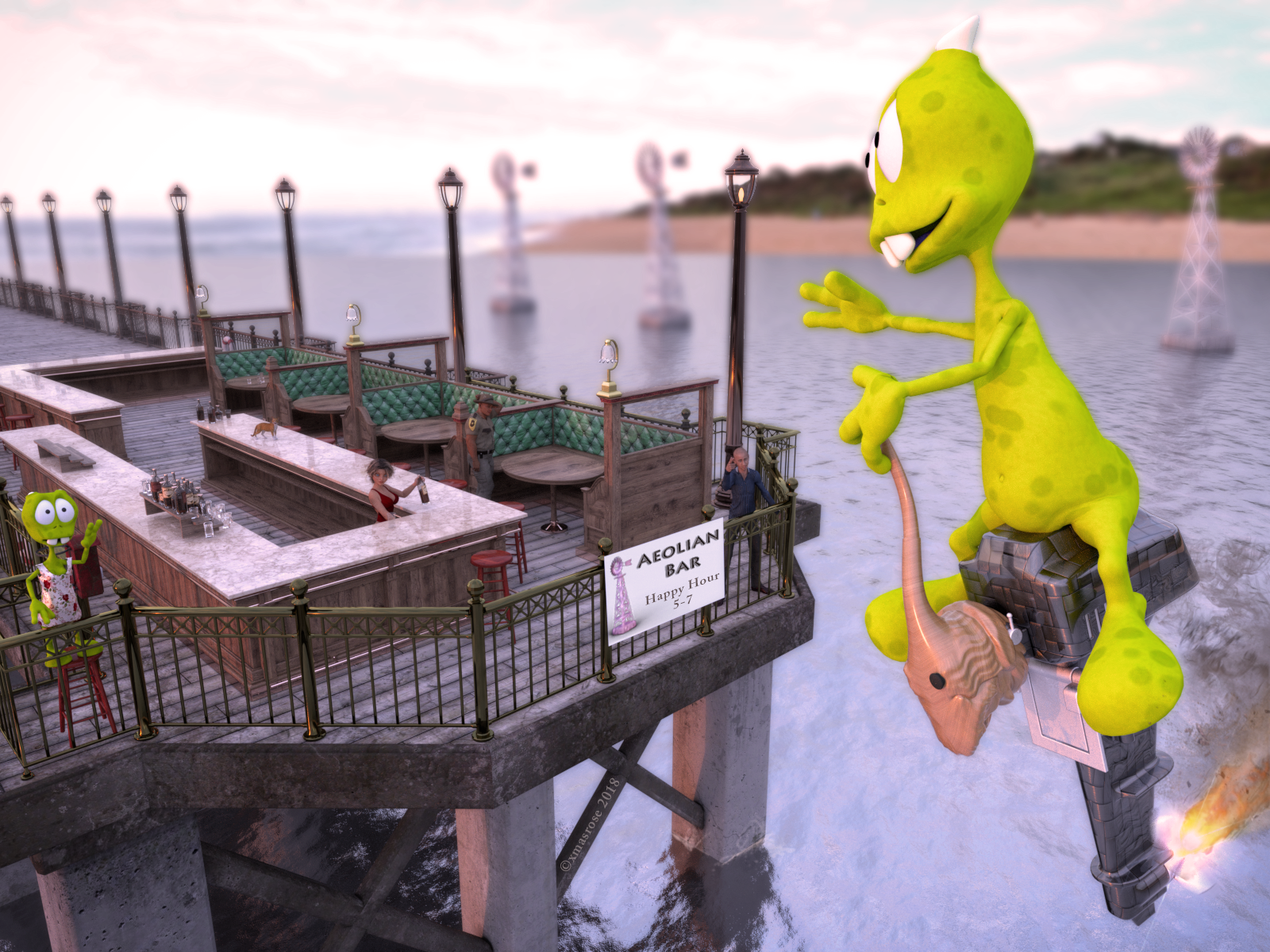
Best viewed bigger if you don't suffer from vertigo
Also used :
Law Enforcement Outfits for Genesis 2 and 3 Male(s)
HW cat
Mec4d PBS shaders for Iray vol.3 MR
Terradome 3 (water)
HDRI : Umhlanga Sunrise
Toon Alien female morph and dress by xmasrose
SimTenero Randomizer2 (Commercial)Presets are easily edited to add and remove new morphs.
I will probably make personal presets with more than one morph pack.... but I also think it's useful to separate morph packs out because so many of them don't play nicely with each other. And I like having different distinct looks, which I think shows up better when I go by morph pack.
But yeah, I think breaking it down by face and upper body/lower body could be pretty useful. Maybe exclude 'ears' from 'face' to get more slots.
BTW, my presets vanished. No idea why. I'll upload them somewhere else later, I guess.
Wierd that the presets disapeared online. Goood to know the presets are easily edited / updated.
Although you're per product example did give me the idea regarding creating groups of presets for the face where some might find it highly useful - for the Real World morphs anyways, including ears (i've always left out the sci-fi, fantasy and most highly stylized morphs since those are very distinctive and imho best dialed in by hand).
As for the morphs not playing well together - they should all be compatable with one another, whether we're talking G8 or G3 it doesnt matter. There's a little something I've found out especially while using Randomizer1... I'm sure everyone who first fired up Randomizer1 and tried the character's face got some hilarious or ugly results that looked squished, pinched, and exploded all at the same time.
By defaults for Randomizer1, the 0.25 Range value is way too high for the face (.25 sometimes is ok for the body, but usuallly .20 and lower gives better results - more desirable hits than disasterous misses), bring it down to 0.14 to start with or lower, and you can further reduce it from there to fine tune the looks.
I'm not sure about Randomizer2 yet as i've to to sit down and give it another try. This could very well be the same case here.
The same thing can happen when manually dialing a bunch of the sliders to -100% or +100% , whereas this utility automates that process randomly within a set Min & Max range however doesn't have the inteligence to detect when a particular value has been set too high or low.
Having to expand each teir and select individual morphs still drives me nuts, hence why I ask for a select by morph group function - even a toggle box next to each teir name that'd save on the individual clicks would be a massive time saver (especially when setting up for different figures and presets - Randomizer1 spoiled us in that respect).
Will try this a bit later and post back...
SimTenero Randomizer2 (Commercial)Presets are easily edited to add and remove new morphs.
I will probably make personal presets with more than one morph pack.... but I also think it's useful to separate morph packs out because so many of them don't play nicely with each other. And I like having different distinct looks, which I think shows up better when I go by morph pack.
But yeah, I think breaking it down by face and upper body/lower body could be pretty useful. Maybe exclude 'ears' from 'face' to get more slots.
BTW, my presets vanished. No idea why. I'll upload them somewhere else later, I guess.
Morphs from G3 to G8Yes, be well, father time is a prique that has taken its toll on all of us pre/post-middle-agers, as we lost too many talented masters here already, so be well, as our health is so easily taken for granted!
As far as the conversions, I have conquered most G3-G8 morphs myself using the tuts here, my only obstacle that I haven't surmounted would be to transfer JCM/MCMs over as I rely quite heavily on KHStudio's morphs, so much so that I completely neglected using G8!
Questions about the characters sold in the shop.So, generally speaking, even if I use the most obscure G8 character, I should still be able to use with it anything that I could use for, say, V8?
You should be able to use items made for G8 on any G8 character. If you use G8 clothes on a morphed character the clothes will automatically try to adjust to the new shape, using custom morphs for that shape if they have one or creating such a morph on the fly. Keep in mind though that if your character has a very different shape from the base, automatic adjustment will sometimes end up in weird results and you may need to adjust it yourself manually...
I'm wondering also about utilities intended for G8 that change the appearance of a character. Do they work too with derived characters? If I use a tool that changes the skin appearance of a character, or ages it, or slants its eyes, or makes it more muscular, etc...will it work equally well on Victoria, on a character itself derived from Victoria ("XYZ for Victoria 8"), etc... Or will it only work properly on the G8 basic figure?
Once again it will work, but for example if you use a "muscular" morph on a character already morphed the effect will probably be a bit different than what you would get using it on the base.
In the same way, if you have a pose for the default base and use it on a modified character you may need to adjust it: eg if you have a pose where G8F has her hands on hips, and use it on a character who has longer arms and wider hips, there's a good chance that the hands won't end up exactly at the right place "as is".
Babies with adult headsWell this looks interesting. I read in the Commercial thread that it can't mix-and-match between generations (and I assume genders). That's too bad, but understandable.
CGI3DM, I'm not sure how much work there is to do it, but I'm sure you're aware the world is in need of an update to GenX to allow morph transfers to Generation 8. You seem to know a lot about morphs, so you seem like a good candidate to take over that niche!
 An Attempt of a "Limited Time Freebie" Message Only Email Alert Thread
TONED EDNA
Toned Edna is a Full Body Morph character which is designed for Genesis 3 Female(s). Textures are all in 4K format for iRay. To use the materials in 3DLight need to convert. This package is for free for some weeks as promo before selling the bundle of this product.
https://www.renderosity.com/mod/freestuff/toned-edna/79972Script to strip morphs out of a pose?also, if you use extended morph, remember to apply Rigging "Adjut rigging to shape" that help for poses (also in Daz menu) I don!t understand what your comment was about using extended morphs and adjusting the Rigging could you expand you re reply, it's the first I've heard of thisSimTenero Randomizer2 (Commercial)Wow... Loaded the new plugin (and registered, exit and reload daz studio), read through the help document.. Daz Studio 4.11.0.196 Beta btw.
- Loaded G3F
- activated the plugin pane...
- Click Create Preset...
Spent 20 mins going through the entire list of morph shapes i have, expanding every teir under Actor: and every sub-teir related to Real World .... spamming the left mouse click button (or space bar + down arrow, then mouse to scroll next screen down) since there's no "Select All" or "Select by Group" like Randomizer1 had ... get to the end and get prompted by a message aboux max allowable properties (800) exceeded and list of properties has been trimmed...
Limited to only 800 of the entire collectoin of shape morphs bought from the store here? Ouch...
Randomizer 1's setup allowed me to dive right in and check off in the Morph Groups list chest, head, face, body or just head and related to head , or body and related to body only either realworld or fantasy, set global min/max ranges and hit randomize. If anything, in Randomizer1 i'd sometimes go into the specific subset of morphs to untick a handful that I didn't want included in the randomize set... So much easier and quicker to select 30 some Morph Groups ie:
Type in RealWorld for the filter then select: Actor/Arms/____ , Actor/Feet/____. Actor/Full Body/___ , .... even easier when just wanting the head/face , save the list selection and make/save a list for the body, then load and randomize as needed.Maybe its only me but I kinda miss Randomizer1's setup and functionality. despite it's script style interface and drawback (part of that drawback i negated via using the Auxilery viewport set to a second camera or isometric view)
Unless i'm doing something wrong or missing something (and please do point it out!) ...?
Lastly, the Morphs list window won't allow resizing when Creat new Preset. I have the pane as "Undocked" for now, as I do with Auxilery View Pane on a multi-monitor setup...
The limit is 800 per preset, but there isn't a limit across presets. The lack of a "select all" or "group select" is just down to the style of utility used to represent the selection tree. I've been asked about this before and am looking at alternatives, but I don't know for sure if that will change in a future update or not. I just tested "Create Preset" in 4.11 beta and the window was resizable (whether or not the main pane was docked), so there may be something specific to your setup or beta version. Have you tried in non-Beta?
Hi again,
The Randomizer2 Dockable/Undockable pane is resizable as much as the Aux View pane , can fill an entire monitor screen with it alone.
Clicking on "Create Preset" that opens up a new window its only re-sizable up to a limited amount. Limited Max Width isn't a problem however the limited height is. Using monitors od 2560x1440 screen resolution or higher(4k - 3840x2160), the window height would be nice to maximize to the full height of the screen given we have to select through the teirs of individual morphs vs morph groups.
Tested in both 4.10x non beta, and 4.11x Beta ... I took 2 screneshots and cropped them to show a partial layout / setup I use when using Randomizer1 (full screenshot is quite a large image), and a quick comparison between the 2 window heights.
Max window height in Randomizer1 wasn't nearly as limiting - since I type in Real for the filter and it narrows down the Morph Groups list considrably, and since its groups, there's maybe 35 groups to select when choosing just the face, fits mostly in the window height area without needing to scroll much up or down. And very simple to select within a minute and begin using the randomize feature.
For those curious (or have yet to buy Randomizer1 , or due to limited to Randomizer1 due to being on the Mac platform), I usually zoom in closer on the head in both views, and once I have something I like I'll "Export Shape" to be safe so i have a shape preset i can go back to if needed, then I limit the range even further, untick the "Ignore Left/Right Morphs" as well as "Zero Before Randomizing" . In this method I've gotten some really nice results without too much time spent in the process. How much time spent is anywheres from a few clicks to a dozen or more clicks until your at "Yup, I like that!" (while having saved a bunch to shape presets in the process to use for later)
Still, geting back on topic to Randomizer2, I wish there was a "Select by Morph Group" it would considerably reduce the setup time spent, let alone clicking to expand each teir / sub teir to get tot he individual morphs. Hope the 800 limit cap could be increased per preset. I generally do the Head/Face in one go, then the entire body next.
I get it that some people might enjoy having dozens of presets to randomize through - as noted the post above by dreamfarmer,
OK, well, here's my first two 'pure' presets. I have a couple more but I ended up adding in stuff from the base morphs so I need to clean stuff up before I export.
Hopefully these work!
https://sharecg.com/v/92125/gallery/8/Script/SimTenero-Randomizer2-Preset-Rarestone-Face-Male
https://sharecg.com/v/92124/gallery/8/Script/SimTenero-Randomizer2-Preset-200+-Morphs-for-G8M
"200 Morphs for G8M" as an example of making / saving presets out per store product package. Really good example there.
Whereas in my example, when I have a well established G3 content library (G8 is still growing & evolving) content library of over 10 Morph packages (ShapeShift, Merch Resources, etc) in addition to 10+ base characters / pro bundles + (Victoria, Olympia, etc) + respective HD addons + including individual characters built on the G3F or G8F base, I like to be able to randomize from that entire "gene pool" range (and randomized selection of morphs used within the total selection range) which is where your Randomizer1 really shines through. Its single handedly the *most awesome product / utility* to have come out since Genesis line for Daz Studio and/or Iray Render Engine for Daz Studio. It litterally unlocks the full potential of the Genesis class of figures, and the dollar value spent on those products to be able to make truly unique looking characters. When you're able to put all those ingredients into a mixing bowl, clicking the Randomize button is where the magic happens.
I guess I was hoping for a Randomizer1 evolved into plugin status. If you were able to enhance and expand Randomizer2's functionality, it would be awesome. Guess I have to decide for now whether or not Randomizer2 is something I'll make use of (unfortunatly at this moment its more headache and tedius than enjoyable).
Edit: Perhaps Randomizer2 might be useful if say just doing the head area, with preset groups per each facial feature - eyes, nose, mouth, ears, overall face; but then its a difference of Micro vs Macro utility scale usage. Will I find usefulness I that? I don't know. How easy will it be to update those preset groups as new morph & character packages come out (say for G8 ) , can the groups be edited or deleted and remade over again?
Thanks ;-)
SereneNight's Sci-fi FunWell here is my contribution to the awesomeness that is the cyberpunk 2047 outfit. Boyd and.... Boyd...... I found it you reversed the crotch adjust 2 morph to negative 100 you got some great male coverage in the elements region. I made the pose 'cause I couldn't find a good 'twins' pose in my runtime.
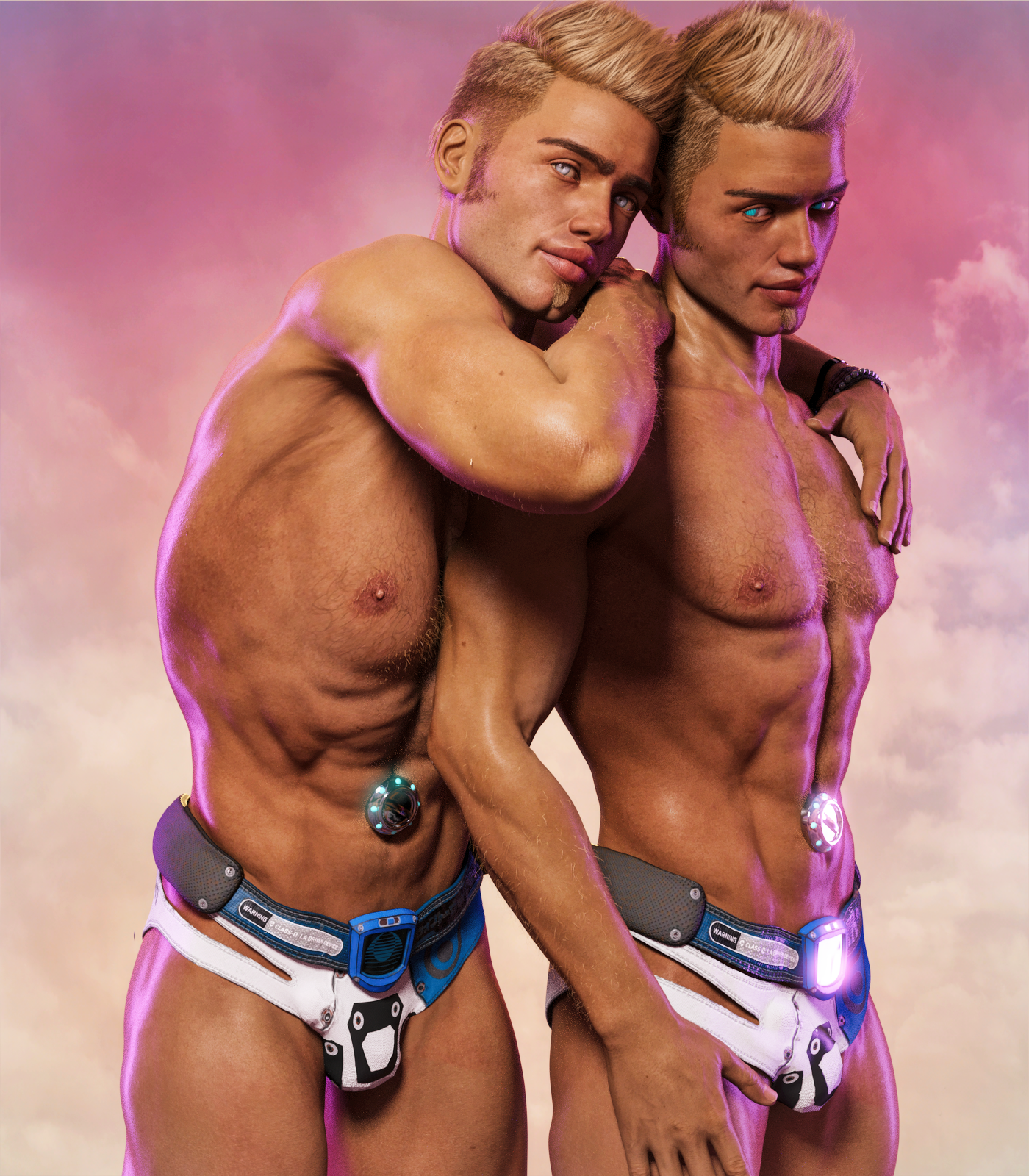
I'm just gonna...yeah.
Wow!
(Released) - East Asian Men for Genesis 8 Male (Commercial)@Linton Wish granted! I removed the mole from all of the base textures and added it as a LIE overlay preset.
@xyer0 I adjusted the lips texture and morph a little bit.
Hope you like the changes made. The only thing is that I have to re-render the promos and that might delay a little the submission.
 SimTenero Randomizer2 (Commercial)
OK, well, here's my first two 'pure' presets. I have a couple more but I ended up adding in stuff from the base morphs so I need to clean stuff up before I export.
Hopefully these work!
https://sharecg.com/v/92125/gallery/8/Script/SimTenero-Randomizer2-Preset-Rarestone-Face-Male
https://sharecg.com/v/92124/gallery/8/Script/SimTenero-Randomizer2-Preset-200+-Morphs-for-G8M
Thanks for sharing. You might want to revise the description so that users know they need to have the various morphs installed for the morph to work. The way the rarestone one reads now is that it somehow installs the rarestone morphs.
Fit Control for Genesis3 (Commercial)Hi. I will need a bit more info than the product is not working. What specifically happens when you launch the script?
Thanks for your reply. To answer your question: nothing. I select G3F, double-click the icon to transfer the morphs, and nothing happens. I don't get the "morphs transferred" message that occurs in the video. I have checked the parameters for the Fit Control morphs under the respective clothing items, and they simply are not there. Not sure what to do from here, but I have read other reports of the product not working, and have not encountered any solutions. Hoping for one here.
OT: New Nvidia Cards to come in RTX and GTX versions?! RTX Titan first whispers.as to NVLink configuration here is the difference between the Quadro and GeForce series.
First image dual RTX 2080 Ti's with NVLink
Second image dual Quadros with NVLink
Notice that only one bridge is employed with the GeForce series (functioning much like an SLI bridge though with faster transfer rate) while two bridges are used on Quadro/Tesla cards (both needed to also support memory pooling). The article the first image is from only mentioned faster data transfer rates between dual 2080 Ti's with NVLink and nothing about memory stacking.
SimTenero Randomizer2 (Commercial)What makes this better than version 1? I got version 1 but wondering if I need to get version 2?
I am pretty biased, obviously :-P I think the most compelling reasons for owners of the original to consider 2 are the ability to keep it docked and available, the improved morph controls (setting individual upper and lower limits), persistent presets (basically having access to multiple different presets at once, and being able to load them all with one "refresh" click) and the favorites system. Overall, I think it integrates better and is easier to use, but I can respect some folks still preferring the layout of the original. If you are perfectly happy with 1, then don't feel pressured to grab the new one if nothing about it is really calling out to you. Other users could probably give you a more objective take though
 .The Premier Artist Sale
My biggest struggle with these sales often does come as a result of the unique daily offers. For example: I want and plan on getting the Parfum bottles, and the Bishop House. If I do it today, I can get a free vehicle. Hm. I'm 'meh' on vehicles. If I wait until tomorrow, I might get an offer that appeals to me more (but nothing I want to purchase to justify it) -- or it might be an offer where I already have everything available, like the Morph packages, or something I'm even less likely to use than vehicles.
So I spend today going, "Hmmm...." and... unfortunately for PAs, sometimes tomorrow's offer is terrible for me, and so is the one the day after and then stuff I wanted to buy starts dropping off the list and then when the Catchup Sale comes around, I've got to choose two of like six items I originally wanted to get....And oh dear, it's still not September yet either.
Toon Dwayne 8Thank you very much, Rieke77 and Knittingmommy.
I was so excited to get something I like, that I have forgotten to save him as preset,
but I have saved the scene with him, so hopefully will get morph list and values, at least.
Now, I have to read the manual...
Daz 3D is part of

Connect
DAZ Productions, Inc.
7533 S Center View Ct #4664
West Jordan, UT 84084Licensing Agreement | Terms of Service | Privacy Policy | EULA
© 2026 Daz Productions Inc. All Rights Reserved.