-
Looking forward to Studio reaching heights like this...
rrward said:
takezo_3001 said:
We will not get to this level when PAs insist on making textures with projected/drawn breasts/glutes and baked-in highlights..
I first got into rendering in the days of Poser 6 and Victoria 3. I remember having wierd issues with unwanted shadows on the chests of small-breasted female characters. I remember trying different lights, smoothing meshes, etc... only to realize that the PAs had baked the shadows onto the undersides of the breasts, which did help with large-breasted figures and the limitations of Firefly at the time, but ruined the skins for anything else. I've never been a fan of baked highlights and shadows.
....there are still hairs that have baked in highlights as well which is why I usually resort to using Slosh's UHT 2 shader kit that has different base shine and translucency settings which can be even more finely adjusted in the surfaces tab.
Looking forward to Studio reaching heights like this...takezo_3001 said:
We will not get to this level when PAs insist on making textures with projected/drawn breasts/glutes and baked-in highlights..
I first got into rendering in the days of Poser 6 and Victoria 3. I remember having wierd issues with unwanted shadows on the chests of small-breasted female characters. I remember trying different lights, smoothing meshes, etc... only to realize that the PAs had baked the shadows onto the undersides of the breasts, which did help with large-breasted figures and the limitations of Firefly at the time, but ruined the skins for anything else. I've never been a fan of baked highlights and shadows.
2nd of nine lives Cat Girrrl render thread prrrstarionwolf said:
i forgot that have Melody 2. That character is for Victoria 4, not Genesis.
Well, the body and limb textures are mapped for Victoria 4, but LittleFox designed the head to be used with the figure of one's preference.
I still prefer Melody for A3 as the geometry of the ears blends into the head and the geometry of the head blends into the neck without a hard seam.
2nd of nine lives Cat Girrrl render thread prrri forgot that have Melody 2. That character is for Victoria 4, not Genesis. I didn't realize how old Melody 2 is until I looked at the product page again.
Daz Studio Pro BETA - version 4.20.0.17! (*UPDATED*)no__name said:
ledom30 said:
Hello. since I installed version 4.15.1.91 (and 4.15.1.96), the skin of my characters is transparent! I am under Windows 11, with an Nvidia 3090 graphics card, driver 472.47 (the latest version). I do my renderings in Iray. I checked the opacity of the surface (cutout opacity). if I use version 4.15.0.30 my renderings are done correctly. I added a checkered background so that we can see it clearly.
I'm surprised not more people reported it. Quick test with Victoria 8 :
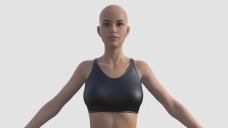
Switching SSS mode to mono remove the transparency.
I am also experiencing this weird error. I'm using 4.15.1.91
3D Art Freebie Challenge October-November 2021-"How to repair ..." -Entries Thread OnlyTitle: How to repair a fairy tale
Caption: So the princess decided to rescue herself and is no longer present. As the fairy godmother, you still have a fairy tale to complete. Follow the steps below to repair this disaster:
- Replace the princess with a fake
- Act like everything is normal
Paid Items:
- Madelyn for Izabella 7 (https://www.daz3d.com/madelyn-for-izabella-7)
- Orlean's Armor for Genesis 8 Male(s) (https://www.daz3d.com/orleans-armor-for-genesis-8-males)
- Elegant Fantasy Poses for Victoria 7 (https://www.daz3d.com/elegant-fantasy-poses-for-victoria-7)
No-Count Items:
- Genesis 8 male
Free Items:
- Prop - Elven Crown (https://www.renderosity.com/freestuff/items/75636/prop---elven-crown)
- Stuffed Toys for Poser (https://www.renderosity.com/freestuff/items/76447/stuffed-toys-for-poser)
- Halloween Backs 2021 (day 7) (http://www.thefantasiesattic.net/halloween/2021/index.html)
- Antonia Fairy Wings (https://www.sharecg.com/v/56933/related/11/Poser/Antonia-Fairy-Wings)
- Trish Hair for Genesis 3 Female (https://www.renderosity.com/freestuff/items/77150)
- GeoWear: Tiara Jewels - G8F and G3F (https://www.renderosity.com/rr/mod/bcs/geowear-tiara-jewels---g8f-and-g3f-/143382)
- Evening Dress for Genesis 2, 3 and 8 Females (https://www.renderosity.com/freestuff/items/87696/evening-dress-for-genesis-2-3-and-8-females)
- Free Glass Coffin Props and Pose for V4 (https://www.most-digital-creations.com/free_poser_poses_textures_morphs_props_15.htm)
- COURS D'EAU FERME (https://www.renderosity.com/freestuff/items/79497/cours-deau-ferme)
- Iray Fur Shaders (https://www.renderosity.com/freestuff/items/88081/iray-fur-shaders)
 Kitbash3D.com with Daz3d experiences/guide?
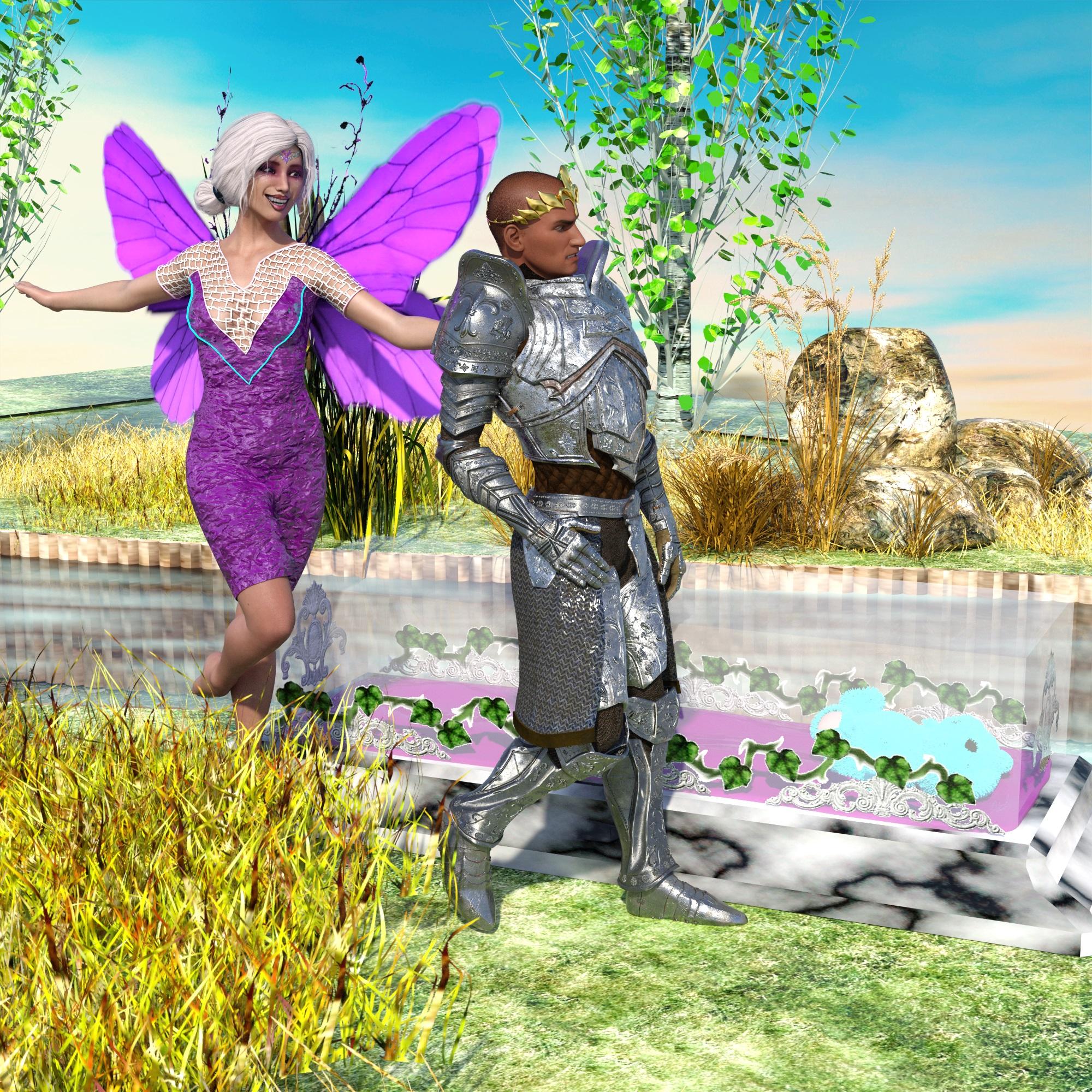
I often use Kitbash3D buildings in my renderings, attached M 8.1 with "Heavy Metal" as a sample, the conversion is a tedious process, luckily I have an older version of MaxonC4D that can open most Kitbash3D files, most successful for me was the export as .dae Format that DAZ Studio can read and the manual setup with Iray Uber shader, it takes it's time but it is worth it. The design of some sets is simply stunning and if you want to have something special for your images, a small building often already is enough cause the sets and buildings are huge in comparison to our "humans" Michael and Victoria. :) Especially the newer sets have PBR textures that can be used very economic with the Iray Uber Shader, but manual work and a bit of understanding for the Iray shader is required. Why DAZ hasn't connected yet with Kitbash3D in any way, who knows, maybe to incorporate actual OBJ/FBX import is not possible with the current DAZ Studio code - or Kitbash3D don't want to add additional (and exotic) export formats to their sets.
SereneNight’s Sci-Fi Fun Thread 3Serene Night said:
inquire said:
What if you changed the root ID of G8M to G8.1M? You might want to see this: https://www.daz3d.com/forums/discussion/466416/genesis-8-1-victoria-8-1#latest
I too have ATGL poses which do not work properly with the various figures. Since these are scriptural poses its too bad the pa did not do an update to make them compatible. I haven't tried changing the identification. It might work. Hmmm.
It works for me. There's a script there that lets you do it easily.
SereneNight’s Sci-Fi Fun Thread 3inquire said:
What if you changed the root ID of G8M to G8.1M? You might want to see this: https://www.daz3d.com/forums/discussion/466416/genesis-8-1-victoria-8-1#latest
I too have ATGL poses which do not work properly with the various figures. Since these are scriptural poses its too bad the pa did not do an update to make them compatible. I haven't tried changing the identification. It might work. Hmmm.
Daz Studio Pro BETA - version 4.20.0.17! (*UPDATED*)TWRaven said:
no__name:
I tried to reproduce your problem on my machine with Victoria 8 and Victoria 8.1 using a checkboard background. Can you post a scene file or a material preset so I can try and reproduce the issue?
DAZ_Rawb said:
Was your SSS mode previously set to Chromatic?
I have the Studio team looking into this right now but their test renders have all had non-ghost figures so we are trying to figure out the secret to being able to reproduce this on our side.
Drivers are 472.47 (studio)
Skin is default Victoria 8 materials.
I thought at first mono SSS were not affected, but it is, just at a way lower level
Default tonemapping/environement setting (hidden dome).
That said when looking at the raw render the effect can be subtle to catch (I nearly missed it at first).
If someone got Photoshop, opening raw render with it will make transparency nearly impossible to miss.Daz Studio Pro BETA - version 4.20.0.17! (*UPDATED*)no__name:
I tried to reproduce your problem on my machine with Victoria 8 and Victoria 8.1 using a checkboard background. Can you post a scene file or a material preset so I can try and reproduce the issue?
no__name said:
ledom30 said:
Hello. since I installed version 4.15.1.91 (and 4.15.1.96), the skin of my characters is transparent! I am under Windows 11, with an Nvidia 3090 graphics card, driver 472.47 (the latest version). I do my renderings in Iray. I checked the opacity of the surface (cutout opacity). if I use version 4.15.0.30 my renderings are done correctly. I added a checkered background so that we can see it clearly.
I'm surprised not more people reported it. Quick test with Victoria 8 :
Switching SSS mode to mono remove the transparency.
Daz Studio Pro BETA - version 4.20.0.17! (*UPDATED*)no__name said:
ledom30 said:
Hello. since I installed version 4.15.1.91 (and 4.15.1.96), the skin of my characters is transparent! I am under Windows 11, with an Nvidia 3090 graphics card, driver 472.47 (the latest version). I do my renderings in Iray. I checked the opacity of the surface (cutout opacity). if I use version 4.15.0.30 my renderings are done correctly. I added a checkered background so that we can see it clearly.
I'm surprised not more people reported it. Quick test with Victoria 8 :
Switching SSS mode to mono remove the transparency.
Was your SSS mode previously set to Chromatic?
I have the Studio team looking into this right now but their test renders have all had non-ghost figures so we are trying to figure out the secret to being able to reproduce this on our side.
Daz Studio Pro BETA - version 4.20.0.17! (*UPDATED*)no__name said:
ledom30 said:
Hello. since I installed version 4.15.1.91 (and 4.15.1.96), the skin of my characters is transparent! I am under Windows 11, with an Nvidia 3090 graphics card, driver 472.47 (the latest version). I do my renderings in Iray. I checked the opacity of the surface (cutout opacity). if I use version 4.15.0.30 my renderings are done correctly. I added a checkered background so that we can see it clearly.
I'm surprised not more people reported it. Quick test with Victoria 8 :
Switching SSS mode to mono remove the transparency.
I checked the renders I've done again with 4.15.1.96 & yes, the human skin are transparent with that same grid pattern.
Daz Studio Pro BETA - version 4.20.0.17! (*UPDATED*)ledom30 said:
Hello. since I installed version 4.15.1.91 (and 4.15.1.96), the skin of my characters is transparent! I am under Windows 11, with an Nvidia 3090 graphics card, driver 472.47 (the latest version). I do my renderings in Iray. I checked the opacity of the surface (cutout opacity). if I use version 4.15.0.30 my renderings are done correctly. I added a checkered background so that we can see it clearly.
I'm surprised not more people reported it. Quick test with Victoria 8 :
Switching SSS mode to mono remove the transparency.
SereneNight’s Sci-Fi Fun Thread 3What if you changed the root ID of G8M to G8.1M? You might want to see this: https://www.daz3d.com/forums/discussion/466416/genesis-8-1-victoria-8-1#latest
White dots in the renderingRoberto said:
DrunkMonkeyProductions said:
It might also be a makeup effect.
Check the face material settings in the surfaces tab.
I'm saying this as it's present on both cheeks, and appears to be symmetrical, though the right cheek is very subtle, possibly due to the lighting.
If you could, what character/material is that?
could verify on my end if i've got it what's going on.
Hi Drunk,
This is Victoria 8.1 with Genesis 8.1 Female Vellus HairThe character not the figure, so we can look it up, or is it a makup that comes with V8.1? Character as in the skin used with what makeup etc.
White dots in the renderingDrunkMonkeyProductions said:
It might also be a makeup effect.
Check the face material settings in the surfaces tab.
I'm saying this as it's present on both cheeks, and appears to be symmetrical, though the right cheek is very subtle, possibly due to the lighting.
If you could, what character/material is that?
could verify on my end if i've got it what's going on.
Hi Drunk,
This is Victoria 8.1 with Genesis 8.1 Female Vellus Hair3D Art Freebie Challenge October-November 2021-"How to repair ..." -Main Thread Onlykatywhite said:
Title: How to repair a fairy tale
Caption: So the princess decided to rescue herself and is no longer present. As the fairy godmother, you still have a fairy tale to complete. Follow the steps below to repair this disaster:
- Replace the princess with a fake
- Act like everything is normal
Paid Items:
- Madelyn for Izabella 7 (https://www.daz3d.com/madelyn-for-izabella-7)
- Orlean's Armor for Genesis 8 Male(s) (https://www.daz3d.com/orleans-armor-for-genesis-8-males)
- Elegant Fantasy Poses for Victoria 7 (https://www.daz3d.com/elegant-fantasy-poses-for-victoria-7)
No-Count Items:
- Genesis 8 male
Free Items:
- Prop - Elven Crown (https://www.renderosity.com/freestuff/items/75636/prop---elven-crown)
- Stuffed Toys for Poser (https://www.renderosity.com/freestuff/items/76447/stuffed-toys-for-poser)
- Halloween Backs 2021 (day 7) (http://www.thefantasiesattic.net/halloween/2021/index.html)
- Antonia Fairy Wings (https://www.sharecg.com/v/56933/related/11/Poser/Antonia-Fairy-Wings)
- Trish Hair for Genesis 3 Female (https://www.renderosity.com/freestuff/items/77150)
- GeoWear: Tiara Jewels - G8F and G3F (https://www.renderosity.com/rr/mod/bcs/geowear-tiara-jewels---g8f-and-g3f-/143382)
- Evening Dress for Genesis 2, 3 and 8 Females (https://www.renderosity.com/freestuff/items/87696/evening-dress-for-genesis-2-3-and-8-females)
- Free Glass Coffin Props and Pose for V4 (https://www.most-digital-creations.com/free_poser_poses_textures_morphs_props_15.htm)
- COURS D'EAU FERME (https://www.renderosity.com/freestuff/items/79497/cours-deau-ferme)
- Iray Fur Shaders (https://www.renderosity.com/freestuff/items/88081/iray-fur-shaders)
All freebies approved, please move to entries!
3D Art Freebie Challenge October-November 2021-"How to repair ..." -Main Thread OnlyTitle: How to repair a fairy tale
Caption: So the princess decided to rescue herself and is no longer present. As the fairy godmother, you still have a fairy tale to complete. Follow the steps below to repair this disaster:
- Replace the princess with a fake
- Act like everything is normal
Paid Items:
- Madelyn for Izabella 7 (https://www.daz3d.com/madelyn-for-izabella-7)
- Orlean's Armor for Genesis 8 Male(s) (https://www.daz3d.com/orleans-armor-for-genesis-8-males)
- Elegant Fantasy Poses for Victoria 7 (https://www.daz3d.com/elegant-fantasy-poses-for-victoria-7)
No-Count Items:
- Genesis 8 male
Free Items:
- Prop - Elven Crown (https://www.renderosity.com/freestuff/items/75636/prop---elven-crown)
- Stuffed Toys for Poser (https://www.renderosity.com/freestuff/items/76447/stuffed-toys-for-poser)
- Halloween Backs 2021 (day 7) (http://www.thefantasiesattic.net/halloween/2021/index.html)
- Antonia Fairy Wings (https://www.sharecg.com/v/56933/related/11/Poser/Antonia-Fairy-Wings)
- Trish Hair for Genesis 3 Female (https://www.renderosity.com/freestuff/items/77150)
- GeoWear: Tiara Jewels - G8F and G3F (https://www.renderosity.com/rr/mod/bcs/geowear-tiara-jewels---g8f-and-g3f-/143382)
- Evening Dress for Genesis 2, 3 and 8 Females (https://www.renderosity.com/freestuff/items/87696/evening-dress-for-genesis-2-3-and-8-females)
- Free Glass Coffin Props and Pose for V4 (https://www.most-digital-creations.com/free_poser_poses_textures_morphs_props_15.htm)
- COURS D'EAU FERME (https://www.renderosity.com/freestuff/items/79497/cours-deau-ferme)
- Iray Fur Shaders (https://www.renderosity.com/freestuff/items/88081/iray-fur-shaders)
Converting V4 clothes to G8shg0816_13461e8196 said:
Leana said:
You need to install a V4 clone for G8F to autofit V4 clothes to G8F directly, only clones from Genesis 1 and up are included in G8F base.
V4 clone:
https://www.daz3d.com/sy-victoria-4-and-michael-4-clones-for-genesis-8
There's also this batch converter:
https://www.daz3d.com/rssy-clothing-converter-from-victoria-4-to-genesis-8-female
Another option is to convert in two steps: first autofit from V4 to Genesis 1, save the G1 version of the clothes, then autofit the G1 version to G8F.
Thank you! I have some V4 clothes and hair I want to use on G8, so this will help!
You don't really need to convert hair just load position and parent to the head.
Daz 3D is part of

Connect
DAZ Productions, Inc.
7533 S Center View Ct #4664
West Jordan, UT 84084Licensing Agreement | Terms of Service | Privacy Policy | EULA
© 2026 Daz Productions Inc. All Rights Reserved.