-
V4 -> G8F Shape Product?
pfunkyfize said:
Hi all,
Does anyone know if there's a character converter that takes a V4 character character head shape and transfers it directly to G8F? I have other converter products that can take V4 to an intermediary character like G2F or G3F then from the intermediary to G8F but it seems to lose accuracy to the original V4 once it gets to G8F. SO I am wondering if there's something out there in the product universe that goes from V4 -> G8F without the intermediate character step...
Thanks!
I have Victoria 4 head and body morph created for G2F by GenX2. I don't remember the origine of Victoria 4 shape, but seeing the Icon in the shape I suspect that I created these morphs using Victoria 4 original cr2 in GenX2. I have the Aiko 3 for genesis shape converted to G3F shape using DS4 tools, so I believe that Victoria 4 morphs can be converted easily to G3F or G8F by DS4 raw tools or PA products.
There are two posble ways for morphs. I don’t have the money to test how this works, but logic says these should works:
Aproach 1: GenX2.
Products:
- Genesis Generation X2: https://www.daz3d.com/genesis-generation-x2
- GenX2 AddOn for Genesis 3: https://www.daz3d.com/genx2-addon-for-genesis-3
- GenX2 AddOn for Genesis 2: https://www.daz3d.com/genx2-addon-for-genesis-2
- XTransfer - Genesis 3 to Genesis 8 Converter: https://www.daz3d.com/xtransfer--genesis-3-to-genesis-8-converter
- V4 and M4 Shapes for Genesis: https://www.daz3d.com/v4-and-m4-shapes-for-genesis
- Victoria 4 for Genesis 2 Female: https://www.daz3d.com/victoria-4-for-genesis-2-female
Procedure:
- We convert Victoria 4 cr2 to G3F morphs using GenX2, GenX2_G2_Add-on and GenX2_G3_Add-on. Then we use Xtranfer for convertng from V4-G3F to V4-G8F.
- G2_addon is needded to G3_addon can works.
- If Victoria 4 cr2 doesn't work for converting, then use V4 genesis shapes or V4 genesis 2 shape for converting from Genesis to Genesis 3, or from Genesis 2 to Genesis 3.
Aproach 2: RSSY products.
Products:
- Character Converter from Genesis 2 Female to Genesis 8 Female: https://www.daz3d.com/character-converter-from-genesis-2-female-to-genesis-8-female-
- Victoria 4 for Genesis 2 Female: https://www.daz3d.com/victoria-4-for-genesis-2-female
Procedure:
- Load G2F shaped as V4
- Convert this figure from Genesis 2 to Genesis 8 using character converter
In the case of skins, there are two approachs too:
- Legacy Cayman studio UVs, from V4 to G8F. Each time geographs must be loaded on G8F, V4 skins must be saved as duf files.
- Blacksmith Texture Transformer + Addon for Genesis 3. V4 skin is transformed into G3F skin, preset materials are created and can be used on G8F. Texture Transformer is expensive.
8 and 8.1 is essentially double dipping?I dont know if I need to start an entire thread for it but, I just bought Victoria 8 ... I assumed it would come with 8.1 like most other characters do. Am I a sucker for buyin 8 when 8.1 was for the same price?
Carrara challenge #59 ANNWFN (Heaven) - In honour of Chohole. Winners announced!Entry: # 2
Title: Angel
Artist: Bunyip02
WIP Links: https://www.daz3d.com/forums/discussion/comment/6930466/#Comment_6930466
Credits: Victoria 4.2 Base - https://www.daz3d.com/victoria-4-2-base
Celestial Hair V4 - https://www.daz3d.com/celestial-hair-v4
The GlacierQueen outfit for Victoria 4 - https://www.daz3d.com/the-glacierqueen-outfit-for-victoria-4
Halo - Armageddon: Airiolus and Beezlebabe II - https://www.daz3d.com/armageddon-airiolus-and-beezlebabe-ii
Archon wings - DAZ3D Page not found
Skies of iRadiance - Sunny Sky HDRIs for Iray - https://www.daz3d.com/skies-of-iradiance-sunny-sky-hdris-for-irayAdditional Notes: Any tips you'd like to share on how you made your image? HDRI used for the background clouds
Included in voting? Yes
 Carrara challenge #59 ANNWFN (Heaven) - In honour of Chohole. Winners announced!
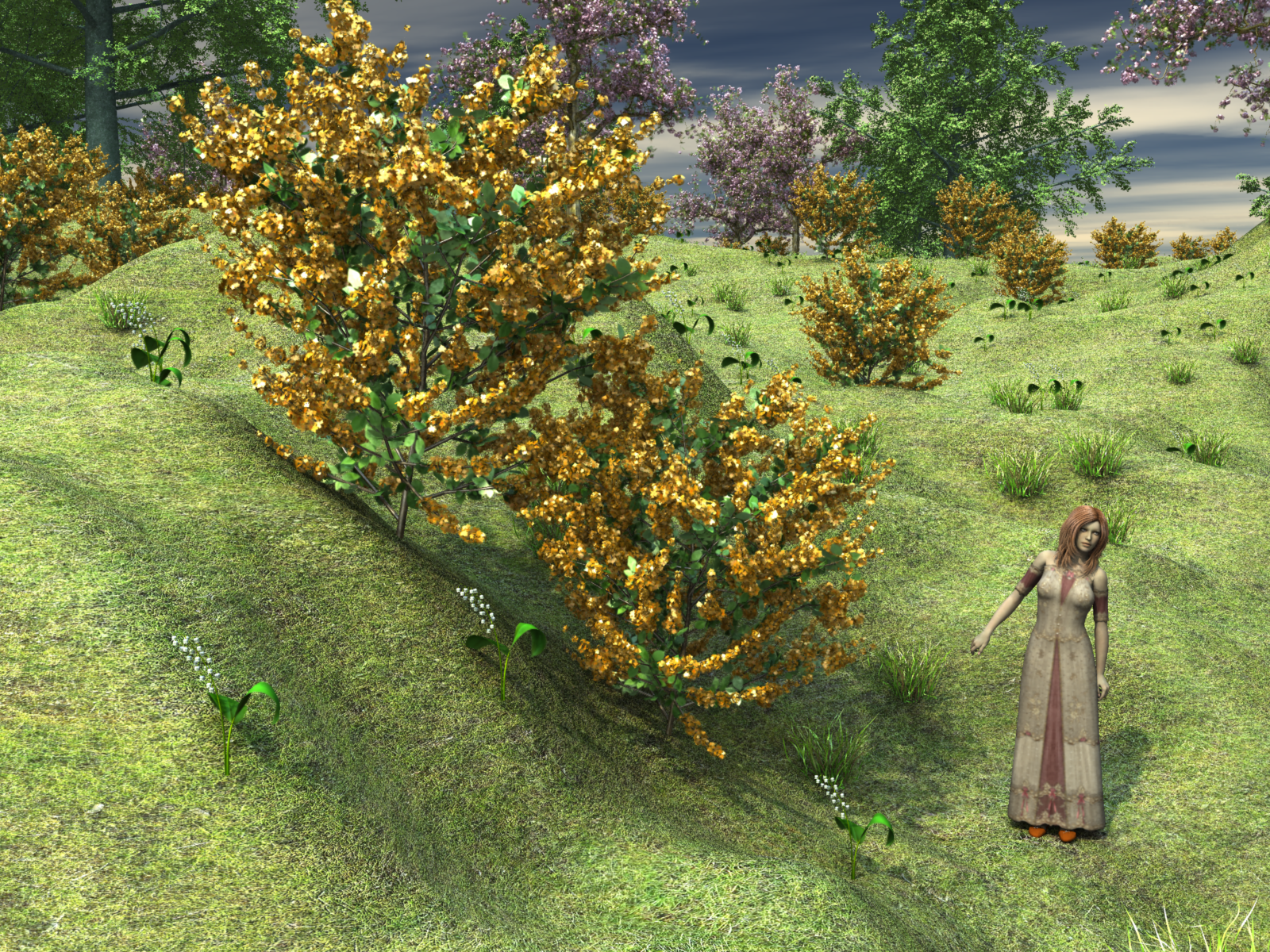
Entry: # 1
Title: Heavenly Blossoms
Artist: Bunyip02
WIP Links: https://www.daz3d.com/forums/discussion/comment/6928441/#Comment_6928441
https://www.daz3d.com/forums/discussion/comment/6928626/#Comment_6928626
Credits: Victoria 4.2 Base - https://www.daz3d.com/victoria-4-2-base
Gregoria Hair - https://www.daz3d.com/gregoria-hair
V4 Morphing Fantasy Dress - https://www.daz3d.com/v4-morphing-fantasy-dress
Rose Gown MFD textures - https://www.daz3d.com/rose-gown
V4 Wildwoods Traveler Slipper - https://www.daz3d.com/v4-wildwoods-traveler
Bryce Terrain - exported from Bryce & imported into Carrara
Carrara Trees
Flinks Blossom Bush 5 by Flink - Renderosity
Flinks Blossum Tree 4 by Flink - Renderosity
Flinks Grass 3 by Flink - Renderosity
Flinks Flowers Lily of the Valley by Flink - Renderosity
Flinks Grass Textures by Flink - RenderosityAdditional Notes: Any tips you'd like to share on how you made your image? Terrain is a Bryce item exported from Bryce as an obj and then imported into Carrara
Included in voting? Yes
 I just downloaded Sabby-EmmaLee by RPublishing, need help in setting up to start wokrflow
PerttiA said:
https://www.daz3d.com/victoria-4-2-pro-bundle (includes the required Morphs++, which is not available by itself)
https://www.daz3d.com/stephanie-4-elite-basegot both , what next please help!
I just downloaded Sabby-EmmaLee by RPublishing, need help in setting up to start wokrflowFinally, I now have Both Stephanie 4 pro bundle + Victoria 4.2 pro bundle.
I installed both Stephanie 4 base and victoria 4 base and tex + shapes, still unable to proceed!
Can any artists from the generation 3-4 era answer my questions about 3DL?Fauvist said:
Could you post an image and describe what in the image you're trying to immitate? What is the "certain look"? A couple of images would help.
https://www.daz3d.com/victoria-4-2-base < ----- literally even this lol, perhaps ill do a render myself showing my own results, but its a certain bronze type of look on the skin....and there is a shine to the hair I cant quite achieve. I know that the hair from Ranger V4 and then its been recoloured, also the bikini seems to be the basic wear one, also with the texture changed. Its that bronzy shine on the skin though. Hard to explain I guess im sorry lol.
Thank you for your answer :)
Can any artists from the generation 3-4 era answer my questions about 3DL?Firstly I hope everyone is doing well, long time lurker I read alot of everyones posts, and have alot of love for the community here.
The question I would like to ask (if i may?), is mainly directed towards users from before Daz Studio 4, or even just Victoria 3-4 era, but maybe someone else just have the knowledge idk.
Prior to Iray, I know alot of people used 3DL (which i myself have dabbled with for a few years now along with Iray), and perhaps they used UE or AOA lights etc. I wonder if seem to find the answer to these history based questions about Daz Studio.
So I guess my questions are the following.
1) Was 3DL present since the first ever release of Daz Studio, or was there a different method of rendering? What was your personal method?
2) Before UE what was the main technique for occlusion etc?
3) When was UE released? (like what was the first Daz Studio version where people started to use it?)
4) Why do I find it so hard to replicate the promo pics to anything before Genesis? (yes I like to do this sometimes lol) Thers is a certain look to them I just cant seem to capture.
Well .....I guess its 4 questions (sorry if thats a little cheeky). I have found a few posts about the history of when the characters where released but I couldnt find anything really on my questions. Sorry if there is and I missed it, sorry if this post is in the wrong section, and sorry about my terrible grammar. :)
Thanking anyone that even reads this for their precious time.
I hope everyone has a great day!!
Morphs won't load [RESOLVED]Oooooh okaaaaaaay, I got it!
I reflected upon that all when having dinner, and my brain worked better, and I thought about the exact same thing you're describing... although you explain it much better than me.
In fact I had a weird manual installation, it seems, all arranged in neat sub-folders, but arranged to MY liking and certainly not to DS's :)
So I guess now all is better since I decided to have a personal "My Daz 3D Library", well arranged, and my characters have stopped looking like Victoria 8 clones.
Thank you SO MUCH for taking the time to help me, PerttiA!!
P.S : I edited the title of my topic to [RESOLVED], wooohooo!
I just downloaded Sabby-EmmaLee by RPublishing, need help in setting up to start wokrflowVictoria Morphs++ are available separately, the product has just been renamed Shapes++ https://www.daz3d.com/victoria-4-2-shapes
Missing Morph Targets?Bejaymac said:
There's two similar errors you'll find in the log "Could not find target property for formula" and "Could not find output property for formula". They basically mean the same thing, DS has loaded a file with an ERC link in it, problem is DS can't find the required file at the specified pathway, so it fails to make the ERC link between the assets.
The main problem with dealing with them is figuring out which is being caused by a missing dependency, and which was caused by a vendor **** up.
The one you posted is one I get with Victoria 8 and Monique 8, as like you I don't have the expressions pack, in this instance those DSF files are safe to delete as they are correctives for a product you don't have, and don't normally have anything else sending ERC links to them.
That however is the end of the easy to deal with versions of these errors, dealing with most of the others requires a fair bit of DSF and in some cases DUF file editing.
Could not find target property for formula: Genesis8Female:/data/DAZ%203D/Genesis%208/Female/Morphs/Product A/File A.dsf#AssetID?value in file : /data/DAZ%203D/Genesis%208/Female/Morphs/Product A/File B.dsf
The above is the sort of thing you get when a vendor ****s it up, basically they have made all their morphs and control assets, done ERC freeze and saved them all as morph assets. Then for whatever reason they go and edit some of their files, even change file/folder names, which of course breaks the ERC they didn't bother their arse to check was still working before they package it.
Dealing with Duplicate Formula errors is childs play compared to dealing with this crap.
Yeah, that's what I thought. I assume whoever makes the core characters for Daz has all the core products like "Genesis 8 Female Expressions" installed, and they saved them improperly.
Unfortunately, I don't have time to edit dozens of DUF files, so...
I guess I'll have to wait till it goes on sale. I just hope it speeds up my G8F loading time.
Missing Morph Targets?Bejaymac said:
There's two similar errors you'll find in the log "Could not find target property for formula" and "Could not find output property for formula". They basically mean the same thing, DS has loaded a file with an ERC link in it, problem is DS can't find the required file at the specified pathway, so it fails to make the ERC link between the assets.
The main problem with dealing with them is figuring out which is being caused by a missing dependency, and which was caused by a vendor **** up.
The one you posted is one I get with Victoria 8 and Monique 8, as like you I don't have the expressions pack, in this instance those DSF files are safe to delete as they are correctives for a product you don't have, and don't normally have anything else sending ERC links to them.
That however is the end of the easy to deal with versions of these errors, dealing with most of the others requires a fair bit of DSF and in some cases DUF file editing.
Could not find target property for formula: Genesis8Female:/data/DAZ%203D/Genesis%208/Female/Morphs/Product A/File A.dsf#AssetID?value in file : /data/DAZ%203D/Genesis%208/Female/Morphs/Product A/File B.dsf
The above is the sort of thing you get when a vendor ****s it up, basically they have made all their morphs and control assets, done ERC freeze and saved them all as morph assets. Then for whatever reason they go and edit some of their files, even change file/folder names, which of course breaks the ERC they didn't bother their arse to check was still working before they package it.
Dealing with Duplicate Formula errors is childs play compared to dealing with this crap.
It's one way to pass the time, although you do need an eye for detail, a mindset for logical thinking and a bucket load of patience
 I just downloaded Sabby-EmmaLee by RPublishing, need help in setting up to start wokrflow
https://www.daz3d.com/victoria-4-2-pro-bundle (includes the required Morphs++, which is not available by itself)
https://www.daz3d.com/stephanie-4-elite-baseMissing Morph Targets?There's two similar errors you'll find in the log "Could not find target property for formula" and "Could not find output property for formula". They basically mean the same thing, DS has loaded a file with an ERC link in it, problem is DS can't find the required file at the specified pathway, so it fails to make the ERC link between the assets.
The main problem with dealing with them is figuring out which is being caused by a missing dependency, and which was caused by a vendor **** up.
The one you posted is one I get with Victoria 8 and Monique 8, as like you I don't have the expressions pack, in this instance those DSF files are safe to delete as they are correctives for a product you don't have, and don't normally have anything else sending ERC links to them.
That however is the end of the easy to deal with versions of these errors, dealing with most of the others requires a fair bit of DSF and in some cases DUF file editing.
Could not find target property for formula: Genesis8Female:/data/DAZ%203D/Genesis%208/Female/Morphs/Product A/File A.dsf#AssetID?value in file : /data/DAZ%203D/Genesis%208/Female/Morphs/Product A/File B.dsf
The above is the sort of thing you get when a vendor ****s it up, basically they have made all their morphs and control assets, done ERC freeze and saved them all as morph assets. Then for whatever reason they go and edit some of their files, even change file/folder names, which of course breaks the ERC they didn't bother their arse to check was still working before they package it.
Dealing with Duplicate Formula errors is childs play compared to dealing with this crap.
I just downloaded Sabby-EmmaLee by RPublishing, need help in setting up to start wokrflow[I just downloaded Sabby-EmmaLee by RPublishing, need help in setting up to start wokrflow]
how can I set it up, please help!
as told in the readme I did the same but later realized I don't have Victoria 4 & I am unable to find Victoria 4 (V4) product anywhere, help!
Edited for Please put your question in the post body and the title - Daz 3D Forums and to remove offsite commercial link
Inks Tattoos and 8.1vijayasimhabr said:
I have been shopping around for some tattoos and inks. However, seems like majority of available products in that category are 8 only. Very few 8.1 options. I found exactly one, as of now. I am slowly beginning to understand the 8 -> 8.1 compatability of products. Most of them work excepts things on the face, I believe.
So, just wish to confirm if all those 8.0 tattoos would work on 8.1? Except for the face inks and face tattoos, I assume.
The tattoos for 8.0 don't necessarily work on the body/head of 8.1 in the way that you expect. Because Studio understands that 8.1 body/head = 8.0 Torso, it will frequently duplicate tattoos on both surfaces. Then what happens is that it depends on the placement of the tattoo whether or not the duplicate can be seen. For example, I've seen big back tattoos do one of two things: either they split, so that the bulk of a large tattoo is on the back, and part of it is on the head, or if it's small enough, it will appear in both places. Chest tattoos, depending on size and placement, may do the same thing, so you could wind up with a tattoo on the chest and have a split/duplicate that appears on the face. So they do work, just not necessarily the way you expect them to. I have a swimsuit image in my dA gallery that shows what can happen.
Also, a general curiosity. Why are there so little tattos for 8.1? did the vendors stop vending inks for 8.1? Or, 8.0 works for 8.1 (I assume), and they simply havent updated their store descriptions?Well, 8.1 is only a few months old. Also, tattoos made for the arms and legs do still work exactly as expected, so depending on the individual resource, they may simply not need to make 8.1 specifc sets for that.
what did the bridge to hexagon do?The Hexagon Bridge allows us to send items to Hexagon from Daz Studio, and back again. Likewise we can send models we make in Hexagon to Daz Studio, and then back again if we want.
Part of the huge magic of this is that, if we send a piece of clothing to Hexagon, we can change it as much as we want and, upon sending it back to Daz Studio, a dialog will launch asking if we want to make a morph slider for the change we've just made.
This is how I would add 'full body' morph target possibilities to clothing and hair for use in Carrara.
Aside from Victoria 4, who is unlocked by default, if we try to make new morphs in Carrara, we have to model each body parts separately, which can be nearly impossible - definitely improbable.
So I would open the item in Daz Studio, send it to Hexagon and make the tiniest change, and name the new morph something that I want to make a morph for in Carrara, and assign it to a new Morph Category of the figure, making it a Full Body morph zone.
So now back in Carrara, I can load that new version, and just make all the new morphs I want without selecting the head separatley from the neck zone, chest, abdomen, etc.,
That's how I made the older Rosie 4 hair from Angelina Hair. I made a bunch of morphs onto the original hair, then loaded in four times into Carrara, each changed quite significantly from the original, in order to make that long, thick curly hair that it was.
Original Angelina Hair
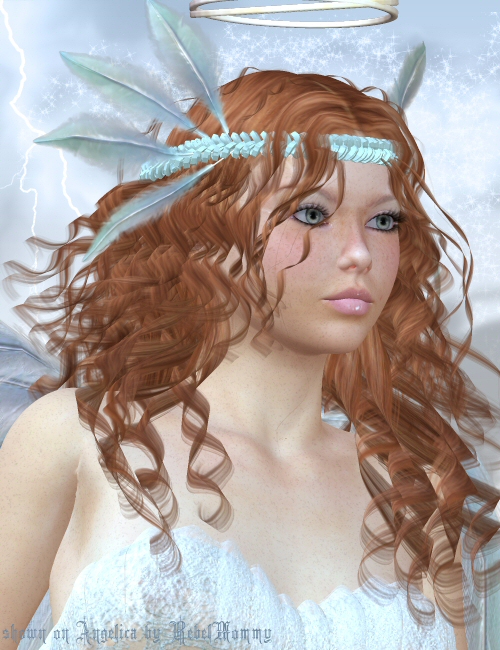
Rosie 4 Hair
 Iray vs LuxCore: "Heads to Heads" Blind Comparison
danielbui78 said:
marble said:
Ok - so tell us already. :)Hehe, sorry for keeping everyone in suspense! Here is the reveal....
Set 1:
- A is LuxCore (via yaluxplug Daz To LuxCore plugin)
- B is Iray
Set 2:
- A is Iray
- B is LuxCore (via yaluxplug Daz To LuxCore plugin)
As was pointed out, some of the things present in the Iray reference that was not in the LuxCore image were:
- sharper contrast with brighter highlights and darker shadows,
- more detailed eye reflections,
- subtle shadows in the jaw line and other angled edges,
- less SSS strength.
And here are a few addiional things that some people might have missed:
- the background images are exactly the same, pixel for pixel, in Set 1 - image A and Set 2 - image B, and vice versa for Set 1-B and Set 2-A.
- The Iray backgrounds have bright areas that are so bright that they lose detail when compared to the LuxCore backgrounds.
- In the Iray images, the shadows around the ears are a little darker than would be expected based on the brightness of the background IBL lighting and intensity of the light bouncing off the highlighted skin.
- Victoria 8.1's eyelashes, eyebrows and lips in the Iray renders have extra specular highlights not seen in the LuxCore renders.
- The far, curved edge of Victoria 8.1's cornea/irises are much darker in the Iray renders than in the LuxCore renders.
- In Set 1 - Image A (LuxCore), the specular highlights on Twosret's face seem unatural, strongly textured and reflecting back up rather than diffusing into the skin, while in Set 1 - Image B (Iray) the specular highlights on Twosret's face seem like they are hitting a relatively flat surface and naturally diffusing deeper into skin.
In my opinion, the brighter hightlights and darker shadows in the Iray renders are due to an additional non-linear tonemapping step that is not implemented by the yaluxplug plugin yet: “burn highlights” and “crush shadows”. Readers familiar with photoshop post-processing are probably well aware of these operations. However, the one advantage you can get from using Iray to do those steps is that they are done while the image is still in its internal HDR 32bits-per-pixel format. So there is no loss of image detail.
I think the subtle shadows on the jaw line and on surfaces that are at sharp angles to the camera are created by the TopCoat rendering phase. When viewed directly on, you don’t notice this TopCoat layer because it is so thin, but at an angle, you start seeing the TopCoat layer, especially on Victoria 8.1, as subtle shadows. This is also not implemented in yaluxplug yet.
Glossy Anisotropy, Refractions and Dual Lobe Specular rendering are other areas that need more work in the yaluxplug plugin.
As for most of the other differences, yaluxplug is not yet fully tuned so that the Iray parameters are converted to the proper LuxCore parameters to produce an identical visual result. I need to go back and tweak the roughness values, bump map strengths, SSS strengths, and specular strengths.
I’ll conclude my ramblings with these final thoughts: In my opinion, Iray and LuxCore are both really good physically based renderers. Both are capable of making very good renders, whether you think that means images with high contrast lighting or a wide range of color and luminance details. The brush is only good as the artist who wields it.
Two final renders for you:
- The first is a custom Iray render with "burn shadows" turned down to zero. IMHO, this makes the image look more visually appealing -- it adds greater range and depth of detail in the shadows while retaining the dramatic strong lighting.
- The second custom render was done by manually adding/modifying about 6 lines in the native LuxCore scene files that are outputted by the yaluxplug plugin. I tweaked the Cornea roughness and transparency to get better eye reflections. I also added 4 lines to generate the missing non-linear tonemapping stage to increase brightness and burn in the highlights. Bumpmapping strength was adjusted down in Twosret's face and up in her lips. A few other things that can't be easily done by modifying a few lines are: TopCoat rendering, adjusting SSS strength for all materials, tweaking the dual lobe specular rendering mask. In the future, I'll incorporate all these tweaks into yaluxplug so that the renders look more appealing without additional user involvement.
Thanks again for everyone's involvement and participation!
Looks awesome. Would be great to see the LuxCore look like that particular iRay render.
Iray vs LuxCore: "Heads to Heads" Blind Comparisonmarble said:
Ok - so tell us already. :)Hehe, sorry for keeping everyone in suspense! Here is the reveal....
Set 1:
- A is LuxCore (via yaluxplug Daz To LuxCore plugin)
- B is Iray
Set 2:
- A is Iray
- B is LuxCore (via yaluxplug Daz To LuxCore plugin)
As was pointed out, some of the things present in the Iray reference that was not in the LuxCore image were:
- sharper contrast with brighter highlights and darker shadows,
- more detailed eye reflections,
- subtle shadows in the jaw line and other angled edges,
- less SSS strength.
And here are a few addiional things that some people might have missed:
- the background images are exactly the same, pixel for pixel, in Set 1 - image A and Set 2 - image B, and vice versa for Set 1-B and Set 2-A.
- The Iray backgrounds have bright areas that are so bright that they lose detail when compared to the LuxCore backgrounds.
- In the Iray images, the shadows around the ears are a little darker than would be expected based on the brightness of the background IBL lighting and intensity of the light bouncing off the highlighted skin.
- Victoria 8.1's eyelashes, eyebrows and lips in the Iray renders have extra specular highlights not seen in the LuxCore renders.
- The far, curved edge of Victoria 8.1's cornea/irises are much darker in the Iray renders than in the LuxCore renders.
- In Set 1 - Image A (LuxCore), the specular highlights on Twosret's face seem unatural, strongly textured and reflecting back up rather than diffusing into the skin, while in Set 1 - Image B (Iray) the specular highlights on Twosret's face seem like they are hitting a relatively flat surface and naturally diffusing deeper into skin.
In my opinion, the brighter hightlights and darker shadows in the Iray renders are due to an additional non-linear tonemapping step that is not implemented by the yaluxplug plugin yet: “burn highlights” and “crush shadows”. Readers familiar with photoshop post-processing are probably well aware of these operations. However, the one advantage you can get from using Iray to do those steps is that they are done while the image is still in its internal HDR 32bits-per-pixel format. So there is no loss of image detail.
I think the subtle shadows on the jaw line and on surfaces that are at sharp angles to the camera are created by the TopCoat rendering phase. When viewed directly on, you don’t notice this TopCoat layer because it is so thin, but at an angle, you start seeing the TopCoat layer, especially on Victoria 8.1, as subtle shadows. This is also not implemented in yaluxplug yet.
Glossy Anisotropy, Refractions and Dual Lobe Specular rendering are other areas that need more work in the yaluxplug plugin.
As for most of the other differences, yaluxplug is not yet fully tuned so that the Iray parameters are converted to the proper LuxCore parameters to produce an identical visual result. I need to go back and tweak the roughness values, bump map strengths, SSS strengths, and specular strengths.
I’ll conclude my ramblings with these final thoughts: In my opinion, Iray and LuxCore are both really good physically based renderers. Both are capable of making very good renders, whether you think that means images with high contrast lighting or a wide range of color and luminance details. The brush is only good as the artist who wields it.
Two final renders for you:
- The first is a custom Iray render with "burn shadows" turned down to zero. IMHO, this makes the image look more visually appealing -- it adds greater range and depth of detail in the shadows while retaining the dramatic strong lighting.
- The second custom render was done by manually adding/modifying about 6 lines in the native LuxCore scene files that are outputted by the yaluxplug plugin. I tweaked the Cornea roughness and transparency to get better eye reflections. I also added 4 lines to generate the missing non-linear tonemapping stage to increase brightness and burn in the highlights. Bumpmapping strength was adjusted down in Twosret's face and up in her lips. A few other things that can't be easily done by modifying a few lines are: TopCoat rendering, adjusting SSS strength for all materials, tweaking the dual lobe specular rendering mask. In the future, I'll incorporate all these tweaks into yaluxplug so that the renders look more appealing without additional user involvement.
Thanks again for everyone's involvement and participation!
Any idea what the name of this chracter model is ?She looks like Victoria 8 to me, slightly mixed with other shapes.
Daz 3D is part of

Connect
DAZ Productions, Inc.
7533 S Center View Ct #4664
West Jordan, UT 84084Licensing Agreement | Terms of Service | Privacy Policy | EULA
© 2026 Daz Productions Inc. All Rights Reserved.