-
Is there an easy way to transfer smart props to a new figure?
I could have sworrn I saw a script or something to do this but I'm drawing a blank now and wondering if it was a tutorial... It seems it ought to be easy with G3-G8, but I have a ton of older smart props that I've been wanting to transfer to the newer figures.
DazToMaya PosingHow do I transfer a pose in Daz Studio to Maya 2018 using the DazToMaya Plugin?
eJCM applies on all now...I see something similar with the "Skinchangers" product which applies a spurious morph when the head is bent, even if Skinchangers is not in use. I have submitted a trouble ticket.
Did you get any feedback regarding the problem? i still didn't get any updates in my "DAZ install manager" as Alessandro Mastronardi mentioned.
Should be live in store since 8 November, I was able to download and update.
eJCM applies on all now...I see something similar with the "Skinchangers" product which applies a spurious morph when the head is bent, even if Skinchangers is not in use. I have submitted a trouble ticket.
Did you get any feedback regarding the problem? i still didn't get any updates in my "DAZ install manager" as Alessandro Mastronardi mentioned.
Issues with morphs projected on to geograftsThanks, Richard. I can't see any 'custom setup' or custom morph on the bought geograft that works as I would expect. (The bought geograft is the genitalia for G2M.) Maybe I just don't know what to look for. The projected morph appears on the geograft as soon as I dial it up on G2M, it's not there prior to that. I have got hidden properties shown. The bones for the geograft are 'magically' added to the projected morph as sub-components as soon as it appears, as far as I can see.
I am wondering if I did something wrong when I used the Transfer Utility with my geograft. I have gone back to that stage, and tried a few combinations of options. Nothing I have tried achieves the same kind of results. If I set up the G3F Height morph as a favorite I can get it transferred to the geograft, as 'FBMHeight', but that is then not a 'projected' or 'auto-generated' morph. Also, I can't find a combination of options that doesn't also completely destroy the weight mapping and the face groups on the geograft: the weight mapping disappears completely, and the face groups all end up with zero faces assigned to them. I have to uncheck 'Remove unused bones' or the TU will remove all the bones in the geograft as well, I presume because the weight maps have gone. I had similar issues with the weight maps and face groups the first time around and just had to slog through re-doing them all.
I'll get back to this after the weekend.
Rudolph the red nosed reindeer morph for G8[Rudolph the red nosed reindeer morph for G8] How about a morph like this for the holidays
dForce, dWeight and dWardrobe. Chronicles of...I just stumbled across a nifty little script that is part of the Genesis 8 Developer Kit, included with the Genesis 8 Starter Essentials. That means this script has been available for around a year and a half, and I didn't even know it existed!
What is it?
It's called "Export Base Resolution OBJ" and it does exactly what it says. Why is that nifty? Because you don't have to go into the Parameters and change Resolution of the item to Base, and then remember to put it back to High Resolution when you're ready to render. Just select the item to export and click on the Script icon. It does bypass the dialog window though. I'm going to check further, but I suspect it uses the default Daz export settings.
Assuming I'm right, this one script can replace steps 3 & 4 of the instructions for Turning Your Perfect Simulation Into A Morph. I can't begin to count the number of times I've exported the object, cleared the simulation and had the Morph Loader process fail because I forgot to change the resolution. And I've already cleared the simulation!
Genesis morphs helpOk thank you so We have to buy all too bad :/
G3 and G8 are close in morph so I was hoping it was compatible
Genesis morphs helpHello
I'm little loose on different morph pack availables for genesis.
What is the difference between
- Genesis 8 Female Body Morphs ,
- Genesis 3 Female Body Morphs and
- Genesis Evolution: Body Morphs ?
The same questions about Head Morphs ...
Do I have to buy all ?!?
Thank you for help
Fixing the kids 4The OP is talking kids, not infants, so the Sixus infant/toddler and these other infants/todlers that some don't like either aren't applicable to the OP's post anyway. The 'Growing Up' morph products, even though I've bought them for Genesis 3 & Genesis 8, do tend to make the models all look like the same child unfortunately. The DAZ Originals morph products, when you adjust them with the proportions as recommended for artists to make children, do all look like child versions of the adults back when they were children so that is preferable approach for me personally.
MimicMolly's Renders & WIPsI had a good Thanksgiving, ate several small lunches because of visiting family friends with my family. Here's a quick artistic render. Link to the DAZ galleries [x]. I also removed the black/white filter to see what it looked like, but it made the whole image softly pink. As a result, I actually switched the colors of the hoodie's inside. (The original was blue, so I made it reddish.)

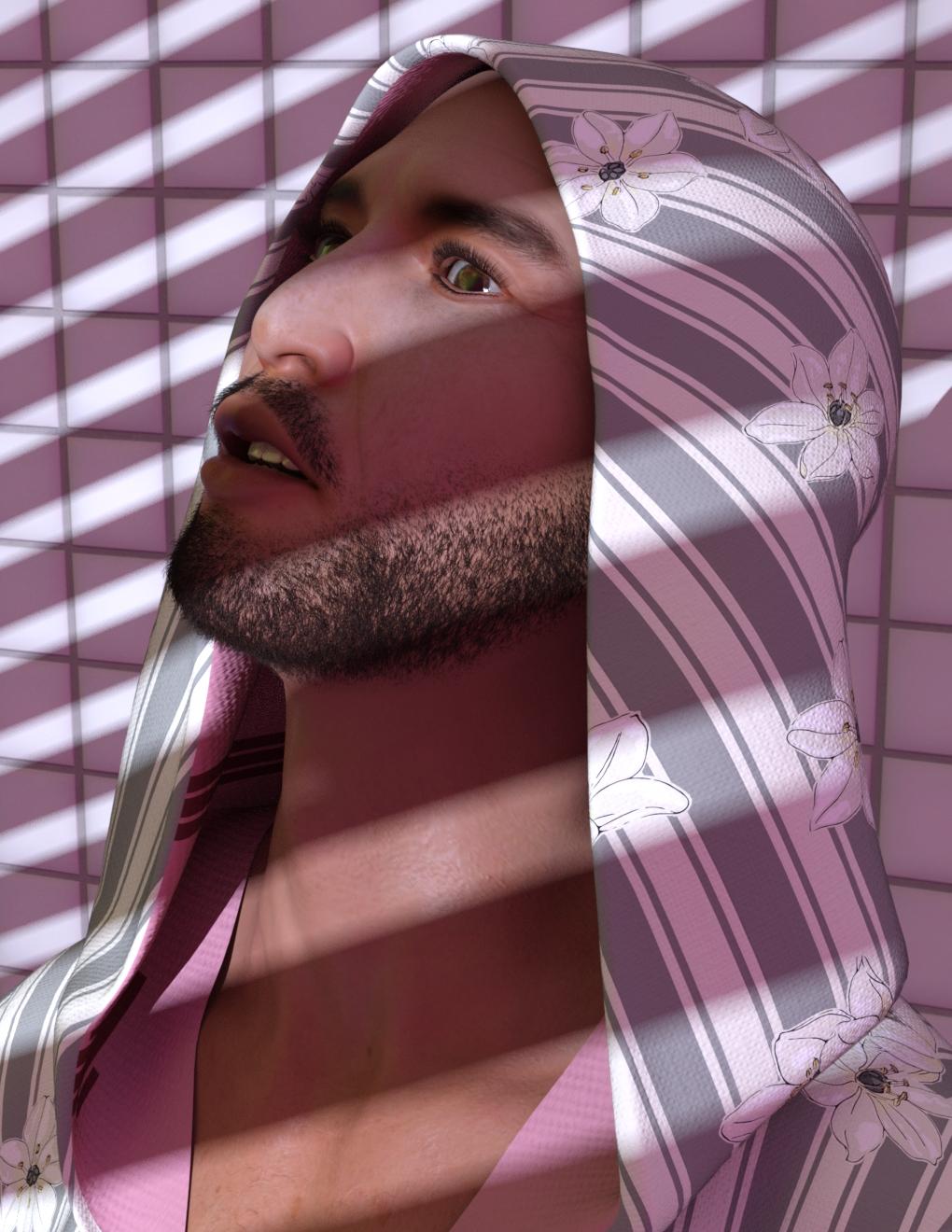
I wanted to get the Lee 8 Pro Bundle, it appealed to me...except for the price tag. O_O; Then I decided I wanted the Lee 8 base, but he looked similar to the Asian morph (Morph #4) in M3D Martin HD Shapes for Michael 8. I guess I'll hold off for now, but he does look nice.
In these renders he is using Brandon for Toon Dwayne 8's textures and Vladimir 8's normals and beard.
Reloading V4/M4 Textures after Creation in DAZYes, the title is bizarre, but here's what's going on...
1. I have a generic V4/M4 Character created, which has all the morphs, and additional add-ons added.
2. I add skin textures, and additional textures (teeth stained, dirty finger nails etc)
3. I morph my character into what I am needing
4. I save file throughout the process.
I close DAZ for a while, then I reopen
I am asked to find any and all textures that were applied previously. This only happens on the first iteration of re-opening a character I created. I have not seen this happen on subsequent saves/re-opens.
Any thoughts?Issues with transferring character from G3F to G8FI've been trying to use SickleYield's guide to transfer morphs in order to move some of my more used characters over from G3F to G8F, but I'm experiencing issues where after I've used the Transfer Utility, some vertices are moving too far or even entirely in the wrong direction in the new G8F morph - here, parts of the fingers are moving completely in the wrong direction, completely wrecking the hands, and vertices around the elbow are moving too far, creating a ridge


I think I've followed the instructions correctly (zeroing the scale of the initial model, using the suggested approach of posing G3F to match G8F, ticking check boxes as instructed), and I've got the G3F merged morph working beautifully (even got the rigging fixed) - but even after several attempts of trying to toggle various settings, this still keeps happening. (Posing G8F to G3F before transferring causes a less obnoxious problem, but still a problem, so I don't think it's just I've managed to interpret those instructions badly).
The body shape I'm using is mostly Victoria 7, albeit with some additional morphs layered on top, and I'm experiencing pretty much exactly the same problem if I try to transfer just the basic V7 shape.
Where have I managed to mess up here? I know people use this method just fine for transferring characters nearly seamlessly between these two very similar generations, but I can't work out what I'm personally doing wrong.
can you use victoria 4 morphs on genesis 3?hello all, i'm looking for fignernail morphs for genesis 3 but the only ones i can find are these ones for m4 and v4 https://www.daz3d.com/m4-and-v4-nail-bundle
Is there a way to transfer these morphs onto my g3 female model?
How do I persuade Raiya to make Brooklyn HD for Genesis 8?Just follow one of sickleyield's morph transfer tutorials to move Brooklyn HD to Genesis 8.
I'm not sure but wouldn't a transfer morph prevent me using the skins (different UV) from the G3 character? It might give me more or less the right shape of course.
G3 and G8 share the same texture UV, just save it as a material preset and then apply it to any G8 figure.
Other than using G8 clothing, I really don't see the benefit of using G8 over G3 when you don;t have a choice and there is a clone product that makes G8 clothing work on G3. Besides, even if you get the transfer done, there is nothing that will transfer the HD morphs to another figure yet, so staying with G3 for a specific character is the best bet for now.
Issues with morphs projected on to geograftsAs far as I know custom bones need to be adjusted, manually or with Adjust Rigging to Shape, which requires using a custom morph. Do the items you are looking at not have a custom set-up for the shapes thata re working before you set the shape to on?
Issues with morphs projected on to geograftsQuestion: When a morph is projected on to a geograft from a figure, say the full body Height morph on Genesis 3 Female, how do you get the bones of the geograft to be re-positioned automatically as part of that projection?
Background/explanation
I have created a geograft with rigging to replace one hand of G3F. When loaded on base G3F it works as expected, including posing the bones. When I dial the Height morph (Actor/Full Body/Real World) on G3F, a generated (projected) morph appears on the geograft (FBMHeight). This has a value matching the G3F Height value. The mesh of the geograft moves up or down according to the increased or decreased height of G3F. So far, so good. However, the bones of the geograft stay in their original position, so the rigging is now broken.
I can fix this up to a point by applying 'Adjust Rigging to Shape' to the geograft. The bones are re-positioned and the rigging will now work. But this has to be done after every change in the value of the Height morph, so it is impractical. It seems to me there must be a way to set up some sort of ERC arrangement such that the G3F Height morph 'drives' the positions of the bones of the geograft so they maintain the correct position in relation to the geograft mesh. I cannot figure out how to achieve this.
I note that with geograft products I have bought, this is indeed what happens. As soon as I dial the Height morph, the FBMHeight property appears on the geografted product, and all the bones of that geograft show up as sub-components of G3F's FBMHeight under 1st stage (Add/Subtract) in the property hierarchy. These sub-components do not appear for the projected morph on my geograft. Now, I can create a new ERC property on G3F after applying Adjust Rigging to Shape to my geograft, with the geograft bones as 1st stage sub-components. Unfortunately, after saving this new property as a morph asset and reloading G3F, all the sub-components for the geograft bones have disappeared from the property. Also, it's a new property on top of the G3F Height and the projected FBMHeight on the geograft, which it seems I should not need.
Can anyone please help me with what I need to do to get this to work in the same way as I see existing geografts work?
Fixing the kids 4The old Millenium baby is still the one which looks more natural proportioned to me than the newer ones. The sixus1 baby has a face which looks much too old. Downright creepy.
Redz made a very pretty morph for that baby, however.
For a Genesis 8 child, have a look at Zev0's growing up sets - here's the male set https://www.daz3d.com/growing-up-for-genesis-8-male-s
Genesis content (Genesis, Genesis 2, 3, and 8) is all optimized for Daz studio; earlier content is optimized for Poser, which can make things a little confusing. For quick renders without a lot of headaches, Genesis 3 and Genesis 8 and their content will generally behave in a consistent way and will work with Iray rendering.
How do I persuade Raiya to make Brooklyn HD for Genesis 8?Just follow one of sickleyield's morph transfer tutorials to move Brooklyn HD to Genesis 8.
I'm not sure but wouldn't a transfer morph prevent me using the skins (different UV) from the G3 character? It might give me more or less the right shape of course.
Fixing the kids 4You can get kids the can pass for 4 - 5 years old and on up just by using the DAZ Originals products that morph the head, body, and expressions. Do a search on child vs adult proportions for artists on the internet to guide you on how to adjust the morphs in those products.
Daz 3D is part of

Connect
DAZ Productions, Inc.
7533 S Center View Ct #4664
West Jordan, UT 84084Licensing Agreement | Terms of Service | Privacy Policy | EULA
© 2026 Daz Productions Inc. All Rights Reserved.