-
(Solved) Complex JCM Setup That I Need Some Help With Please
Hey guys,
I hope you are all set for the holidays coming up and your families are well!
I am setting up my first real attempt at building a very heavily customized character with all the JCM's it will need.
I have run into something with the thigh bending, twisting, and side to side that I would like to ask you guys about.
I've created the thigh bend JCM and have it working. I also created a thigh bend + side to side morph that is working (only triggers if both side to side and bend are used but not when only bend is used).
Now I need to make side to side only and I do not want it to trigger if bend is used. Hopefully that makes since. Basically if side to side is used I do not want the side to side + bend morph to apply, only the side to side.
How would I exclude the side to side morph if the bend is applied so that only the side to side + bend morph applies.
Man, I really hope that isn't too confusing lol.
EssentiallyBend tiggers only bend morph (Created and working)
Bend + Side to Side only tiggers Bend + Side to Side morph (Created and working)
Side to Side only triggers Side to Side morph (Thinking of a solution which is where I need help). I do not want this morph to trigger if side to side + bend is being used.Getting on the 9 train, or notGator said:
Keep in mind that line is out of context, after I listed many cons to the single multi-gendered mesh.
I may come from an older era of forums, but I do not like the increasingly common approach to quote an entire post AND all of its nested quotes in order to respond to it.
It's particularly frustrating when reading the forum on the frankly very-poor mobile implementation, where after a couple of levels of nesting, the innermost posts are reduced to a one letter wide column that goes on for hundreds and hundreds of rows.
Hence, usually, I will reduce posts I'm quoting to key points.
~~~~~
But, if we're taking that argument...
Gator said:
What are the long list of benefits exactly?
To understand my perspective, I'm a Daz user that significantly customizes their things.
And I'm pretty sure I'm in the upper percentiles for doing things the vendors didn't plan for.
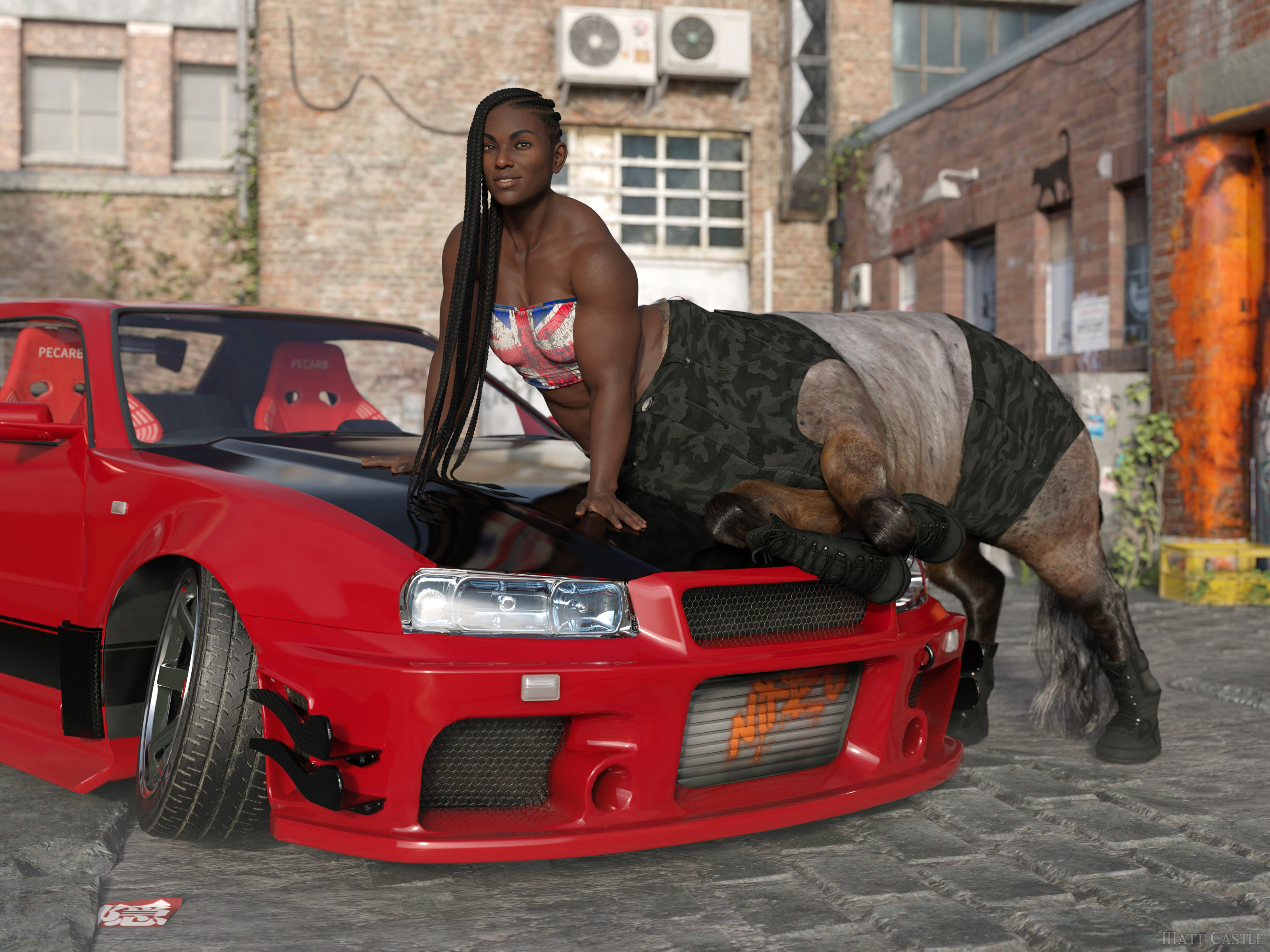
(Well, I say that, but by this point Lyoness absolutely anticipates me doing stupid stuff with her products. She certainly didn't plan that originally though).
The single mesh has some significant drawbacks. Big one that immediately comes to mind is that you have texture compression and stretching issues. It's most apparent in the chest.
True on every generation, if textures are not actually painted onto the morph they're being used on. I've had enough cases where both large and small breasted G8F characters had problems with stretched textures in the chest area.
I'm far from an expert in content creation, but for someone who doesn't care about cross gender clothing it seems like more work. From what I recall, it's recommeded to model to the gender neutral base figure, and then morph to your intended gender. I forget the details, but in any event the times I did it meant modeling/modifying the clothing for two figures (gender neutral and female) instead of one.
Making any clothing item to a good standard already needed manually fitting to major morphs.
Even if you completely disregard any idea of making the clothing work for cross-gender, there's functionally no difference between having to make your clothing fit G9 base, G9 Feminine, Victoria 9, Olympia 9, etc as it was was with G8 base, Victoria 8, Olympia 8, Monique 8, etc. Either way, you already had to make the clothes fit a base shape and then a load of morphs. But on this one, you can be assured that everyone already has G9 Feminine, and a lot of characters sold on the store therefore use it as a shape to sculpt over.
Also, if you're genuinely planning on making the clothing only for one base, then while I hold it's best practice to start on the base shape, the transfer utility *does* have the Reverse Source Shape from Target option, so you can actually model on G9 Feminine, then have Transfer Utility fit to that morphed shape rather than the base shape.
It also means modeling on this totally non-natural genderless figure with fires off my uncanny valley response to 11.
Whether the base figure triggers your uncanny valley response is irrelevant; lots of what we do in the process of developing an asset will look like a distorted version of the final result we're aiming for.
If you don't like the base G9 shape, don't put the base G9 shape in your renders. What shape the figure starts at is not what's important, it's what shape it ends up as - and, indeed, the exact base shape you start from has little limitation on what shape the character can be.
I mean, here's the same character on Genesis 2, Genesis 8 and Genesis 9, despite all of those bases having a different initial shape.
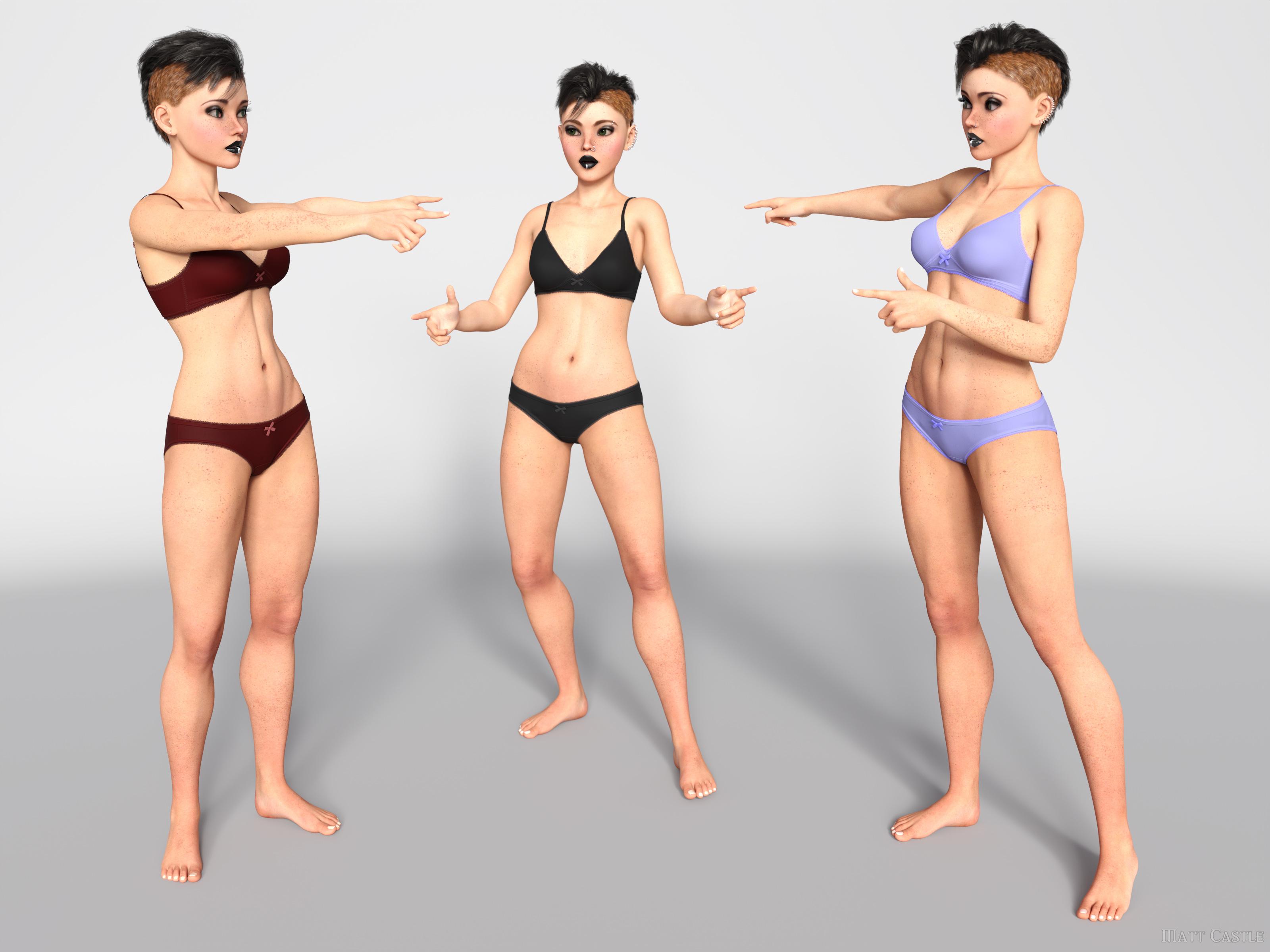
I'd challenge people who think the base figure shape leaves an indelible fingerprint on the characters to put their skills to the test and make a correct call on which base each of these is using.
(And I promise, they are genuinely on Genesis 2, Genesis 8 and Genesis 9; I've not used the same base three times).
Another potential - has there been an improvement with handling a large number of morphs when loading a figure? With G9 now it has to parse through two genders of morphs in your library. I've tried, but I don't really use G9 so I don't have that much.
Yes, significantly so. Daz have brought down loading times massively from where they were, and we know that when we (finally) get DS 5, one of the main things they're trying to resolve is being able to multi-thread processes that DS4 currently can only handle single threaded. As mid-range modern CPUs tend to have about 8 cores, and higher end ones can have 16 or more, that's going to be around an order of magnitude of speed increase.
As for cross-gender clothing, I simply don't have any use for it. Never have in over 10 years of rendering and probably never will.
Already addressed this one, but moving on to your reply...
For the cross-gender clothing support you also need to keep in mind at least today, there really aren't that many unisex outfits in the real world. Even in 2024, our children go to a school that requires uniforms and they are different for the sexes. Even something basic like a polo shirt, they are cut significantly different and fit differently between the sexes. Sure, you can morph it, but you generally morph the crap out of it and wind up compression/stretching issues I mentioned in that post. Same for the US military ACU, while similar the differences are beyond morphs.
Aside from the fact that having *a* matching polo shirt but perhaps not with a perfectly feminine cut is obviously better than having *no* matching polo shirt, if we're talking about singling out points from a post without addressing the entire thing, I address several other points where native cross-compatibility is a boon - anthros don't need the vendor to make two different sets of body fur, aliens don't need two different sets of geografts and HD morphs, male and female members of a family can actually share morphs to get resemblance, etc.
I'll even go so far to say my lack of need for unisex or cross gender is probably the norm - granted, feeds get tailored for what we all click on now but at the art rags I look at there simply isn't much unisex or cross dressing going on out there.
Possibly...
... but I would say that the greatest strength and the entire ethos of the Genesis lines are their flexibilty and compatibility. Victoria, Olympia and Josie aren't all stand-alone figures - we can share the same hairs between them, we can share the same clothes, the same skins, the same poses.
If you say "well, we'll take away a function because not everyone's using it", then suddenly you have no functions. (Hell, on the basis of sales figures, we'd probably have no male bases at all).
But that as an example strongly illustrates a point. Options have exponential potential; even if you don't use rock monsters very often, the fact that you *can* use a rock monster when a scene calls for it massively increases what you can do. Taking away men might be much more obvious in its drawbacks, but the number of scenes I've had to put to one side because I don't have a specific and niche-seeming item to complete them is considerable. (On that note, I have to fanatically promote GCJellyfish's Dirty Dishes sets, because the number of scenes where I've thought "there's no way I can finish this, I won't possibly have a posable banana peel in my library... holy mackerel, I do." Actually, GCJellyfish's sets are like this in general, and I *still* underestimate their feature sets)
Even if few scenes may use cross-gender clothes, I'm willing to guess that many people have done (or had to abandon) scenes that required a seemingly niche function. Taking away functions because they're not useful to you eventually gets to the point where the DS feature set is below the kind of critical mass it needs to be useful.
~~~~~
Sure, things could be done better about G9, but I think the things that G9 has tried to do are good ideas in principle.
P3D 100 Natural ExpressionsAnybody know who the character [used in the promos for P3D 100 Natural Expressions] is? Perhaps it is a P3D combo morph?
Diffeomorphic DAZ Importer version 1.7.0 releasedHello,
I noticed that the FACS expressions are generating some distortions on the eyes, teeth and tongue for G9 (haven't tested previous versions TBH). This happens when "Transfer to Face Meshes" is enabled, which is necessary to get the morphs working with eyelashes and eyebrows. Distortions don't happen when this option is not enabled, but then the brows and lashes do not follow the morphs anymore. Seems like a dead end in both cases.
Any recommendation on how to get it work properly ? If not, I'll have to find the shapekeys and delete them manually. Although this may break other morhps.
Screenshot is G9, base model with no morph applied (for testing), Blender 4.2, Diff 4.2.1.
Thanks,Getting on the 9 train, or notMatt_Castle said:
Gator said:
As for cross-gender clothing, I simply don't have any use for it. Never have in over 10 years of rendering and probably never will.
I'm always disappointed when people conclude that just because a feature isn't one they will use that it's not something anyone else can or will use.
If you look at the five years of G8 and G8.1,I only know of one single school uniform set where the vendor produced matching male and female versions. That's a very reasonable thing to want or need in a uniform, but even of the other sets that aren't skimpy pin-up schoolgirls with unbuttoned blouses and barely-long-enough skirts, they would need you to carry out a conversion to get a matching jumper/blazer/sweater/whatever on both bases.
And I can't say I'm at all surprised that vendors didn't do it that often; it's tedious to have to redo almost exactly the same rigging work twice when you could have done it once - a development process that G9 achieves by its very nature.
~~~~~
I'm certainly no grand G9 fanatic - I have most of my characters built on G8, moving them is a hassle, and G8 certainly isn't suddenly defunct, so I've mostly kept my cast on G8 - but I cannot fathom that some people don't find the concept of a unisex base to be meritorous.
I'm not talking about execution here. It is after all possible to have a good idea but realise it badly. I'm talking about the fact that there's a contingent of people who don't merely say "G9 has been done badly", but instead say things like "G9 is an answer to a question no-one was asking".
If they could be done equally well, it would obviously, unarguably and objectively be better to be able to have one base that can seamlessly share all assets (allowing uniform uniforms, cross-gender familial resemblance, alien/anthro creatures to inherently come with both genders, etc) than two bases with a conversion barrier between them.
Sure, there's an argument to be had about the compromises necessary to achieve that, but we should at least agree that it's a desirable feature.
Keep in mind that line is out of context, after I listed many cons to the single multi-gendered mesh.
For the cross-gender clothing support you also need to keep in mind at least today, there really aren't that many unisex outfits in the real world. Even in 2024, our children go to a school that requires uniforms and they are different for the sexes. Even something basic like a polo shirt, they are cut significantly different and fit differently between the sexes. Sure, you can morph it, but you generally morph the crap out of it and wind up compression/stretching issues I mentioned in that post. Same for the US military ACU, while similar the differences are beyond morphs.
I never said it was impossible for me to fathom a benefit for someone - that's not the point. The point is that IMO the cross-gender compatibility is a net negative for me, what it offers doesn't outweigh the drawbacks. I'll even go so far to say my lack of need for unisex or cross gender is probably the norm - granted, feeds get tailored for what we all click on now but at the art rags I look at there simply isn't much unisex or cross dressing going on out there.
The Mac FAQinquire said:
I don't believe that the Genius Bar or Apple Computer would do that transfer. I did check again with ChatGPT, and just said basically the same thing. It recommended Ace, data recovery, salvage, data, recovery, or secure data recovery, as companies that would perform these services. It said that Ace data recovery has extensive experience with McIntosh computers and transferring data from one kind of drive to another.
It also said that the Geek Squad at Best Buy would be able to perform the service provided that there is no damage to the drive. The other companies that are recommended above would apparently be able to perform more extensive services and would probably be able to help even if there was damage to the drive.
I do have some experience with the genius bar at Apple stores, of which there are a number in my area. They basically make recommendations and might refer a customer to companies who could perform certain services. If it's the Apple Computer itself, that is in need of repair, They can accept it and send it in to be repaired. I don't believe they will perform any repair function on an external hard drive, especially one that is third-party, even if it's a drive that Apple sells on its own website.
I'm just providing this for information and clarification. If anyone has more information on this or wishes to make modifications to this, I welcome that.speech to text does include some funny punctuation errors. It's too difficult to correct some of this on my iPhone, but I got This message into shape that I think anyone can decipher.
I didn't suggest they do it, just that they tell you what you need to buy and prove that it works before you buy it.
The Mac FAQElor said:
Apple is selling a bi-directionnal Thunderbolt 2 to Thunderbolt 3 adapter and it's working fine on my Macbook Pro 14" to plug Apple's Thunderbolt to Ethernet adapter in a Thunderbolt 4 port but I don't remember using it with anything else.
this is basically what ChatGPT Said and recommended. It said that this would be cheaper than taking a hard drive in and requesting that a company do the transfer. It only recommended seeking another company in the case that the hard drive itself had some damage to it, in which case the Geek Squad at Best Buy would not be able to handle it. So a company like Ace Data Recovery Would be able to handle that, at least that is what ChatGPT said.
The Mac FAQI don't believe that the Genius Bar or Apple Computer would do that transfer. I did check again with ChatGPT, and just said basically the same thing. It recommended Ace, data recovery, salvage, data, recovery, or secure data recovery, as companies that would perform these services. It said that Ace data recovery has extensive experience with McIntosh computers and transferring data from one kind of drive to another.
It also said that the Geek Squad at Best Buy would be able to perform the service provided that there is no damage to the drive. The other companies that are recommended above would apparently be able to perform more extensive services and would probably be able to help even if there was damage to the drive.
I do have some experience with the genius bar at Apple stores, of which there are a number in my area. They basically make recommendations and might refer a customer to companies who could perform certain services. If it's the Apple Computer itself, that is in need of repair, They can accept it and send it in to be repaired. I don't believe they will perform any repair function on an external hard drive, especially one that is third-party, even if it's a drive that Apple sells on its own website.
I'm just providing this for information and clarification. If anyone has more information on this or wishes to make modifications to this, I welcome that.speech to text does include some funny punctuation errors. It's too difficult to correct some of this on my iPhone, but I got This message into shape that I think anyone can decipher.
Fixing older clothing for Dforce?mmoch25 said:
felis said:
This is an example. It is The Tyto Ensemble for Genesis 3 Female(s). I realised the product is no longer in Daz.
I added dForce to the dress, loin and scarf. Also added weightmap to dress and loin, to keep the upper part out of simulation. Reduced collision distance on the Loin.
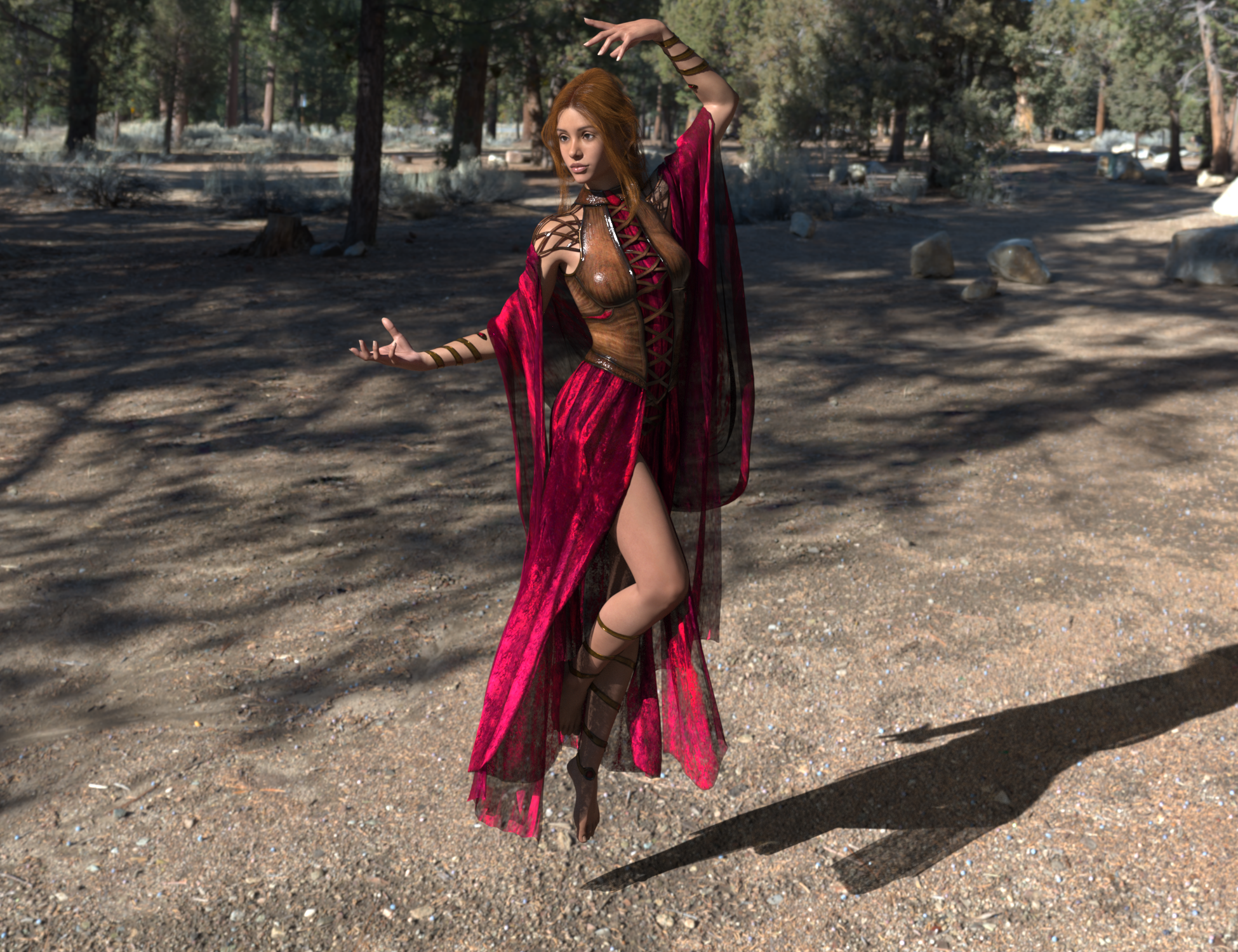
I have used the weight map method before, but sometimes it looks like it's about to explode, it looks really jagged, I then take it into blender to smooth out the morph, and that's when quite often the seams will tear apart.
Jaggedness may mean the offset values is larger than the typical edge (spring) length, so the simulation may distort as it tries to balance them (and may run away and cause the mesh to explode). You shoulkd get warnings about that during the preparation stage, before the actual simulation.
The Mac FAQinquire said:
Totte said:
Ethernet over firewire is fast, but back to the fact that there are a lack of fuctionality in the Thunderbolt 2 -> (3-4-5/USB-C) converters. I use one to connect my old thunderbolt display to the macStudio (works) but tried to use one to connect a thunderbolt 2 drive to it (didnt work), so it seems like not all protocols are fully supported.
OK, I have a question about the thunderbolt cables not working with every product. I do have a back up drive, with tthunderbolt 2 Ports, on which I've stored home movies and 3-D files that I've created. If I do transfer to a new Mac, which uses a thunderbolt 5 Port, I'd want to be able to access that drive. If a thunderbolt connector did not work, Then what could I do? I'm hoping I could get some company, either Apple, or maybe the Geek Squad over at Best Buy, to take that drive and transfer the contents over to a drive that has a Thunderbolt 5 Port. Is this possible? Has anyone done something like this before?
I think you should bring your drive to the Genius Bar and tell them, I want to connect this disk the "that" machine, when I buy it, can you help me?
Fixing older clothing for Dforce?felis said:
This is an example. It is The Tyto Ensemble for Genesis 3 Female(s). I realised the product is no longer in Daz.
I added dForce to the dress, loin and scarf. Also added weightmap to dress and loin, to keep the upper part out of simulation. Reduced collision distance on the Loin.
I have used the weight map method before, but sometimes it looks like it's about to explode, it looks really jagged, I then take it into blender to smooth out the morph, and that's when quite often the seams will tear apart.
The Mac FAQTotte said:
Ethernet over firewire is fast, but back to the fact that there are a lack of fuctionality in the Thunderbolt 2 -> (3-4-5/USB-C) converters. I use one to connect my old thunderbolt display to the macStudio (works) but tried to use one to connect a thunderbolt 2 drive to it (didnt work), so it seems like not all protocols are fully supported.
OK, I have a question about the thunderbolt cables not working with every product. I do have a back up drive, with tthunderbolt 2 Ports, on which I've stored home movies and 3-D files that I've created. If I do transfer to a new Mac, which uses a thunderbolt 5 Port, I'd want to be able to access that drive. If a thunderbolt connector did not work, Then what could I do? I'm hoping I could get some company, either Apple, or maybe the Geek Squad over at Best Buy, to take that drive and transfer the contents over to a drive that has a Thunderbolt 5 Port. Is this possible? Has anyone done something like this before?
Urgent help needed - All base figures distorted!PerttiA said:
To fix any ill-behaving (non-zero default value) morphs, do as follows; (I used G8F as a sample, same method works with other figures as well)
1. Open DS and load "Genesis 8 Basic Female" (to an empty scene)
2. Right Click at Parameters Tab->Preferences->Choose "Show Hidden Properties" (part 3 zeroes only 'visible' dials)
3. Right Click at Parameters Tab->Zero->Zero Figure (Zeroes the value of all the 'visible' dials)
4. Right Click at Parameters Tab->Memorize->Memorize Figure (Sets the current value of all the dials as their default value)
5. Edit->Save As->Support Asset->Save Modified Assets (Writes the changed default value to the morph files that were changed)When saving "Modified Assets" DS shows a dialog and asks for confirmation;
"The following file(s) will be permanently modified:" - "Accept/Cancel" - Choose "Accept"I had a similar problem recently with my Genesis 3 basic female after I had to reinstall DAZ Studio 4.23 and the G3F figure and its related morphs, then had to reinstall them again after my computer slowed to a crawl and then froze on me and I had to turn it off manually and then turn it back on - after doing those things, the G3F base figure and all characters I created based on it came out looking like misshapen, alien-looking characters (but I noticed the G3M base figure had no such problems when I loaded it), so I looked up what to do to fix it and I found this post, so I gave it a try - and it fixed the problem and now all my characters look normal again. Thanks for the solution.
 [Released] RSSY Character And Material Conversion Bundle Genesis 8 to Genesis 9 [Commercial]
I'm mostly sure I'm doing this correctly... I found a video that describes how to use the Transfer Utility and I was using that when I couldn't get the results from the Character Converter to look right, but I was getting the same results either way, that's what initially clued me in to the issue being related to the Materials Suite and not the Converter script. I can produce the same results with the Custom Character Conversion utility using presets with single FBM/FHMs though. I only have a handful of Gen 8s and a lot of them are oddly shaped enough that they don't convert well to begin with, but even with trying the ones that are fairly normal shaped with just the FBM/FHM, the result is a fairly good conversion, but with funky snarled toes. If I run the conversion utility with "Copy Materials Using Materials Suite" unchecked though, the results of the G8Fs that convert well to begin with look practically perfect, but then I'm left without materials. Definitely don't want a refund, it's a fantastic product overall and trying to figure out how to use it was worth the money alone in learning experience.
The Mac FAQinquire said:
can anyone help me with this question?
If it were me, I'd pick up a decent hard drive and transfer everything to it, then from it to the new computer. It's a little slower, but it also creates a full back-up while you do it.
Corners of the lipsWhat mouth open property did you dial on them... Mouth Open or Jaw Open ? G9 has no official Mouth Open property but Jaw Open only... G8.0 has no Jaw Open but Mouth Open only....
So the better way is to check with G8.1 and G9 that have both FACS expressions, then dial Jaw Open property on them.
However, even if you do so, you won't get 100% same morph result as G8 / G9 have different topology / mesh density on Head... let alone Jaw Open property on them have different vertex positions ~~
Corners of the lipsI have converted my head morph from G9 to G8. I did rigging (I believe that is correct.). But when I open mouth, the corners of the lips are too much open and down in comparison with G9 (see attached images). Any hint how to fix it?
Getting on the 9 train, or notGator said:
I'm far from an expert in content creation, but for someone who doesn't care about cross gender clothing it seems like more work. From what I recall, it's recommeded to model to the gender neutral base figure, and then morph to your intended gender. I forget the details, but in any event the times I did it meant modeling/modifying the clothing for two figures (gender neutral and female) instead of one. It also means modeling on this totally non-natural genderless figure with fires off my uncanny valley response to 11.
It doesn't seem to take that much time to fix that dress modeled for Genesis 9 Base Anime Feminine once it has been fitted to Genesis 9 Base (sure, it's done by a seasonned PA, but what's done here feels like the easiest part of modelling something), so, model it on a character you like to work with and use the tricks shared in this video to get it compatible with Genesis 9 Base (or don't care about it at all, there is at least one Genesis 9 clothing product in the Daz Store said to only have a adjustment made for the character it's sold with in a bundle: no trace of any of the three Genesis 9 Base figure in the supported shapes list):

Serene Night said:
Also unisex tends to go one way. Male charcters come with female options, but female characters rarely come with skins and chest adjustment for male chests.
I'm not sure what characters you have in mind, but it doesn't mirror my experience.
PAs characters usually have the textures for one gender only (except for 'sibling' products in which case they have both) while Daz Core Figures have textures for both genders (main exception I could find in my library: Pixie 9 and Josie 9).
Well, at least for chest and AE, because apparently no one thought it would be nice to have a face texture without the freshly shaved beard baked in (my idea of having a young Michael 9 in one scene was fastly abandonned when I applied his skin on a younger version of himself created with Zev0 growing up product).
Navel HD Dials not savedThanks crosswind. My default was set to 0. I changed that to 100% and it solved the problem.
And yes, I am using the morph you showed in the attachment.
Getting on the 9 train, or not3Diva said:
kyoto kid said:
miladyderyni_173d399f47 said:
Currently, for characters I am mostly using G3 & G8, with some G9 & the odd G8.1. The G8.1 & G9 are mostly creatures that I don't have something similar for 3 or 8 like Arcturian (9) & Tree Giant (8.1). Also Hairs since they are so easy to use on other generations.
...pretty much my modus operandi as well. I tend to use a lot of merchant, morph, shaping, and skin resources to create custom characters with G3/G8.as well as transfer utilities that allow me to mix aspects and morphs of both along with even those from G2.
One of the other things that keeps me from moving to G9 is the lack of transfer utilities from older generations. I still use GenX and GenX2 which lets me transfer shapes from as far back as G1 to G3. From twhich I can use either Zev0's XTransfer or River soft Art's character converters (both which come in very handy for converting older custom made characters to G8 without having to rebuild them from scratch again)
I'm a bit reluctant to go with much dForce content (which seems pretty much to have become rule rather than the exception) as I have older hardware that it often doesn't like to play very nicely with.
If you have moved the characters to G8 already, there are a couple of different transfer utilities to move G8 characters to G9:
https://www.daz3d.com/rssy-character-converter-genesis-8-and-81-female-to-genesis-9
https://www.daz3d.com/rssy-character-and-material-conversion-genesis-8-to-genesis-9-bundle
I don't have those but I have a couple of other ones for older generations by the same content creator that work well on human characters. And if you're more "hands-on" The WP Guru on Youtube has a tutorial on how to transfer characters from G8 to G9.
...the only "dedicated" G9 content I have are the Starter Essentials the Starter Essentials Expansions, and Head and Body Shapes (all which I got at pretty nice discount) to support the creature and monster characters I have by PAs like RawArt and Oso3d. The rest of the G9 content I have is also compatible with G8/8.1.
To make G9 as useful for human based characters development as G3 and G8 are would require a bigger investment than I can afford. That is the main reason I have only selectively gone with the creature characters.
Granted there are a few things I like about the unisex base, such as being able to easily swap clothing, more easily create petite and young female characters, and finally, there is is a Skin Builder utility that works on both genders.
Daz 3D is part of

Connect
DAZ Productions, Inc.
7533 S Center View Ct #4664
West Jordan, UT 84084Licensing Agreement | Terms of Service | Privacy Policy | EULA
© 2026 Daz Productions Inc. All Rights Reserved.