-
New DS Filament Render Engine
The only thing that looks accurate when using the Filament viewport is props and clothing.
Figures and nature scenes look like they are soaked in bleach.
Why is that?
Today Filament option on Mac is gone. Who else have this problem?Yesterday I saw it and could use it. But now today it's gone. Who else have the same problem?
New DS Filament Render EngineI'm very excited about filament, but my heart just sank when I saw the filament products. No! I would have to buy products to make the products I own look right? Will new characters/environments etc. come with filament-compatible textures etc., or worse, will they be special add-ons? Cha-ching!No, you don't NEED to buy any products to make products you own "look right". It's just like the other render engine options (Iray and 3DL) you can buy Iray and 3DL lights, shaders, etc to make things look nice in those render engines, but you can also make your own lights and shaders in Iray and 3DL. Same with Filament.
I have read every page of this thread opened every image and watched every video linked from the 14 pages and thought this is just a learning curve this has to get better, but it didn't, because the product is simlpy inferior to the users. Maybe you guys are too close to the forest to see the trees but this product is not flattering. You guys are great at what you do and this product does not showcase anyones skills here, because the product itself is below what you guys are capable of. Despite the fact you are all doing great, considering the product, even Kindred's video was insightful, but with all due respect, it the guy had one hand tied behind his back trying to showcase something that does not showcse well. I doubt animators will use this when there are so many better options. The work displayed here does not do you or the others justice because the product is inferior to your skillset. The product makes professionals like yourselves look amatuerish which is a far cry from what you guys are. I would never have chosen Daz had I seen this and thought the work represented by using filament was what Daz Studio was limited to. It pushes people towards Blender and other programs. If you read the pages here it is really a dozen people trying to make something shine that can't. Look at the pages with an open mind and pretend I did all of the work displayed here and tell me you think it would be worthy of some kudos. Again it is the product. You guys are fantastic, but this is not going to fly. I am not sure if there has been a change in decison makers but I can't believe DAZ is letting this thing loose. I once made a thread about Daz going south, but I only meant a different direction as in new store etc but this is really Daz going south in the typical sense of the word, taking a turn for the worse.
New DS Filament Render EngineI didn't realize that Filament uses the GPU. If I have my viewport set to Filament, when I try to render in Iray, I don't have enough GPU memory left to render. My Iray render fell back to CPU.

And I don't have enough GPU memory to do dForce simulation on a skirt either when the viewport is Filament.
New DS Filament Render EngineI'm very excited about filament, but my heart just sank when I saw the filament products. No! I would have to buy products to make the products I own look right? Will new characters/environments etc. come with filament-compatible textures etc., or worse, will they be special add-ons? Cha-ching!No, you don't NEED to buy any products to make products you own "look right". It's just like the other render engine options (Iray and 3DL) you can buy Iray and 3DL lights, shaders, etc to make things look nice in those render engines, but you can also make your own lights and shaders in Iray and 3DL. Same with Filament.
Thanks 3Diva. Sorry, I meant "look right" as in rendering in filament. DS comes with Iray Uberbase and 3DL shaders for those respective render engines, but unless I'm missing something, there are no Filament shaders included to make the scene with hair, emissives, atmosphere, skin, etc. render correctly in Filament.
New DS Filament Render EngineWhat I'd like to know is...how well do existing DAZ3D assets work in conjunction with Filament? When Iray was released, an entirely new form of textures had to be released. And I've noticed major compatibility issues in regards to lights. etc when used with Iray and vice-versa.
So what now? What existing resources can be used with Filament? Is there a way of adapting existing resources such as fire effects for Iray to be used with Filament?
New DS Filament Render EngineWhat might be of particular interest to animators, is that this 38 frame video took 12.49 seconds to render, start to finish.
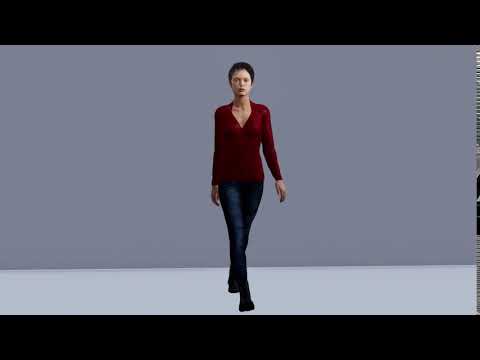
Wow! Filament sounds perfect for animations! I'll have to experiment with that!
New DS Filament Render EngineI didn't realize that Filament uses the GPU. If I have my viewport set to Filament, when I try to render in Iray, I don't have enough GPU memory left to render. My Iray render fell back to CPU.
Novica & Forum Members Tips & Product Reviews Pt 13Video is here. (Filament)
DAZ Studio 4.14 ProblemsWith the Filament Draw Options, once you add those Environment, Tone Mapping, and Filament Draw Option Nodes to the scene you can access them by first selecting them in the scene and then going to the Parameters tab.
As for the DIM issue, I don't know.
I think they then show up in the Render Settings tab too, when selected in the scene. Nevermind, I still had Iray selected as the Engine ;)
DAZ Studio 4.14 ProblemsWith the Filament Draw Options, once you add those Environment, Tone Mapping, and Filament Draw Option Nodes to the scene you can access them by first selecting them in the scene and then going to the Parameters tab.
As for the DIM issue, I don't know.
Thanks Diva. Going to the parameters tab is what I was missing.
The first problem is not a DIM issue. It is DS that doesn't seem to be closing properly. Sorry, if I wasn't clear about that.
New DS Filament Render EngineI'm not understanding something very basic: If you want to use Filament for the viewport, but render in Iray, how do you adjust the environment and tone mapping so it looks OK in the viewport and still renders correctly in Iray? Are there viewport controls for those environment and tone mapping that are independent of the Iray render settings for environment and tone mapping?
there are 3 scene add ons on "create" and adjust on Parameters, no Render Settings, when it must be set on Viewport.

Thank you. That helps.
TonemappingThey're now added to a node you can find in scene tab.
You can create that node before rendering using Create > New Environment Options Node
No, I don't want to use Filament.
This is not a feature linked exclusively to Filament. Using nodes, which can have their values addjsuted in the Parameters pane, rather than settings in a differnt pane, makes it clearer that these are things in the scene and provides a more consistent system. That doesn't mean I don't find the concept somewhat uncomfortable still, but theer is logic behind it and in the long-run (or for new users) it may well make sense.
Novica & Forum Members Tips & Product Reviews Pt 13I'm liking the look of that "Fire for Filament" product but...am I correct in thinking that this product won't render (or render correctly?) when using the Iray render engine? And more generally... do products with "filament" in the name NOT WORK in Iray rendering? There's a "filament information page" up but the single most important thing (to me at least) would be a crystal clear explanation about how "filament"-tagged products do or don't render when using Iray.
I like the talk about near realtime rendering in the VIEWPORT which would save sooo much time when creating and adjusting scenes (instead of having such slow startups and ofttimes renders of the viewport using Iray rendering) but I would prefer to do the final rendering with Iray. (I mean, speaking for myself, speed is not everything for the final work; Sickleyield's Filament product to make dubbed-in shadows for people and scene objects pretty plainly says in the description that Filament does a lousy job at shadowing things-- I mean, gee, that's like going back to 3dl renders without global illumination and other time-costly render-effects sort, which is the whole point and strength of Iray: to have naturally lit and shadowed worlds that look realistic. ) So, given all this, should I be buying add-ons for Filament when I don't intend to quit doing final renders in Iray?
~GenFor heaven's sake, the day just keeps getting better. Internet is out because someone cut a fiber optic cable. I'm using my phone hotspot. Anyway one of those pages has a Fliament video, and goes step by step. It's on one of those product pages. I'd link to it, but all I get are swirlies due to the poor phone hotspot connection, but look for that video. :) I watched part of it and you click three things, I think they load up in Scene. I think you change off the Iray setting, but the internet went down as I was trying to watch it. :(
DAZ Studio 4.14 ProblemsWith the Filament Draw Options, once you add those Environment, Tone Mapping, and Filament Draw Option Nodes to the scene you can access them by first selecting them in the scene and then going to the Parameters tab.
As for the DIM issue, I don't know.
DAZ Studio 4.14 ProblemsI let DIM upgrade my DS 4.12 to DS 4.14 and now I have a couple of problems:
1) DS 4.14 doesn't seem to close properly and remains running in the background. After I have run it once and closed it everytime I want to start it I have to go Task Manager and end the application from background processes before I can start the application even if several hours have passed since I last ran it.
2) I open a scene I did awhile ago and have created the filament draw options and also have tonemapping and draw options in my scene tab; but I can't figure out how to access these options (Problem 2 solved thanks to Diva)
Any help would would be greatly appreciated.
Thanks
New DS Filament Render EngineZilvergrafix said:
Again: The problem, as I see it, is Daz apparently spent time / energy on a new feature that is just, well, bad. They don't have unlimited resources so that undoubtedly denied us advancements in other areas. Like, for instance, hair, which is what is really holding us back from producing photoreal renders.
Photoreal Renders?, Zbrush is your league then, not Daz!
if not, well there is the all mighty big render engines awaiting for you: Vray, Arnold, Maxwell, Keyshot, Lumion, Octane.
hair, easy cake! even Blender does great hair (and I am not a Blender user!) , and Daz have a bridge for that, what is your claim?
remember, all software is a simple tool for your creation, sticking on one is mere...simply not the way!
Daz is approaching photoreal. Only hair, eyes, and some of the other surfaces are keeping us back.
I do think one of the things Daz is up against is that with 3D programs like Blender becoming more accessible, DS is less useful as a substitute for hobbyists. They are really emphasizing making it part of a cross-software workflow, and while I don't think they'll move away from Iray at all it also makes sense to develop tools that make it easier to use DS for setting up scenes that will ultimately be rendered in other programs. With Filament they can make improvements to it as needed (or not, if it turns out not many people care about it as a render engine) and while it's not 100% accurate to Iray it is much better for envisioning what a scene will look like during the setup phase.
Also some of the only professional artists I've seen openly admit to using DS in their work are concept artists and illustrators, and Filament benefits them because it's accurate enough to use as a base, but the actual materials don't matter to the end product since they're going to be painted over anyway. I know photorealism in Iray is a goal for many people, but the more flexible DS is for folks who don't need to use it as a rendering platform the more relevant it's going to stay.
Novica & Forum Members Tips & Product Reviews Pt 13I'm liking the look of that "Fire for Filament" product but...am I correct in thinking that this product won't render (or render correctly?) when using the Iray render engine? And more generally... do products with "filament" in the name NOT WORK in Iray rendering? There's a "filament information page" up but the single most important thing (to me at least) would be a crystal clear explanation about how "filament"-tagged products do or don't render when using Iray.
I like the talk about near realtime rendering in the VIEWPORT which would save sooo much time when creating and adjusting scenes (instead of having such slow startups and ofttimes renders of the viewport using Iray rendering) but I would prefer to do the final rendering with Iray. (I mean, speaking for myself, speed is not everything for the final work; Sickleyield's Filament product to make dubbed-in shadows for people and scene objects pretty plainly says in the description that Filament does a lousy job at shadowing things-- I mean, gee, that's like going back to 3dl renders without global illumination and other time-costly render-effects sort, which is the whole point and strength of Iray: to have naturally lit and shadowed worlds that look realistic. ) So, given all this, should I be buying add-ons for Filament when I don't intend to quit doing final renders in Iray?
~GenTwo thumbs up, I agree!
New DS Filament Render EngineI'm not understanding something very basic: If you want to use Filament for the viewport, but render in Iray, how do you adjust the environment and tone mapping so it looks OK in the viewport and still renders correctly in Iray? Are there viewport controls for those environment and tone mapping that are independent of the Iray render settings for environment and tone mapping?
My understanding is it will not match, especially the lighting and shadows.
No, I don't expect a match. No two render engines match.
Novica & Forum Members Tips & Product Reviews Pt 13I'm liking the look of that "Fire for Filament" product but...am I correct in thinking that this product won't render (or render correctly?) when using the Iray render engine? And more generally... do products with "filament" in the name NOT WORK in Iray rendering? There's a "filament information page" up but the single most important thing (to me at least) would be a crystal clear explanation about how "filament"-tagged products do or don't render when using Iray.
I like the talk about near realtime rendering in the VIEWPORT which would save sooo much time when creating and adjusting scenes (instead of having such slow startups and ofttimes renders of the viewport using Iray rendering) but I would prefer to do the final rendering with Iray. (I mean, speaking for myself, speed is not everything for the final work; Sickleyield's Filament product to make dubbed-in shadows for people and scene objects pretty plainly says in the description that Filament does a lousy job at shadowing things-- I mean, gee, that's like going back to 3dl renders without global illumination and other time-costly render-effects sort, which is the whole point and strength of Iray: to have naturally lit and shadowed worlds that look realistic. ) So, given all this, should I be buying add-ons for Filament when I don't intend to quit doing final renders in Iray?
~GenDaz 3D is part of

Connect
DAZ Productions, Inc.
7533 S Center View Ct #4664
West Jordan, UT 84084Licensing Agreement | Terms of Service | Privacy Policy | EULA
© 2026 Daz Productions Inc. All Rights Reserved.