-
Released! Yukio for Lee 8 and Genesis 8 Male(s) (Commercial)
Yukio is a character set for Lee 8 that has an independently modeled facial structure, and a mix of a custom base body morph and Lee 8's body morph set.
With LIE settings for 4 types of Kabuki styles and a few stage-type LIE Makeup sets there is a bit of everything thrown into this set. He has several tattoos; back, neck, chest, leg and both arms along with a couple of variations and a "ALL" preset.With 3 Skin Translucency (with Anatomical Elements) and 3 Skin Gloss (with Anatomical Elements) settings, he is ready for just about any type of render you may need.
There are 2 Eyelash Bases, 3 additional Color Presets for each Base as well as Fibermesh Eyebrows that have 2 Sets of Black, Brown, Blonde and Red textures and 6 Dyed Color Presets; however, the Fibermesh Anatomical and Body Hair only have the Black, Brown, Blonde and Red textures.
Materials are Iray only.
Anatomical Elements Presets are included.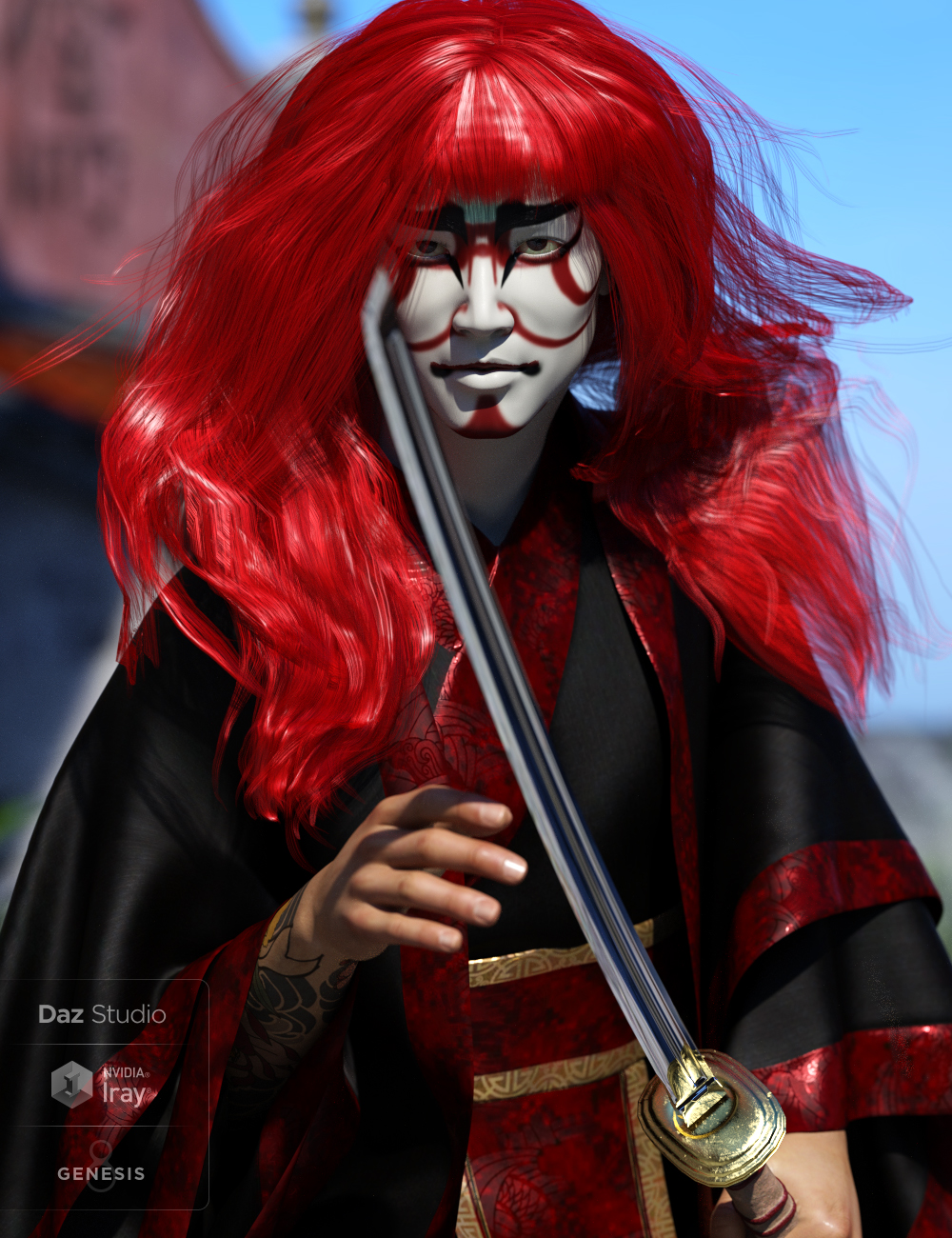 Saving a full character as obj with textures
Thank you, Spotted Kitty! I do exclusively use Iray, so that may be the problem. Would another export format besides OBJ recognize Iray materials? It just has to be something that DS itself recognizes without loading all that other morph data.
Genesis 8 base shape issueSelect the figure, go to the Parameters pane, and click Currently Used on the left - with luck the morph causing this will be fairly obvious; if not you may need to enable Show Hidden Proeprties from the pane's option menu (the lined button in the top corner, or right-clck the tab). Once you have found a likely candidate try reinstalling the product (if it's a third party morph); otherwise, or if that doesn't work, click the gear icon on the slider>Parameter Settings and set the Default value to 0, then use File>Save As>Support Assets>Morph Asset to resave just that morph.
Genesis 8 base shape issueI'm having an issue whenever I load a G8 figure into the scene it always comes out looking very emaciated. I think this is a morph gone wrong, but I'm not sure where this is coming from. I uninstalled the G8 Head and Body morphs and reinstalled the base character, but it still came out the same. Has anyone had the same issue, or have any ideas on how to fix this? In the attachment I've got the base G3 character loaded on the left and the G8 Base loaded on the right.
Thanks
Saving a character morph as a dial presetYes, it's not going to actually break anything (well, as long as limits are on for the navel morph - if you took them off and had several controllers driving it then it might go to rather an extreme).
New items from the Shop does not installIs it actually not isntalled, or does it just have no check mark? The check mark has nothing to do with the package's being isntalled - it indicates that the package has metadata for the Content Management System. If there is not check it may be a set without user-facing files (e.g. a morph expansion which just adds new sliders, rather than having presets to click).
A "wooden puppet" mode, with vertical black stringsThat's more than a morph could do - and morphs are in any event figure-specific. There have been puppet-style add-ons, usually using a mixture of morphs and additional body parts (which would definitely be needed for strings). For example, this set may make a starting point https://www.daz3d.com/sf-ball-joint-dolls-genesis-3-bundle
Dumor3D's new Limo Prince Iray set, anyone get the morphs to work?No mention of it in the Platinum Club Forum, nor in the PA Commercial Products forum.
The morph files are present, but there is no data in them (i.e., "deltas") to actually do anything, and the sliders have no sub-components to control. Maybe it was just a question of deadlines and hopefully will be completed someday, sooner than later.
Importing (bone) weight painting from Blender?I've been trying to work on creating or modifying assets in Blender and then exporting to Daz. This has worked okay for morph shapes, but I'm frequently dissatisfied with the results I get from automatic weight transfer in Daz, which often tears and stretches around tight joints in clothing.
Weight painting in Blender is something I'm fairly good at (I frequently use game engines with tight limits on vertex weights, so I often have to be pretty slick about refining things to work within that), and I'd rather not have to relearn the toolset of another program to do what I already know how to do. With that in mind, what is the best method to import weight painting from Blender? As it is, I've tried both DAE and FBX format exports from Blender and am just getting messed up skeletons in Daz.A "wooden puppet" mode, with vertical black stringsHow about a morph control that takes any figure... to look like a wooden puppet, be it animal, fantasy creature or Genesis figure? And of course, with vertical black or white stringings attached to joints.
Differing style strings from worn-out to new to frayed. Directional control for the strings to rotate angularly.
Controls also for increasing/ overscaling of puppet body parts.
Or better yet a stand alone figure that is a wooden puppet character with the same details as above. And can be accessorized with ANY and ALL clothing or prop article.
How else could this be improved upon, folks?
MC
Saving a character morph as a dial presetUsing OBJ export/Morph Loader is not a good diea as you will lose the links to any correction morphs for things like expressions. A safer approach is:
- Make sure that everything but your moprh is zeroed - that includes the navel and mouth realism morphs
- Right-click on the Parameters pane and select Edit Mode, assuming it isn't already selected
- Right-click on the Parameters pane and select Create New Property - name it as you want your morph dial, set its path to where you want it to appear, change limits if desired
- Set your new property to 1 (or 100%, depending on display settings)
- Right-click on your new property and select ERC Freeze. Your new property shold be listed as the controller in the dialogue that opens, all th shapes you used to make the morph (and nothing else) should be listed as Sub Components. Assuming that is so, click Accept.
- Make sure the new morph is working, if it is use File>Save as>Support Assets>Morph Asset to save it
Why do you need to zero the navel morph, doesn't that mean you have to dial it back in every time?
No, but it does mean you can zero them - if you don't zero them, they will be included in the ERC and will be set by the controller even if you don't want them.
okay so assuming I always want them. I can imagine wanting to change them but I never have yet, so I could leave them in and it would be workable?
Thanks
Reverse source shape from target (Transfer Utility) with script?The following methods provide access to the option labled "Reverse Source Shape From Target" in the Transfer Utility dialog:
- DzTransferUtility::getAdjustTargetBase()
- DzTransferUtility::setAdjustTargetBase()
-Rob
Cannot Morph Any ModelsHow about the Parameters pane with the figure (rather than a bone) selected? Shaping morphs are under the Actor group. Which figure is it, and which - if any - morph packs do you have?
Daz to Cinema 4D mit FbxHallo,
Da gibt es so viel dazu zu sagen...
FBX ist aus mehreren Gründen ein Problem und deshalb verwende ich nur mehr OBJ mit MDD für Animationen.Aus einem anderen Post habe ich gelernt, dass es möglicherweise hilft die Figur und Kleidung getrennt zu ex- bzw. importieren. Das weitere Posen in C4D funktioniert so und so nicht richtig. Schon aufgrund der Abhängigkeiten bei G3/G8 zwischen den Joints und den Morphs die über Joints kontrolliert werden. Könnte alles über ein Plugin gelöst werden, aber das ist ein Haufen Arbeit.
Wie gesagt, für Stills empfehle ich OBJ, damit man auch HD Morph Modifikationen hinüber bekommt.
LG, Walt
what character it is ?Osuine skin and face morph with additional morphs to nostrils, lips, cheek, jaw, & chin. Emma&Jordi character eyes materials (cornea, sclera, iris, pupil, whatever-lacrimals-are-called) with cornea surface changes to roughnesses. You will need to use DO, 200+, E&J, and/or Rarestone head morphs to achieve this.
SereneNight's Sci-Fi Fun Thread 2Everything in this scene is a freebie or was a freebie item at one time.
I wanted to try most of the Messy Baker Props from Rendo. Most look really good. You have to tweak the textures a bit, to get them to look nice, but it is worth it. Most of the food items can be tweaked with https://www.daz3d.com/mec4d-pbs-shaders-vol-2-for-iray For example, the chocolate kisses, the oil, the plastic container, and the eggs, and the contents of the measuring cup, were all options from that set. I recolored the eggs using the orange juice shader, and the egg white using the volumetric gummy bear shader.
I added the Christmas Cookie set which was a freebie from last year. The cookies had gray added to the base, which looked odd, so I removed that and added golden brown. The Pie was a freebie at Rendo. The Kitchen is https://www.daz3d.com/collective3d-portrait-vignettes-horror-2 Most people don't realize there is a clean texture in the set. I raised the table up a bit, and added a diffuse to the tiles, so they weren't so bright.
The bowl has a morph to fill it up, but I was unsuccessful at making that visible.

Really nice work on the textures/shaders. Now that looks like a food prep area. You just need one of the boys stealing some of the cookies.
what character it is ?All of those have been questioned (here's another search)and the consensus is it is the skin @Taoz mentioned because of brows, blush and other telltale signs. The morph is custom (and that was quoted from a CS rep in one of the many threads asking about this figure) and not available for purchase.
The fibermesh brows on the face promo at Rendo may confuse some as these are not the ones used on the DAZ promos, the DAZ promos use the default character preset with the painted eyebrows.
Export Animation with Clothing in MDD format?Thanks for those thoughts, Mikael. When I export the object out of DAZ in OBJ format to use as the basis for the MDD morph, it does seem to export the clothes as seprate items, on separate layers -- in any case, that is how they appear when I open the OBJ file in Modo: Although it's a single OBJ file, Modo sees the leggins as being a separate mesh item, on its own layer. Is there a way to export them as a single layer? I tried combining the meshes in Modo and then applying the MDD influece, but that made a chaotic mess of the clothing.
Reverse source shape from target (Transfer Utility) with script?I'm currently learning simple scripting and working with the Transfer Utility: http://docs.daz3d.com/doku.php/public/software/dazstudio/4/referenceguide/scripting/api_reference/object_index/transferutility_dz
I wrote a script that works almost as intended, but I want to transfer morphs from the Genesis 2 Female in a non-default pose. I could use the "Reverse source shape from target" option, however I just can't find the corresponding setter method in the API documentation. There are setter methods for almost everything else, so I found this a bit strange. Is it missing or am I just overlooking it? Maybe there is another way to achive the same effect?
what character it is ?All of those have been questioned (here's another search)and the consensus is it is the skin @Taoz mentioned because of brows, blush and other telltale signs. The morph is custom (and that was quoted from a CS rep in one of the many threads asking about this figure) and not available for purchase.
Daz 3D is part of

Connect
DAZ Productions, Inc.
7533 S Center View Ct #4664
West Jordan, UT 84084Licensing Agreement | Terms of Service | Privacy Policy | EULA
© 2026 Daz Productions Inc. All Rights Reserved.