-
Problem in scaling armature in blender export
Thanks! I'll look that, but I really need IK.
I've been using workaround, where I export another figure from DAZ, without morphs, but with correct dial setings for armature altering morphs. Then I import that chracter to Blender and use it's armature in meshes armature modifier.
It works, but has drawbacks. I can't delete the original unused armature or other dublicate stuff or driver keys disappear from morph list. I don't know what brakes down or is it even possible to fix it.
I'm having a problem with finger distortion in DAZtoC4DI exported the character through DAZtoC4D.
However, when I try to move my finger in C4D,
As shown in the photo, the fingers are distorted as if the weight is strange.
So, when I imported the character again, only one finger was distorted out of several fingers.
If you import it again, the character will be loaded in a slightly better state.I wonder if the best solution to this problem is to keep trying until all elements are loaded correctly.
There is no problem with the character's fingers in DAZ.
I await knowledge from many people.
Twinmotion renders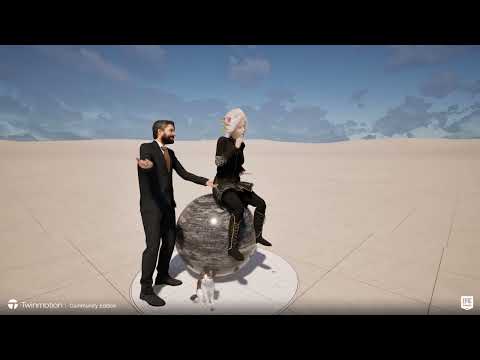
new paid version can import animation
Community noncommercial demo version with watermark
Hexagon Selection type problemWasn't a memory issue for those attempts though. Basically all I had accomplished was to open the program, import something or made a cube, whatever. Then open the uv view and it would freeze.
Me too! 3DCoat has some neat uv abilities. However there is one feature that Hexagon has which if 3DCoat has, I haven't found the switch. And that is the ability to 'see' and do stuff on/with the back facings. [i.e. if one made a long cylinder, can only access to mark seam lines on the outside of the cylinder, not from the inside].
Morph Loader Pro - Geometry did not match, but I did not make any changesIf one sends the figure over the bridge to Hexagon, it is all one 'group' -- so in the .obj file export, try unchecking 'groups' [and one also does not need mats or texture images].
Also check that your export/import settings are a match. {Export out the figure, then import it back it. It needs to be exactly the same size as the original}Add bones to non-Genesis figure and use Genesis clothes on non-Genesis figuresWhile you can import the model, Edit>Object>Rigging>Convert To Figure, and then use the Joint Editor's right-click menu to add bones it probably isn't optimal - especially if the geometry already has face groups and is in, or can be converted to, OBJ. If you have a grouped OBJ you can use the Figure Setup pane - import the OBJ via right-click in the groups ara, then drag it into the Relationships area, arrange the bone hierarchy by drag and drop, use right-click in the Rotation order column to set the rotation order - the order in which the x, y, and z rotations are applied, which you want to go twist - minor Bend - Major bend (so the first would be the oen running along the bone, the second would be the one that made smaller bends, and the last (if needed) would be the oen that made big bends - this is to avoid gimbal lock, where the two axes become aligned and so you can't bend in one dierction), then hit the Create button. However you apply bones, you then have to use the Node Weightmap brush tool to paint on their influence on the model, and almost certainly you will also need to add morphs to improve the bends.
As for converting clotjing, you can either use a modeller (or dForms etc. in DS) to adjust the shape to fit your figure, then use the Transfer Utiltity to copy the rigging from your figure (Source) to the model (Target) or you can create a clone shape for the Genesis figure and let AutoFit do that - either way there will be a lot of tidying up to do in many cases. Note that you can't share the clone shape or converted clothes with others.
Add bones to non-Genesis figure and use Genesis clothes on non-Genesis figuresAs for import, OBJ works best for me. I find FBX import to not work at all. As for adding bones, I have never added them, just adjusted, so I assume you will need to use the joint editor tool in Daz Studio. There are tutorials you can get in the store that focus on rigging (adding bones), There is also a way to transfer the rigging from DAZ figures, but this can only be used for personal use and not shared or sold since the rigging belongs to DAZ.
Unless the rigging you create matches the rigging of the DAZ figures, you won't be able to use any DAZ clothing , hair or shoes on your new figure. You can try creating a clone for your new figure that might help with fitting clothing, but I doubt it.
Add bones to non-Genesis figure and use Genesis clothes on non-Genesis figuresHi!!! I have quite a few 3d models created in Blender/other software (including STL files for 3d prints). I would like to be able to do the following:
1) Import them in Daz3d (FBX format? OBJ?)
2) Convert them into a non-Genesis figure (I think there is an option in Daz3d that allows you to do that?)
3) Add bones to this non-Genesis figure, so I can bend the different parts of the body like I do with Genesis figures
4) If possible, use Genesis clothes on the non-Genesis figure, and ideally do the same with poses etc.
5) Add textures to the clothes
I am still pretty inexperienced with Daz3d. Could you please help me and explain the different steps?
Thanks a lot, best wishes,
G
What String Keywords/Tags Does The OBJ importer look for In DAZ?I have had normal maps import, in the bump channel mind you but they did import
depends entirely on the obj AND mtl file, the way they are set out if paths in quotations etc
a hell of a lot of variation and I have utterly no idea why some work either
Rig Constraints and Limits Blender Animation with DiffeomorphicHey all!
I've figured out a workflow for making characters in Daz and exporting them into Blender. I got the face controls to work. Now, I'm working on my animation skills using Daz models.
I'd love to figure out how to get the constraints and limits to work on the rigs. I usually import using the easy import to import and to convert the rig to a rigify rig. But when I go to pose, I notice that the rig points can go anywhere, and the mesh with stretch and contort look all kinds of ways. I've tried using the "Impose constraints and limits" button in the export menu, but it didn't do anything. Any ideas?
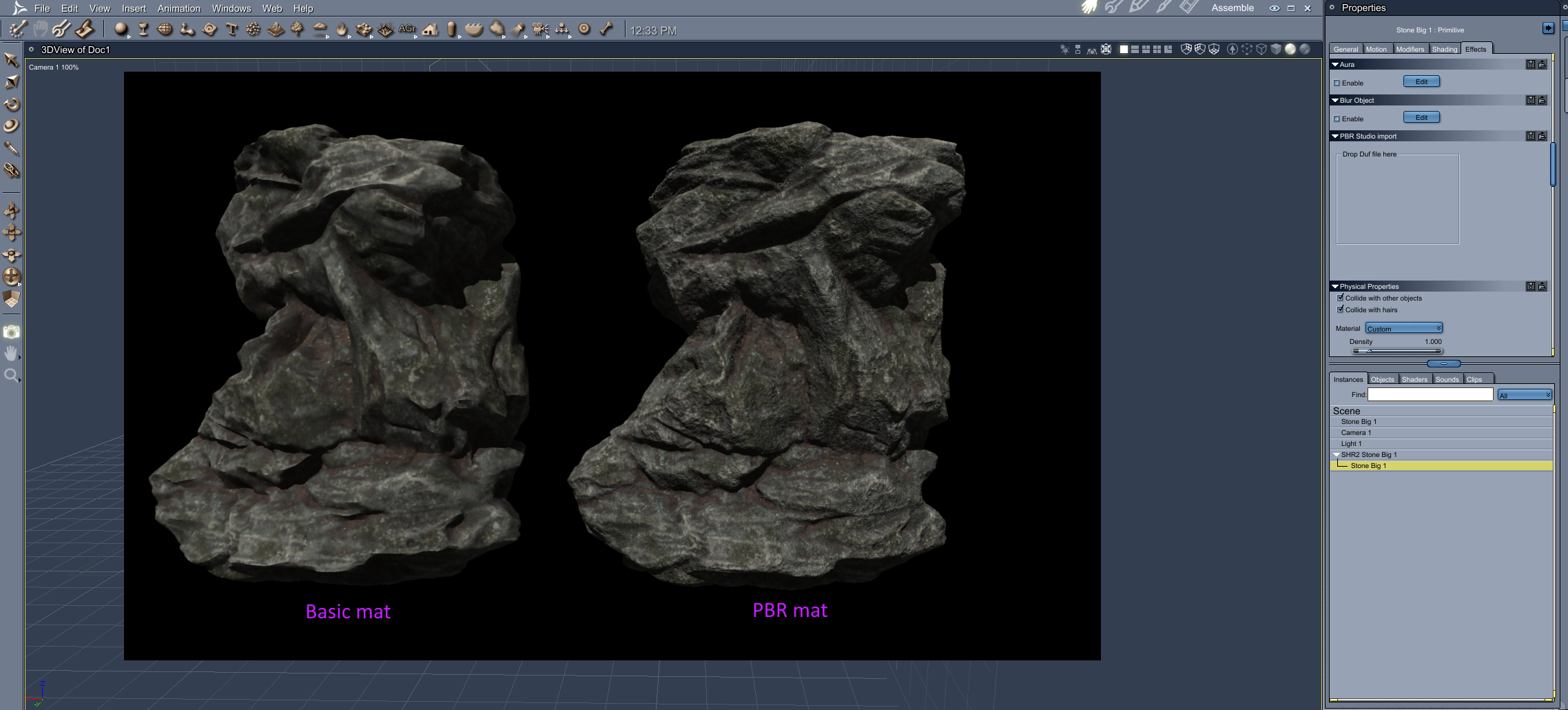
Help wanted creating procedural rock cliffs.Using the PBR Lighting plugin. https://www.daz3d.com/forums/discussion/comment/4625561/#Comment_4625561
Saved the Iray rocks as a Material Preset in DAZ Studio. Dragged that Preset into the PBR Studio import box in Carrara for the Rock.
 RRRR "Behind the scenes" Render Contest *CLOSED *
Gopherus said:
Thanks Totte for your comments on mine
@Totte #03 Great idea... just like when they burned the back lot to simulate the burning of Atlanta in Gone with the Wind. Here they blew up the studio. Good one!
@f.boschanski #01 Yeehaw! Crazy idea! I like it! Her own wood golem. the lighting looks fine, no worries
Pull #04
Urban Warrior.
FLUIDOS Presets: The Blender and the Mixer.
Vintage Stands and Tables.
Aegis To War Poses 2.Thanks for your comment. While i appreciate your feedback regarding the lighting, it does lack the most important information.
I know there is a lot of room for improvement. However, the most import information for me right now is about brightness and temperature.
I got two different moods on my screens. I was aiming for an evening mood.Therefore i would appreciate, if you could take the time to describe the overall appearance:
How does it appear on your screen? Is it more daylight or evening light?
Warm or cold? (i know it has a pink tint too it. that was, although maybe overdone some, on purpose.)
EDIT: its important to me, because the new "new user challenge" is about atmosphere. Hard to set up an atmospheric piece if you don`t know how it ends up on (the majority of) other screens.
_________________________________this challenge is too much fun...
although i really shoudn`t, i pulled a second time:
Boaris for Genesis 3 Male(s)
Copperwhirl Masks for Genesis 8 and 8.1 Females
Sci-Fi Siren Outfit for Genesis 2 Female(s)
Z Glamour Gal - Poses and Expressions for The Girl 8 and Genesis 8 Female
guess what...? pigs in space!
The older generation: Victoria 2/3, Michael 2/3 and their children rendersrichardandtracy said:
I have been using the PA sale to get the remaining Glamerous Vicky stuff I haven't got at a price I can at last afford.
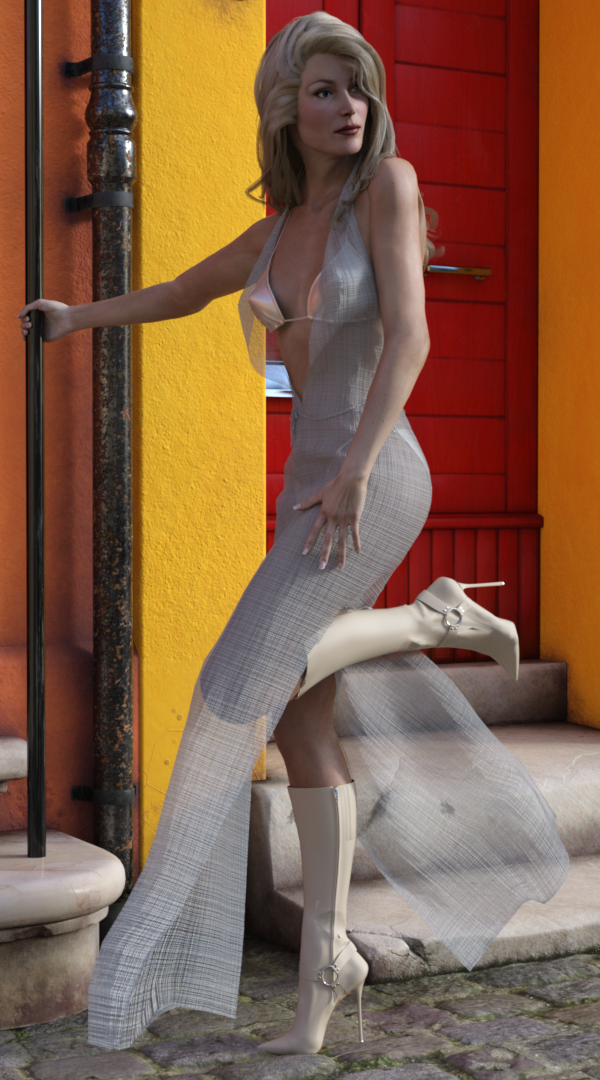
I've been trying to use Poser Dynamic fabric. It was quite hard to get it to work. In the end I had to convert GV3 to Triax Weight mapping, export the dress as an obj, import, make into a figure & transfer the rigging before then simulating from the default pose. Due to the size of the facets around the neck it exploded every time I tried until I realised scaling the character to 500% would give the required clearances. It was a lot more long winded than I had expected. However.. The result doesn't look much like I have resurrected a 20yo character.
Regards,
Richard
Nice!
What String Keywords/Tags Does The OBJ importer look for In DAZ?The OBJ importer is built into the Poser Importer, as a result it's really only going to import settings you would find in Poser, the "simple" material setup (AKA Poser 4 /ProPack surface settings).
What String Keywords/Tags Does The OBJ importer look for In DAZ?Hello everyone, I've been playing around with importing objs into DAZ with their textures intact. I've noticed that when importing the normal map will be ignored. Here is an example of one of the mtl lines. This was from 3DS Max.
//////////////////////////////////////////////////////////////////////////
newmtl Test
Ns 46.4386
Ni 1.5000
d 1.0000
Tr 0.0000
Tf 1.0000 1.0000 1.0000
illum 2
Ka 0.0000 0.0000 0.0000
Kd 1.0000 1.0000 1.0000
Ks 0.2000 0.2000 0.2000
Ke 0.0000 0.0000 0.0000
map_Ka I:\Imports\PNG\Diffuse_Test.png
map_Kd I:\Imports\PNG\Diffuse_Test.png
norm I:\Imports\PNG\Normal_Test.png
//////////////////////////////////////////////////////////////////////////
From this the "Diffuse" will import correctly but the "Normal Map" will be left empty. Now if I use "Bump" instead of "norm" the texture will be applied to the "Base Bump" in DAZ. I've tried entering other tags like "map_n" "Normal_Map" and "Normal" in hopes the tag will be detected and place the texture in the correct slot. No luck so far. I was hoping that there maybe some sort of cheat sheet showing what tags DAZ looks for when Importing objs. This will be a great help when trying to import large scenes with multiple materials. I did try to reverse it by filling in the slots in DAZ and than exporting as an OBJ, but it makes the mtl super simple.
//////////////////////////////////////////////////////////////////////////
newmtl Test
d 1
Kd 1.00000001 1.00000001 1.00000001
map_Kd I:\Imports\PNG\Diffuse_Test.png//////////////////////////////////////////////////////////////////////////
Thanks for taking the time to read this and I hope that perhaps someone out there will also benfit from this question being asked.
[Solved] How to set asset type in "Content Library"NorthOf45 said:
Moving the files breaks the link to the metadata. You need to go to the new folder in Content Library, right-click and "Edit Metadata..." There you can specify Asset Type and add / remove / change any Categories, Compatibilities, and Compatibility Bases.
THAT's the magic. The folder, not the object. Thank you!
DAZ and MyFavorite Artists GenorosityI couldn't believe my luck for such great discounts on some great products, like Ron's Brushes! by Deviney in past years, I could not open Adobe Paintshop brushes with my image editor. Now, with up to date image editor I can import and dabble away! I may have over done it, but I foresee many hours ahead of me doing postwork through the amazing discounts from this recent sale. Also, some MartinJFrost, Alessandro_AM, Predatron, Stonemason, AeonSoul, really so many fabulous artists that madetheir products affordable to me. As I'm not a professional, I don't make any money, and my budget has been tightened by various things. I felt free in investing this great sale. Thank you to DAZ Aand all the artists who have made so many products available to DAZ members which will be inspirational.
Is it possible to convert a morph for G8 female into a morph for G8 male?Hi, thank you very much for your answer!

crosswind said:
There're already around 60 vertex groups ( aka Face Groups in DS) on G8 . If you import obj into Blender with vertex groups, you'll see them. For sculpting purpose, sometimes you may need them, with Masking for instance. But for the partial vertex groups as you mentioned, I don't think you really need them though you can create them.
Ah yes, indeed, I can see them, I don't know why I didn't find them the last time...
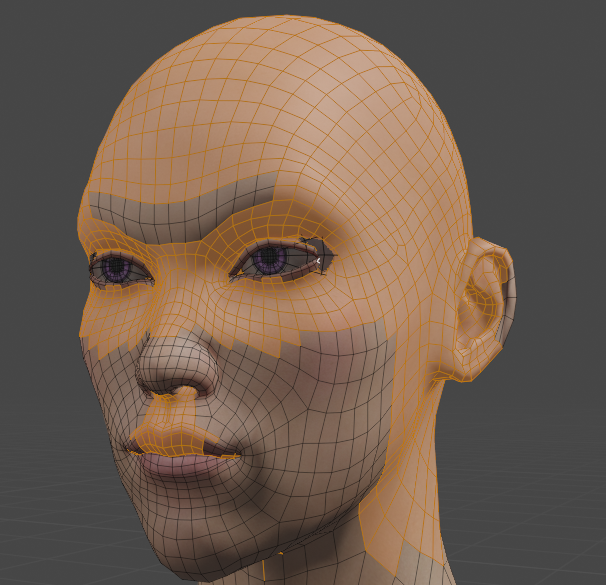
Well, I tried to use the shrinkwrap modifier to the head vertex group only, and I could obtain just one artifact, on the eyes:
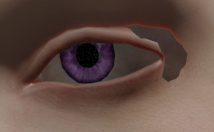
I would like to try to modify the head group "composition" to see if I couldn't fix it if I remove some vertex close to the eyes from this group. But I would prefer not modify the oroginal head group, because I could need it for something else, so I selected all the vertices in this group, I created a new group I called "Headv2", and I tried to use the shrinkwrap to this new group. It should contain exactly the same vertices as the "head" group, since I created it from it, but in fact, when I use the shrinkwrap modifier, I don't obtain the same thing by using the "head" group and the "Headv2" group.
Here is what I obtain with the "head" group:
And here is what I obtain with the "Headv2" group:
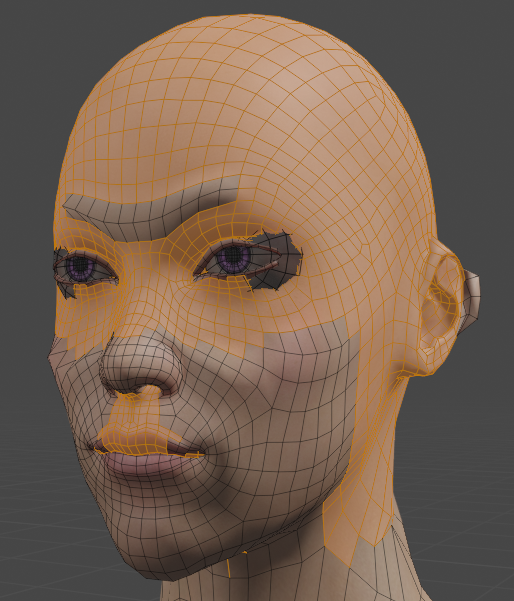
It's quite different; especially on the ears and eyes, there is a big problem...
I used these settings for the shrinkwrap modifier:
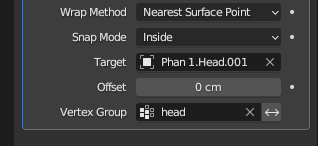
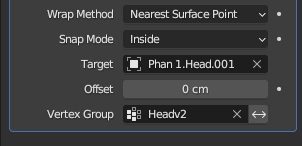
Do you know why I obtain these differences whereas I just "copy" the "head" group to create the "Headv2" group? I don't understand if it's a Blender issue or DS issue (I am using the DD Keita for Yuzuru 8 character (https://www.daz3d.com/dd-keita-for-yuzuru-8) and I imported him by the Daz to Blender Bridge, after some modificatins in Daz so as he becomes as close as possible to my MH character).
Thank you in advance for your help!
[Solved] How to set asset type in "Content Library"crosswind said:
Richard Haseltine said:
crosswind said:
Richard Haseltine said:
You could also use the ruight-click menus in DS to cut and paste the file to its new location, which will update the metadata.
No, it won't... and the item record will be deleted in database.
Hmm, true - and the same with copy/paste. It used to work, I hadn't tested it this time but I have on previous occasions when the question has been asked.
I vaguely had the memory as well that it used to work but it fails now. Maybe we submit a ticket?
Please do.
[Solved] How to set asset type in "Content Library"Richard Haseltine said:
crosswind said:
Richard Haseltine said:
You could also use the ruight-click menus in DS to cut and paste the file to its new location, which will update the metadata.
No, it won't... and the item record will be deleted in database.
Hmm, true - and the same with copy/paste. It used to work, I hadn't tested it this time but I have on previous occasions when the question has been asked.
I vaguely had the memory as well that it used to work but it fails now. Maybe we submit a ticket?
Daz 3D is part of

Connect
DAZ Productions, Inc.
7533 S Center View Ct #4664
West Jordan, UT 84084Licensing Agreement | Terms of Service | Privacy Policy | EULA
© 2026 Daz Productions Inc. All Rights Reserved.