-
Carrara Rain Storm - Free to Carrara Users - beta released (updated)
StormCreek was more challenging to understand than I thought going in. It is a faily complex scene, with a lot of elements. Very Dartanbeck-esque.
One file - stormcreekwithshaders - would not load. Not sure what it is supposed to do.
The main file loads fine. But I immediately discovered that it is very sluggish. I attempt to rotate the scene by moving the mouse, and two seconds later, the scene begins to move. Why is it so slow? The render time is very slow as well. Is it the surface replicators? The Carrara hair plants? Maybe my processor isn't powerful enough? I tried selecting different elements in the file, but nothing seemed to help. Note - I didn't try any of the synchronize camera stuff.
The splashes file loaded easily, and was relativey easy to position on the water. I raised it a bit too high on the following render, but that is easy to correct.
In the render below, all I added was the tree to the preexisting elements in the scene, and some GMIC. The render is not meant to be great art, but to show that the product works as advertised. HW, nicely done! Excellent effect, really nice morph package for the rain effect, and a very interesting terrain. I need to figure out how to save out the rain and splashes so I can use them on other scenes.
This will get a lot of use, thanks!
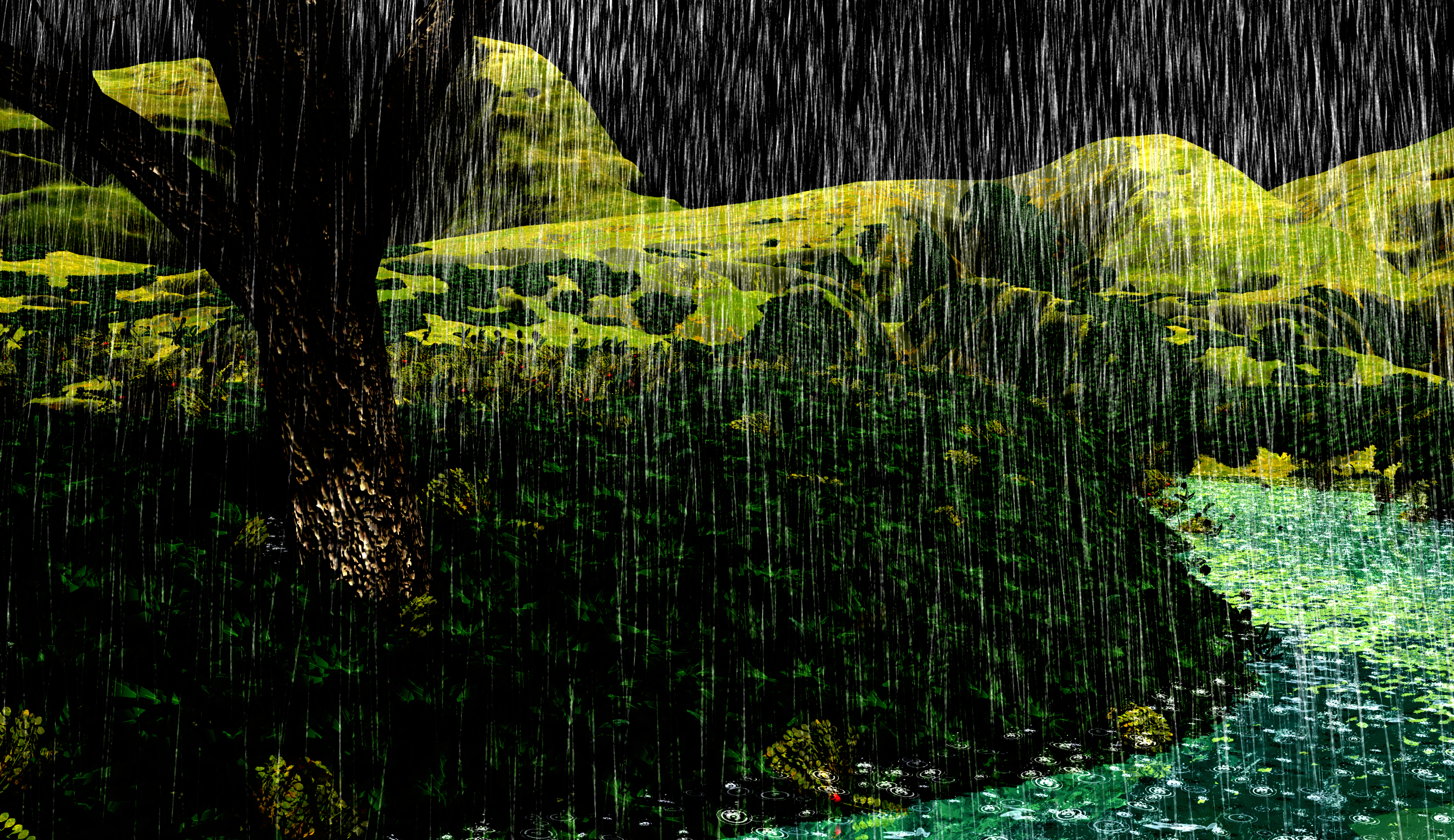
Hey Ub great stuff! Terrific with the tree. Thanks for that feedback.
Argh, sorry it is slow, if you select the surface replicators they have 'mesh' selected in what they show (over on right)
Just choose 'points' or 'none' and that should speed up the scene.
It renders pretty fast on my machine. (I hate slow renders) If I get a slowly rendering scene I usually delete all the lights - then just add one or two and see if that helps.
I tried to make it at fast scene so none of the lights should have soft shadows etc. I opted for replicated meshes rather than transmapping the rain on a plain so I could add morphs to the rain drops. Maybe you could delete the replicated clouds I used for 'atmopshere' and that would speed up the renders?
As for the rain by itself I thought I loaded it up seperately - sorry. I'll reupload it tonight or tomorrow.
regards from oz :)
thanks to everyone who has tried this ! very happy seeing the resulting renders.
Converting Genesis (G1, G2, G3, G8) backwards to Version 4 (M4, V4, D4)?There seems to be more compatability between V4 and G1, and to a lesser (slightly?) extent G2; so the best way to start is from G1.
G1 has (at least mine does) the Victoria 4 shape, hidden.
Dial this in (may need to set parameters) and export as an obj (base resolution) and you can use it as morph target for Genesis shapes; there is a tutorial somewhere. I know G8 has the genesis figures, but don't recall if the Victoria 4 is also available - Im thinking not; if not transfer to Genesis then to V4; it isn't a complicated process, except that for earlier figures with less compatability of vertices, more tweaking may be required.
The most time-consuming part of the pre-process (if not available) is poses for the figures that match that of the target.
Edit:
I've not transferred backwards, only from G3 to G8 and some G2 to G8. G2 normally takes longer when that tweakage is required.
Sorry about the dodgy writing. Genesis with V4 shape applied; G8F with Genesis shape applied.
I looked, Victoria 4 is not available on G8F
Carrara Rain Storm - Free to Carrara Users - beta released (updated)StormCreek was more challenging to understand than I thought going in. It is a faily complex scene, with a lot of elements. Very Dartanbeck-esque.
One file - stormcreekwithshaders - would not load. Not sure what it is supposed to do.
The main file loads fine. But I immediately discovered that it is very sluggish. I attempt to rotate the scene by moving the mouse, and two seconds later, the scene begins to move. Why is it so slow? The render time is very slow as well. Is it the surface replicators? The Carrara hair plants? Maybe my processor isn't powerful enough? I tried selecting different elements in the file, but nothing seemed to help. Note - I didn't try any of the synchronize camera stuff.
The splashes file loaded easily, and was relativey easy to position on the water. I raised it a bit too high on the following render, but that is easy to correct.
In the render below, all I added was the tree to the preexisting elements in the scene, and some GMIC. The render is not meant to be great art, but to show that the product works as advertised. HW, nicely done! Excellent effect, really nice morph package for the rain effect, and a very interesting terrain. I need to figure out how to save out the rain and splashes so I can use them on other scenes.
This will get a lot of use, thanks!
Which Genesis 8 female figure has an hour glass figure like Lilith 7?emma and jordi's 'EJ body shape and detail morphs for g8f' includes a full-body hourglass shape morph.

j
Thanks, this will do just fine!
Do Genesis 8 Female morph packages overlap?I don't think theer's any complete overlap, but there's nothing to stop people making their own take of the same gernal idea and giving it much the same name. There shouldn't be much of that with the main head adn Body morphs since most people who buy morph packs will hae those.
Celebrity Look-a-Likes for 3D figures Part 2RY Kian is definitely Adam Driver. The figure can even be rendered with the scar as Kylo Ren (on the opposite side of the face, though). I wish Raiya would do a Daisy Ridley look-alike.
Best Regards,
Learstang
Same.I'm still amazed no one has done a decent Daisy Ridley. Would buy fast.
I'm presuming you don't like the look of SW Rey or SW Rey Resistance for G3F (or V4) at FoRender? (Different clothes and hair in the two sets, but both include a Rey head morph and materials and textures.)
How to Use dForce: Creating a Blanket, Draping Clothes on Furniture, and Much More [Commercial]Also, something that catches frequently catches me, DON'T use the Clear button on the Simulation Settings pane!. Even if an item is set to freeze the simulation, the clear button overrides that and you'll lose what you had done.
I have now added two actions to my main toolbar:
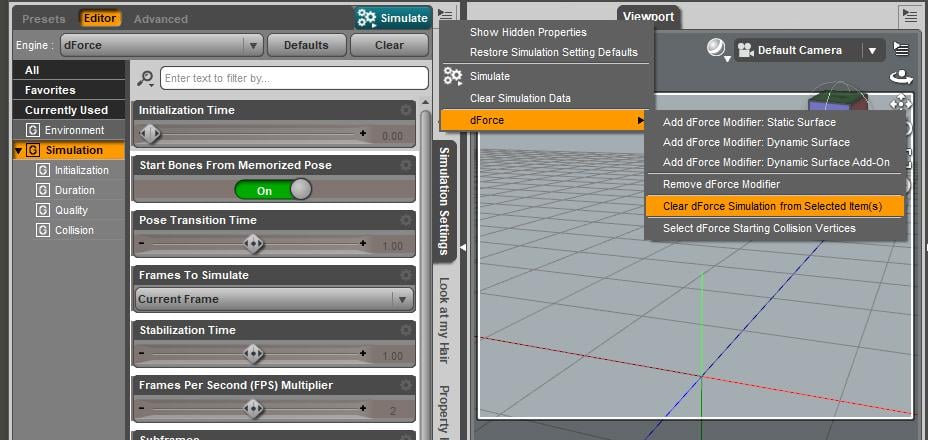
1. Clear dForce Simualtion for the Selected item - (I had to find an icon for the toolbar because th action doesn't have one). This avoids using the main Clear button which clears everything (including frozen items). This is saving me much frustration.

Where did you find the option to do that, before you added it to your toolbar? I've only ever noticed the Clear Simulation on the Simulation tab, just below Simulate, and that of course clears everything.
On the Simulation Settings hamburger menu.
Way cool, thanks! I will have to add that to my custom actions, where it will remain until the next time DS decides to dump my custom actions and make me start over...
Copy the studio folder.
You can then use it as a backup. There's another way, which I can't remember, but the method I use gets me a few settings saved. You can also use it to transfer settings to Beta, although some tweakage can be required.
M6 vs M4 assetsThat outfit has ways to fit the shirt under the waistcoat. I forget if it is a morph or a visibility preset that turns off the sleeves, but there is a way to do it.
Which Genesis 8 female figure has an hour glass figure like Lilith 7?emma and jordi's 'EJ body shape and detail morphs for g8f' includes a full-body hourglass shape morph.
j
Am I missing a step with the Transfer Utility?Redoing the scruff I have made previously for my upcoming character, Gino..... I got it exported allot lighter than the previous one. I did make it FOR Gino. So I've tried a few ways to get to NOT take on the default shape of G8M but to no avail. I've tried using the "current" option and even the Morph option and then scrolling to find the Gino face morph I made. NOPE. When it's all said and done just sinks into his face. When I zero out the Gino face morph I can clearly see that the scruff was trying to conform to the default face shape. I thought the whole idea of using the current shape or choosing the morph was to insure that the shaps I chose FITS exactly the shape of the face when it was all said and done. I guess not??
Any help understanding this a bit more?? Richard H?
Thanks!
Wolffie....
Did you check the ‘reverse source shape from target’ option? You need to do this as well as choose ‘morph’ or ‘current’ if you’ve not modeled on the base G8 shape.
Am I missing a step with the Transfer Utility?Redoing the scruff I have made previously for my upcoming character, Gino..... I got it exported allot lighter than the previous one. I did make it FOR Gino. So I've tried a few ways to get to NOT take on the default shape of G8M but to no avail. I've tried using the "current" option and even the Morph option and then scrolling to find the Gino face morph I made. NOPE. When it's all said and done just sinks into his face. When I zero out the Gino face morph I can clearly see that the scruff was trying to conform to the default face shape. I thought the whole idea of using the current shape or choosing the morph was to insure that the shaps I chose FITS exactly the shape of the face when it was all said and done. I guess not??
Any help understanding this a bit more?? Richard H?
Thanks!
Wolffie....
Do Genesis 8 Female morph packages overlap?I downloaded and installed the Daz Genesis 8 Female Full Body Morphs package, as well as Head. I'm seeing a number of other body morph packages around, including several my Thorne, which are called "resource kits". It looks like quite a few of the morphs are identical, or nearly so. So once I have the Daz morphs, is there really a reason to download body or head morphs from a different vendor? I understand if they're extremely specialized, but if they're much the same as the Daz morphs, then am I really just paying for the few different morphs that aren't included in the Daz package? Thanks for any feedback!
Animate2, Graphmate, KeymateI need a little help with Graphmate and reading some of the posts here, I might just be doing this wrong. So, I'm trying to copy a selection of keyframes in Graphmate so I can copy it threw out the animation cause the character will be repeating the same action over about two minutes. Problems is, I can only select about ten of the parameters, like translate and rotate, but the characters also use a handful of other morphs further down the list. How do I select the morphs I need, if necessary all the morph, so I get all the lines I need in Graphmate to do a true copy of the character? Because of the way Graphmate work, if I scroll the morph list down, I will lose the other selections above.
Thanks.
IMO the thing you're trying to do is much easier with keymate, bcause you can collaps or expand the tree as needed. So you can select and copy/paste a single keyframe containing all the translations and morphs without having to select multiple parameters in the parameters pane. If you want to use graphmate, you need to drag the mouse over multiple parameters to select them, which can be tricky. You could mark the parameters as favorites to get them all in the same list. But yeah, the keymate UI is better suited for this task;)
If you GOZ G8F and change the body in Zbrush, will those morphs automatically transfer to clothing?However, you may well find that it doesn't work reliably unless you use File>Save As>Support Assets>Morph Asset to save the morph.
Will that make the custom morph universal among all G8F figures or would it be unique to a single instance of the figure in the scene?
Yes, once saved as an asset it will be available on all instances of Gensis 8 Female - however, the main data (the deltas, changes in vertex position) is not loaded until the morph has a non-zero value.
Which Genesis 8 female figure has an hour glass figure like Lilith 7?Redz method works well for transferring morphs. It’s been so long since I saw the thread, though, I wasn’t able to find it. Sorry. Maybe someone else has it bookmarked and can get you a link. You can also find a lot of good waist morphs in body morph kits. Take a look at the GDH SomeBody Morphs. I use the waist/stomach morphs from that all the time. There are waist morph options in a lot of merchant resource morph kits, both here and on Renderosity. They may give you what you need to make the Lillith 7-looking figure shape you’re after.
[Released] Goldfish and Props [Commercial]Black Moor goldfish a morph option? As child I had three black moors in my fish bowl. I had them all for 4 years before they went to fishy heaven. Those little bug-eyed guys were like mini hammerhead sharks and I loved them to bits.
Love the textures, some really great scales and colour options!
What To Do When Low On SpaceOkay. I love DAZ Studio, and have snatched up quite a few goodies for it. But...well, my computer only has so much memory. So any suggestions as to what to do when my stable of props and characters gets too big for my computer's britches? Should I transfer everything to an external hard drive or what?
If you GOZ G8F and change the body in Zbrush, will those morphs automatically transfer to clothing?If you GOZ G8F and morph the body in Zbrush, will those morphs automatically transfer to clothing, or do you need to also GOZ the clothing to Zbrush and sculpt the clothing to accomdate for your custom body change?
by default with GOZ, your new morph will be auto-followed by cloths.
If you GOZ G8F and change the body in Zbrush, will those morphs automatically transfer to clothing?However, you may well find that it doesn't work reliably unless you use File>Save As>Support Assets>Morph Asset to save the morph.
Will that make the custom morph universal among all G8F figures or would it be unique to a single instance of the figure in the scene?
If you GOZ G8F and change the body in Zbrush, will those morphs automatically transfer to clothing?As long as AutoFollow is on for the created morph, and the type set to Modifier/Shape - both of which are, I think, true by default. However, you may well find that it doesn't work reliably unless you use File>Save As>Support Assets>Morph Asset to save the morph.
Daz 3D is part of

Connect
DAZ Productions, Inc.
7533 S Center View Ct #4664
West Jordan, UT 84084Licensing Agreement | Terms of Service | Privacy Policy | EULA
© 2026 Daz Productions Inc. All Rights Reserved.