-
Nix 8
I like Nix. His morph shape is solid and good add to the "gene pool". The skin textures are pretty good, and the surface settings work very well right out of the box. IMO he is one of the better G8 DO releases and I hope this continues.
 Looking For Twins
There's FW Naida and Nalin, which uses only Genesis 2 Female, but with a male morph for one of them. With cross-fit, you can use any male clothing on them.
Morphs from G3 to G8Yeah, I didn't expect a lot of people to be super interested in transfers to G1/2,but it's not that much extra work to add. Or at least it didn't seem like that much until I had to do it.
If your script transfers the JCM's (and I recall it does), then it will have some advantages when going fom G1 to G8, since GenX only moves the main morph shape.
L'Adair's WIPsWow nice job! I really hate when I lose all my work after a couple of hours. And I STILL sometimes forget to save. My husband knows exactly what's happened when I start yelling at my computer screen lol.
Thank you, @IceDragonArt.
I finally got the scene done and rendered. It's an entry in the It's Raining Men contest I've got to stop doing these large cinematic scenes. They take up so much time. You manage a render a day, with postwork! I'm doing good to get one of these large scenes done in two weeks!
Here's the signed version in the galleries. It's a large image, and best viewed full screen…

And after all that work on the backpack, you can hardly see it. (But I'm pretty sure if I hadn't created the morph, the backpack would "stick out like a sore thumb!")
How to reduce Genesis file sizes in Carrara?my 'base template' morphs folder has the morphs i want on every figure, like the pupils morph, pose controls.
How to reduce Genesis file sizes in Carrara?I haven't tried it yet but I suspect deleting all the unused morph targets in the vertex room would help
Marvelous Designer 8 coming 6th of November.Hi, Dave. I'm happy you were able to finally get MD!
I purchased the training package from CGElves last January, when it was really cheap, and watched most of them the week after buying MD8. Got a lot of things going on this time of year, so I haven't delved deeply into it yet, but I do have a few tips for you, based on what I've discovered from trial and error:
- You have to convert clothing to OBJs to import into MD. However, when tracing the pattern, MD will create a pattern piece for each Face Group, (i.e. Upper Chest, Lower chest, etc.) as well as for each surface. I have had the most success bringing in older clothing and tracing a pattern when I've used the Geometry Editor Tool in Daz Studio first to select all the polys and apply them to a single Face Group. I then rename the group with all the polys "default" and remove the rest and only then do I export to OBJ.. The MD8 trace function then uses the material zones to create the pattern. Pattern tracing doesn't always work, though, and I've had MD stop working while trying to trace the pattern of some items. I usually get an error about importing the "fabric", too, but that doesn't necessariy stop the import from working.
- You can create your own "Avatars" from Daz figures. I recommend using the base. For example, Genesis 3 Male instead of Michael 7. Export the figure as a Wavefront OBJ from Daz. It doesn't matter if it is Base or High Resolution, but I've used Base out of habit. Import the OBJ as an Avatar, with the Scale settings to Daz Studio (cm) and the option at the bottom of the dialong to put the figure to the floor checked. (Sorry, I'm doing this from memory.) Now select and save as an Avatar. Once saved, you can load the Daz Avatar figure without having to import it every time.
- Avatar's are loaded in World Center, but MD does not treat your Daz Avatar the same as their own. It will be set back slightly. When you load a Daz clothing object, it will be forward of the Avatar. After fighting with this for I don't know how long, it finally occurred to me to fix it in DS. I was draping an existing shirt to create a morph. My solution was to import the object into DS, translate it to where I needed it be, slightly forward of where it loaded. Hide everything else and export the obj, overwriting it's existing file. Then delete the object, Unhide the figure and the clothing item and use Morph Loader Pro to apply the translated obj to the target clothing as a morph.
I see xmasrose has beat me to the punch, er post, and linked to SY's videos. They will be helpful, but keep in mind, they are using MD4, so the location of some of the tools has changed. The tools are still relatively easy to find, though, imo. So far, the MD8 videos on Youtube are more about informing us of the new features, then teaching how to use them. Hopefully that will change soon.
Yeah, I think I've watched all of the latest MD8 "new features" videos but I had little experience of older versions to compare with. The sculpt tool looks interesting and there seems to be a lot of enthusiasm for the mesh conversion - although I'm still not sure if and when I will need to use that.
Your experiences with the misalignment on import sound a bit tricky - I have not seen that mentioned elsewhere but I'm not at the stage of importing/exporting garments yet. The first thing I did today was to create avatars for G3F and G8F (and also one for G3F in A pose). I got really stumped because they were being imported without textures/materials even though there was a .MTL file created by the DAZ Studio Object export dialogue. I finally figured out that it needed a couple of changes to the export options but it took a lot of trial and error. I know some prefer to work with plain white avatars but I got stuck on solving why I couldn't get the textured version.
I have to decide what I'm going to use MD for. One of the Poser artists who posts his work on DevArt makes all his clothes in MD now. Seems he doesn't bother rigging or conforming them but just drapes them for each pose. I guess that's pretty much my goal too, eventually. Or use some of my wardrobe of suitable older clothing objects - I think I have quite a few old Optitex garments hiding in my runtime somewhere.
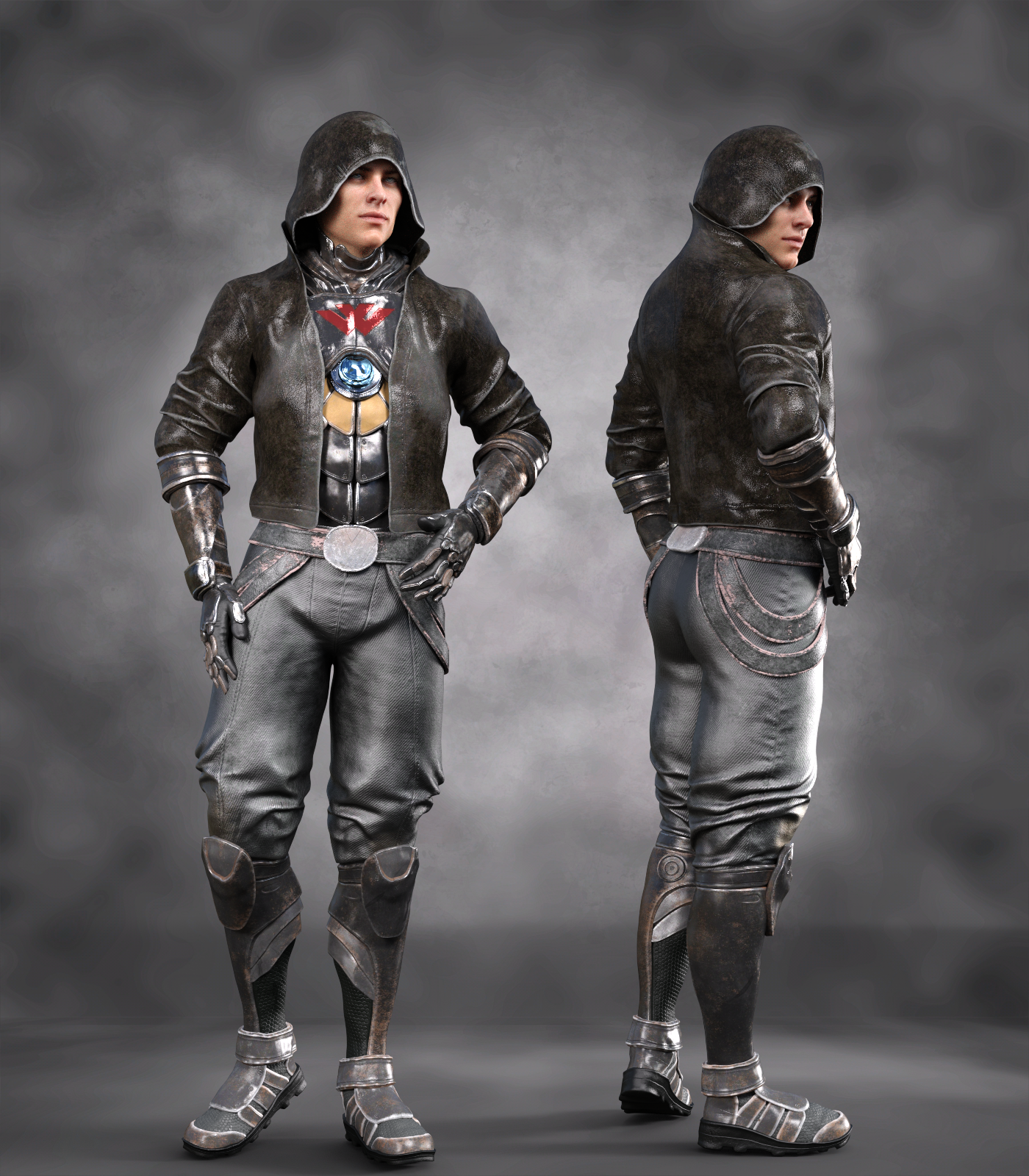
SereneNight's Sci-Fi Fun Thread 2Noah Sci-Fi Outfit for Genesis 8 Males.
This set looks really good. It was released today and missed the big NIX intro, which is suprising, but. Yura really has stepped up their game with textures. These are really impressive and realistic, without being super memory intensive. You get lots of great suit colors in this set as well
The only negative, is the pelvis/groin looks a little... High? Almost Looks like a female hip and there is a baked in round shape, highter than my male character's anatomical elements. I see it in a few textures... Is that his armor? Is it tucked in all the way down there? I don't know, but not liking it. It draws the eye there, and makes me wonder where the rest of him has got to.
I did try dialing in a bulge morph to try to see if that could be corrected, but still looked weird. Overall, I love the outfit, just wish the groin didn't have the baked in (?) line. It just emphasizes there is no bulge.
 Marvelous Designer 8 coming 6th of November.
I LOVE MD.
I made this shirt in MD8 using the Gen8F Base in Default pose as an avatar. I literally took a shirt I wanted to make, and laid it flat on the table and measured the edges of the pieces and redrew that in MD, sewed it together and draped it on the model. (Then I had to shrink it down to fit better and that got a little complicated.)
In the end it turned out pretty close.
Bringing it into Daz was super easy with the transfer tool, and it was mostly conforming...ish, kinda.
Dforced it with default settings and got this:

A fews months back I made this dress in the MD7 trial. I figured it would be pretty easy. I was wrong.
I spend nearly the entire 30 days making patterns and starting over. I think re-started from scratch 7 different times to only get 75% of the dress I was trying to make before the demo expired. Luckily it still looked like a decent dress so I've used it in some renders. What I learned was MD is amazing, patterning is hard.
It's also super handy for curtains and such.
I imported the pergola as an avatar in MD7, and tried to make some drapes. MD worked great, my execution was a little lacking: Marvelous Designer 8 coming 6th of November.
Hi, Dave. I'm happy you were able to finally get MD!
I purchased the training package from CGElves last January, when it was really cheap, and watched most of them the week after buying MD8. Got a lot of things going on this time of year, so I haven't delved deeply into it yet, but I do have a few tips for you, based on what I've discovered from trial and error:
- You have to convert clothing to OBJs to import into MD. However, when tracing the pattern, MD will create a pattern piece for each Face Group, (i.e. Upper Chest, Lower chest, etc.) as well as for each surface. I have had the most success bringing in older clothing and tracing a pattern when I've used the Geometry Editor Tool in Daz Studio first to select all the polys and apply them to a single Face Group. I then rename the group with all the polys "default" and remove the rest and only then do I export to OBJ.. The MD8 trace function then uses the material zones to create the pattern. Pattern tracing doesn't always work, though, and I've had MD stop working while trying to trace the pattern of some items. I usually get an error about importing the "fabric", too, but that doesn't necessariy stop the import from working.
- You can create your own "Avatars" from Daz figures. I recommend using the base. For example, Genesis 3 Male instead of Michael 7. Export the figure as a Wavefront OBJ from Daz. It doesn't matter if it is Base or High Resolution, but I've used Base out of habit. Import the OBJ as an Avatar, with the Scale settings to Daz Studio (cm) and the option at the bottom of the dialong to put the figure to the floor checked. (Sorry, I'm doing this from memory.) Now select and save as an Avatar. Once saved, you can load the Daz Avatar figure without having to import it every time.
- Avatar's are loaded in World Center, but MD does not treat your Daz Avatar the same as their own. It will be set back slightly. When you load a Daz clothing object, it will be forward of the Avatar. After fighting with this for I don't know how long, it finally occurred to me to fix it in DS. I was draping an existing shirt to create a morph. My solution was to import the object into DS, translate it to where I needed it be, slightly forward of where it loaded. Hide everything else and export the obj, overwriting it's existing file. Then delete the object, Unhide the figure and the clothing item and use Morph Loader Pro to apply the translated obj to the target clothing as a morph.
I see xmasrose has beat me to the punch, er post, and linked to SY's videos. They will be helpful, but keep in mind, they are using MD4, so the location of some of the tools has changed. The tools are still relatively easy to find, though, imo. So far, the MD8 videos on Youtube are more about informing us of the new features, then teaching how to use them. Hopefully that will change soon.
2018 Holiday Loyalty Rewards SaleBlarg. Took ages to decide what I wanted from the PC+ section (just too much to choose from!), but with the 8Bit Retro being a must buy for me anyway (despite my relatively modest age, I've spent a lot of time over the years using BBC Micros), I was pretty much compelled to grab that offer.
As an aside, because I'm not sure how to report this kind of thing (as it's not strictly my own problem), I noticed that Riot Girl for G3F, currently in the 50/60% best seller section, was not listed when I went to check out what else was on Luthbellina's PA page. (And no, I hadn't yet purchased it at that point, but it just doesn't show up on the PA page).
I initially guessed that might be some kind of crude workaround to stop it stacking both a best-seller and featured PA discount, but given that Zeddicus has Z Fighter that is in the best seller section but stills show up via the PA page, I'm guessing it's probably a genuine bug.
How do giftcards work?Actually, what 3Ddreamer said is the way to do it, except you must manually transfer or convert the amount of your gift card to a store credit in your account - it won't happen automatically. If you don't know how to do that, it really is pretty simple. Go into your account, click on the Gift Cards icon, then enter the gift card code that you received by email into the space provided, then click on REDEEM GIFT CARD. The amount should now appear under Store Credit.
It's even simpler than that. You don't actually have to enter the gift card code. The gift card code (I don't know about the icon) in the email is a live link, despite looking like plain text. Click it, and if your broswer is already logged into DAZ, you go right to the redeem screen, where you click redeem. Two clicks, done. Easy button.
Carrara Rain Storm - Free to Carrara Users - beta released (updated)
image revisited
I like this version better than your Challenge entry.

Fantastic Christmas present, thank you!
I'm just starting work on a noir animation, so your timing is superb.
It was raining in the city. A cold rain . . .
Excellent, Cbird. It would have been perfect for the noir Challenge. :)
It renders pretty fast on my machine. (I hate slow renders) If I get a slowly rendering scene I usually delete all the lights - then just add one or two and see if that helps.I only have 4 cores. About the only thing that sped it up (so far) was to delete the surface replicator and the puddle file. Not much left. :) So, I just deal with it. The results make it worthwhile.
UB I uploaded the rain file by itself to the first post - it's the small one!
And it works great! Again, it took me a while to understand what was going on. Only now can I begin to appreciate how wonderful this product is. The morph controls are so useful. Hopefully, I will be adding a rainy image to the Challenge soon.
Many, many thanks!
How to reduce Genesis file sizes in Carrara?the base genesis as a car file is 25mb
adding Aiko5 and NYU for Aiko5 increased the .car saved file to 170mb
and every morph installed adds to the conforming clothes file sizes.
i keep a copy of the base genesis bolder as a folder 'template' i rename folders back and forth, and drop in the morphs i want to add to the character to a copy of the base folder. rename it to make it live before saving to car file.
 Darwins' Schtuff Pt Deux
So- FYI; I have family coming into town at the end of the week, and with the prep we have to do for the holiday next week I doubt I'll be online but a minute or three here and there until nearly the New Year.
To all of those that follow this thread- Merry Christmas, Happly Holidays, Happy New Year!
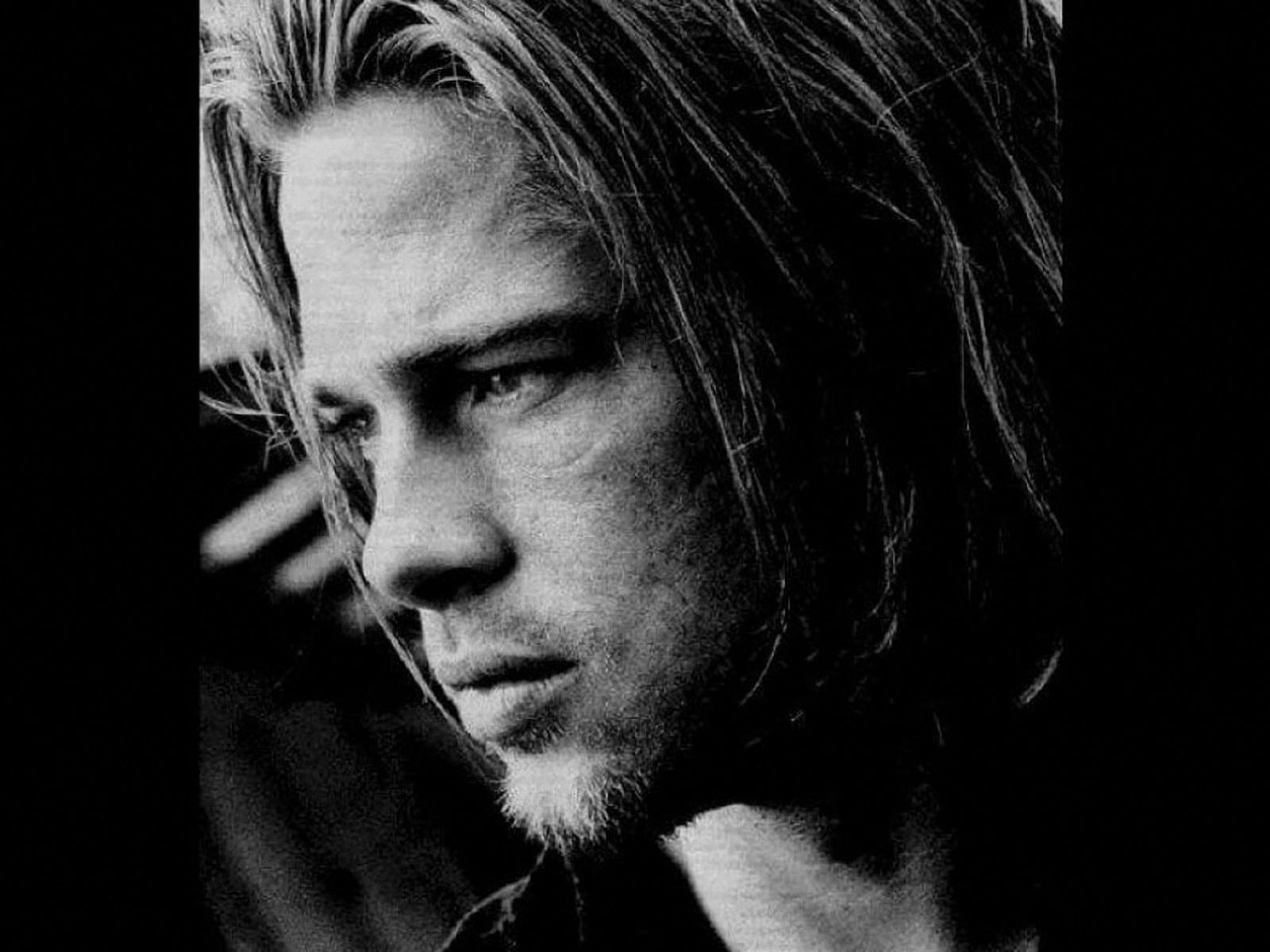
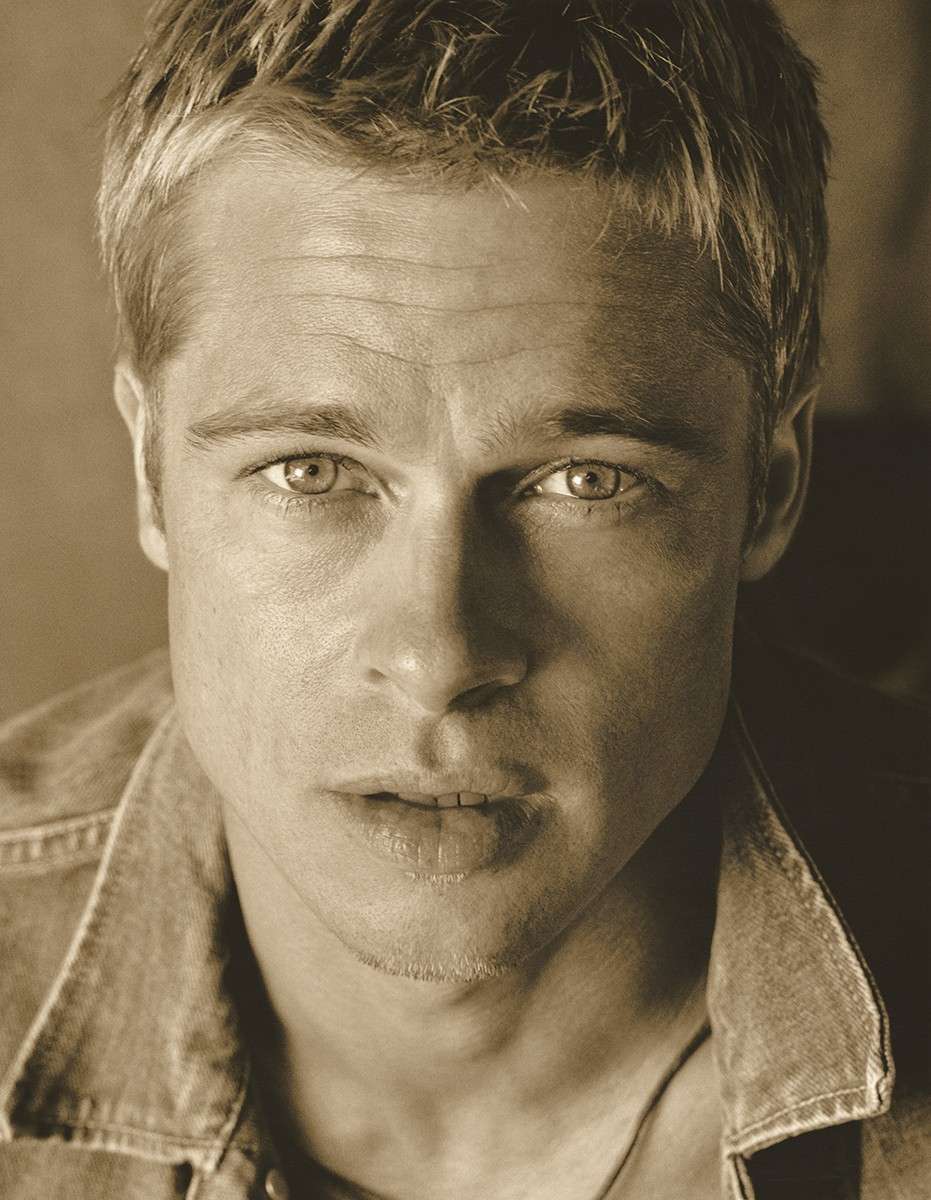
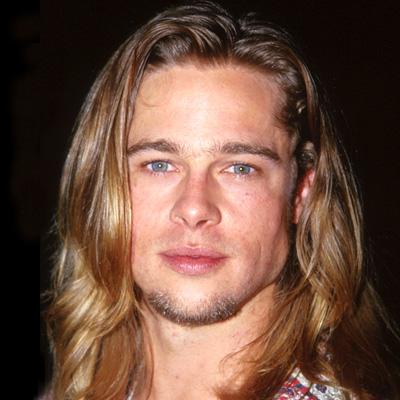
aaaaaand.... the first stage of the Pitt Morph is done. I used Jeroyn's skin on him for a tester, with eyes I may end up using once his skin is done. I've yet to tweak the morphing for the minor detail and poly moving- this was mainly to block out the facial structure for the 'feel' of the look.
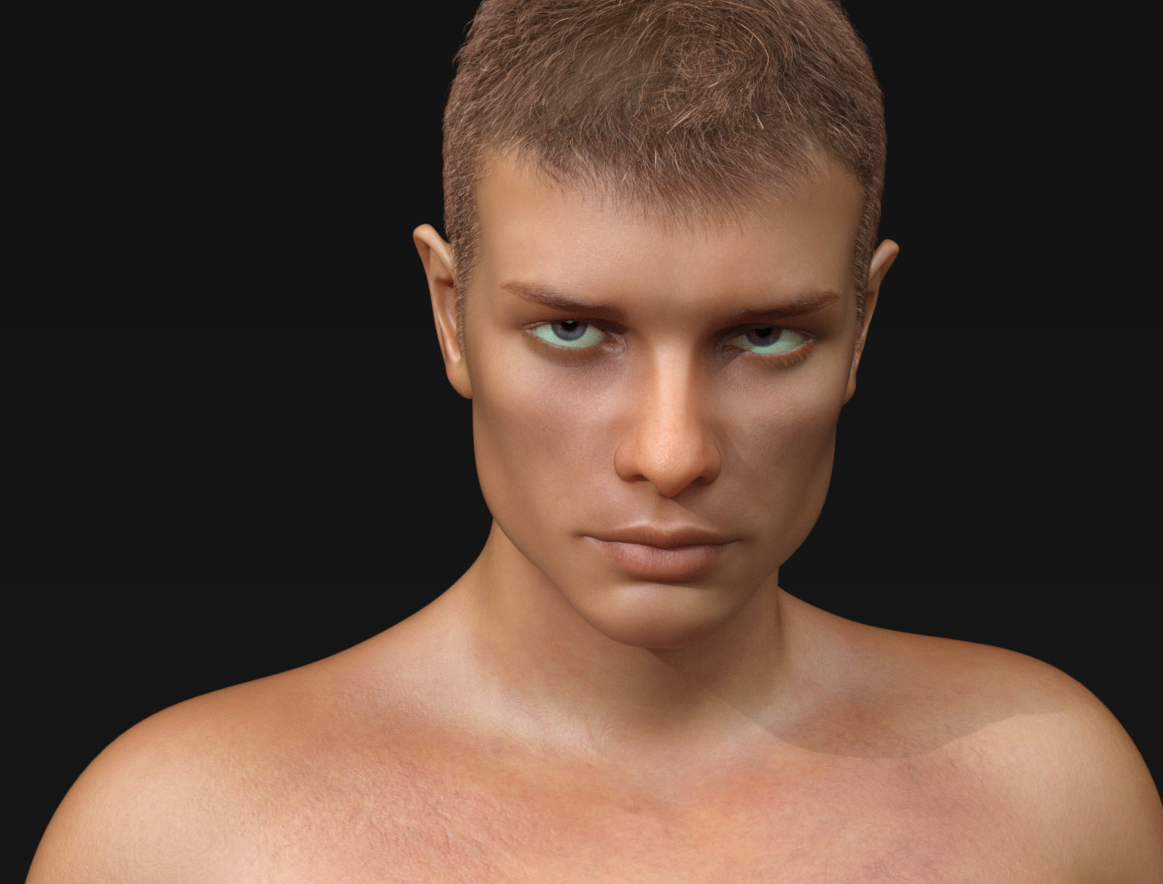
examples of my references:
 Transferring Library to External Hard Drive
Okay, here's the thing. I recently decided to transfer my library to an external hard drive. And I'm currently in the process of sorting out various issues that go along with such a transfer. However...I'm running into some problems.
Adding the new directories to my Content Library was easy enough. However, I don't know how to reassign Smart Content to work with the library in the external hard drive. Also, there's the issue of scenes I haven't rendered, etc. Will I still be able to render those files after the transfer, or will I have to undergo some arduous process if for some reason I want to revisit my older files or whatever?
Facegen, Skinbuilder - What may I share?Hello,
I recently bought FaceGen and Skinbuilder, used it, and created a morph and a skin for a Genesis8 Figure. Since I wanted to share the final product, I would like to ask two things:
- How do I save a complete preset to "give away"?
- Am I allowed to share morphs and skins made with skinbuilder (for free), and facegen?
Thank you in advance!
If possible, please share some images. I always like to see what people come up with using facegen.
Using daz for reference drawings, are there settings that make this easier?Here's what I've done since the early days or Poser and now using DAZ Studio instead for my graphic novels. I set my scene in DAZ Studio with figures and props, etc. My figures are unclothed, but with the muscle morphs and height settings I need. To this day I cannot get my head around setting up lights so I "borrowed" the set up I was used to from Poser by exporting a plain pz3 file. A quick import into DS and a save as a scene preset and there are my basic lights. I don't use the lights in DS to dictate my final shading. But having some kind of a light set up makes the figure's muscularity easier to see. It also helps to better deliniate the props in the scene.
Once the scene is set how I want it, I use the snipping tool ( Windows 10) to grab an image without bothering to render in DAZ Studio. The image is placed into Adobe Illustrator for sketching, final line drawing work , speach bubbles and lettering. When that is done, I export to Photoshop for coloring and shading. The finished image is saved out of Photoshop as a jpeg and added to the story folder (My stories are one image/page and thus not like a traditonal comic book)
Before making the leap to an all digital workflow I used to print a copy of my final scene and use it to transfer a guide onto illustration board. I would use a thick charcoal pencil to blacken the back of the printed image. Then I'd tape the image onto the illustration board and transfer the outline of my image onto the media. After that it would be pencil drawing, inking with rapidograhs and coloring with colored inks.Is it possible to make genesis 8 work with a morph that alters the default pose?I sort of did this creating my iClone character creator clone for genesis 3
what I did was baked the rotations on my Genesis 3 to match it before applying the morph and running erc then rotated the arms back and exported that obj and repeated the process
the clone itself was made with a mixture of posing, scaling, softselection and vertex moving and shrinkwrap in Carrara and Blender
Facegen, Skinbuilder - What may I share?You can share the morph (morph only, no part of the original figure) made with facegen, but you cannot share any textures from DAZ, PAs or Skinbuilder. Skinbuider is designed to create personal prijects or commercial addons only.
Daz 3D is part of

Connect
DAZ Productions, Inc.
7533 S Center View Ct #4664
West Jordan, UT 84084Licensing Agreement | Terms of Service | Privacy Policy | EULA
© 2026 Daz Productions Inc. All Rights Reserved.