-
!! Carrara Challenge 44 - Any Element, Not Just the 5th WIP Thread
Great work from everyone so far - some very inspiring stuff!
I've got an idea for this one and meant to work on it today, until my mom's computer "freaked out" and I had to go do tech support. Turns out the motherboard was bad - or at least that's the most likely issue after about two hours of Google search led troubleshooting and fix attempts. Since it was just a cheap email-and-solitaire desktop and about eight years old I went out and bought her a new one and spent the day tranferring all her files from dropbox (sooo glad I set that up for her, so I didn't have to figure out how to get her files off the old computer which just keeps restarting every few seconds), installing updates and software, etc. Fun.

So, hopefully tomorrow I can get something started .

Well, at least you were able to avoid catastrophic file loss. My mom uses hers for pretty much the same limited set of functions. We are trying to transfer her to a tablet. There seems to be more hassle from updates/outdates/virus/installation etc. on her desktop.
Looking forward to your project. Still lots and lots of time.
Shape Rigger Plus(Commercial)Thank you. I always had issues with rigging - specially of the eye / mouth area of my custom character. The orientation of the some of nodes were always wrong and I usually unchecked the head from the list when doing the ERC Freeze to use the default G8F orientation. With your utility, all the orientations came out correct. The expressions work better now. Will explore it further with multiple morph.
Shape Rigger Plus(Commercial)So a small gripe is having to set morph to zero first. Could you do that in the script and then restore the values after?
That feature was left out. I'm sure in the update we can have it as an option. We will discuss it.
It's called a non rigged morph, not non fitted. Also bones are assigned to vertices, not the other way around. If the bones are not in place that match the morph shape, that is called an un-rigged morph. Hope that makes sense.All morphs are created without rigging.
I see in the video when you apply the morph, the bones don't move. You call this a non-rigged morph, or a non-fitted morph?
Because I assumed rigging happens when vertices are assigned to bones, so how can a morph be described as rigged or non-rigged when all of the model's vertices are already assigned to bones?
Thanks for clearing up any confusion about these terms, btw.
Shape Rigger Plus(Commercial)All morphs are created without rigging.
I see in the video when you apply the morph, the bones don't move. You call this a non-rigged morph, or a non-fitted morph?
Because I assumed rigging happens when vertices are assigned to bones, so how can a morph be described as rigged or non-rigged when all of the model's vertices are already assigned to bones?
Thanks for clearing up any confusion about these terms, btw.
Shape Rigger Plus(Commercial)
That feature was left out. I'm sure in the update we can have it as an option. We will discuss it.So a small gripe is having to set morph to zero first. Could you do that in the script and then restore the values after?
Shape Rigger Plus(Commercial)This doesnt't change jcm requirements if a morph needs it.Shape Rigger Plus(Commercial)If the morph is rigged with this, even if it has rigging, it will automatically remove duplicate ID issues if resaved. The script makes sure it eliminates those as well. So basically if a morph has duplicate id issues, just re-rig it via the script, save it and the issue is gone.
Now that's a real time saver ! Sold
Creepy MenThat's why I said "most" of the content rather than painting it with the broad brush of "all". I just can't understand the point or need to morph genitals, breasts, or orifices into proportions the size of Avagadro's Number, figuratively speaking. I can understand the possible need for more realistic/diverse looks for certain body parts and character/actor interaction morphs for certain types of scenes, but even you would have to admit that some of it is waaay out there beyond... the twilight zone! heh.
Shape Rigger Plus(Commercial)So a small gripe is having to set morph to zero first. Could you do that in the script and then restore the values after?
Shape Rigger Plus(Commercial)<Also the HD expressions are already rigged, so I am not sure what you are asking. If however your imported face morph that is not rigged, you will get allignment issues if you apply expressions to that.
Is it possible to create a morph without rigging? I assume all morphs implicitly have rigging, whether they are fitted or non-fitted.
I don't want that to be confused with things that are rigged and non-rigged.
Morphs are not rigged automatically. It's up to you.
An easy way to check if a morph needs rigging adjusted: dial the morph up and load various poses. Do things deform in strange ways? Then yes. When you move limbs around for sure, say the arm is in another position because of the morph, lower leg is bent more outwards, stuff like that. If it's just some small local thing, say a changed navel shape or even a thicker thigh without changing the position per se, it may not need rigging adjusted but no harm in just doing it when unsure. Use the joint editor tool to see where all the bones and joints are that make up the figure.
Is the transfer utility enough?Transfer Utility is all you need to make it conforming, but it may not bend in a manner you like. I think you might also have to edit the weight maps, especially if the clothing is not real close fitting. Weight map editing is an art, I think. I've never developed the skill. You may also need to make Joint Controlled Morphs (JCMs) to deal with ill-fitting areas and pokethrough when bones bend.
Recital Hall and Auditorium...thank you. as well
I know quite a bit about pipe organs (as well as pianos) as not only have I performed on them, but also studied their history, design, construction, and regulation back when I was in college, (was interested in actually getting into the craft itself, however turnover is extremely rare as it is usually a lifelong occupation), but alas, my ability to transfer that knowledge into a 3D mesh is extremely lacking.
Strings of Christmas LightsDoes anyone know of some strings of Christmas lights - perferably with the ability to morph them at least sectionally?
Is the transfer utility enough?I am considering the purchase of Marvelous Designer, but I'm confused on content creation. Once I make something - say a shirt, will the transfer utility be enough to make the item conforming? I've been doing searches all day practically and I'm not sure of the answer still.
I understand I may have to pull the obj into blender or hexagon to fix the quads MD produces. I'm kinda stumped on what to do after I bring it in to Studio. In my mind it seems simple but something telling me it not that easy.
Now, if its not, where can I find the info I need to learn how to do this?
Thank in advance for anyones assistance!
Products Converted from Studio to PoserWaitress Uniform
Good Conversion
A waitress that's not a pinup - fantastic. I did have some odd goings on as detailed in the previous post but they were avoided the same way by using the Poser Companion Files I created - loading each item on its own and saving it back (there are companion files included with the product but I like the Fit Control morphs). There are only two or three shapes supported in the product, so here I've added the Stephanie 6 morph using Poser's Copy Morph and then a combination of the clothes' morphs and the Fit Control morphs to deal with the odd bit of poke through.
My only niggle would the bow tie, which deforms with the head turning - I'll save it out as a smart prop to solve that though. Otherwise, I'm rather pleased. In the second image you can see that the clothing has some thickness morphs for both the cloth and the buttons, which helps define the vest where the lighting blends it with the skirt. The blouse has some nice casual morphs for the buttons and base.
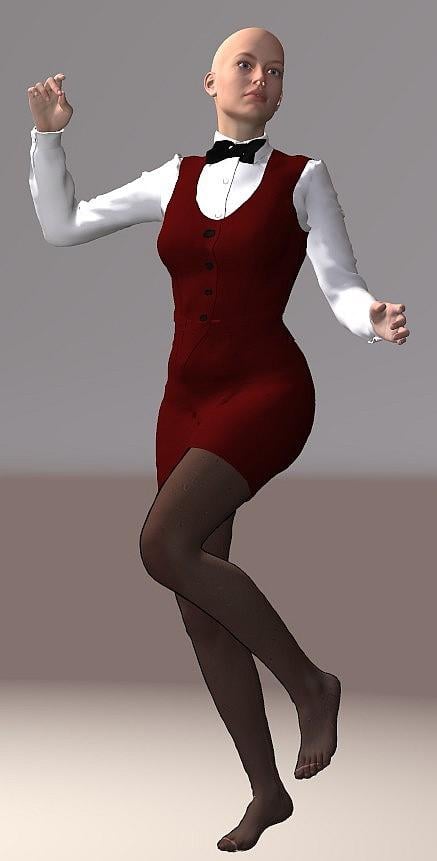
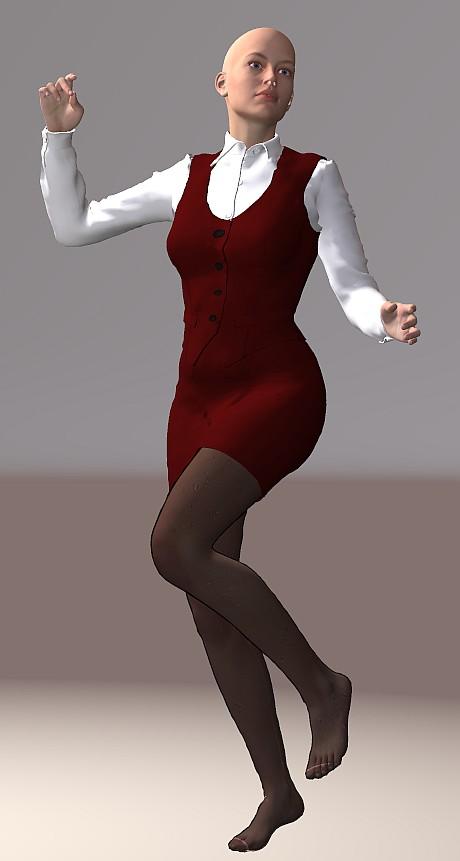
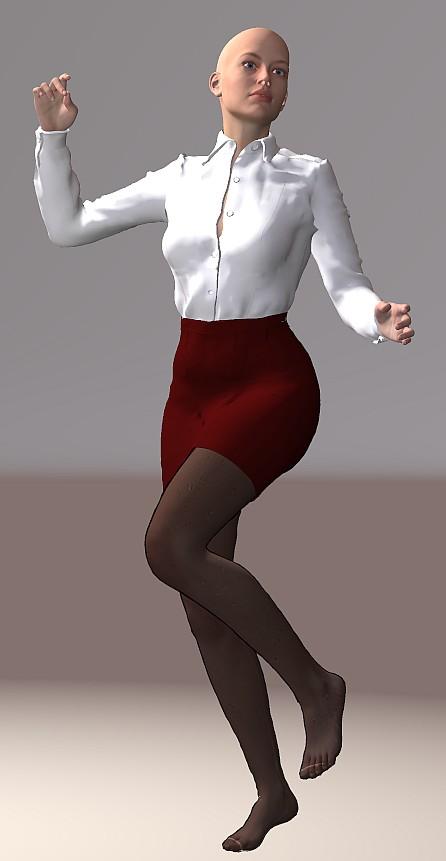 Shape Rigger Plus(Commercial)
Is this product only for character morphs, or does it have other uses? If only morph clothing or props, does it have a purpose for me, to?
Shape Rigger Plus(Commercial)All morphs are created without rigging. Rigging takes place after a morph is created. It is up to you as the creator to decide if the morph requires rigging or not. Look at the last promo for example. That shows a morph imported onto figure with and without rigging applied (in a pose), and the problems you might experience if the morph isn't rigged vs rigged. Hope that answers your question.
G8M Height morphNeat. Now to raise the money ;)
I'll see what I can do about grabbing that soonest.
Same of the Morph rigger. Talk about saving me some hassle...
Shape Rigger Plus(Commercial)
Is it possible to create a morph without rigging? I assume all morphs implicitly have rigging, whether they are fitted or non-fitted.<Also the HD expressions are already rigged, so I am not sure what you are asking. If however your imported face morph that is not rigged, you will get allignment issues if you apply expressions to that.
I don't want that to be confused with things that are rigged and non-rigged.Products Converted from Studio to PoserV6 Timeless Dress
Good Conversion
(but with bumps along the way)
I'm going to have to amend my notes on clothing conversions to account for some oddities that seem to occure now and then with the method that I had outlined above.
I began by following that method and found, as with some other items that I'll come to in later posts, that, after adding morphs, when I saved the cr2 prior to running the File Optimizer, an obj file was created along with it. Not an obvious problem, save that these obj files have no UVs. If you run against this problem, it is usually solved by omitting the step of adding morphs using DSON, as recommended in Netherwork's guide. Instead, load the item from the companion file and save that back under the same name. Now run that cr2 through the File Optimizer. If you need to add morphs, then you'll have to rely on Poser's Copy Morph feature (I think that may be a pro only feature though, so if you don't have Poser Pro, you will have to make do with whatever morphs are supported by the item).
In this instance, while the boots worked (mostly) just fine (I had trouble with the foot pose and ended up making the hiding the toes to render), it was the dress that gave me realy grief.
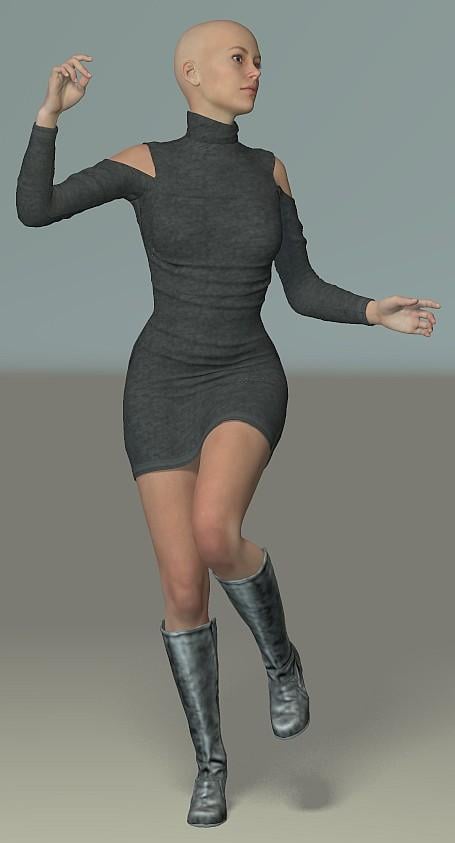
So, things to note beyond that. There are very few supported morphs - off hand, I think the only shapes are V6 and Gia 6, along with a few odd items for smaller breasts. There are no adjustment or movement morphs. The mesh is simple and light, and the clothing wrinkles are not a part of it, instead being from a displacement map. In this image, I've used Poser to add the Stephanie 6 morph which created a little poke through here and there which I took care of using the added Fit Control morphs.
The Boots have a single texture file with the reflections baked in, so you might want to re-texture these. The dress has both a texture and, as already mentioned, a displacement map. Conventionally, when applying a displacement map in Poser, you would use a maths function, with subtraction set at .5 - don't do that here, just apply the map directly to the node and set the displacement value for something like 0.025.
Daz 3D is part of

Connect
DAZ Productions, Inc.
7533 S Center View Ct #4664
West Jordan, UT 84084Licensing Agreement | Terms of Service | Privacy Policy | EULA
© 2026 Daz Productions Inc. All Rights Reserved.