-
[Diffeo] Strength of custom morph JCM? (resolved)
There is one strange thing.
Only custom morphs of Victoria 8 and Victoria 8.1 worked, the other characters didn't.
I tried bending the limbs in pose mode, and in bodymorph as well.
(Tested with pure Daz original characters, not mixed / DAZ Studio 4.16 BETA / 'Expot To Blender', Not HD)
All G8 characters custom morphs were imported from here :
D:\My DAZ 3D Library\data\DAZ 3D\Genesis 8\Female\Morphs\DAZ 3D\Character's Name
All G8.1 characters custom morphs were imported from here :
D:\My DAZ 3D Library\data\DAZ 3D\Genesis 8\Female 8_1\Morphs\Daz 3D\Character's NameI have already checked these paths in Daz. (yellow box in image)
After importing these morphs I didn't set anything further.
Even though they are all original characters, and same path, why did only two Victoria work?
Am I importing these morphs from the wrong path, or do I need to set something more?Victoria 8 comes with clones for Genesis, G2, G3. Where are they?contedesfees said:
Up with this, I will not put! Clone is not autofit! And Victoria 8 was obviously intended as an advancement to Genesis 8 Female.
Obvious to whom?
All characters including Victoria 8 are created as a morph, using G8F as their base; textures tend to be included in these - although morph only character packs do exist.
The clones are used (as explained) for autofit; they can be accessed by making hidden morphs visible; they aren't suitable for most actions other than autofit as there are no corrective morphs with these basic shape morphs.
RESOLVED: Error loading Character - What am I doing wrong?First, thank you for your thorough response. And for pointing out how to find that Log! I have been looking for it.
I did a complete delete and reinstall of my entire library prior to running the steps listed above.
1. No amplifying information was provided in the log. It simply listed the error. Again, if I 'Browse to File Location' I am able to see all the files are present.
2. Yes, the Genesis 8.1 model loads without any problems. Other 8.1 character sets load without problems (i.e. Ginny HD 8.1). In fact, I can load all other 47 characters I have installed. Echo HD 8.1 is the only character that gives me the errors.
3. Unfortunately, I do not own Victoria 8.1 (yet).
4. There are two environment assets that have been installed using Daz Connect.RESOLVED: Error loading Character - What am I doing wrong?Please don't confuse Daz Central and Daz Connect. They are as different as night and day. Daz Central is a dumbed down version of DIM. Daz Connect is what is used when you install a product from within Daz Studio.
Deleting content files and reinstalling them might not fix this issue. Uninstalling from DIM if the product was installed with Daz Connect will not fix anything. If you truly want to nuke everything and start over, I think that involves resetting the database as well as deleting all content files. If you have ever created any categories of your own or assigned any content to categories, you would want to export user data before resetting the database.
A few questions to try to home in on the problem:
- Have you looked at the Daz Studio log file to see if there is any more information about the "Resource Error"? To do that, try to load Echo HD from within Daz Studio. As soon as you get the resource error and close the error window, go to the Help menu and select Troubleshooting and then View Log File... (See Screensot) A window will open full of log text. Scroll to the very bottom for the latest information. Do you see any details about the error, like WHAT resource is causing the problem?
- Can you load Genesis 8.1 Basic Female from inside Daz Studio OK, or do you get the same resource error?
- If you own Victoria 8.1, can you load her OK, or do you get the same resource error?
- To see if you have ever installed any products from inside Daz Studio (with Daz Connect) Open the Content Directory Manager and expand the Daz Connect Data section to find the path that Daz Connect uses. (See screenshot.) Then once you know that path, use your file explorer to navigate to that path and see if it contains folders in the data/cloud subfolder. If you see a bunch of folders named 1_XXXXX, where the XXXXX is a bunch of numbers representing the SKU of a specific product, that means that you have installed that product with Daz Connect. If there are only a few, it may be fairly simple to uninstall those products from within Daz Studio. Uninstalling them with DIM will NOT remove them from Daz Connect. DIM and Daz Connect are entirely separate installations in different locations on your computer, but both populate the same database. Yes, it can become a big mess.
Victoria 8 ExpressionsHi,
I recently installed Victoria 8 but can't I dont see her expressions in the Posing tab. For example, I've checked and see "Rage" expression in below folders, but can't find them. In the Posing tab, only the standard ones appear for Genesis 8 - afriad, angry, flirting, frown, shock, smile, suprised.
C:\Daz 3D\Applications\Data\DAZ 3D\My DAZ 3D Library\data\DAZ 3D\Genesis 8\Female\Morphs\DAZ 3D\Victoria 8
-
eJCMVictoria8Rage_HDLv2.dhdm
-
eJCMVictoria8Rage_HDLv2.dsf
Using DAZ character names?One of the characters in my own fictional Steampunk world is represented by Alexandra 8. The character is the queen of the largest city of the world, the aesthetics of which is largely inspired by Victorian Britain. Since the real Queen' Victoria's full name was Alexandrina Victoria, I decided to call my character Alexandra VIII. It is nod to both the real person and the amazing Daz figure.
I see nothing wrong or against the EULA with that.
 Using DAZ character names?
Drip said:
There is something to say for the name being part of the product you purchase. Which then would imply that it'd be fine to use a Victoria model and call her Victoria in your story. The same would then apply to the Tetracovine. The name being part of the product you purchased would imply that you could use the model in your renders and call it a Tetracovine in your story when referencing the creature in those renders.
I would say that's a pretty different scenario because Victoria is a name that probably millions of ordinary people have had over several centuries. To my knowledge, nothing else has ever been called "tetracovine".
Kind of "shell problem" with nylon Stockings of iWave.Try loading the stockings to a default victoria 8 without the 3rd party gens added and see if you still have the problem. Golden palace uses a geoshell also and many times you have to adjust the materials manually to get it to work
Using DAZ character names?There is something to say for the name being part of the product you purchase. Which then would imply that it'd be fine to use a Victoria model and call her Victoria in your story. The same would then apply to the Tetracovine. The name being part of the product you purchased would imply that you could use the model in your renders and call it a Tetracovine in your story when referencing the creature in those renders.
Obviously, this is one of those cases of semantics that lawyers love and earn money from.
But, do note that the UELA article also mentioned "objects". It'd be quite silly, if we were to buy a model of a car on this site, but weren't allowed to use that car (which is an object) in our renders.
Kind of "shell problem" with nylon Stockings of iWave.Hello margrave, thank you for your answer.
Sorry, it is Victoria 8. The Stockings are From Daz3D, Nylon Stockings SKU 53033.
Attached is the screenshot of the surfaces tab, but I do not know how to open the cutout opacity section.
Yours, AlphaOmega[Diffeo] Strength of custom morph JCM? (resolved)Yes, adjusters are like full body morphs in Daz, intuitive and easy to use.
In the case of Victoria 8.1 jcm, a Custom Morph that worked, it was very convenient because it was applied in real time just by adjusting the adjusters value.[Diffeo] Strength of custom morph JCM? (resolved)Also tried a mix Victoria + Jacqueline and works fine too.
steps:
- in daz studio make a figure mix 50% Victoria + 50% Jacqueline then export as dbz
- in blender import the figure then merge rigs then make all bones posable
- import standard jcms
- import the custom Victoria jcms
- import the custom Jacqueline jcms
Can you target selection for morphs?PerttiA said:
Depends on the character, yes if using Victoria 4/Michael 4 or older characters, no if using Genesis 1-8.1 characters, although often Genesis 1-8.1 characters do have separate head and body morphs, but if you want to use just part of the morph, you need to buy separate utilities for it.
Thanks, but what would the utility be called? Is it here in Daz3d.com?
Can you target selection for morphs?Depends on the character, yes if using Victoria 4/Michael 4 or older characters, no if using Genesis 1-8.1 characters, although often Genesis 1-8.1 characters do have separate head and body morphs, but if you want to use just part of the morph, you need to buy separate utilities for it.
Skin Builder for 8.1panton41_dfeb1322a2 said:
Ptrope said:
It's definitely problematic. The difference in materials, not just UVs, seem to be making it impossible to get a good result. I've loaded a G8 female and done the changes with her, then tried copying the materials to the G8.1 figure, but the difference between torso/face and body/head is falling apart at the seams. I've tried using "Base female' for the UVs, but it still zdoesn't fit. Any suggestions? As far as skin goes, G8.1 seems more like a complete generational difference than an update to an existing one.
They probably don't want to brand a new figure "Genesis 9" until DazStudio 5.0 ships.
So even though the difference between Gen 8 and 8.1 is far, far larger than Victoria 4 to 4.2 it still gets the "8.x" branding.
I'm, not sure what youa re trying to say here, since Victoria 4.2 was an incremental update to Victorai 4/4.1. If you want to cite a minor chnage that was released as a new figure I suppose Victoria and Michasel 2 would do, since they were essentially morph sets for the previous generation (but we didn't have the techniques for adding morph channels back then). Genesis 8.1 is clearly not a new figure - it's an incremental update, adding only the new surface grouping compared to 8 (new UVs could be added to Genesis 8, though the head/body split as needed for this particular UV set) but taken as an opportunity to roll out some other enhancements.
I would imagine Genesis 9 will be kept for something that makes actual changes, rather than tweaks. Whether that comes with Daz Studio 5 will, I would imagine, depend on what new features make the initial release.
Skin Builder for 8.1Ptrope said:
It's definitely problematic. The difference in materials, not just UVs, seem to be making it impossible to get a good result. I've loaded a G8 female and done the changes with her, then tried copying the materials to the G8.1 figure, but the difference between torso/face and body/head is falling apart at the seams. I've tried using "Base female' for the UVs, but it still zdoesn't fit. Any suggestions? As far as skin goes, G8.1 seems more like a complete generational difference than an update to an existing one.
They probably don't want to brand a new figure "Genesis 9" until DazStudio 5.0 ships.
So even though the difference between Gen 8 and 8.1 is far, far larger than Victoria 4 to 4.2 it still gets the "8.x" branding.
[Diffeo] Strength of custom morph JCM? (resolved)Yes, tested with latest dev version Diffeo + Blender 3.0 & 2.93
Custom morphs worked for Victoria, but not for other characters.
[Not working]
Base : Genesis 8.1
Custom Morphs : Jacqueline 8.1, RosaMaria 8.1
[Worked]
Base : Genesis 8.1
Custom Morph : Victoria 8.1[Diffeo] Strength of custom morph JCM? (resolved)I made a 50% Victoria 8 and she works fine here, are you using the dev version ?
Help find a character
Could be just Victoria 8.1 not dialed in all the way, maybe less than 30%, because she almost looks like the default Genesis 8/8.1 Female.vl80s2012 said:https://www.daz3d.com/fe-diverse-hair-vol-1-for-genesis-8-and-81-females
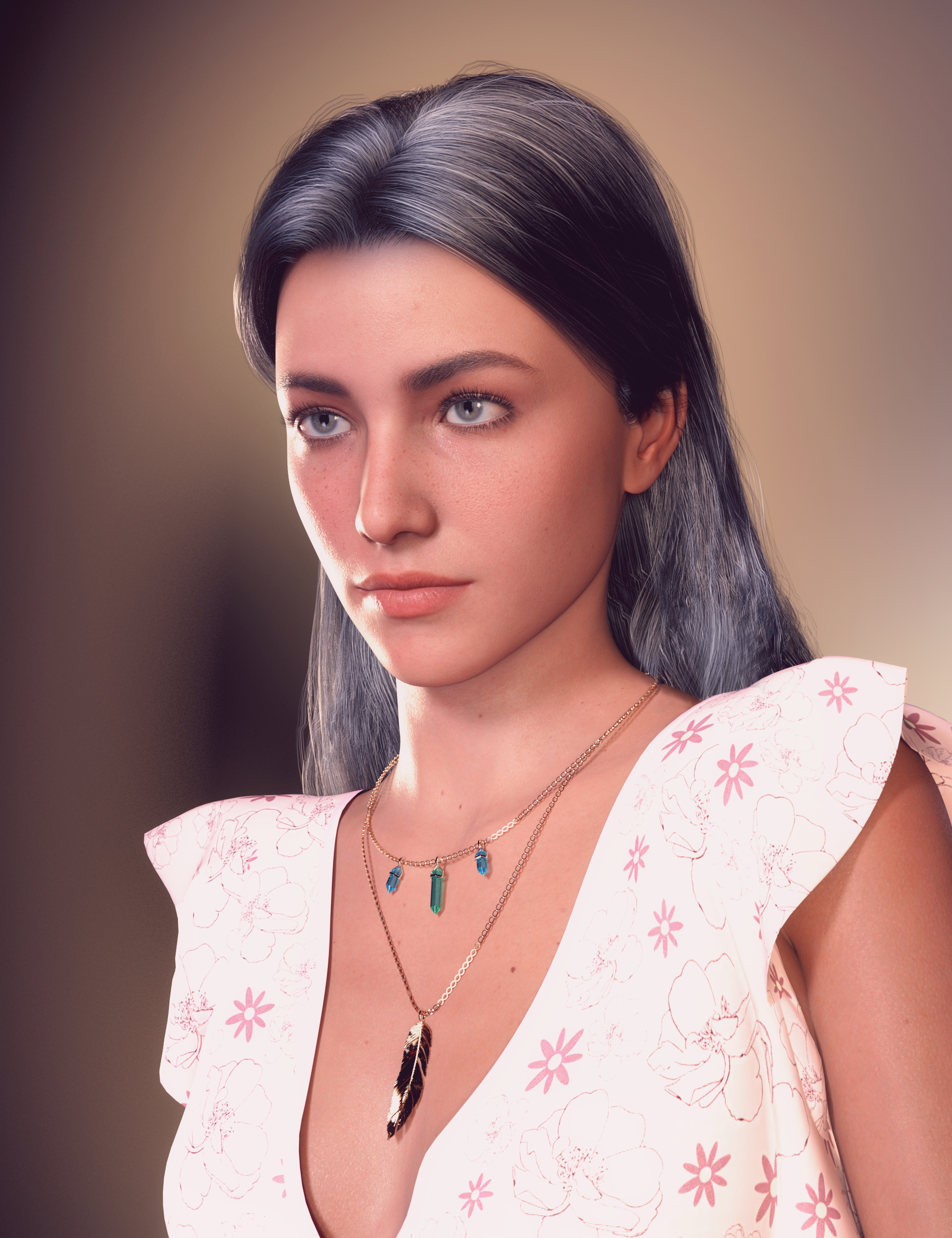
Hello everyone! Tell me, what kind of face morph is shown here?
The textures are taken from Victoria 8.1, but I can't find the face morph.Help find a characterhttps://www.daz3d.com/fe-diverse-hair-vol-1-for-genesis-8-and-81-females
Hello everyone! Tell me, what kind of face morph is shown here?
The textures are taken from Victoria 8.1, but I can't find the face morph.Daz 3D is part of

Connect
DAZ Productions, Inc.
7533 S Center View Ct #4664
West Jordan, UT 84084Licensing Agreement | Terms of Service | Privacy Policy | EULA
© 2026 Daz Productions Inc. All Rights Reserved.