-
Welcome to Toon World
Margarita scared
Aiko 3-Kioki Morph
Christian 8i did a lot of factoring yesterday over this and came to the result that I'm out of the bundle business unless I'm getting a serious discount. like many have stated, a lot of the bundle stuff is not used anyway. Sooner or later those bundles will be marked way down in price ... or the characters will be. ...
but there comes a time that just using the quadrillion morph products can make any character you could ever want. The weak point are the skin textures, which to me seem to be getting better and more realistic all the time. Christian 8 testures, as well as his bud Hudson, look very good, (to keep somewhat on topic). That is where I should place my focus, learning to make skin textures. but even then, unless you doing a lot of closeup work in the nude, most of them don't even matter all that much. Why we get gential textures or even genitals unless you doing serious nudity? once the clothes are on, why bother even applying textures?
WOW ..I'm rambling way OT Would like a list of the morph adjustments for figures
Very new to rendering, so if this is a confused or elementary question, you all have my apologies. I would like to keep a record of the morph adjustments that I have made to each of my figures. I have searched by every keyword I could think of, but cannot find a way to export a list of the components in a scene or the adjustments that have been made. Is there a secret decoder ring to finding these?
Adding custom icons/cards to morph dials in DS -- what step am I missing?I get this error when I try to do it "The selected image is not in a mapped directory please select another image..'" I tried putting the png in the morph folder in the Data folder but it still gives me this error. I even get this error message if I try to change the already present icon in a PA morph for a slightly different one in the same folder by way of experiment. What should I be doing?
Thanks
Shape of Water CreatureProbably not this creature...but cooler looking.
https://www.daz3d.com/carnomoloch-character-and-outfit
The downside is it is a figure instead of a morph.
Only reason I haven't bought that yet is because it's a separate figure. It is pretty cool looking! Not the one I was thinking of, but still cool.
He's a fantastic figure, I love working with him. He does eat up a lot of resources if you don't lower his subd though. But he looks fantastic in final renders
Morph VisualizerThe Geometry Editor tool does have an option to select teh vertices used in a morph.
Gen 8 Vertices/Geometry prob upper teethIs that a Daz store character/morph?
Bad Teeth?That usually means that in crating the morph in ZBrush the mesh was divided to a higher level in ZBrush for sculpting with SMT on, then returned to base resolution for export as a morph. Is it one of your own morphs, or is it something made by another person?
How Do I?....That's tricky - dForce can work only with the mesh provided, so if that is modelled vacuum-packed it won't help much. If you use a dForm with a weight map (or take the emsh into Hexagon) you may be able to create a morph that would give a bit more loose cloth, on which dForce could them work, but it would be fiddly (and using a dForm at least it would be hard not to stretch the buttons).
Looking for product - legacy figuresHello everyone and Happy New Year.
I'm looking for some product to kick-start a project up which I was working a while back, It seems that half of the stuff that I had on an old laptop didn't survive the transfer over to the new one.
1) an editable body suit for Genesis 1 - something similar to that which was offered by Wilma P for Genesis 2 a while back
2) a texture pack with various skin textures for G2F and G2M
3) an African morph and skin texture for G2MIf anyone can help me and point me in the right direction I would be extremely grateful.
Thanks in advanceHow do I transfer pictures from iPad to pc?There are thumb drives available now for cheap which have both a USB and lightning connector. Not just useful for transfer, but also useful for watching movies on your iPad/iPhone without having to use up storage on the device. If you're interested, I'd suggest paying a bit more for the ones that kind of wrap around the back of your device as having the drives jutting straight out from the lightning connector is no good.
- Greg
How do I transfer pictures from iPad to pc?There is, of course, messaging which has no size limit, bluetooth transfer, and since you have an iPad, you should have an itunes account which means that you have an icloud account so you can put the pictuires in iCloud Drive or use the web based iclod acount to mail them to yourself (mail drop can hand up to 1 GB files).
Christian 8Once again Male = No open morph, if dForce Coveralls and Tools for Genesis 8 Male(s) were a female outfit, it would include a "look at my boobs" open morph.
I won't pay for a product which brings less option than the female content.
About Christian 8, I will purchase it only for the tattoo textures, no PA character is "attractive". I skip the Pro Bundle.
Male vs female


I normally try not to pile on with this sort of thing, and I think often both male and female versions of outfit have similar issues with lack of morphs (or you can find vendors who put similar morphs in both male and female in clothing), but I definitely agree with this. I would immediately buy coveralls for men with an opening morph (or series or morphs, or alternate versions, whichever is needed to make "open collar" and "fully open" options work), but zipped to the neck only ones I don't have a use for personally.
Bad Teeth?So I am goofin around and I notice that when I use a chest morph this occurs? Odd, any known reason a chest morph would produce a Austin Power's dental plan?? It looks like it is hitting the teeth with a smother. Very odd indeed. Is there a cure?
Gen 8 Vertices/Geometry prob upper teethI've seen this problem pop up on a few female Gen8 characters I have. It looks like a stray vertice that pulls the geometry for Upper teeth morph. Suggestions on how to fix?
Morph VisualizerYou just got your pack of new lip morphs and what do you do? Dial each one up and down to see what
they actually look like. Nothing better. But once you're working with a huge set of dials, say muscle morphs
with muscle names you don't know, or face morphs with "cheeks01..cheeks12", inspecting each one is a
painstaking process. A tool that could graphically show the location and magnitude of the deltas on the figure
would be a huge time-saver. I'd buy that! Perhaps another fine Zev0 product?
Many morph packages -
I also noticed that the newer base characters don;t seem to morph as well as V4/M4 ... the mesh seems to pull apart quicker. any comments on that?I haven't noticed that, here's a rather extreme morph for G3 and the mesh looks perfectly fine to me. I've checked the G8 version too and it looks the same.
 G8
G8Aha, in the feedback and discussions of the Walther model, other people are experiencing the same issue of a youthful morph that was applied to their G8M models.
I deleted my version of Walther, uninstalled Michael 8 to test. Reinstalled M8 and still, the morph distortion is there. Might have to try reloading the updated version of Walther and see.
Shape Splitter - Divide, Combine and Save (The new version is already available. 1.2.1)[Commercial]Hi thanks for getting back. I'll try again now that I have the instructions. I did look for the instructions. Theyr'e usually on the Read Me page but that was pretty sparse and there's no hint on that page that there's instructions in any file. I am not able to search for a morph. On the video at this point
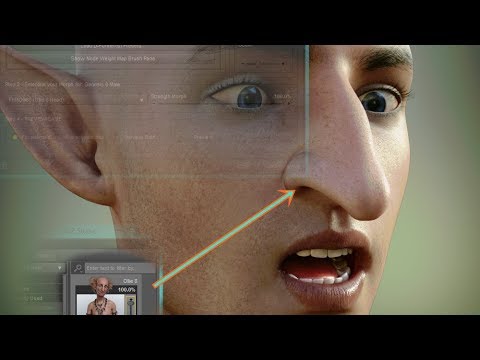
it shows you typing in the search field. Mine is blocked. I'm unable to type anything in there. I gave up with it at this point and used the weight map to create the morphs in the long winded, manual way, the way you'd use the headsplit.
Thanks
I'm sorry you had that problem.
It seems that it is a bug, in your installation of Daz Studio.
But even if you can not search the field, is it possible to select any morph from the list?To solve your problem you would have to reinstall DAZ Studio. You could also create a support ticket.
https://www.daz3d.com/help/help-contact-usAnd as a last option, you can also return the product.
And I'm sorry that you had the problem with X-Morphs.
G8Now it gets whacky. If I load ONE G8M figure only, I then edit/zero figure gives me a generic G8M base. I move all the body and head morphs accordingly to 100% in the Currently Used and we get the exact figure. Great! But say I load a 2nd G8M, Michael 8 for example, again I go through the process. But this time I have no body/head morph parameters to slide to 100%. Instead, I get slides for other G8M figures I have -- meaning I can't get to the intended figure at all. Michael 8 becomes a generic G8M base.
Daz 3D is part of

Connect
DAZ Productions, Inc.
7533 S Center View Ct #4664
West Jordan, UT 84084Licensing Agreement | Terms of Service | Privacy Policy | EULA
© 2026 Daz Productions Inc. All Rights Reserved.