-
problem with creating new morph
yuyu.atem said:
Thank you very much!
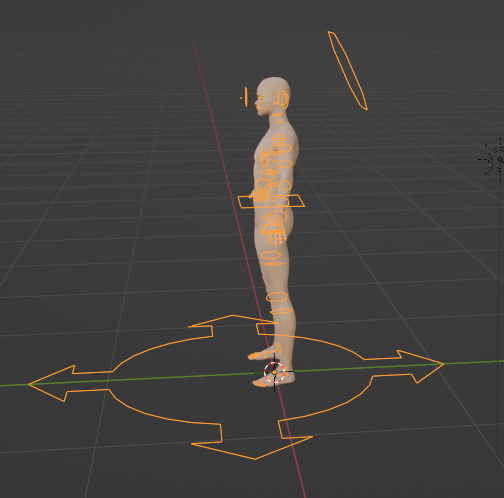
When I use the DTB, there is several "forms" around the character in Blender:
 ......
So, it doesn't seem to be due to the other existant morphs already applied... I don't understand at all what is my mistake...

Thank you in advance for your help!
DTB rigifies the figure as default... those parts in orange are 'rigs'. You can uncheck Bones in Overlay settings to hide them. And that was why I suggested not use DTB but pure obj.
But they both work fine as long as you give them correct settings when import / export. You must carefully check those settings.
3rd party software to animate on DAZ3D?I started trying to go the Blender route. The export/import tools are really pretty slick. I got hung up on hair. There were a bunch of other things that I'd have to work out before the renders would look even close to what I was getting from Iray and/or OctaneRender from Daz Studio.
Then I asked myself: Why are you wasting all of this time? Dart, you don't know Blender. You're far from having anything that beats what you've been doing in Carrara. Why are you doing this?
So I thought up a way to make animation in Daz Studio something that more closely resembles my experience in Carrara. What I ended up with is Much MUCH better than that, and I can bring my new method to Carrara as well, since it can read DUF files! Total Win!
problem with creating new morphTimberWolf said:
This video covers the whole process, including the settings for Morph Loader Pro. Setting the morph import options is obvious once you see it demonstrated but the UI is a little counter-intuitive in this regard and doesn't follow the usual Daz conventions.
It's worth watching it all the way through for an overview but the part you specifically require is at 17:00.

Thank you very much!
 It works perfectly, now!
Just a thing I don't understand: after saving the DS character file (just the file itself, not the morph as an asset), when I click on the "reset" button of the new morph, the character doesn't come back to the shape it had before I create the new morph. It chages, but it is not it's origonal shape. Is it normal? It didn't seems do that before I save the file...
Thank you in advance for your answer!
Diffeo export at base level with geograft, import as morphKeep in mind that blender doesn't work as daz studio. In daz studio it is common to mix figures, in blender this makes little sense. We import the baked final shape but then corrective morphs are from the base figure so they are different from daz studio. There's an option in easy import named "baked correctives" that will import all the corrective morphs, this is good to get a single custom figure as Victoria 8 for example, but will be extremely heavy for a mix of figures.
[Released] RSSY Hair Converter from Genesis 8 to Genesis 9 [Commercial]RiverSoftArt said:
barbult said:
SickleYield said:
If you're getting better result with AutoFit, you might be better off returning the product rather than suffering more frustration. It's not that we don't want to help, it's that I literally don't have the same problem. I didn't do some weird magic trick with Primavera hair for the promo, I'm pretty sure I just converted it with the Regular conformer and used it without the geoshells. It's almost never worth using anything but the Regular conformer with dForce hair because dForce hair seldom has "real" geometry, it's grown as procedural type strands off a cap. There are a few hairs by for e.g. AprilYSH that have dForce and movement morphs, but they are the exception, not the rule. I would swear the manual does say this.
Thank you for responding, SickleYield. Primavera Hair is a Linday polygonal geometry cloth-based dForce hair. It is not strand-based dForce hair. The Swept Wetlook Hair is regular OOT hair, not dForce at all. I am a fan of RiverSoftArt and SickleYield products and own a lot of them. This converter is very convenient and has excellent features, like setting the metadata and creating a product from the conversion. I was hoping that the converted results could be improved, by offering specific examples of things that don't work as expected. But if you don't experience the same issues, I see that my examples don't help.
If you have access to another clean DS on another system or in a VM, you could convert it also in there (to avoid whatever is borking it up). Then you copy the results back to your main DS (where you already converted it so you have nice metadata) and see if that cleans it up.
I can try to install it on my husband's computer some time when he is not using it. Thanks for the suggestion.
problem with creating new morphThis video covers the whole process, including the settings for Morph Loader Pro. Setting the morph import options is obvious once you see it demonstrated but the UI is a little counter-intuitive in this regard and doesn't follow the usual Daz conventions.
It's worth watching it all the way through for an overview but the part you specifically require is at 17:00.
problem with creating new morphThank you very much!
When I use the DTB, there is several "forms" around the character in Blender:
But they don't seem appear on the video. Is it normal I have it? And when I export the character from Blender into an obj format, have I to import these forms too?
I wached the video but I don't understand what I did wrong...
Richard Haseltine said:
When importing the morph make sure the figuer is still in the same state as when you sent it across, then in the more Options section check Reverse Deformations - that will leave the morph applying only your changes from Blender.
Could you tell me where is the more option section, please? I don't find it...
Edit:
I made another test to try to understand what happens. I reimport the DD Keita into Blender with the DTB (there are still several morphs already applied) and I create a simple "horn":
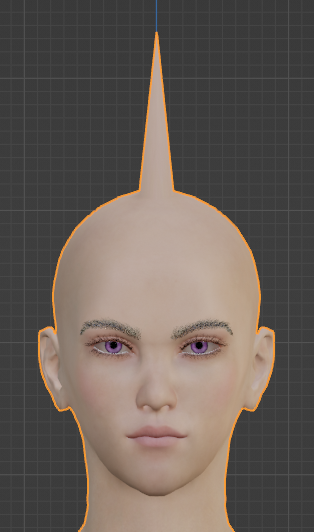
Then, I loaded it with the Morph Loader Pro, and here is what I obtained:
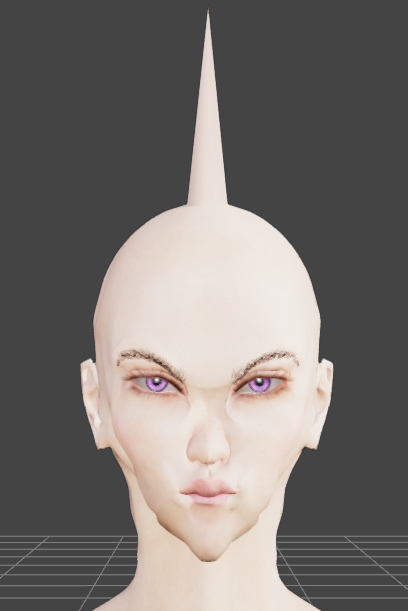
The horn appears, but the rest of the head (and body) is also modified.
Then, I opened a new DS file and loaded the DD Keita character, without to apply any morph, and I reimpoted it into Blender with the DTB. I recreated a new horn:
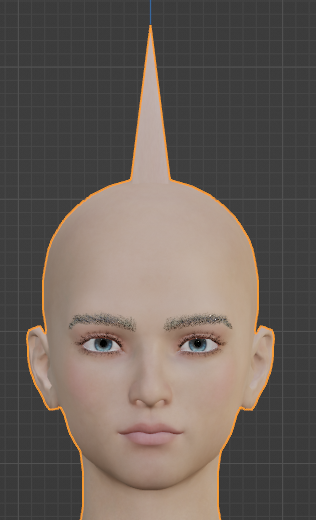
But when I load it as a morph with the Morph Loader Pro, the rest of the head and body is still modified too:
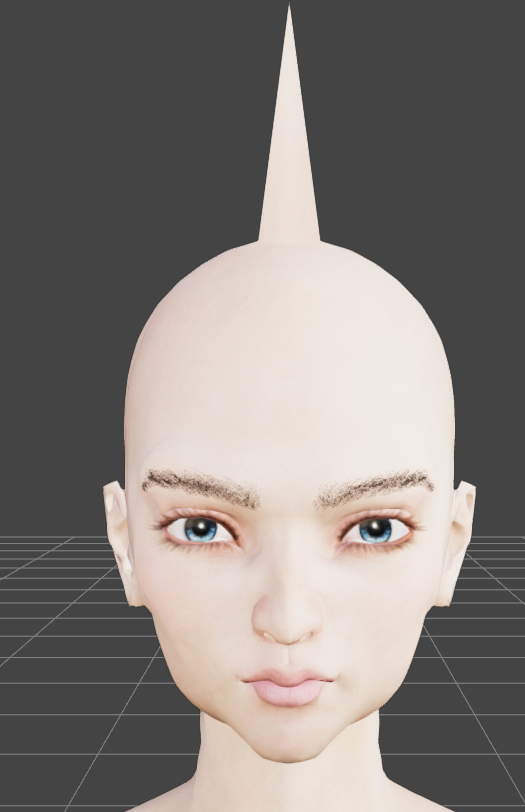
So, it doesn't seem to be due to the other existant morphs already applied... I don't understand at all what is my mistake...
Thank you in advance for your help!
Diffeo export at base level with geograft, import as morphThanks for the answers.
I decided to work without the geograft, but ran into the next problem.
I exported the figure in A-pose at base level, imported it with easy import and imported a Daz animation by using import action.
Did some cloth simulation in Blender and exported the figure as an obj sequence.
When I import an obj as a morph on the Daz Figure at the right keyframe it looks ok.
As it's an animation I decided to convert the Daz Figure to a prop to use the obj animation importer.
Which is working, but some parts of the prop are slightly different posed compared to the figure. For example the arms are bend a little bit more on the prop, compared to the figure.
I know that's a very unusual workflow, but I know it works.
Any idea what could cause this difference?problem with creating new morphThank you very much for yuour answers!
I tried these settings and the size change disappeared:
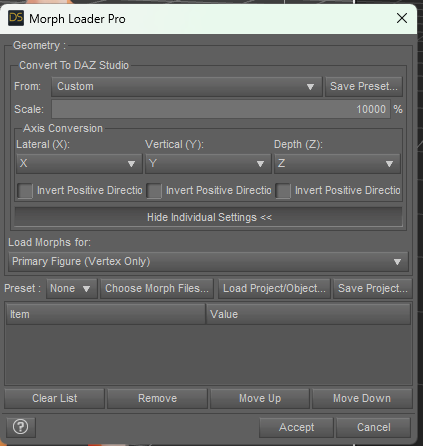
However I didn't obtain what I wanted. In Blender, I modified only the head, not the body, but afer importing the morph into DS, both the head and the body are modified. The head is not how I modelled it in Blender at all.
Here are screenshot of what I created in Blender:
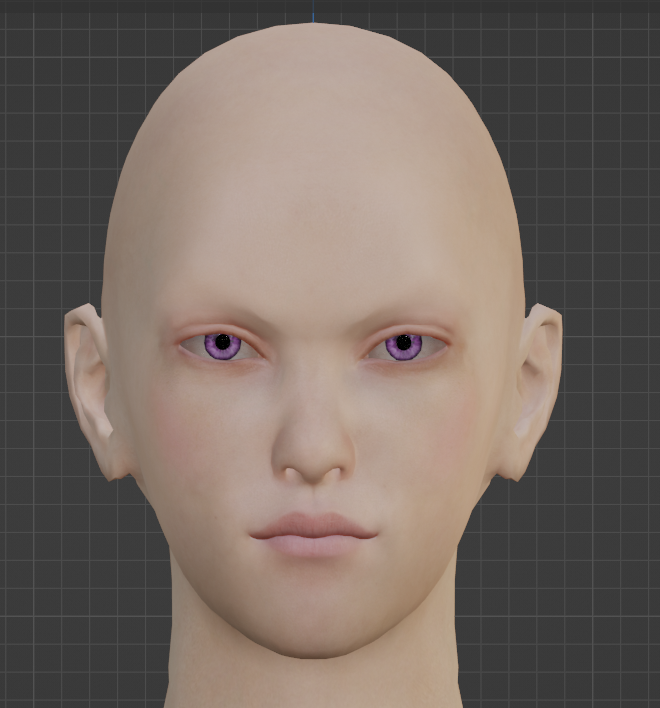
Here is the obj file I reimported into Blender to see how it looks:
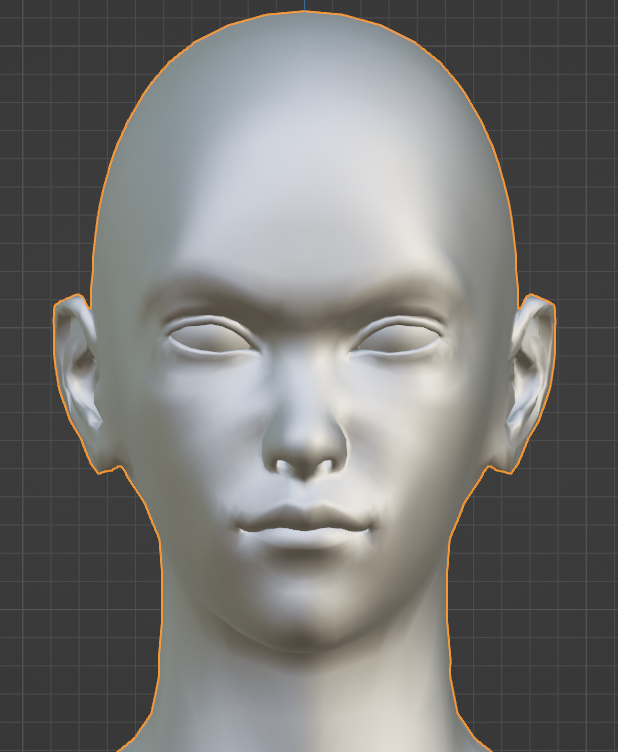
Here is what I obtain when I set the new morph to 100% in DS:
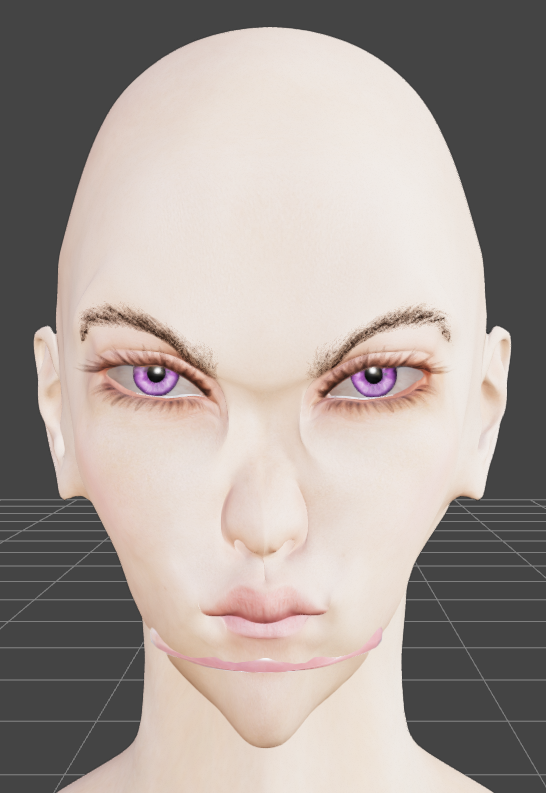
How you can see, it's completly different. I tried different settings for the Morph Loader Pro, but I still obtained this issue. Could you help me to fix it, please?
I forgot to precise I am not using the G8 male base model: I am using the DD Keita (https://www.daz3d.com/dd-keita-for-yuzuru-8). Before to import him into Blender, I applied several existant morphs so as he would be already close to the shape I wanted before to modify it in Blender. Then, I made the modifications I needed in Blender, and I converted the character into an obj file, and I used the Morph Loader Pro without cancelling the existant morphs I used before.
Could it explain why I don't obtain what I created in Blender?
Thank you in advance for your help!
[Released] RSSY Hair Converter from Genesis 8 to Genesis 9 [Commercial]barbult said:
SickleYield said:
If you're getting better result with AutoFit, you might be better off returning the product rather than suffering more frustration. It's not that we don't want to help, it's that I literally don't have the same problem. I didn't do some weird magic trick with Primavera hair for the promo, I'm pretty sure I just converted it with the Regular conformer and used it without the geoshells. It's almost never worth using anything but the Regular conformer with dForce hair because dForce hair seldom has "real" geometry, it's grown as procedural type strands off a cap. There are a few hairs by for e.g. AprilYSH that have dForce and movement morphs, but they are the exception, not the rule. I would swear the manual does say this.
Thank you for responding, SickleYield. Primavera Hair is a Linday polygonal geometry cloth-based dForce hair. It is not strand-based dForce hair. The Swept Wetlook Hair is regular OOT hair, not dForce at all. I am a fan of RiverSoftArt and SickleYield products and own a lot of them. This converter is very convenient and has excellent features, like setting the metadata and creating a product from the conversion. I was hoping that the converted results could be improved, by offering specific examples of things that don't work as expected. But if you don't experience the same issues, I see that my examples don't help.
If you have access to another clean DS on another system or in a VM, you could convert it also in there (to avoid whatever is borking it up). Then you copy the results back to your main DS (where you already converted it so you have nice metadata) and see if that cleans it up.
Trying to convert .obj character from a video game to G8This isn't possible. You could technically construct your own skeleton in Studio but the clothing wouldn't bend correctly, poses would all have to be manual and you'd still have the issue of creating your own materials. Bit of a mess. Bear in mind that game characters won't have any underlying body geometry beneath the clothing either - any excess polygons are culled at the modelling stage.
If I wanted to do this I'd have a look and see if any of the available characters in the store looked reasonably close to the character I wanted to recreate. Doesn't have to be perfect, but same ethnicity, same kind of skin, that sort of thing. Then I'd grab something like https://www.daz3d.com/200-plus-head-and-face-morphs-for-genesis-8-female-s or https://www.daz3d.com/200-plus-head-and-face-morphs-for-genesis-8-male-s , import the .obj and switch between the two recreating the character myself on the G8 base using morphs. (I am assuming this character is vaguely human!)
That way you have all the facilities, hair, poses, clothing and props of G8 available to you. I'd be surprised if you couldn't reconstruct a close match to whatever outfit that character has with items from the store as well. Might involve a bit of creative repurposing but I'm sure it could be done. It won't be exact, no, but that also shifts in your favour as there is very little chance that any company's legal team would cast their beady eye on you.
If you're looking for a one-click solution then, sadly, no. There isn't one. Making your own character would be more challenging but ultimately much, much more useful. Possibly more satisfying too :)
(Edit: Not being familiar with this IP, I had a quick look and there isn't a single character that I could see that couldn't be recreated by morphing a G8F or G8M and getting the clothing, props and hairstyles from the store. If Daz doesn't have it (they almost certainly do), other places will. The only character that would require extra effort is the blue-faced guy, and his pixelly visage could be knocked up in Photoshop or equivalent in half an hour or so and applied to the Face surface.)
3rd party software to animate on DAZ3D?I'm always doubtful about exporting from DAZ Studio but then I know very little about animating in other software. My doubts surround clothing and geografts. Clothing content from DAZ is designed for dForce and, although other software has cloth simulation I'm unable to find examples of clothed characters exported and animated/simulated elsewhere. Most of the examples I've seen have been wearing tight fitting clothing which does not need cloth simulation (quite often I see poke through during the animation though). As for geografts which often come with their associated geometry shells, I have no idea how to approach that. I think that the above-mentioned DDI can import geografts into Blender but I don't know how successfully (including morphs, rigging, etc?).
Blender animation is a pretty difficult learning curve at the outset, then there's learning how to pose, perhaps simulate cloth and hair, adjust materials and lighting. That's a lot of learning and probably why people put up with the vastly inferior DAZ timeline.
Takes forever to start a new sceneIt shouldn't be that way, as Drogo mentioned... Ctrl + N is mostly a process of clearing what was stacked in RAM. I strongly suggest you guys do the simple test as below:
[DS General Release]
1) Clear the log first. Load a G8.1F or G9 character will full materials (Actor / Character Preset). Check the log and search 'Finished asset load (open)' to see the loading time, then check the time on the last line, and sum them up.
2) Close the log. Ctrl + N, then check the log - from 'Stop following' to last line 'Scene Cleared' to calculate the clearing time.
3) Search 'duplicate formula' in the log. If there're multiple searching results... that's the culprit of slow loading time as well as the clearing time to some extent. You have to resolve them first of all... i.e. you have to resolve all issues coming from all Base Figures before resolving 'Scene Issues' if there's any...I pasted my log down below. It's a cleanest loading of a default G8.1F Base Figure (after years of 'fixing', no error, no warning msg...). I have appr. 27.6K G8.xF active character morph files ( *.dsf ) in data folder.
Loading Time (assets + textures): 45 seconds.
Clearing Time: 36 seconds.
( BTW, loading time of G9 is faster than G8, technically, especially with Public Build )2023-10-11 07:58:58.800 [INFO] :: Prepare asset load (open): /People/Genesis 8 Female/Genesis 8.1 Basic Female.duf
2023-10-11 07:58:58.800 [INFO] :: Locking viewport redraw...
2023-10-11 07:58:58.800 [INFO] :: Viewport redraw locked.
2023-10-11 07:58:58.883 [INFO] :: Native format content directories: 3
2023-10-11 07:58:58.883 [INFO] :: Poser format content directories: 2
2023-10-11 07:58:58.883 [INFO] :: Other import format content directories: 0
2023-10-11 07:58:58.883 [INFO] :: Begin asset load (open): /People/Genesis 8 Female/Genesis 8.1 Basic Female.duf
2023-10-11 07:58:58.945 [INFO] :: *** Scene Cleared ***
2023-10-11 07:58:58.945 [INFO] :: Determining missing assets...
2023-10-11 07:58:59.060 [INFO] :: Setting textures...
2023-10-11 07:58:59.150 [INFO] :: Scanning for addons...
2023-10-11 07:59:15.537 [INFO] :: Creating node geometry...
2023-10-11 07:59:15.543 [INFO] :: Creating UV sets...
2023-10-11 07:59:15.548 [INFO] :: Creating materials...
2023-10-11 07:59:15.659 [INFO] :: Resolving legacy figures...
2023-10-11 07:59:15.659 [INFO] :: Preparing modifiers...
2023-10-11 07:59:15.913 [INFO] :: Creating modifiers...
2023-10-11 07:59:17.556 [INFO] :: Creating property aliases...
2023-10-11 07:59:17.607 [INFO] :: Creating sum stage formulas...
2023-10-11 07:59:38.157 [INFO] :: Creating multiply stage formulas...
2023-10-11 07:59:38.218 [INFO] :: Processing scene data...
2023-10-11 07:59:38.218 [INFO] :: Finalizing modifiers...
2023-10-11 07:59:38.219 [INFO] :: Finalizing channels...
2023-10-11 07:59:38.219 [INFO] :: Finalizing materials...
2023-10-11 07:59:38.219 [INFO] :: Sorting property groups...
2023-10-11 07:59:38.225 [INFO] :: Finalizing scene data...
2023-10-11 07:59:38.288 [INFO] :: Begin Loading Character Addons...
2023-10-11 07:59:38.396 [INFO] :: Prepare asset load (merge): /data/DAZ 3D/Genesis 8/Female 8_1 Eyelashes/Tools/Script Loads/Genesis 8.1 Female Eyelashes.duf
2023-10-11 07:59:38.396 [INFO] :: Locking viewport redraw...
2023-10-11 07:59:38.396 [INFO] :: Viewport redraw locked.
2023-10-11 07:59:38.398 [INFO] :: Native format content directories: 3
2023-10-11 07:59:38.398 [INFO] :: Poser format content directories: 2
2023-10-11 07:59:38.399 [INFO] :: Other import format content directories: 0
2023-10-11 07:59:38.399 [INFO] :: Begin asset load (merge): /data/DAZ 3D/Genesis 8/Female 8_1 Eyelashes/Tools/Script Loads/Genesis 8.1 Female Eyelashes.duf
2023-10-11 07:59:38.404 [INFO] :: Determining missing assets...
2023-10-11 07:59:38.425 [INFO] :: Setting textures...
2023-10-11 07:59:38.465 [INFO] :: Scanning for addons...
2023-10-11 07:59:38.492 [INFO] :: Creating node geometry...
2023-10-11 07:59:38.493 [INFO] :: Creating UV sets...
2023-10-11 07:59:38.493 [INFO] :: Creating materials...
2023-10-11 07:59:38.497 [INFO] :: Resolving legacy figures...
2023-10-11 07:59:38.497 [INFO] :: Preparing modifiers...
2023-10-11 07:59:38.498 [INFO] :: Creating modifiers...
2023-10-11 07:59:38.510 [INFO] :: Creating sum stage formulas...
2023-10-11 07:59:38.519 [INFO] :: Creating multiply stage formulas...
2023-10-11 07:59:38.519 [INFO] :: Finalizing modifiers...
2023-10-11 07:59:38.519 [INFO] :: Sorting property groups...
2023-10-11 07:59:38.520 [INFO] :: Setting up follow targets...
2023-10-11 07:59:38.520 [INFO] :: Start following: Genesis 8.1 Female << Genesis 8.1 Female Eyelashes
2023-10-11 07:59:38.520 [INFO] :: Following started: Genesis 8.1 Female << Genesis 8.1 Female Eyelashes
2023-10-11 07:59:38.520 [INFO] :: Connect base morphs: Genesis 8.1 Female << Genesis 8.1 Female Eyelashes
2023-10-11 07:59:38.567 [INFO] :: Applying projection morphs...
2023-10-11 07:59:38.569 [INFO] :: Loaded morph deltas: 0m 0.2s - /data/Daz 3D/Genesis 8/Female 8_1 Eyelashes/Morphs/DAZ 3D/Base/bs_EyelashesCollapsed.dsf
2023-10-11 07:59:38.570 [INFO] :: Creating morph projection map: Genesis 8.1 Female << Genesis 8.1 Female Eyelashes
2023-10-11 07:59:38.591 [INFO] :: Base morphs connected: Genesis 8.1 Female << Genesis 8.1 Female Eyelashes
2023-10-11 07:59:38.591 [INFO] :: Applying projection morphs...
2023-10-11 07:59:38.591 [INFO] :: Creating morph projection map: Genesis 8.1 Female << Genesis 8.1 Female Eyelashes
2023-10-11 07:59:38.621 [INFO] :: Finished asset load (merge): 0m 0.223s - /data/DAZ 3D/Genesis 8/Female 8_1 Eyelashes/Tools/Script Loads/Genesis 8.1 Female Eyelashes.duf
2023-10-11 07:59:38.661 [INFO] :: Unlocking viewport redraw...
2023-10-11 07:59:38.661 [INFO] :: Viewport redraw unlocked.
2023-10-11 07:59:38.665 [INFO] :: Loaded morph deltas: 0m 0.2s - /data/DAZ 3D/Genesis 8/Female/Morphs/DAZ 3D/Base/PHMMouthRealism_HD_div2.dsf
2023-10-11 07:59:38.665 [INFO] :: Processing morph projection queue: Genesis 8.1 Female << Genesis 8.1 Female Eyelashes
2023-10-11 07:59:38.666 [INFO] :: Loaded morph deltas: 0m 0.0s - /data/Daz 3D/Genesis 8/Female 8_1/Morphs/Daz 3D/Head/PHMEyelashesLengthUpper.dsf
2023-10-11 07:59:38.668 [INFO] :: Loaded morph deltas: 0m 0.0s - /data/Daz 3D/Genesis 8/Female 8_1/Morphs/Daz 3D/Head/PHMEyelashesLengthLower.dsf
2023-10-11 07:59:38.670 [INFO] :: Loaded morph deltas: 0m 0.0s - /data/Daz 3D/Genesis 8/Female 8_1/Morphs/Daz 3D/Head/PHMEyelashesCurl.dsf
2023-10-11 07:59:38.671 [INFO] :: Morph projection queue processed: Genesis 8.1 Female << Genesis 8.1 Female Eyelashes
2023-10-11 07:59:38.679 [INFO] :: Loaded morph deltas: 0m 0.1s - /data/Daz 3D/Genesis 8/Female 8_1/Morphs/Daz 3D/Mouth Realism/PHMMouthRealism8_1_HD_div4.dsf
2023-10-11 07:59:38.992 [INFO] :: Prepare asset load (merge): /data/DAZ 3D/Genesis 8/Female 8_1 Tear/Tools/Script Loads/Genesis 8.1 Female Tear.duf
2023-10-11 07:59:38.992 [INFO] :: Locking viewport redraw...
2023-10-11 07:59:38.992 [INFO] :: Viewport redraw locked.
2023-10-11 07:59:38.995 [INFO] :: Native format content directories: 3
2023-10-11 07:59:38.995 [INFO] :: Poser format content directories: 2
2023-10-11 07:59:38.995 [INFO] :: Other import format content directories: 0
2023-10-11 07:59:38.995 [INFO] :: Begin asset load (merge): /data/DAZ 3D/Genesis 8/Female 8_1 Tear/Tools/Script Loads/Genesis 8.1 Female Tear.duf
2023-10-11 07:59:39.001 [INFO] :: Determining missing assets...
2023-10-11 07:59:39.020 [INFO] :: Setting textures...
2023-10-11 07:59:39.060 [INFO] :: Scanning for addons...
2023-10-11 07:59:39.077 [INFO] :: Creating node geometry...
2023-10-11 07:59:39.078 [INFO] :: Creating UV sets...
2023-10-11 07:59:39.078 [INFO] :: Creating materials...
2023-10-11 07:59:39.083 [INFO] :: Resolving legacy figures...
2023-10-11 07:59:39.083 [INFO] :: Preparing modifiers...
2023-10-11 07:59:39.101 [INFO] :: Creating modifiers...
2023-10-11 07:59:39.109 [INFO] :: Creating property aliases...
2023-10-11 07:59:39.109 [INFO] :: Creating sum stage formulas...
2023-10-11 07:59:39.118 [INFO] :: Creating multiply stage formulas...
2023-10-11 07:59:39.118 [INFO] :: Finalizing modifiers...
2023-10-11 07:59:39.118 [INFO] :: Finalizing channels...
2023-10-11 07:59:39.118 [INFO] :: Finalizing materials...
2023-10-11 07:59:39.118 [INFO] :: Sorting property groups...
2023-10-11 07:59:39.119 [INFO] :: Setting up follow targets...
2023-10-11 07:59:39.119 [INFO] :: Start following: Genesis 8.1 Female << Genesis 8.1 Female Tear
2023-10-11 07:59:39.119 [INFO] :: Following started: Genesis 8.1 Female << Genesis 8.1 Female Tear
2023-10-11 07:59:39.119 [INFO] :: Connect base morphs: Genesis 8.1 Female << Genesis 8.1 Female Tear
2023-10-11 07:59:39.148 [INFO] :: Applying projection morphs...
2023-10-11 07:59:39.150 [INFO] :: Loaded morph deltas: 0m 0.1s - /data/Daz 3D/Genesis 8/Female 8_1 Tear/Morphs/DAZ 3D/Base/bs_TearProjectionShape.dsf
2023-10-11 07:59:39.151 [INFO] :: Creating morph projection map: Genesis 8.1 Female << Genesis 8.1 Female Tear
2023-10-11 07:59:39.168 [INFO] :: Base morphs connected: Genesis 8.1 Female << Genesis 8.1 Female Tear
2023-10-11 07:59:39.168 [INFO] :: Applying projection morphs...
2023-10-11 07:59:39.168 [INFO] :: Creating morph projection map: Genesis 8.1 Female << Genesis 8.1 Female Tear
2023-10-11 07:59:39.187 [INFO] :: Finished asset load (merge): 0m 0.191s - /data/DAZ 3D/Genesis 8/Female 8_1 Tear/Tools/Script Loads/Genesis 8.1 Female Tear.duf
2023-10-11 07:59:39.252 [INFO] :: Unlocking viewport redraw...
2023-10-11 07:59:39.252 [INFO] :: Viewport redraw unlocked.
2023-10-11 07:59:39.465 [INFO] :: Prepare asset load (merge): /data/DAZ 3D/Genesis 8/Female 8_1/Tools/Script Loads/G8_1FAddOnMaps.duf
2023-10-11 07:59:39.465 [INFO] :: Locking viewport redraw...
2023-10-11 07:59:39.465 [INFO] :: Viewport redraw locked.
2023-10-11 07:59:39.465 [INFO] :: Processing morph projection queue: Genesis 8.1 Female << Genesis 8.1 Female Tear
2023-10-11 07:59:39.468 [INFO] :: Morph projection queue processed: Genesis 8.1 Female << Genesis 8.1 Female Tear
2023-10-11 07:59:39.470 [INFO] :: Native format content directories: 3
2023-10-11 07:59:39.471 [INFO] :: Poser format content directories: 2
2023-10-11 07:59:39.471 [INFO] :: Other import format content directories: 0
2023-10-11 07:59:39.471 [INFO] :: Begin asset load (merge): /data/DAZ 3D/Genesis 8/Female 8_1/Tools/Script Loads/G8_1FAddOnMaps.duf
2023-10-11 07:59:39.481 [INFO] :: Determining missing assets...
2023-10-11 07:59:39.507 [INFO] :: Setting textures...
2023-10-11 07:59:39.507 [INFO] :: Creating materials...
2023-10-11 07:59:39.512 [INFO] :: Applying animations...
2023-10-11 07:59:39.538 [INFO] :: Setting up follow targets...
2023-10-11 07:59:39.538 [INFO] :: Finished asset load (merge): 0m 0.67s - /data/DAZ 3D/Genesis 8/Female 8_1/Tools/Script Loads/G8_1FAddOnMaps.duf
2023-10-11 07:59:39.541 [INFO] :: Unlocking viewport redraw...
2023-10-11 07:59:39.541 [INFO] :: Viewport redraw unlocked.
2023-10-11 07:59:39.542 [INFO] :: Finished Loading Character Addons
2023-10-11 07:59:39.744 [INFO] :: Finished asset load (open): 0m 40.862s - /People/Genesis 8 Female/Genesis 8.1 Basic Female.duf
2023-10-11 07:59:42.415 [INFO] :: Unlocking viewport redraw...
2023-10-11 07:59:42.416 [INFO] :: Viewport redraw unlocked.
2023-10-11 07:59:43.042 [INFO] :: Loaded image: G8_1FBaseHeadMapD_1002.jpg
2023-10-11 07:59:43.292 [INFO] :: Loaded image: G8FBaseLegsMapD_1003.jpg
2023-10-11 07:59:43.409 [INFO] :: Loaded image: G8_1FBaseEyes01_1007.jpg
2023-10-11 07:59:43.570 [INFO] :: Loaded image: G8FBaseArmsMapD_1004.jpg
2023-10-11 07:59:43.701 [INFO] :: Loaded image: G8_1FBaseMouthMapD_1006.jpg
2023-10-11 07:59:43.861 [INFO] :: Loaded image: G8_1FBaseFaceMapD_1001.jpg
2023-10-11 07:59:44.070 [INFO] :: Loaded image: G8_1FBaseBodyMapD_1003.jpg
2023-10-11 07:59:44.184 [INFO] :: Loaded image: G8_1FEyelashesO.jpg
2023-10-11 07:59:44.238 [INFO] :: Loaded image: G8_1TearOpacity.jpg
2023-10-11 08:01:40.444 [INFO] :: Stop following: Genesis 8.1 Female << Genesis 8.1 Female Eyelashes
2023-10-11 08:01:40.444 [INFO] :: Following stopped: Genesis 8.1 Female << Genesis 8.1 Female Eyelashes
2023-10-11 08:01:40.456 [INFO] :: Stop following: Genesis 8.1 Female << Genesis 8.1 Female Tear
2023-10-11 08:01:40.457 [INFO] :: Following stopped: Genesis 8.1 Female << Genesis 8.1 Female Tear
2023-10-11 08:02:16.459 [INFO] :: *** Scene Cleared ***
PS: I have a pretty big scene with 6 HD characters + werables + complex environments / props, etc., its Loading Time / Clearing time : 8 m 26s / 3m 47s. In general, if it takes more than 300 seconds for me to clear a scene, I'll go for closing / killing DS session and relanch it...problem with creating new morphOBJ doesn't have a fixe scale, so it's a question of what its unit is taken to represent. If the import doesn't match the export from the source then the scale will be wrong.
problem with creating new morphRichard Haseltine said:
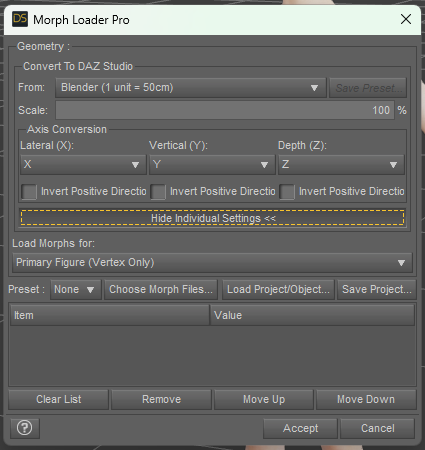
Import the OBJ using different settings until you find the set that works - I don't think the bridge sues 100%, since Blender's default unit is not the cm.
Thank you very much for your answer! So, if I understand well, when the units don't mach, DS considers that the size changed, is it that? I tried with these settings too, but it didn't work:
 Importing Camera animation from blender into? Possible or not?
Is there any way to import animated camera from blender (fbx camera or obj camera) somehow? or is there any way to import camera animation into daz at all? Any format, i have cool camera animation in blender and i want it to use it in daz, cause iray is such good render engine! Thanks for help
problem with creating new morphImport the OBJ using different settings until you find the set that works - I don't think the bridge sues 100%, since Blender's default unit is not the cm.
[Released] RSSY Hair Converter from Genesis 8 to Genesis 9 [Commercial]SickleYield said:
If you're getting better result with AutoFit, you might be better off returning the product rather than suffering more frustration. It's not that we don't want to help, it's that I literally don't have the same problem. I didn't do some weird magic trick with Primavera hair for the promo, I'm pretty sure I just converted it with the Regular conformer and used it without the geoshells. It's almost never worth using anything but the Regular conformer with dForce hair because dForce hair seldom has "real" geometry, it's grown as procedural type strands off a cap. There are a few hairs by for e.g. AprilYSH that have dForce and movement morphs, but they are the exception, not the rule. I would swear the manual does say this.
Thank you for responding, SickleYield. Primavera Hair is a Linday polygonal geometry cloth-based dForce hair. It is not strand-based dForce hair. The Swept Wetlook Hair is regular OOT hair, not dForce at all. I am a fan of RiverSoftArt and SickleYield products and own a lot of them. This converter is very convenient and has excellent features, like setting the metadata and creating a product from the conversion. I was hoping that the converted results could be improved, by offering specific examples of things that don't work as expected. But if you don't experience the same issues, I see that my examples don't help.
problem with creating new morphHello,
I tried to create a new morph for the G8 male's head, by using Blender. I imported the G8 inti Blender by using the DazToBlender Bridge, then I modified the position of several vertices on the head. I didn't modifiy the size of the character. After to obtain what I wanted, I exported the modified character into an obj format, and I imported as a morph into DS by using the Morph Loader Pro.
Since I kept the default settings to import my character from DS to Blender, I kept the default settings to the Morph Loader Pro too:
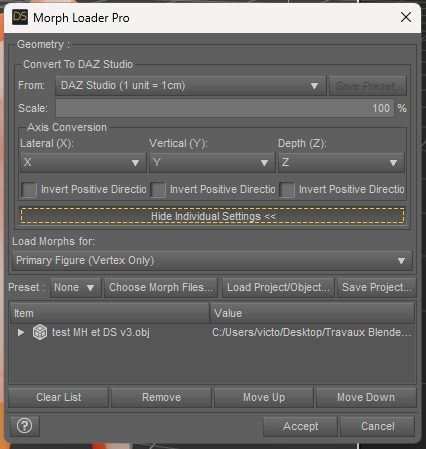
But instead to obtain the modifications I made to the head, when I apply this new morph, I change the size of the character. It's not what I wanted at all! The head modifications I created in Blender don't even appear...
I checked the obj character into Blender, and he has still the same size, so I don't understand at all why the size is modified in DS...It's the first time I try to create a morph, so maybe I misunderstood how it works... Could you help me to fix it, please?
Thank you in advance!
OBJ export from Daz to Blender (and reverse)The normal way of doing it is in the export/import options, where you can change orientation and scale.
Daz Studio uses unit of cm.
Blender uses default unit of meter. But you can change that in the scene tab, and maybe generally in preferences. Even if you change the unit size, you still need to change orientation in export/import (either in blender or in Daz Studio)
Daz 3D is part of

Connect
DAZ Productions, Inc.
7533 S Center View Ct #4664
West Jordan, UT 84084Licensing Agreement | Terms of Service | Privacy Policy | EULA
© 2026 Daz Productions Inc. All Rights Reserved.












