-
Daz Studio 4.14 Pro, General Release!
I installed it using DIM.
First render stopped with error, probably because a Windows update (W10 64 home) downloaded in the background.
Installed the Windows update. Reboot.
Reinstalled Nvidia drivers (I do that after each Windows upgrade). Reboot.
Now my monitor goes black randomly when using Daz. Feature?
What is the driver version?
For Nvidia? Studio 456.71 released 10/20/2020.
I assume it randomly goes black during rendering? Iray or Filament?
It randomly goes black on off before rendering.
Sounds like the scene may be too big for the GPUs memory. What are your render settings (Render Settings pane - Advanced tab)?
Daz Studio 4.14 Pro, General Release!I installed it using DIM.
First render stopped with error, probably because a Windows update (W10 64 home) downloaded in the background.
Installed the Windows update. Reboot.
Reinstalled Nvidia drivers (I do that after each Windows upgrade). Reboot.
Now my monitor goes black randomly when using Daz. Feature?
What is the driver version?
For Nvidia? Studio 456.71 released 10/20/2020.
I assume it randomly goes black during rendering? Iray or Filament?
It randomly goes black on off before rendering.
Daz Studio 4.14 Pro, General Release!In general, how stable is it if you're not doing animation? Right now, I'm mostly interested in trying out Filament.
I use DS for approx 16 hours a day, it is stable. Which version of DS do you have installed now?
AIUTO...CHI CONOSCE L’ITALIANO? PARTE DODICILenio, a te le ombre in Filament sono complete? A me le taglia in base all'angolo della telecamera e se allontano troppo gli oggetti dal centro del mondo le ombre nemmeno vengono proiettate... Ma le posso vedere se guardo glo iggetti da una telecamera vicina al centro del mondo.

Te lo domando per capire se si tratta di una stranezza dovuta alla mia GPU, nonostante supporti appieno OpenGL 4.6 e la VRAM sia praticamente vuota.
Non renderizzo niente dal 5 novembre più o meno, sono stati giorni un po' occupati!
Magari provo la prossima volta che lo apro, com'è che si controllavano le ombre?
Daz Studio 4.14 Pro, General Release!In general, how stable is it if you're not doing animation? Right now, I'm mostly interested in trying out Filament.
Daz Studio 4.14 Pro, General Release!I installed it using DIM.
First render stopped with error, probably because a Windows update (W10 64 home) downloaded in the background.
Installed the Windows update. Reboot.
Reinstalled Nvidia drivers (I do that after each Windows upgrade). Reboot.
Now my monitor goes black randomly when using Daz. Feature?
What is the driver version?
For Nvidia? Studio 456.71 released 10/20/2020.
I assume it randomly goes black during rendering? Iray or Filament?
New DS Filament Render EngineDoes someone know if Fire for Filament https://www.daz3d.com/fire-for-filament ;can be animate?
Daz Studio Pro BETA - version 4.15.0.30! (*UPDATED*)Seems that point lights do not cast shadows no matter if its deep shadow map or raytraced. Is this intended or a known defect?
Will there be lights that allow softer shadows for filament? Right now all lights are hard shadows.
Also the play/pause which I set to spacebar is very finicky and does not always stop the playback of the timeline.
+1 on emissives question.
Animation Machine specs?Honestly, it depends on the look you are going for - since I use anime characters from MMD, OpenGL works just fine. I used to apply the lowest settings for Iray for 3-4 second per frame rendering just to get shadows in the scene (remember to render with the Aux viewport open to Iray preview so it does not always need to recache the scene every frame).
Still rocking my 2014 rig with a GTX 780 Ti, i5-4590K and 16 GB RAM. If that helps to gauge your hardware need.
Now with Filament, it no longer pegs my CPU and GPU.
New DS Filament Render EngineMy 2c worth:
- Filament is great as a scene preview draw style, it has pretty much already replaced my use of Texture Shaded previews. Agreed it does not match Iray in many respects but it is a clear step forward compared to Texture Shaded.
- I don't know if everyone is seeing this, but with just the default HDRI lighting the scene, it is way too bright when lighting a figure. The fix for this is to load Filament Draw Options into the scene and set the ISO Scale much lower, I find around 0.25 about right. Or reduce the Environment Intensity Scale. You can also play with the SSAO settings which provide control over Ambient Occlusion. Having set that up, you can save it as a Scene Subset in a convenient place to reuse quickly and simply. Using the Filament Draw Options settings means that the Iray settings are unaffected.
- I will mostly be using Filament as a preview draw style, but it is great knowing that I can render quickly with it if needed and that is particularly important for animation - I am sure that many people will start doing animation with DS a lot more, simply because you can see what you are doing a whole lot easier and can render something out without waiting hours or even days. When doing animation, the factor that has most impact when considering "realism" is not the render quality but the quality of the movement itself, and it will be a lot easier to fine tune that when you can get a real-time preview.
New DS Filament Render EngineI dunno what the big deal is. If you want to use it, do. If you don't, don't. You still have everything you had before. I'm sure it'll improve over time.
Laurie
What could be the deal here?!
Paying money again for some materials, just to make something look right in a new "engine" may be a point (...not to mention new texture packs for the new hot filament shape, character whatever...)
Losing time (again) because of the lack of references, tutorials and so on (biggest community = biggest possibility to SOLVE problems we run into and if you ask me, Blender is the way to go...)
Losing maybe even ressources to the real problems many different features have, that should be solved (...the bridges are also new but still not there yet and they are a real improvement, when they work)
I mean they could have maybe cleaned up the library, writing a script that tells us if we have all our content, fixing missing texture paths, improving rendertimes, by adding a free feature for "best rendering results", because it is possible to render faster and if this is possible, even the iray viewport can be improved by a lot. They also could have changed the database structure, adding features like "Environment, Cars, Motorcycles, Kitchens, Roofs, Socks... whatever...) The library like it is, is a mess. And it seems materials for clothes, hairs, whatever can be here and there... nobody cares it seems. Setting up a scene could be so much faster, just by reorganizing everything there is. I mean i have nothing against vendors, that have their small link in the product, but why does daz allows to have items all over the place with nearly NO real system to it?!
There is so much that could be improved in the program, that it's even hard to tell where to start...
If i look at Blender: The crowd works for them, creating addons, materials, features and so on... If something is used really often and is helpful, they add it to their standart and push further with nearly every update there was in the past. Evee can now render real time alike photorealism and it does not make to much of a difference to render then again with cycles. There are differences yes, but you can rely on the fact that if it looks good in evee, it will work in cycles even better, just by tweaking some little things for the shaders.The complexity is also a big point here. It's still far from easy to create skins, arrange a scene, setup lights, rendering settings and so on... In blender you learn one time how things work and you can be sure of the fact that will not change in years! Also on the SHB changes broke the shaders of the hair in general. I cannot use the materials - one click - like i set them up a while ago... Things like that is like messing with the user. Do it to often and the user will say: "You know what, i transfer the model, environment and so on and use my shaders of my faforite render engine, because there everything works properly scince day one!"
And animation and posing is not worth the pain... Sorry but that would only be the case if daz would have features like "no wrong bending", free partial animation sets and so on. So to speak: Features that nobody has an would make it easier to do realistic animations, without breaking a sweat. If daz would have realized a few years ago, that animating features like a closing hand, a bending arm, a scratching on the head, would be powerful it would have been a lot more crowded here, since it was hard to transfer the animations into another program. Right now even that is possible. But now it's way to late, since nearly every bigger 3D editing program has them already in a good quality and even realistic ones are totally free to get and easy to transfer.
So in the end, Daz is still slower when it comes to rendering - even if they know how to improve it for sure - but they don't share it for free, same with the shaders, lights, camera settings, same with the poses, same with scripts and so on... just the wrong way to go, when nearly everyone arround them rushes into open source. Everyone should think of content creating more in a manner of "time saving". Someone build a pirate, someone a dog, someone a unicorn, dragon... whatever. That's what someone pays for, not for some textures, some shaders, some scripts... because everything is already out there and most things are out there for free too. You cannot even tell the difference anymore, this much content is out there. But who needs 500 wood textures, shaders... who needs 100 - similar - hands, that close to a fist, winks, smiles?! Right, nobody. But our whole texture, pose, shader or material database is full of those similiar things. What do you think is the reason the library is so extreme big?! Because it's a mess... And everyone claims to have "the wood texture...", creates a folder for themselves ... yeah slightly changed, often not even noticable but still probably from somewhere else.
I mean look at the hairs... just take a look at the textures of the hairs... do you notice something?! A few blurry lines all over again and again and again... mostly only black and white. Why do we need hundreds of them, if 10 would be enough?! And you wonder why a scene gets too big... i tell you, no wonder if you use 20 different hair textures in 2-4K and could not even tell the real difference, when you would just choose to take one of these blurried line textures on all the hairs... same goes with wood, metal, glas, fabrics of any kind...
Daz would be amazing if they would realize what they are really doing wrong! And would become faster on it's own in the process...Good points, but fixing all this would probably require that they start all over from scratch, plus reduce their income so much that they can't afford it. So it's sort of a catch 22 I think.
Mhmmm, i would not say that. There are so many ways to go. I mean really, look at the shop at this moment, look back a few months/years. Was'nt much of a difference. At some Point Blender also realized that it would be a good thing to start from scratch, adding their knowledge together to a better thing. Did Blender die?! Hell no, they are on the best path to become industry standart for many productions.
And if you think about it, blender is by far more complex than Daz Studio. What is complex at Daz are the item database and neat models. Like i said, a few years back, a right choosing to get more into animation, making it free for all... the database would have explodet on it's own! That's the truth, because most of the people see that sharing brings them further than "protecting" some images, shapes... whatever. With animation it would be the same. One animates from a closing hand a fist, another one a fist with a index finger that beckons, another one would make the "fuuuuu (you know...)". I mean look what is happening out there. Blender releases nearly with every of their new videos the production process and the assets with it, also the models, textures and it has so much content, you don't even know where to start. And yeah, the databases of many different - real time and toon like - creators are growing INSIDE blender itself. Just add their plugin or search the plugins for the already added ones over the blender add ons, ans start creating scenes, while modeling, searching databases, downloading and have fun!
That's where the industry will go in the end. Same will happen with animation, because it's happening with shaders, models, textures and so on at the same time right now.Also references, tutorials... everything there is top notch now, pushed from the community, from ordinary guys, that started playing with the program, learning to program, learning to model, texturing, exploring, learning and sharing it again. Why do you think UE jumped the train with Quixel Mixer?! Because people are the source, not one company. Epics library grows also, but not as fast as blender i'd say.
And you are happy about a new first look at a "preview" feature, that renders fast. Man, this already exists... That's just sad, but i think it is because right now you have to search for those "features" blender already has includet. Some vendors or companies dit not realize yet that everything they make will be in the end in a by far bigger database, with millions of items, sharing textures, shaders and everything else to make it by far the most powerful thing there is/will be.No, i'm on topic! I share my thoughts of Daz and the new feature! I think this is important and i also think that it should be discussed. I mean we talk about a future a program can still have! The question is will they wake up and stop create features that are just half cooked...
FilamentPlease post comments in the main threaad whish is monitored
https://www.daz3d.com/forums/discussion/442982/new-ds-filament-render-engine#latestAIUTO...CHI CONOSCE L’ITALIANO? PARTE DODICIImago, ma per usare Filament, devo inserire i nodi di rendering nella scena, ho visto di sfuggita il tutorial, ma non l'ho ancora provato.
Un altra cosa, ho trovato questo sito che vende arte virtuale (sic), e c'è questo signore che vende questo video:
Maxstealth's Collection | Rare Digital Art | MakersPlace
Guaradatelo e ditemi se non riconoscete qualcosa.
How to stop using Filament!!Those are not Filament settings, they're used by Iray too. They were in the render settings tab before.
Novica & Forum Members Tips & Product Reviews Pt 13Also! I made a tutorial on this page on how a currently assemble and light environments in FIlament in case you missed it -
https://www.daz3d.com/forums/discussion/442982/new-ds-filament-render-engine/p5
You don't need any products, just whatever environment you're using.
Novica & Forum Members Tips & Product Reviews Pt 13@kindredarts Would you like to discuss your experience with Filament? Answer a few questions if folks have them? (He's made some of the products.)
I'm on a good sleep schedule so I'm gonna to head out, did get internet back right at 10pm. (As promised.) Watching Tampa getting 3 feet of floodwaters so far, they are at high tide. Oooh, water rescues starting up now. Stay safe Floridians! My sister is in Jacksonville and she'll get 40mph gusts, but thank goodness not a hurricane coming in.
Hey guys - yes, i can stick around and answer questions if you need answers. I made the tutorial video, but i made it with an older private build we were testing, so some of the names/directories might be a bit different. Just let me know if you're stuck.
I know there's mixed feelings about it in some areas of the forum, but i really like it. I do a lot of daz coaching and training, especially with budding new PA's. A lot of the people i speak to are in Ukraine, Belarus, Croatia and lot of developing countries. Getting a hold of high end Nvidia cards in these countries, especially if you're a young student, is incredibly difficult. I did a lot of voluntary work and promotion with Filament because i believe it will lower the bar of entry for a lot of people. I hope people will embrace the engine because more engagement with it, will mean more development in the future. We're not tied down with filament like with are with 3rd party engines like iray/3dl. Don't get me wrong, i love iray, but there's certainly space for this.
Another complaint i'm hearing is that it just doesn't look as good as iray, which is really disheartening. I understand the criticism, but we're artists. You shouldn't need a high end DSLR to take a nice picture, and you shouldn't need a resource-intensive renderer to make a nice render. I made these before Filament even worked properly -
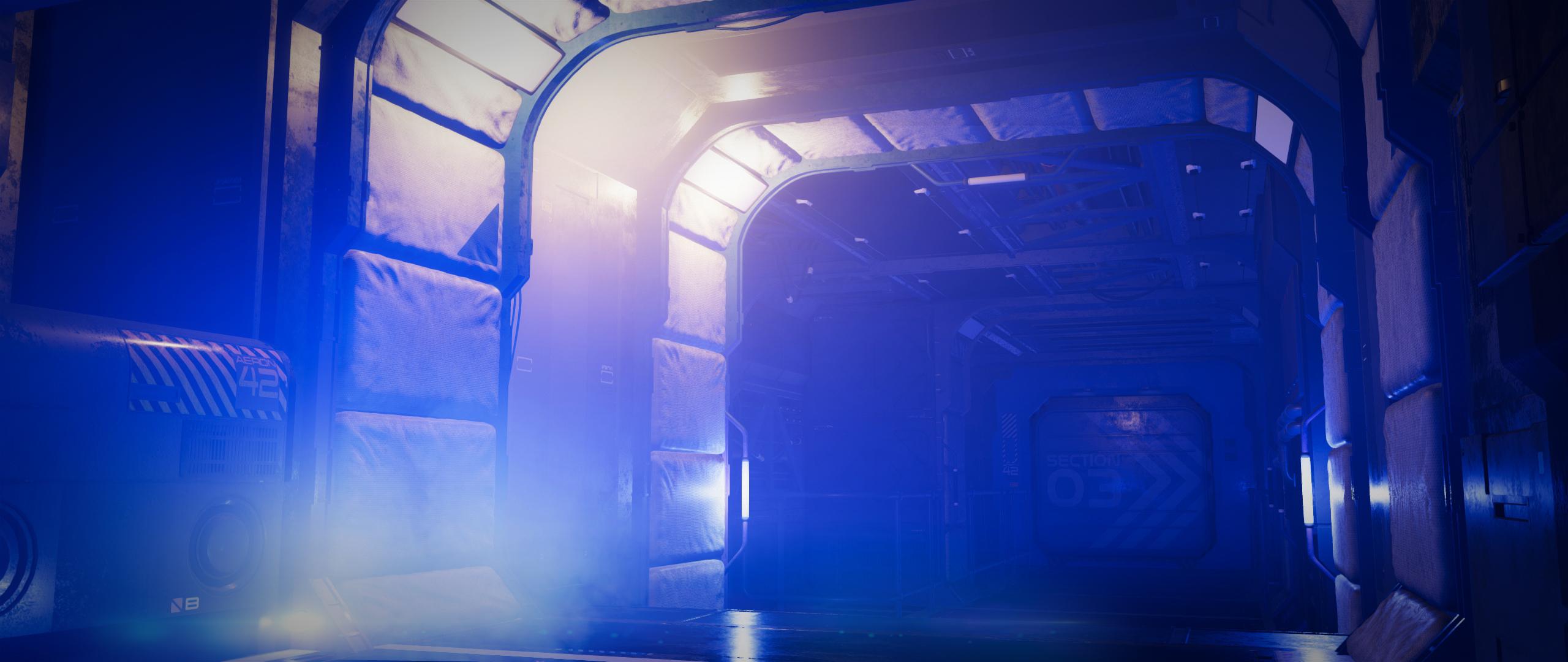
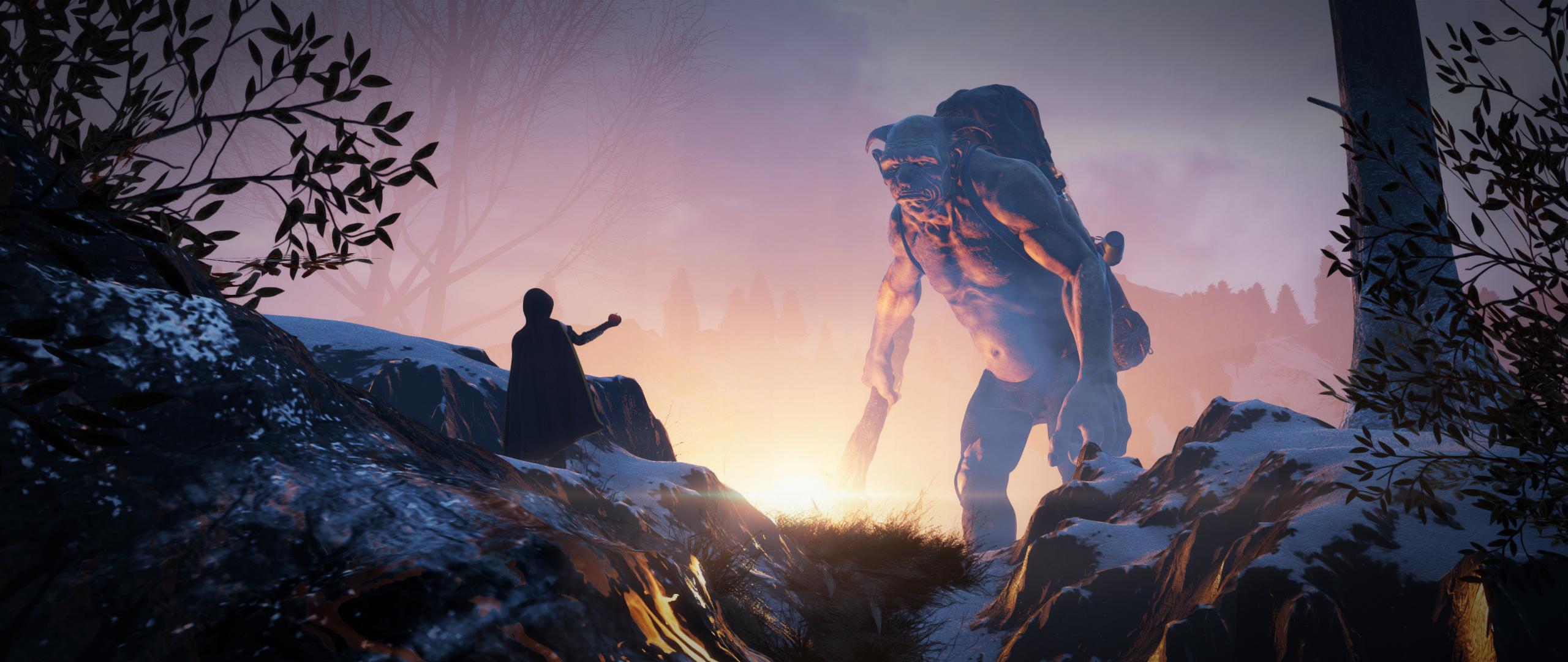

It's obviously not avengers level CG, but you could probably compare this kind of rendering to a lot of mainline iray content on the gallery. The reason i supported this so heavily, is that even if you're rocking a ten year old laptop that only has one fan rolling at full blast, you can make art. You don't need to know how to rig, how to model, how to program or even how to sim. There's mad amounts of free content out there, just dust off your old PC in the corner and make something. Filament will help you do that.
I hope that explains why i supported this move so much. There's a lot of people out there who just aren't fortunate enough to be able to adopt this as a hobby, and my hope is that we are able to reach them. This won't affect any of the higher end goodies.
You asked what i think of it currently - It obviously requires some tlc over the coming months. After speaking with Daz and the team responsible for the port, i'm confident that we will see more functionality. There's still bits missing, like emissive surfaces and SSS etc, they are there, they just haven't made it into the current iteration i believe. I will keep voicing the need for this functionality until it's integrated. Also, the HDRI's are still maxing out at 4k i believe, they are aware of this, its certainly on the list.
Hopefully, my little rant made sense, it's been a loooong couple of months i've spent with this, i'm going to have to hibernate over the Christmas period.
Anyway, If anyone needs help, let me know...
KA
How to stop using Filament!!I tried filament and it was fine, but now I can' render in IRay. Every time I try, even from a fresh canvas Daz adds 'Tonemapper Options' and 'Environment Options' to my scene tab and the endered image is black. My Render engine is set to IRay. WTF?!
Filament seam issueThere is a main thread here for filament. It is somewhat monitored, and many questions have already been answered, so please post there
New DS Filament Render EngineI dunno what the big deal is. If you want to use it, do. If you don't, don't. You still have everything you had before. I'm sure it'll improve over time.
Laurie
What could be the deal here?!
Paying money again for some materials, just to make something look right in a new "engine" may be a point (...not to mention new texture packs for the new hot filament shape, character whatever...)
Losing time (again) because of the lack of references, tutorials and so on (biggest community = biggest possibility to SOLVE problems we run into and if you ask me, Blender is the way to go...)
Losing maybe even ressources to the real problems many different features have, that should be solved (...the bridges are also new but still not there yet and they are a real improvement, when they work)
I mean they could have maybe cleaned up the library, writing a script that tells us if we have all our content, fixing missing texture paths, improving rendertimes, by adding a free feature for "best rendering results", because it is possible to render faster and if this is possible, even the iray viewport can be improved by a lot. They also could have changed the database structure, adding features like "Environment, Cars, Motorcycles, Kitchens, Roofs, Socks... whatever...) The library like it is, is a mess. And it seems materials for clothes, hairs, whatever can be here and there... nobody cares it seems. Setting up a scene could be so much faster, just by reorganizing everything there is. I mean i have nothing against vendors, that have their small link in the product, but why does daz allows to have items all over the place with nearly NO real system to it?!
There is so much that could be improved in the program, that it's even hard to tell where to start...
If i look at Blender: The crowd works for them, creating addons, materials, features and so on... If something is used really often and is helpful, they add it to their standart and push further with nearly every update there was in the past. Evee can now render real time alike photorealism and it does not make to much of a difference to render then again with cycles. There are differences yes, but you can rely on the fact that if it looks good in evee, it will work in cycles even better, just by tweaking some little things for the shaders.The complexity is also a big point here. It's still far from easy to create skins, arrange a scene, setup lights, rendering settings and so on... In blender you learn one time how things work and you can be sure of the fact that will not change in years! Also on the SHB changes broke the shaders of the hair in general. I cannot use the materials - one click - like i set them up a while ago... Things like that is like messing with the user. Do it to often and the user will say: "You know what, i transfer the model, environment and so on and use my shaders of my faforite render engine, because there everything works properly scince day one!"
And animation and posing is not worth the pain... Sorry but that would only be the case if daz would have features like "no wrong bending", free partial animation sets and so on. So to speak: Features that nobody has an would make it easier to do realistic animations, without breaking a sweat. If daz would have realized a few years ago, that animating features like a closing hand, a bending arm, a scratching on the head, would be powerful it would have been a lot more crowded here, since it was hard to transfer the animations into another program. Right now even that is possible. But now it's way to late, since nearly every bigger 3D editing program has them already in a good quality and even realistic ones are totally free to get and easy to transfer.
So in the end, Daz is still slower when it comes to rendering - even if they know how to improve it for sure - but they don't share it for free, same with the shaders, lights, camera settings, same with the poses, same with scripts and so on... just the wrong way to go, when nearly everyone arround them rushes into open source. Everyone should think of content creating more in a manner of "time saving". Someone build a pirate, someone a dog, someone a unicorn, dragon... whatever. That's what someone pays for, not for some textures, some shaders, some scripts... because everything is already out there and most things are out there for free too. You cannot even tell the difference anymore, this much content is out there. But who needs 500 wood textures, shaders... who needs 100 - similar - hands, that close to a fist, winks, smiles?! Right, nobody. But our whole texture, pose, shader or material database is full of those similiar things. What do you think is the reason the library is so extreme big?! Because it's a mess... And everyone claims to have "the wood texture...", creates a folder for themselves ... yeah slightly changed, often not even noticable but still probably from somewhere else.
I mean look at the hairs... just take a look at the textures of the hairs... do you notice something?! A few blurry lines all over again and again and again... mostly only black and white. Why do we need hundreds of them, if 10 would be enough?! And you wonder why a scene gets too big... i tell you, no wonder if you use 20 different hair textures in 2-4K and could not even tell the real difference, when you would just choose to take one of these blurried line textures on all the hairs... same goes with wood, metal, glas, fabrics of any kind...
Daz would be amazing if they would realize what they are really doing wrong! And would become faster on it's own in the process...
Valid points here, gniiial.
Not really on topic here but I would add that I just wish 3D apps, in general, had a more friendly approach to rendering.
3D is a hard enough discipline and having to render things 'outside' of the box and then have that outside box play with a different set of rules from the main 3D app is extremely frustrating.
For instance... A while ago I was trying to learn C4D. But then I discovered that in order to have those beautiful renders, that I appreciated and saw in the best portfolios, I had to use Octane (or another 3rd party engine).
That is unfortunate because Octane comes with its own set of 'rules' and learning curve. Not to mention the economic aspect...
In my opinion things should, generally, become more intuitive with time. Not less.
A 3D app should be selfsufficient. Think Photoshop or Gimp.
Ideally you would model (or setup a scene, like in Daz), light it and render.
End of 3D rant.New DS Filament Render EngineI've skimmed through the documentation I can find, but at the risk of asking a daft question - how do you get DS to render using Filament? I see no options in the engine dropdown menu. I tried setting it to 'Viewport' and it renders litrerally instantly, but looks very 'toonish' and hairs are sort of transparent. Am I missing something? Or are Iray materials not necessarily going to work with Filament?
Daz 3D is part of

Connect
DAZ Productions, Inc.
7533 S Center View Ct #4664
West Jordan, UT 84084Licensing Agreement | Terms of Service | Privacy Policy | EULA
© 2026 Daz Productions Inc. All Rights Reserved.