-
What features would you like to see appear in dazstudio 5?
*sigh* I keep finding lovely freebies in .3ds format. Being able to import those would be so helpful. The others probably would too.
You can convert .3ds files online to .obj. and use them in DS. Or if you have Poser installed you can save them as a prop and import into DS.
As for a new DS feature I'd like to see.... a morph brush just like the Poser one.
Number one on my list. A morph brush. Would go soooooo far in helping to smooth, fit, do quick morphs.
Laurie
I think d-Formers was supposed to be that but it's too fiddly. I agree. Some basic modeling options from within DAZ Studio like a push, pull and smoothing brush option with a panel for controlling what's happening would be very very helpful. I don't always like to fire up ZBrush!
Sydney 8HD morphs modify a base figure. Weird results with a different base is not at all unusual.
And yet, I'm forever using HD morphs (of varying strengths) on different characters other than the one intended and they look fine.
Laurie
Morphs move the (virtual, for an HD morph) vertices in a straight line, normals chnage the facing of a surface for lighting purposes. If they are designed for a shape markedly different from the base then using them on a diffrent shape or on the base is likely to produce artefacts. I don't know if it would be possible to separate the head and body HD morphs, perhaps with a fall-off at the neck so they could apply together correctly, but that may well be the only possible approach.
Sydney 8Hello All,
I am just poking my head in here as well and I too am very interested in buying Sydney as I like her overall look, but then I was reading this thread about the breast issues. Now am I correct in saying that this issue is only with the HD overlay? Otherwise is Sydney fine without using that overlay?
As it is, what I don't like is that the HD overlay is something you have to pay extra for. As it is, most of these figures Daz releases just seem WAY too expensive. Initially it is OK, but even with the release break Syndey on her own is about $22.
Even though I am fairly new to Daz, I realized quickly that I was better off just buying morph packages and do the work myself and make my own characters...which was the intention anyway. However, the morph packages I have don't have many morphs to age the body and I wanted to create an older, but still pretty woman. So my first attempts at this is pretty much a failure. In fact I am even too embarrassed to post my first attempt! I know with the Skin Builder package, that will take care of most of the skin / surface aging issues. But things like wrinkles and how the face is shaped when it is aged, then I need the morphs for that. So in a nutshell, buying an older character will get the basics and then I can fine tune with the morphs. Even though Sydney is very detailed, aged well and still looks attractive, I do agree in regards to the Orange Oompa Loompa spray tan look. In terms of Daz's creations, I would say that I like the Alexandra 8 package best. In fact I do like the Pro Bundle for Alexandra better than that the one for Sydney. But even with my Platinum Discount the pro bundle is $94!! So I am going to have to wait for a sale on her.
The only downside with Alexandra is that she doesn't seem to be old enough...like if I want to do an older 'witch' look or something like that. With Sydney, I am sure I can 'dial in' as much of the aged look I want and then go back to my morphs and adjust as necessary.
I do admit if someone did create an 'aged' add on for Zelara, I would go for that myself. Her skin is perfect! I can see a few wrinkles here and there, some nice crows feet around the eyes and of course the laugh lines around the mouth. She would be an awesome looking older woman.
In the meantime I found this package:
https://www.daz3d.com/ej-daisy-and-malmorda-for-genesis-8-female
The discount with PC this came to $13.17. Almost $10 cheaper than Sydney and you get TWO older ladies. I read the description and this package comes with four different skin tones, going from pale to spray tan. You need the female morph package for this to work with the body. I am going to say that after buying this, the looks of these ladies are NOT as stellar as the pictures show. I was hoping that 'Daisy', the heavier set woman with her more pleasant face that I could work with her to make her a bit more attractive. So that is a work still in progress. The other woman I am not sure if I could make her pretty, however, her face structure is excellent for an evil witch or scorceress.
So I am just bringing that up in the event others are looking for an alternative.
I would still buy Sydney as well if I saw what others did with her, but I mainly would like to know what she would look like without the HD package as I am NOT spending $22 for the model and then ANOTHER $17 for the HD overlay, and from what I understand from reading this thread, that it has issues on top of it.
Hi jukingeo,
There are two issues with Sydney. One, the HD morphs which if I understand correctly, leaves a crease in the lower chest area of a figure when not combined with the Sydney base shape (messy). The second issue is the breast deformation on Sydney. It is entirely possible that daz may argue that this is not an issue at all and never fix it. So you will have to morph out the issue which is what ive been attempting. If you want to make your own older characters you should try Aging Morphs for Genesis 8 Female(s), https://www.daz3d.com/aging-morphs-for-genesis-8-female-s . If your looking for a pre made character, one of my favorites is https://www.daz3d.com/grandmother-hd-for-genesis-8-female-and-edie-8 . Also, theres Mabel 8, https://www.daz3d.com/mabel-8 .
Remember, Daz has an excellent return policy. 30 days, return for any reason. Just make sure that you specify how you want that refund, the daz default is store credit.
Sydney 8The wrinkles look alright, but the skin...how can this be considered "realistic"?
Becasue it apparently IS a normal skin color in Salt Lake CIty, Utah, where DAZ is based. Seriously. Utah is the spray tan capital of the U.S. by a crazy wide margin: https://www.artesiantan.com/blog/in-which-states-is-spray-tanning-the-most-popular/
For extra fun, Googlemap Salt Lake and do a search for Spray tan. Ta da! The whole city lights up like a Xmas tree.
That is just disgusting. But Daz has been around for over 20 years and it is only now with G8 that we are getting these hyper orange characters. Nearly every render posted by users in this thread is a MASSIVE improvement over the default Sydney and the promo renders. Something is wrong with that. This is something that needs to be addressed ASAP. Attention Daz Studio, you are losing out on potential sales with these bad promos. I might have bought Sydney with renders in this thread. But if somebody is judging purely on the promo renders, well I know I wouldn't buy such a character, because I didn't. Having seen some of the promos I might change my mind, but you guys seriously need to change how you do things.I don't care if Utah is the spray tan capital of the world, that look is not normal anywhere else. I can travel hundreds of miles daily and it is difficult for me to recall seeing many people like this. And I go from rural valleys and mountains to highly metro areas with millions of people. I have seen some people who do the tanning beds too much, and some spray tans too, but they just looked dark, not like a freakin' oompa loompa.Human skin is not 90% translucent like Daz sets it to. You can get some light through ear lobes and the webbing between for fingers and maybe a little on the nose, but you don't normally see light passing through other parts so easily without it being extremely bright light. But if you place one of these G8 Daz Original Orange characters in front of any light, they will allow that light to pass through every part of their body as if they are made of Jello. Only the head will not glow because of the extra geometry and hair around it. Plus this leaves a sharp seam where the head meets the neckline.So this goes beyond bad spray tan looks.Additionally, it is a real shame that customers have absolutely no way of altering a HD morph to fix the breast crease issue. While we can alter the textures and settings to fix the orange, there is no way to change HD morphs. You can't just jump into Hexagon and make a change, even for personal use. Not cool. At least with normal maps its an easy to fix. But for anybody who perhaps wants to alter Sydney's breast shape, they may run into issues with that change not working well with the HD morph.Anyway, Zelara can be pretty mature looking, perhaps add an aging morph to her and you can get something akin to Sydney. I may try that later.Hello All,
I am just poking my head in here as well and I too am very interested in buying Sydney as I like her overall look, but then I was reading this thread about the breast issues. Now am I correct in saying that this issue is only with the HD overlay? Otherwise is Sydney fine without using that overlay?
As it is, what I don't like is that the HD overlay is something you have to pay extra for. As it is, most of these figures Daz releases just seem WAY too expensive. Initially it is OK, but even with the release break Syndey on her own is about $22.
Even though I am fairly new to Daz, I realized quickly that I was better off just buying morph packages and do the work myself and make my own characters...which was the intention anyway. However, the morph packages I have don't have many morphs to age the body and I wanted to create an older, but still pretty woman. So my first attempts at this is pretty much a failure. In fact I am even too embarrassed to post my first attempt! I know with the Skin Builder package, that will take care of most of the skin / surface aging issues. But things like wrinkles and how the face is shaped when it is aged, then I need the morphs for that. So in a nutshell, buying an older character will get the basics and then I can fine tune with the morphs. Even though Sydney is very detailed, aged well and still looks attractive, I do agree in regards to the Orange Oompa Loompa spray tan look. In terms of Daz's creations, I would say that I like the Alexandra 8 package best. In fact I do like the Pro Bundle for Alexandra better than that the one for Sydney. But even with my Platinum Discount the pro bundle is $94!! So I am going to have to wait for a sale on her.
The only downside with Alexandra is that she doesn't seem to be old enough...like if I want to do an older 'witch' look or something like that. With Sydney, I am sure I can 'dial in' as much of the aged look I want and then go back to my morphs and adjust as necessary.
I do admit if someone did create an 'aged' add on for Zelara, I would go for that myself. Her skin is perfect! I can see a few wrinkles here and there, some nice crows feet around the eyes and of course the laugh lines around the mouth. She would be an awesome looking older woman.
In the meantime I found this package:
https://www.daz3d.com/ej-daisy-and-malmorda-for-genesis-8-female
The discount with PC this came to $13.17. Almost $10 cheaper than Sydney and you get TWO older ladies. I read the description and this package comes with four different skin tones, going from pale to spray tan. You need the female morph package for this to work with the body. I am going to say that after buying this, the looks of these ladies are NOT as stellar as the pictures show. I was hoping that 'Daisy', the heavier set woman with her more pleasant face that I could work with her to make her a bit more attractive. So that is a work still in progress. The other woman I am not sure if I could make her pretty, however, her face structure is excellent for an evil witch or scorceress.
So I am just bringing that up in the event others are looking for an alternative.
I would still buy Sydney as well if I saw what others did with her, but I mainly would like to know what she would look like without the HD package as I am NOT spending $22 for the model and then ANOTHER $17 for the HD overlay, and from what I understand from reading this thread, that it has issues on top of it.
Measure MetricsMoved to Daz Studio Discussion since it's a question about using a script, rather than writing scripts.
In order to change a measurement you need to use the other tab to tell the script which property to adjust - given the number of different morph sets out there it doesn't come with every one predefined. You pick the node (usually the figure for a morph, but you might need to select a bone to use scale for example) and then the proeprty on the node; once that is done you should be able to check the measure in the main tab and adjust its value.
Sydney 8
That is just disgusting. But Daz has been around for over 20 years and it is only now with G8 that we are getting these hyper orange characters. Nearly every render posted by users in this thread is a MASSIVE improvement over the default Sydney and the promo renders. Something is wrong with that. This is something that needs to be addressed ASAP. Attention Daz Studio, you are losing out on potential sales with these bad promos. I might have bought Sydney with renders in this thread. But if somebody is judging purely on the promo renders, well I know I wouldn't buy such a character, because I didn't. Having seen some of the promos I might change my mind, but you guys seriously need to change how you do things. I don't care if Utah is the spray tan capital of the world, that look is not normal anywhere else. I can travel hundreds of miles daily and it is difficult for me to recall seeing many people like this. And I go from rural valleys and mountains to highly metro areas with millions of people. I have seen some people who do the tanning beds too much, and some spray tans too, but they just looked dark, not like a freakin' oompa loompa. Human skin is not 90% translucent like Daz sets it to. You can get some light through ear lobes and the webbing between for fingers and maybe a little on the nose, but you don't normally see light passing through other parts so easily without it being extremely bright light. But if you place one of these G8 Daz Original Orange characters in front of any light, they will allow that light to pass through every part of their body as if they are made of Jello. Only the head will not glow because of the extra geometry and hair around it. Plus this leaves a sharp seam where the head meets the neckline. So this goes beyond bad spray tan looks. Additionally, it is a real shame that customers have absolutely no way of altering a HD morph to fix the breast crease issue. While we can alter the textures and settings to fix the orange, there is no way to change HD morphs. You can't just jump into Hexagon and make a change, even for personal use. Not cool. At least with normal maps its an easy to fix. But for anybody who perhaps wants to alter Sydney's breast shape, they may run into issues with that change not working well with the HD morph. Anyway, Zelara can be pretty mature looking, perhaps add an aging morph to her and you can get something akin to Sydney. I may try that later.The wrinkles look alright, but the skin...how can this be considered "realistic"?
Becasue it apparently IS a normal skin color in Salt Lake CIty, Utah, where DAZ is based. Seriously. Utah is the spray tan capital of the U.S. by a crazy wide margin: https://www.artesiantan.com/blog/in-which-states-is-spray-tanning-the-most-popular/
For extra fun, Googlemap Salt Lake and do a search for Spray tan. Ta da! The whole city lights up like a Xmas tree.
3DXChange and DAZ rigging confusionWendy,
Yeah, I have tried the Zaz script but I have to use the G1 BVH I created in 3DXchange applied to G2 to transfer to G3 with Zaz becauase there is no G1 or V5 to G3. The motion still looks OK on G2. The arms on G3 just won't accpt the transfer correctly though . There are places where the motion calls for placing the hands on the hips and it just twists the arm about half way on G3 after the transfer. Also when motion calls for clapping G3 doesn't bring hands all the way together. Again it seems like the twisting in the arms and shoulders are the problem. I have the same issue with the G2 to G3 converter I bought also, and the feet covert that great with that one either. The think I don't understand though is that the motions look fine in 3DXchange when applide to the DAZ characters. You know of any different converters ?
James 8 for Christian Problem@vwrangler, I'm seeing the same results. Also, it took 17 minutes to load James. For comparison, it took about 45 seconds to load Ry Kian HD.
I'll be updating my trouble ticket with screenshots.
(I had trouble loading James after I'd loaded the base G8M and dialed in the James morphs. I ended up closing DS, reopening and then loading James. I forget to compare heights. I may do that before updating the ticket.)
ETA: I loaded the base and applied James' morph, and then I loaded James. At first glance, spineless James does look shorter, but then I noticed he is also loaded below world center. Hitting Ctrl+D moved him up, (Y Translate: 3.50!) and then both looked to be the same height.
Sydney 8Has anyone put in a ticket? I noticed the flat breast issue too and don't have all the morphs above to fix it. I tried, but they still look less than spectacular. Also, the crease under the breast NEEDS to be fixed. If it were a PA item, they'd be made to fix it. Daz should fix this.
Laurie
The issue with the crease under the breasts only occurs when using the Sydney 8 HD morph without the Sydney 8 base shape. Daz may not consider that something to fix. It works just fine with Sydney. The biggest reason I have for wanting it to work with other body shapes is the problem with the breast shape on the base morph.
I agree the breasts' shape should be fixed. Maybe if all of us file a ticket complaining about how unnatural it is, and how difficult it is to morph into a more pleasing shape, Daz will oblige us with a fix. (But I'm not going to hold my breath.)
Ok. Ill file a ticket tomorrow morning.
Sydney 8Has anyone put in a ticket? I noticed the flat breast issue too and don't have all the morphs above to fix it. I tried, but they still look less than spectacular. Also, the crease under the breast NEEDS to be fixed. If it were a PA item, they'd be made to fix it. Daz should fix this.
Laurie
The issue with the crease under the breasts only occurs when using the Sydney 8 HD morph without the Sydney 8 base shape. Daz may not consider that something to fix. It works just fine with Sydney. The biggest reason I have for wanting it to work with other body shapes is the problem with the breast shape on the base morph.
I agree the breasts' shape should be fixed. Maybe if all of us file a ticket complaining about how unnatural it is, and how difficult it is to morph into a more pleasing shape, Daz will oblige us with a fix. (But I'm not going to hold my breath.)
What features would you like to see appear in dazstudio 5?*sigh* I keep finding lovely freebies in .3ds format. Being able to import those would be so helpful. The others probably would too.
You can convert .3ds files online to .obj. and use them in DS. Or if you have Poser installed you can save them as a prop and import into DS.
As for a new DS feature I'd like to see.... a morph brush just like the Poser one.
Number one on my list. A morph brush. Would go soooooo far in helping to smooth, fit, do quick morphs.
Laurie
Rigidity groups and keeping hard surfaces hard... not working!I read through all of this and I have a question regarding rigidity groups and "fitted" items:
If I bring a prop into Daz Studio, and use the Transfer Utility to convert it to a "fitted" item, does this mean that rigidity groups will not work correctly for it, no matter what I do?
Even if I try Geometry Assignment -> Rigidity Group Editor, and turn off scaling for all axes?
If that's the case, then what's the purpose of Rigidity Groups, as non-fitted props are already rigid?What features would you like to see appear in dazstudio 5?*sigh* I keep finding lovely freebies in .3ds format. Being able to import those would be so helpful. The others probably would too.
You can convert .3ds files online to .obj. and use them in DS. Or if you have Poser installed you can save them as a prop and import into DS.
As for a new DS feature I'd like to see.... a morph brush just like the Poser one.
Faceted / Planar models for drawing reference?Hi all,
I'm wondering if there is a product/add-on/morph set or something that replicates (for male and female figures) the "planar" style of physical artists' reference often used in schools. (Ironically, I think this is how Poser started...)
Kinda like the stuff seen here:
http://www.planesofthehead.com/products.phpThanks!
James 8 for Christian ProblemI went ahead and downloaded him, and he still hasn't been fixed.
I did notice in his readme file list that he's supposed to have a main/controller slider (CTRLJames.duf), and I didn't see it when I either did a search for "James" or looked at the Currently Used section. (Although I didnt check to see if it was hidden; have to try that.) It would be fairly simple to fix if he had that controller -- all you'd need to do would be to slide it back to zero and save the changed morph file. Without it, the question is whether or not any of the other sliders are handled independently, or if they're all controlled by the separate head and body sliders, which I didn't check. (Although, thinking on it, they must be controlled by the separate sliders, because otherwise simply reinstalling the Head and Body Morphs and Starter Essentials would get rid of the problem, and it doesn't.)
I just checked the trouble ticket, and it now says this has been fixed:
Hi Anita,
This has been fixed. Please install the update.
Thank you,
EmmaleeThe update is in DIM and I'm downloading it now.
Noob questions on making a morphJust to be sure I have this right - when you create a morph for an object, a vehicle, wardrobe, anything, you export in base res, right?
And if it doesn't keep exactly the same number of edges, faces, and vertices (though I suppose, if you change one of those, you change all of them, but you know what I mean :) ), otherwise, it's not a "morph" but a geograft you want to use, and that's a whole different sack of cats[sup]1[/sup], right?
1 - SickleYield. (2017, January 01). Geograft/Clothes With Extra Bones In Daz Studio 4.9Sydney 8As many of us like to use the face of one character with the body shape of another, it's important to know about this in advance. I think it would be great if there were a separate morph to dial this out, kind of like the Nose smaller morphs for Ollie and Edie, so the HD morph could be used with other body shapes,
I've gone back to my earlier posts and changed wrinkle to crease, for clarity.
but the HD is made for Sydney... does that mean it will work on any other character correctly? I know there were some HD compnents from other characters that did not work 100% either ... I had asked about this in another thread and was told it should work but not always. I figured that is becasue its not made for other characters really. it would be nice if they all did, but then why would we buy any other? yesah, amybe for diversity, but unless doing closeup stuff, most of the time its not realll pertenent anyway.
The HD is made for Sydney, yes, and will probably work best with Sydney's shape, and especially with her skin. Forehead wrinkles, for example, will correspond with the wrinkles in the skin materials. However, if I use a different body shape for her but keep her skin textures, the HD will help to accentuate the imperfections of the character. But with that crease under the breasts, I'll have to make sure that area is clothed.
I've had pretty good success using an HD morph not specifically for a character. If the hands are going to be prominent in an image, I like to use HD. I'd say the more unique the character, the more likely there will be issues.
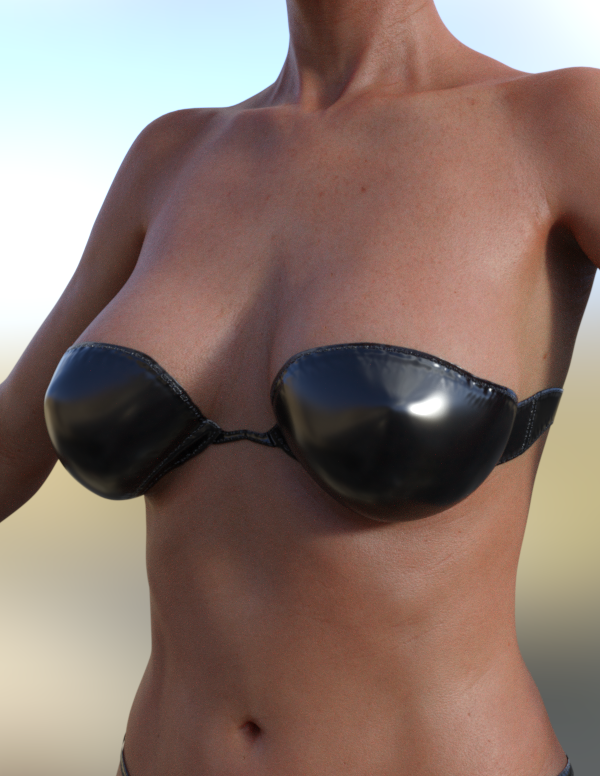
Ah, hmm, thanks for pointing out the issue with the breasts. No chance that looks a bit more normal in render with normal maps and what not? It does look like they are pressed up against something, like you said... I do like her face.No. They render flat, too. I love everything else about her. It's a shame the HD morph has the crease problem around the breast, as well. One solution would be to use Sydney and dial out the body shape and keep the HD morph for the details in the skin. But with the crease under the breasts, that will be limited to situations where the area under the breasts is fully covered. No bikinis! lol
Try this. I dont know if you have the morph packs that I do but ill list them out. This seems to be an alright adjustment to the wonky breasts. See if maybe you can make some better adjustments. Im still not ok with the sculpt but I think this is at least an improvement.
DAZ morphs:
Breasts Small = 20%
Breast Control:
!Breast Under Smoother 4 = 35%
Breast Height Upper = -30%
Breast Sag 1 = 30%
Breast Sag 2 = 100%
Breast Under Height = 20%
Breast Under Weight = 20%
Areola Depth = -50%
Center Gap Width = 20%
Breast Utilities for G8F:
Breast Pointy = 100%
Nipple Move Horizontal = 100%
Natural Breast Morphs for G8F:
Breasts Depth = 10%
Can never have too many morphs... Im sure some of these can be substituted if you dont have the same morph packs.
This combo seems to make a better shape to start anyhow. Id show some renders, but that wont work, nude at least. I think its silly that we cant even post renders to demonstarte a bug, error.
Thanks. I'll give it a try. Anyway, you can do what I did to get an image. Set your Draw Mode for the viewport to Wire Shaded, go to the File Menu and select Save Last Draw, and then Daz Studio will save a copy of the viewport. That can show the shape of the breast without violating the TOS.
Sydney 8Ah, hmm, thanks for pointing out the issue with the breasts. No chance that looks a bit more normal in render with normal maps and what not? It does look like they are pressed up against something, like you said... I do like her face.No. They render flat, too. I love everything else about her. It's a shame the HD morph has the crease problem around the breast, as well. One solution would be to use Sydney and dial out the body shape and keep the HD morph for the details in the skin. But with the crease under the breasts, that will be limited to situations where the area under the breasts is fully covered. No bikinis! lol
Try this. I dont know if you have the morph packs that I do but ill list them out. This seems to be an alright adjustment to the wonky breasts. See if maybe you can make some better adjustments. Im still not ok with the sculpt but I think this is at least an improvement.
DAZ morphs:
Breasts Small = 20%
Breast Control:
!Breast Under Smoother 4 = 35%
Breast Height Upper = -30%
Breast Sag 1 = 30%
Breast Sag 2 = 100%
Breast Under Height = 20%
Breast Under Weight = 20%
Areola Depth = -50%
Center Gap Width = 20%
Breast Utilities for G8F:
Breast Pointy = 100%
Nipple Move Horizontal = 100%
Natural Breast Morphs for G8F:
Breasts Depth = 10%
Can never have too many morphs... Im sure some of these can be substituted if you dont have the same morph packs.
This combo seems to make a better shape to start anyhow. Id show some renders, but that wont work, nude at least. I think its silly that we cant even post renders to demonstarte a bug, error.
 Sydney 8
but the HD is made for Sydney... does that mean it will work on any other character correctly? I know there were some HD compnents from other characters that did not work 100% either ... I had asked about this in another thread and was told it should work but not always. I figured that is becasue its not made for other characters really. it would be nice if they all did, but then why would we buy any other? yesah, amybe for diversity, but unless doing closeup stuff, most of the time its not realll pertenent anyway.
All HD morphs work on the base figure, although the end results may not be to your liking since it was designed to work with the figure morph and textures of the figure it was designed for. I add the Alexandria and Victoria HD morphs all the time to other characters to add more detail.
Sydney 8As many of us like to use the face of one character with the body shape of another, it's important to know about this in advance. I think it would be great if there were a separate morph to dial this out, kind of like the Nose smaller morphs for Ollie and Edie, so the HD morph could be used with other body shapes,
I've gone back to my earlier posts and changed wrinkle to crease, for clarity.
but the HD is made for Sydney... does that mean it will work on any other character correctly? I know there were some HD compnents from other characters that did not work 100% either ... I had asked about this in another thread and was told it should work but not always. I figured that is becasue its not made for other characters really. it would be nice if they all did, but then why would we buy any other? yesah, amybe for diversity, but unless doing closeup stuff, most of the time its not realll pertenent anyway.
Daz 3D is part of

Connect
DAZ Productions, Inc.
7533 S Center View Ct #4664
West Jordan, UT 84084Licensing Agreement | Terms of Service | Privacy Policy | EULA
© 2026 Daz Productions Inc. All Rights Reserved.