-
Licence clarification
That depends on what you mean by content.
The EULA does not permit you to re-disritbute any part of the actual figure which you purchase, either as is or in a derirative, altered or morphed version.
The license permits you to use the figure to make images, or videos.
The Content is provided for User's exclusive use. User does not have the right to provide the Content to others in any form or on any media except as set forth in this Agreement., User may (i) access, use, copy and modify the Content in the creation and presentation of two-dimensional animations and renderings, (ii) incorporate two dimensional images (including two dimensional images that simulate motion of three dimensional objects) derived by User from the Content in User’s other works, and (iii) publish, market, distribute, transfer, sell or sublicense User’s two-dimensional animations, renderings and other works; provided that User may not in any case publish, market, distribute, transfer, sell or sublicense any renderings, animations, software applications, data or any other product from which any Content, or any part thereof, or any substantially similar version of the Content can be separately exported, extracted or de-compiled into any re-distributable form or format.If you need clarification you should submit a help ticket to Daz https://helpdaz.zendesk.com/hc/en-us/requests/new
Genesis 8 UV for Legacy UVs geograft (Done)Hi,
After several transfer I think it was the wrong way because I must transfer David 5 textures to Michael 5 and M5 to Genesis 8.
In fact, Genesis 3 UV for Genesis and Genesis 3 UV for Genesis 2 Male products would make the task easier. I could convert Darius 6 UV, Gianni 6 UV and David 5 UV textures directly to Genesis 3.
Can I get the Genesis 2 Male UV and Genesis UV for these products please ?
Need help finding a morph file and the ZBrush folderHave you saved it as a moprh asset? If not it's just embedded in the scene file, it doesn't have any files of its own. If you do use File>Save As>Support Assets>Morph Asset then the names you enter for Author and product dtermine the sub-folder of the figure's assets folder used - e.g. /Data/Daz 3D/Genesis 8/male/Morphs/Author/Product/Morphname.dsf
Need help finding a morph file and the ZBrush folderAll programs installed and functional as normal. Everything works as it should, I sent the file out to zbrush made my adjustments then goz'd it back to Daz. I fill in the morph name and leave the path defualt as ZBrush. The morph shows in the list and works fine but I can't find the actual ZBrush folder or the morph file. I've been digging around here looking for answers.
Sydney 8The wrinkles look alright, but the skin...how can this be considered "realistic"?
Becasue it apparently IS a normal skin color in Salt Lake CIty, Utah, where DAZ is based. Seriously. Utah is the spray tan capital of the U.S. by a crazy wide margin: https://www.artesiantan.com/blog/in-which-states-is-spray-tanning-the-most-popular/
For extra fun, Googlemap Salt Lake and do a search for Spray tan. Ta da! The whole city lights up like a Xmas tree.
That is just disgusting. But Daz has been around for over 20 years and it is only now with G8 that we are getting these hyper orange characters. Nearly every render posted by users in this thread is a MASSIVE improvement over the default Sydney and the promo renders. Something is wrong with that. This is something that needs to be addressed ASAP. Attention Daz Studio, you are losing out on potential sales with these bad promos. I might have bought Sydney with renders in this thread. But if somebody is judging purely on the promo renders, well I know I wouldn't buy such a character, because I didn't. Having seen some of the promos I might change my mind, but you guys seriously need to change how you do things.I don't care if Utah is the spray tan capital of the world, that look is not normal anywhere else. I can travel hundreds of miles daily and it is difficult for me to recall seeing many people like this. And I go from rural valleys and mountains to highly metro areas with millions of people. I have seen some people who do the tanning beds too much, and some spray tans too, but they just looked dark, not like a freakin' oompa loompa.Human skin is not 90% translucent like Daz sets it to. You can get some light through ear lobes and the webbing between for fingers and maybe a little on the nose, but you don't normally see light passing through other parts so easily without it being extremely bright light. But if you place one of these G8 Daz Original Orange characters in front of any light, they will allow that light to pass through every part of their body as if they are made of Jello. Only the head will not glow because of the extra geometry and hair around it. Plus this leaves a sharp seam where the head meets the neckline.So this goes beyond bad spray tan looks.Additionally, it is a real shame that customers have absolutely no way of altering a HD morph to fix the breast crease issue. While we can alter the textures and settings to fix the orange, there is no way to change HD morphs. You can't just jump into Hexagon and make a change, even for personal use. Not cool. At least with normal maps its an easy to fix. But for anybody who perhaps wants to alter Sydney's breast shape, they may run into issues with that change not working well with the HD morph.Anyway, Zelara can be pretty mature looking, perhaps add an aging morph to her and you can get something akin to Sydney. I may try that later.Hello All,
I am just poking my head in here as well and I too am very interested in buying Sydney as I like her overall look, but then I was reading this thread about the breast issues. Now am I correct in saying that this issue is only with the HD overlay? Otherwise is Sydney fine without using that overlay?
As it is, what I don't like is that the HD overlay is something you have to pay extra for. As it is, most of these figures Daz releases just seem WAY too expensive. Initially it is OK, but even with the release break Syndey on her own is about $22.
Even though I am fairly new to Daz, I realized quickly that I was better off just buying morph packages and do the work myself and make my own characters...which was the intention anyway. However, the morph packages I have don't have many morphs to age the body and I wanted to create an older, but still pretty woman. So my first attempts at this is pretty much a failure. In fact I am even too embarrassed to post my first attempt! I know with the Skin Builder package, that will take care of most of the skin / surface aging issues. But things like wrinkles and how the face is shaped when it is aged, then I need the morphs for that. So in a nutshell, buying an older character will get the basics and then I can fine tune with the morphs. Even though Sydney is very detailed, aged well and still looks attractive, I do agree in regards to the Orange Oompa Loompa spray tan look. In terms of Daz's creations, I would say that I like the Alexandra 8 package best. In fact I do like the Pro Bundle for Alexandra better than that the one for Sydney. But even with my Platinum Discount the pro bundle is $94!! So I am going to have to wait for a sale on her.
The only downside with Alexandra is that she doesn't seem to be old enough...like if I want to do an older 'witch' look or something like that. With Sydney, I am sure I can 'dial in' as much of the aged look I want and then go back to my morphs and adjust as necessary.
I do admit if someone did create an 'aged' add on for Zelara, I would go for that myself. Her skin is perfect! I can see a few wrinkles here and there, some nice crows feet around the eyes and of course the laugh lines around the mouth. She would be an awesome looking older woman.
In the meantime I found this package:
https://www.daz3d.com/ej-daisy-and-malmorda-for-genesis-8-female
The discount with PC this came to $13.17. Almost $10 cheaper than Sydney and you get TWO older ladies. I read the description and this package comes with four different skin tones, going from pale to spray tan. You need the female morph package for this to work with the body. I am going to say that after buying this, the looks of these ladies are NOT as stellar as the pictures show. I was hoping that 'Daisy', the heavier set woman with her more pleasant face that I could work with her to make her a bit more attractive. So that is a work still in progress. The other woman I am not sure if I could make her pretty, however, her face structure is excellent for an evil witch or scorceress.
So I am just bringing that up in the event others are looking for an alternative.
I would still buy Sydney as well if I saw what others did with her, but I mainly would like to know what she would look like without the HD package as I am NOT spending $22 for the model and then ANOTHER $17 for the HD overlay, and from what I understand from reading this thread, that it has issues on top of it.
I did the following character nearly entirely with Zev0's aging morphs (in this case for Genesis 3 Male) and I can vouch for their awesomeness ;). He was pretty thorough, even right down to morphs for knobby fingers...
It does help to have an aging skin to go with the morphs so if you wanted to buy that character set, you could definitely augment them with Zev0's morphs and make your own character :).
Laurie
 Sydney 8
Got her, including the HD add-on. Thinking about returning her immediately. When you dial out the Sydney body the G8F base shows a folding-out wrinkle below her breasts.
I don't believe anyone addressed this definitively yet, so I brought both Sydney and Sydney HD into DS and dialed out just the body morph on each. The wrinkle below the breasts is only there when you remove the body morph, but leave the HD body morph.
I won't return her because of it, but it's a shame the wrinkle is there. I've been known to use a different body on a figure while still using the HD morph. However, with clothing covering the chest, it might not cause an issue. On the other hand, the added detail around the base of her large breasts adds realism to the skin. After half a century, the skin that's pulled by the weight of the mammary glands has it's own set of lines and wrinkles, something I've not seen in a 3D figure before.
I didn't do any rendering as it's well past my bedtime, but I wanted to reassure anyone wondering about this issue, that it isn't a problem with the base morph.
Normal maps can also add such detail; not got the character so cant check.
In this case, I also dialed out the HD morph and the wrinkle went away. However, I didn't render either one, so I can't yet say how the normal maps affect them.
A small section of Olympia 8 Normal map; as you can see, that detail at the base of the breast will cause creasing. As, what appears to be, an uncompressed tiff, it will have lots of detail too.
@nicstt, I think there is a misunderstanding based on the use of the word "wrinkle". Sydney is an older gal and she has lots of wrinkles, which I love. However the issue with the breasts if one tries to use the HD morph with the G8F Base Female is a crease in the mesh. Here is an image I put together in Photoshop from saving viewport draws that should show you exactly what I mean. Normal Maps are off. I have not tried the HD on any other figure/character morph.

As many of us like to use the face of one character with the body shape of another, it's important to know about this in advance. I think it would be great if there were a separate morph to dial this out, kind of like the Nose smaller morphs for Ollie and Edie, so the HD morph could be used with other body shapes,
I've gone back to my earlier posts and changed wrinkle to crease, for clarity.
The creases mainly relate to bust size; it causes the skin to fold, much like it folks at the groin and abdomen when bending over - even with very slim folks.
As an older woman, I have first-hand knowledge of how the skin beneath the breasts creases at various stages of age and breast size. I assure you, my skin has never doubled over on itself into a crease below the breasts. Perhaps I'm the odd-woman out…?
Regardless, I hope we can agree to disagree on this issue…
Sydney 8Has anyone put in a ticket? I noticed the flat breast issue too and don't have all the morphs above to fix it. I tried, but they still look less than spectacular. Also, the crease under the breast NEEDS to be fixed. If it were a PA item, they'd be made to fix it. Daz should fix this.
Laurie
The issue with the crease under the breasts only occurs when using the Sydney 8 HD morph without the Sydney 8 base shape. Daz may not consider that something to fix. It works just fine with Sydney. The biggest reason I have for wanting it to work with other body shapes is the problem with the breast shape on the base morph.
I agree the breasts' shape should be fixed. Maybe if all of us file a ticket complaining about how unnatural it is, and how difficult it is to morph into a more pleasing shape, Daz will oblige us with a fix. (But I'm not going to hold my breath.)
The crease under the breasts is also present on the Melinda add on character. I bought Melinda mainly because I liked the look of the skin texture, I don't have Sydney.
If you position the camera to get one of the breasts in profile and zoom right in on the underside where it meets the torso, the ridge is almost pyramid shaped. I really don't know what it's supposed to represent. It just looks ridiculous.
That only occures if you dont have Sydney. With the Sydney body shape, its not there.
Yes, someone mentioned earlier in the thread that you get the crease if you dial in the Sydney HD morph without the Sydney base shape - for example if you were trying to add Sydney's HD wrinkles to another character's shape.
whatever is causing this distortion of the mesh, is also present in the Melinda character. It obviously shouldn't be present on any of the characters, since it isn't there when you use Sydney HD, so it clearly isn't intentional.
I think it's more a case of the artist compensating for the Sydney shape.around the breasts. Sydney is listed as a required product.because the character was created off of the shape of Sydney. It's no surprise, given the sagging breast look of Sydney, that the shape morph of Melinda without Sydney has issues around the breasts.
HD morphs adds specific detail to their respective figures. In Sydney's case, that includes details to support the look of sagging breasts on a 50-something woman. But to look right on other characters, the breasts need to have the sagging look to begin with. And of the plethora of female body shapes I have in my runtime only one not intended for Sydney looked good with Syd's HD morph. A second one looked okay, but not quite bikini worthy.
Testing out Christian and Sydney

That looks pretty amazing. Great job!
@jukingeo, Welcome to the wild and crazy world of Daz 3D.
If you're not too picky about the shape of her breasts, Sydney looks amazing. As an older woman, and a bleeping perfectionist, they bother the h3ll out of me! lol Sydney also looks fine with her HD morph. It's created specifically for her and augments all her lovely wrinkles and other imperfections. The issue with the HD morph only comes into play when used without the Sydney shape.
I second AnotherUserName's recommendation of Zev0's aging morphs to attain your goal of an attractive older woman. They will work on any Gensis 8 female, including Zelara. You may need to go to the Parameters pane and increase the level of SubD, (Mesh Resolution) to get the best results.
(Zev0 also has aging morphs for the males, and for both in the Genesis 3 line as well.) I don't recommend blindly buying everything Zev0 has released, but when you have a specific need one of his products is for, I recommend you grab it. (You can save yourself a lot of money if you ignore the sales and only buy what you need when you need it. Even if you pay full price, in the long run, you'll spend less money and have a runtime that's not bloated with a lot of products you end up never using—like my runtime!)
One more thing, don't be afraid to mix and match. There's no reason you can't dial in another face with Daisy or Malmorda to modify their faces. A little of this, a lot of that, maybe a bit of someone else… And you can apply any G8 female materials to any G8 female. There are lots of combinations that will look horrific, but there are also lots of combinations that will look pretty darn good, too. Be sure to preview in Iray, (or 3Delight, if that's what you're rendering with.) The default texture view in Daz Studio doesn't do any character justice, especially when the figure has Iray materials.
Sydney 8Got her, including the HD add-on. Thinking about returning her immediately. When you dial out the Sydney body the G8F base shows a folding-out wrinkle below her breasts.
I don't believe anyone addressed this definitively yet, so I brought both Sydney and Sydney HD into DS and dialed out just the body morph on each. The wrinkle below the breasts is only there when you remove the body morph, but leave the HD body morph.
I won't return her because of it, but it's a shame the wrinkle is there. I've been known to use a different body on a figure while still using the HD morph. However, with clothing covering the chest, it might not cause an issue. On the other hand, the added detail around the base of her large breasts adds realism to the skin. After half a century, the skin that's pulled by the weight of the mammary glands has it's own set of lines and wrinkles, something I've not seen in a 3D figure before.
I didn't do any rendering as it's well past my bedtime, but I wanted to reassure anyone wondering about this issue, that it isn't a problem with the base morph.
Normal maps can also add such detail; not got the character so cant check.
In this case, I also dialed out the HD morph and the wrinkle went away. However, I didn't render either one, so I can't yet say how the normal maps affect them.
A small section of Olympia 8 Normal map; as you can see, that detail at the base of the breast will cause creasing. As, what appears to be, an uncompressed tiff, it will have lots of detail too.
@nicstt, I think there is a misunderstanding based on the use of the word "wrinkle". Sydney is an older gal and she has lots of wrinkles, which I love. However the issue with the breasts if one tries to use the HD morph with the G8F Base Female is a crease in the mesh. Here is an image I put together in Photoshop from saving viewport draws that should show you exactly what I mean. Normal Maps are off. I have not tried the HD on any other figure/character morph.
As many of us like to use the face of one character with the body shape of another, it's important to know about this in advance. I think it would be great if there were a separate morph to dial this out, kind of like the Nose smaller morphs for Ollie and Edie, so the HD morph could be used with other body shapes,
I've gone back to my earlier posts and changed wrinkle to crease, for clarity.
The creases mainly relate to bust size; it causes the skin to fold, much like it folks at the groin and abdomen when bending over - even with very slim folks.
Sydney 8I like Sydney, she has a ton of detail that I felt would be good to add to my GF8 gene pool. Origanally I was going to get the deal on the pro bundle with the free items and the gift card, but after spending time looking at the pro bundle there really wasn't anything in it I wanted. So I have been thinking about it and decided to just get the base character with the HD addon. The orange skin deal isn't that bad IMO and is an easy fix, so it isn't an issue for me as I tweak EVERYTHING all the time and hardly ever use anything stock.. The breast issue isn't that bad for me either since i have found that as long as I have the Sydney body at 50%, it's not an issue and I can add other morphs to it just fine.
Anyhoo, here is a test image with the HD at 100% and the base head morphs at 50% and the base body morph at 25%, plus many more body morphs to get her where I wanted her to be.
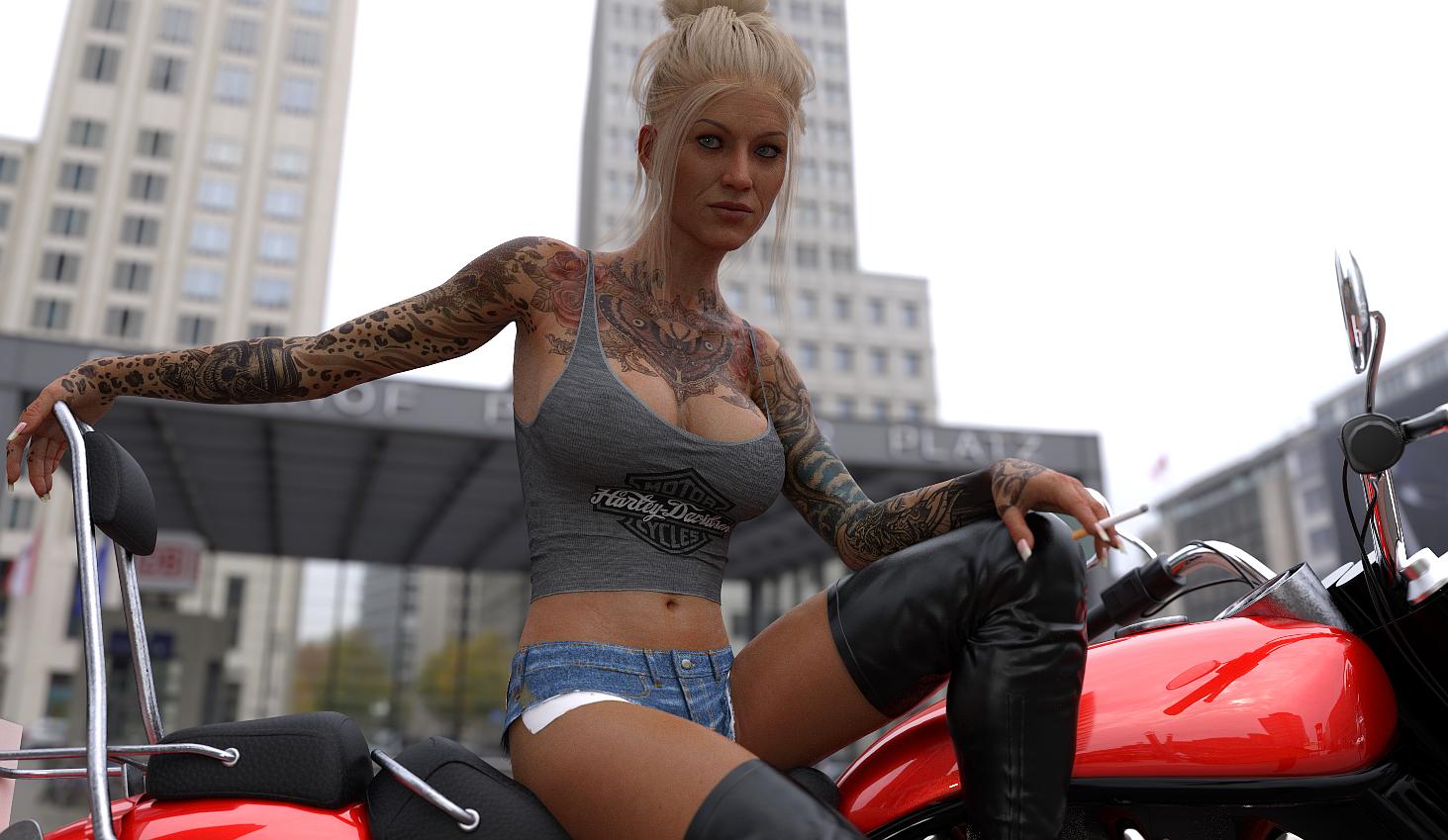 Sydney 8
Has anyone put in a ticket? I noticed the flat breast issue too and don't have all the morphs above to fix it. I tried, but they still look less than spectacular. Also, the crease under the breast NEEDS to be fixed. If it were a PA item, they'd be made to fix it. Daz should fix this.
Laurie
The issue with the crease under the breasts only occurs when using the Sydney 8 HD morph without the Sydney 8 base shape. Daz may not consider that something to fix. It works just fine with Sydney. The biggest reason I have for wanting it to work with other body shapes is the problem with the breast shape on the base morph.
I agree the breasts' shape should be fixed. Maybe if all of us file a ticket complaining about how unnatural it is, and how difficult it is to morph into a more pleasing shape, Daz will oblige us with a fix. (But I'm not going to hold my breath.)
The crease under the breasts is also present on the Melinda add on character. I bought Melinda mainly because I liked the look of the skin texture, I don't have Sydney.
If you position the camera to get one of the breasts in profile and zoom right in on the underside where it meets the torso, the ridge is almost pyramid shaped. I really don't know what it's supposed to represent. It just looks ridiculous.
That only occures if you dont have Sydney. With the Sydney body shape, its not there.
Yes, someone mentioned earlier in the thread that you get the crease if you dial in the Sydney HD morph without the Sydney base shape - for example if you were trying to add Sydney's HD wrinkles to another character's shape.
whatever is causing this distortion of the mesh, is also present in the Melinda character. It obviously shouldn't be present on any of the characters, since it isn't there when you use Sydney HD, so it clearly isn't intentional.
Sydney 8Has anyone put in a ticket? I noticed the flat breast issue too and don't have all the morphs above to fix it. I tried, but they still look less than spectacular. Also, the crease under the breast NEEDS to be fixed. If it were a PA item, they'd be made to fix it. Daz should fix this.
Laurie
The issue with the crease under the breasts only occurs when using the Sydney 8 HD morph without the Sydney 8 base shape. Daz may not consider that something to fix. It works just fine with Sydney. The biggest reason I have for wanting it to work with other body shapes is the problem with the breast shape on the base morph.
I agree the breasts' shape should be fixed. Maybe if all of us file a ticket complaining about how unnatural it is, and how difficult it is to morph into a more pleasing shape, Daz will oblige us with a fix. (But I'm not going to hold my breath.)
The crease under the breasts is also present on the Melinda add on character. I bought Melinda mainly because I liked the look of the skin texture, I don't have Sydney.
If you position the camera to get one of the breasts in profile and zoom right in on the underside where it meets the torso, the ridge is almost pyramid shaped. I really don't know what it's supposed to represent. It just looks ridiculous.
That only occures if you dont have Sydney. With the Sydney body shape, its not there.
Sydney 8Has anyone put in a ticket? I noticed the flat breast issue too and don't have all the morphs above to fix it. I tried, but they still look less than spectacular. Also, the crease under the breast NEEDS to be fixed. If it were a PA item, they'd be made to fix it. Daz should fix this.
Laurie
The issue with the crease under the breasts only occurs when using the Sydney 8 HD morph without the Sydney 8 base shape. Daz may not consider that something to fix. It works just fine with Sydney. The biggest reason I have for wanting it to work with other body shapes is the problem with the breast shape on the base morph.
I agree the breasts' shape should be fixed. Maybe if all of us file a ticket complaining about how unnatural it is, and how difficult it is to morph into a more pleasing shape, Daz will oblige us with a fix. (But I'm not going to hold my breath.)
The crease under the breasts is also present on the Melinda add on character. I bought Melinda mainly because I liked the look of the skin texture, I don't have Sydney.
If you position the camera to get one of the breasts in profile and zoom right in on the underside where it meets the torso, the ridge is almost pyramid shaped. I really don't know what it's supposed to represent. It just looks ridiculous.
Is it possible that you are getting that problem because you don't have Sydney?
Im checking now.
Sydney 8Has anyone put in a ticket? I noticed the flat breast issue too and don't have all the morphs above to fix it. I tried, but they still look less than spectacular. Also, the crease under the breast NEEDS to be fixed. If it were a PA item, they'd be made to fix it. Daz should fix this.
Laurie
The issue with the crease under the breasts only occurs when using the Sydney 8 HD morph without the Sydney 8 base shape. Daz may not consider that something to fix. It works just fine with Sydney. The biggest reason I have for wanting it to work with other body shapes is the problem with the breast shape on the base morph.
I agree the breasts' shape should be fixed. Maybe if all of us file a ticket complaining about how unnatural it is, and how difficult it is to morph into a more pleasing shape, Daz will oblige us with a fix. (But I'm not going to hold my breath.)
The crease under the breasts is also present on the Melinda add on character. I bought Melinda mainly because I liked the look of the skin texture, I don't have Sydney.
If you position the camera to get one of the breasts in profile and zoom right in on the underside where it meets the torso, the ridge is almost pyramid shaped. I really don't know what it's supposed to represent. It just looks ridiculous.
Is it possible that you are getting that problem because you don't have Sydney?
Problems with converted legacy to G3F after restarting DAZI've been using darkhound1's legacy to G3F morph converter, https://www.deviantart.com/darkhound1/art/Legacy-to-Gen3-morph-converter-1-1-buy-it-here-589021408 , basically it lets you transfer your V4 shaping morphs to G3F. Never had any issues. Now this one suddenly came, the figure converted perfectly but after I closed and reopend DAZ, the legs now have a very weird shape. Like attached. I blacked out the privates. Anyone know what's going on and how to fix this?
EDIT: I think this might be caused by a clothing I autofitted using Wear Em All, it was for G2F fitted to this G3F model. I tried recreating the character step by step and closing and reopening DAZ in each step. The problem started after I fitted the clothing. What do I do to correct this?
Help With HeadShop OneClickEyes closed may represent a problem. The Autodot system needs to find eyes to set up the conversion.
Eyes closed is not something we support.
Will this problem be fixed in a future update for the tool?I am not sure why the eyelids became transparent. Try the Parameters/Morphs slider to decrease morph. It is possible that the eyeballs intrude into the lids.
Sydney 8Has anyone put in a ticket? I noticed the flat breast issue too and don't have all the morphs above to fix it. I tried, but they still look less than spectacular. Also, the crease under the breast NEEDS to be fixed. If it were a PA item, they'd be made to fix it. Daz should fix this.
Laurie
The issue with the crease under the breasts only occurs when using the Sydney 8 HD morph without the Sydney 8 base shape. Daz may not consider that something to fix. It works just fine with Sydney. The biggest reason I have for wanting it to work with other body shapes is the problem with the breast shape on the base morph.
I agree the breasts' shape should be fixed. Maybe if all of us file a ticket complaining about how unnatural it is, and how difficult it is to morph into a more pleasing shape, Daz will oblige us with a fix. (But I'm not going to hold my breath.)
The crease under the breasts is also present on the Melinda add on character. I bought Melinda mainly because I liked the look of the skin texture, I don't have Sydney.
If you position the camera to get one of the breasts in profile and zoom right in on the underside where it meets the torso, the ridge is almost pyramid shaped. I really don't know what it's supposed to represent. It just looks ridiculous.
What features would you like to see appear in dazstudio 5?*sigh* I keep finding lovely freebies in .3ds format. Being able to import those would be so helpful. The others probably would too.
You can convert .3ds files online to .obj. and use them in DS. Or if you have Poser installed you can save them as a prop and import into DS.
As for a new DS feature I'd like to see.... a morph brush just like the Poser one.
Number one on my list. A morph brush. Would go soooooo far in helping to smooth, fit, do quick morphs.
Laurie
I think d-Force was supposed to be that but it's too fiddly. I agree. Some basic modeling options from within DAZ Studio like a push, pull and smoothing brush option with a panel for controlling what's happening would be very very helpful. I don't always like to fire up ZBrush!
You can already do that with Dformers. There's also an ability to paint a map with a brush for it.
That may be, but it's not very intuitive. Not like Poser's morph brush is. Just activate it and go. No adding other stuff beforehand, switching to tools a normal hobbyist rarely uses, etc. Most of the time when I need to do quick smoothing or fix something I jump to Hexagon, which isn't very intuitive either. Plus you have to save anything you do as a morph...all these things include extra steps that aren't necessary to a morph brush to fix a little bit of poke, pull out a nose tip, push in a cheek, etc. now and then.
Laurie
What features would you like to see appear in dazstudio 5?*sigh* I keep finding lovely freebies in .3ds format. Being able to import those would be so helpful. The others probably would too.
You can convert .3ds files online to .obj. and use them in DS. Or if you have Poser installed you can save them as a prop and import into DS.
As for a new DS feature I'd like to see.... a morph brush just like the Poser one.
Number one on my list. A morph brush. Would go soooooo far in helping to smooth, fit, do quick morphs.
Laurie
I think d-Force was supposed to be that but it's too fiddly. I agree. Some basic modeling options from within DAZ Studio like a push, pull and smoothing brush option with a panel for controlling what's happening would be very very helpful. I don't always like to fire up ZBrush!
You can already do that with Dformers. There's also an ability to paint a map with a brush for it.
Import clothes in DSOK it was worth a try. Then I suggest to have a look what settings you can change in the Transfer Utility to get better weight maps on the clothing instead of trying to fix them with the pain and smooth brush.
I think the issues with this jacket comes from the Transfer Utility and the template "dress knee-length" that isn't "suitable" for the shape of the jacket.
I guess the default settings in the Transfer Utility works best with skin tight clothing while your jacket is more of a loose shape and not as close to the body.
Another cause for those deformations I think could be how the Genesis 3 and 8 weight maps and the JCM morphs got projected with the wrong Transfer Utility settings.
To see if there are JCMs working in the backround try this: while the figure is posed select the clothing and have a look at the Parameters pane under "Currently Used" also make shure Show Hidden Properties is checked in the Paramertes Option Menu the button on top with the lines and the arrow. I'm shure there will be hidden morphs that are named JCM those morphs are working in the backround on I guess any joint bending on figures with General Weight Maps rigging.
There are a few settings in the Transfer Utility options that you could try. The first is the Distance Tolerance slider that you can turn up to increase the projection distance so the weight maps and morphs of the Source figure will get transfered to even further away from the body Target clothing items.
Also make shure you select Shaping and Pose in the Morph Targets Options. The transfer process will take loger with this, but all the neccesary character shapes and morphs of the Source figure and the posing related Joint Correction Morphs (JCM) should get transfered along with this.
The default setting Morph Targets: None is OK for a fast transfer but as soon as you use morphs like character shapes on the figure those morphs gets automaticly generated as hidden properties in the clothing figure. You should be aware of those "autogenerated morphs" when it comes to fit the clothing to a character shape dialed up on the figure.
 What features would you like to see appear in dazstudio 5?
*sigh* I keep finding lovely freebies in .3ds format. Being able to import those would be so helpful. The others probably would too.
You can convert .3ds files online to .obj. and use them in DS. Or if you have Poser installed you can save them as a prop and import into DS.
As for a new DS feature I'd like to see.... a morph brush just like the Poser one.
Number one on my list. A morph brush. Would go soooooo far in helping to smooth, fit, do quick morphs.
Laurie
I think d-Formers was supposed to be that but it's too fiddly. I agree. Some basic modeling options from within DAZ Studio like a push, pull and smoothing brush option with a panel for controlling what's happening would be very very helpful. I don't always like to fire up ZBrush!
Daz 3D is part of

Connect
DAZ Productions, Inc.
7533 S Center View Ct #4664
West Jordan, UT 84084Licensing Agreement | Terms of Service | Privacy Policy | EULA
© 2026 Daz Productions Inc. All Rights Reserved.