-
HeadShop 13 with LoveChild
I have Headshop Oneclick. Can I upgrade? The promo page doesn't declare this.
Page says one can upgrade from HeadShop 9, 10, 11 or 12.
HeadShop 13 with LoveChildTo be honest I can't imagine ever paying even the sale price for what it appears to offer, considering there are already other apps that seem to work better.
In every single one of their promo images you can see misaligned nostrils and areas of hair that didn't blend out properly and one very odd instance of an african face projected onto a white texture map (do they not offer different skin tones?).

It's really bad when the makers of the product can't even reach acceptable results.
Having never used any previous version of HeadShop, am I missing something? I'm geniunely wondering because this seems like it should be a $20 plug-in at full price at best.
what are the better working apps? I need to check them out. thanks
HeadShop 13 with LoveChildI have Headshop Oneclick. Can I upgrade? The promo page doesn't declare this.
HeadShop 13 with LoveChildBe careful when making a purchase ... there are 2 types, one is an upgrade, the other is the full product.
Thanks for your replies
I already own Headshop 12 with Love Cjild. What I really was asking is: Is HeadShop 13 enough of an improvement to, especially in texture blending, to justify upgrading from HS 12?
You're welcome. I don't know as I don't have Headshop 12 with Love Child. So I'm showing some of the images and hope it answers your question.
Of the 2 face textures it makes, the one with the photo merged to it, needs some work on the seam allowance but the seams are just fine on the 2nd face image.
If one uses the 'blank MR' images not on templates, the end result is not desired. Whichever texture image one uses while running the program, it will have information 'stamped' on it from the images in the program's folder. {which is why I changed them because nobody wants 500 editions that look alike of anybody}.
Now if you also have Face Transfer, that does a beautiful job IMHO of matching the skin's hues TO the photo being used. {but switching out the original figure's textures for MRs is a bit of a task, I have a tutorial for that in my tutorial thread.} However Face Transfer's morphs 'need help' if wanting side renders and so the additional morph package for that utility was made [and appreciated] but those additional morphs are not MR of course.
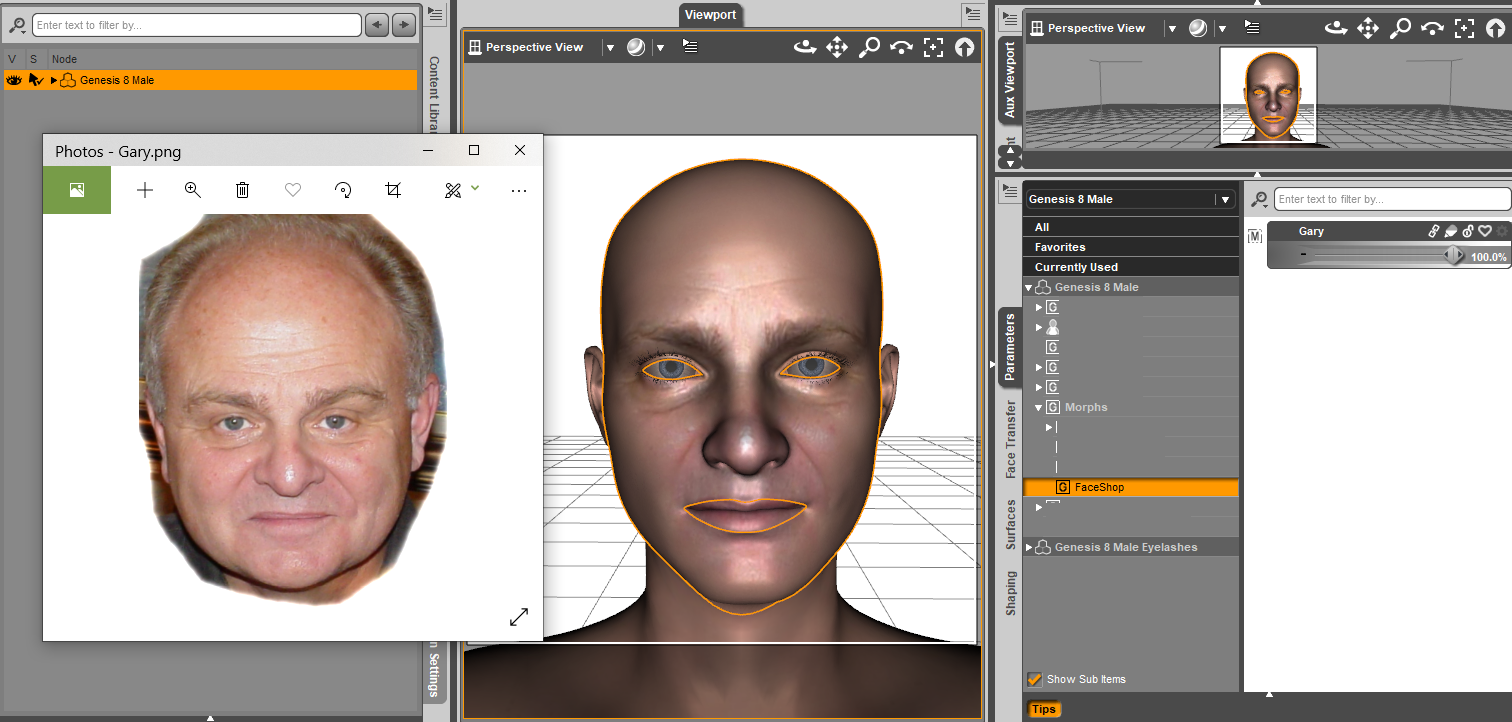
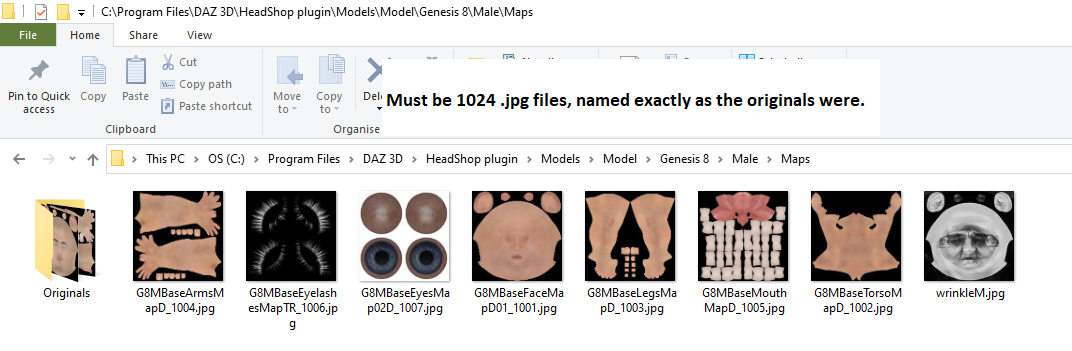 HeadShop 13 with LoveChild
Be careful when making a purchase ... there are 2 types, one is an upgrade, the other is the full product.
Thanks for your replies
I already own Headshop 12 with Love Cjild. What I really was asking is: Is HeadShop 13 enough of an improvement to, especially in texture blending, to justify upgrading from HS 12?
HeadShop 13 with LoveChildBe careful when making a purchase ... there are 2 types, one is an upgrade, the other is the full product.
While HeadShop works from a basic set of textures for the figure, initially loading a face texture. The rest of the textures and a better face texture image can be manually applied from the folder they were created into.
To work with various skin tones, i.e. very dark skins, one would want to replace that basic set of textures with an MR of their choosing OR a basic set made using the 'RST' [real skin tone] images [of which I've released a number].
For ALL of the morphing plugins/programs, ideally one normally uses the provided face texture - as is if you want to - but for more perfection, as a starter; fixing it in an image editor. While there, one can also add more details to the rest of the basic skin too. One can find MR and/or resource photographic images of people in a variety of stores. If you don't want to go with subscription websites, I can recommend ArtStation.
As to the morphing photograph being matched point for point, the quality of the photograph plays a big part ;-) HeadShop 13 can handle angled photos better. Do not use photos that are super large in weight. Properly lit portrait photos work best of course. And for some reason black/white photos may work better than coloured ones. No glasses, no beards, etc. of course. {such can be removed in an image editor before processing}
With regards to the skin textures provided, the REALLY nice thing is that TWO faces are provided. One has the photograph merged onto it, the other is without the photograph. So one can work with the morph and a clean base skin texture set for starters {or as is if so desired}.
The love child section allows one to morph what might be the result between 2 adults. As I recall one would then dial in child morphs [from other products] to resize the figure down properly.
So it sounds like I'm not really missing anything... You would think for a $100 program they would provide you with a few different skin tone textures, or at least be able to modify the hue of 1 base texture to at least attempt to closely match the face photo.
Also if they can't even provide promo photos where nostrils are lined up, there's not very much hope for the end user to do it any better, regardless of the photo quality.
And if you are most likely going to have to retexture anyway, I don't really see the point of purchasing something like this (especially for the asking price!) when you can do the same thing with the face transfer that comes with daz studio for free (it seems like it's just as much work if not more to retexture from the examples I saw for Head Shop as it would be to retexture the watermarked face transfer texture). You could also use Art Breeder or one of dozens of other free face mixing programs and then bring it into face transfer, so I'm not seeing any great extra value of love child.
I'm not trying to be rude, the advertising is honest at least. The price is just blowing my mind for the quality offered. If they can actually compete and sell in this market, good on them I guess. Although, I hope that people aren't fooled into buying it simply because of Daz's implicit endorsement by featuring it in their marketplace.
I'd like to add I'm not trying to knock anyone using head shop. This is all my opinion based on what I've seen, and I have never personally used the software so I could be totally off point here. If you're comfortable using a tool and it gets you where you need to go, then that's a good tool for you.
um, hmm ... one does not retexture watermarked face transfer textures for redistribution. Something called a license ;-)
Over time all products in the Daz3D store go on sale. I rather doubt too many people buy everything at full price. They buy memberships and wait for prices they are happy to spend on what they want.
It is a LOT easier to replace the base textures [swapping in one's own MRs] in HeadShop 13 than it is for Face Transfer.
Here's an example of the new textures it made using an MR available for free over at sharecg.com.
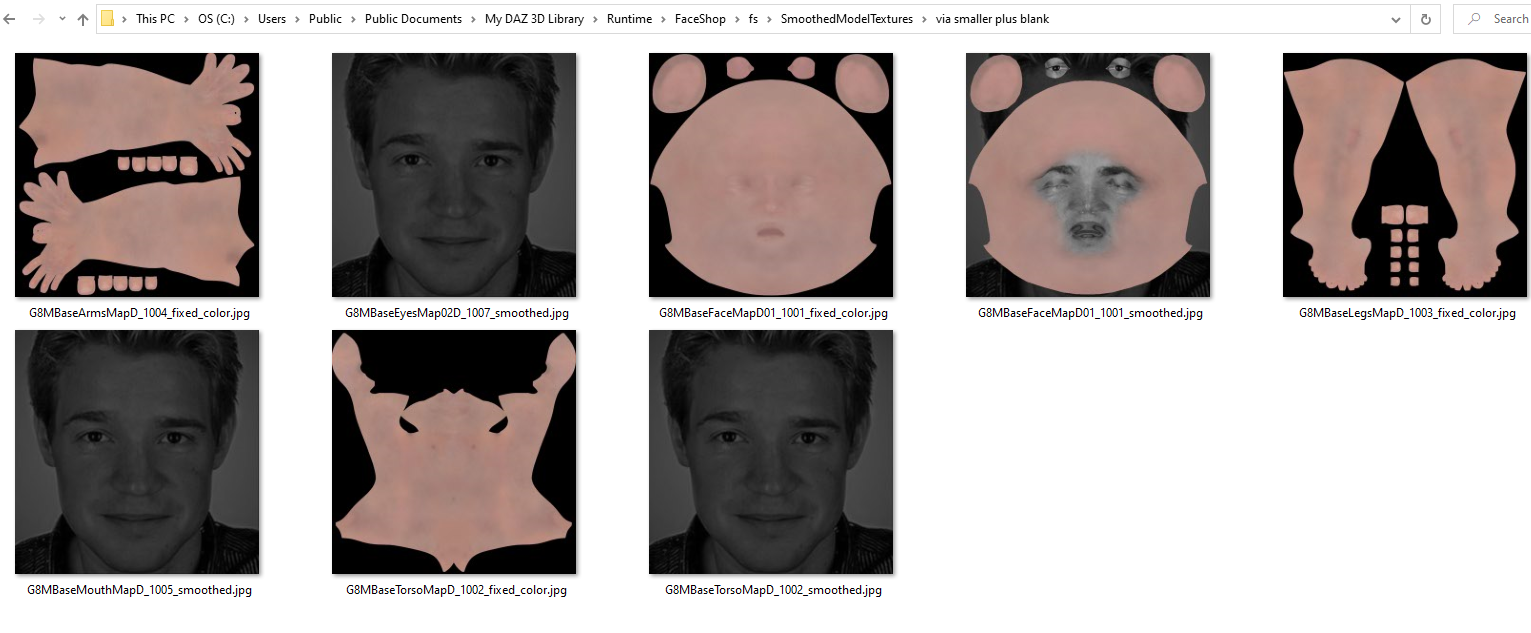
Just to be clear I did not mean retexture for redistribution! Just for personal use. I didn't realize that Head Shop could be used as a merchant resource, so I guess that can add to the value I suppose.
So you're saying it exports a version of the face on it's own that is easy to add as a new layer over your own MR skin (or any skin in your library if for personal use) in the image editor of your choosing? I can see how that's helpful, although the examples from their promo do not make the skin quality look good to me at all, and I can't imagine using them for any sort of product. I only was speaking of retexturing earlier meaning that you would be repairing the texture or replacing the skin texture with another you already own because the skin texture it appears to output does not look usable.
Personally, even if it were on a 75% off sale, I would not consider $25 a fair price for what's offered, but that may just be me. I also know how to easily make better results face matching and texturing in Blender, so a product like this feels less crucial to me if it doesn't cut a significant amount of time from my workflow, which this would not.
Thanks for all the detailed explanations about the product though! I also think it's awesome how many MR's you give away for people to use and I think people using this product should definitely pair it with your skin textures for better results.
HeadShop 13 with LoveChildBe careful when making a purchase ... there are 2 types, one is an upgrade, the other is the full product.
While HeadShop works from a basic set of textures for the figure, initially loading a face texture. The rest of the textures and a better face texture image can be manually applied from the folder they were created into.
To work with various skin tones, i.e. very dark skins, one would want to replace that basic set of textures with an MR of their choosing OR a basic set made using the 'RST' [real skin tone] images [of which I've released a number].
For ALL of the morphing plugins/programs, ideally one normally uses the provided face texture - as is if you want to - but for more perfection, as a starter; fixing it in an image editor. While there, one can also add more details to the rest of the basic skin too. One can find MR and/or resource photographic images of people in a variety of stores. If you don't want to go with subscription websites, I can recommend ArtStation.
As to the morphing photograph being matched point for point, the quality of the photograph plays a big part ;-) HeadShop 13 can handle angled photos better. Do not use photos that are super large in weight. Properly lit portrait photos work best of course. And for some reason black/white photos may work better than coloured ones. No glasses, no beards, etc. of course. {such can be removed in an image editor before processing}
With regards to the skin textures provided, the REALLY nice thing is that TWO faces are provided. One has the photograph merged onto it, the other is without the photograph. So one can work with the morph and a clean base skin texture set for starters {or as is if so desired}.
The love child section allows one to morph what might be the result between 2 adults. As I recall one would then dial in child morphs [from other products] to resize the figure down properly.
So it sounds like I'm not really missing anything... You would think for a $100 program they would provide you with a few different skin tone textures, or at least be able to modify the hue of 1 base texture to at least attempt to closely match the face photo.
Also if they can't even provide promo photos where nostrils are lined up, there's not very much hope for the end user to do it any better, regardless of the photo quality.
And if you are most likely going to have to retexture anyway, I don't really see the point of purchasing something like this (especially for the asking price!) when you can do the same thing with the face transfer that comes with daz studio for free (it seems like it's just as much work if not more to retexture from the examples I saw for Head Shop as it would be to retexture the watermarked face transfer texture). You could also use Art Breeder or one of dozens of other free face mixing programs and then bring it into face transfer, so I'm not seeing any great extra value of love child.
I'm not trying to be rude, the advertising is honest at least. The price is just blowing my mind for the quality offered. If they can actually compete and sell in this market, good on them I guess. Although, I hope that people aren't fooled into buying it simply because of Daz's implicit endorsement by featuring it in their marketplace.
I'd like to add I'm not trying to knock anyone using head shop. This is all my opinion based on what I've seen, and I have never personally used the software so I could be totally off point here. If you're comfortable using a tool and it gets you where you need to go, then that's a good tool for you.
um, hmm ... one does not retexture watermarked face transfer textures for redistribution. Something called a license ;-)
Over time all products in the Daz3D store go on sale. I rather doubt too many people buy everything at full price. They buy memberships and wait for prices they are happy to spend on what they want.
It is a LOT easier to replace the base textures [swapping in one's own MRs] in HeadShop 13 than it is for Face Transfer.
Here's an example of the new textures it made using an MR available for free over at sharecg.com.
HeadShop 13 with LoveChildBe careful when making a purchase ... there are 2 types, one is an upgrade, the other is the full product.
While HeadShop works from a basic set of textures for the figure, initially loading a face texture. The rest of the textures and a better face texture image can be manually applied from the folder they were created into.
To work with various skin tones, i.e. very dark skins, one would want to replace that basic set of textures with an MR of their choosing OR a basic set made using the 'RST' [real skin tone] images [of which I've released a number].
For ALL of the morphing plugins/programs, ideally one normally uses the provided face texture - as is if you want to - but for more perfection, as a starter; fixing it in an image editor. While there, one can also add more details to the rest of the basic skin too. One can find MR and/or resource photographic images of people in a variety of stores. If you don't want to go with subscription websites, I can recommend ArtStation.
As to the morphing photograph being matched point for point, the quality of the photograph plays a big part ;-) HeadShop 13 can handle angled photos better. Do not use photos that are super large in weight. Properly lit portrait photos work best of course. And for some reason black/white photos may work better than coloured ones. No glasses, no beards, etc. of course. {such can be removed in an image editor before processing}
With regards to the skin textures provided, the REALLY nice thing is that TWO faces are provided. One has the photograph merged onto it, the other is without the photograph. So one can work with the morph and a clean base skin texture set for starters {or as is if so desired}.
The love child section allows one to morph what might be the result between 2 adults. As I recall one would then dial in child morphs [from other products] to resize the figure down properly.
So it sounds like I'm not really missing anything... You would think for a $100 program they would provide you with a few different skin tone textures, or at least be able to modify the hue of 1 base texture to at least attempt to closely match the face photo.
Also if they can't even provide promo photos where nostrils are lined up, there's not very much hope for the end user to do it any better, regardless of the photo quality.
And if you are most likely going to have to retexture anyway, I don't really see the point of purchasing something like this (especially for the asking price!) when you can do the same thing with the face transfer that comes with daz studio for free (it seems like it's just as much work if not more to retexture from the examples I saw for Head Shop as it would be to retexture the watermarked face transfer texture). You could also use Art Breeder or one of dozens of other free face mixing programs and then bring it into face transfer, so I'm not seeing any great extra value of love child.
I'm not trying to be rude, the advertising is honest at least. The price is just blowing my mind for the quality offered. If they can actually compete and sell in this market, good on them I guess. Although, I hope that people aren't fooled into buying it simply because of Daz's implicit endorsement by featuring it in their marketplace.
I'd like to add I'm not trying to knock anyone using head shop. This is all my opinion based on what I've seen, and I have never personally used the software so I could be totally off point here. If you're comfortable using a tool and it gets you where you need to go, then that's a good tool for you.
HeadShop 13 with LoveChildBe careful when making a purchase ... there are 2 types, one is an upgrade, the other is the full product.
While HeadShop works from a basic set of textures for the figure, initially loading a face texture. The rest of the textures and a better face texture image can be manually applied from the folder they were created into.
To work with various skin tones, i.e. very dark skins, one would want to replace that basic set of textures with an MR of their choosing OR a basic set made using the 'RST' [real skin tone] images [of which I've released a number].
For ALL of the morphing plugins/programs, ideally one normally uses the provided face texture - as is if you want to - but for more perfection, as a starter; fixing it in an image editor. While there, one can also add more details to the rest of the basic skin too. One can find MR and/or resource photographic images of people in a variety of stores. If you don't want to go with subscription websites, I can recommend ArtStation.
As to the morphing photograph being matched point for point, the quality of the photograph plays a big part ;-) HeadShop 13 can handle angled photos better. Do not use photos that are super large in weight. Properly lit portrait photos work best of course. And for some reason black/white photos may work better than coloured ones. No glasses, no beards, etc. of course. {such can be removed in an image editor before processing}
With regards to the skin textures provided, the REALLY nice thing is that TWO faces are provided. One has the photograph merged onto it, the other is without the photograph. So one can work with the morph and a clean base skin texture set for starters {or as is if so desired}.
The love child section allows one to morph what might be the result between 2 adults. As I recall one would then dial in child morphs [from other products] to resize the figure down properly.
HeadShop 13 with LoveChildTo be honest I can't imagine ever paying even the sale price for what it appears to offer, considering there are already other apps that seem to work better.
In every single one of their promo images you can see misaligned nostrils and areas of hair that didn't blend out properly and one very odd instance of an african face projected onto a white texture map (do they not offer different skin tones?).
It's really bad when the makers of the product can't even reach acceptable results.
Having never used any previous version of HeadShop, am I missing something? I'm geniunely wondering because this seems like it should be a $20 plug-in at full price at best.
HeadShop 13 with LoveChildHas anybody tried the new HeadShop 13 with LoveChild yet? Is there really any significant improvement more than Headshop 12, especially in texture blending?
Report sales errors here: "There's Always Another Sale™"Readmes are missing for https://www.daz3d.com/headshop-13-with-lovechild--upgrade-from-hs12 and https://www.daz3d.com/headshop-13-with-lovechild-
HeadShop 13 submitted to DAZ (Commercial)
The requirement for studio to be in a folder named Daz3d, as I do not have that nomenclature anywhere in my studio software install, only in the library itself. Additionally, I do not have a temp folder on C:, I have mine set to a separate location as well. Every plugin I have used with studio works fine with my setup, the only one I have run into that does is headshop (granted that was several versions ago when the app did not work at all if your install wasn't on C). It has been years since I have seen any app that wasn't an a temporary app written for a specific enterprise server that actually cares where it is installed, as long as it's files are in a structure it expects to find them in. I was really hoping this version would be clear if such restrictions, but if it isn't then I will have to pass on this one as well.While that's an improvement over forcing the isntallation of Studio to be on C:, it still means this program is completely unusuable for me, and anyone that configures their install manually.
How is that so? Our experience is that half of our users do install HeadShop on drives other than c: - without any issue. Pls. elaborate...
Also, I do not recall receiving a request for skype/tech support at [email protected]
Morph Fixer deltas by regionHello everybody!
I miss a tool as useful as "Shape Rigger Plus" that can restore only part of the "deltas", for example; Eyes, jaw. This would solve problems that occurred when we used FaceGen Artist Pro and / or HeadShop, which despite the new version in both software that automatically corrects "Spherical Eyes", the problem with the eyelids when closing the eyes continues, leaving a visible gap in the sides From the eyes.
Another thing I miss, despite the fact that the new version of Daz Studio, without a doubt, is an incredible update with great and inducible advanced features, a large part of the users, are still trying to get it for an upgrade of their old PC ,
Having said that, a percentage of users still work with the version of Daz Studio 4.10, which is my case for example.
The idea would be a version of plugins or scripts that is not dForce is obvious, only to fix deltas by part or region or poses and riggers, like the script mentioned above.
Free of charge, there are some utilities capable of correcting some "bugs" so to speak caused by the interpretation of some applications before photographs of faces, as is the case with the utility,
"Eye & Jaw Morph Fixer for Face Morphs" and "Full Body Morph Fixer".Thanks in advance for reading this.
Cheers!
Anderson - Gendragon3D
HeadShop 13 submitted to DAZ (Commercial)While that's an improvement over forcing the isntallation of Studio to be on C:, it still means this program is completely unusuable for me, and anyone that configures their install manually.
How is that so? Our experience is that half of our users do install HeadShop on drives other than c: - without any issue. Pls. elaborate...
Also, I do not recall receiving a request for skype/tech support at [email protected]
Users want the plugin to work if their temp folder isn't on C:. FluidOS plugin is able to cope with writing temporary files to the user's temp folder that resides at a non-default location so this isn't a limitation of the DAZ API.
HeadShop 13 submitted to DAZ (Commercial)While that's an improvement over forcing the isntallation of Studio to be on C:, it still means this program is completely unusuable for me, and anyone that configures their install manually.
How is that so? Our experience is that half of our users do install HeadShop on drives other than c: - without any issue. Pls. elaborate...
Also, I do not recall receiving a request for skype/tech support at [email protected]
HeadShop 13 submitted to DAZ (Commercial)Will this work with studio installs that are not default c: locations? I have every aspect of studio installed onto a separate drive, and know this was a problem for a previous version. Has that been fixed?It was working and will also work with DAZ Studio non-standard installations, such as when Studio or Libraries installed on drives other than c:. What is required is that DAZ is installed in one self-contained folder called "DAZ 3D" in which reside the full DAZStudio4 subfolder containing the full app. HeadShop installer can be directed to install the "HeadShop plugin" folder into "DAZ 3D" folder. (There's one requirement that involves the c: drive; HeadShop writes "temp" files into DAZ default location to C:/Users/username/AppData/Roaming/DAZ 3D/Studio4/temp).
Also see "How-to" install video
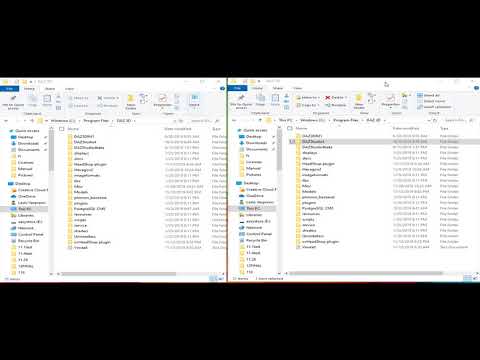
While that's an improvement over forcing the isntallation of Studio to be on C:, it still means this program is completely unusuable for me, and anyone that configures their install manually.
HeadShop 13 submitted to DAZ (Commercial)Will this work with studio installs that are not default c: locations? I have every aspect of studio installed onto a separate drive, and know this was a problem for a previous version. Has that been fixed?It was working and will also work with DAZ Studio non-standard installations, such as when Studio or Libraries installed on drives other than c:. What is required is that DAZ is installed in one self-contained folder called "DAZ 3D" in which reside the full DAZStudio4 subfolder containing the full app. HeadShop installer can be directed to install the "HeadShop plugin" folder into "DAZ 3D" folder. (There's one requirement that involves the c: drive; HeadShop writes "temp" files into DAZ default location to C:/Users/username/AppData/Roaming/DAZ 3D/Studio4/temp).
Also see "How-to" install video
HeadShop 13 submitted to DAZ (Commercial)Hi, I see, that the seam on the neck, around the ear and on the head is still there.
What you see is a rough preview in HeadShop, without the new Back-of-head, Ear or Neck textures applied. Once exported into DAZ Studio and all textures applied, the seams dissappear.
Ok, great to know. I am looking forward to the release, then,
HeadShop 13 submitted to DAZ (Commercial)The two images were also high-res sources (4165x4165). In regard to remove highlights, we do have a mirror-texture function, where one side of the head that has better texture than the other can mirrored. Uniquelly, HeadShop also features a retouch brush in the Color Tab, the only one such among "Photo-to-3DHead" software. Still, it is a good suggestion for HS14:-)
Thanks for your comment!
That is good to hear! Something like a tone equalizer would be very handy, allthough you if you want really good results you always have to prep your source I guess.
Daz 3D is part of

Connect
DAZ Productions, Inc.
7533 S Center View Ct #4664
West Jordan, UT 84084Licensing Agreement | Terms of Service | Privacy Policy | EULA
© 2026 Daz Productions Inc. All Rights Reserved.