-
Tasha 8
I would be very disappointed if they replaced Lilith, especially with this girl. I don't think they would, though. I think Tasha is more like Arabella's well-fed versionBravo! She looks like a cross of Eva Mendes and Jeri Ryan. Evidently Lilith's replacement. Face morph fabulous. Skin looks good so far. That Twilight Outfit dress! Super mature HD, but I have a trick to smooth the eyes which sometimes works.
Another character that looks like the 3 other characters, and another hair with questionable undergrowth. But hey! The main character's great.
Tasha 8Bravo! She looks like a cross of Eva Mendes and Jeri Ryan. Evidently Lilith's replacement. Face morph fabulous. Skin looks good so far. That Twilight Outfit dress! Super mature HD, but I have a trick to smooth the eyes which sometimes works.
Another character that looks like the 3 other characters, and another hair with questionable undergrowth. But hey! The main character's great.
Glad I'm not the only one who thinks she looks like Jeri Ryan. The physique seems very Arabella 7 to me.
That's what I'm thinking, not so much Lilith's as she is Arabella's replacement. Lilith sold exceedingly well like all the other major reoccuring characters. The only Genesis 3 Female icon that didn't make the "Best of the best" sales list was Bethany.
Tasha 8Bravo! She looks like a cross of Eva Mendes and Jeri Ryan. Evidently Lilith's replacement. Face morph fabulous. Skin looks good so far. That Twilight Outfit dress! Super mature HD, but I have a trick to smooth the eyes which sometimes works.
Another character that looks like the 3 other characters, and another hair with questionable undergrowth. But hey! The main character's great.
Glad I'm not the only one who thinks she looks like Jeri Ryan. The physique seems very Arabella 7 to me. But the characters and hair in the bundle seem like they are maybe not the best thing anyone involved has ever made, and the only clothes in the bundle I liked was L2R.
Is there any config to transform Genesis Male to an Eastern ethnicity face/eyes?I think looks a bit too young for an old man, so it would be better if you can locate an old asian texture, but I don't think the morph is too bad.
Yep, he seems like middle age man. I was seeking for someone older. Age morph does not makes miracles by itself. Odaa posted a link that helped me a lot, I have used this character (Sensei) plus age deformer plus viking's beard...
The result got very good.
I appreciate all your help, guys.Elizabeth 2: A whole new free Poser figure.Free Top:
Dynamic Hoodie
Dynamic hoodie for Elizabeth2, Project Evolution and LaFemme. Includes a morph to pull the hood down. This is a dynamic item and requires use of the cloth room in Poser.
https://www.renderosity.com/mod/freestuff/dynamic-hoodie/81163Tasha 8Bravo! She looks like a cross of Eva Mendes and Jeri Ryan. Evidently Lilith's replacement. Face morph fabulous. Skin looks good so far. That Twilight Outfit dress! Super mature HD, but I have a trick to smooth the eyes which sometimes works.
Another character that looks like the 3 other characters, and another hair with questionable undergrowth. But hey! The main character's great.
If this is truly Lilith’s replacement, that’ll mean she’s been scrapped due to lack of sales. That’ll disappoint those whose been waiting for Lilith 8 just to hear she’s been replaced and scraped.
Tasha 8Bravo! She looks like a cross of Eva Mendes and Jeri Ryan. Evidently Lilith's [pardon moi] Arabella's replacement. Face morph fabulous. Skin looks good so far. That Twilight Outfit dress! Super mature HD, but I have a trick to smooth the eyes which sometimes works.
Another character that looks like the 3 other characters, and another hair with questionable undergrowth. But hey! The main character's great.
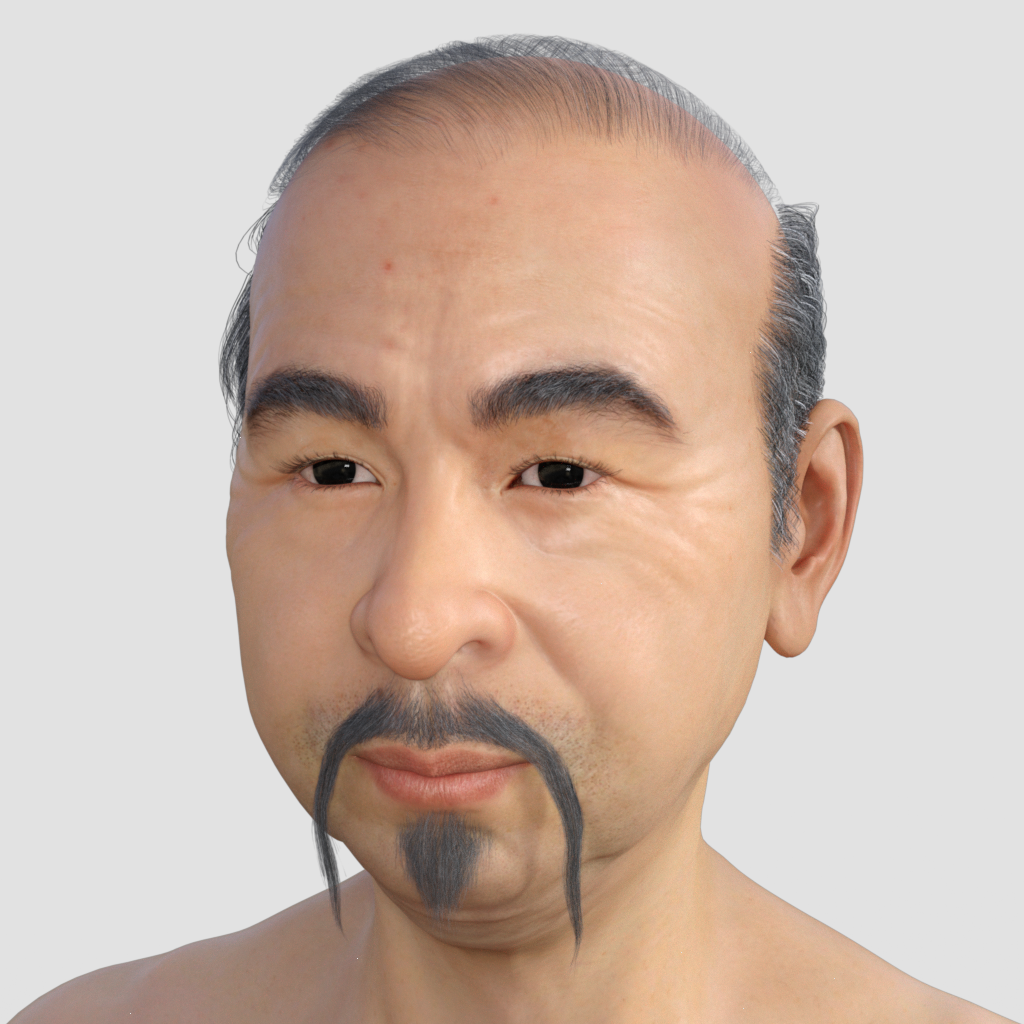
Is there any config to transform Genesis Male to an Eastern ethnicity face/eyes?Below is a character I knocked up using: https://www.daz3d.com/floyd-8 and https://www.daz3d.com/east-asian-men-for-genesis-8-male. The texture is from the latter, and I think looks a bit too young for an old man, so it would be better if you can locate an old asian texture, but I don't think the morph is too bad.
 La Femme in DS
...I loved the girl next door for V4 and still use her morph on G8 and you can see lots of the same style on the new figure.
Was this via the Gen X or X2 product to early Genesis, and then forward to G8 using Clones and such? I loved that morph, as well.
GenX to G3 and then I tried one of the latter copies of the script from Singular Blues before it was pulled to transfer it to G8.
Here is 100% GF8 GND body with a few morph adjustments
 Is there any config to transform Genesis Male to an Eastern ethnicity face/eyes?
For G3M, this clothing set comes with an older East Asian male character (morph and skin) as a bonus: https://www.daz3d.com/wise-sensei-for-genesis-3-male-s
Otherwise, what you're trying to do would need to combine Lee 7 or Lee 8 with the Aging Morphs (available in G3M or G8M versions). You may also find People of Earth: Asia (available in G3M and G8M versions) useful, or some of the Lee-based characters, but you would need your preferred version of Lee for most of the options.
Facegen or HeadshopThe pic in my avatar is the render i got from using Facegen. I had trouble with headshop and returned it. Could not get it to produce anything that didn't look totallty distorted. Facegen also has issues, and trying to use various photos I'd downloaded did not have great results. The head has to be lined up in such a specific straight on way with your chin just slightly up, and then best to also add side profile shots to the program, all with very bright lighting or flash. I had to take new selfie photos in that specific way to get it generated so that it wasn't distorted once it created the 3D model. Both programs allow you to morph your face shape further, but headshop trying to use that feature just caused it to crash every time for me. With facegen I haven't really used the feature to make adjustments. I just can't see much further use for it since other people's photos i try aren't shot in the same specific manner. But maybe others have had better results.
(I attached a larger image of a render I produced with the created model from Facegen)
La Femme in DS...I loved the girl next door for V4 and still use her morph on G8 and you can see lots of the same style on the new figure.
Was this via the Gen X or X2 product to early Genesis, and then forward to G8 using Clones and such? I loved that morph, as well.
*closed* RRRR - What can go wrong when moving - Render Contesttag: luci45 #4
Exiled Again
Big Ronny Rumoroso soon oulived his welcome on the lovely tropical isle of San Cristobal. After several other relocations didn't work out either, he was sent to the remote planet Miuhiri in the Cebastea System, accompanied only by his loyal servant DumDum. He did not like the crowded shuttle ride.used:
Design Tool Box Paint and Paper Replaced with Chain Item from #1:Mobster Outfit for Genesis 3 Male(s)
Sci-fi Desks and Chair
Peony Kimono for Genesis 2 Female(s)
Elijah 7
Colors for Frawn Hair (LB)
Creature Creator Add-ons for Genesis 2 Female(s) (LB)
Bad Guy for Genesis (LB)
Shuttlestar (LB)
Brutes Thugs Bruisers Tough Guys for F5 (LB)
Ice Bandit Outfit for Genesis 3 Male(s) (LB)Also used
Pure Hair: Cool for Genesis
Vintage Male Hair for Genesis 3 and 8 Male
Woody for Genesis 3 Male
Creature Creator for Genesis 2 Female(s)
Fantasy Creature Creator HD Morph Pack for Genesis 3 Male
Ribbits for Genesis
TyRex
LoREZ Arab Male
Travel Baggage
M3D Coen Shapes HD for Genesis 3 Male
Ivan 7
asteroid hdri space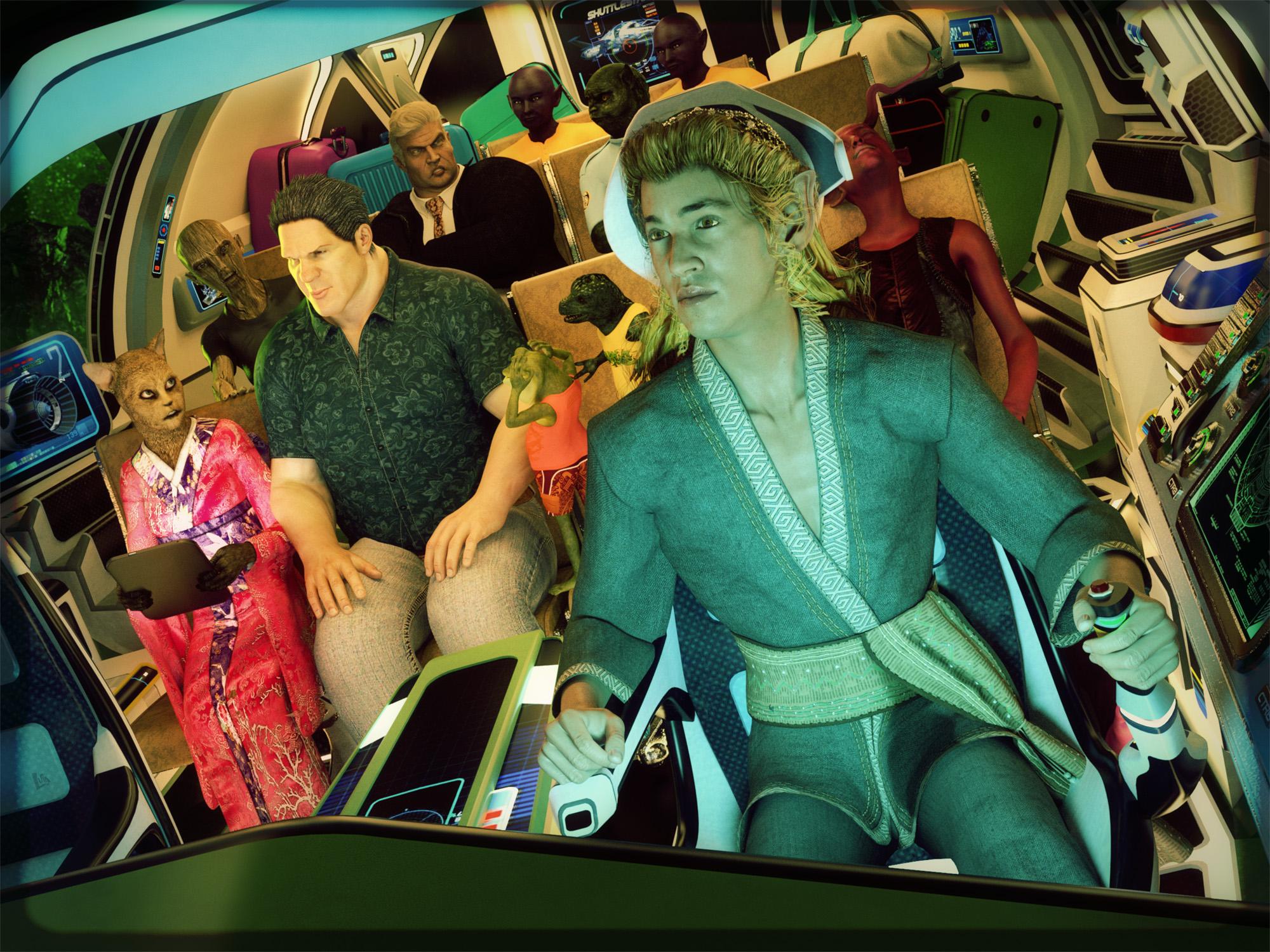 La Femme in DS
As an ex poser user for years I am thrilled to see poser only users get a new figure and by a talented group of developers. I loved the girl next door for V4 and still use her morph on G8 and you can see lots of the same style on the new figure.
I thought about reinstalling poser 11 and giving her a try, but I haven't seen anything that would make it better for my projects than what i have with G8 and trying to get her to work in DS is just a waste of my time since she is designed to work in poser, so why bother IMO, let the poser users enjoy their sucess.
Converting Under-Arm Wings To G8FRichard, what are you baking in each step? The costume or the figure that will wear the costume? I'm confused.
Bake the figure to match the clothing implicit pose, rig the clothing, then pose the clothing to match the figure base pose and bake the clothing.
Is the issue the A pose? If so you can bend the arms into a T pose and then right-click in the Viewport with the Joint Editor>Edit>Bake Joint Rotations, then do your rigging from that (I think you also need to zero out any JCMs). Once done, pose your wings to the A pose of the default figure and use the same Joint Editor right-click>Edit>Bake Joint Rotations to get a version that will work, then tidy up JCMs and any other tweaking needed.
The issue isn't the pose. I know about baking in the joint rotations. The problem is the new weight-mapping. I'm not sure how to transfer the weight-mapping from G8F to the wings without them getting horribly distorted.
After transfer (which should give the correct joint centres but not so useful weights) you'd have to do a fair bit of hand editing. Or you could just rig the struts and then let dForce handle the membrane, I would think.
Thanks for the clarification, Richard.
Quality - has it dropped or am I just insane?I think the quality has gone up.
Overall I agree.
I also think people's expectations have gone up too....I was just about to post that for myself, I know that my expectations have risen as the "base" quality has improved over the years.
For instance, I'm now more focused on the flexibility of an outfit. How are the material zones laid out? Can I recolor / rexture them or will I lose too many details doing that? Can I re-use a skirt from one outfit with a top from another or are the styles so specific that they'll look silly together? How does the clothing support body morphs and movements beyond a simple standing modeling pose? If it's not dForce enabled by default, does it explode when I try to set it up myself?
A character morph / texture has to be REALLY special now that I have about 30 of them for G8 females. And I'm looking for more "natural" looks. In other words they should have some flaws. I have enough generic perfect supermodels. Give me a girl (or man) that has some character to them.
Poses that don't offer partials and mix/match aren't likely to get my money either. Even better if they do the mirroring for me so I don't have to remember how to do that myself. I'd rather spend $15 on poses I can use quickly for the specific look I want than $9 on a set where I'm constrained to a single look that the PA chose for me.
There is definitely quality in the market. Some new vendors are clearly still learning. Some others have come out of the gate with impressive products. Just because I'm being pickier about spending my money doesn't mean the overall quality is lower. It just means I'm being more discerning as a consumer.
Converting Under-Arm Wings To G8FRichard, what are you baking in each step? The costume or the figure that will wear the costume? I'm confused.
Bake the figure to match the clothing implicit pose, rig the clothing, then pose the clothing to match the figure base pose and bake the clothing.
Is the issue the A pose? If so you can bend the arms into a T pose and then right-click in the Viewport with the Joint Editor>Edit>Bake Joint Rotations, then do your rigging from that (I think you also need to zero out any JCMs). Once done, pose your wings to the A pose of the default figure and use the same Joint Editor right-click>Edit>Bake Joint Rotations to get a version that will work, then tidy up JCMs and any other tweaking needed.
The issue isn't the pose. I know about baking in the joint rotations. The problem is the new weight-mapping. I'm not sure how to transfer the weight-mapping from G8F to the wings without them getting horribly distorted.
After transfer (which should give the correct joint centres but not so useful weights) you'd have to do a fair bit of hand editing. Or you could just rig the struts and then let dForce handle the membrane, I would think.
FaceGen and EyesI haven't had trouble with the eyeballs warping per se when I use facegen, but I have had cases where the eyes pointed in the wrong direction or where what the morph dials call "eye shape", but which is really more like "eyelid shape" or "shape of the visible part of the eye as defined by the surrounding eyelids," looked kind of weird. Pointing in the wrong direction I fix with eye pose controls, and some of the eye options in the 200 Morphs pack by @Dogz can go a long way to fixing the other.
Krampus HD for Genesis 8 MaleJust bought and installed Krampus HD.
Opening the file gives me this error:Duplivate formulas found in files. Make sure that the content is properly installed. See the log files for more details.
I work with DAZ Studio 4.11 beta (still habe4.8 installed). And I installed the files with DIM. Anoybody any idea what went wrong?
Logfile says this:
2019-02-04 13:09:14.317 Loaded Morph Deltas in 0 min 0.0 sec.
2019-02-04 13:09:14.319 Loaded file: Krampus_Horns_Ridge_Morph.dsf
2019-02-04 13:09:14.469 Loaded Morph Deltas in 0 min 0.0 sec.
2019-02-04 13:09:14.489 Loaded Morph Deltas in 0 min 0.0 sec.
2019-02-04 13:09:14.489 Loaded file: KrampusLegsFix.dsf
2019-02-04 13:09:14.499 Loaded file: KrampusMouthCorrective.dsf
2019-02-04 13:09:14.529 Loaded Morph Deltas in 0 min 0.0 sec.
2019-02-04 13:09:14.529 Loaded file: Krampus_Test_04.dsf
2019-02-04 13:11:47.597 File loaded in 2 min 57.1 sec.
2019-02-04 13:11:47.597 Loaded file: krampus.duf
2019-02-04 13:11:48.913 Loaded Morph Deltas in 0 min 0.6 sec.
2019-02-04 13:11:48.913 Loaded file: PHMEyelashesExpand.dsf
2019-02-04 13:11:48.944 Loaded Morph Deltas in 0 min 0.0 sec.
2019-02-04 13:11:48.944 Loaded file: Krampus_Test_04.dsf
2019-02-04 13:11:48.960 Loaded Morph Deltas in 0 min 0.0 sec.
2019-02-04 13:11:48.960 Loaded file: Krampus_Horns_Ridge_Morph.dsf
2019-02-04 13:11:48.960 Loaded Morph Deltas in 0 min 0.0 sec.
2019-02-04 13:11:48.960 Loaded file: Krampus_Horns_High.dsf
2019-02-04 13:11:49.900 Loaded image KrampusLegs05.jpg
2019-02-04 13:11:49.978 Loaded image AK_ED5sclera4.jpg
2019-02-04 13:11:50.072 Loaded image AK_ED5eyes02a.jpg
2019-02-04 13:11:50.386 Loaded image KrampusArms05.jpg
2019-02-04 13:11:50.620 Loaded image Krampus_Mouth02.jpg
2019-02-04 13:11:50.856 Loaded image AK_ED5esoc1.jpg
2019-02-04 13:11:51.185 Loaded image KrampusFace05.jpg
2019-02-04 13:11:51.466 Loaded image KrampusTorso05.jpg
2019-02-04 13:11:51.606 Loaded image Krampus_HornsTX.jpg
2019-02-04 13:11:51.686 Loaded image G8MBaseEyelashesMapTR_1006.jpgLa Femme in DSI agree with Caravelle , some of her does not look natural to me , her wrists ,ankels , feet, knees and mouth for some reason don't look right to me, i do like the HD morph promo look of the rest her body .
Daz 3D is part of

Connect
DAZ Productions, Inc.
7533 S Center View Ct #4664
West Jordan, UT 84084Licensing Agreement | Terms of Service | Privacy Policy | EULA
© 2026 Daz Productions Inc. All Rights Reserved.