-
Canine Head for Genesis 2 Female?Could also be a Dog World morph transfered via Genx and using a different ear morph or prop: https://www.daz3d.com/dog-world-bundleHow to export a DAZ figure in fbx format preserving high resolution and etc.
I have the ability to convert perfectly rigged DAZ 3D HD characters with all the HD goodness intact to FBX (Unreal, Unity, Blender, iClone, Motion Builder, Endorphin Etc...) with the ultimate in optimized Texture Atlas'!
I can also create ultra high-quality full body professional maps and textures such as:
Normal Maps, (For HD detail on Lo Density meshes)
Scientifically Accurate Sub Surface Scattering (backlight) maps, (For the glow of light that shines through skin)
Cavity Maps, (Texture that shows all the 'indentations' such as the mouth, eyes, etc)
Density Maps, (Texture that shows the thickness of the mesh at every point in grayscale data)
Dust Maps (snow on Roof, or head & shoulders, etc),
Occlusion Maps (massively increases perceived internal/self shadow detail!),
Texture Wraps (output of a Geometrically correct single Atlased map that applys any source texture (you choose or supply) evenly on any surface, with no UVW warping.)
Email details/requirements for a quote:
include: general requirements, number of source textures to be 'Atlased', what additional 'data maps' (see above) you require, number of morphs, (I specialize in making the best use of the Facial Bones so that (computationally expensive) Morph Targets, (blendshapes) only need to be used in places where you want HD details to change over time! (Wrinkles forehead, throbbing veins etc.). The HD Nomals map I create will make the FBX normal rez mesh LOOK like the HD so there any gret options to use the lo-rez FBX mesh for the LOD's BUT: with perfect Normal maps, they look GREAT!!
VERY FAST WORK, I have perfected the procedure!
I am Robert. I hope to hear from you! Come subscribe to my fun random VR / CGI Youtube channel: www.youtube.com/NextWorldVR
Tynkere Carrara FAQ scrapbook & other thingsSorry, I don't have off road car so can't help with that.
Hair
I will chip in my two cents on hair. These are just my random thoughts on some approaches. Your mileage may vary. For me, hair is a series of compromises. Attempts to create realistic hair by modeling a mesh either rely on transmapped alpha maps to create the illusion of detail or have extremely high polygon counts, or both. The poly counts of fiber mesh hair models in particular strain my computer's resources. Dynamic hair native to Carrara is great, but its appearance is very sensitive to changes in lighting. Although the dynamic hair renders as expected with the standard Carrara renderer, it does some unexpected things with the Toon filter and with the NPR render engine, both of which I like. Fortunately, the ever generous and amazing Philemo has created a plugin to convert dynamic hair to mesh, which can help with the rarely used by others Carrara NPR render engine.
- classic approach - conforming figures and parented props made from relatively simple meshes that are parented/conformed to the head. These rely on transmaps for details like hair fringe. This type of hair is very common. A Poser artist named Kazaburo was making great transmapped hair decades ago. Some current hair figures are essentially still this same approach. I have a whole folder of this type of hair that was made for V4 that I have converted for use with Genesis and Genesis 2 using the transfer utility in Studio. In Carrara, they load and conform/parent like any other figure or prop. Load times and conforming times (morph projection) are directly related to the complexity of the underlying mesh, but many of these have relatively simple meshes and load/morph relatively quickly. Like any other item made for Poser or Studio, some tweaks have to be done for the shaders. Generally, only have to tweak once and then save a global Carrara shader to the broser.
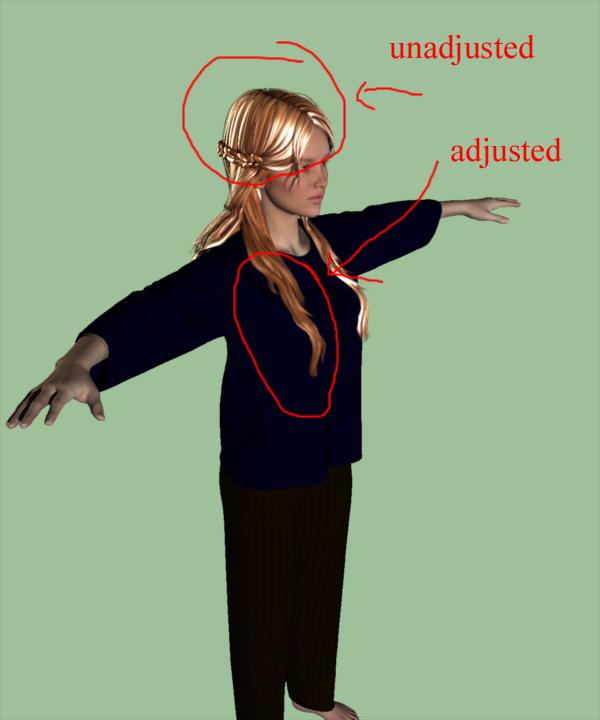
Here is an example of Daz's fairytale hair that was made for V4. It is a conforming figure, relatively high density as these things go, but loads and performs well in Carrara.
- Once a conforming/pareted hair (in this case converted from V4 to Genesis 2 using Studio) is loaded and conformed to Genesis 2 in Carrara like any other item, you can change the hair color using the Daz material pose presets. Highlight the hair figure subfolder (not actor) and double click the material preset in your content folder. In the attached, I changed from the default color to blonde by using this selection and double click method.
- Like any other item designed for either Poser or Daz Studio, it is best to tweak the shaders for Carrara. Here you can see that the default materials for the Fairytale hair look too smooth plasti, and shiny.
- To tweak for Carrara, now select the actor level of the hair model, and go to the shader room and check the settings. For this hair model, the default load has white highlights (equal to 100%), almost zero shiny, and the default bump actually is zero. You can confirm that a transmap did load in the alpha channel and other settings as desired.
- For this example, I adjusted the shaders for the front right strands of hair. I decreased the highlight and increased shiny and bump. In this test render, compare the adjusted hair tothe unadjusted.
- Once satisfied with your Carrara tweaks for all sections of hair, you can save the global settings for all sections by clicking and dragging from the multicolored sphere to the shader folder of your lower browser.
Even though that example was for V4 hair, the same principles apply to transmapped mesh hair designed for Genesis, Genesis 2, etc.
Reallusion's Character Creator 3 and CarraraPerhaps this is nothing new to Carrara users who use Reallusion products.
I recently bought Reallusion's Character Creator 3 (CC3) even though I don't have the latest version of Iclone which it is intended for.
Apart from the native figures which come with it, the program allows import of various other figures from DAZ(Genesis 1-8 and generation 4), Smith-Micro and Hivewire (so far).
The figures get re-topologised (EDIT I'm not certain if that's correct) and re-rigged to suit export to Iclone, game engines or other software. Before export, the figures can undergo lots of morphing and mixing adjustments (I bought a morph & skins add-on pack to greatly expand the choice). Clothes and hair can be imported; clothes can be weight-painted after fitting to conform to the figure.
I tried a few .FBX exports to Carrara incorporating some of Reallusion's motion files which I have from previous versions of Iclone and the results are quite decent.
There is a disclaimer from me in case anyone is thinking of spending cash on this: This is all I know and unfortunately I don't have time to test this out exhaustively. I'm not familiar with the quirks of DAZ's G3 and G8 figures and am not up-to-date with Reallusion's handling of them for lip-sync, eyebrows etc. so I can't help at all there.
Also, any bought motions (of which there are zillions in many categories) need Reallusion's export licence as opposed to the free ones I've used. Within my older versions of Iclone, I have the tools to create my own walks and other motions easily and should be able to get them into Carrara for free but I haven't tried doing so.
But here is a short video of the results:
The figures can be posed in Carrara but several extra bones exist at most joints. It is necessary to choose the 'wireframe' named bones and not the 'twist' named bones. (The 'twist' bones can be hidden, which helps make posing easier). You can see the difference it makes to choose the correct bones in the attached images!
I guess that VWD draping could be applied to clothes and hair but I don't have the Carrara bridge program for that yet.
Regards to all.
Edited to correct possible mis-understanding on my part
Can I render my DAZ scene in 3DS-Max, or Maya, or C4D?The best bet if money is an issue is to download Blender. Its free and there are a couple of scripts to help export a figure.
That said, there are a few export utilities for Maya, to Alembic, to ZBrush, and ofcourse Hexagon, from the top my head. When it comes to file formats, FBX is also supported, as is Collada (DAE)
So could you please confirm that Maya or Blender can render DAZ scenes--(combined with figures, environment, pose, morph, ect together) and generate a similar result (.png) as same as DAZ Studio rendered itself?
If so, which file format from DAZ to Blender, or to MAYA?
Thanks.
I tried one time, more as a "proof of concept" than anything. I think I used a script from Mcj. It imports correctly in Blender, but you need to tweak your materials for Blender Cycles (its render engine) to make it really look good.
https://sites.google.com/site/mcasualsdazscripts4/mcjteleblender3FBX works too, and with the same thing, you need to adapt the materials I believe.
So I am afraid I can't point you to a full workflow tutorial. I highly recommend trying it yourself, Blender can be downloaded here.I dont have experience with Maya (don't have it) but I know there are at least a few users on the forums, maybe do a forum search on that.
 Perfect! Thank you so much!Skin tones - why isn't there a baseline?
Look up humanae pantone a photographer took hundreds of photos of people and pantone have put together rgb swatches to correspond with the skin colours of the photographs .
Have a look at fiddling with iray skin srttings thread i think page 86 ? read Arnold c posts on a basic skin colour. But like others I have read around the subject taken on board what i have read on various threads on the forum here and elsewhere! But for me i load up a photo with a skin colour i am trying to achieve in a photo editing program or such like and take the rgb colours and transfer the rgb settings to the transmisson colour and tweak the other settings and dont forget the white balance you can almost change the tango G8 skin into something more realistic just by the white balance
Unreal Engine rolls out Real Time Ray Tracing"For Daz selling the same content from their own store in a different
one would be just a bad deal for them. 12% are 12%."I agree
You want to get buyers into YOUR eco system where every product there is fromyou.
It is much harder to get your product noticed buried in the cornicopia of someone elses Market.IMHO Daz's Game content division is doing a Horrible job at presenting Daz content to the indie game community
https://www.morph3d.com/morph-artist-toolsIf you search youtube it is hard to find any videos from "Morph3D" Less than a year old
and even those only focus on playing "dress up" with the Characters as still artist do in Daz studiohttps://www.youtube.com/results?search_query=morph3d
Game developers want to see the content& Characters being used in the their favorite engines
and demonstrations of the export pipeline.If you search youtube for "Iclone Character creator 3"
You see examlpes of the Characters used in the game engines as well as
pipeline tutorials for transfering the content to Unreal & unityCan I render my DAZ scene in 3DS-Max, or Maya, or C4D?The best bet if money is an issue is to download Blender. Its free and there are a couple of scripts to help export a figure.
That said, there are a few export utilities for Maya, to Alembic, to ZBrush, and ofcourse Hexagon, from the top my head. When it comes to file formats, FBX is also supported, as is Collada (DAE)
So could you please confirm that Maya or Blender can render DAZ scenes--(combined with figures, environment, pose, morph, ect together) and generate a similar result (.png) as same as DAZ Studio rendered itself?
If so, which file format from DAZ to Blender, or to MAYA?
Thanks.
I tried one time, more as a "proof of concept" than anything. I think I used a script from Mcj. It imports correctly in Blender, but you need to tweak your materials for Blender Cycles (its render engine) to make it really look good.
https://sites.google.com/site/mcasualsdazscripts4/mcjteleblender3FBX works too, and with the same thing, you need to adapt the materials I believe.
So I am afraid I can't point you to a full workflow tutorial. I highly recommend trying it yourself, Blender can be downloaded here.I dont have experience with Maya (don't have it) but I know there are at least a few users on the forums, maybe do a forum search on that.
Can I render my DAZ scene in 3DS-Max, or Maya, or C4D?The best bet if money is an issue is to download Blender. Its free and there are a couple of scripts to help export a figure.
That said, there are a few export utilities for Maya, to Alembic, to ZBrush, and ofcourse Hexagon, from the top my head. When it comes to file formats, FBX is also supported, as is Collada (DAE)
So could you please confirm that Maya or Blender can render DAZ scenes--(combined with figures, environment, pose, morph, ect together) and generate a similar result (.png) as same as DAZ Studio rendered itself?
If so, which file format from DAZ to Blender, or to MAYA?
Thanks.
Cannot load g3M or g3FHi I have searched forums and my own various notes but coudn't find an answer.
I installed G3 essentials via DIM but nothing shows up in smart content.
I then downloaded and manually installed to another directory which carrara can find and shows the files ok but clicking on G3F people I get the old Carrara "Error Occurred "
I mainly wanted to see what the lipsinc might look like with this version of Genesis which I believe has more facial morph. Maybe there isn't a dmc file anyway ?
Appreciate any advice on loading and if anyone has experience with G3 lipsinc would be glad to hear it.
No HD, No Peace! Or... A little peace? I dunno...But for those few figures Daz included it, (with both bundles and the base figure,) there was an outcry like you wouldn't believe. People actually posted they refused to purchase the figures because they didn't want the HD morph!
I'm very involved in most of the "Official 8" figure launches and really have only seen TWO people say they wouldn't buy the figure because it includes the HD. Did I miss a thread about it where a ton of people said they refused to buy a figure if it includes HD?
Comparing the two people I saw say they wouldn't buy a figure because of the HD to much much more people vocal about being HAPPY that the HD is included, I don't think I've seen anything close to an "outcry like you wouldn't believe" against the release of a figure with the HD included. But again, I might have missed a thread on it, so please post the link to it if there was a huge outcry about it. It's possible that I missed it and that there was a big outcry that I just didn't see.
Oh, boy, Tracy. You want me to find those threads…? lol… I'll try. I do remember complaints on several threads; each thread was dedicated to the new figure released. I suppose it could be the same people in all the threads.
I just remember being incredulous that people were complaining so vehemently about a free extra! It may end up being only two people that refused to buy, but they made so much "noise" I remember it as an "outcry." I mean, sheesh, if you really don't want something in a bundle, don't download it. (That's the generic "you", not any one person in particular.)
There was a clothing item in a pro bundle for one of the guys that I didn't like at all, so I hid it in DIM and not only didn't download it, DIM isn't nagging me to, either.
Anyway, I'll see what I can find.
hahah I do remember the two people made quite a bit of "noise" about it and posted several times about it. Like I said though, I could have just missed it if it was more than those two.
I remember a lot of people being pretty happy about the included HD though. :D
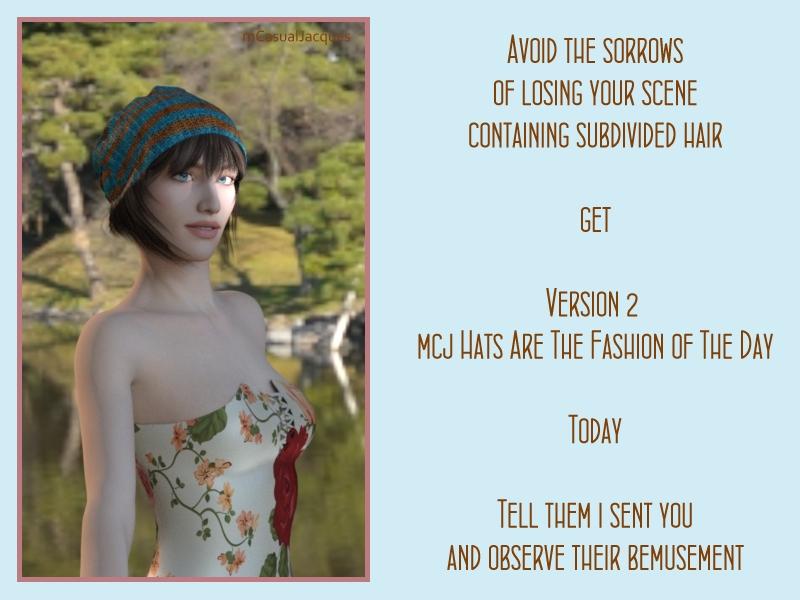
Get Version 4 ! mcjHatsAreTheFashionOfTheDay : Fit Any Hair in Hats Pc/MacNo But Really, You Should Get Version 2
with version 1 if your hair prop was subdivided and you created the hat-fit morph
the scene file could become un-openable !!! so you do want version 2
which makes sure to put the hair prop in non-subdivided state before computing the hat fit morph
then everybody ilives happily forever after
 No HD, No Peace! Or... A little peace? I dunno...
But for those few figures Daz included it, (with both bundles and the base figure,) there was an outcry like you wouldn't believe. People actually posted they refused to purchase the figures because they didn't want the HD morph!
I'm very involved in most of the "Official 8" figure launches and really have only seen TWO people say they wouldn't buy the figure because it includes the HD. Did I miss a thread about it where a ton of people said they refused to buy a figure if it includes HD?
Comparing the two people I saw say they wouldn't buy a figure because of the HD to much much more people vocal about being HAPPY that the HD is included, I don't think I've seen anything close to an "outcry like you wouldn't believe" against the release of a figure with the HD included. But again, I might have missed a thread on it, so please post the link to it if there was a huge outcry about it. It's possible that I missed it and that there was a big outcry that I just didn't see.
Oh, boy, Tracy. You want me to find those threads…? lol… I'll try. I do remember complaints on several threads; each thread was dedicated to the new figure released. I suppose it could be the same people in all the threads.
I just remember being incredulous that people were complaining so vehemently about a free extra! It may end up being only two people that refused to buy, but they made so much "noise" I remember it as an "outcry." I mean, sheesh, if you really don't want something in a bundle, don't download it. (That's the generic "you", not any one person in particular.)
There was a clothing item in a pro bundle for one of the guys that I didn't like at all, so I hid it in DIM and not only didn't download it, DIM isn't nagging me to, either.
Anyway, I'll see what I can find.
Get Version 4 ! mcjHatsAreTheFashionOfTheDay : Fit Any Hair in Hats Pc/Macthe morphs are added directly to the figure, so when you save the scene, it's daz studio itself that saves the morph in the data folder. not sure why it poses a problem in you case, i suspect it has to do with dforce or subdivision surfaces or daz's whats it called 3-axis morphs. my script adds old-school Poser morphsI don't think Daz Studio is saving the mcjFitHat morph in the data directory when I save a scene. In the scene file, I see the mcjFitHat section with all of its deltas listed. I searched my data directory an there are no mcjFitHat files. To save the morph in the data folder, it has to be saved as a Morph Asset.
I did another experiment with a hair figure with subD. After saving the file and trying to reload it, I got the same access violation. So, I think you are probably right about subD causing a potential problem. The same hair with base resolution worked fine.
The dForce hair that I had the original access violation on also used subD.
Thanks for your help figuring out the problem.
Get Version 4 ! mcjHatsAreTheFashionOfTheDay : Fit Any Hair in Hats Pc/Macthe morphs are added directly to the figure, so when you save the scene, it's daz studio itself that saves the morph in the data folder. not sure why it poses a problem in you case, i suspect it has to do with dforce or subdivision surfaces or daz's whats it called 3-axis morphs. my script adds old-school Poser morphsGet Version 4 ! mcjHatsAreTheFashionOfTheDay : Fit Any Hair in Hats Pc/MacUh oh! A trouble! The scene I cannot reopen the scene I saved with the the collider and hair under the hat. It crashes Daz Studio when opening the scene.

i will see if it's related to the plugin maybe it's better to delete the collider node after use but maybe i'll have to modify the collider plugin note that anyway a collider is not reusable after you close the scene because it forgets what it was attached to.
i tried 2 times to close and open a file wilt a collider, didnt crash,, i think it's not the collider plugin's fault
the error message you got seems to indicate the Morph channel which was created by the mcjhatsarethefashionoftheday script got into a fight with Daz Studio's scene initializer
maybe if the hair prop was subdivided there was a wrong vertex count in the morph
-------
sometimes, instead of opening a scene file, you can file/merge it with an opened file ... this may let you recover your scene
if it's really critical, you could go in the daz studio data/ folder, locate the files associated to the morph name and delete them
that way when you open the file the morph wont be found and maybe the scene loader will go "oh well" and load the scene anyway
--------
maybe there's an interaction with the dForce things, all my tests so far were done with hair figures and props
--------
Merge didn't work. I got the same access violation. Where does the script store the data files for the morph? (I didn't save the morph as a morph asset, so I figured the morph was saved internal to the scene.) The hair itself was installed with Daz Connect. Hopefully the script is not trying to write anything into the "cloud" folder. Anything a user writes into that folder is not later recognized by Daz Studio. Users have to save morphs and other assets into a non-cloud content library.
No HD, No Peace! Or... A little peace? I dunno...But for those few figures Daz included it, (with both bundles and the base figure,) there was an outcry like you wouldn't believe. People actually posted they refused to purchase the figures because they didn't want the HD morph!
I'm very involved in most of the "Official 8" figure launches and really have only seen TWO people say they wouldn't buy the figure because it includes the HD. Did I miss a thread about it where a ton of people said they refused to buy a figure if it includes HD?
Comparing the two people I saw say they wouldn't buy a figure because of the HD to much much more people vocal about being HAPPY that the HD is included, I don't think I've seen anything close to an "outcry like you wouldn't believe" against the release of a figure with the HD included. But again, I might have missed a thread on it, so please post the link to it if there was a huge outcry about it. It's possible that I missed it and that there was a big outcry that I just didn't see.
Get Version 4 ! mcjHatsAreTheFashionOfTheDay : Fit Any Hair in Hats Pc/MacUh oh! A trouble! The scene I cannot reopen the scene I saved with the the collider and hair under the hat. It crashes Daz Studio when opening the scene.
i will see if it's related to the plugin maybe it's better to delete the collider node after use but maybe i'll have to modify the collider plugin note that anyway a collider is not reusable after you close the scene because it forgets what it was attached to.
i tried 2 times to close and open a file wilt a collider, didnt crash,, i think it's not the collider plugin's fault
the error message you got seems to indicate the Morph channel which was created by the mcjhatsarethefashionoftheday script got into a fight with Daz Studio's scene initializer
maybe if the hair prop was subdivided there was a wrong vertex count in the morph
-------
sometimes, instead of opening a scene file, you can file/merge it with an opened file ... this may let you recover your scene
if it's really critical, you could go in the daz studio data/ folder, locate the files associated to the morph name and delete them
that way when you open the file the morph wont be found and maybe the scene loader will go "oh well" and load the scene anyway
--------
maybe there's an interaction with the dForce things, all my tests so far were done with hair figures and props
--------
Get Version 4 ! mcjHatsAreTheFashionOfTheDay : Fit Any Hair in Hats Pc/MacOh, WOW! This is great! I donated with your donations link on your website.
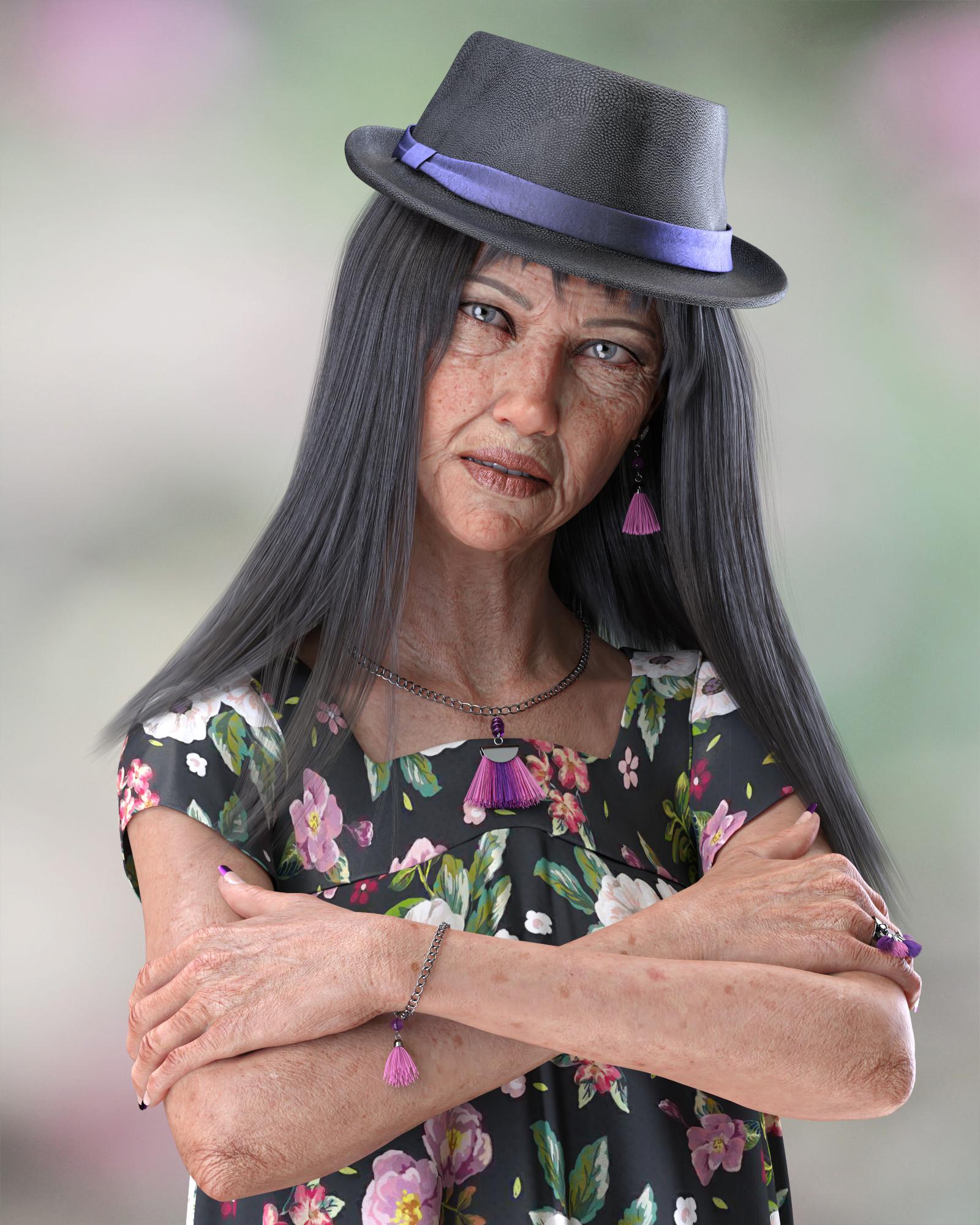
I took a scene that I recently completed and added a hat I recently purchased. The character is G8F and the hair is Bang Bob Hair with dForce. After the hair was simulated, I froze the simulation and used this script to morph the hair to fit under the hat. For comparison, the scene without the hat is in my gallery.
 No HD, No Peace! Or... A little peace? I dunno...
Morphs move the vertices of a mesh. Subd interpolates that mesh to effectively have 4x per step.
HD morphs will move the interpolated vertices.
So if the HD morph is trying to move out a vertex between two other vertices but subdivision is too low to add the vertex, well, nothing happens.
In a way it’s like trying to view a high resolution image on a tv with lower resolution; you’re not going to see the extra detail.
Daz 3D is part of

Connect
DAZ Productions, Inc.
7533 S Center View Ct #4664
West Jordan, UT 84084Licensing Agreement | Terms of Service | Privacy Policy | EULA
© 2026 Daz Productions Inc. All Rights Reserved.