-
March Madness 2019
So the Z Plus Size Model Shape Preset and Poses for Genesis 8 Female that just got released and comes with a 40% March Madness deal does include the Plus Size Model Morph, but still requires the Genesis 8 Female Body Morphs product - which triples the price?
That's a shame.That set of morphs is often at a discount that makes them very inexpensive; I picked them up for 3.99 on one such sale.
March Madness 2019So the Z Plus Size Model Shape Preset and Poses for Genesis 8 Female that just got released and comes with a 40% March Madness deal does include the Plus Size Model Morph, but still requires the Genesis 8 Female Body Morphs product - which triples the price?
That's a shame.Welcome to Hatsune Miku Anime Manga Cafe ☕You can trimmer her shoulder with kioki morph
Aiko 3 with SubD, Smoothing Modifier, and skin settings tweaking. She's pretty cute! I just have to figure out how to scale down her shoulders and how to give her expressions. :)
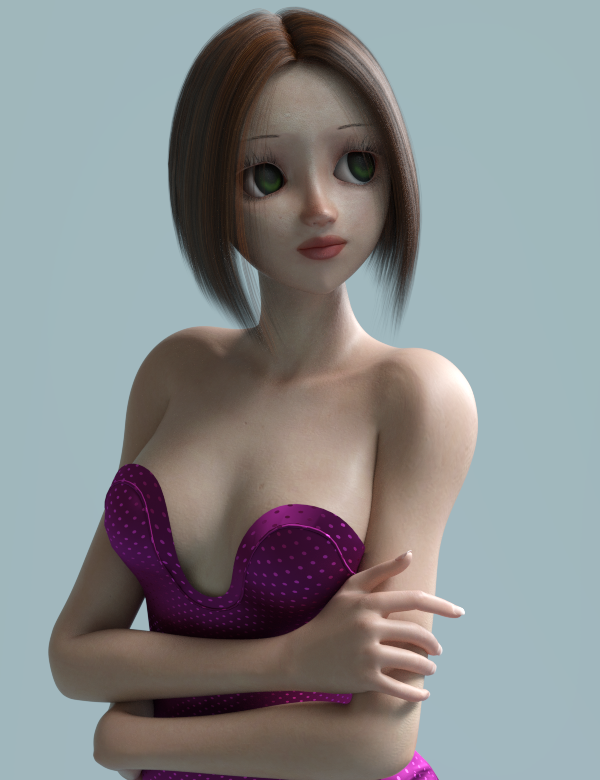
Very nice indeed I like the skin quite unique, you can trimmer her shoulders with kioki morphs, also there is a list of free expressions for Aiko 3 around the web.
Legacy UVs for Genesis 8 [Commercial]Greetings,
CypherFOX, I didn't do a Genesis Base UVs conversion (Male or Female) because so few characters actually use them, usually monsters or other specialist creatures, and they usually have peculiar morphs or geografts which cannot be used on Genesis 3 or 8 in any case. The Foxy and Wolfie characters you mention seem to be like that.
Most Genesis characters use V4, M4, V5 or M5 UVs. As Leana says you can use the Map Transfer facility (tutorial: https://www.daz3d.com/forums/discussion/95701/tutorial-converting-custom-genesis-2-uvs-to-genesis-3) to convert Base Genesis UVs before using one of the Legacy UVs products, but you may still face an obstacle with the Fox and Wolf geografts.
Yeah, I've written off the geografts as not going to work; I just want to transfer the texture over because between it and a new really nicely done tail that was released, it gives a toonish appearance of a fox-girl, with all the morphs and HD that come along with being a Genesis 8 character.
Thanks to the directions, I managed this image with G8F, after a lot of tweaking to the materials.
-- Morgan
Can't get this to workI have it. Installed it. Tested it. The morph does not apply. There is also a folder that applies the poses and the morph simultaneously. The pose applies but not the morph.
The .duf file has the wrong location for the file. In content there's an extra folder in there which is omitted in the duf. I'd mess it up if I tried to insert the missing folder name and if I moved the folder containing the product up a level to match WHICH DIDNT Work I tried it, DIM wouldn't find the files to uninstall. The product itself is in the wrong place totally anyway.
It's broken.
Lots edits as I was checking..
The morph is in data but it has a different name than the .png. The .duf file points to the png name, not the morph name.
It's broken.
I'm tired of this already
 Can't get this to work
So it sounds like you use the old Poser tree to find your products rather than Content Library (which is how I load stuff, so... awesome). First, try deleting the Gen 8 figure currently in the scene, then load a fresh one. Then, with that selected, try the Shape morph under the pose folder again . If that fails, there should be a morph under the Actor/People or Actor/Full Body part of the new Gen 8 Female that's called Z Plus Sized Model, or something like that. Try dialing that up.
Welcome to Hatsune Miku Anime Manga Cafe ☕I would not know I'm a Carrara user she always looks good on Carrara she bends pretty good just put limits on on certain joints, im not sure if Daz Studios has Limit Movements because you dont want to bend her too much. Now Kioki and V3 Morph Addons works pretty good on her.
Oh, that's too bad. I don't have V3 or Kioki. I've added them to my wishlist though. :) I think it would be fun to use Aiko 3 every once in a while as I keep running into cute products made for her.
Save a combination of morphs as a single morphRight, it's a master slider. If you have lots of tweaks, all of which are on and off (not corrective morphs which need to vary depending on another property) thata re your own work then of coruse you can bake them (in Zbrush, or in DS by exporting as OBJ with just those morphs et and loading as a new morph) to a single morph first. If you saved any custom morphs as Morph Assets, then save your master slider as a Morph Asset, then it will be available on all instances of the base figure.
Can't get this to workI don't have the product but from the store page's Read Me it looks like you need the Genesis 8 Female Body Morphs for it to work: https://www.daz3d.com/genesis-8-female-body-morphs
It looks like you should be able to find the shaping preset (to apply the body shape to a Genesis 8 Female character) in your Content Library under: Shaping >> Apply >> Body
I have those body morphs installed already. There is nothing under the shaping folder for this. It is in a pose folder that loads outside the genesis 8 folder where everything is. It just says Genesis 8, click it and there is a pose folder full of the poses you can use, and one apply morph icon which does nothing. The poses will work but the morph does not. The body stays the way it originally loaded.
Can't get this to workIf you installed the product while Daz3d was running then you might want to try and restart the program first, morphs and stuff usually require a restart to show up.
Daz was not loaded when I installed this morph. I have restarted it many times and still nothing.
Can't get this to workHave a look in the "Parameters" menu, and look for submenu: 'Real World'
My picture is an example of another 'big girl morph'Mod Edit :- Image removed due to nudity
Nothing under real world for this. It does have a setting under the "shaping" tab, "currently used" with a dial labeles for this morph. It is set at 100 and moving the dial does nothing.
Buy Something That Doesn't Work in Carrara? Post your Questions and Workarounds here. (please)https://www.daz3d.com/ball-joint-doll-for-genesis
Ball Joint Doll for Genesis - wondered if anyone got this to work ?
When I apply the morph target wwird things happen around the head and that's all.
thanks in advance :)
Save a combination of morphs as a single morphSo does that mean that the new slider is simply a master slider that controls other sliders? If so, then I assume that I cannot delete the other sliders, So if I have a morphed figure that has lots of small morph adjustments, made in Zbrush, then I still cannot delete them using this method? Will the new ERC frozen morph be available in all other G8F figures that I load?
HUGE PROBLEM: I need a G8F HD-Addon that looks as detailed & muscular as Ophelia 7's HD Addon!. Just use G3F with that HD morph you like so much.
This. I go back anf forth using G3 and G8 with sharing of some morphs and all textures. Sometimes I can't tell thye difference
Figure Setup not working ????Is this because the .obj model created in another 3D program is faulty in some way ?
I guess you have no DS: FaceGroups / ZBrush:PolyGroups / Blender: VertexGroups in your exported OBJ file. DS is looking for those Group informations in the OBJ file to create bones for them in the Figure Setup pane.
Import the OBJ first in the usual way open the Tool Settings pane and select the Geometry Editor and have a look if any FaceGroups gets imported. If not well maybe you can create them from the Surface Groups or otherwise get the export right to include the original groups in the other 3D program you are using.
I've made a few (kind of tutorial) videos about the Figure Setup and creating Face Groups with the Geometry Editor also including the Transfer Utility and creating a GeoGraft in Daz Studio. I've start to use the Figure Setup in the second video.
- DazStudio Twi'lek for G3F ReDone 01 Face Groups
- DazStudio Twi'lek for G3F ReDone 02 Figure Setup
- DazStudio Twi'lek for G3F ReDone 03 Weight Map
- DazStudio Twi'lek for G8F 01 Editing ZarconDeeGrissom's Version
- DazStudio Twi'lek for G8F 02 Opacity Map
- DazStudio Twi'lek for G8F 03 Transfer Utility Failed
DS & Titan RTXEDIT. For the sake of completeness it is anyway to be seen if that 300% gain is referenced to real production scenes with large textures and complex shaders. Since RTX accelerates only the raytrace part then when we have complex shaders it can only get as far as a 50% gain as @drzap pointed out, and in this case OOC may work fine enough.
https://www.facebook.com/groups/RedshiftRender/permalink/531192430663305/
Oh absolutely. In fact, see this post from about 2 months ago where I brought up this very issue specifically in the context of Iray rendering:
For an idea of what it could mean for DS/Iray rendering performance if/when full RT core support comes, take DS/Iray's implementation of OptiX Prime as an example. OptiX Prime is an entirely software-based, hardware-agnostic addon library to Nvidia's general purpose pathtracing API OptiX which specializes in doing one thing and one thing only - determining which direction a single ray of eg. light should go so that a Cuda/CPU core can then concentrate on the relatively straightforward task of rendering a pixel value from it. In other words, a single instance of OptiX Prime serves exactly the same function as an RT core. The only key difference betweeen them being that instances of OptiX Prime take up precious clock cycles of general purpose Cuda/CPU core processing power, whereas RT cores are able to function at a much higher level of comparative performance and with no ill effects on any other parts of the system since they exist as self-contained hardware units embedded on the GPU substrate itself.
So in a hypothetical version of Iray with full RT core support, it isn't inconceivable to think that you could see a Pascal era "OptiX Prime acceleration enabled" level increase in raytracing performance (which my tests on a 10xx series card put at around 20%) compounded in direct porportion to the number of RT cores on your card. So on a graphics card with 1 RT core, a 100 minute render without RT core support could take as little as 80 minutes with it included (25% better performance.) Likewise on a card with 2 RT cores it could take as little as 100 - 20% of 100 = 80 - 20% of 80 = 64 minutes (56% better performance.) While on a card like the 2070, with its 36 RT cores, a 100 minute render could take as little as 100 - 20% (repeated recursively 36 times) = 0.04056481921 minutes aka 2.43 seconds (which would amount to a raytracing calculation performance increase of 246419%...)
While this last number may seem completely unrealistic (yes, I meant to write 246419%) remember that the only thing actually being accelerated here is the initial step of the overall raytracing process itself. Which, while historically the most time-consuming part of the process, isn't the only slowdown point. For example, Cuda cores are still gonna take the same amount of time as before to render the final values of pixels. It's just that they will no longer be stuck constantly having to help make/wait for the delivery of fresh path data so that they can use finish those pixels. They can just get what need ready made and in real time from the RT cores, and be about business. If you were to venture an estimate as to what the real-world performance increase in all of this would be, I'd say about an order of magnitude - so about 10x better performance in raytraced DS/Iray rendering as currently seen on Turing cards today.
Keep in mind that this 10x (+1000%) performance prediction serves merely as an upper limit of the increased performance you could expect to see from RTX hardware in scenes without complex shaders.
So yes. RTX acceleration is only going to enhance performance on a scene-by-scene basis. However, in the scenes where it is going have a noticeable impact, that impact is potentially going to be huge (within multiple orders of magnitiude - as thisd most recent Puget Systems study indicates.) No longer having raytracing as the most time-consuming part of the rendering pipeline is gonna mean that most performance slowdowns will be due to complex shading or insufficient texture transfer bandwidth - which is where my trepidations with OOCR come in.
HUGE PROBLEM: I need a G8F HD-Addon that looks as detailed & muscular as Ophelia 7's HD Addon!Then the answer to your initial question is "There isn't one". Just use G3F with that HD morph you like so much.
HUGE PROBLEM: I need a G8F HD-Addon that looks as detailed & muscular as Ophelia 7's HD Addon!Is it possible to track down the artist who made Ophelia 7's HD-Addon, then pay him to make a similar HD-Addon for Genesis 8?
Maybe we can start a kickstarter to fund it.
An HD Add-on is made for a specific character, hence the "add-on" and is usually created as part of the character creation process. As for a PA making something similar, I already referenced Leony HD above by Raiya which comes with her own HD Add ons included and is actually more muscular than Ophelia, though not as aged. That said, most of the muscular mass on either Ophelia or Leony comes from the normal morphs, not the HD add on, which contributes primarily the ultra fine details like skin wrinkles and veins. If it's just muscles that you want, there are the base bodybuilder and fitness morphs in the base morph packs and some very good HD add-on muscle products such as https://www.daz3d.com/muscularity-morphs-for-genesis-8-female-s that will bulk out just about anything. If you want the additional fine details, there are products like https://www.daz3d.com/add-some-veins-hd-for-genesis-8 that can generate a lot of that. And if what's being refered to here as "muscular" is actually a refernce to Ophelia's more Junoesque stature, that can be dialed in as well using the base morphs.
Leony HD morphs are problematic in so many areas and it's of poor quality. I didn't want to say anything, but since you brought it up again. The neck, lower buttocks and obliques are just completely whacked.
The other two morphs you mentioned don't have the ultra fine detail that Ophelia 7's HD-Addon has.
You're welcome to prove me wrong by doing comparison renders, but there is no way any of you can make Genesis 8 HD muscular look as good as Ophelia 7's HD addon, no one can do it, it's impossible. The only viable solution is for the guy who created ophelia 7's hd-addon to make the same exact thing for a genesis 8 character.HUGE PROBLEM: I need a G8F HD-Addon that looks as detailed & muscular as Ophelia 7's HD Addon!Is it possible to track down the artist who made Ophelia 7's HD-Addon, then pay him to make a similar HD-Addon for Genesis 8?
Maybe we can start a kickstarter to fund it.
An HD Add-on is made for a specific character, hence the "add-on" and is usually created as part of the character creation process. As for a PA making something similar, I already referenced Leony HD above by Raiya which comes with her own HD Add ons included and is actually more muscular than Ophelia, though not as aged. That said, most of the muscular mass on either Ophelia or Leony comes from the normal morphs, not the HD add on, which primarily contributes the ultra fine details like skin wrinkles and veins. If it's just muscles that you want, there are the base bodybuilder and fitness morphs in the base morph packs and some very good HD add-on muscle products such as https://www.daz3d.com/muscularity-morphs-for-genesis-8-female-s that will bulk out just about anything. If you want the additional fine details, there are products like https://www.daz3d.com/add-some-veins-hd-for-genesis-8 that can generate a lot of that. And if what's being refered to here as "muscular" is actually a refernce to Ophelia's more Junoesque stature, that can be dialed in as well using the base morphs or add-on packs like Zev0's.
Skinny ribs for Genesis 8Thar sort of rib showing you speak of is usually dependant in the arms being stretched up & out and breath being inhaled on a thin not very muscular person more than being really too skinny like emanciated. All of the DO waif style characters would show ribs like that but only in specific situations. It's not going to look right in other poses and I don't know there is financial incentive to spend so much time sculpting such a niche item.
If you look at the images I showed above you will see two with arms up and two with arms very much down, so the ribs showing does not depend only on arm position. Making a skinny ribs morph would not take a long time, it is a simple mesh morph, it does not require any special rigging, it simply needs access to DAZ3d HD technology as there are insufficient polygons in the G8F mesh to allow this without the HD technology.
Why don't you buy X-Morphs and see if you can transfer only the ribs over to a seperate morph?
I do have X-morphs but as I pointed out, the Emaciated morph does not show ribs at the side as would be realistic (as shown in the images above), so isolating the Chest part of the Emaciated morph would not work.
By the way - those pictures are using harsh, high contrast studio lighting, the models have deeply inhaled to expand and flex their rib cages, and to top it off, sucked in their guts. Hardly a realistic way to present the fit of clothing but whatever.
I'm not asking you to like a Skinny ribs morph and I don't want to get in to a discusion about what is artistic or not, that would be off topic.
If you are animating you need to sync the ribs showing at the right time and that emanciated morph is closer than you think. Just don't dial it in all the way. And if you are animating then alternate between 25% emanciated & 50% or 75% emanciated depending on the current pose and whether in rib cage is expanded with an inhaled breath.
As I pointed out, the Emaciated morph is not realistic as it does not show the ribs at the side of the chest, only the front. I'm sure its a wonderful morph for many purposes but not what I want.
Thanks for the tip on animating, I'll bear that in mind when eventually I get around to trying animation.
Daz 3D is part of

Connect
DAZ Productions, Inc.
7533 S Center View Ct #4664
West Jordan, UT 84084Licensing Agreement | Terms of Service | Privacy Policy | EULA
© 2026 Daz Productions Inc. All Rights Reserved.