-
How do I configure backpack straps to stay in place?
Did you model the backpack and "chest rig" yourself?
If so, the easiest way would be to finalize the pose and then modigy the model in your modeling program to fit clothed figure correctly.
I used Hexagon to modify the backpack from this World War II uniform. You can see my Daz Studio viewport saves before and after here. You can see how distorted the backpack is when "fit to" the posed figure. I lost my first attempt when Hexagon died, but I also changed my starting point.
I learned you don't need to undo the distortion of autofit if you only parent the backpack to the figure. That also lets you move it to where the least amount of things need to be morphed. I used the shirt as my guide in Hexagon, and made the straps fit as realistically tight as I could. And I was able to select and move the each of the rigid parts as one, keeping their original shape. Once I was happy with the changes, I saved the backpack as a Wavefront OBJ. You can do the same from the program you modeled the item in originally. When you like the results, save the file as you did the original object. Bring this into Daz Studio and parent it to your figure.
You could use the modified object to create a morph for the original, but that's several extra steps and won't give you any better results in the final render.
Even if you didn't model the backpack yourself, you can modify it in a modeling program like Hexagon, though it may take you a lot longer if you have to learn the program first.
Things missingGreetings all. Here's the situation, I was running out of space on the main drive of my PC so initially I created a "My Library 2" folder on another drive in my PC. After purchasing more products I couldn't install them due to lack of space on the main. I changed the installation folder to the 2nd drive but everything wasn't coming up. So I figured just un- and reinstall to get it back, no luck plus now all my morph sliders are gone. I'm purchasing a new drive tomorrow and reloading Win10 on it but what do I need to do to get Daz 3D back to normal after I install the new drive. Thanx in advance.Medieval, Fantasy Clothes for Teens and youngerI know that some of the clothes work well for young Lords and Ladies, but we could use more selection for the young nobles and young peasants alike, after all we have the King's son! And maybe some different, more youthful dresses for the girls in the royal court.Interesting topic. I'd love to see some fantasy childrens clothing too. And since it's our artwork it can be whatever we want right? I agree about possibly raising the neckline for creating a younger version. Maybe a looser cut on the waistlines? Slightly shorter hem to allow for running, or even split skirt for both male and female if you are going for fantasy instead of authentic. I definitly need more rag clothing and had wondered if I could create them out of some of jepes scarves.
But I have a question to add to this. Can the adult clothing items even be used on the children in daz? I've not tried it but that is in my future plans. I know there are some gen4 clothing items that will work pretty well for me, including the fantasy character ones. I've already tested them and found out they will transfer over to an adult g8 male, so I'm going to assume they will also work on a kid.
Love your samples. I would definitly add those to my daz library if they were available except I'd prefer a less modern gown bodice top.[Tutorial] Converting Custom Genesis 2 UVs to Genesis 3I own 2 products from rendo by CaymanStudios
Legacy UVs for Genesis 3: G2F
Legacy UVs for Genesis 3: V4So the UVs for Gen3: G2 would be the one I'd use?
The Map Transfer utility allows you to convert UVs within a Generation only. So if you have an obscure Genesis 2 UV like Gia 6 you can only transfer it to another Genesis 2 UV. Genesis itself (Genesis 1) does natively support V4 UVs. So if you want to use a Genesis texture use Legacy UVs for Genesis 3: V4, and if you want to use a Genesis 2 Female texture use Legacy UVs for Genesis 3: G2F.
ok, great, thanks!
Help identifying Female Characters (by Zeddicuss)Hey guys :)
I'm trying to find two female characters (guess G8) used by Zeddicuss in many promos, can you help me?
https://www.daz3d.com/z-aerobics-step--dumbbells-props-and-poses-for-genesis-3-and-8 (the brunette)
https://www.daz3d.com/z-runway-model-morph-dial-and-one-click-expressions-for-genesis-3-8


Also a tip about the material would be appreciated, the one used in Z Runway Model is wonderful :)
Skinny ribs for Genesis 8About Male, I use 20% of Wither and X-Morphs (create body morph)
 Morph Loader Pro - Geometry did not match
Thanks - update does require matching verticies. Just been wrestling with the Sledgehammer - it's a bigger problem than my first thought because its 1643x1643x3 differences to formulaically identify which 12 of the 1643 are the culprits - but it's an interesting problem so I'll push it further tomorrow. Cheers, Lx
UPDATE from today:
Transfer Utility does magic. Make sure the default "fit to" and "parent" uptions are unticked for this purpose or the model behaviour seems downright wierd (eg one bone following and the others not).
Whatever transfer utility does re-writes vertex orders so simply making the same fix on any morph mesh and then importing the morph (I'm using Hexagon Bridge) does not work (works technically but the outcome is distorted garbage) - the solution was bridge the transfered object back to Hexagon and then use the old morph models as a template to re-create them on the newly transferred mesh. Some work but way quicker than working from scratch.
Morph Loader Pro - Geometry did not matchYou can import the corrected OBJ and use the Transfer Utility to rig it from the original. There's also the Update command, but I think that requires matching vertices.
From Genesis 1 to Genesis 8?You won't be able to save the UV, that is specific to the genesis figure. There is a product that will add geographs to allow for the UV to be used on the newer figures though (look for cayman studios). As for the morph, GenX will allow to to transfer the shape to Genesis 3, but at the moment that is no produst in the store to transfer shapes to Genesis 8.
oh i am updating because i do not want to use the old UV!
hmm, transferring to Gen3male is not bad! so all i need is to get GenX to get my shape to G3M, right?You need GenX2 and the G2 add-on and the G3 add-on to transfer a morph to G3M.
From Genesis 1 to Genesis 8?You won't be able to save the UV, that is specific to the genesis figure. There is a product that will add geographs to allow for the UV to be used on the newer figures though (look for cayman studios). As for the morph, GenX will allow to to transfer the shape to Genesis 3, but at the moment that is no produst in the store to transfer shapes to Genesis 8.
oh i am updating because i do not want to use the old UV!
hmm, transferring to Gen3male is not bad! so all i need is to get GenX to get my shape to G3M, right?Genesis 8 Combination of Morphs into NEW Character?I fi understood correctly, here's what you can do:
- Create your Genesis character, with its morphs and all and export it as an OBJ
- In Parameters, set Genesis' resolution to "Base", Subdivision and RenderSub levels to 0 before you export.
- Load a new Genesis, zeroed, and hit Edit / Object / Morph Loader Pro
- Find and click Choose Morph Files and select your OBJ
- If all is good, a morph with the combined character will be created in Parameters, under Morphs
That's the idea! Anyway, as Richard said, those would be only for personal use. If you want to redistribute your own morphs, they'll have to be, well, your own -- not a combination of other people's. You can do that exporting a zeroed figure, modify it in Blender, save it as an OBJ and load it with Morph Loader Pro. More info about all this, by the wise SickleYield, here.
*Released* Bold Brows For the Genesis 8 Males [Commercial]Thanks everyone :)
First, @chevybabe25, this will be an insta-buy when it hits the store. Thank you, thank you, thank you!
With @jepegraphics question in mind, these will be rigged for the G8M figure, right? So we could actually use the corresponding face bones in the brow to modify the shape to an extent, or so it seems to me. (I've done this with other fiber mesh brows for G8…)
Yes.. You can use those if you are trying to achieve something special in an already custom morphed figure. For those that do not know about the facial rig :
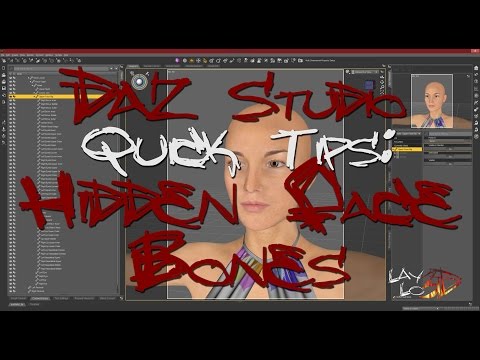
Or if you are are in the process of making a custom morph just pay a smidge more attention to the actual shape of the brow. When I work in zbrush on a custom morph, I always add a head texture map with just an average shaped brow painted on. This way I can see exactly what I am doing to that area.
Welcome to Hatsune Miku Anime Manga Cafe ☕I am unaware of any comprehensive package that ever was available that addressed all of the bending issues associated with A3, Diva, similar to what is available for V4, for example. What there is tends to be in bits and bobs here and there. Casual does have a couple or so on his site, including one that addresses the thigh bends, found under the Morphs categories there:
https://sites.google.com/site/mcasualsdazscripts4/mcja3sitmorph
He has quite a lot of other A3 stuff on his site as well. There is also an improved smile morph and neck joint correction there.
If I think of or stumble across any others I'll let you know. BTW, I don't know which package you picked up, but did it include her head and body morphs? Not the ones that come with the base figure, but the addons?
Oh nice - free too! Cool! Thank you. :) I appreciate it!
I got the Aiko 3 Professional Bundle.
Can't get this to workI have it. Installed it. Tested it. The morph does not apply. There is also a folder that applies the poses and the morph simultaneously. The pose applies but not the morph.
The .duf file has the wrong location for the file. In content there's an extra folder in there which is omitted in the duf. I'd mess it up if I tried to insert the missing folder name and if I moved the folder containing the product up a level to match WHICH DIDNT Work I tried it, DIM wouldn't find the files to uninstall. The product itself is in the wrong place totally anyway.
It's broken.
Lots edits as I was checking..
The morph is in data but it has a different name than the .png. The .duf file points to the png name, not the morph name.
It's broken.
I'm tired of this already

My point exactly. The folder installs just above the Genesis 8 folder in the people folder. I tried to move it inside the genesis 8 female poses folder and it didn't help.
The folder mislocation is probably a second bug. I don't understand why QA doesn't catch these folder mislocations, as they have to install and load the products and therefore can't avoid noticing them.
[Tutorial] Converting Custom Genesis 2 UVs to Genesis 3I own 2 products from rendo by CaymanStudios
Legacy UVs for Genesis 3: G2F
Legacy UVs for Genesis 3: V4So the UVs for Gen3: G2 would be the one I'd use?
The Map Transfer utility allows you to convert UVs within a Generation only. So if you have an obscure Genesis 2 UV like Gia 6 you can only transfer it to another Genesis 2 UV. Genesis itself (Genesis 1) does natively support V4 UVs. So if you want to use a Genesis texture use Legacy UVs for Genesis 3: V4, and if you want to use a Genesis 2 Female texture use Legacy UVs for Genesis 3: G2F.
[Released] RSSY Clothing Converter from Victoria 4 to Genesis 8 Female [Commercial]I've been trying to convert an clothing and it's getting a lot of really weird deformations.
It seems to be due to the way it reassigns the bones seems to be deforming it like crazy when it converts it over. That and there seems to be strange deformations in the armpit as a result of the transfer.
A lot of the issue seems to be the way the bones are assigning the faces.
Any idea how to fix this?
I doubt I have an idea how to fix your issue. There are some clothing items that just don't work. Posting pictures might help though.
[Released] RSSY Clothing Converter from Victoria 4 to Genesis 8 Female [Commercial]I've been trying to convert an clothing and it's getting a lot of really weird deformations.
It seems to be due to the way it reassigns the bones seems to be deforming it like crazy when it converts it over. That and there seems to be strange deformations in the armpit as a result of the transfer.
A lot of the issue seems to be the way the bones are assigning the faces.
Any idea how to fix this?
Genesis 8 Combination of Morphs into NEW Character?Thanks for the quick reply Richard!
I thought maybe if I export it as FBX and bring it back it will somehow reset / zero all the morphs but the character will remain with it's morph,
But I'm not sure how it works exaclty, still exploring Daz and trying to learn this magical tool.Genesis 8 Combination of Morphs into NEW Character?That would not be soemthing you could share, since most morph sets do not allow redistribution in that way or at best place restrictions. In any event, a lot of morph have adjustments that kick in only in certain situations (for example, an eye shape may need an adjustment to work correctly with teh EyeClosed morphs) and baking will strip out the links that enable those corrections to work.
Can't get this to workI have it. Installed it. Tested it. The morph does not apply. There is also a folder that applies the poses and the morph simultaneously. The pose applies but not the morph.
The .duf file has the wrong location for the file. In content there's an extra folder in there which is omitted in the duf. I'd mess it up if I tried to insert the missing folder name and if I moved the folder containing the product up a level to match WHICH DIDNT Work I tried it, DIM wouldn't find the files to uninstall. The product itself is in the wrong place totally anyway.
It's broken.
Lots edits as I was checking..
The morph is in data but it has a different name than the .png. The .duf file points to the png name, not the morph name.
It's broken.
I'm tired of this already
My point exactly. The folder installs just above the Genesis 8 folder in the people folder. I tried to move it inside the genesis 8 female poses folder and it didn't help.
Daz 3D is part of

Connect
DAZ Productions, Inc.
7533 S Center View Ct #4664
West Jordan, UT 84084Licensing Agreement | Terms of Service | Privacy Policy | EULA
© 2026 Daz Productions Inc. All Rights Reserved.