-
How to transfer copy/pasted references to different computer???
crosswind said:
Yes, after you Pasted Reference, the reference metadata of that material preset was updated to cms database but not to the shared XML file of metadata (*.dsx file in: runtime\support folder) of the main product.
You just right click on the main product to "Edit Metadata", you'll see the added material preset in Assets list, then tick Auto Export on the bottom of the diaologue box, Accept. Then the main product's dsx file will be updated. In this way, you can re-import metadata of the products in other PC, after replicating your Daz Library from current PC to that PC...
Another way is: you can backup the whole cms database and restore it into other PCs... then all metadata can be synchronized.
If I'm using the same hard drive and just moving it from one computer to the next is this still the process i need to follow. Ive done this to a lot of products so im looking at the second option. What would be the file path for the cms database? Also thank you for your help.
How to transfer copy/pasted references to different computer???Yes, after you Pasted Reference, the reference metadata of that material preset was updated to cms database but not to the shared XML file of metadata (*.dsx file in: runtime\support folder) of the main product.
You just right click on the main product to "Edit Metadata", you'll see the added material preset in Assets list, then tick Auto Export on the bottom of the diaologue box, Accept. Then the main product's dsx file will be updated. In this way, you can re-import metadata of the products in other PC, after replicating your Daz Library from current PC to that PC...
Another way is: you can backup the whole cms database and restore it into other PCs... then all metadata can be synchronized.
How to transfer copy/pasted references to different computer???So it took me a while to figure out how to correctly transfer my script and favorites menues from one computer to another. Now what I'm trying to figure out is if i can get all of my pasted references to move over as well. In case i need to explain exactly what I mean here goes. Lets say I have an outfit and that outfit has a texture package made by another creator and does show up in the smart conent with that outfit. You open that material package up in Products in the content library. Fromt the smart contente window you right click on an item Show Asset In>Content Library>Products. Once in this window you can right click on and item(s) and click Copy. Then you can navigate to the product that has the outfit for this example. Once in the product that you want to move the copied items to you right click in the pane and select Paste Reference. This will create copies of those items in that product that will show up in smart content so things are grouped together nice and neat rather that having to go to different products in smart content. So, with all that being said my question now is when i transfer to a differenct computer, how do i also transfer that information. I use the same portable hard drive on both computers, I've exported and imported metadata to get my smart content working. Ive got my custom menues working on both computers now but not these references. Also for that matter, Items such as custom materials that I've created no longer show in smart content on the other computer I've transfered to either. Please help.
Diffeomorphic - How to export animation?For the test, you better import an Action or make an animation with the rig first... Bake to FK makes no keyframe if the timeline is empty...
No need to change module name of MHX...
Diffeomorphic - How to export animation?I can't get it work on G8F too.
Where did I do wrong.
My steps:1. In blender I import a figure by using easy import.
2. covert the rig to MHX
3. Move a hand IK bone.
4. locrot.
5. move to the frame 20
6. Move the hand IK bone again to somewhere else
7. locrot.
8. Bake Pose to FK Rig.
9 Save Pose Preset.
Save it to a file.10. On DAZ click a figure.
11. Apply the pose preset.
Nothing happened.
Plain Street HDRHDRIs
I recently bought a large collection of night skies, mostly with stars, here from Orestes Graphics. They are fine sets, and excellent for my purposes. But for a lit city at night, you wouldn't be seeing many stars.
Some HDRIs I passed by because I need more astronomy:https://hdrmaps.com/hdris/night/
https://www.hdri-hub.com/hdrishop/freesamples/freehdri (and a larger paid collection).
https://polyhaven.com/hdris/night
There are some HDRI night and evening city street wraparounds at those links; whether any of those streets have the character you want is another question.
Aside from the city streets, there are also sky images with flat or flattish foregrounds your urban 3D scenery can easily hide. Some of these could easily be darkened if need be. https://polyhaven.com/hdris/skies
Streets
There are a lot of different urban models, with different character, and I don't know which you want. Some city sets where you can still see the character of older Catholic Europe, if that's of interest:
Faveral:
Alsace (more recent and gorgeous)
Yvoire (more recent also)
Provence (also)
Le Village Bundle (older)
Stonemason:
Stonemason also has a lot of less specific, more modern, often dystopian urban work.
at Renderosity:
Parisian Street (older)
European Street for Daz Studio (older)
There is also, at Renderosity, an extensive collection of general city sections by Dreamland models, called Movie Set. (older)
The ones I note as older have smaller textures, also simpler in appearance. They're less demanding to load and render, but they were less likely to get weathering, dirt, incidental scuffs, and other signs of realism, as you can easily see in some of the previews.
If you're going to haul older sets, with those lower resolution, pristine-looking textures, into the same render with something recent, more detailed, or grungier, you probably either want to keep it out of strong light and out of the foreground, or rescale and rework the textures, or apply new shaders to the surfaces.
I don't know of any Daz/Poser models of some obvious completely modern cities to hold a Carnivale-style celebration. At that point I might drag in models from modern-looking urban sets and some of the older-looking ones. I've never rendered a finished work that didn't include background elements from different sets, myself.
Going outside Daz/Poser to import models is possible, but outside of this market, they tend to be more expensive, so I don't do it that often.
Diffeomorphic - import errorhttps://prnt.sc/xzL8_SuLXmIL
I tried to import daz3d to blender using diffeomorphic.
I use easy import and get a bunches of error.Anyone know how to solve this?
How to rotate a certain area of a mesh (character lip)?First, you can use FACS expression dials like Mouth / Jaw Open, Mouth Roll, Press, Purse, Shrug, Up / Down, etc.... or manipulate Lip sub-nodes under Lower Face Rig to easily get a "bite lip" expression. (like ss1)
Well, making it in Blender is doable but will be cumbersome, especially for the case of manipulating Lips (as well as Jaw, mouth cavity moving... etc.) no matter with Edit or Sculpt mode... because making such a "bite lower lip" is not a simple "lip rotation"....you need to do it with Mask while having to make other partial parts "staying" or "moving" naturally with this expression. Then after importing back to DS, you may also have to check rigging, corrective morphs as well... blah blah blah.
So better get to know FACS first of all, then try to well use them... At least you may dial some expressions first, fine-tune them in Blender and import delta back...rather than doing all from scratch. Then you'll get much better results, as well as pretty efficiently for sure.
AIUTO...CHI CONOSCE L’ITALIANO? PARTE QUATTORDICISe non fai così non ci sbatti la testa e non impari come funziona.
L'import della mesh riggata si fa (l'ho fatto per la spada Monado e il Gundam Arios), solo che poi non hai pose compatibili, infatti posare il Gundam è una rottura di palle perchè va fatto manualmente.In DAZ puoi anche modificare i joint (il Gundam Arios non si trasformava nativamente.. ho dovuto mettere qualche joint in più per trasformarlo in aereo).
Scometto che i joint inutili stanno tutti alla fine di qualcosa (es. fine del piede o in sommità alla testa o sulla punta delle dita). Quelli sono i control point che ha usato l'animatore per posare il modello originale. Siccome i joint stanno dentro alla geometria, conviene mettere dei joint esterni - più facili da selezionare - per posare la figura.Comunque se hai bisogno di importare un FBX.. fammi un fischio
[SOLVED] Saving assets for product for saleThat is metadata, accessed by right-click on its folder then select the files and adjust their Content Type in the dialogue box, using the field in the middle.Though DS should geenrally do that for you, as long as you don't move the files from outside DS.
AIUTO...CHI CONOSCE L’ITALIANO? PARTE QUATTORDICISe posso dire la mia su Shinteo, mi sa che ha trovato il modo per importare gli FBX in DAZ, e poi li salva cosi com'è. Però parlo dei personaggi completi, tipo Stitch o il Chocobo. Infatti hanno un sacco di bones in più, che non servono a nulla, ma probabilmente sono rimasti dall'import. E faccio il mea culpa, ho fatto convertire la Lopunny che ho sul mio sito da lui, tutto su permesso di Warfaremachine che l'aveva creata, però ci ho dovuto lavorare parecchio per sistemarla, sia con le bones che con i morphs.
How to rotate a certain area of a mesh (character lip)?Blender is more powerful and stable, but perhaps you should consider learning Hexagon as well. It is designed to work with Daz Studio (easy import and export) and it works great at making small morph changes like you are describing.
Things to note: maker sure your model is zeored out when you send it over and back or strange things happen. Also, pay attention to the names as everything must stay the same for the morph to apply to the model when re-imported.
Learning 3Delight AgainTynkere said:
Ah. Was missing AweHair_Displacement.sdl and AweHair.sdl - thanks for sharing that. Looking forward to seeing how it works now.
Last night’s tweaking is brings up question about how it renders, or maybe surface settings.
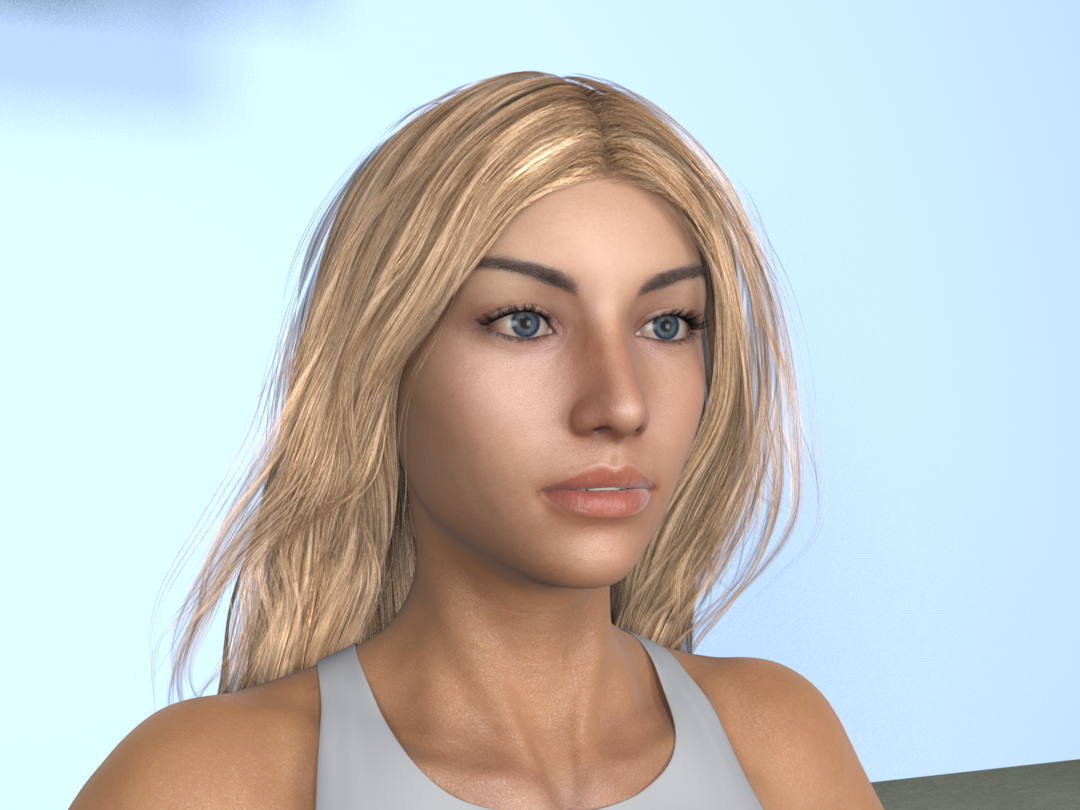
Swapped sclera & iris textures. Hopefully they look a bit better.
Odd thing in scripted ‘draft’ render. Difficult to describe, but eyes & mouth will look sharp and in focus until final pass. Then, as it finishes, eyes look slightly out of focus -- to me at least. Render settings or eye moisture surface?
Same for mouth. No idea what would be causing a sort of white mask over the lips-- esp. at corners and where mouth is closed. Tried adjusting specular 1 & 2 -- no luck.
Oh good to see it's working now!! Eyes are definitely much better.
Just guessing here but I'd say a little bit of both:) The draft render uses only 4x4 PS (pixel samples) for fast previewing. So the sampling is a bit rough. Combined with the pixelfilter (Gaussian 2x2?) at that pixel resolution it will be a bit blurred. At least, by the looks of it, you did not use progressive mode? Progressive will reset pixelfilter to box 1x1, which in practise is no filter. So will be sharper and noisier.
I render at minimum 16x16 PS (what the 3DL-devs recommend for final renders), non-progressive and use the CatmullRom filter at 4x4 or 5x5 pixel width, depending on pixelsize. The gaussian filter is too blurred for my liking, unless I need that effect. Another way is of course to render at double pixelsize and scale down in post, and take the render hit;)
Are you using specular maps? If so, check if the lips are too bright. To me it looks like they are too reflective, or have a too high IoR with a too low Fresnel roughness value? Or try to raise bump/displacement to scatter the reflections a bit more? Or it could be your ambient lighting that is overly bright? Are you using the environment sphere with indirect light/occlusion enabled? If yes, try turning off visibility for everthing except camera, see if that changes things. You can use the various offset parameters to finetune both the appearance and light/reflections of the env. sphere...
Also, if you use more specular strength on the lips than on the face, you can get this effect. The PBR solution is to use a roughness map with a gradient on the face and lips, which is how I do it, mostly. Import the face spec. map into GIMP/PS, create a white layer and paint the lips, maybe also forehead, cheekbones, under eyes, with a mid gray color, which will make those areas 50% less rough. Or make them even darker for a more dramatic effect. Save the layer as a RGB .png (not grayscale). I save my custom maps as 16bit .png:s but 8bit will work just fine.
Oh, btw, what hair is that, looks cool?
Daz Studio 4.23(.0.x) - NVIDIA IrayIray 2023.1.2, build 373000.1755
Added and Changed Features
- Iray API
- Added a warning for incorrectly used database requests for local removals, i.e., calling ITransaction::remove(..., true) when there is not another version of that database element in a more global scope.
- Material Definition Language (MDL)
- libbsdf:
- The roughness values computed by the generated auxiliary functions changed to contain only glossy contributions.
- The color weights for normals and roughness in the generated auxiliary functions are now reduced by luminance instead of average.
- Allow more direct assignments of vectors instead of element-wise assignments for HLSL. (MDL-1311)
- Avoid unnecessary calls to functions whose values are not actually used. (MDL-1324)
- Avoid reading whole arrays from argument blocks or read-only data segments when providing those arrays as function parameters. This especially improves rendering performance of axf_importer materials. (MDL-1113, OM-117268)
- libbsdf:
Fixed Bugs
- Iray Photoreal
- Optimized guided sampling. Performance per iteration is now improved at the cost of slightly more noise per iteration. Overall image quality for same time comparisons is at least similar, mostly better though.
- Fixed missing radiance correction when entering a volume through a section plane.
- Fixed a brightness issue when using microfacet BSDFs in df::scatter_transmit mode and guidance.
- Corrected log output of compression level in auto instancing mode
- Iray Interactive
- Fixed a number of potential sources for geometry glitches.
- Material Definition Language (MDL)
- nvidia::core_definitions: Fixed ‘–‘ in display names.
- Fixed type computation of ternary operator in MDL SDK/neuray.
- Fixed a rare crash that could happen in an MDL module imports other modules and import the same module (diamond pattern). MDL-1341
- Fixed default constructor of enum values which sometimes did not choose the first enumerator as default value.
How can I transform an object to a figure and animate it?Crios said:
antotaroit said:
Yeah, but when I export it to an .OBJ file the dimensions change
When export in OBJ you must set DAZ scale at 100%,The import and export settings must be inverse of each other - 100% is easiest but not mandatory.
Clothing mesh messed up when posed on customized characterI have added pants to a Genesis 8 character which I have heavily customized with many many morphs. The pants is from this product and I used the method to create a Genesis 9 clone for adding Genesis 9 clothing to Genesis 8 figures - this just as background. I am quite sure that it has nothing to do with the usage of a Genesis 9 cloth on a Genesis 8 character as I tested the same pants and the same pose on other Genesis 8 figures including the base figure without having the same problems.
So problem now appears with any pose with bending thighs bones. I've attached a screenshot showing the areas of the pants where the problems appear (there are torn areas on the pants which have no opacity so I marked the areas which should not show the underlying character mesh). I first thought some smooting would help or dforce but nothing helped. So I looked further and I found that the mesh is actually messing up - I think that the weight maps are not really fitting the figure any more?! I've attached another screenshot that shows you the inside of the pants when posed and a third screenshot with the pants on another Genesis 8 figure in the same pose. You may see that the mesh of the pants is deformed in another way here which looks much more correct.
I first remembered that on custom characters that you import by a single custom morph you need to "Adjust rigging to shape" and make an ERC freeze on the morph to avoid problems with the rigging. Following the tutorial at least I adjusted the rigging to the shape but I cannot do an ERC freeze if I have not a single morph for my character (yet - should I?). As I said, the character is build up by a bunch of dialed in characters and morphs. But this did not solve the problem - and I am not sure if this actually would be a solution as I have no problem with the character itself during posing... it's this pants which makes the trouble.
In Blender I adjusted the weight painting and I am quite sure that the weight panting is somehow misplaced... but I wonder why this is just the case for my character but not for other characters or the base figure? I have also tested some other pants on the same character and they are doing well. So I think that it might just be a problem of some pixels / vertices which do not have the correct weight painting for some bones due to the different influences (customized character, auto-fitted Genesis 9 cloth on Genesis 8 figure)?! Is there something that I need to keep in mind additionally?
Importing Surface Groups - SOLVEDThere is some conforming clothes I have in DAZ that only have one surface material. However, I need to give them several surface groups. I can do it manually in DAZ, but it's so much easier to do it in Blender. And I don't want to create a new conforming figure from the old one, because I'll have to worry about weight mapping and JCMs.
So, is it possible to import just surface groups to an existing model?
Thank you in advance.
Exporting to Unreal adjusts all node positions. Is it possible to lock it?I don't know the right way to explain this and I don't know how to take a movie of it happening (not to mention the Peek Through mentioned below is NSFW). Basically I use the bridge to export, during the exporting process all of the limbs, clothes, nodes, etc do these micro adjustments, literally resetting all of the property adjustments I made to fit things together. When the export is over, things snap back into place.
WHY WHY WHY does it do this? Is there something going on with Daz I do not understand? This happens with the Unity bridge as well so I think it has less to do with Unity or Unreal and more about the export process.
--
The problem I'm having is peek through - and it only shows up AFTER the import into Unreal. Everything is fine in Daz. I export to Unreal, tons of peek through. I can't take a screenshot of the peek through either because while I'm not doing anything considered NSFW, the peek through is..
I'll try to get SFW pictures of what's going on.
Changing the labels in Smart ContentAfter turning Update and Online off, you have to uninstall this hair product and reinstall in DIM, otherwise "has cloud metadata" is still set as True, preventing it from being modified by you...
Changing the labels in Smart ContentI think that explains things. I installed it using DIM but I had the update metadata on start turned on. I turned it off and we will see how things go from there.
Daz 3D is part of

Connect
DAZ Productions, Inc.
7533 S Center View Ct #4664
West Jordan, UT 84084Licensing Agreement | Terms of Service | Privacy Policy | EULA
© 2026 Daz Productions Inc. All Rights Reserved.