-
Import custom 3D model and use Genesis morph
Hi, I'm looking information about this but I did not find anything.
What I want is to manually reduce the number of Genesis polygons (decimator is not a valid option). So what I want is to import the Genesis model from DAZ to blender and then reduce the polygons.
But I want to reduce the polygons, import the new model to DAZ and then be able to use all Genesis morphs in that custom model with reduced polygons. And if I then buy licenses like Genesis Evolution Bundle, Michael 4-5 or anyone who uses Genesis as a base, I can use those morphs in my custom model.
In short, I want to establish a Genesis custom model with fewer polygons as a base model Genesis.
It's possible?
Genesis 8 Female Body Morphs - Where?Yikes! Well, I finally found them but JEEZ. So they're already loaded essentially?
How the F%@& ya suppose to find THAT without some proper, easily accessible documentation?
Yeah, like you said they're essential "already loaded", you just need to have the figure selected for them to show up in the Shaping Tab. Pretty much any morph you purchase (be it from a morph pack or a character morph) will be found there once it's downloaded. At least all the Genesis morphs. The only ones that aren't are pretty much just the old figures like V4 or older.
Genesis 8 Female Body Morphs - Where?Just so you know going forward, all the morphs for the genesis figures are like this. I don't think they have had injection files since... well, V4 days? Don't remember for the very first version of Genesis. Shaping files, if any are included, are either typically either just setting a given dial to 1, or they are pose files that set several morph dials to a value and the shape doesn't have a single dial.
Thanks Fisty & Darc! Amazing Morphing Pumps & Boots G8F - more footwear like this please!I decided to increase the sole thickness morph a bit more, and also adusted the heel shapes using the provided morphs. I widened a couple of the shaping parameters a bit to do this, and used a clear plastic shader on the soles, and leather shaders on the uppers. Sea creatures not included...
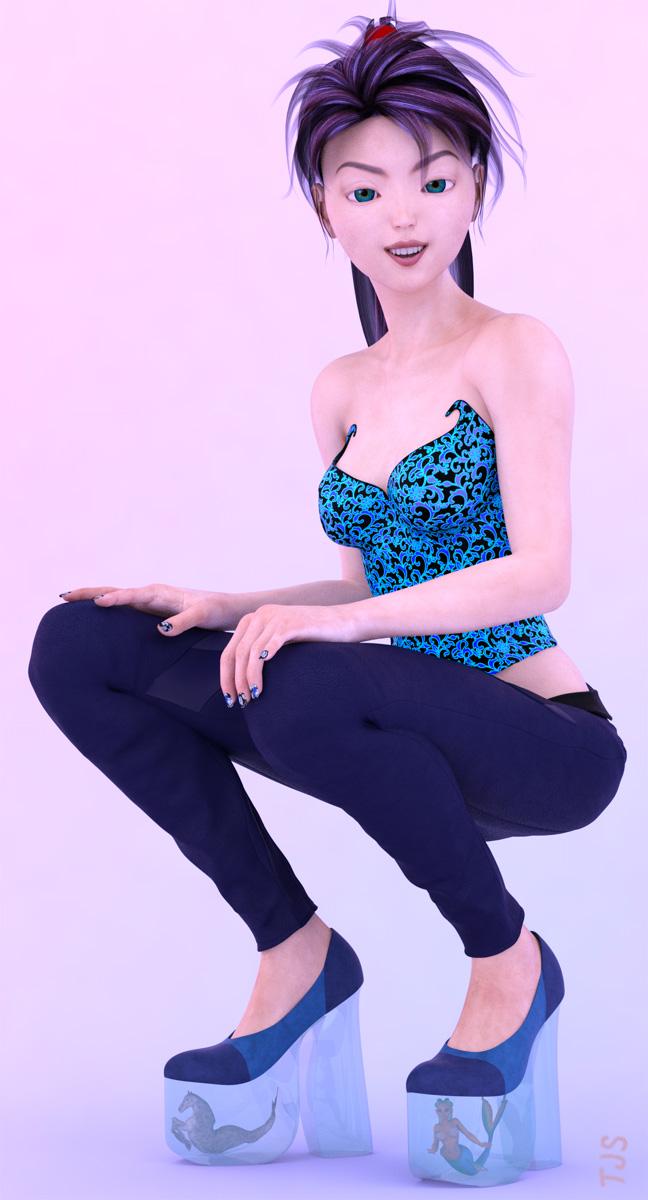
These shoes are fun to play around with!
About restrictions when transferring to Zburush using GOZHi
Primitives created with daz can be exchanged with zbrush properly,
but when you transfer an object imported into DazStudio 410, an error will occur with Zbrush.
Please tell me the conditions for successful transfer.
tank you.
Is there a female morph for Daz Dog 8?There is a "Female" morph that just focuses on the genitals (also a neutered morph). Off-hand I don't recall any female breed morphs specifically that adjust any other aspects of the body,though there are other body morphs to adjust proportions. That said, I don't know enough about dog anatomy to know how much difference there is in body size and proportions between the sexes of most breeds.
Is there a female morph for Daz Dog 8?I just picked up the base Daz Dog 8 in the recent sale and was wondering if all the dogs are boys or do we have a female dog?
Problems with Export Gen 3 Male and FemaleHelo.
I have a little Problem here. I try to export a Genesis 3 Female and Male into Cinema 4d.
If i export Whillis Gen 3 into Cinema i only got the Original Genesis 3 Male.
If i export it as a Obj, it works well at the most cases. But i need my Model as a FBX because i have Problems to setup the Weights.
Why does it not work ? If my Model has Armor or Clothing i just use the Option merge clothing into Skeleton. It works well but not the Modified Morph.
What should i do ? Has it something to do how i setup my Mesh ? I can either just Click on Victoria 7 or maybe Chandra the Mesh is good in Daz3d Studio but not in Cinema. If i just load the Gen 3 Mesh and pull the Modifyers it wrks good too. But only the Export makes trouble.
V4 clone to G8F clothing questionsI really wouldn't try going Victoria 3 to Victoria 4, then AutoFitting that - goign from one figue with Parametric Rigging to another you potentially have to tweak the fall-off spheres, which is a pain - going straight to a weight-mapped figure you don't have that (though there may be other issues, of course)
Yeah, I've pretty much given up on the V3 items. And this weekend has been spent going through the store and adding items to my wishlist... All 587 pages of 60 items a page, (yes, I have a headache, and my wishlist is almost as big at the catalog now.)
But this does actually get back to my original point, I DID find an update to one V4 outfit The Sunarian Priestess outfit, I never really did find a place to use it at the time, but I think I may have a place for it in a future render. Thing is, that's it. 587 pages of items from V3 to G8F and that was the only item I have that I could find an update for. Even DAZ is negligent in this area, the "Conforming" anatomy hasn't been updated since V4, and remember V4.2 changed her model structure. So generation 8 on the Main Daz figures and there is no update to a base feature that, heck based on how many zombie textures, props and gore items there are out there, Internal organs and Brains might be something someone would want...
The question is though, since it was a conforming item to V4.2, G8F with a V4 clone, looks at the V4 Skeleton as a clothing item, so it can and DOES, get fit to G8F, (see image, BTW G8F is very much a resource in both images.) But now what, I've used it in a render, but G8F MUST be in the image and used to "pose" the skeleton. (to be honest i think that was the way it was for V4.2 as well.)
But is this now a G8F Skeleton?
Can I apply all the different morph forms to it and save it off as G8F Skeleton, or is it forever just a V4.2 "fit" to G8F item. Same for the internal organs and brain... Michael had his own versions, if I clone him into G8M, the same question applies. What about V4 Jeanz... if I put them on G8F do they become G8F clothing, forever, or just a fit item. V4 Pharoah, Winter Wear, Domino... etcetera, literally hundreds of V4/V4.2 clothing items that i can now fit to G8F.
Could I post them up someplace as a freebee? V4.2 Domino for G8F. (would ask permission first, I'm not trying to step on anyone just trying to figure out what happens to the model iteself and if that can be shared to other folks, that might also have that item, but not cloned V4 into G8F.)
Anyway, my own brain hurts after going through the entire DAZ catalog, which there was more to update than just a few sets (to iRay shaders) and the Sunarian Priestess outfit... that one could be really interesting with dForce on it...
Anyway, thanks for reading.
Rigging/Weight map Issue? Not sure what to do here.Sorry, I’d misunderstood the suggestion. Converting V4 to weight map rigging then using the transfer utility seemed to do the trick with a little work. Thanks for the help!
Shape Rigger Plus(Commercial)That is very strange..... I cannot duplicate the duel bones. Looks like the morph rigs fine, but I have no idea why it shows two sets of bones. Maybe open a support ticket at Daz and ask why this happens? Or Hopefully somebody else can comment here and try and duplicate this or explain what it is.
Well, thanks anyway for your time. The product itself work just fine. I tested the morph in many G8F poses and it follows along almost perfectly (Very little adjustments required, if any).
I tip my hat to you Sir! Your products are stellar and always among my favorites on the marketplace.
Now I just need to know what's going on with the dual bones...lol
I'll just open a support ticket.
Cheers!
Shape Rigger Plus(Commercial)That is very strange..... I cannot duplicate the duel bones. Looks like the morph rigs fine, but I have no idea why it shows two sets of bones. Maybe open a support ticket at Daz and ask why this happens? Or Hopefully somebody else can comment here and try and duplicate this or explain what it is.
Shape Rigger Plus(Commercial)Well, can morphs be brought from Genesis 3 to Genesis 8, using DAZ Studio Pro, and then rigged properly using this product? I tried to bring a few morphs over by coping them and then pasting them in to the appropriate place, but when I tried to activate them, nothing happened.
Yes that is what it is designed for which is rigging morphs that have been imported or transferred onto your figure. Also to note if your morph did not activate then there is an issue wth your morph. The rigging process happens once you get an imported morph to dial up properly. Also copying morphs from one figure to the next will not work. It isn't that simple. They have to be properly converted.
Sydney 8 ... Chest morphs... Really?!What I miss about the base morph packs is that you used to get all kinds of ethnic morphs with it - Native American, African, East Indian noses, etc. But I digress ;)
Laurie
That is one thing i really don't miss.... I remember those silly face dials for "Bridget" and "Elizabeth" as if Irish and English people look radically different while a single dial would be for the "ethnic" character ignoring that Africa is larger than Europe and most of Asia combined and that a Bedoin looks lothing like a Twa.... The Native American dial was the funniest. I had a conversation with a friend about an American presidentil candidate who took a genetic test to prove her ancestry but the test consisted of mainly Central and South American samples. I explained the distance between Chicago to Rio is roughly London to Beijing... one wouldn't use genetic samples of someone from Bristol to ask genetic questions about someone from Shanghai.... Hurrah for more specific morphs.
Characters with displacement mapsThe technology has largely been superseded by HD morphs. HD morphs have the advantage of being mergeable with each other, better clothing fit and easier adjustment; the corresponding disadvantages are that they're impossible for end users to edit outside that.
As such, I use them on occasion when I need that capability but don't have a suitable morph. (I've also even experimented with converting HD morphs to displacement maps as a way of bridging HD across generations).
They are awkward with Iray, although can work well; other render engines seem to do it better. I'm thinking of cycles for blender and octane (for Blender, Studio and many others).
Displacement and HD are equally dependent on the SubD level in Iray.
Characters with displacement mapsThe technology has largely been superseded by HD morphs. HD morphs have the advantage of being mergeable with each other, better clothing fit and easier adjustment; the corresponding disadvantages are that they're impossible for end users to edit outside that.
As such, I use them on occasion when I need that capability but don't have a suitable morph. (I've also even experimented with converting HD morphs to displacement maps as a way of bridging HD across generations).
They are awkward with Iray, although can work well; other render engines seem to do it better. I'm thinking of cycles for blender and octane (for Blender, Studio and many others).
Do Body Morphs and Shape Shift do the same thing or should I buy both?The third-party morph sets like Shape Shift do not usually offer the same morphs as the base Head and Body morphs, since it's expected most people will already have those - sometimes they may if there are different approaches, or if the PA doesn't like the Daz morph, but it's not usual.
Sydney 8 ... Chest morphs... Really?!Ok... I've been using D|S since V2. So I sort of know my way around the mprogram. I've never encountered a character that has such a limited number of adjustments in a Basic (including HD) mesh (see screenshot). It's insulting that I must spend additional funds to get basic functionality. In past iterations, HD, or add-on, packs gave morphs that extended a character. My issue, such as it is, is that EVERY D|S female is supplied with a DD or DDD breast size. In EVERY other character, "breast_small" or :"breast_gone" is a basic morph. I guess DAZ has broken down the functionality to optimize purchases. Well, we'll see.
Sydney 8 is a Genesis 8 Female - not a stand-alone character. All the "8" figures are Genesis 8, as such all you need is the Genesis 8 Female Body Morphs and the Genesis 8 Female Head Morphs to adjust any of the Genesis 8 Female figures. The Genesis 8 Female Body Morphs come with breast adjustment morphs. Most of the "8" figures don't come with their own individual adjustment morphs.
Thanks, but you speak to my point. I have to spend an additional 20 bucks to get BASIC functionality. Meh, I'm done
Oh, also SickleYield has some great freebie morphs for Genesis 8: https://sharecg.com/v/91888/browse/21/DAZ-Studio/SY-200-Morphs-for-Genesis-8-Head-and-Body
It has quite a few different breast adjustments, including a "Breasts Tiny" and a "Breasts Gone" morph that can make even very busty women a lot more "petite" up top. lol
Ok... I've been using D|S since V2. So I sort of know my way around the program. I've never encountered a character that has such a limited number of adjustments in a Basic (including HD) mesh (see screenshot). It's insulting that I must spend additional funds to get basic functionality. In past iterations, HD, or add-on, packs gave morphs that extended a character. My issue, such as it is, is that EVERY D|S female is supplied with a DD or DDD breast size. In EVERY other character, "breast_small" or :"breast_gone" is a basic morph. I guess DAZ has broken down the functionality to optimize purchases. Well, we'll see.
Sydney 8 is a Genesis 8 Female - not a stand-alone character. All the "8" figures are Genesis 8, as such all you need is the Genesis 8 Female Body Morphs and the Genesis 8 Female Head Morphs to adjust any of the Genesis 8 Female figures. The Genesis 8 Female Body Morphs come with breast adjustment morphs. Most of the "8" figures don't come with their own individual adjustment morphs.
Thanks, but you speak to my point. I have to spend an additional 20 bucks to get BASIC functionality. Meh, I'm done
Oh, also SickleYield has some great freebie morphs for Genesis 8: https://sharecg.com/v/91888/browse/21/DAZ-Studio/SY-200-Morphs-for-Genesis-8-Head-and-Body
It has quite a few different breast adjustments, including a "Breasts Tiny" and a "Breasts Gone" morph that can make even very busty women a lot more "petite" up top. lol
I love Sydney too she has become my favorite character but I don’t like her balloon looking breasts. I use these morphs by SY all the time to tone down her breasts. Best free morph package ever.
Sydney 8 ... Chest morphs... Really?!What I miss about the base morph packs is that you used to get all kinds of ethnic morphs with it - Native American, African, East Indian noses, etc. But I digress ;)
Laurie
Sydney 8 ... Chest morphs... Really?!LOL, if the DO Head Morphs would only come with as many morphs adjustments for the nose, the mouth, the teeth, the tongue, the cranium, the ears, the eyes, the forehead...each as what comes with the DO Female Body morphs for the nipples, the breasts, and some parts in that area there I'd never heard of before.
You think that is something, take a look at how many morphs there are in my fav breast morph package from Hellboy https://www.daz3d.com/breast-utilities-for-genesis-8-female-s
Daz 3D is part of

Connect
DAZ Productions, Inc.
7533 S Center View Ct #4664
West Jordan, UT 84084Licensing Agreement | Terms of Service | Privacy Policy | EULA
© 2026 Daz Productions Inc. All Rights Reserved.