-
Body Chains 2 for G3+8F - how good is autofit on males?
yep, straight out of the box. I figured I would go straigjht to my fav male morph which is fairly far from the base shape to see how much it distorted and I was happily surprised. I figure in the set you linked to the ones that drape off the arm might distort more since they are meant to be free flowing and not fitted, but the rest should do well.
GoZ QuestionAre you looking for the morph in the Parameters pane? The other panes are filtered by type, so may miss a morph if it isn't set to Modifier/Shape.
Syph and BodysuitSo it looks like the Bodysuit is just using a detailed texture and not and built in modeled detail, is this correct? Which outfit is shown in the first picture which I have included below?
It’s in effect a texture and morph, her body will take that shape and the texture is offset on a geoshell so it is modelled but on her mesh with HD morphs
I don’t have this one BTW but there are many similar things
GoZ QuestionI did as you said and GoZ did ask me if I want to make a morph, which was great - thanks. But for some unknown reason, I can’t find the morph of my saddle back in DAZ. I tried saving it in the Group Path of: ZBrush, Morphs, General Transitions, etc. But Its not there. And I know it doesn’t have anything to do with the resolution since the saddle started at the Base Resolution. What am I doing wrong? Where is it?
BTW: I was able to modify the original mesh - so I was able to save the modified saddle in DAZ. But I would rather of had the morph.
dForce Space Tech Jumpsuit problemThanks for your suggestions, MarkH and Felis. Unfortunately they did not solve the problem.
So far, the only way I could stop the problem with the leg cuffs distorting is to run a simulation from the default pose and without the floor plane, and using an unmorphed G8F. Which means to use this in a render means running a simulation in an empty scene before adding the rest of the scene, and hoping I can then morph the character without ruining the shape of the simulated cloth.
But I'm really hoping for a better solution, and I'll glady eat my words if someone can tell me what I'm doing wrong.
Import custom 3D model and use Genesis morph@ dmputa
Licensing aside as long as you don't distribute the unity game I guess it counts as feasibility study.
Over the time I made a few screenshots of the important settings and dialogs here you have them with short instructions. These are my ten steps to success even if you are not an expert. I hope it works for you.
1. hide everything in the scene but the genesis figure, select it and go to Parameters pane set Mesh Resolution to Base
2. File>Export choose Wavefront OBJ
3. Daz Studio export OBJ options

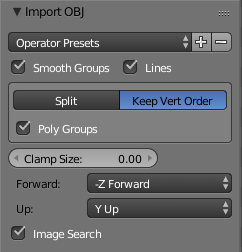
4. in Blender File>Import>Wavefront OBJ in the bottom left corner you will see these options set them like showen Keep Vert Order / Forward / Up - press the plus button to save a preset
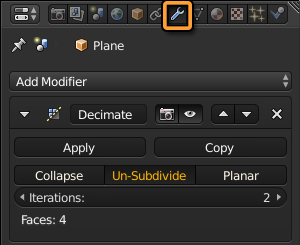
5. do your decimation try the Decimate Modifier select it from the Add Modifier menu with the settings below Un-Subdivide Iterations:2
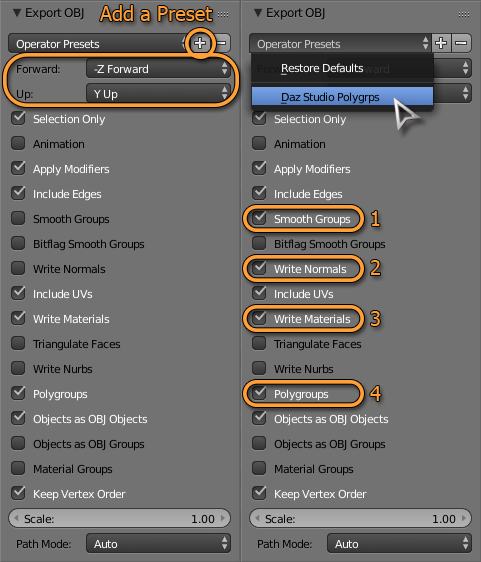
6. export the decimated genesis File>Export>Wavefront OBJ in the bottom left corner again you get some options select them like showen on the right
- also notice the Forward and Up settings
- you can add a preset here so you don't have to select everything everytime
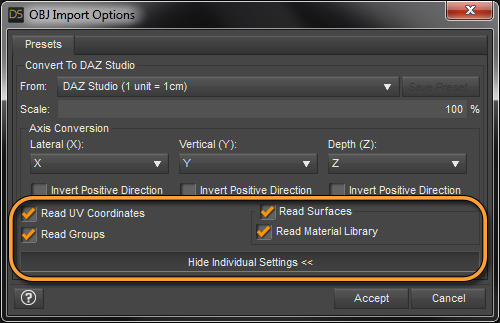
7. back in Daz Studio File>Import (you can also drag and drop OBJs from the file browser into the viewport) you get this dialog set it like showen below
- it's important too keep the same scale as you exported
8. now that you have the decimated and the default genesis figures in the scene run the Transfer Utility
Source Item: original Genesis - Target Item: decimated Genesis
- uncheck Face Groups and Surface Groups the model got imported with those already
- Merge Hierarchies is not neccessary
- select Morph Targets: From Source: All (default is None)
- select Replace Source With Target - no post transfer options needed
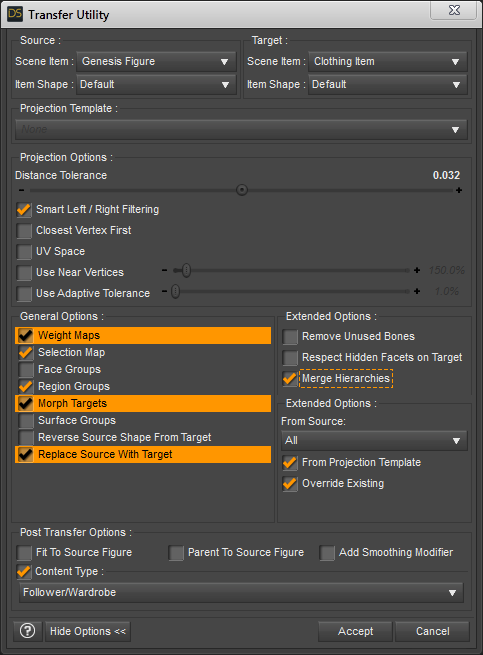
9. you should also consider to reduce the ammount of surfaces and textures for better game performance - I read somewhere this is important for less draw cycels and better FPS - more Surfaces = less FPS
- for reducing the ammount of textures and resolution have a look at this post Instructions for using the texture atlas
- the next thing I would do is to combine several surface groups in the Daz Studio Geometry Editor - just select a few surfaces to combine - if you followed the Instructions for using the Texture Atlas you get a better understanding of which surface is needed and which is not - basicly you would need a seperate shader for skin, eyes, mouth maybe an extra for teeth thats it
- right-click on a surface in the list and choose Add Selection to Surface (I didn't found a better picture to show that)
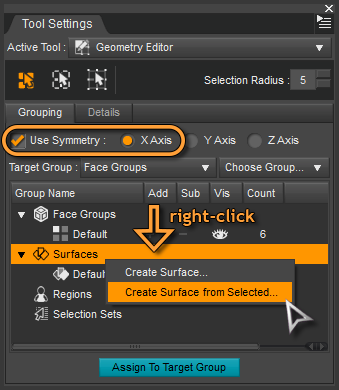
10. the latest step would be exporting the genesis figure with clothes as FBX I can't help you with that
There are also a few youtube tutorials that explain this eg. Daz3D Genesis3 to Unity3D - Full Tutorial - Youtube
GoZ QuestionIt will offer to create a morph only if you sent the item over at base resolution, and did not add or remove any geometry in ZBrush.
GoZ QuestionWhat is the common denominator on why when I use GoZ to ZBrush to adjust something (like fitting a saddle to a creature it wasn’t made for or making a adjustment to a character's body) some times on the return to DAZ it ask if I want to make a morph and other times it only lets me create a new object/model? I want the option for a morph so the textures etc will still apply in DAZ.
Import custom 3D model and use Genesis morphYou need to Wishlist Decimator and wait for an awesome sale, it can create levels of detail for your figures which is like high resolution in reverse and yes all morphs if baked ie appear along timeline export as FBX, I don’t use Unity but this works for iClone!
Bear in mind for a redistributable game you will need a game developer license for every additional morph set you use as well as for the base set and it’s included morphs and since those are all $50 too it gets expensive fast!
Yeah. To say Daz is game dev unfriendly is kinda an understatement.
He'd be much better off looking into alternative resources.
Import custom 3D model and use Genesis morphYou need to Wishlist Decimator and wait for an awesome sale, it can create levels of detail for your figures which is like high resolution in reverse and yes all morphs if baked ie appear along timeline export as FBX, I don’t use Unity but this works for iClone!
Bear in mind for a redistributable game you will need a game developer license for every additional morph set you use as well as for the base set and it’s included morphs and since those are all $50 too it gets expensive fast!
Gensis 8 Body Morph BundleThank you Leana, they seem to be there :)
May I ask ask another quick question while I'm here please?
When I click on any fo the movement tools, eg. the perspective cube, rotation etc. in the top right of the viewer or in a paramater or morph control in the tabs, my character disappears and I only see all of the bounding boxes until I let the button go, then the character reappears. Do I have a setting wrong?
Import custom 3D model and use Genesis morphThank you very much everyone, guys.
 The most promising option seems is that of Syrus_Dante, so think I'm going to start with that option.
Morphs depend on the vertex count and order. Depending on Blender's abilities you might be able to export all the morphs as OBJs, load them as morphs in Blender (it can do that, I'm fairly sure), then reduce the mesh resolution, export the base and morphs as OBJ, load them into DS, and rebuild the linkages. Not a small task, and wouldn't help with later additions.
The truth is that I don't know how to do several of the things you mention. I found an explanation of how to export morphs, but they simply exported several OBJ models with each morph activated. I don't think that's what you meant. I also don't know how to import morphs to blender.
So what are you using the lower poly genesis for? I have found decimator to work well for my needs.
I'm doing a video game in Unity and I'm creating a character editor. I have tried the Blender decimator and, first, it doesn't work because it doesn't allow using decimator in a model with key shapes. And second, it's not the best way to reduce a model and I think I could reduce it more and better manually. I imagine that the DAZ decimator is the same or very similar to the Blender decimator, but it is very expensive for a simple test.
But if I can not reduce it by myself, surely the DAZ decimator will be the option I use.
Shure it is possible - I would do the following. In Blender reduce the polygons of Genesis as you like. Blender got this Decimate Modifier set it to Un-Subdivide with an even number works best. Then export the OBJ from Blender. Import the OBJ into Daz Studio. Finaly run the Transfer Utility with the right settings. There are a few settings leave most of them at default but the most important is Replace Source with Target to get what you want.
You need to run the Transfer Utility process again for new purchased morphs first marking them as favourits. This time in the Transfer Utility you only need to select Morphs: Favourits and Subcomponents to get the new morphs to your low-poly version.
You or someone else could specify more how to get what you say? For example, how to correctly use Transfer Utility to transfer normal Genesis morphs to my Genesis low poly. It would be great something explained step by step, I'm not an expert in DAZ.
 looking for this model
Would be epic if the shop add directly models used in the products, thats help a lot for find things, sometime I like a dress or a hair but rarely its displayed the products used in the products pics.
The problem is that artists can render dozens of promos that never get used (some of which may be months old by the time a product is ready to be added to the store), or have others do some of the promo rendering, making keeping track of exactly what has and hasn't been used a significant challenge... and if a character is a blend of multiple morphs or customised skin, it can become basically pointless listing what was used, as you can't replicate it without an exact formula (which artists may not want to share).
It's always appreciated, but it's not practical to make compulsory.
Besides they often use content available from other stores too, and Daz doesn't allow linking to those.
Indeed - and another common hiccup is that it may use future products that aren't yet up for release on the store, and to keep going back would be a headache.
I've started to try to be fairly exhaustive when uploading my images to the gallery*, but general morph packs, Fit Control, pose sets... these are all easily forgotten.
* Which occasionally leads to hilarity with the Daz Deals browser add-on letting you see art that links a given product, because apparently very few people have linked some products, leading to some of my weirder character creations gracing the top of the gallery entries for them...
dForce Space Tech Jumpsuit problemIf that character is Sahel, try neutralizing the custom foot morph.
Gensis 8 Body Morph BundleHi team, Mr What-is-This-DAZ-Sorcery here.
OK, just bought Genesis 8 Female Body Morph Resource Kit, downloaded and installed. Problem, I can't find it. I can see it in Finder (I'm on MAC) where DIM told me it was installed, but nowhere to be seen in DS. Path is as follows. Ready, Ahem!
Users/Shared/My DAZ 3D Library/Data/DAZ 3D/ Genisis 8/Female/Morphs/HSTW/BMK1 and then all the file names.
Now, I kind of suspected it won't show up as a stand alone folder, I can't even see a "Data" folder in DS. But I have searched the various tabs associated with Genesis 8 and morphing and posing and wotnot but cannot find any reference to the Morphing software I bought. I have refreshed and restarted DS to no avail.
I know I may appear to be somewhat of a nugget here, but that's because I am. Any help appreciated. Many thanks
Malc
Body Chains 2 for G3+8F - how good is autofit on males?could someone who just bought Body Chains 2 for Genesis 3 and 8 Female(s) - and maybe, while we're at it, the 3 similar products from Sshodan? - please try them on G3M and G8M and upload snapshots?
i really like those chain products, but i never use females. and while most outfits containing normal clothes usually fit ok with autofit + possibly some clone thingy addon, or when hair really doesn't autofit i can parent it and the results are usually ok, i can obviously not parent a chain outfit. and while some distorsions in a clothing item might still be acceptable, it would look awful with only chains... especially since very thin mesh elements like straps or chains often distort when used with other figures... also, most clone thingy addons still haven't been issued for crossgender figures.
for emergency case i have the free transgender morph to use GF as a guy, but since i have no other morphs (yet) for G3F/G8F, my "male" looks quite meh, and also i have no anatomical elements (yet) to stick on a female (and then comes the material creating, again, like for male figures sold without genmats...)
of course, if anyone created something just like that for males, they'd have a buyer... *winking & nudging like mad*
V4 clone to G8F clothing questionsOnce an item is AutoFitted it is like any other item fitted to the figure.
So if I continue the Sunarian example, it is a CR2 file, If I load it, fit it to G8f and then Save it as a DUF file, it "should" load from that point forward to G8F. allowing me to remove the CR2 file from my directories, and only use the new DUF file... Correct? and will always auto fit to G8F?
Yes.
A morph is the reshaping of a mesh by moving its vertices and is object specific. No you cannot redistribute.
Jestmart, this actually kind of confuses me, since there is a tutorial sold on the marketplace on just HOW to do exactly what you are saying cannot be done, and how to make money selling the end results on DAZ Store.
I.E. Character X for V8... Let's see, load V8, move some character MORPHS around, change her shape a bit here and there, save the end result off as a character file and Walla, sell it on DAZ for $15 dollars a pop, don't include textures, have those load the V8 defaults with the disclaimer: "MUST Have V8 to ____".
Or better yet, load G8F, move things around on her, change some actor settings slant her eyes, blah, blah blah... save it off and sell it as a completely NEW character for G8F.
Wait, isn't that morphing her and redistributing? (with or without a profit margin?) Okay, so now take that model into blender and really change the geometry around, bring it back in, add it to your character as a HD Morph for Character X and market it... Have we not just added a morph to a different morph that was in fact the G8F?
Let's be honest with what is happening there, V8 or any other character that says it is G8F compatible is, in fact simply a Morph (or set of morphs) applied to the G8F character. To take that even farther, the F and M aspects are simply morphs to the Genesis 8 character, (which is a rather strange looking thing, neither male nor female in gender definitions. Can be achieved by changing all her actor dials to 50% for male and female. (But I digress.)
Oh here's a concept, Change G8F to be 50% G8M and save off the actor and call it PAT, you know, after the movie character. Use a skin shader and Tada, a completely NEW character that should be able to be sold in the DAZ store. I mean there is a DAZ sanctioned tutorial for sale in the store that tells you exactly how to do just that.
Hmmm... if I take G8f, turn her V4.2 Morph up all the way, then do some changes actor changes to her Am I creating a NEW character for V4.2 or for G8F, Hmmm... maybe it's a new character for V4.2 for G8F...
This is becoming a ghoofy rant, but you see what I'm saying here... base line is if Genesis 8 is required for ANY of the characters purchased here, then they are in fact nothing more than morphs to said character, so how can it be said that morphing the character cannot be redistributed? (BTW, I never said I wanted to SELL them, heck I'd even be willing to give them back to the original artist so that they could redistribute them, I'm more concerned with some of this older content getting UPDATED to the newer models and/or capabilities of DAZ Studio.
Attached Image is the G8F dev load on the right, to her right is G8F as G8M, behind him is G8F as G3M, behind him is G8F as G2M, and behind him is G8F as Genesis. the gang is all there, just turn the dials, or push the buttons.
Characters can either use custom morphs, made by directly editing the shape (using a modelling or sculpting application) or they can be settings for the Daz or other morph sets (where the morphs are applied and the preset justs toers the amount of the morph applied, it doesn't store the shape itself). Unless they are merchant resources used in accordance with the license terms it isn't permissible to duistribute a morph baked from another morph or morphs.
Sorry another hardware question concerning studioRunning 3 sticks will default you down to single channel (64bit mode) effectively cutting your memory transfer speed in half. Just make sure that the two remaining sticks are placed in the correct slots for dual channel mode.
Does it really matter with Studio if the memory transfer speed is cut in half? I assumed the bottleneck in the process of loading a scene into RAM is the hard drive, not the RAM.
That's an interesting question - how much memory speed affects the loading of a scene. I do know that I tried putting my content on an SSD earlier in the year and it made no noticable difference to the running of az Studio, so I put everything back onto the HDD. That would suggest that the bottleneck is memory or CPU speed, but I imagine it would be difficult to keep control of all variables to test this.
Hi :D
I've experienced a HUGE difference when I put my Daz Products on my NVME SSD, compared to my 3.5" HDD ^^
Does your SSD have RAM and a good controller?Transfer Utility functions?This is to be expected with the way the Transfer Utility works.
To fix this you would need to correct the Weight Maps manual with the Node Weight Map Brush tool.
Select the pelvis node of the figure in the Scene pane and paint with the brush to add weight to the pelvis. By doing this you substract the weight from the thighs so the bikini bottom dosn't follow the legs movement anymore. Also using the smoothing brush can help fixing things - use it with care somethimes it can make things worse.
I made a few youtube videos showing how to use the Node Weight Map Brush tool. In the posted video tutorial below I'm working with Genesis 2 that got a different weight map system called TriAx where you can directly manipulate the Bulge Maps.
If you are working with the newer generations Genesis 3 and 8 the weight map system had changed to general weight map. There the Bulge Maps got replaced by [JCM] Joint Controlled Morphs. The JCMs that the genesis figures are using will get autgenerated onto the clothing once you pose them with the clothing fitted to. The Weight Maps and the JCM work together to get the bending right. You just need to tweak the JCMs sometimes because the autgenerated ones not always show the best result.
I would say all genesis figure generations and clothing show some distortions in that area if you pose the thighs bejond 45° angle rotation in any direction. You can get third party JCM products for your genesis figures that try to address this not just for better bending thighs.
For example I'm takling about something like this: Bend Control Bundle for Genesis 8 Female(s) and Male(s) - Daz 3D
Here are my youtube videos I hope they can help you some. Ignore the customized interface the tools work the same in any layout you choose.
- DazStudio G2F BasicWear 01 WeightMaps TriAx - Youtube
- DazStudio G2F BasicWear 02 BeautyBend - Youtube
If you like to customize your interface like I did have a look at my thread here: How to Customize Daz Studio - to speed up Workflow!?
Syph and BodysuitThere is a 'Sylph Mech Skin' that fits OVER the G8 character, so any clothing needs to be adjusted to fit. The Mech Skin itself seems to be a geograft, with similar material zones to G8.
Here's a quick render with the arm surface opacity set to zero, so you can see the 'human' skin underneath.
EDIT: When I tried to transfer the textures from the Mech Skin to G8F's arms, her arms mostly disappeared. Even so, I think having the Mech as a geograft offers more opportunity to modify your character than just texturing the G8 skin would.
Daz 3D is part of

Connect
DAZ Productions, Inc.
7533 S Center View Ct #4664
West Jordan, UT 84084Licensing Agreement | Terms of Service | Privacy Policy | EULA
© 2026 Daz Productions Inc. All Rights Reserved.