-
More Non-photorealisitic Renders (NPR II)
mmitchell_houston said:
vrba79 said:
Also a reminder that if you just don't have the scratch for PWToon right now, D|S actually comes with a fairly versatile Toon shader set. It even renders faster than PWToon. Here's one render without and then with the outlines turned on.

In my experience, I've found that when trying for any sort of NPR/Toon effect, you get better results by turning down (or completely removing) bump maps. In this case, I'm referring to the speckled effect on the column to our far left. It's kind of funny, though. Now that I'v shrunk the image, the speckling doesn't bother me as much as when I saw it full sized. Nevertheless, if you are having trouble with your textures, I suggest the first thing you do is look at the bump maps.
Usually good about remembering that, but I was in a hurry to get that render done.
More Non-photorealisitic Renders (NPR II)mmitchell_houston said:
pavsikakyj said:
I was wrong about UberSoftLight. It gives even better result ans is way faster than AOA.
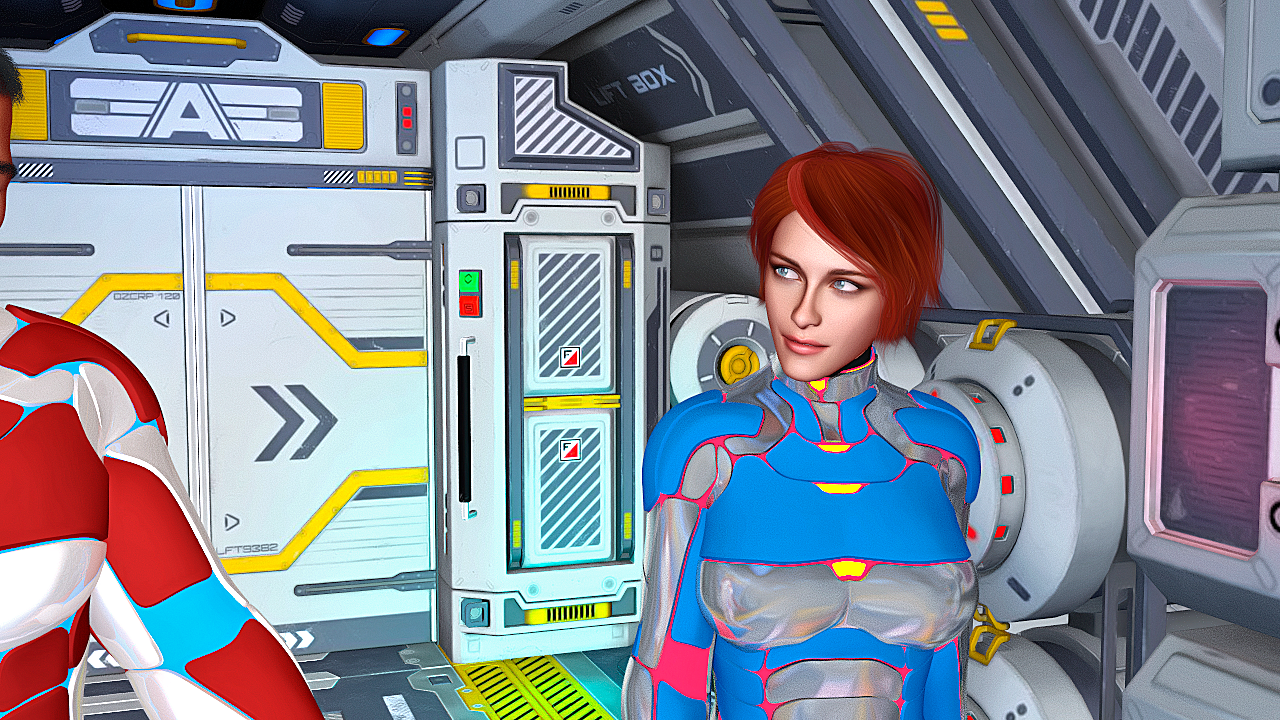
The effect works well on the backgrounds and armor, but I'm getting a real disconnect between the flat, illustrated look of the cockpit and her armor and the much more realistic shading on her skin and hair. It could just be my preference, but the two styles are jarring when presented next to each other. BTW, the character design looks good, though.
I used PWtoon only for her skin.
Now I applyed shader on part of the suit and background.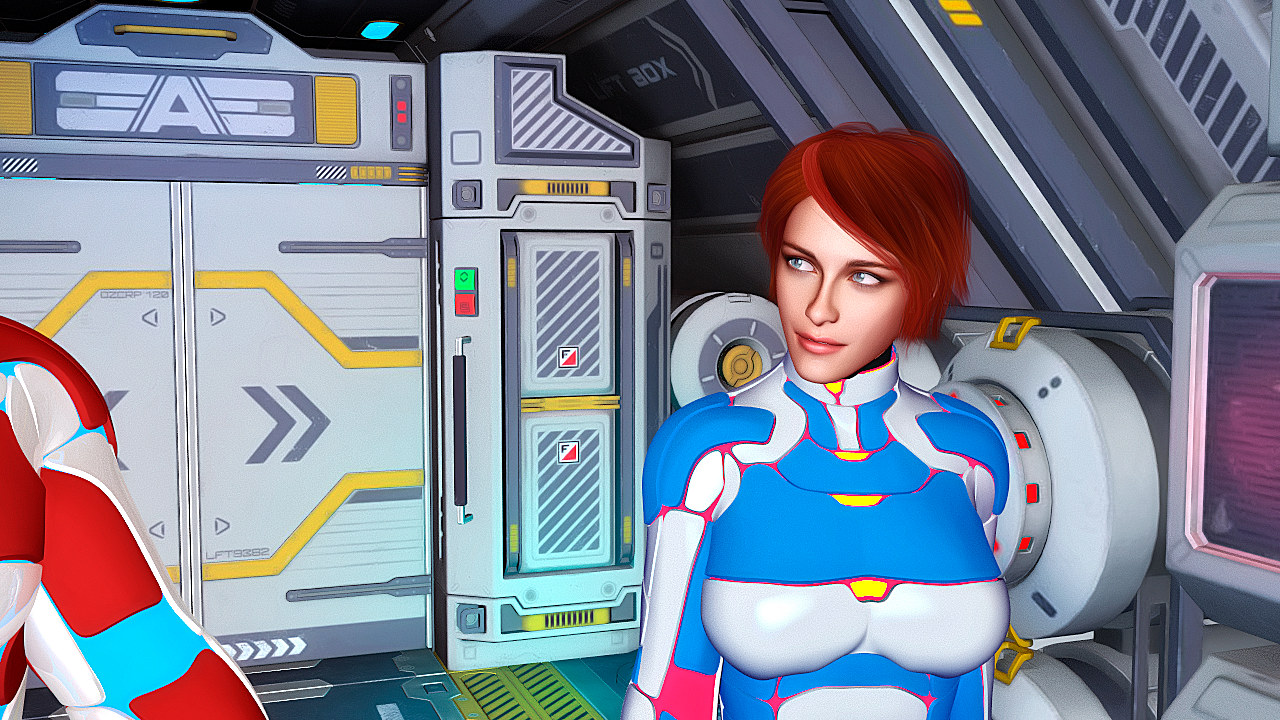 More Non-photorealisitic Renders (NPR II)
vrba79 said:
Also a reminder that if you just don't have the scratch for PWToon right now, D|S actually comes with a fairly versatile Toon shader set. It even renders faster than PWToon. Here's one render without and then with the outlines turned on.
In my experience, I've found that when trying for any sort of NPR/Toon effect, you get better results by turning down (or completely removing) bump maps. In this case, I'm referring to the speckled effect on the column to our far left. It's kind of funny, though. Now that I'v shrunk the image, the speckling doesn't bother me as much as when I saw it full sized. Nevertheless, if you are having trouble with your textures, I suggest the first thing you do is look at the bump maps.
More Non-photorealisitic Renders (NPR II)pavsikakyj said:
I reopen PWToon for myself thankth to juvesatriani
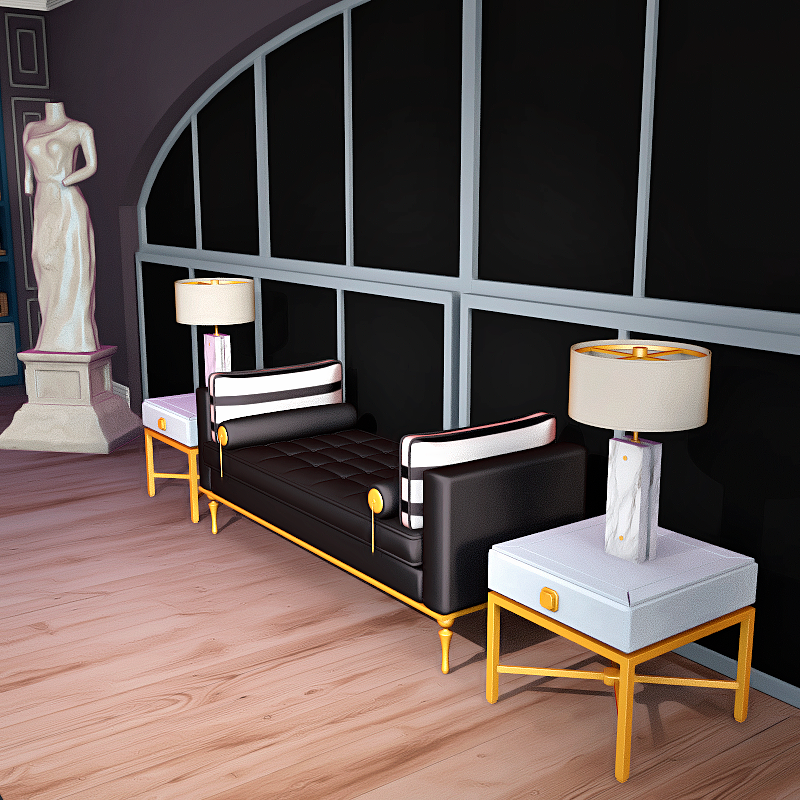
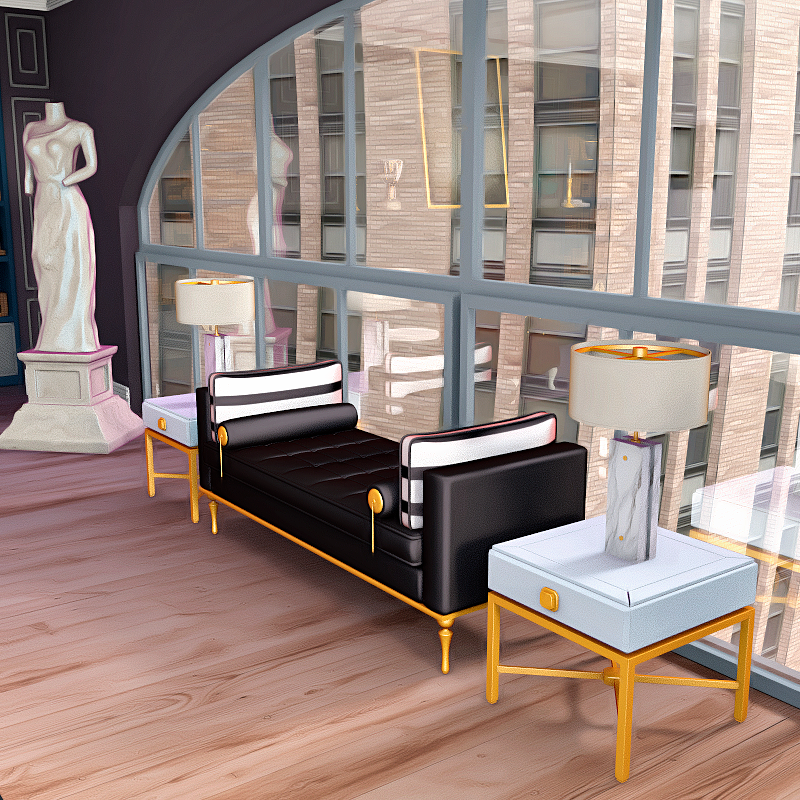
I'm not sure what I'm supposed to see here. This doesn't look NPR to me in any way. I just see a standard 3D render. It's a nice little scene, but this leans more toward photorealism than it does to traditional artwork or even cel shading. As I said, it is a nice scene, though, and I like the reflections and shadows. This looks like a nice set for a scene.
More Non-photorealisitic Renders (NPR II)juvesatriani said:
pavsikakyj said:
I reopen PWToon for myself thankth to juvesatriani
Very clean Toon render !! Glad to hear if those kit useful for you
Which one you`ve used ? JS Smooth or Multipass ? or both?
I`m in progress to find better and easy way to blend Multipass output + IRAY so we can utilize emmision + bloom without doing GLOW+Flare manually in Photoshop
I`m also trying to simplify my Multipass kit . I`ve found Shadow + AO pass can be done in One click render rather than in separate process (with help Simple Multiplass for 3Delight Script )
But to avoid the photoshop multipass action script failed to load , we should rename Ambient Light output as "AO" . I`ll be doing some test and post the update in main post
Happy creating and have fun !
I used default 3Delight one-step render with tweaked PWtoon shaders. And some of your Photoshop actions (Toons smooth, Toon sharpen and Make it flat). For lighting I used IBL Master, AOA Ambient and AOA Distant.
This one I rendered with 16 sampling: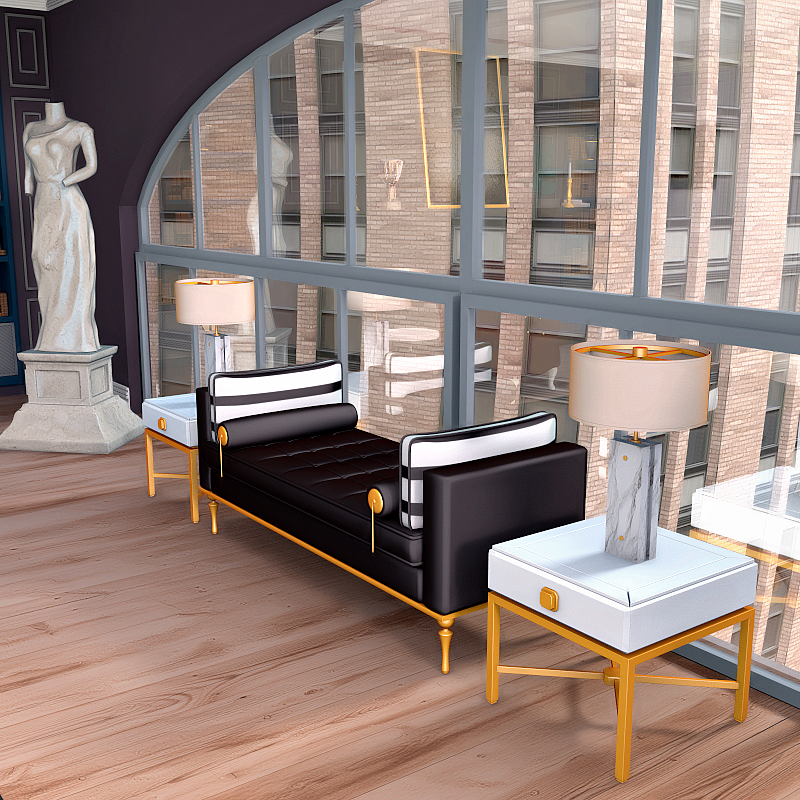
By the way. In 3Delight for glowing efects you can try Ubervolume.
More Non-photorealisitic Renders (NPR II)pavsikakyj said:
I reopen PWToon for myself thankth to juvesatriani
Very clean Toon render !! Glad to hear if those kit useful for you
Which one you`ve used ? JS Smooth or Multipass ? or both?
I`m in progress to find better and easy way to blend Multipass output + IRAY so we can utilize emmision + bloom without doing GLOW+Flare manually in Photoshop
I`m also trying to simplify my Multipass kit . I`ve found Shadow + AO pass can be done in One click render rather than in separate process (with help Simple Multiplass for 3Delight Script )
But to avoid the photoshop multipass action script failed to load , we should rename Ambient Light output as "AO" . I`ll be doing some test and post the update in main post
Happy creating and have fun !
More Non-photorealisitic Renders (NPR II)More Non-photorealisitic Renders (NPR II)JS Multi Pass is a collection of helper tool that I often use as layer generator when doing NPR /Cel Shading projects in Photoshop
This kit heavily depend on DAZ Studio - PW toon - AoA ambient light and Free SImple Multipass for 3delight script ,
and occasionally need help from Free IRAY to 3delight converter and OSO TOON`s RANDOM MAT ID script for better and detail outline passThe main inspiration from this kit was from Youtube video called ROBOT WILL PROTECT YOU
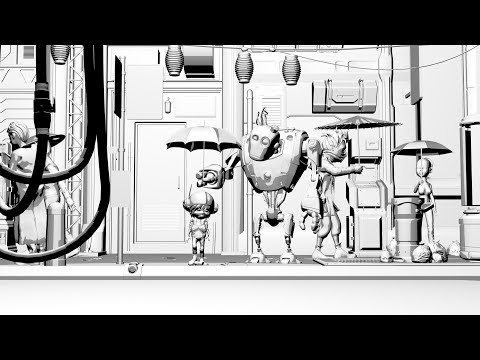
And my constant struggle with Environment - Props or Building which sometime great in standard render but suck when using toon shader . After all, I need to have more control and flexbility rather than let machine decide it for me about blend mode between element - opacity value etc
NOTES :
I admit this kit maybe not for everyone especially for people who want ONE CLICK SOLUTION . I guess there are better and excellent way to doing it in DAZ Studio . But until my little brain can grasp other technique and workflow, I think I`ll be stick with this one for a whileHere some caveat you need to understand first before decide to use this workflow
- You need to setup dedicated render output folder for each projects . It sucks but it will save you in long run or bigger project
- Render output name should be set like explained in MINI WALKTROUGH to make Photoshop action companion work properly
- It run using 3Delight Render Engine only , so it would makes no speed different if you have FANCY GPU card
- Use PW toon because easy to setup and fast !! even if I need to outputting 6-10K resolution for each image passes
- Take a lot of HD Space if you use this workflow for animation
- If someday newer version DAZ STUDIO offer ready to use solution like COMIC BOOK PREVIEW in POSER maybe this will be obselete
- The Photoshop Companion Action script only tested in CS6 and recent version , so I`m not sure if work in earlier version although it should be
Here links all tools you needJS Multipass and Photoshop Action
https://drive.google.com/drive/folders/1Odv-RB5Q7RV_7WGSeEkkpMK5h3ZqQVlv?usp=sharingDAZ STUDIO
https://www.daz3d.com/dazcentral
PWToon shader
https://www.daz3d.com/pwtoon
Simple Multipass Render for 3Delight , check the bottom one
https://www.daz3d.com/forums/discussion/451996/free-script-simple-multi-pass-render-iray
Free IRAY to 3Delight script
https://www.daz3d.com/forums/discussion/139326/irayto3delight-conversion-script/p1
Advanced Ambient Lighht
https://www.daz3d.com/advanced-ambient-lightOptional for better outline solution
OSO Toon
https://www.daz3d.com/oso-toon-shader-for-irayThe mini walkthrough will be in next post
More Non-photorealisitic Renders (NPR II)I worked a lot with UE2. It is not the best thing for NPR. I got UberSoftLight and it is much better than UE2, but still not as good, as AOA lights. What shader do you use for transparent stuff and hair? PWtoon is not the best choice for it. I use Ubersurface with disabled occlusion. It saves render time dramatically and stil has good NPR look.
Here is what I have done with your presets and AOA light (plus my humble personal tuning). You have done excellent work. Thank you once more.Nicely done !!
Sometimes for better speed I turn off shadow option in each light . Or using SHADOW MAP than Raytrace . 3Delight seem slower if raytrace and Opacity used at same time .
Another option will be what @vrba79 told us . Keep using default shader for opacity stuff and Turning on the Cartoon render mode
(It hidden in newer version . You can access it via RENDER SETTING > PREFERENCES > SHOW HIDDEN Properties.)
In most case it passing through what default 3delight and PW Toon shader setting . But @richard haseltine can confirm it that true or not
And Yeah for AO passes , I love what AoA Ambient Light result than UE2 . It easy to setup and offer better control speed wise when dealing with Opacity map . You can flag it so occlusion will use lower setting or bypass it . Thats why my Hair Base preset having so much Glossy effect as default .
More Non-photorealisitic Renders (NPR II)Also a reminder that if you just don't have the scratch for PWToon right now, D|S actually comes with a fairly versitile Toon shader set. It even renders faster than PWToon. Here's one render without and then with the outlines turned on.
 More Non-photorealisitic Renders (NPR II)
juvesatriani said:
pavsikakyj said:
juvesatriani said:

Here`s another one, I`ll be posting mini tutorial how to get those styles (if someone interest) after figuring out how to make easy to understand/follow since English not my first language
I`l also including some PW Toon Presets for creating Flat - Multiple Shadow and 3d delight DAZ shader to get Quick AO pass.
All outline produced used DAZ outline script which included in every DAZ studio version
Oh please do post your tutorials and presets!
I am currently in the process of writing a tutorial about Multipass for NPR.
Maybe tomorrow night ( GMT +7) I'll post it, after completing some test renders and recreating presets that are easy for everyone to use, as well as actions that will be useful when doing post processing in Adobe Photoshop.
I will also test UE2 for alternatives to AoA Light in terms of AO Pass. In theory, UE2 is more accurate, but for NPR purposes, accuracy may not be what we need.But at least for those who doesnt AOA Ambient Light still possible to duplicate this technique.
I`m also considering to utilize IRAY`s clay render as AO pass alternative .
I worked a lot with UE2. It is not the best thing for NPR. I got UberSoftLight and it is much better than UE2, but still not as good, as AOA lights. What shader do you use for transparent stuff and hair? PWtoon is not the best choice for it. I use Ubersurface with disabled occlusion. It saves render time dramatically and stil has good NPR look.
Here is what I have done with your presets and AOA light (plus my humble personal tuning). You have done excellent work. Thank you once more.More Non-photorealisitic Renders (NPR II)Richard Haseltine said:
pavsikakyj said:
juvesatriani said:
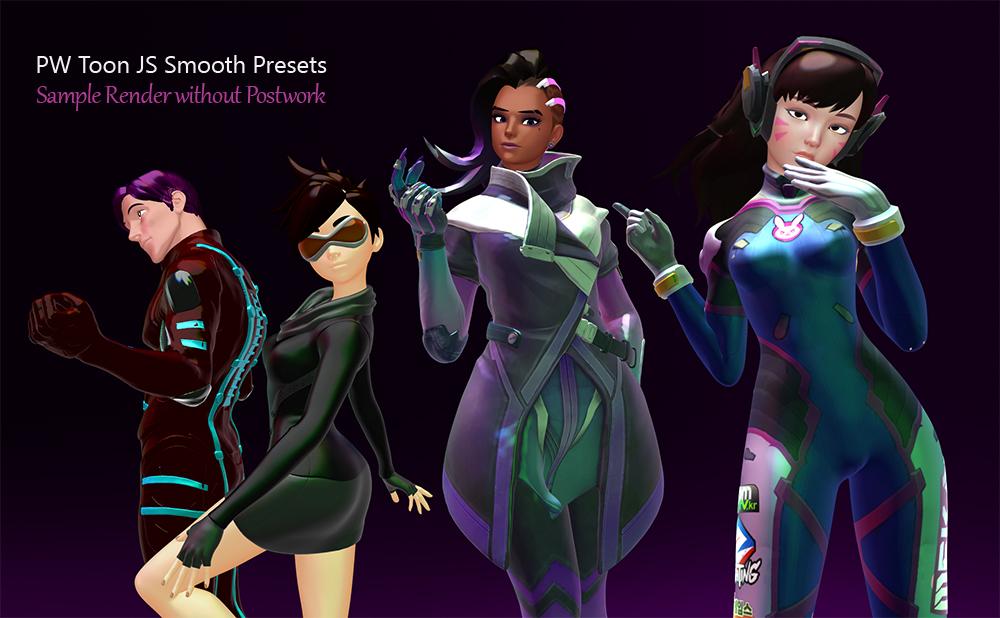
You can get these PW Toon Preset in here . I`ll be posting in freebie forum after having "proper" promo images and better Readme file . But I want to share in this thread first, because you`re all the best !!!
https://drive.google.com/drive/folders/1sNjIBqMTtX4r_WamJvOlhVZR3hlnd0F9?usp=sharing
Readme
JS Smooth toon Presets for DAZ Studio and PW TOON
This freebie need DAZ Studio instaled in your machine and PWToon Shader from DAZ Store to make it work
Each Folder contain several preset which organized to make it easy to use
These presets only work for 3Delight so change your render engine first
You can go to Render Setting and look at Engine option and Change to 3DelightI recommend to load JS Starter Light from !! SCENE SETUP folder and also Smooth Toon Render Preset before loading figures or props
When first loaded , You`ll see that you have Starter Light Group set in your scene . Open it and toogle on off each light for get different render style
The render Preset set Shading rate to 5, which in theory makes your render faster . But if your render really need outline or geoshell line you should manually resetting back shading rate value to 1 or smaller values
One thing to note : All presets have No ( Zero- Non active) outline or internal line .
Because I dont like it but feel free to make it active
The PRESETS
FULL MAT Presets contain One Click Smooth toon for Genesis 3 - Genesis 8 and G 8.1
For another Gneration Figures try to use Skin Shader Presets which included in BASE SHADER ONLY folderIn BASE SHADER folder also contain presets for Cloth and hair .
You can use each shader presets for another figure or objects if you want .
Make sure you select your object in Scene Explorer and the right surface first, before applying those presetsIf you want to retaining all textures use CTRL+ CLICK instead
FULL MAT + Textures Presets is solution if you already have some texture set from DAZ Store or another sites
All named with original character/figure where they came from . So check if you already those set or not
Most presets already optimized and tested to get better results but feel free to tweak and change to suit your styleAll MODEL LINKS you`ll need it to use those presets will be include in MODEL INFO text .
Right now it only have few presets . But I`ll be adding more in next updateSTARTER FIGURE folder contain each Genesis Generation Figure ( except G2 families) with basic Smooth Toon Shading applied
Those presets for peoples who want to tweak and assign their favorite Texture manually
G8 or G8.1 figures presets not loaded with Eyelash or Brow . You need adding manually and apply toon shader itselfThanks and Enjoy
JuveSatrianiThanks for great presets! You helped me with Rim multyplier greatly!
I tried your PWToon presets with AOA lights. It appears slower, than with your lights, but I like the result more.
Please don't post renders or textured previews of bare female breasts.
I'm sorry. Just didnt think of it as nudity
More Non-photorealisitic Renders (NPR II)pavsikakyj said:
juvesatriani said:
You can get these PW Toon Preset in here . I`ll be posting in freebie forum after having "proper" promo images and better Readme file . But I want to share in this thread first, because you`re all the best !!!
https://drive.google.com/drive/folders/1sNjIBqMTtX4r_WamJvOlhVZR3hlnd0F9?usp=sharing
Readme
JS Smooth toon Presets for DAZ Studio and PW TOON
This freebie need DAZ Studio instaled in your machine and PWToon Shader from DAZ Store to make it work
Each Folder contain several preset which organized to make it easy to use
These presets only work for 3Delight so change your render engine first
You can go to Render Setting and look at Engine option and Change to 3DelightI recommend to load JS Starter Light from !! SCENE SETUP folder and also Smooth Toon Render Preset before loading figures or props
When first loaded , You`ll see that you have Starter Light Group set in your scene . Open it and toogle on off each light for get different render style
The render Preset set Shading rate to 5, which in theory makes your render faster . But if your render really need outline or geoshell line you should manually resetting back shading rate value to 1 or smaller values
One thing to note : All presets have No ( Zero- Non active) outline or internal line .
Because I dont like it but feel free to make it active
The PRESETS
FULL MAT Presets contain One Click Smooth toon for Genesis 3 - Genesis 8 and G 8.1
For another Gneration Figures try to use Skin Shader Presets which included in BASE SHADER ONLY folderIn BASE SHADER folder also contain presets for Cloth and hair .
You can use each shader presets for another figure or objects if you want .
Make sure you select your object in Scene Explorer and the right surface first, before applying those presetsIf you want to retaining all textures use CTRL+ CLICK instead
FULL MAT + Textures Presets is solution if you already have some texture set from DAZ Store or another sites
All named with original character/figure where they came from . So check if you already those set or not
Most presets already optimized and tested to get better results but feel free to tweak and change to suit your styleAll MODEL LINKS you`ll need it to use those presets will be include in MODEL INFO text .
Right now it only have few presets . But I`ll be adding more in next updateSTARTER FIGURE folder contain each Genesis Generation Figure ( except G2 families) with basic Smooth Toon Shading applied
Those presets for peoples who want to tweak and assign their favorite Texture manually
G8 or G8.1 figures presets not loaded with Eyelash or Brow . You need adding manually and apply toon shader itselfThanks and Enjoy
JuveSatrianiThanks for great presets! You helped me with Rim multyplier greatly!
I tried your PWToon presets with AOA lights. It appears slower, than with your lights, but I like the result more.
Please don't post renders or textured previews of bare female breasts.
More Non-photorealisitic Renders (NPR II)juvesatriani said:
You can get these PW Toon Preset in here . I`ll be posting in freebie forum after having "proper" promo images and better Readme file . But I want to share in this thread first, because you`re all the best !!!
https://drive.google.com/drive/folders/1sNjIBqMTtX4r_WamJvOlhVZR3hlnd0F9?usp=sharing
Readme
JS Smooth toon Presets for DAZ Studio and PW TOON
This freebie need DAZ Studio instaled in your machine and PWToon Shader from DAZ Store to make it work
Each Folder contain several preset which organized to make it easy to use
These presets only work for 3Delight so change your render engine first
You can go to Render Setting and look at Engine option and Change to 3DelightI recommend to load JS Starter Light from !! SCENE SETUP folder and also Smooth Toon Render Preset before loading figures or props
When first loaded , You`ll see that you have Starter Light Group set in your scene . Open it and toogle on off each light for get different render style
The render Preset set Shading rate to 5, which in theory makes your render faster . But if your render really need outline or geoshell line you should manually resetting back shading rate value to 1 or smaller values
One thing to note : All presets have No ( Zero- Non active) outline or internal line .
Because I dont like it but feel free to make it active
The PRESETS
FULL MAT Presets contain One Click Smooth toon for Genesis 3 - Genesis 8 and G 8.1
For another Gneration Figures try to use Skin Shader Presets which included in BASE SHADER ONLY folderIn BASE SHADER folder also contain presets for Cloth and hair .
You can use each shader presets for another figure or objects if you want .
Make sure you select your object in Scene Explorer and the right surface first, before applying those presetsIf you want to retaining all textures use CTRL+ CLICK instead
FULL MAT + Textures Presets is solution if you already have some texture set from DAZ Store or another sites
All named with original character/figure where they came from . So check if you already those set or not
Most presets already optimized and tested to get better results but feel free to tweak and change to suit your styleAll MODEL LINKS you`ll need it to use those presets will be include in MODEL INFO text .
Right now it only have few presets . But I`ll be adding more in next updateSTARTER FIGURE folder contain each Genesis Generation Figure ( except G2 families) with basic Smooth Toon Shading applied
Those presets for peoples who want to tweak and assign their favorite Texture manually
G8 or G8.1 figures presets not loaded with Eyelash or Brow . You need adding manually and apply toon shader itselfThanks and Enjoy
JuveSatrianiThanks for great presets! You helped me with Rim multyplier greatly!
I tried your PWToon presets with AOA lights. It appears slower, than with your lights, but I like the result more.
More Non-photorealisitic Renders (NPR II)You can get these PW Toon Preset in here . I`ll be posting in freebie forum after having "proper" promo images and better Readme file . But I want to share in this thread first, because you`re all the best !!!
https://drive.google.com/drive/folders/1sNjIBqMTtX4r_WamJvOlhVZR3hlnd0F9?usp=sharing
Readme
JS Smooth toon Presets for DAZ Studio and PW TOON
This freebie need DAZ Studio instaled in your machine and PWToon Shader from DAZ Store to make it work
Each Folder contain several preset which organized to make it easy to use
These presets only work for 3Delight so change your render engine first
You can go to Render Setting and look at Engine option and Change to 3DelightI recommend to load JS Starter Light from !! SCENE SETUP folder and also Smooth Toon Render Preset before loading figures or props
When first loaded , You`ll see that you have Starter Light Group set in your scene . Open it and toogle on off each light for get different render style
The render Preset set Shading rate to 5, which in theory makes your render faster . But if your render really need outline or geoshell line you should manually resetting back shading rate value to 1 or smaller values
One thing to note : All presets have No ( Zero- Non active) outline or internal line .
Because I dont like it but feel free to make it active
The PRESETS
FULL MAT Presets contain One Click Smooth toon for Genesis 3 - Genesis 8 and G 8.1
For another Gneration Figures try to use Skin Shader Presets which included in BASE SHADER ONLY folderIn BASE SHADER folder also contain presets for Cloth and hair .
You can use each shader presets for another figure or objects if you want .
Make sure you select your object in Scene Explorer and the right surface first, before applying those presetsIf you want to retaining all textures use CTRL+ CLICK instead
FULL MAT + Textures Presets is solution if you already have some texture set from DAZ Store or another sites
All named with original character/figure where they came from . So check if you already those set or not
Most presets already optimized and tested to get better results but feel free to tweak and change to suit your styleAll MODEL LINKS you`ll need it to use those presets will be include in MODEL INFO text .
Right now it only have few presets . But I`ll be adding more in next updateSTARTER FIGURE folder contain each Genesis Generation Figure ( except G2 families) with basic Smooth Toon Shading applied
Those presets for peoples who want to tweak and assign their favorite Texture manually
G8 or G8.1 figures presets not loaded with Eyelash or Brow . You need adding manually and apply toon shader itselfThanks and Enjoy
JuveSatrianiMore Non-photorealisitic Renders (NPR II)vrba79 said:
Very nice!
Yeah, you can't beat PWtoon for that mix of render speed and versatility. I bought it several years ago and have gotten my money out of it a thousand times over.
I agree PW Toon really versatile . Its quick and easy way to get several render pass/type ( Flat - Hard Shadow & Ambient ) although I know Blender NPR is something I wanna tackle someday
I`ve already bought several good rating Blender NPR/Toon shaders , but sadly I couldnt make it work just like I wanted when using DAZ Figures .
More Non-photorealisitic Renders (NPR II)Very nice!
Yeah, you can't beat PWtoon for that mix of render speed and versatility. I bought it several years ago and have gotten my money out of it a thousand times over.
More Non-photorealisitic Renders (NPR II)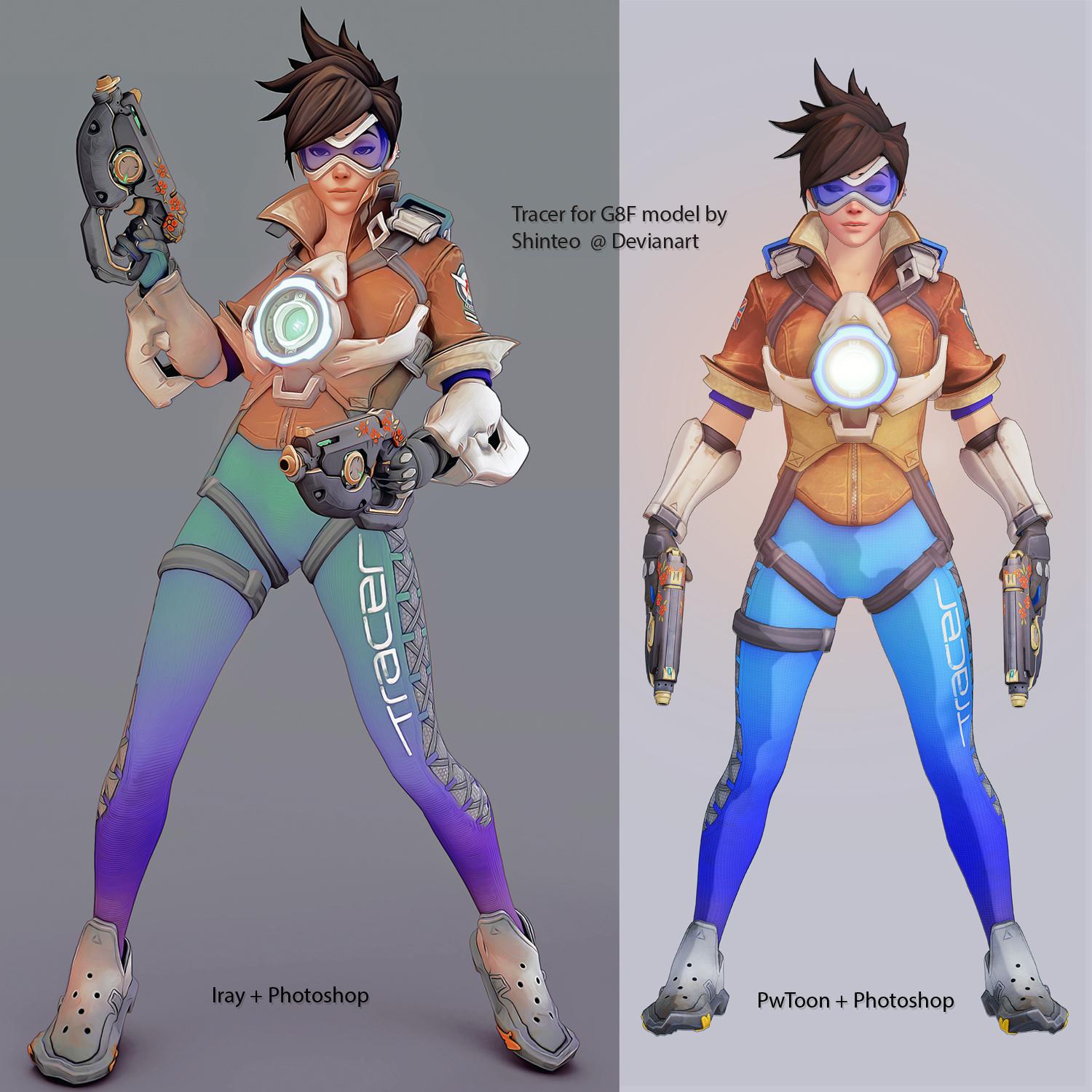
I`ve spent whole day to find balance between speed and easy to manage my personal Fan Art project . And after so many failed atttempt using Blender (for NPR ), I decide to back and find ways to maximizing DAZ render and photoshop to suit my style.
This image off course not perfect but I think I`m getting there , right ?
PW Toon version have advantage because I can render as big as possible and fast ! So multiple pass really easy . The real challenge is to make realistic material blend with another elements .
And For IRAY, Render size and my GPU is the culprit . But postwork process for this image seem faster .
Credit : Tracer model for g8F is freebie from Shinteo @ Devian Art
Studio 4.15 and PwToonCheers for the help guys. Have managed to get it working - had to uninstall and reinstall pwToon before it behaved, which was annoying. But it SEEMS to be working again...so far. :)
More Non-photorealisitic Renders (NPR II)A little tutorial on how to use Photoshop to complement PWToon.
It could probably use some improvement, but its here for whoever wants to use, modify or improve it! That's half the fun of sharing these kinds of tutorials, right?

Daz 3D is part of

Connect
DAZ Productions, Inc.
7533 S Center View Ct #4664
West Jordan, UT 84084Licensing Agreement | Terms of Service | Privacy Policy | EULA
© 2026 Daz Productions Inc. All Rights Reserved.






