-
Trying to maximise number of figures in a Scene
with the Efigy hair, I don't use the shiny stone shader, just something more hairlike
probably best to re-UV map it so a hair shader goes in the correct directions but not really bothered for distant figures, just looks like pinned up plaited/braided hair to me
I actually got them for Filament
cannot find a render right now and computer is busy doing something
those lowpoly figures don't have any more realistic hairs by looks
https://www.daz3d.com/lm-lowpi-lowpoly-figure
but yeah, if you dislike the Princess and the Pauper look, you probably wouldn't like these hairs either
 barbult's take on the lives of Jack and Richard
99 Recolored Gnomes on the Wall...
99 recolored gnomes on the wall. Richard takes one down and passes it around. 98...
(rendered in Filament)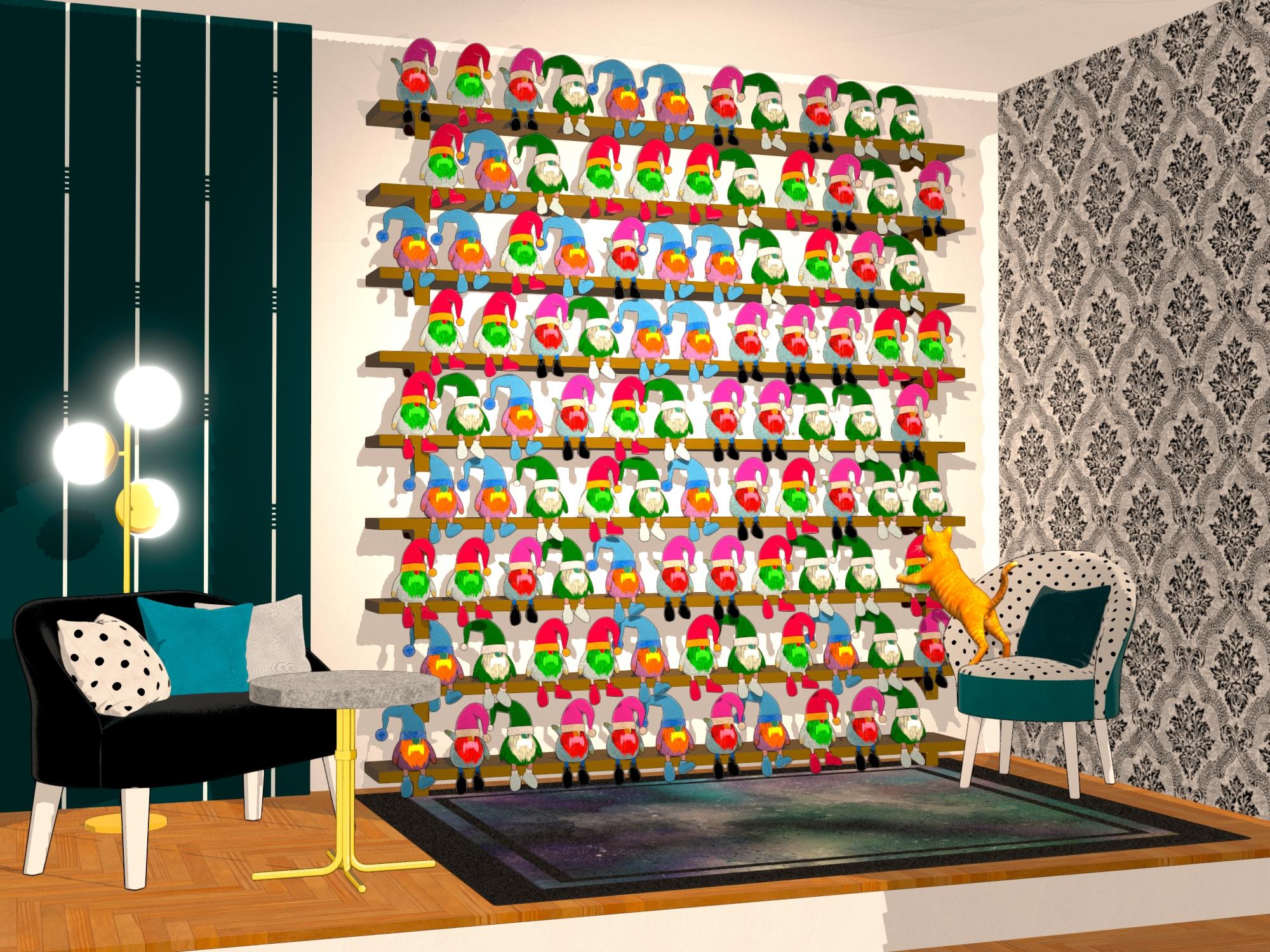
Gifts used:
November 28 2024: NewGuy gifting NG Holiday Gnome Stuffy
December 12 2024: Lully gifting Lullys Colors (they set the shader to Iray Uber, so I had to apply FilaToon shader afterward)Some Reader Comments:
SilverGirl: I have absolutely no idea where/how you come up with these.
None.
But this gave me a serious case of the giggles, and I will never be able to hear that song again without thinking about gnomes.
Thank you.barbult: I don't know either! They just come to me.
NewGuy: I love it!! I really hope you used instances on this though. Even with his low poly design that might crash some systems. Bravo!
ArtAngel: The most fun render here! What a great job on filament! Love, love this render. Now it's off to the vet for me with my every-two-hour-eye-treatment cat.
barbult: (to NewGuy) Yes, I used UltraScatter Matrix mode to create 9 vertical rows of 11 horizontal rows of Gnome instances, from a group of 4 actual mesh Gnomes. The shelf rows were created UltraScatter Matrix mode, too, from one actual mesh shelf. I had UltraScatter scale the Gnome down to fit all of those on the wall.
Richard Haseltine: Pass it around? You mean share my toys?
 (These really aren't very good emojis)
barbult: (to Richard Haseltine) Oh, how inconsiderate of me to suggest such a thing!

-------------------------------------
Dance Lessons
Richard wants to surprise and impress Lola when he takes her to the Daz Holiday Party, so he signed up for private dance lessons.

Gift Used: December 13 2024: Nelmi gifting Black and Red Fabric Iray Shaders
Some Reader Comments:
Payat Parin: Such an impressive work here. That would be an acrobatic skill for Richard. I got a feeling I know who Lola is :)
memcneil70: Richard is having a ball this year.
Richard Haseltine: or going to one. Hmm, claws may be an issue in a partner dance - still, genial ineptitude seems popular on Strictly.
-------------------------------------
Eat Dessert First
After a strenuous dance lesson, Richard sat down to a giant feast. Where to begin? Dessert is always a good place start.

Gifts used:
November 29 2024: JDA HDRI gifting Christmas Food
December 03 2024: Mattymanx gifting MMX Stone Tiles Freebie for Iray
December 08 2024: Elleque gifting PreT Cookware Casserole
December 10 2024: 3DStyle gifting Modern X-Mas Decoration
December 12 2024: Lully gifting Lullys Colors
December 13 2024: Nelmi gifting Black and Red Fabric Iray Shaders
December 14 2024: Muscleman gifting A Cozy Christmas
And a couple from past years-------------------------------------
Green Holiday Hair
Lola: I hope Richard will like my green holiday hair!
Richard: Gaaah! What happened?

Gift Used: December 15 2024: Color Galeria gifting CGI Christmas Headband for Genesis 9
Trying to maximise number of figures in a Scenerichardandtracy said:
WendyLuvsCatz said:
on hair, try moulded hair
for example
https://www.daz3d.com/Effigy-Hair-Models-for-Genesis-81-Females
https://www.daz3d.com/effigy-hair-models-for-genesis-81-male
that is hair that is a single mesh shaped anound the head with normal mapping for strands
or the character's head moulded into hair and a texture added using LIE
you don't need strands or transmapped strips from a distance
Hmm. Not sure about moulded hair. However, you have triggered an idea, where I write a little decimator type routine where it goes through a few passes and sees if the deviation from previous profile is less than a user decided amount and merges adjacent facets if yes. It's something I've thought about intermittently for a while. May be worth doing now.
Regards
Richard
well that's just some in the shop, I make my own moulded hair by adding a 3D skin in Zbrush and Zprojecting onto a subdivided version of it to add displacement I can make into a normal map
done this for some DAZ strandbased hairs to use in Filament
remove all lightcrosswind said:
With Scene Only, Filament draw style at least requires a Distant Light in the scene.
Thanks
remove all lightWith Scene Only, Filament draw style at least requires a Distant Light in the scene.
remove all lightThis question has probably been asked many times, I just don't know how to find it in the discussions. I would appreciate a tip on that too. Though my question is why when I am in filament view and I have no lights in a scene and HDRI set to "Scene Only" do I still see my object , when the screen should be black?
Thanks
Daz Studio 6 Beta - version 6.25.2026.19821! (Updated July 23, 2026)Richard Haseltine said:
Filament active will do that too. Adding a default camera would do the same, I think. But yes, I do not get the prompt for a truly empty scene.
I forgot about Filament.
Creating a Default Camera on New doesn't, not when I tried anyway.
Daz Studio 6 Beta - version 6.25.2026.19821! (Updated July 23, 2026)DoctorJellybean said:
a_gus said:
This message is a general comment on the Daz software, whatever the version. But I'm taking advantage of the arrival of the new version to give some feedback on what could, in my humble opinion, make it run more smoothly:
The first point is that a new, empty scene is created as soon as the application is opened. And when we open an existing scene from a file, and open the application in the process, an empty scene is systematically created and we're asked if we want to save it...
The natural answer is "no", but before opening the existing scene, closing the empty scene takes an unnecessarily long time.
Would it be possible for the application not to create an empty scene on opening, with, why not, a launcher of recent scenes instead?Another behavior that exasperates me is the fact that, in certain selection windows (for example, to select a constraint object), we have to select the element, then click on “OK”. It would be quicker to double-click on the element to select it, as you can only select one.
Actually, a new scene is only created when the application is opened with the Iray viewport active. That creates an Environment Options Node and a Tonemapper Options Node, which constitutes a new scene. I think when it Loads a File on Launch, it also constitutes a new scene.
Filament active will do that too. Adding a default camera would do the same, I think. But yes, I do not get the prompt for a truly empty scene.
Things I'm Playing with ........I've lost my muse ,been mostly trying to move things from Poser formats to DUF's and trying to figure out iRay shaders ,and how to get stuff to look right in Filament if they have transparences .......and having brain farts ,loseing focus ,and being very frustrated ......latest render didn't turn out the way I wanted it gotta figure out how to fix it .....

Lumino wings but they don't look right ,
The New Mac FAQThe current release is Daz Studio 4.24.0.3. I use it on my Mac and Window computers without issue. The Alpha DS 2025 is a work in progress and does give an Apple OS user the option to use Filament/FilaToon. But scripts/plugins are not available yet. I am using both on my Macs and shifting from one to the other as I need different processes.
You can have all versions loaded at the same time if you isolate the 4.21 installers before downloading any updates. Put them into a folder separate and labeled what they are. I believe this is discussed above in this thread.
AIUTO...CHI CONOSCE L’ITALIANO? PARTE QUATTORDICICiao ragazzi, mi è capitato un altro deterioramento di scena, diverso dai precedenti.
Una scena piccola sulla quale non ho lavorato neanche così tanto, ho fatto 3-4 render, fino a ieri sera nessun problema, la riapro stamattina e la vedo così (foto 1).
Se però attivo la Iray preview, l'immagine si forma comunque (foto 2), e idem se la visualizzo in "cartoon shaded". Solo in "filament" non si vede. Ho anche provato a salvare lo scenario (il corridoio insomma) come subset, senza personaggi o tonemapper/environment options, e aprirlo in una scena nuova vuota, ma si crea la stessa identica situazione.
Dipende sempre dalla scheda video?
C'è modo di salvare la scena o devo rifarla nuova?
All LightsDistant Lights have diection but not location (they always shine from "outside" the scene). You are rotating the light node but the render/Iray Preview/Filament Drawstyle is not reflecting that? Are the lights set to point at something?
No lights in preview.pauldb13 said:
For me I can't can't get any preview lights at all even using Ctrl-L. The scene stays dark in perspective view making it impossible to work in. With Ctrl-L not working at all how can I solve this problem?
I tried Ctrl-L several times and I still get this in every camera. It's too datk to work in even in perspective mode it's the same lighting, i.e. none.You're with Filament draw style for which a distant light is needed. You can switch to Texture shaded draw style by hitting Ctrl + 9.Then turn off Preview Light.
Daz Studio 6 Beta - version 6.25.2026.19821! (Updated July 23, 2026)empartoo said:
MIH_BAD said:
vicster56 said:
Hey all! After I updated this morning, DAZ Studio 2025 ALPHA - version 6.25.2025.21308 will not load. see Attached files. Thanks!
Don't take it the wrong way, thanks for posting. I would use DAZ 4 if you don't have the 50xx series ...
Just wait for public release ... there is no advantage at all (I think)
Happy rendering

I don't know this to be true. I have a 3060ti and there is a gigantic, extremely noticeable speed increase when using 2025aplha. What would take 2 hours to render in 4, take only 20-30 mins. The ui is way more responsive when in iRay preview, and I have yet to have an freezing issues, which are quite common in 4.
@MIH_BAD I would also like to bring to your attention that for Mac OS users, the Alpha allows us to use Filament/FilaToon products. And I agree that my RTX 4090 Win11, enjoys a reduction is rendering time, along with my MacMini Pro M4. And the more users testing this Alpha, the more input the programmers are receiving to improve it. I do hope your experience improves.
Mary
Daz Studio 6 Beta - version 6.25.2026.19821! (Updated July 23, 2026)I think I just earned the award for the craziest behavior. The button that's supposed to assign the shader to a selected surface in Shader Mixer is instead creating a camera.
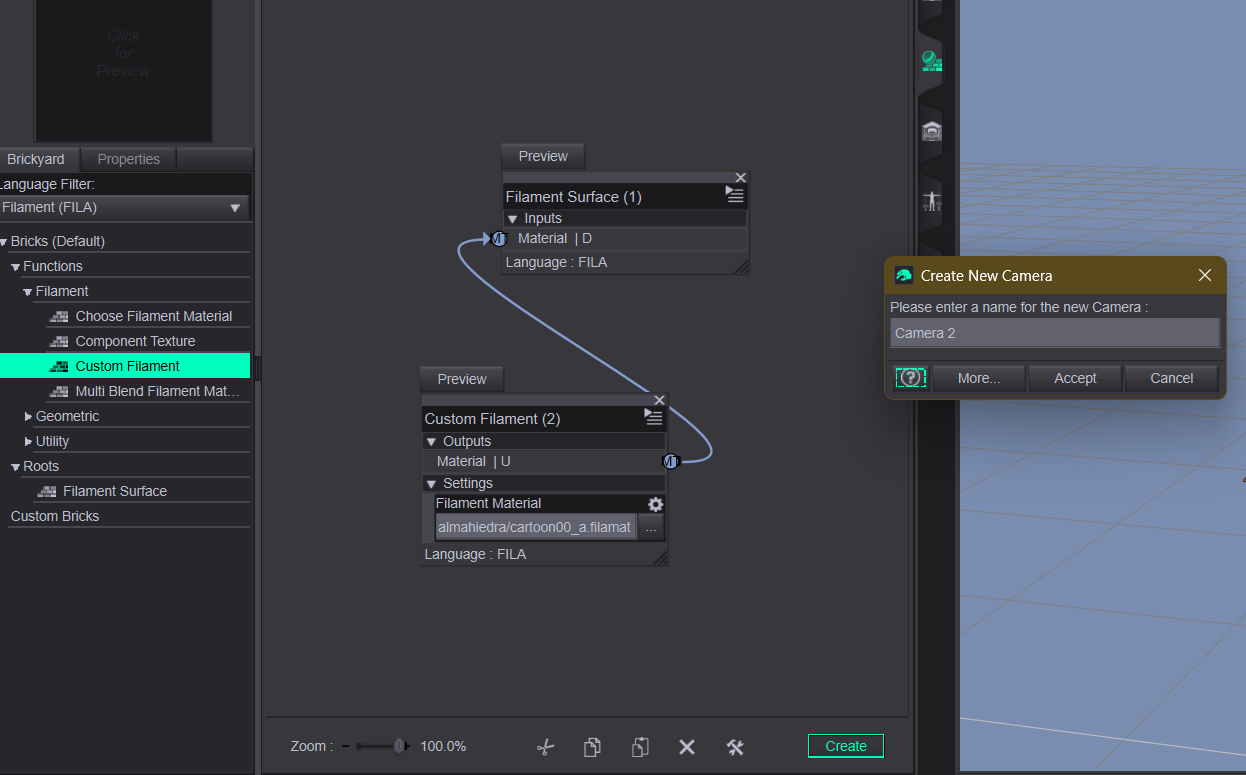
I hope this means they're making extensive changes to Shader Mixer to improve its usability. And if that's the case, they might consider adding a shader builder for Filament, since the one for RenderMan no longer exists
UltraScenery - new(er) territory [Commercial]Sorry, I kind of crashed out yesterday. Today is a bit of a bust too. I short-hand the proper name for Daz Studio 6.25.2025.22607 as DS6 or the Alpha. The last five numbers are the current version.
Right now I only have the Alpha installed on my Windows 11, RTX 4090 and my MacMini Pro M4. I am not installing it on my Windows 10, GTX-1080Ti desktop and GTX-1080 laptop. It could be installed but will be depreciated over time, so I considered it not worth the space on my drive which is limited.
What I have found is the DS6 renders really fast on the Mac. It also allows me to use Filament/FilaToon now. I am able to switch between DS 4.24 (Beta) and DS 6 (Alpha) in my workflow. Simply save a file and open it in the version of DS that I need. One thing I have learned the hard way is to save, and save often. When I am ready to render, close everything down on the Mac or Win 11, reboot, open the DS 6 and the file, verify all the settings are still there, add the file name, and hit render. Find something else to do for five minutes or so. Rather than the two to three hours I used to deal with on the Mac's Beta.
Just watch out for really high vertices. They bite hard.
While I am not as tech savvy as many here, I started with reading both threads for DS6 and have tried to keep up with them. Sometimes they do go WAY over my head. But at times I get answers before I have a problem. And I can also identify things at times too.
Regarding USC2, I would start in DS4.24 and then open the scene in DS6. I just don't know if there is any interaction between the scene and plugin for a simple render. That is what I want to test.
Memory questionThe Alpha was released early because of the RTX 5000 series kept folks from using DS 4.24. It is the qt4 vs qt6 issue. So right now plugins and most scripts do not work in DS2025. But on my MacMini M4 the other day I was able to create a render of a character, outfit, hair, scene, and simulate it. I had to replace the hair as it had an unusual reaction to dForce. The new hair was close to 6 million vertices and it crashed. I had saved thankfully prior to that. Rebooted and reopened and loaded the hair again. I also used PowerPose. Rendered okay. Apple computers have access to Filament/FilaToon now as well. But if I want to use many of the scripts I rely on, I save my scene file and reopen them in the Beta, DS 4.24.
One thing I have found out is many of my renders run faster on DS2025 than on DS 4.24.
But if you want more technical details:
Daz Studio 2025 (6.25.2025.x) - NVIDIA Iray 2024 - Daz 3D Forums
Daz Studio 2025 ALPHA - version 6.25.2025.22607! (Updated August 14, 2025) - Daz 3D Forums
Daz Studio 6 Beta - version 6.25.2026.19821! (Updated July 23, 2026)jbrettl said:
jbrettl said:
jbrettl said:
Richard Haseltine said:
jbrettl said:
Currently the log this time is stopped at
2025-08-16 17:23:43.331 [INFO] :: Begin asset load (open): /Props/SY Whips And Lashes Genesis 3 and Genesis 8/Props/SYWAL Short Whip.dufand it has been over 40 minutes
I'm pretty sure it is hung :)
I have uninstalled Daz Alpha through DIM and removed the directory and registry remnants, re-installed. I did not remove %appdata% pieces
I have two 5090's. Through devmgmt.msc disabled one, didn't help, disabled both, didn't help (I really don't want to pull the beast out again and pull cables :) )I have tested both 5090's successfully independently with a scene that will load
Thanks
That does sound pretty extreme, but not terribly informative. Does Task Manager show activity (e.g. CPU activity or RAM increasing) for DS? Does a different Viewport Drawstyle help?
I'll try whatever you want. The rest of the system was responding fine so It isn't like Daz was running away with anything. But good idea, I'll check to see if memory increases that will indicate some processing. I'm not sure how the viewport comes into play. It does default to filament and I left it there. I'll try with texture
Yeah, weird, it is just not doing anything memory wise. It actually went down to xxx,608 now, but not fluctuating
CPU fluctuates but around 6.x%Obviously the best thing is to have other people obvserve the same behavior. I don't know if you have that product to test, but if others do, maybe it is just me.
Can I post to ask people with the product to test (tee hee, already done)? and if I link to the product would that be considereded advertising for the product, and is that ok in this thread?
I have seen the same behavior with a figure I had stored in previous versions. It has a lot of custom morphs, but I have narrowed it down to being connected to the Nagaleon tail. I have a re-rigged version of that I use, which has around twice the bones as the original version. I notice the original version loads slowly (>1 minute load time), and my re-rigged one doesn't load in 2 hours. I may leave it overnight tonight to see if it loads at all.
I also saw it lock up after the texture message, using around 1 CPU worth of load, so it seems to be spinning a single thread. I think the texture thing might be a red herring: I loaded the figure with all textures removed (just a plain white iRay surface) and got the same behavior. Not convinced that final log message is actually meaningful. I am somewhat suspicious of the depth of the chain of bones causing some weird issue, but it really is just a guess.
Daz Studio 6 Beta - version 6.25.2026.19821! (Updated July 23, 2026)jbrettl said:
jbrettl said:
Richard Haseltine said:
jbrettl said:
Currently the log this time is stopped at
2025-08-16 17:23:43.331 [INFO] :: Begin asset load (open): /Props/SY Whips And Lashes Genesis 3 and Genesis 8/Props/SYWAL Short Whip.dufand it has been over 40 minutes
I'm pretty sure it is hung :)
I have uninstalled Daz Alpha through DIM and removed the directory and registry remnants, re-installed. I did not remove %appdata% pieces
I have two 5090's. Through devmgmt.msc disabled one, didn't help, disabled both, didn't help (I really don't want to pull the beast out again and pull cables :) )I have tested both 5090's successfully independently with a scene that will load
Thanks
That does sound pretty extreme, but not terribly informative. Does Task Manager show activity (e.g. CPU activity or RAM increasing) for DS? Does a different Viewport Drawstyle help?
I'll try whatever you want. The rest of the system was responding fine so It isn't like Daz was running away with anything. But good idea, I'll check to see if memory increases that will indicate some processing. I'm not sure how the viewport comes into play. It does default to filament and I left it there. I'll try with texture
Yeah, weird, it is just not doing anything memory wise. It actually went down to xxx,608 now, but not fluctuating
CPU fluctuates but around 6.x%Obviously the best thing is to have other people obvserve the same behavior. I don't know if you have that product to test, but if others do, maybe it is just me.
Can I post to ask people with the product to test (tee hee, already done)? and if I link to the product would that be considereded advertising for the product, and is that ok in this thread?
Daz Studio 6 Beta - version 6.25.2026.19821! (Updated July 23, 2026)jbrettl said:
Richard Haseltine said:
jbrettl said:
Currently the log this time is stopped at
2025-08-16 17:23:43.331 [INFO] :: Begin asset load (open): /Props/SY Whips And Lashes Genesis 3 and Genesis 8/Props/SYWAL Short Whip.dufand it has been over 40 minutes
I'm pretty sure it is hung :)
I have uninstalled Daz Alpha through DIM and removed the directory and registry remnants, re-installed. I did not remove %appdata% pieces
I have two 5090's. Through devmgmt.msc disabled one, didn't help, disabled both, didn't help (I really don't want to pull the beast out again and pull cables :) )I have tested both 5090's successfully independently with a scene that will load
Thanks
That does sound pretty extreme, but not terribly informative. Does Task Manager show activity (e.g. CPU activity or RAM increasing) for DS? Does a different Viewport Drawstyle help?
I'll try whatever you want. The rest of the system was responding fine so It isn't like Daz was running away with anything. But good idea, I'll check to see if memory increases that will indicate some processing. I'm not sure how the viewport comes into play. It does default to filament and I left it there. I'll try with texture
Yeah, weird, it is just not doing anything memory wise. It actually went down to xxx,608 now, but not fluctuating
CPU fluctuates but around 6.x%Obviously the best thing is to have other people obvserve the same behavior. I don't know if you have that product to test, but if others do, maybe it is just me.
Daz 3D is part of

Connect
DAZ Productions, Inc.
7533 S Center View Ct #4664
West Jordan, UT 84084Licensing Agreement | Terms of Service | Privacy Policy | EULA
© 2026 Daz Productions Inc. All Rights Reserved.