-
any news on the hd plugin?? :D
OK, I'll add a duplicate vertices algorithm on Monday (away for the weekend). It will solve the seam issue.
That would be really great. Thank you.
Here is another example. Floyd 8, HD-morph applied and not applied
I've uploaded a new version with an optional seam welding which seems to solve the David 5 problem. Unfortunately, It doesn't with the G8 issue. I'm afraid I have to work a little more on the subject

OK, I found it. It was the way I was computing normals.
I've just uploaded a new version with the bug correction.
Trying to keep two separate copies of Gen 8 Male and Female.I almost finished but for bits and pieces of setting up my new desktop. However my old copy of G8F and 8M are really loaded with additional morphs from Gen 3 and each other. I just did an install on the desktop with them all being clean copies. Is there a way to transfer over my modded copies on my laptop without overwriting the clean copies that are on my new desktop? Would look for a tutorial but have no clue even how to word the search. Thanks for the help.
Could you just load a Gen 8 figure, zero all of the used morphs, save that as a scene. Since the Genesis figures don't inject morphs the way that Poser figures do, the closest you are going to get is zeroed morphs.
No that is not what I mean. -chuckles- The problem is added too many. I have a set core I use and some cases what happened was I transferred over the G3 morphs and then the G8 morphs came out so they are doubled up in the figure. It isn't a case of just zeroing out the dials anymore. Only thing I can possiblely do is just load one hard drive and take out the other. But then I would not be able to use any new stuff on the old. I know there is a way to do it though I am just not sure how.
suggestion: automated 24h test "before buy" systemI would love this! There are so many times I've not purchased something because I would only use them in my webcomic once, this way I could have them for free!
And I could create background images without buying the required products!
And billboards for later use.
Or transfer the downloaded files to my graphics computer which never goes online!
This would save me a ton of money!Okay, okay, I'm kidding. Yeah, I don't see any benefit for DAZ, and lots of possible abuse. I don't think it's a viable idea.
How to Make a Clothes fit and work for Victoria 4?If you want clothing to match the morphs for V4 you have to create each morph individually.
You can have V4 clothes follow morphs like clothes for Genesis line do if you use the “transfer active morphs” feature in DS. You need to use that feature explicitly once you have your morphs setup in your scene though, it won’t do it automatically by default.
Trying to keep two separate copies of Gen 8 Male and Female.I almost finished but for bits and pieces of setting up my new desktop. However my old copy of G8F and 8M are really loaded with additional morphs from Gen 3 and each other. I just did an install on the desktop with them all being clean copies. Is there a way to transfer over my modded copies on my laptop without overwriting the clean copies that are on my new desktop? Would look for a tutorial but have no clue even how to word the search. Thanks for the help.
Could you just load a Gen 8 figure, zero all of the used morphs, save that as a scene. Since the Genesis figures don't inject morphs the way that Poser figures do, the closest you are going to get is zeroed morphs.
ISO North American SquirrelsWith some tweeks such as X-scaling the head, morph the ears, etc, you can get pretty close.
One of my "source" references outside my bedroom window:

A real quick test with the AM squirrel:
 How to Make a Clothes fit and work for Victoria 4?
If you want clothing to match the morphs for V4 you have to create each morph individually.
Trying to keep two separate copies of Gen 8 Male and Female.I almost finished but for bits and pieces of setting up my new desktop. However my old copy of G8F and 8M are really loaded with additional morphs from Gen 3 and each other. I just did an install on the desktop with them all being clean copies. Is there a way to transfer over my modded copies on my laptop without overwriting the clean copies that are on my new desktop? Would look for a tutorial but have no clue even how to word the search. Thanks for the help.
Lighting the Human FigureI have for some while been unhappy with the rendered quality of the human skin.
I have mostly used HDR's as lighting - my computer has no cuda cores so rendering can be a rather drawn out affair.
Just now I have decided to do a quick reference render of the various human mats so that I can refer to these prior to setting up a scene for rendering. For speed and simplicity I decided to use the camera headlight. I am more than surprised at the huge increase in the detail visible in these renders, they are photographic quality, and some take only a matter of minutes to complete.
So, I would be greatful for advice on how to transfer some of this detail and speed to to the rendering of a scene.
(RESOLVED) Daz Character Setup for Artists Part 3 Heads UpDid you get also the other ones? Anybody had time to take a look?
I wonder if part 3 is aimed at new PAs? :
What's Included and Features
Published Artist Tool: High Definition Morphs
I mainly wanted to get the 3rd one for the info regarding the PA tool, hoping to glean some inner workings and see if being a PA is something I may strive for one day. After I realized it was the incorrect files I opened the ticket. I then picked up the first one to see what the series was like and it was the correct file.
I have never published anything so I am not sure how high level or granular this would be considered from a PA's perspective but the first part gave me some understanding of morphs within Daz that I have not pieced together from the plethora of information I have scoured, probably more due to the way I learn than anything. I can say that the material for the first one is pretty conscise. I picked up alot of tidbits and felt most were very straight to the point. I finished the material with a very deep appreciation for what all goes into making a character morph both from the PA and behind the scenes with Daz before it gets released. The first part made me realize that, at least for now, I will only stick with very simple small morphs that do not require all the behind the scenes work to make the morphs work properly with everything else in Daz. There used to only be 2 things that I would never do myself, Roofing and laying carpet. Creating large scale custom morphs is now on that list. Much respect to all the PA's and skilled people who can produce this stuff!
3D Comic Book Tips And Pictures@Griffin_Avid I used to collect a few issues here and there. The fantasy aspect I think is what I enjoyed the most. The huge creatures and supernatural stuff. So much fun.
Red Nails is in the Book 1 compendium released by Dark Horse. Great story. The character of Tolkemec has a unique and grisley appearance. The art is great in that story. I really like the sense of scale with these ancient structures. It's also got dinosaurs, living skeletons and all the cool stuff associated with Conan. It's a good story.
I really like the John Buscema artwork. Probably my favourite from book 1 is 'Iron shadows in the moon'. But they are all good stories.
I am including the original renders out of Daz. The abs were part of the morph on the Michael 4 character. I think it was the Barbarian pack I used, which was obviously inspired by Conan itself.
I actually never considered using the older generation models for comic design, however, this render came out alright. I might dig out the old Victoria 4 model and do some tests using these characters in a comic format. Surprising what you can discover when you are just trying out things.
On a side note. How long does it usually take you guys to make a complete comic issue. It's already taken me over a month to make 1 and half pages, I'm thinking this may take some time to complete!
I'm also including a test render trying to emulate the Boris Vallejo art style. Might be good for cover artwork.
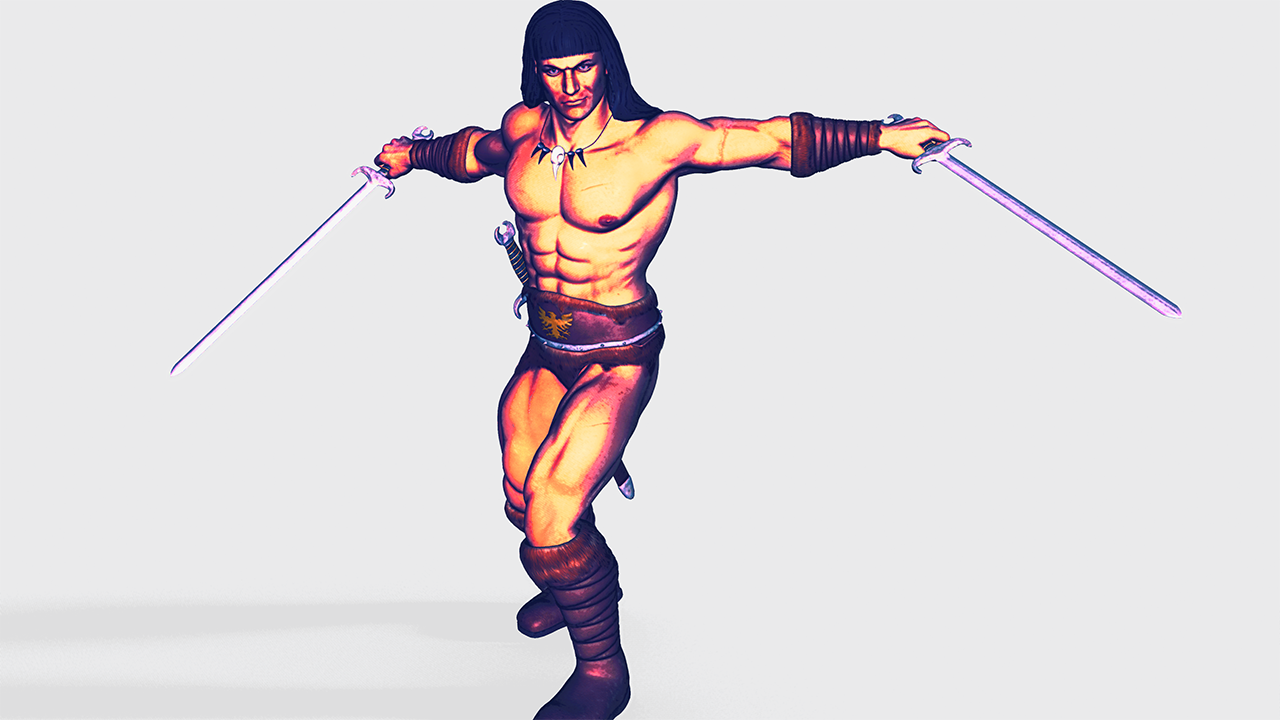
This render has a nice feel to it. Have you looked at Topaz Studio? It's a very cool set of filters designed to emulate painted effects.
(Also, Michael 4 and Victoria 4 both still have a lot of life left in them, especially when you are working with non-photographic renders (i.e. black & white or painted effects). All of my comics work uses the older generation figures because Poser 11 has the geometric edge feature (Live Comic Book Preview) that I use for my linework.
Converting shoes from G8 to G3 keeping morphs?It didn't work at first, I got the Geometry did not match message. I figured it was probably because I didn't save the original G8 shoe as an obj file, I just converted it to a prop and transferred from there. Once I saved the original shoe as an obj and went through the Transfer Utility, Morph Loader Pro worked like a charm. Thanks.
Converting shoes from G8 to G3 keeping morphs?You could, with the original shoes in the posed postion, apply each morph you want, export as OBJ (with everything else hidden), then once done load those OBJs as morphs through Morph Loader pro (which allows you to load them in one go - the morph will take its name from the OBJ). That will work for plain shapes, if there's any ERC linking (to other morphs or to joint rotations) things get a bit fiddlier.
any news on the hd plugin?? :DOK, I'll add a duplicate vertices algorithm on Monday (away for the weekend). It will solve the seam issue.
That would be really great. Thank you.
Here is another example. Floyd 8, HD-morph applied and not applied
I've uploaded a new version with an optional seam welding which seems to solve the David 5 problem. Unfortunately, It doesn't with the G8 issue. I'm afraid I have to work a little more on the subject
Skinny ribs for Genesis 8I would also like to see a skinny rib morph product for G3F as well, i can't seem to find one anywhere.
Darona, unable to thorughly hide feetI actually had a morph that allowed me to drop her show size to 0, that and a slight morph to the shin thickness worked. Now does anyone have a good way to make a transition section between the hooves and the shins?
Some Body Part Rotations Are Being Exported As MorphsI am trying to export a Genesis 8 Female animation out to an FBX file but some of the rotational changes for some of the body parts are being exported as morphs rather than rotations. How do I stop this from happening. This occurs when I have both Animations and Morphs checked in the FBX Export Options dialog box. Is it done by Edit Morph Export Rules button? Can someone explain how to add the rules?
 Skins and textures not listed in smart content and not appliable.
Do you have G8F selected in the scene? That's the message you get when you try to apply a material to ...nothing.
hmmm, I thought I did, some of the items are now working but I'm not sure if that's just because I dragged most of the skin material into genesis 8 female's skin folder (to try and fix this). But I think you are on to something, should I specifically click a part of the body the item is supposed to be applied to?
Also as a side question, I read that you can use g8m morphs on g8f by using the utility transfer tool, but everytime I tried the program crashes so I'm not sure if I did it wrong or not...or will ever be able to do that. Theoretically, could I transfer genesis morphs and genesis 3 morphs to genesis 8 figures too? And when I transfer will the morph come with a slider or will just be a copy of the other figure's current morph level.
Thanks2nd of nine lives Cat Girrrl render thread prrrI think you did very well with her, Molly!
As for Melody 2, that product turned out to be something of a missed opportunity. I appreciated the concept, an anthropomorphic funny animal head that could be applied to almost any figure. But the product kinda' got abandoned. True, several texture sets were offered, but twas it and all of them were bold, cartoonish patterns, nothing remotely quasi-realistic like the "Fisher Cat" set. But beyond that, nothing. The original Melody (and Micah) got the 'Furries for..." morph add-ons, allowing one to create a condsiderable variety of mammal types, felines, canines, rodents, cervids, mustelids, etc. Within the forums of Runtime DNA, Lady LittleFox had stated those "were coming" for Melody 2. She also presented "works in progress" for add-ons like fluffy "pectotal ruffs" that would conform to V4's chest and used transparency mapping to create the effect.
But during those discussions LittleFox released "Star" (the stand-alone version) and when that product proved super popular, Melody 2 got pushed to the side and was forgotten. But I can understand the circumstances. As a merchant, she was smart to "follow the money". Since "Star" proved a hot seller, it would make sense focus upon it and create content for it instead.
Melody 2 had potential, but it "got lost in the shuffle".
Sincerely,
Bill
I adore Star, so I can see why she went with that. It's unfortunate that Melody 2.0 didn't get the support that the A3 version did. I'm still having tons of fun with it though. I'll have to see about tweaking the texture maps and see if I can figure out a way to give it a little bit more of a fur-like look. :)
How's a Wolf (2.0) to howl?I hadn't looked at the Wolf www.daz3d.com/wolf-2-0-by-am for awhile & tonight loaded it & noticed that there's no control for the Jaw & Mouth. There are poses with mouth open, snarl, etc. but not finding any actual morph controls for those, just the ears & basic Head, Tail, legs.
What/where am I overlooking? The Product page does mention a complete collection of morphs, expressions so maybe a reinstall is called for?
Daz 3D is part of

Connect
DAZ Productions, Inc.
7533 S Center View Ct #4664
West Jordan, UT 84084Licensing Agreement | Terms of Service | Privacy Policy | EULA
© 2026 Daz Productions Inc. All Rights Reserved.