-
Installing DAZ Studio/DAZ Central onto external hard drive
Happy Holidays to everyone!
My DAZ Library is becoming so large, I decided to purchase an external hard drive to contain everything. I decided to delete everything from my desktop and just start fresh (early spring cleaning?).
Is there a tutorial or walk through that can show me how to make sure everything is just on that external hard drive? I just want to make sure everything is in a central location.
Why does my content NOT fully installThat sounds like an issue with the Content Management System. I'd suspect the most likely cause is that DS was closing when you launched Install Manager/Central, and as a result the database was not available for updating when you installed. Try reinstalling the content with DS running (it's only if you are installing stuff "like software" - especially plug-ins and application updates - that DS needs to be closed) and see if the products tghen show as installed.
BecsSo, sometime, earlier today, I purchased the new Becs character. I opened the handy-dandy, Install Manager (updated each time it needed updating) I've been using for nigh on two years and what to my wonderment? She isn't in there. I said to myself, "Self, this has happened before a few times, so just go straight into your Daz Studio and look around at the bottom of the figures tab and she'll be there." Now I thanked myself because he has pretty good advice and it is true that this has happened before and when someone/thing isn't in the install manager they or it is just waiting for me in the Studio itself and I'll download her there. She wasn't there.
So I said to myself, "Self, your computer has been on for a while now and it is possible that there's some technicle, cyber reason from it being on so long. Just restart your laptop and she'll be there." I once again thanked myself, rebooted my laptop, checked the DIM and DS and Becs is no where to be seen.
Now, Self tells me to take a nap because we had a problem with Freya when she came out and after a nap she was there in her full, Nordic Goddess of Butt Kickery glory. So thanks to myself and a nap happened. After awaking and checking Becs still was nowhere to be seen.
Self and me were both a bit confused by this but I told Self that I got this one and I downloaded Daz Central. That oughta do it! Let me tell you, Both me and myself are a bit disappointed because we purchached Becs and she won't come on down to my laptop to play. She won't even manually download.
Is anyone else having a problem with Becs?
Daz Central log inI had or have this problem. It does not accept my password all of a sudden. It had been working fine until last Sunday...I would reset and the new password worked for Daz 3d but not for Central, thus locking me out of the studio as well.
I've been in communication with Tech Suppport (good luck) then on Friday mornng it took the password. But now it has stopped taking the password. WTH is happening?
I'm open to any suggestions...
Daz Central log inDaz Central keeps logging out on me and refuses to log back in when I enter the correct password. I end up having to reset the stupid pasword.
Daz Central problems with Zbrush 2019.1.2That would not be the path Daz Central would use for the application - it dumps everything in a single master Daz 3D folder on the chosen drive. You may want to install using Install Manager https://www.daz3d.com/get_install_manager/
Daz Central problems with Zbrush 2019.1.2Hi, this is a bit of a mess, I updated my Macbook pro with the new OS Big Sur 11.1 and now Daz doesn't work anymore... so I installed Daz Central on my laptop pc and tried to insert the Daz exe file path in my zbrush 2019.1.2 and it seems that I cannot locate Daz exe anywhere anymore... what is going on? I'm working with Daz for many years and never had this many issues before... I tried this path (using windows search with daz*.* keyword) C:\Program Files\DAZ 3D\DAZStudio4\DAZStudio.exe but Zbrush says that "Path does not exist, check the path and try again...
Help with "Daz To Blender" / Not Showing Upwintoons said:
Ok, I've been doing some research and this what I found :
I know some of you aren't able to find the location of the Add-on. I think its because downloading the addon from Daz Central puts it in a different location and actually extracts the files in a different location. Here's what I did to solve it.
First, go to C:\Users\username\appdata\Roaming\Blender Foundation\Blender\BLENDER_VERSION\scripts\addons\DTB
Move these files to C:\Users\esima\appdata\Roaming\Blender Foundation\Blender\2.91\scripts\addons\DTB
You may not see the DTB folder when moving the files, so just add the folder yourself and name DTB. Then, restart blender and go to preferences, addon and search DazToBlender. You will then see the addon. Restart Blender again and you will see the addon in the right corner as mentioned in the video. Thank you and enjoy. :)
thank you for the deep instruction. was confused myself. this really helps everyone!
Help with "Daz To Blender" / Not Showing UpOk, I've been doing some research and this what I found :
I know some of you aren't able to find the location of the Add-on. I think its because downloading the addon from Daz Central puts it in a different location and actually extracts the files in a different location. Here's what I did to solve it.
First, go to C:\Users\username\appdata\Roaming\Blender Foundation\Blender\BLENDER_VERSION\scripts\addons\DTB
Move these files to C:\Users\esima\appdata\Roaming\Blender Foundation\Blender\2.91\scripts\addons\DTB
You may not see the DTB folder when moving the files, so just add the folder yourself and name DTB. Then, restart blender and go to preferences, addon and search DazToBlender. You will then see the addon. Restart Blender again and you will see the addon in the right corner as mentioned in the video. Thank you and enjoy. :)
Uninstall DAZ Studio on a MacIf you have already updated to MacOS Big Sur then the only way will be to manually remove everything as DIM & Daz Central won't work.
Unable to Log In. Had to create a new account. ANNOYING!!Good luck with tech support. they are worthless
I cannot log onto Daz Central for the past few days. Up to then it was working fine but it won't accept my password. I can still log onto my account and my filea are all there but for how long? I just can't get into Daz central and access the studio where all my purchases and work is stored. I'm dead in the water as far as that is concerned. I contacted tech support and wating to hear back.
I'm open to any suggestions at this point.
Daz Studio disappeared after uploading misc product updatesThanks for taking the trouble to answer. It was all sorted by the end of your step 4!
Going forward, perhaps I shouldn't be using both Install Manager and Daz Central. They both have elements I like - but it seems this can cause a conflict.
Thanks again!
D
A Few Books (Hardbacks) For DAZ Studio 4rezaf said:
... When you apply the provided Iray shader manually (I had to redownload and look where you put it as it's not in the product directory as usual but stashed away under presets - I originally downloaded the prop quite a while ago) it indeed works as intended...
I believe that the automatic placing of stuff into your product directory only happens when you install a product that comes directly from DAZ via one of the automated installation channels (DIM or DAZ Central) which do some post-installation jiggery-pokery.
However, any product that contains the appropriate metadata (and that includes these books) can be manually added to your product directory.
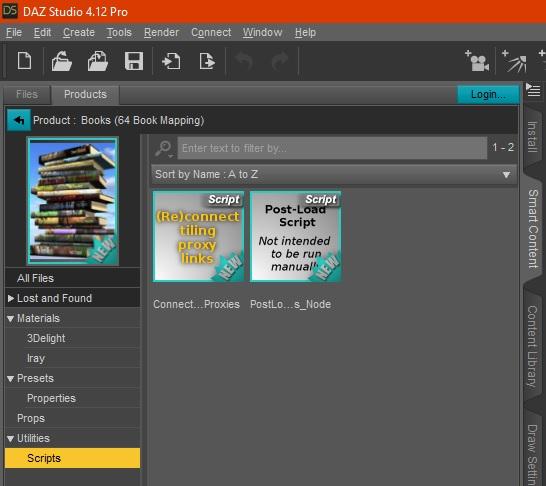
Since the process isn't obvious I included it in the readme '3DC043r1 - DS-Native Books (64 Book Mapping) ReadMe.txt', but for good measure I'll duplicate the Installation section below, with the metadata installation bit in bold, plus a couple of pictures:
Installing:
===========
Copy the contents of the 'DS Content' folder from the zip into your preferred DAZ Studio content folder.To install the metadata (which is now in the /Runtime/Support folder of your preferred DAZ Studio content folder):
- In DAZ Studio open the context menu from the Content Library.
- Select 'Content DB Maintenance...'
- Tick just the 'Re-import Metadata...' box and click 'Accept'
- On the 'Import Metadata' dialogue find 'Books (64 Book Mapping)' under 'All Products' and make sure that it is the only item on that dialogue that has a tick.
- Click 'Accept'
- You should now see 'Books (64 Book Mapping)' under 'Content Library >Products > B'
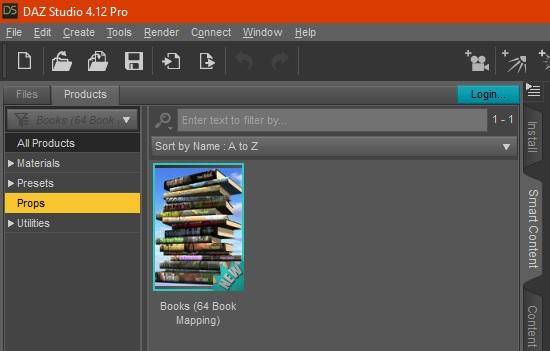
- On 'Smart Content > Products' (and/or 'Smart Content > Files') click the 'Props' category to see the books.
If you want to make your own textures copy the XCF or PSD from the 'Extra Stuff' folder of the zip to wherever you like.The context menu is the little icon top right of the Content Library pane, indicated in the screenshot below
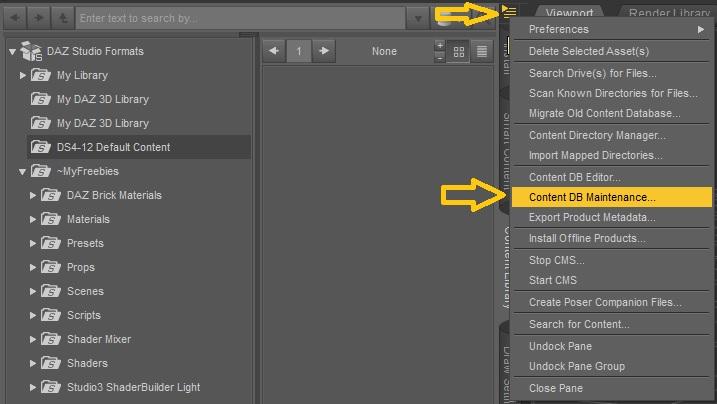
Once you've followed those metadata installation instructions you should see everything you need under the Products section on your Content Library tab
And yes, I have just retested that.
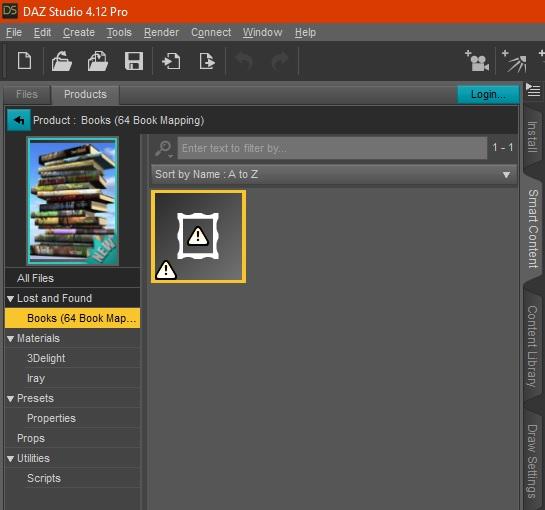
(Note: I have no idea now know what the item with an exclamation mark in a triangle in a picture frame is - it appears to be grouped under 'Lost and found'. I've asked about that on a relevant thread, and worked the answer out for myself before anybody responded - the metadata includes a script file that I only needed in order to create the props ( 'AddMy4ParametersWith2ERC.dsa'). That file wasn't part of the package I uploaded because it's of no use to an end user. So the icon appears because the file doesn't exist. The solution is to simply right-click the icon and select either "Remove Reference..." or "Remove Orphaned Reference...")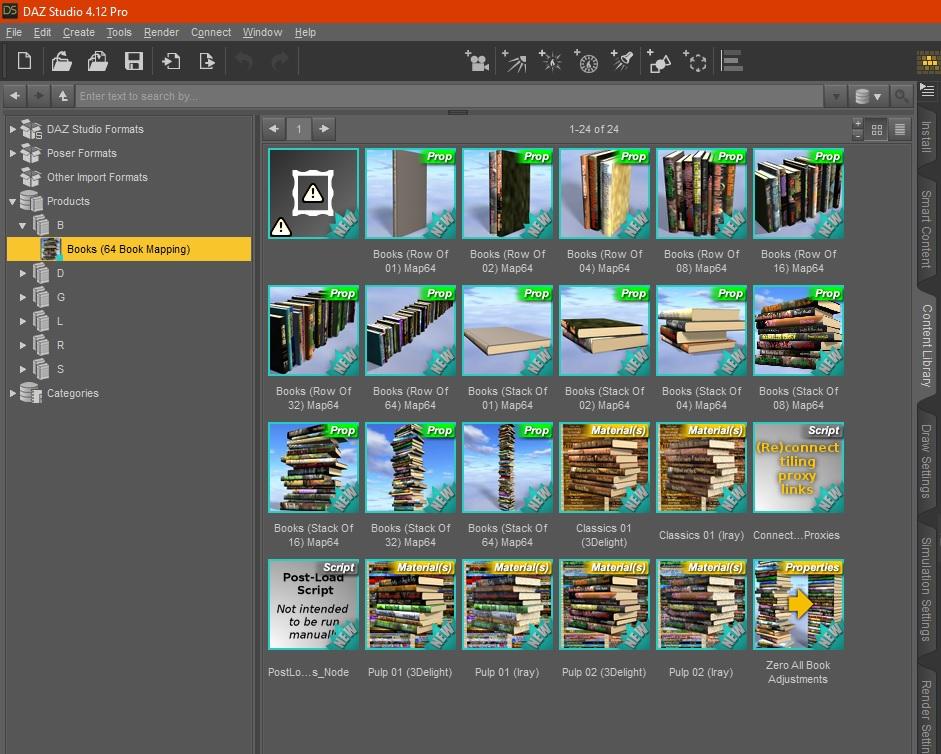
 Daz Central and Bryce
Bryce is not Studio. Neither DIM nor Central work. See https://www.daz3d.com/forums/discussion/460136/not-possibe-to-install-bryce-content-over-the-install-manager#latest
Daz Central and BryceI was going to install both Bryce and Carrara and it appears that Daz Central is not showing either of the programs, but it does Hexagon. I have used Bryce for so long I hate to see it end. Is it getting phased out? How about Carrara?
Getting Warning When Logging into DAZ3DIm still having the issue with logging into daz central and DIM
Daz Central does not accept passwordI have done that but it takes Tech support days and sometimes week to respond. Pity they do not have any phone support. I trried changing the password and still I am locked out of Daz Central. Without that login I cannot access the studio which means the order I recently purchased is not accessible to me. I'm dead in the water....AARRGGG
Daz Studio disappeared after uploading misc product updatesMy suggestions:
- Reboot your computer. (This will kill off any rogue processes.)
- Uninstall DAZ Central for now. (You can reinstall it later.)
- Bring up Install Manager, and check to see if it still thinks DS 4.14 is installed. If it does, use the uniinstall menu item for the "Intalled pane" to try to delete it.
- Assuming it is no longer installed, check "Ready to Install Pane"--if the DS 4.14 is there, select it to reinstall.
- If it isn't there, check the "Ready to Download Pane" --if DS 4.14 is there, select install.
- Reinstall DAZ Central if desired.
If you can't find DS 4.14 at all, you may have a corrupt install. Use Windows -> Settings -> Apps to uninstall install manager. Download Intstall Manager from DAZ's web site and reinstall. Repeat steps 3-6 above.
Alternative to get you up and running. This will install the current Beta.
- "Buy" the Daz Studio Beta at https://www.daz3d.com/daz-studio-beta. ;
- It should be free. Restart Install Manager. You should see the DS Beta in the Ready to Download pane.
- Go to the Install Manager adavanced settings (gear Icon in upper right). Set the path for Daz Studio 4.x Public Build. I usually use "C:/Program Files/DAZ 3D/DAZStudio4 Public Build" which puts it right beside the the production release.
- Install the Beta and any Public Build Plugins from the Install Manager Ready to Download pane.
You can use the Beta (which is reasonable stable) to finish up what you're doing until you have more time to diagnose what's up with the regular release.
HTH,
-K
Daz Studio disappeared after uploading misc product updatesMy DS 4.14, which was open at the time, disappeared after installing various product updates via Install Manager. I tried to reinstall it but my Daz Central just immediately pops up, indicating that it is already installed. So I try to open it from within Daz Central but nothing happens.
So I next tried to uninstall it through Daz Central with a view to doing a clean install, but the uninstalling process has got to 86% and has been stuck there for the last 1/2 hour. So I can neither launch, install or uninstall!
Help! What has happened and what can I do about it?
Daz Central does not accept passwordI have been using Daz central for the past few weeks and I LOVE IT. I had used install manager in the past but since my computer repairs I been using Daz central. I click on the icon DC on my dock and Daz studio opens and I'm off and running. It never asked for my password as it was stored and suddenly...
A funny thing happened today, It asks for a password. Using the password I use to log onto Daz 3D but all of a sudden it does not take the password and won;t open Daz Studio. I just purchased some products but since I cannot open DAZ central or Daz studio, i have no way of working in studio or using anything.
What happened? why does it not accpet my password now despite the fact that its the same password I used to log onto Daz.
any suggestions or words from the wise?
Daz 3D is part of

Connect
DAZ Productions, Inc.
7533 S Center View Ct #4664
West Jordan, UT 84084Licensing Agreement | Terms of Service | Privacy Policy | EULA
© 2026 Daz Productions Inc. All Rights Reserved.