-
Transforming a normal G8 male character to a baby
No, best you can do is about 5 years old. I guess as some 3 year olds look 'older', you could say 3 year old or toddler but definately past the infant stage.
You need to search on the internent for proportions for toddlers - 6 years old and then use the morphs in these products do get as close to those proportions as you can:
https://www.daz3d.com/genesis-8-male-head-morphs
https://www.daz3d.com/genesis-8-male-body-morphs
https://www.daz3d.com/genesis-8-male-expressions
https://www.daz3d.com/genesis-8-female-head-morphs
https://www.daz3d.com/genesis-8-female-body-morphs
https://www.daz3d.com/genesis-8-female-expressions
And you'll probably want this product if you're not that good at eyeballing when you create art:
https://www.daz3d.com/measure-metrics-for-daz-studio
Don't forget, you'll probably want to dial in a bit of chubbiness / portliness from the body morphs. The head morphs don't have a chubby morph unfortunately but roundness & yuthful works somewhat. And too many people make the mistake of giving toddlers an infant face but they do tend to look more like they are going to look as grow ups then most people think so don't let that throw you.
Unfortunately when you install those DAZ Originals morphs products the entries in the Shaping tab are not prefaced with a abbrevation or something to let you easily find just those particular morphs, eg, DAZ Head or DAZ Body or DAZ Exp. You know you have the right ones though if they are off-red on the left fading to grey on the right. Most of the head morphs are located on the face although a few are on the head.
Night & Day City - Product Promo [Commercial]Maybe I'll finally be able to use DS for more than just a figure optimizer/creator, aniBlock manipulator, and morph plugin!
Are you going to go in-depth like you did in your Carrara releases?
It depends what you mean by "in-depth". It won't be the quite same as the Carrara release as there isn't an equivalent to the Instance Randomizer plugin. So I have included the ability to turn on and off parts of buildings manually and change color sets on them. It will include both day and night sets (which with the Iray rendering looks great!) and there will be some preset blocks and scenes as well as the individual buildings and other props. I will position it as a modular city-building set. Does that answer the question?
How to dial away the hollow back of female G8?What's really funny is there's a thread of people trying to emulate that pose with hilarious results.
Lol Where is the topic spoofing the comic style? Could use a good laugh.

To Topic:
Since I have lot of fun with Leony as “Lara Croft” got curious. Compared to G3... G8 does seem to have sway back. Had never noticed. Good to know about morph! : )
Oddly enough (imo) Leony seems to have less sway than G8 or even V8 (unless perspective is throwing me off.)
Did the OP mean the cleft or depression over the spine? Assume Leony was meant as a sort of “Tomb Raider” character, so if true to game, she does have that hardbody cleft over spine.
Now am just curious if it has a name. Found a sacral morph and a ‘fitness’ morph, but nothing that really dials up/down this feature. As said, just curious. :)

G8 has the most sway back?

'Spinal cleft?' What's this called?
Auto Shape Enhancer [Commercial]thanks, but the morph dosen't seem to do anything for me?
Your Auto Shape Enhancer morph is at 0%
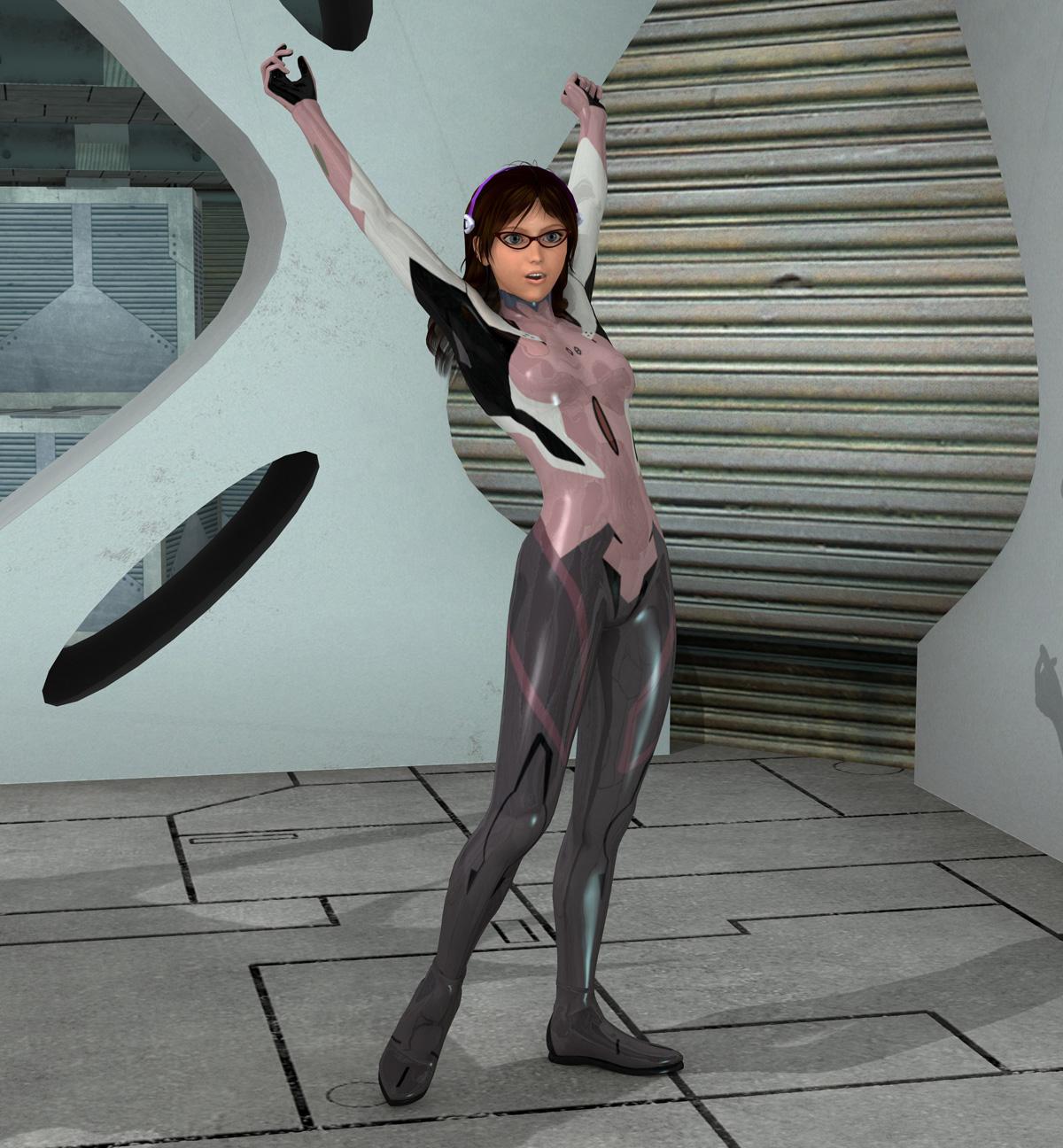
Welcome to Hatsune Miku Anime Manga Cafe ☕Genesis with some morph sliders, Plugsuit by EvilElliot, Mari Makinami Illustrious in the shadow of Evangelion Unit-08.
 Buy Something That Doesn't Work in Carrara? Post your Questions and Workarounds here. (please)
snip
It comes with an amazing assortment of morph dials for various functions of this amazing ship - none of which work in Carrara.
they are likely not morph dials but linked erc sliders, you can in that Carrara plugin called DAZ studio create Pose control sliders that can each affect joints and morphs so say a muscle flexes when an arm is bent using one etc
what you do if using the duf versions is dial them in DAZ studio and save them as pose presets, animated not a bad idea either as places keys along timeline that Carrara can then save as nla poses
if using the Poser versions it is more likely a pmd so out of luck
I don't have this BTW to test
It's DUF only.
Yeah, I was thinking about doing pose presets. But when I found out how easy it is to simply drag on the parts of the vehicle itself instead of using dials, I think I like doing it this way better. It's as simple as right-click > select > drag or rotate as farr as I can or want to. Unlike most other things, this thing is linked in a way that the model doesn't get shoved around at the end of a move or rotation. So sweet! I'm going to get the ship like this that came before it too - just because! :)
Buy Something That Doesn't Work in Carrara? Post your Questions and Workarounds here. (please)snip
It comes with an amazing assortment of morph dials for various functions of this amazing ship - none of which work in Carrara.
they are likely not morph dials but linked erc sliders, you can in that Carrara plugin called DAZ studio create Pose control sliders that can each affect joints and morphs so say a muscle flexes when an arm is bent using one etc
what you do if using the duf versions is dial them in DAZ studio and save them as pose presets, animated not a bad idea either as places keys along timeline that Carrara can then save as nla poses
if using the Poser versions it is more likely a pmd so out of luck
I don't have this BTW to test
Night & Day City - Product Promo [Commercial]Maybe I'll finally be able to use DS for more than just a figure optimizer/creator, aniBlock manipulator, and morph plugin!
Are you going to go in-depth like you did in your Carrara releases?
Buy Something That Doesn't Work in Carrara? Post your Questions and Workarounds here. (please)nice looking review thanks Dart :) love that render too
LOL! That's a promo pic! :)
I did manage to get it saved tp my browser with shaders, lighting, and a multitude of cameras - between three PC crashes. A lot of other things aren't giving me such luck. This ship being as big as it is, I was expecting it to be a real resource hog. It's not.
Pretty cool in fact. After getting the shaders optimized (lots of fun options, including atmosphere entry charring overlays!) I was able to get some interior lights going, and found the bridge of the ship to be really neat. Port and Starboard Navigation stations with Holo terminals, a Pilot seat with Holo terminal, and a captain chair behind it all, up a level.
Below the bridge is a Crane operations station with holo terminal and windshield glass (and seat). Not sure what the crane operator does yet.
Below all of that is the really cool Cargo Hold, with several overlapping door systems that really work well. The bone structure is really cool - makes it really easy to operate without the morph dials. Don't even need them. The cargo hold has several bays for storing cargo or, perhaps, working on small craft - I'll likely be using either Kibaretto's Thunderbike or Petipet's Needle, for example, and those small craft can exit via the main door, or a lift in the back of the hold. Again, two sets of doors to open to lower the lift to the outside. Awesome! Then behind all of that is a doorway leading to a short hall and another door which leads to the crew ramp so they can walk in and out while the cargo hold is blocked by loading machines and vehicles.
I used the ol' Consolidate Duplicate shaders, and then edited all of the shaders via the shaders tab. Well I found out later that we can individualize all of the engine and thruster glows for various flight and maneuver operations - so I'll be editing that. There are other options to discover by checking the multitude of options available in the Daz Studio folder locations. Lots of props and lots of shader options. Oh... and it's a pretty big ship! Nothing ginormous like a capital ship, but it's a nice big transport for sure!
Auto Shape Enhancer [Commercial]Understanding Daz licenseOK. It appears that Renpy is a Visual Novel, which would mean that you are using 2d images, am I correct?
If I am then you will be covered by the Standard EULA.
If your game uses any part of the mesh of the Daz content then you would need the interactive licenses.
The Standard EULA statesTerms of Use. Two Dimensional Works. Subject to the terms and conditions of this Agreement, User may (i) access, use, copy and modify the Content in the creation and presentation of two-dimensional animations and renderings, (ii) incorporate two dimensional images (including two dimensional images that simulate motion of three dimensional objects) derived by User from the Content in User’s other works, and (iii) publish, market, distribute, transfer, sell or sublicense User’s two-dimensional animations, renderings and other works; provided that User may not in any case publish, market, distribute, transfer, sell or sublicense any renderings, animations, software applications, data or any other product from which any Content, or any part thereof, or any substantially similar version of the Content can be separately exported, extracted or de-compiled into any re-distributable form or format.
Converting a G3 character to G8What method are you using to transfer the morphs from Genesis 3 to Genesis 8?
Auto Shape Enhancer [Commercial]Illidanstorm, here is an abdominal morph for you. Hope this help.
Auto Shape Enhancer [Commercial]So I just bought this and think I like it, I'm just not happy that the figure has abs all the sudden and there is no option to turn it off.
Could you please make a morph to turn off the abdominal muscles? It seems to be within the thigh morph.Saving Custom Clothing MorphsI often make custom morphs to adapt G3F clothes to my G3F characters. I use the very straightforward method of exporting an OBJ, create my morph in Blender, and import again in DAZ. I save my morph when the results are to my liking. No problem.
However, I'm not able to save my morph if, for instance, I use clothes made for G2F and AutoFit on my G3 character. What am I doing wrong? To be more precise, I'm able to import from Blender, verify that everything works properly and save my work, but the morph is lost if I close and re open DAZ.
Rockin' out with Phil Wilkes!Would you characterise those differences more in the rendring approach or would you say there were other main factors between yourself and Phil ?
I watching "Learning Carrara" and "Advanced Carrara Techniques", I noticed that nearly everything we do in Carrara, we do in a somewhat different fashion, which is delightfully awesome! I'll be able to give some better examples of that once I get a new computer. Right now I can barely run Carrara, which is sending me to a very dark place lately. It's a nightmare!
Purely as an observer, your artwork evokes to me the Edgar Rice Burroughs paperback covers from the 70s, or the classic Boris Vallejo Conan covers. I really like your images.
Wow, Thanks! I've been a big fan of Boris Vallejo, Frazetta, and others in that realm nearly all my life, which is likely why I tend toward that style - even if by accident, even though sometimes it's been fairly intentional! LOL
I understand your main two characters are based on yourself and partner. Was it a difficult workflow to nail the likenesses ? The tutorials I see rely on reference material which are more like official passport photos front and side view with a neutral facial expression. However, if trying to nail the likeness of, say an actor or rock star, the reference is not so conveniently available and if there are twenty different photos, the lens distortion factor could be different for each one, so I think there must still be some hand/eye coordination needed.
Generation 4 was Morph heaven for me - so getting Genesis Generation X2 has been a real treat for me! Now I can have those morphs on characters that relied on them before, and even better, I get my cool expression morphs collections I've bought for V4, and can use them on male figures as well!
Anyway, back to your question:
The morphs that came with Morphs++ were extensive and very well named. I used those to tweak and tweak my Rosie character for quite some time. I used to run up to her and gaze at her face while she was reading, watching TV, or whatever. Eventually she got used to it! LOL Even after I had a pretty good start, like the version of Rosie we see in my Just a Bit of Fun video, I still have made tweaks here and there. Michael 4 was actually almost already shaped like my face - kind of - so I didn't really do a whole lot with that one. Then I exaggerated the strength and beefiness to turn Dartanbeck into much more of a strong man than I am! LOL I mean, he's an imaginary Super Hero... he's supposed to be beefier than me, right?
I mentioned my Expressions morphs collection. Real difficulty came to me when I started trying to make Rosie 4 talk and smile. I just couldn't quite get the right moth shapes while it was moving or during a smile. This bothered me immensely, so I'd just move on to working on other things I needed to learn, like optimizing texture sizes to use less RAM, lighting like a cinematographer, learning the differences between shine and reflection, etc., When Facial Expressions for V4 came out, and I noticed that, unlike a lot of other "expression" products, this one actually added morph dials, I had to have it! With that, I then decided to add in the Girl 4 expressions too, and I could dial a little here, a little there, and back and forth, to get results that I was overjoyed with. Some of those results are in Just a Bit of Fun.
Textures were a different story altogether. Well, not for Dartanbeck. Those are just plain ol' M4 High Rez. For Rosie, I bought these and those... then I bought some more and more, and just kept buying. Okay now here's the funny part. You know what I'm using for Rosie's textures? V4 High Rez! LOL However, they're not just that. I've spent a lot of time in Howler painting them to be how I need them to be, and then repeating each process for the highlight and bump maps as needed.
Getting Arki's EYEdeas 3+ product, along with the Natural Textures add-on, was a real game changer. When I was completely satisfied with the eyes previously, it was only because I didn't know any better. But once I got my hands on Digital Lighting and Rendering, by Jeremy Birn, and read the part about rendering and lighting eyes, I needed to do something different. Well, the timing couldn't have been better - and it was funny for me. I made a custom morph to concave V4's irises, so that I could get the "Eye Sheen" phenomenon that is so important to cinematographers. It worked... kinda. It was just an experiment, so I worked quickly on it, and it was successful enough to urge me on to try and make them better.
It was just then, when Runtime DNA merged with DAZ 3D, and Arki's wonderful product hit the store shelves, and t caught my eye right away - it comes with iris morphs for just such a thing - along with a whole lot more. But also, Jeremy Birn talked about "Light Linking" - setting lights to only affect the eyes, and not the rest of the figure. Well, we cannot do that with Daz Figures in Carrara since the eyes are technically part of the same mesh. Arki's EYEs conform to Gen 4 figures and work beautifully. And that makes light lnking very easy. But even when using individual EYEdeas 3+ eye models on Genesis or Genesis 2 (or 3 or 8, for that matter) and parenting them to the eyes on the main figure, it turns out that we can still Light Link to them - so it truly is a win Win!
Yeah... with figure technology working much faster than my hobbiest learning curve, I'm still tweaking my two main characters! :)
I love Phil's Photo-Real approach as well - and he's always introducing something that I haven't tried yet, so I love to pay attention whenever he has something to say!
dForce skin pressure settings?Ah, I was hoping it wouldn't have the same limitations because I didn't think most dForce objects and clothing were that polygon-heavy.
Is it even possible to get that kind of skin impact detail using Zbrush and then exporting the displacement/morph/whatever into Studio? I think you said a long time ago that Studio would still reduce the resolution of any HD morphs created in Zbrush or other high-polygon modelers.
Buy Something That Doesn't Work in Carrara? Post your Questions and Workarounds here. (please)Rosie just bought me this really cool starship!
Arachnid Class Transport

It comes with an amazing assortment of morph dials for various functions of this amazing ship - none of which work in Carrara.
I must say, I was a bit annoyed at first, but now it doesn't make a difference at all anymore - and here's why:
A lot of times, when morph dials don't work, it's worse than that. When we try to use translation or rotation to perform what the morph dials are for, we might get horrible results - or even find that we can't even do that. THIS SHIP IS DIFFERENT!!!
This thing is awesome! We can just rotate or translate away! If the selected thing isn't supposed to move or rotate, it won't. It doesn't cause the whole ship to move... simply nothing happens! So Cool! But there's more!
When I rotated the big main door open - the one on the bottom of the ship that allows us to drive cargo into the hold - it stops according to constraints very nicely, and then we can use the universal translate tool to drag the ramp down from there. But we still can't see the inside of the hold - there are thes really cool airlock seal doors in the way. I thought: "Oh great... I'm going to have to carefully drag each one of these, and when I find the end, the whole ship will rotate out of whack". Nope. I grabbed Left #1 and dragged it to the left (to open it) and when #1 got to it's end, #2 started to move, when #2 got to it's end, #3 moved, etc., until the whole works was open and just came to a nice stop without moving the ship at all! How did he do that?!!!
Everything on the model is like that - and there's a lot to play with! It has a rear ramp for the crew with interior doors that work! The big main guns spin to unleash a hail of deadly salvos! We can drag the landing gear up and down without effort... this thing is So Frakkin' Cool!!!
Just thought I'd say this here. This model is not advertised at all as cool as it should be. I loved the promos, but was utterly shocked at how awesome this thing is compared to how little is written about it. It does, however, say that it also comes with a separate Cargo Hold stand-alone prop, as well as a stand-alone bridge, which is actually quite the thing itself! My computer is still crashing every few minutes, so I still have a lot to discover about it once I get the shaders finished.
This model is a real dream! Two thumbs (more, if I had them) Waaaay Up!!! Oh... and the textures folders has a LOT of wonderful maps for Carrara shader gurus to have a blast with!!! :)
How to prevent erc links from being overridden on custom JCMs?Changing the overwrite settings would be my expected method - though it may deend on which property (morph or rotation) the ERC link is saved with.
Tongue Control HD for Genesis 3 and 8 (Commercial)ah ok thanks. I was using the tongue In-Out morph to get the tongue to leave the mouth. I used the z length now and it works. Thanks
Daz 3D is part of

Connect
DAZ Productions, Inc.
7533 S Center View Ct #4664
West Jordan, UT 84084Licensing Agreement | Terms of Service | Privacy Policy | EULA
© 2026 Daz Productions Inc. All Rights Reserved.