-
my Scripts dropdown is missing
Did you ever find a fix ??? Can't find mine either. Installed with DIM installer and also Central installer. Tried to reformat C drive , re-install windows 10, Install ONLY Blender and Daz and still nothing to be found. Installer doesn't show where it's put tho Both installers say it's installed. Finding nothing in Blender to import anything from Daz. It SHOULD NOT be this hard. What am I doing wrong ????????
Why do I have stuff in Smart Content > Available?Despite trying all the above steps, I still haven't resolved this issue and 41 products remain greyed out... it's very annoying.
I performed the DIM Filter by Tag >Connect Installed and nothing showed up.
All the files were installed by DIM and can be found within Content Lbrary but they all show up as greyed out within Smart Content > Available and do not appear in Smart Content > Installed.If anybody has any of the below products, could you please let me know if you're facing the same problem?
I am a purely DIM person (haha) and do not use Central or Connect. Thanks so much!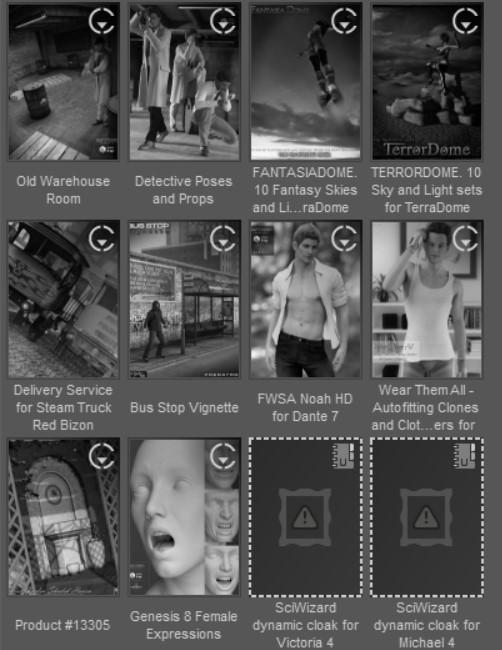
 Random thoughts and questions and ideas from a long time DAZ user..
Thanks everyone for helping me understand what it is that I need to get to improve my DAZ experience. My rig is 7 years old and I see that I'll have to do some research and see what's untimately feasible, definitely memory and storage.
As far as the fields saying install, I meant that when I open DAZ Central on the right side most of my assets have show an install button when I already have the item installed on my machine. Install manager does the same thing, under the downloads tab many items in that list I already have installed on my machine. I was wondering if there was a way I can synce the three together so I know in DC and IM what Iis installed.
Daz central - any option to install all content?I'm coming back to DAZ after a couple of years. I have a large content library and I'm not enjoying the experience of clicking the "Install" button hundreds of times. Is there any way to do them all in one shot that I'm not seeing?
Thank you.
Where is the specific Studio 4.8 or 4.9 download link?bsg1xpx02_3b62a99815 said:
Hi,
Finding download link for any version above 4.1.4 seems to be elusive.
My copy of Daz Central only offers to allow version 4.14. 3rd party websites are offering 4.9.4, however, using one of those would require considerable virus scanning. I did download one from the allpc something website and the zip file was labeled 4.9.4, however upon unzipping it, it was 4.1.4. A youtube video describes the advantages of version 4.9, but fails to provide a legitimate download link. Maybe it's hiding in plain site somewhere. I did find the documentation to 4.9, but the links went back to 4.1.4.
Any advice, as to the whereabouts of 4.9, will be most highly appreciated.
Thanks much
You can put in a ticket, there is a request for an older version there. I too was surprised you have to go through these hoops. It's quite rare in the industry. It's probable to keep everyone upgraded to the latest version.
Where is the specific Studio 4.8 or 4.9 download link?Hi,
Finding download link for any version above 4.1.4 seems to be elusive.
My copy of Daz Central only offers to allow version 4.14. 3rd party websites are offering 4.9.4, however, using one of those would require considerable virus scanning. I did download one from the allpc something website and the zip file was labeled 4.9.4, however upon unzipping it, it was 4.1.4. A youtube video describes the advantages of version 4.9, but fails to provide a legitimate download link. Maybe it's hiding in plain site somewhere. I did find the documentation to 4.9, but the links went back to 4.1.4.
Any advice, as to the whereabouts of 4.9, will be most highly appreciated.
Thanks much
DAZ Central Isn't Working CorrectlySorry for the bother, guys, but DAZ Central just isn't working correctly. For example, I just purchased two morph packages through the market place. I installed them through DAZ Central, and I get a warning that files are missing when I open DAZ Studio.
My fix:
I opened the old, trusty DAZ Install Manager, uninstalled the morph packages, and then reinstalled them through the same old manager. Works great!
Also, the bridge to Unreal is b-b-b-b-b-broken. You can only bridge props. Characters are completely f##ked.How do I change where Daz3D 4.14 saves?Daz Central allows only the setting of a base path, from which all others are derived. If you want to set paths individually then use Install Manager https://www.daz3d.com/get_install_manager/
Unreal Engine 4.26 is Oùt!!!moreffector said:
metaside said:
Quick question: I'm still on 4.25 right now because of some plugins, but how would I update the bridge? I noticed that in DIM it still seems to be an old version "Packaged Date: Monday, August 24, 2020 11:22:44 PM (2020-08-24T21:22:44Z)".
Oh and merry xmas / happy holidays everybody!
Here is an article : https://www.daz3d.com/forums/discussion/452926/daz-to-unreal-bridge-plugin-showing-problem-morph-exporting-fix
Stick with 4.25, and use the original package from the original DAZ Installer. I tried going through DAZ Central asked me to install both DAZ Studio and DAZ to Unreal, even though I had both. But after trying to find a fix for characters not coming across, I had to reinstall everything. I then relied on DAZ Central for everything, and nothing worked. Went back to the original installer, and I got everything back up and working again. Props will come across nicely, but characters are still an issue.
Use this video to get the characters across:
https://www.youtube.com/watch?v=BkDakjwPd7o
I don't think they come over with eyes, however. Not sure. Need to check again.
What a mess!DAZ Central Problem!I just installed a new external E Drive and moved My Daz Library onto it and opened DAZ and changed the path for My Daz Library in the Directory Manager, but I cannot figure out how to change the path in DAZ Central to tell it to install to the new External E Drive. I tried changing the Base Path Location in Daz Central to the new external E Drive, but now it wants to install a new version of DAZ itself on the new E drive, but I dont want to do that, I just want nit to install my content on there. How do I fix this?
Daz Central log insliders49 said:
I had or have this problem. It does not accept my password all of a sudden. It had been working fine until last Sunday...I would reset and the new password worked for Daz 3d but not for Central, thus locking me out of the studio as well.
I've been in communication with Tech Suppport (good luck) then on Friday mornng it took the password. But now it has stopped taking the password. WTH is happening?
I'm open to any suggestions...
I blame Covid.
Random thoughts and questions and ideas from a long time DAZ user..I've been using DAZ Studio since the V4 days, I actually started off on Poser but found the interface of DAZ easier to use, especially using the camera and adding lights in the scene so I stuck with it and I enjoy it to this day. So, after a few years of using it I came to some questions that come to me when I use it, I'm not the the smartest guy so maybe some of my questions are simple to answer but here goes...:
How do I get the content in my DAZ to sync with the content that is in Install manager (please don't get rid of it, more on why later) and DAZ Central? I have content in my DAZ that's installed, however, when I go into IM or DC the install button is there as though I haven't installed it. I have a lot of content (4000 items!) It's difficult to coordinate which is and isn't really installed.
DAZ Central needs to have a way to find out where the items are installed at. I have to go to Install manager often to find out where odd props are or where something I just installed is..
I wish there was a tutorial that went through what each button in each drop down does. There so many good features in DAZ but many procedures are complicated and there really isnt a place, other than the forums to understand how to do things. A place where it all resides to look up or watch would be beneficial. The wiki, well... sometimes useful most times it tells me the technical aspect but not the reason why I would use it or in other words the application of it as it pertains to the scene.
I need to upgrade my computer, I would like to know what I need to have on my machine to have DAZ run smoothly and quickly. Price no object, but I'm tired of my renders causing my computer to crash, like really crash because the thing needs to restart. If someone knows..please tell me.
Other than that, I love using DAZ! It gives me my relaxation, my escape, and my creativity a place to explore and connect with people with the same likes.
Best regards,
Designem
Clean Install of OS and DAZ3 days ago, I reinstalled everything after reformatting Drive C.
DAZ Central installed ver 4.14 Pro. But content is still not showing up, DAZ cannot see my files for some reason.
Please help!
Cannot find G8F .dsf fileIs this using the default Genesis 8 Female base preset to load the figure? Have you checked to see if there are multiple sets of files for the figure, from an old instalaltion perhaps? How did you install - if through DIM or Daz Central (or manually) does the icon for Genesis 8 Starter Essentials in the Products tab of Smart Content have a circled triangle icon at top-right?
My Christmas Present: Wonder Woman 1984!My first reaction when hearing the title was "Why have the story in 1984?!" I decided not to let that bother me.
I like Wonder Woman. I love to watch beautiful, smart women who can kick "posteriors!" Gal Gadot does a great portrayal of Wonder Woman. She suffered many injuries, including a broken back, for this role.I've seen Gal Gadot on Saturday Night Live, and other appearances on TV. She's a genuine woman who really cares about her job and people in general.
I didn't keep score on just how many 1980's references were in the movie. There were enough to remind me of things I'd forgotten (I was 34 years old in 1984.) I agree with those who didn't like all the dark scenes. In my opinion, far too many TV shows and movies spend far too much time in the dark. But I've learned just to roll with it.
There is one central theme to the movie. I don't want to post any spoilers. You should pick up the theme very quickly. Then keep that in mind as the story progresses.
Installing DAZ Studio/DAZ Central onto external hard driveThank you for the feedback, Catherine!
Though, I'm not sure how to make sure the pathways are the correct one. I managed to install Daz Central into my External Hard Drive (D:\). And DAZ Studio is in the External Hard Drive as well (D:\). I normally install all of my products through Smart Content panel. All of that information is getting sent to my Desktop Documents folder (C:\Users\micha\Documents\DAZ 3D\Studio\My Daz Connect Library\data\cloud\meta).
How do I change it?
UPDATE: Products uploaded through DAZ Central get uploaded to my External Hard Drive (D:\), but I just can't figure out how to edit the path for Smart Conent.
Beta for DazCentral, your new Content ManagerDaz Central Needs a tick box or something so that it will only show content that is not yet installed. Is there a way to do this that I am missing? I have a rather large library of assets that I have collected over the years and it is a pain in the hind end to have to scroll through all the installed content to get to the stuff that has not yet been installed, plus Daz Central doesn't scroll very fast when it gets to the bottom of the loaded page.
Installing DAZ Studio/DAZ Central onto external hard driveHappy Holidays to everyone!
My DAZ Library is becoming so large, I decided to purchase an external hard drive to contain everything. I decided to delete everything from my desktop and just start fresh (early spring cleaning?).
Is there a tutorial or walk through that can show me how to make sure everything is just on that external hard drive? I just want to make sure everything is in a central location.
Why does my content NOT fully installThat sounds like an issue with the Content Management System. I'd suspect the most likely cause is that DS was closing when you launched Install Manager/Central, and as a result the database was not available for updating when you installed. Try reinstalling the content with DS running (it's only if you are installing stuff "like software" - especially plug-ins and application updates - that DS needs to be closed) and see if the products tghen show as installed.
BecsSo, sometime, earlier today, I purchased the new Becs character. I opened the handy-dandy, Install Manager (updated each time it needed updating) I've been using for nigh on two years and what to my wonderment? She isn't in there. I said to myself, "Self, this has happened before a few times, so just go straight into your Daz Studio and look around at the bottom of the figures tab and she'll be there." Now I thanked myself because he has pretty good advice and it is true that this has happened before and when someone/thing isn't in the install manager they or it is just waiting for me in the Studio itself and I'll download her there. She wasn't there.
So I said to myself, "Self, your computer has been on for a while now and it is possible that there's some technicle, cyber reason from it being on so long. Just restart your laptop and she'll be there." I once again thanked myself, rebooted my laptop, checked the DIM and DS and Becs is no where to be seen.
Now, Self tells me to take a nap because we had a problem with Freya when she came out and after a nap she was there in her full, Nordic Goddess of Butt Kickery glory. So thanks to myself and a nap happened. After awaking and checking Becs still was nowhere to be seen.
Self and me were both a bit confused by this but I told Self that I got this one and I downloaded Daz Central. That oughta do it! Let me tell you, Both me and myself are a bit disappointed because we purchached Becs and she won't come on down to my laptop to play. She won't even manually download.
Is anyone else having a problem with Becs?
Daz 3D is part of

Connect
DAZ Productions, Inc.
7533 S Center View Ct #4664
West Jordan, UT 84084Licensing Agreement | Terms of Service | Privacy Policy | EULA
© 2026 Daz Productions Inc. All Rights Reserved.