-
Looking for the outfit and hat in this picture
Scroll down at the bottom of the page.
Daz 3D Items Used:
https://www.daz3d.com/vintage-rose-for-genesis-3-females
https://www.daz3d.com/neck-romance-collars-for-genesis-8-and-81-females
https://www.daz3d.com/victoria-iven-for-genesis-3-females
Hat is missing, but here are some other suggestions:
https://www.daz3d.com/vintage-bouquet
https://www.daz3d.com/vintage-floral-i
https://www.daz3d.com/vintage-noirAll Dials Lead to Angelina JolieTheMysteryIsThePoint said:
Anyone else have the problem that if you mix and match head morphs long enough, you will inevitably end up with a character that looks a lot like Angelina Jolie? I get that she is one of a few archetypical beauties of a generation, but why Angelina so much and not, say, Salma?
I don't know what you're dial spinning, but from my experience, if you dial too many character morphs in too strongly, you end up with a figure where the different parts end up way out of proportion with each other. You basically end up with an alien-looking figure with a rail-thin body. I try to keep the sum of all character percentages dialed in to a figure equal to or below 100%. The more character shaping dials you apply to a figure beyond that, the greater the work/shaping needed for individual areas to keep everything within a reasonable proportion. Sometimes you don't want to apply the same character morphs to the body that you apply to the head because they just don't go well together. Victoria 8 is one example that I can think of when using multiple character morphs. Her body morphs can result in making a character too tall/thin.
Why do some characters load from the smart content figure window, and others don't?I understand the logic of it. Earlier generations were based on named figures, by which I mean that the base female for gen4 was Victoria 4, and the base male was Michael 4. I could be misremembering, because I wasn't around in those days, but I believe there were also multiple bases, so Aiko 4 wasn't a morph of Victoria, but a separate figure, and so on. With Genesis, the figures started from a generic base, and Michael, Victoria etc. we're morphs on that base. The first generation of Genesis was also unisex, which I'm guessing they expected would work out better than it did. Put all that together, and it makes at least some sense to treat it like an entirely new line, rather than simply the next iteration of how they'd been doing things.
Why do some characters load from the smart content figure window, and others don't?Sorry, I meant G3, but Victoria 7 always messes me up in that for some reason, even though I get all the other generations right. :)
Integration of live-action footage and computer generated imagery.Flomotion on YouTube has another wonderful tutorial on riding a CG and I am looking forward to how he holds the reins in another tutorial.At 11:20 he shows how to stop the dinosaur from sliding on ice in the desert. It would help to render Victoria (her walks render like a giraffe on roller skates) or whoever as a separate layer with a walk cycle you can loop if need be. Make sure that layer has alpha background.
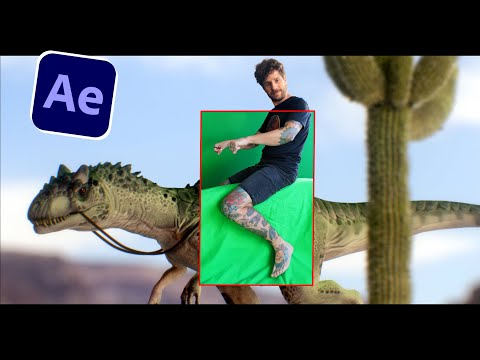 The whole tutorial is excellent as usual.
Why do some characters load from the smart content figure window, and others don't?
The whole tutorial is excellent as usual.
Why do some characters load from the smart content figure window, and others don't?Honzo said:
So some of the figures 'for G2M' are not characters, but shaping and materials presets?
Every character is built upon the specific base genesis generation.
Genesis 8 Female is the base.
Victoria 8 is a morph and texure set for base Genesis 8 Female. Victoria is the flagship figure with a long history of development here at DAZ3D
Victoria 1-4 were the base figures prior to Genesis 1 being introduced. Victoria 5 was a morph and texture set for Base Genesis 1. That figure was introduced about 10 years ago more or less.
Post your DAZ to Unity rendersdanielbui78 said:
Victoria 8.1 with some dramatic indoor lighting and the work-in-progress New Skin Shader.
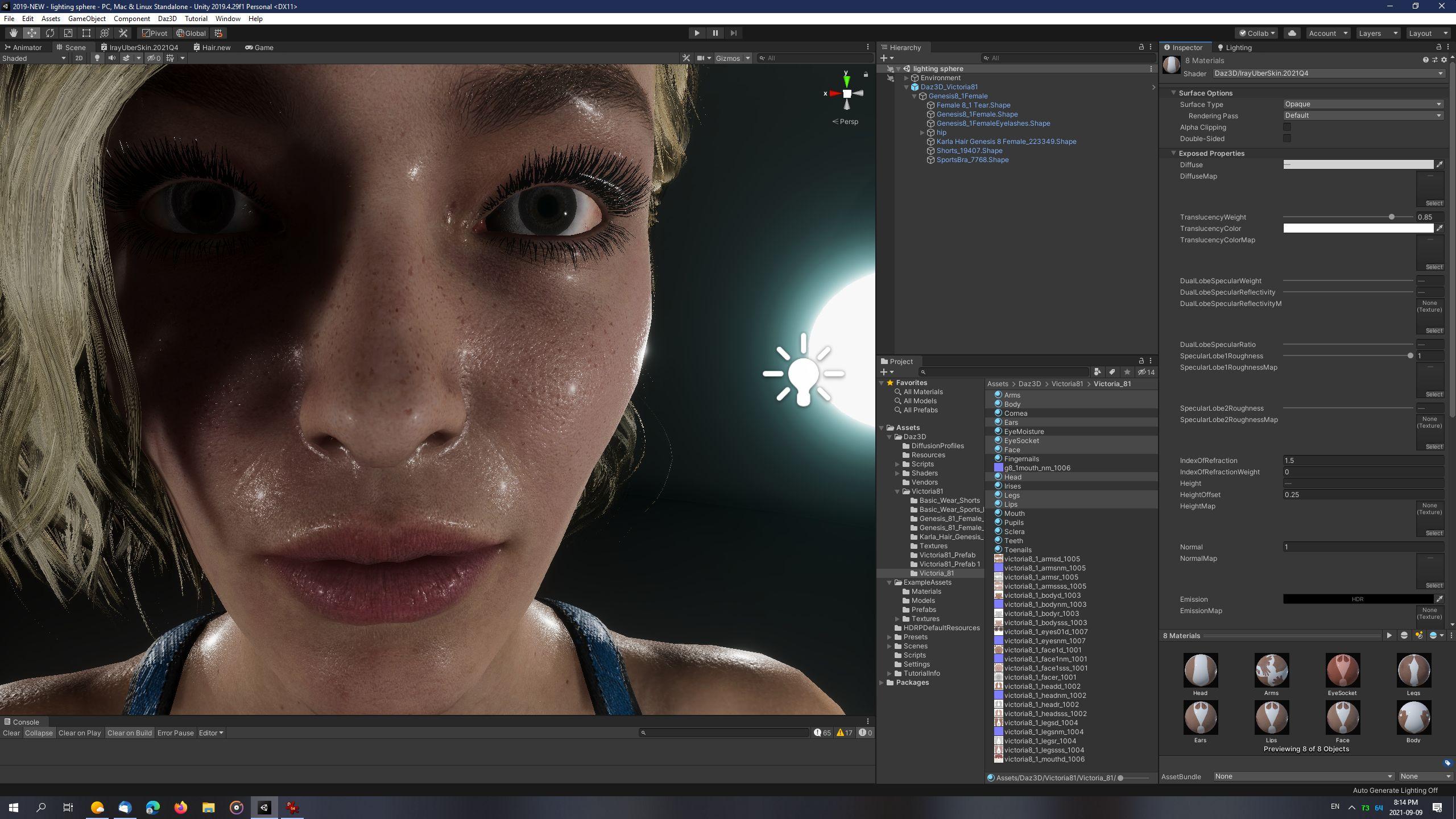
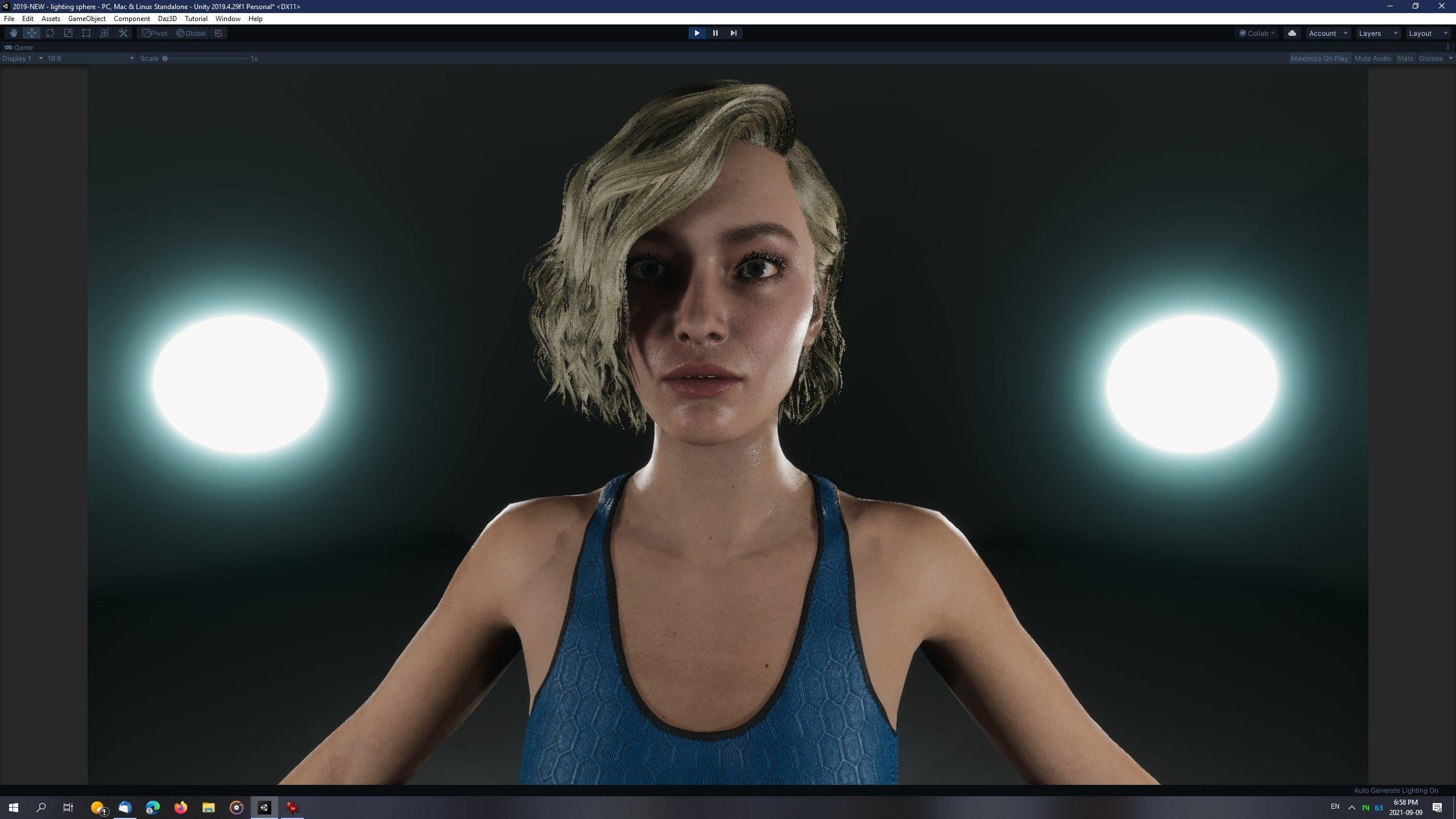
This is the highest quality skin shader I've seen come out of Unity, and trust me I've searched high and low. Whatever changes you made to the dual lobe worked! Is there any way you could release it in its current state?
PoserDAZ Freebie Site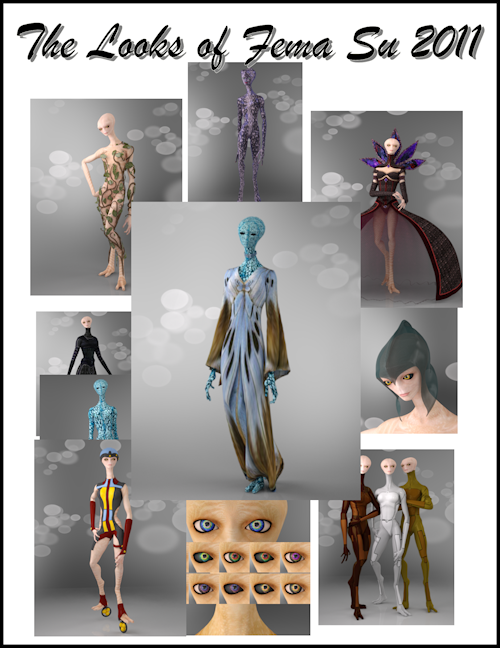
An update about the PoserDAZ Freebie Site.
There has been activitiy on the site. I hear footsteps instead of echos. I have completed the FemaSu 2011 catalogue. Karth most graciously released her FemaSu collection which was sold at the now defunct PoserAdicts store, for free over on ShareCG. It was like Christmas again. With that happening I went to town and created the pages for all the freebies I have.
One of the last pages I did was one about Poser magnets. Now I am a hardened Studio girl. I don't do much in Poser when it comes to the more advanced stuff. Needless to say I had to learn something new. The freebie is Mess 'O' Magnets by Jim Farris. He designed the freebie so that people could have the dynamic version of the Butterfly dress by English Bob fit FemaSu. The dress orginally was for Victoria 3. Jim created this freebie 11 years ago. None of the links he listed were any good. Anybody wanting to make this happen would be something out of luck. So I thought gee I can just point anyone that is interested to the correct links to the freebies and provide a very rudimentary tutorial on how I figured out how to use the magnets in Poser Pro 2014 (cause that is what I have). It worked. But I did cheat and after I applied the magnets in Poser I exported out the dress in obj format and brought it into Studio. Cause you know, hardened and all that. Such a pretty dress and FemaSu looks just beautiful.
On another note we have had others coming by and helping out. richardandtracy is busy adding his pages of his contributions to the community. Lots of cool stuff. Others have found links that no longer work and that keeps me busy finding out if there is another copy some where.
Come say howdy and look at the pages. We are always open to suggestions. Like I keep telling people there is always more than one way to do something.
FemaSu can be found here: FemaSu 2011 - Poser and Daz Studio Free Resources Wiki (miraheze.org)
Mess 'O' Magnets can be found here: Mess 'O' Magnets - Poser and Daz Studio Free Resources Wiki (miraheze.org)
See you soon and Happy St Patty's Day everybody
Can anyone tell what character and skin is this?My first title was bad and I moved it from another forum section and didn't get many views. I got more views after fixing those things and more chances to find someone who knows. My other question about character and skin was answered and it was for old victoria 4. If the character cannot be identified what about the skin? Maybe it will give clues for the character. I wish all products listed items used in promos but many do not.
Alternative to Carrara 8.5 for Mac OS 12.1 (Monterey)?Hello,
If you are not into blender, but willing to experiment, you may try to run Carrara on Linux via Wine HQ. It works decently enough. At least on my computer it uses all cores available. The only thing to note is that it is better not to cancel rendering operations as Carrara may crash then and Cloth plug-in by Sparrowhawke didn;t work (last time I tried, was many year ago). But most things work except posibly for a few plug-ins and latest DAZ 3D dolls. Victoria 4 and Michael 4 seem to be doing fine. And everything else seem to be working pretty well, especially considering it was not designed to be wine hq friendly.
However, if you are not nostalgic, I would go with Blender 3D. Version 3 is awesome. Functionality wise it is bonkers. Who needs Maya anymore?
And it only is more complicated if you do advanced things. Nowadays for simple 3D tasks blender is almost as simple as Carrara is if you take time to learn fundamentals of Blender's ui. Everything esle is similar, just with plenty more functionality.
Upgrading Genesis 8.0 charactersMichael 8.1 and Victoria 8.1 are new characters, they are not updates to Michael 8 and Victoria 8.
Upgrading Genesis 8.0 charactersPerhaps I'm confused. If I have Victoria 8.0 or Michael 8.1 (or others), I figured I would at least need to purchase the Victoria (or Michael) 8.1 base character to get the new features.
Upgrading Genesis 8.0 charactersI apologize if this is a duplicative question. I have had Daz3d for a while but have not had time to use it a lot. I have purchased a few Dax Original characters, including pro bundles and HD add on for Genesis 8.0, plus a number of independent artists' characters.
What is needed to purchase to upgrade these to Genesis 8.1. For example, do I need to purchase the Victoria 8.1 base character or (hopefully not) the whole 8.1 pro pack? Or a new version of the HD add on?
Why use custom characters?I've been using Daz for over a year, and I was wondering that other than clothing items occassionally having fitting morphs for certain characters (like Honni 8 or Ellithia 8), is there any reason to buy these base characters besides getting gen mats and personal taste? I was just curious what everyone's thoughts were. I have bought Ellithia 8 and Victoria 8 when they were priced comparably to morphed G8 figures, but don't normally consider buying them. Is there a special reason I should?
Products for different figures (noob question)Lyrra Madril said:
Once upon a time there was Poser. Poser is, like its successor DAZ Studio, a program for setting up, costumising and rendering human and animal figures. In about 2000 DAZ the company made the 'Millenium Woman' or Victoria 1. As time and technology ground on, they made Michael 1, and eventual Victoria and Michaels 2,3, and 4 as well as various other named characters.
All of those figures are A) not particularly able to share content without extensive jumping through hoops B) made for Poser (although DS can use them) and C getting pretty old. Techbnology has advanced a great deal since then. Newer figures can take advantage of that.
Starting around the Victoria 4 days, DAZ the company started makign DAZ Studio the program. (this is why I try to differentiate the two). For quite a while content was _made_ in and for Poser, but was also _useable_ in DAZ Studio.
And then along came Genesis 1 - a non gendered figure, made in DS for DS. This added a whole pile more exciting technology under the hood that allows clothing to reshape to fit characters morphs, be converted on the fly, and so forth and so on. Genesis was more or less useable in Poser using a special addon thing,
However later versions Genesis 2, 3 and 8 - are entirely meant for use in DAZ Studio and can't be easily used in Poser (tnot that it stopped anyone from trying)
Genesis 2 would also import into Poser via the DSON Importer, though that doesn't work in the current version of Poser.
So for a new user what this boils down to - the bigger the number the more recent the content is, and the more likely it will be at least somewhat useable with a genesis 8 based figure. For the sake of your sanity matching the numbers is the easiest.
If you have a Victoria 4 outfit you want to use on g8. you can - but you will either need one of Riversoft and Sickleyields excelent Clothing Convertors, or a bit of time on your hands. it is in fact possible to convert from V4 to Gensis. From gensis to g2, to g3 to g8. but like xeroxing a thing a few times it can get ... messy.
Once converted to Genesis you can go straight to Genesis 8 as it has AutoFit clones for all of the pevious generations.
There are also 'autofit clones' which expand the ability of the autofit 'Fit to' dialog to convert clothing for X figure to Y figure.
Also. V4 era clothing predates DAZ S old 3delight shaders and DS Iray shader (the current) so it will take some fiddling around to get it to render nicely. There are many various shader kits about that will helpw ith this, but if you want load-and-go, stick to Genesis 3 or 8 products while you get used to things.
Also - some things do not convert well. Specifically shoes and long dresses. The autoconversion thing does its best but well. No. Not excellent.
LM
Products for different figures (noob question)Once upon a time there was Poser. Poser is, like its successor DAZ Studio, a program for setting up, costumising and rendering human and animal figures. In about 2000 DAZ the company made the 'Millenium Woman' or Victoria 1. As time and technology ground on, they made Michael 1, and eventual Victoria and Michaels 2,3, and 4 as well as various other named characters.
All of those figures are A) not particularly able to share content without extensive jumping through hoops B) made for Poser (although DS can use them) and C getting pretty old. Techbnology has advanced a great deal since then. Newer figures can take advantage of that.
Starting around the Victoria 4 days, DAZ the company started makign DAZ Studio the program. (this is why I try to differentiate the two). For quite a while content was _made_ in and for Poser, but was also _useable_ in DAZ Studio.
And then along came Genesis 1 - a non gendered figure, made in DS for DS. This added a whole pile more exciting technology under the hood that allows clothing to reshape to fit characters morphs, be converted on the fly, and so forth and so on. Genesis was more or less useable in Poser using a special addon thing,
However later versions Genesis 2, 3 and 8 - are entirely meant for use in DAZ Studio and can't be easily used in Poser (tnot that it stopped anyone from trying)
So for a new user what this boils down to - the bigger the number the more recent the content is, and the more likely it will be at least somewhat useable with a genesis 8 based figure. For the sake of your sanity matching the numbers is the easiest.
If you have a Victoria 4 outfit you want to use on g8. you can - but you will either need one of Riversoft and Sickleyields excelent Clothing Convertors, or a bit of time on your hands. it is in fact possible to convert from V4 to Gensis. From gensis to g2, to g3 to g8. but like xeroxing a thing a few times it can get ... messy.
There are also 'autofit clones' which expand the ability of the autofit 'Fit to' dialog to convert clothing for X figure to Y figure.
Also. V4 era clothing predates DAZ S old 3delight shaders and DS Iray shader (the current) so it will take some fiddling around to get it to render nicely. There are many various shader kits about that will helpw ith this, but if you want load-and-go, stick to Genesis 3 or 8 products while you get used to things.
Also - some things do not convert well. Specifically shoes and long dresses. The autoconversion thing does its best but well. No. Not excellent.
LM
Products for different figures (noob question)alainmerigot said:
> If "Genesis 8 (or 8.1) Female" does not appear under "Compatible Figures" on a product's page, does that %100 mean that the product CANNOT be used with a Genesis 8 Female?
Of course not, and I largely use old V4 to G3 cloths, hair, etc. As it has already been said, autofit works well for cloths and there are converters for cloths, hair, poses, etc and all can do a great job, though the results may sometimes be disappointing.
That's great to hear!
It sounds as though you're saying that if a product does not list G8F under Compatible Figures, there is at least a chance, especially for clothing items, that I can try it on a G8F and it will "just work" via autofit. Do I have that correct?
In the event that it doesn't, what are these converters and how do I get them? Say I have one outfit product that is meant for Victoria 4, and another that is meant for G2F or G3F; assuming that autofit doesn't take care of it, what do I need to do in order to be able to use each of these products on a G8F?
Another specific question - Victoria 4 seems to associated with something called "Poser," which I'm unclear whether it is some kind of extension for Daz3D or a different software entirely. Some Victoria 4 products will list both "Poser" and "Daz Studio 4.20" under "Compatible Software," while others will ONLY list Poser; what does it mean in the latter case?
Products for different figures (noob question)I would advise you to use G8 or G8.1 chars. As richard say, there are converters and daz has a feature called "autofit" that can convert on the fly an outfit for a G8 char. Just apply the cloth to the figure and autofit will trigger. Some other generations are also supported, but unless you have a specific reason (a char that you really like, a large collection, etc), there is no real reason to use older chars.
To clarify and answer some of your questions.
> a product inteded for a G8 figure can be loaded onto a G8.1 figure but not the other way around
No, 99.99% of products are bidirectionally compatible, except for what concerns expressions.
> Victoria 8" does not appear to be an item that can appear under "Compatible Figures" on a product's page
Victoria 8 is a morph over genesis 8 and all G8F items are compatible with her (or any other genesis 8 char).
> Related to both these questions, you said "Victoria 4 products are usually not compatable with G8F"; why "usually?" When might they be?
V4 assets are NEVER directly compatible with genesis 8. But there are converters, either offline or on-the-fly (autofit for cloths).
> If "Genesis 8 (or 8.1) Female" does not appear under "Compatible Figures" on a product's page, does that %100 mean that the product CANNOT be used with a Genesis 8 Female?
Of course not, and I largely use old V4 to G3 cloths, hair, etc. As it has already been said, autofit works well for cloths and there are converters for cloths, hair, poses, etc and all can do a great job, though the results may sometimes be disappointing.
Products for different figures (noob question)There are various converters - Genesis can convert fitted items for any older Genesis, though the quality of such auto-conversiosn can be variable. There are tool for converting other content - morphs (shapes), textues, and poses - though you may sometimes need more than one conversion (and so more than one product) for some routes. In Genesis the Genesis figure is the base and the named characters sch as Victoris 5+ are add-ons (new shapes and materials).
The older figures, Michael.Victoria/Kids 4 and earlier, use a different system and do not have the same ability to convert content between them (there are covnerters, but they require much more input from the user). The fourth geenration figures have three bases, Kids, Michael, and Victoria, with other named characters being add-ons - in the previous generations all of the named characters (e.g. Aiko 3, Stephanie 3, Hiro 3, David 3) were separate figures entirely, with their own content.
Products for different figures (noob question)zombietaggerung said:
To explain in slightly more detail: Victoria 4 products are usually not compatable with G8F. Because Victoria 4 is an extremely old character. The name "Victoria" is just the name that is used for the first core female figure of each new generation. As in Victoria 4, 5, 6, 7, 8 and 8.1. If you are new to this I would recommend sticking with the Genesis 8/8.1 figures since they are the most current and probably the easiest for a new user to work with. Genesis 8 Female has many add-on characters for it, including a Victoria 8/8.1. The G8F Body morphs that you linked to are ONLY compatable with G8F not Victoria 4.
Thanks. I've since realized that the Victoria 4 figure is not as prolific as I thought it was when I made this thread.
I have two follow up questions to this. First, you say that Victoria 4 is "extremely old," but how old is too old? I think I read in another thread recently that a product inteded for a G8 figure can be loaded onto a G8.1 figure, but not the other way around. Is this just true of G8 versus G8.1, or is it also true between different-numbered versions? Can a product (an outfit for example) intended for a Genesis [number less than 8] Female be loaded onto a Genesis 8 Female? I suspect that the answer is no, but I want to make sure. Does it depend on how big the gap is, as you implied? If so, again, how old is too old?
Second, I'm confused about just how "different" and incompatible various character models like Victoria and Akio are from a "Genesis [number] Female." You say that "Genesis 8 Female has many add-on characters for it, including a Victoria 8/8.1"; however, "Victoria 8" does not appear to be an item that can appear under "Compatible Figures" on a product's page, whereas "Victoria 4" is, and, simply put, I don't understand why that is, and what it implies.
Related to both these questions, you said "Victoria 4 products are usually not compatable with G8F"; why "usually?" When might they be?
To summarize both these questions - If "Genesis 8 (or 8.1) Female" does not appear under "Compatible Figures" on a product's page, does that %100 mean that the product CANNOT be used with a Genesis 8 Female? Or is it possible that they can be used together, either because the product is for a "Genesis [number less than 8 but not THAT much less than 8] Female," or because it can work assuming I have some intermediary product like "Victoria [something]?"
Daz 3D is part of

Connect
DAZ Productions, Inc.
7533 S Center View Ct #4664
West Jordan, UT 84084Licensing Agreement | Terms of Service | Privacy Policy | EULA
© 2026 Daz Productions Inc. All Rights Reserved.