-
4.22 can't import OBJ file anymore?
Check Poser Importers in Help>About Installed plug-ins. That handles the OBJ import, though as part of the base install it should be good.
Solved - File Does Not ExistZippyGuitar said:
Glad you got that sorted out. Back in 2017/2018, I had nasty database/product issues with both base Genesis 3 & Genesis 8. If memory serves, the biggest issue I had was Daz connect updating the metadata for the Genesis 3 and 8 figures. I was told it was okay to let that happen but I'm almost certain that's not correct. So I stopped logging in to let Connect update the metadata. Also at that time, over half my products were installed via DIM and Connect. I've since corrected all that. Now the only issue I have is the occasional missing base G8 or G3 figure files if I use the animation timeline. But there is no missing file. Daz Studio is still looking for a file that was part of Connect... I think.
Thanks, Zippy! I'm trying to get everything figured out.
 Diffeomorphic DAZ Importer version 1.6.0 released
Padone said:
@Paintbox when you import as dbz the figure morphs are baked so you don't see them in blender. The idea is that you bake the actor morphs then import the morphs you need for animation as custom morphs. The easy way to do this is with easy import using "daz favorites". There's also "baked correctives" if you need the exact daz morphs for a custom figure.
You may want to refer to the wiki rather than the old 1.6 documentation.
https://bitbucket.org/Diffeomorphic/import_daz/wiki/Import/Easy Import DAZ
That did it, worked like a charm, thanks a million @Padone
It also helps to work with the current documentation ;)
Diffeomorphic DAZ Importer version 1.6.0 released@Paintbox when you import as dbz the figure morphs are baked so you don't see them in blender. The idea is that you bake the actor morphs then import the morphs you need for animation as custom morphs. The easy way to do this is with easy import using "daz favorites". There's also "baked correctives" if you need the exact daz morphs for a custom figure.
You may want to refer to the wiki rather than the old 1.6 documentation.
https://bitbucket.org/Diffeomorphic/import_daz/wiki/Import/Easy Import DAZ
4.22 can't import OBJ file anymore?I Remember both .FBX and .OBJ files were supported 6 month ago on 4.21, but now only .fbx?
Can I get a confirmation on this? is this intentional?
Solved - File Does Not ExistGlad you got that sorted out. Back in 2017/2018, I had nasty database/product issues with both base Genesis 3 & Genesis 8. If memory serves, the biggest issue I had was Daz connect updating the metadata for the Genesis 3 and 8 figures. I was told it was okay to let that happen but I'm almost certain that's not correct. So I stopped logging in to let Connect update the metadata. Also at that time, over half my products were installed via DIM and Connect. I've since corrected all that. Now the only issue I have is the occasional missing base G8 or G3 figure files if I use the animation timeline. But there is no missing file. Daz Studio is still looking for a file that was part of Connect... I think.An Import workflow for KITBASH3D kitsFBX has more features but is also proprietary and more complex which scares me off so I went with the Blender-OBJ-MML import flow. Happy with it so far, may not be the typical import flow intended for Kitbash3D kits but on the bright side I learned a bit about how materials work without spending time on tutorials.
To import the emissive texture you should probably rename the Emissive Iray property name to Emission Color in the MML Texture Map Types tab where you bind it to file names ending with "emissive". Then you have to manually set the emissive color to white and increase the luminosity to get it to show once for each emissive material.
I also found this discussion in case anybody wants to know more about how to make use of the ao map:
https://daz3d.com/forums/discussion/386791/what-do-i-do-with-an-ao-mapNEED HELP TRYING TO FIGURE OUT A WORKFLOW FOR ENDORPHIN TO C4D USING DAZ CHARACTERSAnd to expand on my previous post: you don't need to get your animation back into DS if it was built on a G8 skeleton. Simply import your Daz character into C4D, import the animation, apply the character definition tag to both, then add a character solver tag to the character.
NEED HELP TRYING TO FIGURE OUT A WORKFLOW FOR ENDORPHIN TO C4D USING DAZ CHARACTERSI'd never heard of Endorphin before now, so I don't know how it works. Can you import a G8 character into Endorphin, build your animation on that, and then export it? Does Endorphin export BVH?
Diffeomorphic DAZ Importer version 1.6.0 releasedI sailed passed most things easily that I needed, but I am left with one question. I want to use the "breast control" morphs in Blender to simulate a push up behaviour in clothes. It succesfully applied them in the finished import, but I don't see how or where I can change the values (I found all the other properties easily like FACS control and other pose controls)
I mostly followed the tutorials found at : https://diffeomorphic.blogspot.com/p/advanced-morph-section-version-16.html
But I am still a bit stuck. Any help would be much appreciated!
NEED HELP TRYING TO FIGURE OUT A WORKFLOW FOR ENDORPHIN TO C4D USING DAZ CHARACTERSYou want to animate a Genesis character in C4D.
The export of Daz Studio animated scenes to C4D is mainly done with the Alembic format which is very efficient. If other possibilities exist, they are little used and little described on the internet.
Then it doesn't matter what render engine is in C4D. Moreover, before launching the rendering, we check that the animation is played correctly in C4D.
As a result, you should start to define a process with whatever softwares you are using, starting by testing it with a very basic animation and an unclothed C4 character.
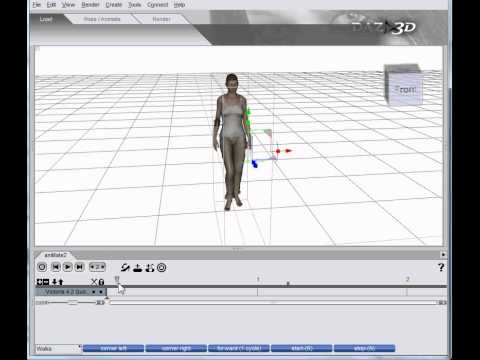
Furthermore, in your post, you do not indicate how you import the scene into C4D, which does not allow you to respond precisely.►►► aniMate 2 - Real aniMating Power for Daz Studio!Import BVH
Cool little demo includes correcting the messed up first frame
 Solved - File Does Not Exist
ZippyGuitar said:
Is your Daz Studio still logging into Daz Connect? If so, you really should not let it if you are installing via DIM. Trust me, I didn't know when I first started using Daz Studio 8 years ago and was installing everything via DIM and Connect. What a mess it turned out to be. Even when I stopped using Connect as an install option I occassionally logged into Daz Studio via Connect to let it update metadata. Bad, bad, bad all around. I wish Connect never existed. It's manual install or DIM for me.
How do I prevent it?
Solved - File Does Not ExistIs your Daz Studio still logging into Daz Connect? If so, you really should not let it if you are installing via DIM. Trust me, I didn't know when I first started using Daz Studio 8 years ago and was installing everything via DIM and Connect. What a mess it turned out to be. Even when I stopped using Connect as an install option I occassionally logged into Daz Studio via Connect to let it update metadata. Bad, bad, bad all around. I wish Connect never existed. It's manual install or DIM for me.
Srange problem with Goz using DAZ4.22ver [Solved]I'm using Zbrush 2023 and DAZ4.22, when using "send to zbrush " function, I can only send simple object like clothes,pants,ect. If I try to send the entire character to zbrush, I got warning tell me “Unable connect with Pixologic ZBrush,chack the installation". It's very strange that I can still import object to Zbrush and export it back to DAZ, but only simple object works, nor character can be sent to zbrush.
Bulk delete, or edit away, "blank" entries in the Content Library Product listingsstitlown said:
Richard: There's every chance it's something I've done myself in the past. I've mucked around for years and not cared, but now it's showing up super slow I'm taking an interest.
Crosswind: So if I reset and re-import it might fix it without blowing everything sky high? I do have some non-Daz content installed, but not all that much, and I don't use Connect (except by mistake) nor do I "categorise". Should I "export" first?
That's the standard functions of Daz. So yes, you should Export User Data first, with Conent Database Maintemance. Then Reset Database & Re-Import Metadata. Just in case, you better first check in "runtime\support folder", to make sure those unwanted *.dsx files are not really there because sometimes the unwanted *.dsx files are still there in the folder but just with wrong data... Then after re-import, you still can see them there in Content Lib with "blank icons"... So it's better to dbl-check first of all...
FWIW, the library's look up behavior is very clear given I worked backwards from Z to T last night viz: with each dodgy reference removed, the look-up (both the spazz-out back to the top of the tree after a delete and the subsequent re-expansion of a "letter") becomes faster and faster such that by the time there's only a few spazz references left the look-up is acceptably fast.
Thanks for your input.
Bulk delete, or edit away, "blank" entries in the Content Library Product listingsRichard: There's every chance it's something I've done myself in the past. I've mucked around for years and not cared, but now it's showing up super slow I'm taking an interest.
Crosswind: So if I reset and re-import it might fix it without blowing everything sky high? I do have some non-Daz content installed, but not all that much, and I don't use Connect (except by mistake) nor do I "categorise". Should I "export" first?
FWIW, the library's look up behavior is very clear given I worked backwards from Z to T last night viz: with each dodgy reference removed, the look-up (both the spazz-out back to the top of the tree after a delete and the subsequent re-expansion of a "letter") becomes faster and faster such that by the time there's only a few spazz references left the look-up is acceptably fast.Thanks for your input.
Audio problemsI know how to bring in Audio from the Edit menu> Audio option. Problem is, I can’t hear it in the import (Audio Options) window when I press the: Play button nor from within the timeline.
I have double check the wav file and it plays just fine (outside of DAZ). What am I doing wrong?
I am running DAZ Studio 4.22 on a Mac computer.
BTW: I just purchased the Face Mojo so I want to try lip-syncing. I have the captured face movements and the captured audio. I can get the motion applied to the G3 Female, but not the audio.
daz 4.22 menusDo you mean the Content Library pane? Window>Panes(Tabs)>Content Library, then drag by the topbar to the left until you get a line of highlight colour to dock it (or just reload your layout - Window>Workspace>Select layout, or to restoe just the pane layout Window>Workspace>Customis and use the Import button at the bottom).
The Mac FAQActually, my experience so far is that it has 4.22 is playing better than 4.21. Of course that is not saying much. I still can't get metadata to change things from wardrobe to accessories when someone puts a purse in 'wardrobe/acessory' and you want to clean-up the mess. Or get rid of 'Lost and Found'. I was able to until a crash last spring and now nada.
Daz 3D is part of

Connect
DAZ Productions, Inc.
7533 S Center View Ct #4664
West Jordan, UT 84084Licensing Agreement | Terms of Service | Privacy Policy | EULA
© 2026 Daz Productions Inc. All Rights Reserved.